欢迎加入开源鸿蒙跨平台社区:
https://openharmonycrossplatform.csdn.net
1. 项目介绍
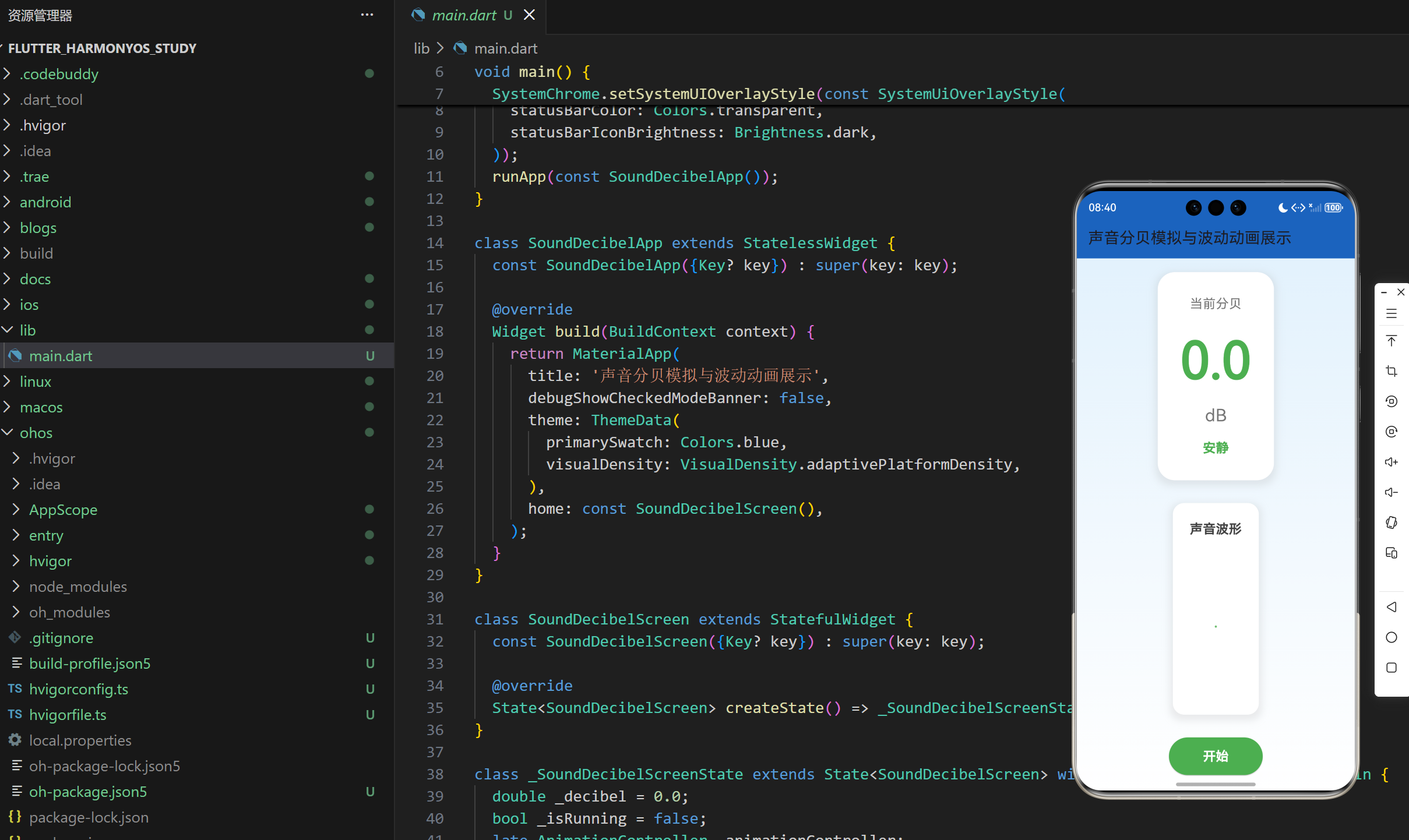
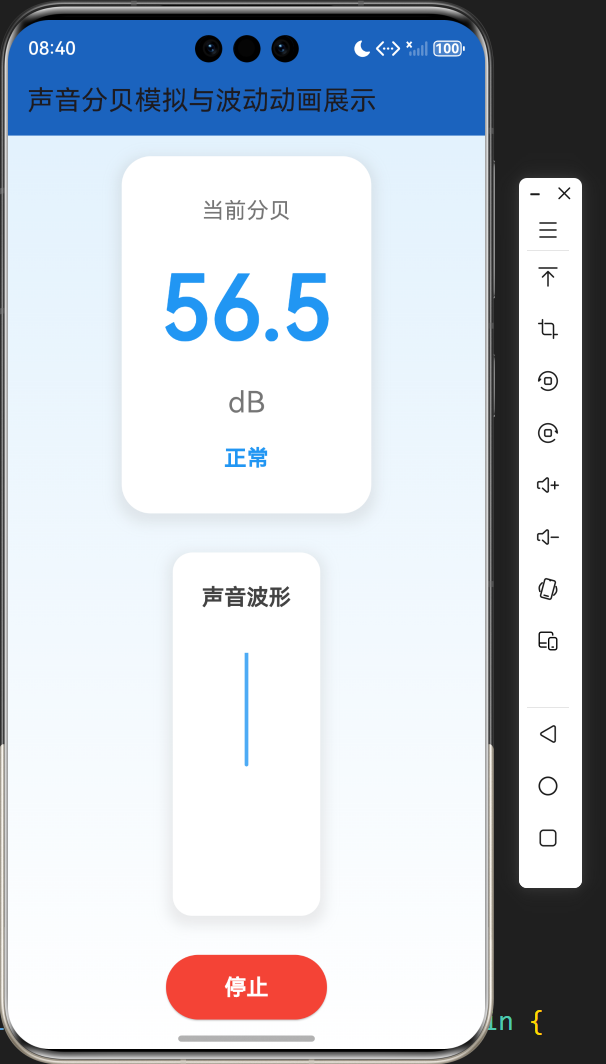
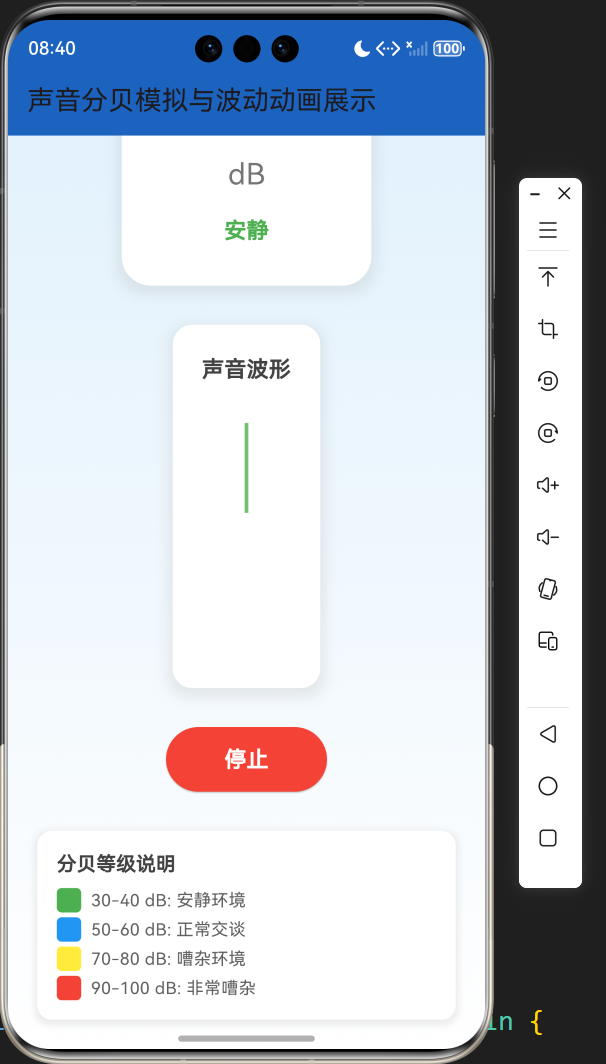
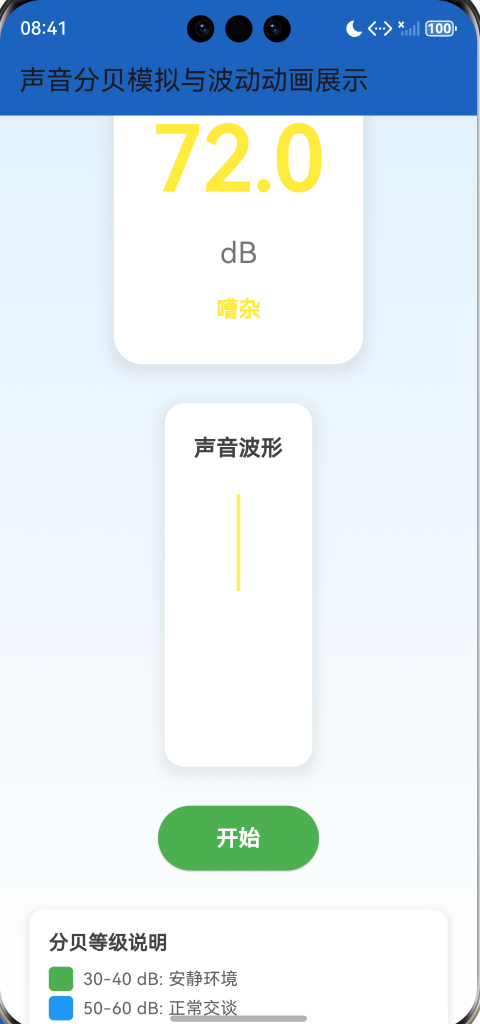
声音是我们日常生活中不可或缺的一部分,了解声音的分贝水平对于保护听力和创造舒适的环境至关重要。声音分贝模拟与波动动画展示是一个基于 Flutter 开发的应用,它能够模拟不同环境下的声音分贝值,并通过直观的波动动画展示声音的变化。本文将详细介绍如何使用 Flutter 实现这个声音可视化应用,包括分贝模拟、波形动画绘制和用户界面设计等方面。
1.1 项目目标
- 实现一个模拟声音分贝值变化的应用
- 实时显示当前分贝值和对应的环境等级
- 根据分贝值显示不同的颜色,提供直观的视觉反馈
- 展示声音波形动画,使声音可视化
- 提供控制按钮,允许用户开始和停止模拟
- 采用美观的界面设计,提供良好的用户体验
1.2 技术栈
- Flutter:跨平台 UI 框架
- Dart:编程语言
- AnimationController:用于实现动画效果
- CustomPaint:用于绘制波形动画
- Timer.periodic:用于定期更新分贝值和波形数据
- Random:用于模拟分贝值的随机变化
- LinearGradient:用于创建渐变背景
2. 核心功能设计
2.1 分贝模拟
- 随机分贝生成:模拟不同场景下的分贝值,包括安静环境、正常交谈、嘈杂环境和非常嘈杂环境
- 分贝范围:模拟 30-100 dB 的分贝值,覆盖日常生活中常见的声音水平
- 波动效果:在基础分贝值上添加随机波动,使模拟更加真实
2.2 分贝显示
- 实时更新:每 50 毫秒更新一次分贝值
- 数值显示:以大号字体显示当前分贝值,精确到小数点后一位
- 等级显示:根据分贝值显示对应的环境等级(安静、正常、嘈杂、非常嘈杂)
- 颜色反馈:根据分贝值显示不同的颜色,从绿色(安静)到红色(非常嘈杂)
2.3 波形动画
- 实时波形:根据当前分贝值生成并显示波形动画
- 动态变化:波形的振幅随分贝值的变化而变化
- 平滑过渡:波形动画流畅,提供视觉上的连续感
- 颜色同步:波形颜色与分贝值的颜色保持一致
2.4 控制功能
- 开始/停止按钮:控制模拟的开始和停止
- 状态切换:按钮文本和颜色随状态变化(开始时为绿色,停止时为红色)
- 动画控制:开始时启动动画,停止时暂停动画
2.5 界面设计
- 卡片式布局:使用卡片式布局,层次分明
- 渐变背景:使用浅蓝色到白色的渐变背景,营造舒适的视觉效果
- 响应式设计:适应不同屏幕尺寸,在手机和桌面设备上都能良好显示
- 阴影效果:为卡片添加阴影,增强视觉层次
3. 技术架构
3.1 项目结构
lib/
└── main.dart          # 主应用文件,包含所有代码
3.2 组件结构
SoundDecibelApp
└── SoundDecibelScreen
    ├── State management (decibel, isRunning, waveData)
    ├── Animation (AnimationController)
    ├── Timer (Timer.periodic)
    ├── Business logic (_simulateDecibel, _updateWaveData, _getDecibelLevel, _getDecibelColor)
    ├── UI components
    │   ├── Decibel display
    │   ├── Wave animation (CustomPaint)
    │   ├── Control button
    │   └── Decibel level explanation
    └── Helper methods
3.3 数据模型
- _decibel:当前模拟的分贝值
- _isRunning:模拟是否正在运行的状态
- _waveData:存储波形数据的列表,用于绘制波形动画
- _animationController:控制动画的控制器
- _timer:定期更新分贝值和波形数据的定时器
4. 关键代码解析
4.1 分贝模拟
dart
double _simulateDecibel() {
  // 模拟不同场景的分贝值
  // 安静环境: 30-40dB
  // 正常交谈: 50-60dB
  // 嘈杂环境: 70-80dB
  // 非常嘈杂: 90-100dB

  // 生成一个基础值,然后添加随机波动
  double baseValue;
  int random = _random.nextInt(10);

  if (random < 3) {
    // 安静环境
    baseValue = 30 + _random.nextDouble() * 10;
  } else if (random < 7) {
    // 正常交谈
    baseValue = 50 + _random.nextDouble() * 10;
  } else if (random < 9) {
    // 嘈杂环境
    baseValue = 70 + _random.nextDouble() * 10;
  } else {
    // 非常嘈杂
    baseValue = 90 + _random.nextDouble() * 10;
  }

  // 添加随机波动
  double fluctuation = (_random.nextDouble() - 0.5) * 5;
  return (baseValue + fluctuation).clamp(0.0, 120.0);
}代码解析:
_simulateDecibel方法:模拟不同场景下的分贝值random = _random.nextInt(10):生成一个 0-9 的随机数,用于决定模拟的环境类型- 根据随机数选择不同的环境类型,并生成对应的基础分贝值
fluctuation = (_random.nextDouble() - 0.5) * 5:生成一个 -2.5 到 2.5 之间的随机波动值(baseValue + fluctuation).clamp(0.0, 120.0):将最终的分贝值限制在 0-120 dB 范围内
4.2 波形数据更新
dart
void _updateWaveData() {
  // 移除第一个元素
  _waveData.removeAt(0);
  // 添加新的元素,基于当前分贝值
  double amplitude = _decibel / 120.0; // 归一化到0-1范围
  // 添加一些随机波动使波形更自然
  double randomFactor = 0.8 + _random.nextDouble() * 0.4;
  double newData = amplitude * randomFactor;
  _waveData.add(newData);
}代码解析:
_updateWaveData方法:更新波形数据_waveData.removeAt(0):移除波形数据列表的第一个元素,使波形向左移动amplitude = _decibel / 120.0:将分贝值归一化到 0-1 范围,作为波形的振幅randomFactor = 0.8 + _random.nextDouble() * 0.4:生成一个 0.8-1.2 之间的随机因子,使波形更自然newData = amplitude * randomFactor:计算新的波形数据点_waveData.add(newData):将新的数据点添加到波形数据列表的末尾
4.3 波形绘制
dart
class WavePainter extends CustomPainter {
  final List<double> waveData;
  final Color color;

  WavePainter({required this.waveData, required this.color});

  @override
  void paint(Canvas canvas, Size size) {
    final paint = Paint()
      ..color = color.withOpacity(0.8)
      ..strokeWidth = 3
      ..style = PaintingStyle.stroke
      ..strokeCap = StrokeCap.round;

    final path = Path();
    final centerY = size.height / 2;
    final stepX = size.width / (waveData.length - 1);

    // 绘制波形
    path.moveTo(0, centerY - waveData[0] * centerY);
    for (int i = 1; i < waveData.length; i++) {
      final x = i * stepX;
      final y = centerY - waveData[i] * centerY;
      path.lineTo(x, y);
    }

    canvas.drawPath(path, paint);

    // 绘制基线
    final baselinePaint = Paint()
      ..color = Colors.grey.shade300
      ..strokeWidth = 1
      ..style = PaintingStyle.stroke;
    canvas.drawLine(Offset(0, centerY), Offset(size.width, centerY), baselinePaint);
  }

  @override
  bool shouldRepaint(covariant CustomPainter oldDelegate) {
    return true;
  }
}代码解析:
WavePainter类:继承自CustomPainter,用于绘制波形动画paint方法:实现绘制逻辑paint对象:设置画笔的颜色、宽度、样式等属性path对象:创建路径,用于绘制波形centerY = size.height / 2:计算画布的垂直中心,作为波形的基线stepX = size.width / (waveData.length - 1):计算每个数据点之间的水平距离path.moveTo和path.lineTo:创建波形路径canvas.drawPath:绘制波形canvas.drawLine:绘制基线shouldRepaint方法:返回true,表示每次都需要重新绘制
4.4 分贝等级和颜色
dart
String _getDecibelLevel(double decibel) {
  if (decibel < 40) {
    return '安静';
  } else if (decibel < 60) {
    return '正常';
  } else if (decibel < 80) {
    return '嘈杂';
  } else {
    return '非常嘈杂';
  }
}

Color _getDecibelColor(double decibel) {
  if (decibel < 40) {
    return Colors.green;
  } else if (decibel < 60) {
    return Colors.blue;
  } else if (decibel < 80) {
    return Colors.yellow;
  } else {
    return Colors.red;
  }
}代码解析:
_getDecibelLevel方法:根据分贝值返回对应的环境等级_getDecibelColor方法:根据分贝值返回对应的颜色- 两个方法都使用了相同的阈值:40 dB、60 dB 和 80 dB,将分贝值分为四个等级
- 颜色从绿色(安静)到红色(非常嘈杂),提供直观的视觉反馈
4.5 模拟控制
dart
void _startSimulation() {
  setState(() {
    _isRunning = true;
  });
  _animationController.repeat();
  _timer = Timer.periodic(const Duration(milliseconds: 50), (timer) {
    setState(() {
      // 模拟分贝值变化
      _decibel = _simulateDecibel();
      // 更新波形数据
      _updateWaveData();
    });
  });
}

void _stopSimulation() {
  setState(() {
    _isRunning = false;
  });
  _animationController.stop();
  _timer?.cancel();
}代码解析:
_startSimulation方法:开始模拟_isRunning = true:更新运行状态_animationController.repeat():启动动画控制器,使波形动画持续运行Timer.periodic:每 50 毫秒执行一次回调,更新分贝值和波形数据_stopSimulation方法:停止模拟_isRunning = false:更新运行状态_animationController.stop():停止动画控制器_timer?.cancel():取消定时器
4.6 主界面构建
dart
@override
Widget build(BuildContext context) {
  return Scaffold(
    appBar: AppBar(
      title: const Text('声音分贝模拟与波动动画展示'),
      backgroundColor: Colors.blue.shade800,
    ),
    body: Container(
      decoration: BoxDecoration(
        gradient: LinearGradient(
          begin: Alignment.topCenter,
          end: Alignment.bottomCenter,
          colors: [
            Colors.blue.shade50,
            Colors.white,
          ],
        ),
      ),
      child: SingleChildScrollView(
        padding: const EdgeInsets.all(24),
        child: Column(
          crossAxisAlignment: CrossAxisAlignment.center,
          children: [
            // 分贝显示
            Container(
              margin: const EdgeInsets.only(bottom: 32),
              padding: const EdgeInsets.all(32),
              decoration: BoxDecoration(
                color: Colors.white,
                borderRadius: BorderRadius.circular(24),
                boxShadow: [
                  BoxShadow(
                    color: Colors.grey.withOpacity(0.2),
                    spreadRadius: 4,
                    blurRadius: 8,
                    offset: const Offset(0, 4),
                  ),
                ],
              ),
              child: Column(
                children: [
                  Text(
                    '当前分贝',
                    style: TextStyle(
                      fontSize: 18,
                      color: Colors.grey.shade600,
                    ),
                  ),
                  const SizedBox(height: 16),
                  Text(
                    '${_decibel.toStringAsFixed(1)}',
                    style: TextStyle(
                      fontSize: 72,
                      fontWeight: FontWeight.bold,
                      color: _getDecibelColor(_decibel),
                    ),
                  ),
                  const SizedBox(height: 8),
                  Text(
                    'dB',
                    style: TextStyle(
                      fontSize: 24,
                      color: Colors.grey.shade600,
                    ),
                  ),
                  const SizedBox(height: 16),
                  Text(
                    _getDecibelLevel(_decibel),
                    style: TextStyle(
                      fontSize: 18,
                      color: _getDecibelColor(_decibel),
                      fontWeight: FontWeight.bold,
                    ),
                  ),
                ],
              ),
            ),

            // 波动动画
            Container(
              margin: const EdgeInsets.only(bottom: 32),
              padding: const EdgeInsets.all(24),
              decoration: BoxDecoration(
                color: Colors.white,
                borderRadius: BorderRadius.circular(16),
                boxShadow: [
                  BoxShadow(
                    color: Colors.grey.withOpacity(0.2),
                    spreadRadius: 4,
                    blurRadius: 8,
                    offset: const Offset(0, 4),
                  ),
                ],
              ),
              child: Column(
                children: [
                  Text(
                    '声音波形',
                    style: TextStyle(
                      fontSize: 18,
                      fontWeight: FontWeight.bold,
                      color: Colors.grey.shade800,
                    ),
                  ),
                  const SizedBox(height: 24),
                  SizedBox(
                    height: 200,
                    child: CustomPaint(
                      painter: WavePainter(
                        waveData: _waveData,
                        color: _getDecibelColor(_decibel),
                      ),
                    ),
                  ),
                ],
              ),
            ),

            // 控制按钮
            Container(
              margin: const EdgeInsets.only(bottom: 32),
              child: Row(
                mainAxisAlignment: MainAxisAlignment.center,
                children: [
                  ElevatedButton(
                    onPressed: _isRunning ? _stopSimulation : _startSimulation,
                    style: ElevatedButton.styleFrom(
                      backgroundColor: _isRunning ? Colors.red : Colors.green,
                      foregroundColor: Colors.white,
                      padding: const EdgeInsets.symmetric(horizontal: 48, vertical: 16),
                      shape: RoundedRectangleBorder(
                        borderRadius: BorderRadius.circular(32),
                      ),
                      textStyle: const TextStyle(
                        fontSize: 18,
                        fontWeight: FontWeight.bold,
                      ),
                    ),
                    child: Text(_isRunning ? '停止' : '开始'),
                  ),
                ],
              ),
            ),

            // 分贝说明
            Container(
              padding: const EdgeInsets.all(16),
              decoration: BoxDecoration(
                color: Colors.white,
                borderRadius: BorderRadius.circular(12),
                boxShadow: [
                  BoxShadow(
                    color: Colors.grey.withOpacity(0.2),
                    spreadRadius: 2,
                    blurRadius: 4,
                    offset: const Offset(0, 2),
                  ),
                ],
              ),
              child: Column(
                crossAxisAlignment: CrossAxisAlignment.start,
                children: [
                  Text(
                    '分贝等级说明',
                    style: TextStyle(
                      fontSize: 16,
                      fontWeight: FontWeight.bold,
                      color: Colors.grey.shade800,
                    ),
                  ),
                  const SizedBox(height: 8),
                  Row(
                    children: [
                      Container(
                        width: 20,
                        height: 20,
                        decoration: BoxDecoration(
                          color: Colors.green,
                          borderRadius: BorderRadius.circular(4),
                        ),
                      ),
                      const SizedBox(width: 8),
                      Text('30-40 dB: 安静环境', style: TextStyle(color: Colors.grey.shade700)),
                    ],
                  ),
                  const SizedBox(height: 4),
                  Row(
                    children: [
                      Container(
                        width: 20,
                        height: 20,
                        decoration: BoxDecoration(
                          color: Colors.blue,
                          borderRadius: BorderRadius.circular(4),
                        ),
                      ),
                      const SizedBox(width: 8),
                      Text('50-60 dB: 正常交谈', style: TextStyle(color: Colors.grey.shade700)),
                    ],
                  ),
                  const SizedBox(height: 4),
                  Row(
                    children: [
                      Container(
                        width: 20,
                        height: 20,
                        decoration: BoxDecoration(
                          color: Colors.yellow,
                          borderRadius: BorderRadius.circular(4),
                        ),
                      ),
                      const SizedBox(width: 8),
                      Text('70-80 dB: 嘈杂环境', style: TextStyle(color: Colors.grey.shade700)),
                    ],
                  ),
                  const SizedBox(height: 4),
                  Row(
                    children: [
                      Container(
                        width: 20,
                        height: 20,
                        decoration: BoxDecoration(
                          color: Colors.red,
                          borderRadius: BorderRadius.circular(4),
                        ),
                      ),
                      const SizedBox(width: 8),
                      Text('90-100 dB: 非常嘈杂', style: TextStyle(color: Colors.grey.shade700)),
                    ],
                  ),
                ],
              ),
            ),
          ],
        ),
      ),
    ),
  );
}代码解析:
build方法:构建应用的主界面AppBar:应用标题栏,使用蓝色主题Container:主容器,使用渐变背景SingleChildScrollView:支持滚动,适应不同屏幕尺寸Column:垂直布局,包含所有UI组件- 分贝显示:显示当前分贝值、单位和等级,使用大号字体和动态颜色
- 波动动画:使用
CustomPaint绘制波形动画 - 控制按钮:根据运行状态显示不同的文本和颜色
- 分贝说明:展示不同分贝等级的含义和对应的颜色
5. 技术亮点与创新
5.1 实时分贝模拟
- 真实的场景模拟:模拟不同环境下的分贝值,包括安静环境、正常交谈、嘈杂环境和非常嘈杂环境
- 随机波动:在基础分贝值上添加随机波动,使模拟更加真实
- 实时更新:每 50 毫秒更新一次分贝值,提供流畅的视觉体验
5.2 波形动画
- 实时波形:根据当前分贝值生成并显示波形动画
- 动态振幅:波形的振幅随分贝值的变化而变化,直观反映声音的强度
- 平滑过渡:波形动画流畅,提供视觉上的连续感
- 颜色同步:波形颜色与分贝值的颜色保持一致,增强视觉统一性
5.3 直观的视觉反馈
- 颜色编码:根据分贝值显示不同的颜色,从绿色(安静)到红色(非常嘈杂)
- 等级显示:显示对应的环境等级,帮助用户理解分贝值的含义
- 大号字体:使用大号字体显示分贝值,确保清晰可见
5.4 交互设计
- 直观的控制按钮:开始/停止按钮,状态明确
- 动态按钮状态:按钮文本和颜色随状态变化,提供清晰的视觉反馈
- 响应式布局:适应不同屏幕尺寸,在手机和桌面设备上都能良好显示
5.5 代码结构
- 模块化设计:将功能分解为多个方法,提高代码的可读性和可维护性
- 自定义绘制 :使用
CustomPainter实现波形动画,展示了 Flutter 的绘图能力 - 状态管理 :使用
setState管理应用状态,简洁有效
6. 应用场景与扩展
6.1 应用场景
- 教育目的:帮助学生了解声音分贝的概念和不同环境的声音水平
- 环境监测:作为一个简单的声音监测工具,帮助用户了解周围环境的声音水平
- 听力保护:提醒用户注意高噪音环境,保护听力健康
- 科普展示:在科技馆、博物馆等场所作为科普展示工具
- 娱乐应用:作为一个有趣的声音可视化工具,提供娱乐价值
6.2 扩展方向
- 真实声音检测:集成麦克风,实时检测真实环境的声音分贝
- 历史记录:添加历史记录功能,记录不同时间的声音水平
- 图表分析:添加图表功能,展示声音水平的变化趋势
- 警报功能:当声音超过一定阈值时,发出警报提醒
- 多平台支持:确保在不同平台上的一致性表现
- 自定义主题:允许用户自定义应用的主题和颜色
- 分享功能:支持将声音数据分享到社交媒体
7. 代码优化建议
7.1 性能优化
- 使用 const 构造函数:对于不变的 Widget,使用 const 构造函数,减少不必要的重建
- 优化动画 :考虑使用
TickerProviderStateMixin优化动画性能 - 减少重绘 :使用
RepaintBoundary包裹波形绘制部分,减少不必要的重绘 - 批量更新:考虑批量更新状态,减少 setState 的调用次数
7.2 代码结构优化
- 组件化:将 UI 组件拆分为更小的、可复用的组件,如分贝显示组件、波形动画组件等
- 逻辑分离:将业务逻辑与 UI 逻辑分离,提高代码的可维护性
- 参数化:将颜色、字体大小等参数提取为可配置的常量,便于统一管理
- 错误处理:添加适当的错误处理,提高应用的稳定性
7.3 用户体验优化
- 添加动画效果:为控制按钮添加点击动画,提升用户体验
- 触觉反馈:在支持的设备上,添加触觉反馈,增强交互体验
- 无障碍支持:添加无障碍支持,提高应用的可访问性
- 加载状态:添加加载状态指示,提升用户体验
7.4 功能优化
- 添加真实声音检测:集成麦克风,实时检测真实环境的声音分贝
- 添加历史记录:记录不同时间的声音水平,提供历史数据
- 添加图表分析:展示声音水平的变化趋势,提供更直观的分析
- 添加警报功能:当声音超过一定阈值时,发出警报提醒
8. 测试与调试
8.1 测试策略
- 功能测试:测试分贝模拟、波形动画、控制按钮等核心功能
- 性能测试:测试应用在不同设备上的性能表现,确保动画流畅
- 兼容性测试:测试在不同平台、不同屏幕尺寸上的表现
- 用户体验测试:测试应用的易用性和用户体验
8.2 调试技巧
- 使用 Flutter DevTools:利用 Flutter DevTools 分析性能瓶颈和调试问题
- 添加日志:在关键位置添加日志,便于调试
- 使用模拟器:在不同尺寸的模拟器上测试,确保适配性
- 用户测试:邀请用户测试,收集反馈,不断改进
9. 总结与展望
9.1 项目总结
本项目成功实现了一个美观实用的声音分贝模拟与波动动画展示应用,主要功能包括:
- 模拟不同环境下的声音分贝值
- 实时显示当前分贝值和对应的环境等级
- 根据分贝值显示不同的颜色,提供直观的视觉反馈
- 展示声音波形动画,使声音可视化
- 提供控制按钮,允许用户开始和停止模拟
- 采用美观的界面设计,提供良好的用户体验
9.2 技术价值
- 学习价值:展示了如何使用 Flutter 实现声音可视化应用,包括动画、自定义绘制等技术
- 实用价值:提供了一个可直接使用的声音分贝模拟工具
- 参考价值:为类似功能的开发提供了参考方案
- 教育价值:有助于了解声音分贝的概念和不同环境的声音水平
9.3 未来展望
- 集成真实声音检测:使用麦克风实时检测真实环境的声音分贝
- 添加历史记录和分析:记录和分析声音水平的变化趋势
- 添加警报功能:当声音超过一定阈值时,发出警报提醒
- 优化性能:进一步优化动画性能,确保在低端设备上也能流畅运行
- 扩展平台支持:确保在更多平台上的一致性表现
- 添加自定义主题:允许用户自定义应用的主题和颜色
10. 附录
10.1 完整代码
dart
import 'package:flutter/material.dart';
import 'package:flutter/services.dart';
import 'dart:math';
import 'dart:async';
void main() {
SystemChrome.setSystemUIOverlayStyle(const SystemUiOverlayStyle(
statusBarColor: Colors.transparent,
statusBarIconBrightness: Brightness.dark,
));
runApp(const SoundDecibelApp());
}
class SoundDecibelApp extends StatelessWidget {
const SoundDecibelApp({Key? key}) : super(key: key);
@override
Widget build(BuildContext context) {
return MaterialApp(
title: '声音分贝模拟与波动动画展示',
debugShowCheckedModeBanner: false,
theme: ThemeData(
primarySwatch: Colors.blue,
visualDensity: VisualDensity.adaptivePlatformDensity,
),
home: const SoundDecibelScreen(),
);
}
}
class SoundDecibelScreen extends StatefulWidget {
const SoundDecibelScreen({Key? key}) : super(key: key);
@override
State<SoundDecibelScreen> createState() => _SoundDecibelScreenState();
}
class _SoundDecibelScreenState extends State<SoundDecibelScreen> with SingleTickerProviderStateMixin {
double _decibel = 0.0;
bool _isRunning = false;
late AnimationController _animationController;
List<double> _waveData = [];
Timer? _timer;
final Random _random = Random();
@override
void initState() {
super.initState();
_animationController = AnimationController(
vsync: this,
duration: const Duration(milliseconds: 30),
)..addListener(() {
setState(() {});
});
_initializeWaveData();
}
void _initializeWaveData() {
_waveData = List.generate(100, (index) => 0.0);
}
void _startSimulation() {
setState(() {
_isRunning = true;
});
_animationController.repeat();
_timer = Timer.periodic(const Duration(milliseconds: 50), (timer) {
setState(() {
// 模拟分贝值变化
_decibel = _simulateDecibel();
// 更新波形数据
_updateWaveData();
});
});
}
void _stopSimulation() {
setState(() {
_isRunning = false;
});
_animationController.stop();
_timer?.cancel();
}
double _simulateDecibel() {
// 模拟不同场景的分贝值
// 安静环境: 30-40dB
// 正常交谈: 50-60dB
// 嘈杂环境: 70-80dB
// 非常嘈杂: 90-100dB
// 生成一个基础值,然后添加随机波动
double baseValue;
int random = _random.nextInt(10);
if (random < 3) {
// 安静环境
baseValue = 30 + _random.nextDouble() * 10;
} else if (random < 7) {
// 正常交谈
baseValue = 50 + _random.nextDouble() * 10;
} else if (random < 9) {
// 嘈杂环境
baseValue = 70 + _random.nextDouble() * 10;
} else {
// 非常嘈杂
baseValue = 90 + _random.nextDouble() * 10;
}
// 添加随机波动
double fluctuation = (_random.nextDouble() - 0.5) * 5;
return (baseValue + fluctuation).clamp(0.0, 120.0);
}
void _updateWaveData() {
// 移除第一个元素
_waveData.removeAt(0);
// 添加新的元素,基于当前分贝值
double amplitude = _decibel / 120.0; // 归一化到0-1范围
// 添加一些随机波动使波形更自然
double randomFactor = 0.8 + _random.nextDouble() * 0.4;
double newData = amplitude * randomFactor;
_waveData.add(newData);
}
String _getDecibelLevel(double decibel) {
if (decibel < 40) {
return '安静';
} else if (decibel < 60) {
return '正常';
} else if (decibel < 80) {
return '嘈杂';
} else {
return '非常嘈杂';
}
}
Color _getDecibelColor(double decibel) {
if (decibel < 40) {
return Colors.green;
} else if (decibel < 60) {
return Colors.blue;
} else if (decibel < 80) {
return Colors.yellow;
} else {
return Colors.red;
}
}
@override
void dispose() {
_animationController.dispose();
_timer?.cancel();
super.dispose();
}
@override
Widget build(BuildContext context) {
return Scaffold(
appBar: AppBar(
title: const Text('声音分贝模拟与波动动画展示'),
backgroundColor: Colors.blue.shade800,
),
body: Container(
decoration: BoxDecoration(
gradient: LinearGradient(
begin: Alignment.topCenter,
end: Alignment.bottomCenter,
colors: [
Colors.blue.shade50,
Colors.white,
],
),
),
child: SingleChildScrollView(
padding: const EdgeInsets.all(24),
child: Column(
crossAxisAlignment: CrossAxisAlignment.center,
children: [
// 分贝显示
Container(
margin: const EdgeInsets.only(bottom: 32),
padding: const EdgeInsets.all(32),
decoration: BoxDecoration(
color: Colors.white,
borderRadius: BorderRadius.circular(24),
boxShadow: [
BoxShadow(
color: Colors.grey.withOpacity(0.2),
spreadRadius: 4,
blurRadius: 8,
offset: const Offset(0, 4),
),
],
),
child: Column(
children: [
Text(
'当前分贝',
style: TextStyle(
fontSize: 18,
color: Colors.grey.shade600,
),
),
const SizedBox(height: 16),
Text(
'${_decibel.toStringAsFixed(1)}',
style: TextStyle(
fontSize: 72,
fontWeight: FontWeight.bold,
color: _getDecibelColor(_decibel),
),
),
const SizedBox(height: 8),
Text(
'dB',
style: TextStyle(
fontSize: 24,
color: Colors.grey.shade600,
),
),
const SizedBox(height: 16),
Text(
_getDecibelLevel(_decibel),
style: TextStyle(
fontSize: 18,
color: _getDecibelColor(_decibel),
fontWeight: FontWeight.bold,
),
),
],
),
),
// 波动动画
Container(
margin: const EdgeInsets.only(bottom: 32),
padding: const EdgeInsets.all(24),
decoration: BoxDecoration(
color: Colors.white,
borderRadius: BorderRadius.circular(16),
boxShadow: [
BoxShadow(
color: Colors.grey.withOpacity(0.2),
spreadRadius: 4,
blurRadius: 8,
offset: const Offset(0, 4),
),
],
),
child: Column(
children: [
Text(
'声音波形',
style: TextStyle(
fontSize: 18,
fontWeight: FontWeight.bold,
color: Colors.grey.shade800,
),
),
const SizedBox(height: 24),
SizedBox(
height: 200,
child: CustomPaint(
painter: WavePainter(
waveData: _waveData,
color: _getDecibelColor(_decibel),
),
),
),
],
),
),
// 控制按钮
Container(
margin: const EdgeInsets.only(bottom: 32),
child: Row(
mainAxisAlignment: MainAxisAlignment.center,
children: [
ElevatedButton(
onPressed: _isRunning ? _stopSimulation : _startSimulation,
style: ElevatedButton.styleFrom(
backgroundColor: _isRunning ? Colors.red : Colors.green,
foregroundColor: Colors.white,
padding: const EdgeInsets.symmetric(horizontal: 48, vertical: 16),
shape: RoundedRectangleBorder(
borderRadius: BorderRadius.circular(32),
),
textStyle: const TextStyle(
fontSize: 18,
fontWeight: FontWeight.bold,
),
),
child: Text(_isRunning ? '停止' : '开始'),
),
],
),
),
// 分贝说明
Container(
padding: const EdgeInsets.all(16),
decoration: BoxDecoration(
color: Colors.white,
borderRadius: BorderRadius.circular(12),
boxShadow: [
BoxShadow(
color: Colors.grey.withOpacity(0.2),
spreadRadius: 2,
blurRadius: 4,
offset: const Offset(0, 2),
),
],
),
child: Column(
crossAxisAlignment: CrossAxisAlignment.start,
children: [
Text(
'分贝等级说明',
style: TextStyle(
fontSize: 16,
fontWeight: FontWeight.bold,
color: Colors.grey.shade800,
),
),
const SizedBox(height: 8),
Row(
children: [
Container(
width: 20,
height: 20,
decoration: BoxDecoration(
color: Colors.green,
borderRadius: BorderRadius.circular(4),
),
),
const SizedBox(width: 8),
Text('30-40 dB: 安静环境', style: TextStyle(color: Colors.grey.shade700)),
],
),
const SizedBox(height: 4),
Row(
children: [
Container(
width: 20,
height: 20,
decoration: BoxDecoration(
color: Colors.blue,
borderRadius: BorderRadius.circular(4),
),
),
const SizedBox(width: 8),
Text('50-60 dB: 正常交谈', style: TextStyle(color: Colors.grey.shade700)),
],
),
const SizedBox(height: 4),
Row(
children: [
Container(
width: 20,
height: 20,
decoration: BoxDecoration(
color: Colors.yellow,
borderRadius: BorderRadius.circular(4),
),
),
const SizedBox(width: 8),
Text('70-80 dB: 嘈杂环境', style: TextStyle(color: Colors.grey.shade700)),
],
),
const SizedBox(height: 4),
Row(
children: [
Container(
width: 20,
height: 20,
decoration: BoxDecoration(
color: Colors.red,
borderRadius: BorderRadius.circular(4),
),
),
const SizedBox(width: 8),
Text('90-100 dB: 非常嘈杂', style: TextStyle(color: Colors.grey.shade700)),
],
),
],
),
),
],
),
),
),
);
}
}
class WavePainter extends CustomPainter {
final List<double> waveData;
final Color color;
WavePainter({required this.waveData, required this.color});
@override
void paint(Canvas canvas, Size size) {
final paint = Paint()
..color = color.withOpacity(0.8)
..strokeWidth = 3
..style = PaintingStyle.stroke
..strokeCap = StrokeCap.round;
final path = Path();
final centerY = size.height / 2;
final stepX = size.width / (waveData.length - 1);
// 绘制波形
path.moveTo(0, centerY - waveData[0] * centerY);
for (int i = 1; i < waveData.length; i++) {
final x = i * stepX;
final y = centerY - waveData[i] * centerY;
path.lineTo(x, y);
}
canvas.drawPath(path, paint);
// 绘制基线
final baselinePaint = Paint()
..color = Colors.grey.shade300
..strokeWidth = 1
..style = PaintingStyle.stroke;
canvas.drawLine(Offset(0, centerY), Offset(size.width, centerY), baselinePaint);
}
@override
bool shouldRepaint(covariant CustomPainter oldDelegate) {
return true;
}
}10.2 依赖项
- flutter:Flutter 框架
- flutter/services.dart:提供 SystemChrome 类,用于设置系统 UI 样式
- dart:math:提供 Random 类,用于生成随机数
- dart:async:提供 Timer 类,用于定期更新数据
10.3 运行环境
- Flutter SDK:3.0.0 或更高版本
- Dart SDK:2.17.0 或更高版本
- 支持的平台:Android、iOS、Web、Windows、macOS、Linux