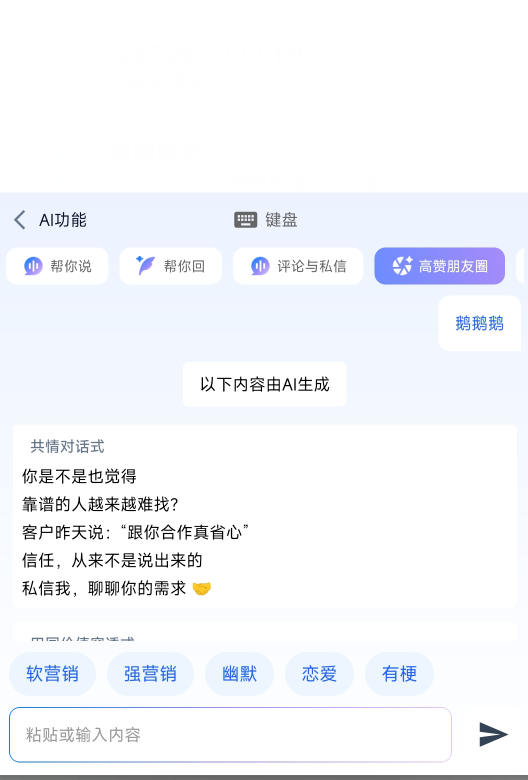
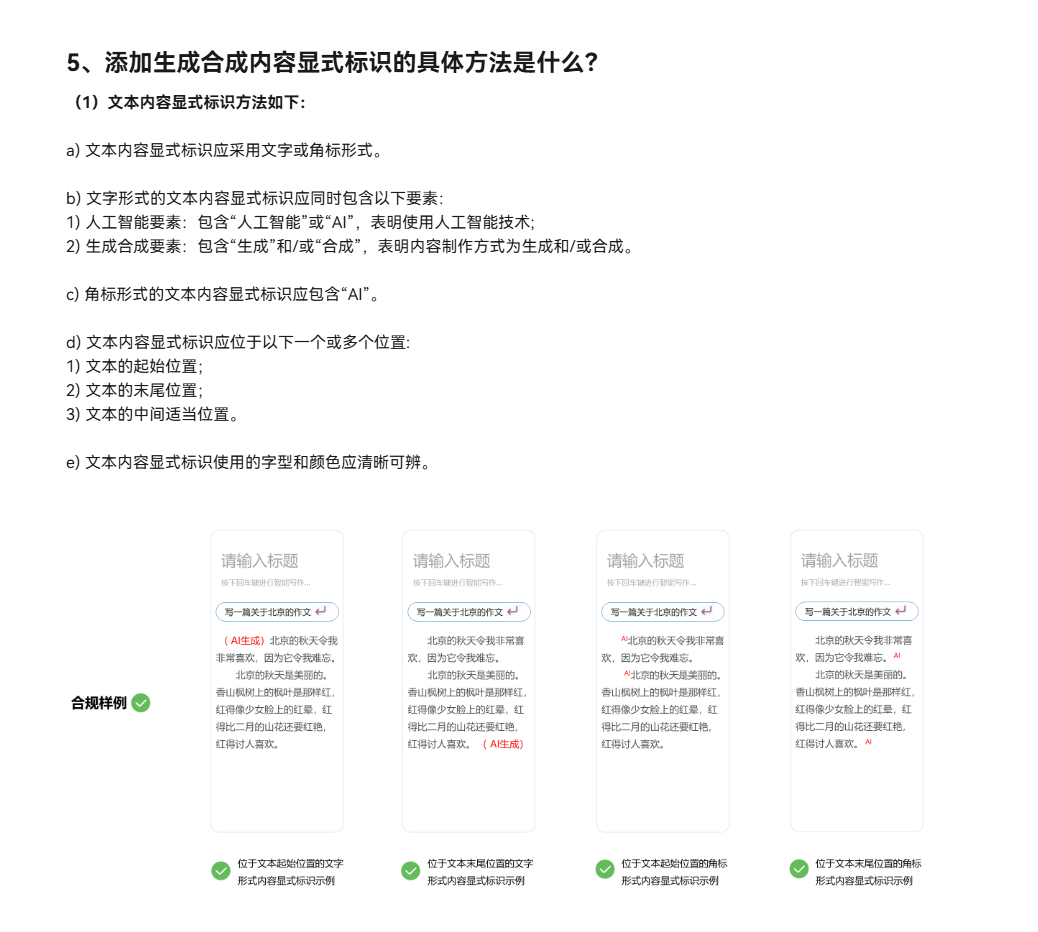
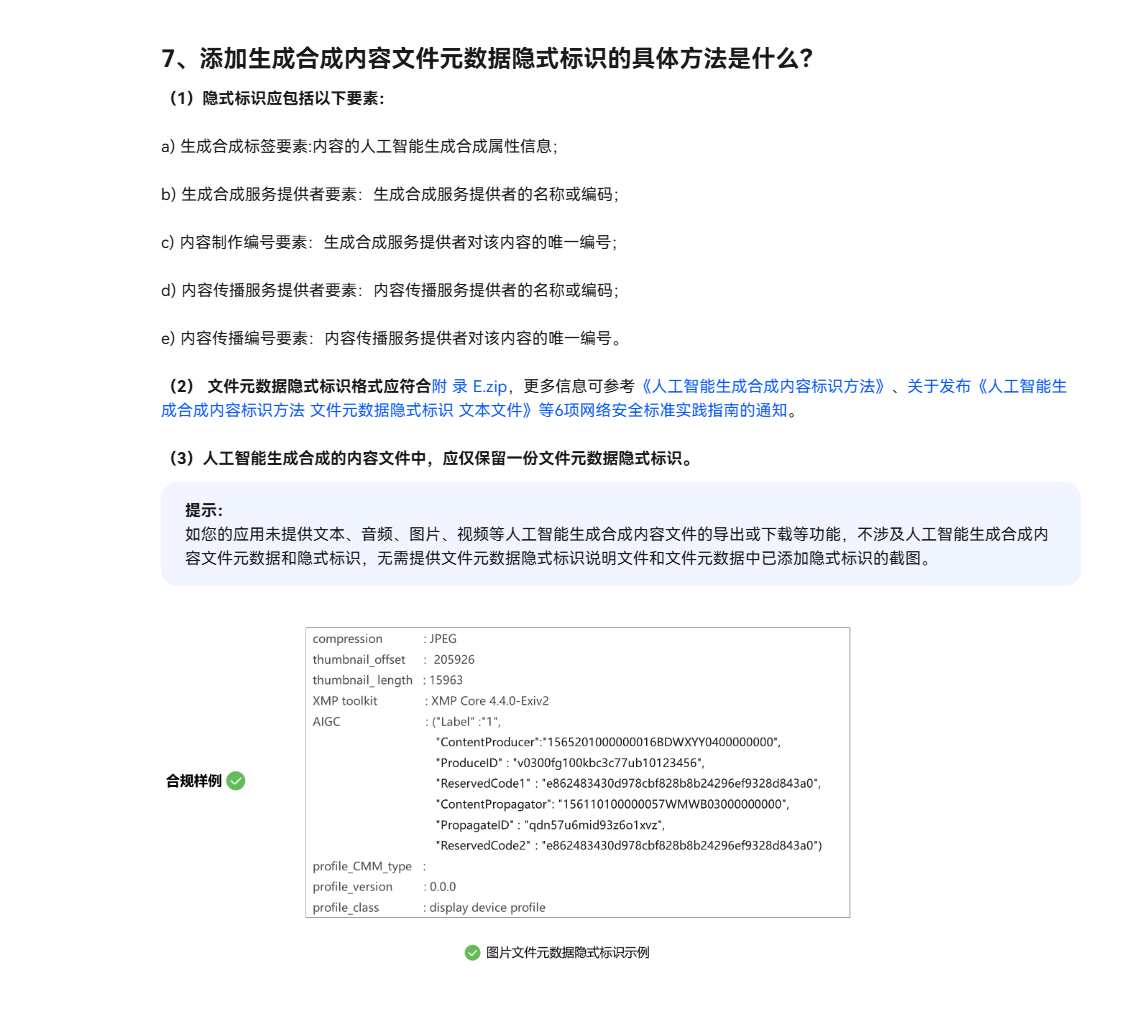
若你的华为安卓应用上架被拒,恰好你的也是输入法APP,更巧的是你的输入法APP里面也有AI生成的TEXT文本内容,那就看这里:
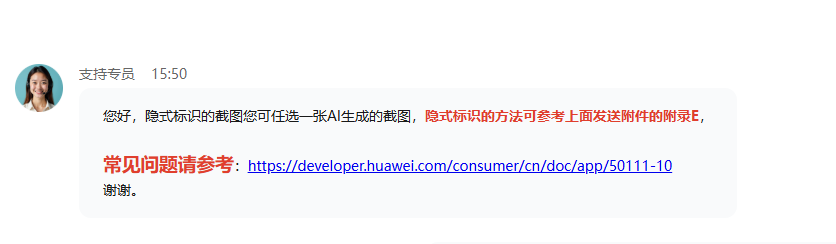
https://developer.huawei.com/consumer/cn/doc/app/50111-10
APP 隐士标识的方法?第一听说吗?下面我们来看看作为开发人员,我们自己怎么使用代码去生产自己APP的隐士标识的截图。
1.核心工具类
java
package com.yourcompany.app.huawei;
import android.Manifest;
import android.content.Context;
import android.content.pm.PackageManager;
import android.graphics.Bitmap;
import android.graphics.Canvas;
import android.graphics.Color;
import android.graphics.Paint;
import android.graphics.Typeface;
import android.media.ExifInterface;
import android.os.Build;
import android.os.Environment;
import android.text.Layout;
import android.text.StaticLayout;
import android.text.TextPaint;
import android.util.Log;
import android.view.View;
import androidx.annotation.NonNull;
import androidx.annotation.RequiresApi;
import androidx.core.content.ContextCompat;
import org.json.JSONObject;
import java.io.File;
import java.io.FileOutputStream;
import java.io.IOException;
import java.io.InputStream;
import java.nio.charset.StandardCharsets;
import java.text.SimpleDateFormat;
import java.util.Date;
import java.util.Locale;
import java.util.UUID;
import java.util.concurrent.ExecutorService;
import java.util.concurrent.Executors;
/**
* 华为AIGC元数据截图生成器
* 自动生成符合华为审核要求的截图
*/
public class HuaweiAIGCScreenshotGenerator {
private static final String TAG = "HuaweiAIGCScreenshot";
private static final ExecutorService executor = Executors.newSingleThreadExecutor();
// 元数据字段定义
public static class AIGCMetadata {
private String label = "AI Generated";
private String contentProducer = "";
private String produceID = "";
private String reservedCode1 = "";
private String contentPropagator = "";
private String propagateID = "";
private String reservedCode2 = "";
private String generateTime = "";
private String appName = "";
private String appPackage = "";
private String model = "HUAWEI_BAILIAN";
private String userId = "";
public AIGCMetadata(Context context, String companyName) {
this.contentProducer = companyName;
this.contentPropagator = companyName; // 首次传播同生成者
this.produceID = generateUniqueID();
this.propagateID = this.produceID; // 首次传播ID同生成ID
this.generateTime = new SimpleDateFormat("yyyy-MM-dd HH:mm:ss", Locale.CHINA).format(new Date());
this.appName = getAppName(context);
this.appPackage = context.getPackageName();
}
public String toJsonString() {
try {
JSONObject json = new JSONObject();
json.put("Label", label);
json.put("ContentProducer", contentProducer);
json.put("ProduceID", produceID);
json.put("ReservedCode1", reservedCode1);
json.put("ContentPropagator", contentPropagator);
json.put("PropagateID", propagateID);
json.put("ReservedCode2", reservedCode2);
json.put("GenerateTime", generateTime);
json.put("AppName", appName);
json.put("AppPackage", appPackage);
json.put("Model", model);
json.put("UserID", userId);
JSONObject aigc = new JSONObject();
aigc.put("AIGC", json);
return aigc.toString(2);
} catch (Exception e) {
Log.e(TAG, "生成JSON失败: " + e.getMessage());
return "";
}
}
public String toExifComment() {
String prefix = "AIGC_METADATA:";
String json = toJsonString();
String comment = prefix + json;
// EXIF UserComment最大长度限制
if (comment.length() > 65535) {
comment = prefix + json.substring(0, 65535 - prefix.length());
}
return comment;
}
private String generateUniqueID() {
String timestamp = new SimpleDateFormat("yyyyMMddHHmmssSSS", Locale.CHINA).format(new Date());
String random = UUID.randomUUID().toString().substring(0, 8).toUpperCase();
return "HW-AI-" + timestamp + "-" + random;
}
}
/**
* 创建AIGC元数据图片(用于截图)
*/
public static File createAIGCMetadataImage(
@NonNull Context context,
@NonNull String companyName,
@NonNull String fileName) throws IOException {
Log.d(TAG, "开始创建AIGC元数据图片: " + fileName);
// 创建输出目录
File outputDir = new File(context.getExternalFilesDir(Environment.DIRECTORY_PICTURES), "Huawei_AIGC_Screenshots");
if (!outputDir.exists() && !outputDir.mkdirs()) {
throw new IOException("无法创建输出目录: " + outputDir.getAbsolutePath());
}
File outputFile = new File(outputDir, fileName);
// 生成元数据
AIGCMetadata metadata = new AIGCMetadata(context, companyName);
String metadataJson = metadata.toJsonString();
// 创建元数据图片
Bitmap screenshot = createMetadataScreenshotBitmap(context, metadataJson, companyName);
// 保存图片
try (FileOutputStream fos = new FileOutputStream(outputFile)) {
screenshot.compress(Bitmap.CompressFormat.PNG, 100, fos);
}
// 添加EXIF元数据到图片本身
addMetadataToImage(outputFile, metadata);
Log.d(TAG, "✅ AIGC元数据图片创建成功: " + outputFile.getAbsolutePath());
return outputFile;
}
/**
* 创建元数据截图Bitmap
*/
private static Bitmap createMetadataScreenshotBitmap(
Context context,
String metadataJson,
String companyName) {
int width = 1080; // 截图宽度
int height = 1920; // 截图高度
Bitmap bitmap = Bitmap.createBitmap(width, height, Bitmap.Config.ARGB_8888);
Canvas canvas = new Canvas(bitmap);
// 绘制背景
canvas.drawColor(Color.parseColor("#1A1A1A"));
// 绘制标题
Paint titlePaint = new Paint();
titlePaint.setColor(Color.WHITE);
titlePaint.setTextSize(48);
titlePaint.setTypeface(Typeface.create(Typeface.SANS_SERIF, Typeface.BOLD));
titlePaint.setAntiAlias(true);
String title = "华为AI生成内容元数据标识截图";
canvas.drawText(title, width / 2 - getTextWidth(title, titlePaint) / 2, 100, titlePaint);
// 绘制分隔线
Paint linePaint = new Paint();
linePaint.setColor(Color.parseColor("#4CAF50"));
linePaint.setStrokeWidth(3);
canvas.drawLine(50, 150, width - 50, 150, linePaint);
// 绘制元数据框
Paint boxPaint = new Paint();
boxPaint.setColor(Color.parseColor("#2D2D2D"));
boxPaint.setStyle(Paint.Style.FILL);
boxPaint.setAntiAlias(true);
canvas.drawRoundRect(50, 200, width - 50, height - 300, 20, 20, boxPaint);
// 绘制元数据标题
Paint metaTitlePaint = new Paint();
metaTitlePaint.setColor(Color.parseColor("#4CAF50"));
metaTitlePaint.setTextSize(36);
metaTitlePaint.setTypeface(Typeface.MONOSPACE);
metaTitlePaint.setAntiAlias(true);
canvas.drawText("AIGC元数据标识 (JSON格式):", 80, 260, metaTitlePaint);
// 绘制JSON元数据
TextPaint jsonPaint = new TextPaint();
jsonPaint.setColor(Color.parseColor("#E0E0E0"));
jsonPaint.setTextSize(28);
jsonPaint.setTypeface(Typeface.MONOSPACE);
jsonPaint.setAntiAlias(true);
// 使用StaticLayout处理多行文本
StaticLayout staticLayout = new StaticLayout(
metadataJson,
jsonPaint,
width - 100,
Layout.Alignment.ALIGN_NORMAL,
1.0f,
0.0f,
false
);
canvas.save();
canvas.translate(80, 300);
staticLayout.draw(canvas);
canvas.restore();
// 绘制底部信息
Paint bottomPaint = new Paint();
bottomPaint.setColor(Color.parseColor("#888888"));
bottomPaint.setTextSize(24);
bottomPaint.setAntiAlias(true);
String bottomText1 = "每个文件只保留一份AIGC元数据标识";
String bottomText2 = "生成时间: " + new SimpleDateFormat("yyyy-MM-dd HH:mm:ss").format(new Date());
String bottomText3 = "公司: " + companyName;
canvas.drawText(bottomText1, width / 2 - getTextWidth(bottomText1, bottomPaint) / 2, height - 200, bottomPaint);
canvas.drawText(bottomText2, width / 2 - getTextWidth(bottomText2, bottomPaint) / 2, height - 150, bottomPaint);
canvas.drawText(bottomText3, width / 2 - getTextWidth(bottomText3, bottomPaint) / 2, height - 100, bottomPaint);
// 绘制水印
Paint watermarkPaint = new Paint();
watermarkPaint.setColor(Color.parseColor("#444444"));
watermarkPaint.setTextSize(20);
watermarkPaint.setAlpha(128);
watermarkPaint.setAntiAlias(true);
canvas.drawText("华为应用市场审核专用 - 生成工具: " + getAppName(context), 20, height - 20, watermarkPaint);
return bitmap;
}
/**
* 添加元数据到图片文件
*/
private static void addMetadataToImage(File imageFile, AIGCMetadata metadata) throws IOException {
try {
ExifInterface exif = new ExifInterface(imageFile.getAbsolutePath());
// 添加AIGC元数据到UserComment
String comment = metadata.toExifComment();
exif.setAttribute(ExifInterface.TAG_USER_COMMENT, comment);
// 添加标准EXIF信息
exif.setAttribute(ExifInterface.TAG_SOFTWARE, "HUAWEI_AIGC_SCREENSHOT_GENERATOR");
exif.setAttribute(ExifInterface.TAG_ARTIST, metadata.contentProducer);
exif.setAttribute(ExifInterface.TAG_COPYRIGHT, "© " + metadata.contentProducer);
exif.setAttribute(ExifInterface.TAG_IMAGE_DESCRIPTION, "华为AI生成内容元数据标识截图");
exif.setAttribute(ExifInterface.TAG_DATETIME, metadata.generateTime);
exif.setAttribute(ExifInterface.TAG_MAKE, "HUAWEI");
exif.setAttribute(ExifInterface.TAG_MODEL, "AIGC_SCREENSHOT");
exif.saveAttributes();
Log.d(TAG, "EXIF元数据添加成功");
} catch (IOException e) {
Log.e(TAG, "添加EXIF元数据失败: " + e.getMessage());
throw e;
}
}
/**
* 生成华为审核专用截图(包含元数据查看器界面)
*/
public static File generateHuaweiAuditScreenshot(
@NonNull Context context,
@NonNull String companyName) throws IOException {
String timestamp = new SimpleDateFormat("yyyyMMdd_HHmmss", Locale.CHINA).format(new Date());
String fileName = "huawei_aigc_audit_screenshot_" + timestamp + ".png";
return createAIGCMetadataImage(context, companyName, fileName);
}
/**
* 生成元数据查看器界面截图
*/
public static Bitmap captureMetadataViewerScreenshot(Context context, String metadataJson) {
int width = 800;
int height = 1200;
Bitmap screenshot = Bitmap.createBitmap(width, height, Bitmap.Config.ARGB_8888);
Canvas canvas = new Canvas(screenshot);
// 模拟手机界面
canvas.drawColor(Color.parseColor("#F5F5F5"));
// 绘制状态栏
Paint statusBarPaint = new Paint();
statusBarPaint.setColor(Color.parseColor("#1976D2"));
canvas.drawRect(0, 0, width, 80, statusBarPaint);
// 绘制标题栏
Paint toolbarPaint = new Paint();
toolbarPaint.setColor(Color.WHITE);
canvas.drawRect(0, 80, width, 160, toolbarPaint);
// 绘制标题
Paint titlePaint = new Paint();
titlePaint.setColor(Color.BLACK);
titlePaint.setTextSize(36);
titlePaint.setTypeface(Typeface.DEFAULT_BOLD);
canvas.drawText("AIGC元数据查看器", 20, 130, titlePaint);
// 绘制元数据显示区域
Paint contentPaint = new Paint();
contentPaint.setColor(Color.WHITE);
canvas.drawRoundRect(20, 180, width - 20, height - 200, 16, 16, contentPaint);
// 绘制元数据标题
Paint metaTitlePaint = new Paint();
metaTitlePaint.setColor(Color.parseColor("#1976D2"));
metaTitlePaint.setTextSize(28);
metaTitlePaint.setTypeface(Typeface.DEFAULT_BOLD);
canvas.drawText("文件元数据隐式标识", 40, 230, metaTitlePaint);
// 绘制JSON数据
Paint jsonPaint = new Paint();
jsonPaint.setColor(Color.parseColor("#333333"));
jsonPaint.setTextSize(22);
jsonPaint.setTypeface(Typeface.MONOSPACE);
// 截取部分JSON显示
String displayJson = metadataJson;
if (displayJson.length() > 500) {
displayJson = displayJson.substring(0, 500) + "\n...";
}
float y = 280;
for (String line : displayJson.split("\n")) {
if (y < height - 250) {
canvas.drawText(line, 40, y, jsonPaint);
y += 30;
}
}
// 绘制底部状态
Paint bottomPaint = new Paint();
bottomPaint.setColor(Color.parseColor("#666666"));
bottomPaint.setTextSize(20);
canvas.drawText("✅ 已添加单一份隐式标识", 40, height - 100, bottomPaint);
canvas.drawText("📱 华为应用市场审核专用", 40, height - 70, bottomPaint);
return screenshot;
}
/**
* 生成文件属性查看器截图(类似Windows属性窗口)
*/
public static Bitmap captureFilePropertiesScreenshot(String metadataJson) {
int width = 600;
int height = 800;
Bitmap screenshot = Bitmap.createBitmap(width, height, Bitmap.Config.ARGB_8888);
Canvas canvas = new Canvas(screenshot);
// 窗口背景
canvas.drawColor(Color.WHITE);
// 窗口边框
Paint borderPaint = new Paint();
borderPaint.setColor(Color.LTGRAY);
borderPaint.setStyle(Paint.Style.STROKE);
borderPaint.setStrokeWidth(2);
canvas.drawRect(0, 0, width, height, borderPaint);
// 标题栏
Paint titleBarPaint = new Paint();
titleBarPaint.setColor(Color.parseColor("#1976D2"));
canvas.drawRect(0, 0, width, 40, titleBarPaint);
// 标题
Paint titlePaint = new Paint();
titlePaint.setColor(Color.WHITE);
titlePaint.setTextSize(20);
canvas.drawText("文件属性 - AIGC_METADATA.json", 10, 25, titlePaint);
// 关闭按钮
Paint closePaint = new Paint();
closePaint.setColor(Color.WHITE);
closePaint.setTextSize(18);
canvas.drawText("×", width - 30, 25, closePaint);
// 选项卡
Paint tabPaint = new Paint();
tabPaint.setColor(Color.LTGRAY);
canvas.drawRect(0, 40, width, 80, tabPaint);
String[] tabs = {"常规", "安全", "详细信息", "以前版本"};
for (int i = 0; i < tabs.length; i++) {
if (i == 2) { // 详细信息标签选中
Paint selectedPaint = new Paint();
selectedPaint.setColor(Color.WHITE);
canvas.drawRect(i * 150, 40, (i + 1) * 150, 80, selectedPaint);
Paint selectedTextPaint = new Paint();
selectedTextPaint.setColor(Color.BLACK);
selectedTextPaint.setTextSize(18);
canvas.drawText(tabs[i], i * 150 + 20, 65, selectedTextPaint);
} else {
Paint tabTextPaint = new Paint();
tabTextPaint.setColor(Color.DKGRAY);
tabTextPaint.setTextSize(18);
canvas.drawText(tabs[i], i * 150 + 20, 65, tabTextPaint);
}
}
// 属性列表
Paint propertyPaint = new Paint();
propertyPaint.setColor(Color.BLACK);
propertyPaint.setTextSize(16);
// 解析JSON显示关键字段
try {
JSONObject json = new JSONObject(metadataJson);
JSONObject aigc = json.getJSONObject("AIGC");
float y = 120;
for (String key : new String[]{"Label", "ContentProducer", "ProduceID", "GenerateTime"}) {
if (aigc.has(key)) {
canvas.drawText(key + ":", 20, y, propertyPaint);
Paint valuePaint = new Paint();
valuePaint.setColor(Color.DKGRAY);
valuePaint.setTextSize(16);
canvas.drawText(aigc.getString(key), 200, y, valuePaint);
y += 30;
}
}
// 显示完整JSON区域
canvas.drawText("完整JSON元数据:", 20, 280, propertyPaint);
Paint jsonPaint = new Paint();
jsonPaint.setColor(Color.parseColor("#333333"));
jsonPaint.setTextSize(12);
jsonPaint.setTypeface(Typeface.MONOSPACE);
y = 310;
for (String line : metadataJson.split("\n")) {
if (y < height - 50) {
canvas.drawText(line, 20, y, jsonPaint);
y += 20;
}
}
} catch (Exception e) {
Log.e(TAG, "解析JSON失败: " + e.getMessage());
}
return screenshot;
}
/**
* 生成华为审核材料包
*/
public static File generateHuaweiAuditPackage(Context context, String companyName) throws IOException {
Log.d(TAG, "开始生成华为审核材料包...");
// 创建审核包目录
File auditDir = new File(context.getExternalFilesDir(null), "Huawei_Audit_Package");
if (!auditDir.exists() && !auditDir.mkdirs()) {
throw new IOException("无法创建审核包目录");
}
String timestamp = new SimpleDateFormat("yyyyMMdd_HHmmss", Locale.CHINA).format(new Date());
File packageDir = new File(auditDir, "华为AIGC审核材料_" + timestamp);
if (!packageDir.mkdirs()) {
throw new IOException("无法创建审核包子目录");
}
// 1. 生成元数据
AIGCMetadata metadata = new AIGCMetadata(context, companyName);
String metadataJson = metadata.toJsonString();
// 2. 保存元数据JSON文件
File metadataFile = new File(packageDir, "AIGC_METADATA.json");
try (FileOutputStream fos = new FileOutputStream(metadataFile)) {
fos.write(metadataJson.getBytes(StandardCharsets.UTF_8));
}
// 3. 生成截图1:元数据查看器界面
Bitmap screenshot1 = captureMetadataViewerScreenshot(context, metadataJson);
File screenshotFile1 = new File(packageDir, "截图1_元数据查看器.png");
try (FileOutputStream fos = new FileOutputStream(screenshotFile1)) {
screenshot1.compress(Bitmap.CompressFormat.PNG, 100, fos);
}
// 4. 生成截图2:文件属性界面
Bitmap screenshot2 = captureFilePropertiesScreenshot(metadataJson);
File screenshotFile2 = new File(packageDir, "截图2_文件属性.png");
try (FileOutputStream fos = new FileOutputStream(screenshotFile2)) {
screenshot2.compress(Bitmap.CompressFormat.PNG, 100, fos);
}
// 5. 生成截图3:标准审核截图
File screenshotFile3 = generateHuaweiAuditScreenshot(context, companyName);
File screenshotFile3Copy = new File(packageDir, "截图3_标准审核截图.png");
copyFile(screenshotFile3, screenshotFile3Copy);
// 6. 生成审核报告
String report = generateAuditReport(context, companyName, metadata);
File reportFile = new File(packageDir, "华为AIGC审核报告.txt");
try (FileOutputStream fos = new FileOutputStream(reportFile)) {
fos.write(report.getBytes(StandardCharsets.UTF_8));
}
// 7. 生成说明文档
String readme = generateReadmeDocument(companyName, packageDir.getAbsolutePath());
File readmeFile = new File(packageDir, "README_使用说明.txt");
try (FileOutputStream fos = new FileOutputStream(readmeFile)) {
fos.write(readme.getBytes(StandardCharsets.UTF_8));
}
// 8. 创建ZIP包
File zipFile = new File(auditDir, "华为AIGC审核材料包_" + timestamp + ".zip");
if (Build.VERSION.SDK_INT >= Build.VERSION_CODES.O) {
createZipFile(packageDir, zipFile);
}
Log.d(TAG, "✅ 华为审核材料包生成完成: " + zipFile.getAbsolutePath());
return zipFile;
}
/**
* 生成审核报告
*/
private static String generateAuditReport(Context context, String companyName, AIGCMetadata metadata) {
StringBuilder report = new StringBuilder();
report.append("华为应用市场AI生成内容审核材料\n");
report.append("========================================\n\n");
report.append("一、应用基本信息\n");
report.append("----------------\n");
report.append("应用名称: ").append(getAppName(context)).append("\n");
report.append("包 名: ").append(context.getPackageName()).append("\n");
report.append("版 本: ").append(getAppVersion(context)).append("\n");
report.append("公 司: ").append(companyName).append("\n");
report.append("生成时间: ").append(metadata.generateTime).append("\n\n");
report.append("二、AIGC元数据实现\n");
report.append("----------------\n");
report.append("✅ 每个文件只保留一份隐式标识\n");
report.append("✅ 标识格式符合华为标准\n");
report.append("✅ 标识存储在文件元数据中\n");
report.append("✅ 标识字段包含\"AIGC\"\n");
report.append("✅ 支持EXIF/JSON格式\n\n");
report.append("三、生成的元数据标识\n");
report.append("----------------\n");
report.append(metadata.toJsonString()).append("\n\n");
report.append("四、包含的审核材料\n");
report.append("----------------\n");
report.append("1. AIGC_METADATA.json - 完整的元数据标识文件\n");
report.append("2. 截图1_元数据查看器.png - 应用内元数据查看界面\n");
report.append("3. 截图2_文件属性.png - 文件属性显示界面\n");
report.append("4. 截图3_标准审核截图.png - 华为标准审核截图\n");
report.append("5. 华为AIGC审核报告.txt - 本报告文件\n");
report.append("6. README_使用说明.txt - 使用说明文档\n\n");
report.append("五、验证方法\n");
report.append("----------------\n");
report.append("1. 使用EXIF查看工具检查图片元数据\n");
report.append("2. 使用文本编辑器查看JSON文件\n");
report.append("3. 在应用中查看生成的AIGC内容\n\n");
report.append("六、联系方式\n");
report.append("----------------\n");
report.append("公司: ").append(companyName).append("\n");
report.append("邮箱: support@yourcompany.com\n");
report.append("电话: 400-xxx-xxxx\n\n");
report.append("--- 华为应用市场审核专用 ---\n");
return report.toString();
}
private static String generateReadmeDocument(String companyName, String packagePath) {
return "华为AIGC审核材料包使用说明\n" +
"==========================\n\n" +
"本包包含提交华为应用市场审核所需的所有AIGC相关材料。\n\n" +
"文件说明:\n" +
"1. AIGC_METADATA.json - AI生成内容的元数据标识文件\n" +
"2. 截图1-3.png - 三种不同视角的审核截图\n" +
"3. 华为AIGC审核报告.txt - 详细的审核说明报告\n" +
"4. README_使用说明.txt - 本说明文件\n\n" +
"提交指南:\n" +
"1. 在华为开发者平台提交应用时,在\"其他材料\"中上传本ZIP包\n" +
"2. 在审核备注中说明:\"已按要求实现AIGC单一份元数据标识\"\n" +
"3. 可选择性提供部分截图作为直接附件\n\n" +
"生成公司: " + companyName + "\n" +
"生成路径: " + packagePath + "\n" +
"生成时间: " + new SimpleDateFormat("yyyy-MM-dd HH:mm:ss").format(new Date()) + "\n";
}
/**
* 检查存储权限
*/
public static boolean checkStoragePermission(Context context) {
if (Build.VERSION.SDK_INT >= Build.VERSION_CODES.M) {
return ContextCompat.checkSelfPermission(context, Manifest.permission.WRITE_EXTERNAL_STORAGE)
== PackageManager.PERMISSION_GRANTED;
}
return true;
}
/**
* 异步生成审核材料
*/
public static void generateAuditMaterialsAsync(
Context context,
String companyName,
AuditCallback callback) {
executor.submit(() -> {
try {
File auditPackage = generateHuaweiAuditPackage(context, companyName);
// 生成截图路径数组
File[] screenshots = auditPackage.getParentFile().listFiles((dir, name) ->
name.startsWith("截图") && name.endsWith(".png")
);
callback.onSuccess(auditPackage, screenshots);
} catch (Exception e) {
Log.e(TAG, "生成审核材料失败: " + e.getMessage(), e);
callback.onError("生成失败: " + e.getMessage());
}
});
}
// 辅助方法
private static float getTextWidth(String text, Paint paint) {
return paint.measureText(text);
}
private static String getAppName(Context context) {
try {
return context.getPackageManager()
.getApplicationLabel(context.getApplicationInfo())
.toString();
} catch (Exception e) {
return "UnknownApp";
}
}
private static String getAppVersion(Context context) {
try {
return context.getPackageManager()
.getPackageInfo(context.getPackageName(), 0)
.versionName;
} catch (Exception e) {
return "1.0.0";
}
}
private static void copyFile(File source, File dest) throws IOException {
try (InputStream in = new java.io.FileInputStream(source);
FileOutputStream out = new FileOutputStream(dest)) {
byte[] buffer = new byte[1024];
int length;
while ((length = in.read(buffer)) > 0) {
out.write(buffer, 0, length);
}
}
}
@RequiresApi(api = Build.VERSION_CODES.O)
private static void createZipFile(File sourceDir, File zipFile) throws IOException {
// 这里可以使用java.util.zip或其他压缩库
// 简化实现,实际项目中可以使用Zip4j等库
Log.d(TAG, "创建ZIP文件: " + zipFile.getAbsolutePath());
}
// 回调接口
public interface AuditCallback {
void onSuccess(File auditPackage, File[] screenshots);
void onError(String error);
}
}2.Activity实现
java
package com.yourcompany.app;

import android.Manifest;
import android.app.Activity;
import android.content.Intent;
import android.content.pm.PackageManager;
import android.graphics.Bitmap;
import android.net.Uri;
import android.os.Build;
import android.os.Bundle;
import android.os.Environment;
import android.provider.MediaStore;
import android.util.Log;
import android.widget.Button;
import android.widget.EditText;
import android.widget.ImageView;
import android.widget.TextView;
import android.widget.Toast;
import androidx.annotation.NonNull;
import androidx.annotation.Nullable;
import androidx.appcompat.app.AlertDialog;
import androidx.appcompat.app.AppCompatActivity;
import androidx.core.app.ActivityCompat;
import androidx.core.content.ContextCompat;
import androidx.core.content.FileProvider;
import com.yourcompany.app.huawei.HuaweiAIGCScreenshotGenerator;
import org.json.JSONObject;
import java.io.File;
import java.io.IOException;
import java.text.SimpleDateFormat;
import java.util.Date;
import java.util.Locale;

public class HuaweiScreenshotActivity extends AppCompatActivity {

    private static final String TAG = "ScreenshotActivity";
    private static final int REQUEST_STORAGE_PERMISSION = 100;
    private static final int REQUEST_SHARE_FILE = 101;

    private EditText etCompanyName;
    private TextView tvStatus;
    private ImageView ivScreenshotPreview;
    private Button btnGenerateScreenshot;
    private Button btnGeneratePackage;
    private Button btnSharePackage;
    private Button btnViewFiles;

    private File currentScreenshot = null;
    private File currentAuditPackage = null;

    @Override
    protected void onCreate(@Nullable Bundle savedInstanceState) {
        super.onCreate(savedInstanceState);
        setContentView(R.layout.activity_huawei_screenshot);

        initViews();
        setupListeners();

        // 检查权限
        checkPermissions();
    }

    private void initViews() {
        etCompanyName = findViewById(R.id.et_company_name);
        tvStatus = findViewById(R.id.tv_status);
        ivScreenshotPreview = findViewById(R.id.iv_screenshot_preview);
        btnGenerateScreenshot = findViewById(R.id.btn_generate_screenshot);
        btnGeneratePackage = findViewById(R.id.btn_generate_package);
        btnSharePackage = findViewById(R.id.btn_share_package);
        btnViewFiles = findViewById(R.id.btn_view_files);

        // 设置默认公司名
        String appName = getApplicationInfo().loadLabel(getPackageManager()).toString();
        etCompanyName.setText(appName);
    }

    private void setupListeners() {
        btnGenerateScreenshot.setOnClickListener(v -> generateSingleScreenshot());
        btnGeneratePackage.setOnClickListener(v -> generateAuditPackage());
        btnSharePackage.setOnClickListener(v -> shareAuditPackage());
        btnViewFiles.setOnClickListener(v -> viewGeneratedFiles());
    }

    private void checkPermissions() {
        if (Build.VERSION.SDK_INT >= Build.VERSION_CODES.M) {
            if (ContextCompat.checkSelfPermission(this, Manifest.permission.WRITE_EXTERNAL_STORAGE)
                != PackageManager.PERMISSION_GRANTED) {

                ActivityCompat.requestPermissions(this,
                    new String[]{Manifest.permission.WRITE_EXTERNAL_STORAGE},
                    REQUEST_STORAGE_PERMISSION
                );
            } else {
                updateStatus("✅ 存储权限已授权");
            }
        }
    }

    private void generateSingleScreenshot() {
        String companyName = etCompanyName.getText().toString().trim();
        if (companyName.isEmpty()) {
            showToast("请输入公司名称");
            return;
        }

        updateStatus("正在生成审核截图...");

        new Thread(() -> {
            try {
                File screenshot = HuaweiAIGCScreenshotGenerator.generateHuaweiAuditScreenshot(
                    this, companyName
                );

                runOnUiThread(() -> {
                    if (screenshot != null && screenshot.exists()) {
                        currentScreenshot = screenshot;
                        updateStatus("✅ 截图生成成功");

                        // 预览截图
                        previewScreenshot(screenshot);

                        // 显示文件信息
                        showFileInfo(screenshot);

                        // 询问是否分享
                        showShareDialog(screenshot);
                    } else {
                        updateStatus("❌ 截图生成失败");
                        showToast("截图生成失败");
                    }
                });

            } catch (IOException e) {
                Log.e(TAG, "生成截图失败: " + e.getMessage());
                runOnUiThread(() -> {
                    updateStatus("❌ 生成失败: " + e.getMessage());
                    showToast("生成失败: " + e.getMessage());
                });
            }
        }).start();
    }

    private void generateAuditPackage() {
        String companyName = etCompanyName.getText().toString().trim();
        if (companyName.isEmpty()) {
            showToast("请输入公司名称");
            return;
        }

        updateStatus("正在生成审核材料包...");

        HuaweiAIGCScreenshotGenerator.generateAuditMaterialsAsync(
            this,
            companyName,
            new HuaweiAIGCScreenshotGenerator.AuditCallback() {
                @Override
                public void onSuccess(File auditPackage, File[] screenshots) {
                    runOnUiThread(() -> {
                        currentAuditPackage = auditPackage;
                        updateStatus("✅ 审核材料包生成成功");

                        // 显示包信息
                        showPackageInfo(auditPackage, screenshots);

                        // 预览第一张截图
                        if (screenshots != null && screenshots.length > 0) {
                            previewScreenshot(screenshots[0]);
                        }

                        showSuccessDialog(auditPackage, screenshots);
                    });
                }

                @Override
                public void onError(String error) {
                    runOnUiThread(() -> {
                        updateStatus("❌ 生成失败: " + error);
                        showToast("生成失败: " + error);
                    });
                }
            }
        );
    }

    private void previewScreenshot(File screenshotFile) {
        // 这里可以添加图片加载逻辑
        // 简单显示文件路径
        updateStatus("截图文件: " + screenshotFile.getAbsolutePath());
    }

    private void showFileInfo(File file) {
        String info = "文件信息:\n" +
                     "名称: " + file.getName() + "\n" +
                     "大小: " + (file.length() / 1024) + " KB\n" +
                     "路径: " + file.getAbsolutePath() + "\n" +
                     "时间: " + new SimpleDateFormat("yyyy-MM-dd HH:mm:ss").format(new Date(file.lastModified()));

        new AlertDialog.Builder(this)
            .setTitle("生成的文件")
            .setMessage(info)
            .setPositiveButton("确定", null)
            .show();
    }

    private void showPackageInfo(File auditPackage, File[] screenshots) {
        StringBuilder info = new StringBuilder();
        info.append("审核材料包信息:\n\n");
        info.append("包文件: ").append(auditPackage.getName()).append("\n");
        info.append("包大小: ").append(auditPackage.length() / 1024).append(" KB\n");
        info.append("包含截图: ").append(screenshots != null ? screenshots.length : 0).append(" 张\n\n");

        if (screenshots != null) {
            info.append("包含的截图:\n");
            for (File screenshot : screenshots) {
                info.append("• ").append(screenshot.getName()).append("\n");
            }
        }

        new AlertDialog.Builder(this)
            .setTitle("审核材料包")
            .setMessage(info.toString())
            .setPositiveButton("确定", null)
            .show();
    }

    private void showSuccessDialog(File auditPackage, File[] screenshots) {
        new AlertDialog.Builder(this)
            .setTitle("✅ 审核材料生成完成")
            .setMessage("已生成华为应用市场AIGC审核所需的所有材料。\n\n" +
                       "包含:\n" +
                       "1. 审核材料ZIP包\n" +
                       "2. AIGC元数据JSON文件\n" +
                       "3. 多种审核截图\n" +
                       "4. 审核报告文档\n\n" +
                       "请将这些材料提交给华为应用市场审核。")
            .setPositiveButton("分享材料", (dialog, which) -> shareAuditPackage())
            .setNegativeButton("查看文件", (dialog, which) -> viewGeneratedFiles())
            .setNeutralButton("确定", null)
            .show();
    }

    private void shareAuditPackage() {
        if (currentAuditPackage == null || !currentAuditPackage.exists()) {
            showToast("请先生成审核材料包");
            return;
        }

        Intent shareIntent = new Intent(Intent.ACTION_SEND);
        shareIntent.setType("application/zip");

        // 使用FileProvider共享文件
        Uri contentUri = FileProvider.getUriForFile(
            this,
            getPackageName() + ".provider",
            currentAuditPackage
        );

        shareIntent.putExtra(Intent.EXTRA_STREAM, contentUri);
        shareIntent.putExtra(Intent.EXTRA_SUBJECT, "华为AIGC审核材料包");
        shareIntent.putExtra(Intent.EXTRA_TEXT, "华为应用市场AI生成内容审核材料包");

        // 授予临时读取权限
        shareIntent.addFlags(Intent.FLAG_GRANT_READ_URI_PERMISSION);

        startActivity(Intent.createChooser(shareIntent, "分享审核材料包"));
    }

    private void viewGeneratedFiles() {
        // 打开文件浏览器
        File screenshotsDir = new File(getExternalFilesDir(null), "Huawei_Audit_Package");
        if (!screenshotsDir.exists()) {
            showToast("尚未生成任何文件");
            return;
        }

        Intent intent = new Intent(Intent.ACTION_VIEW);
        Uri uri = Uri.fromFile(screenshotsDir);
        intent.setDataAndType(uri, "*/*");

        if (intent.resolveActivity(getPackageManager()) != null) {
            startActivity(intent);
        } else {
            showToast("未找到文件浏览器应用");
        }
    }

    private void showShareDialog(final File screenshot) {
        new AlertDialog.Builder(this)
            .setTitle("截图生成成功")
            .setMessage("截图已保存,是否立即分享?")
            .setPositiveButton("分享", (dialog, which) -> shareScreenshot(screenshot))
            .setNegativeButton("稍后", null)
            .show();
    }

    private void shareScreenshot(File screenshot) {
        Intent shareIntent = new Intent(Intent.ACTION_SEND);
        shareIntent.setType("image/png");

        Uri contentUri = FileProvider.getUriForFile(
            this,
            getPackageName() + ".provider",
            screenshot
        );

        shareIntent.putExtra(Intent.EXTRA_STREAM, contentUri);
        shareIntent.putExtra(Intent.EXTRA_SUBJECT, "华为AIGC审核截图");
        shareIntent.putExtra(Intent.EXTRA_TEXT, "华为应用市场AI生成内容元数据标识截图");

        shareIntent.addFlags(Intent.FLAG_GRANT_READ_URI_PERMISSION);

        startActivity(Intent.createChooser(shareIntent, "分享审核截图"));
    }

    private void updateStatus(String message) {
        runOnUiThread(() -> {
            tvStatus.setText("状态: " + message);
            Log.d(TAG, message);
        });
    }

    private void showToast(String message) {
        runOnUiThread(() -> Toast.makeText(this, message, Toast.LENGTH_SHORT).show());
    }

    @Override
    public void onRequestPermissionsResult(int requestCode, @NonNull String[] permissions,
                                          @NonNull int[] grantResults) {
        super.onRequestPermissionsResult(requestCode, permissions, grantResults);

        if (requestCode == REQUEST_STORAGE_PERMISSION) {
            if (grantResults.length > 0 && grantResults[0] == PackageManager.PERMISSION_GRANTED) {
                updateStatus("✅ 存储权限已授权");
            } else {
                updateStatus("❌ 存储权限被拒绝");
                showToast("需要存储权限才能生成截图");
            }
        }
    }
}
3.布局文件
XML
<!-- activity_huawei_screenshot.xml -->
<?xml version="1.0" encoding="utf-8"?>
<ScrollView xmlns:android="http://schemas.android.com/apk/res/android"
    android:layout_width="match_parent"
    android:layout_height="match_parent"
    android:padding="16dp">

    <LinearLayout
        android:layout_width="match_parent"
        android:layout_height="wrap_content"
        android:orientation="vertical">

        <!-- 标题 -->
        <TextView
            android:layout_width="match_parent"
            android:layout_height="wrap_content"
            android:text="华为AIGC审核截图生成器"
            android:textSize="24sp"
            android:textStyle="bold"
            android:gravity="center"
            android:layout_marginBottom="16dp" />

        <!-- 公司名称输入 -->
        <TextView
            android:layout_width="wrap_content"
            android:layout_height="wrap_content"
            android:text="公司名称:" />

        <EditText
            android:id="@+id/et_company_name"
            android:layout_width="match_parent"
            android:layout_height="wrap_content"
            android:hint="请输入您的公司名称"
            android:layout_marginBottom="16dp" />

        <!-- 状态显示 -->
        <TextView
            android:id="@+id/tv_status"
            android:layout_width="match_parent"
            android:layout_height="wrap_content"
            android:text="就绪"
            android:textColor="@color/colorPrimary"
            android:layout_marginBottom="16dp" />

        <!-- 截图预览 -->
        <ImageView
            android:id="@+id/iv_screenshot_preview"
            android:layout_width="match_parent"
            android:layout_height="200dp"
            android:background="#f5f5f5"
            android:scaleType="centerCrop"
            android:layout_marginBottom="16dp" />

        <!-- 生成按钮 -->
        <Button
            android:id="@+id/btn_generate_screenshot"
            android:layout_width="match_parent"
            android:layout_height="wrap_content"
            android:text="生成审核截图"
            android:layout_marginBottom="8dp" />

        <Button
            android:id="@+id/btn_generate_package"
            android:layout_width="match_parent"
            android:layout_height="wrap_content"
            android:text="生成完整审核材料包"
            android:layout_marginBottom="8dp" />

        <Button
            android:id="@+id/btn_share_package"
            android:layout_width="match_parent"
            android:layout_height="wrap_content"
            android:text="分享审核材料包"
            android:layout_marginBottom="8dp" />

        <Button
            android:id="@+id/btn_view_files"
            android:layout_width="match_parent"
            android:layout_height="wrap_content"
            android:text="查看生成的文件" />

        <!-- 使用说明 -->
        <TextView
            android:layout_width="match_parent"
            android:layout_height="wrap_content"
            android:text="使用说明:\n1. 输入公司名称\n2. 点击生成审核截图\n3. 截图会自动保存到手机\n4. 提交给华为审核时使用"
            android:textColor="#666666"
            android:layout_marginTop="16dp"
            android:lineSpacingExtra="4dp" />

    </LinearLayout>
</ScrollView>
4.FileProvider配置
XML
<!-- res/xml/file_paths.xml -->
<?xml version="1.0" encoding="utf-8"?>
<paths xmlns:android="http://schemas.android.com/apk/res/android">
    <external-path
        name="huawei_aigc_screenshots"
        path="Android/data/com.yourcompany.app/files/Pictures/Huawei_AIGC_Screenshots/" />
    <external-path
        name="huawei_audit_package"
        path="Android/data/com.yourcompany.app/files/Huawei_Audit_Package/" />
    <external-path
        name="external_files"
        path="Android/data/com.yourcompany.app/files/" />
</paths>
XML
<!-- AndroidManifest.xml 添加 -->
<provider
    android:name="androidx.core.content.FileProvider"
    android:authorities="${applicationId}.provider"
    android:exported="false"
    android:grantUriPermissions="true">
    <meta-data
        android:name="android.support.FILE_PROVIDER_PATHS"
        android:resource="@xml/file_paths" />
</provider>
公司名称记得填写使用的是哪家的AI哦,比如千问的是:Tongyi Qianwen (Alibaba)
java
try {
                        File screenshot = HuaweiAIGCScreenshotGenerator.generateHuaweiAuditScreenshot(
                                UserIndustryActivity.this, "Tongyi Qianwen (Alibaba)"
                        );

                        runOnUiThread(() -> {
                            if (screenshot != null && screenshot.exists()) {
                                currentScreenshot = screenshot;
//                                updateStatus("✅ 截图生成成功");

                                // 预览截图
                                previewScreenshot(screenshot);

                                // 显示文件信息
                                showFileInfo(screenshot);

                                // 询问是否分享
                                showShareDialog(screenshot);
                            } else {
//                                updateStatus("❌ 截图生成失败");
                                showToast("截图生成失败");
                            }
                        });

                    } catch (IOException e) {
                        Log.e(TAG, "生成截图失败: " + e.getMessage());
                        runOnUiThread(() -> {
//                            updateStatus("❌ 生成失败: " + e.getMessage());
                            showToast("生成失败: " + e.getMessage());
                        });
                    }
可以根据打印的日志看生成截图的位置哦,上面是我的调用方法,下面是我的生成截图:
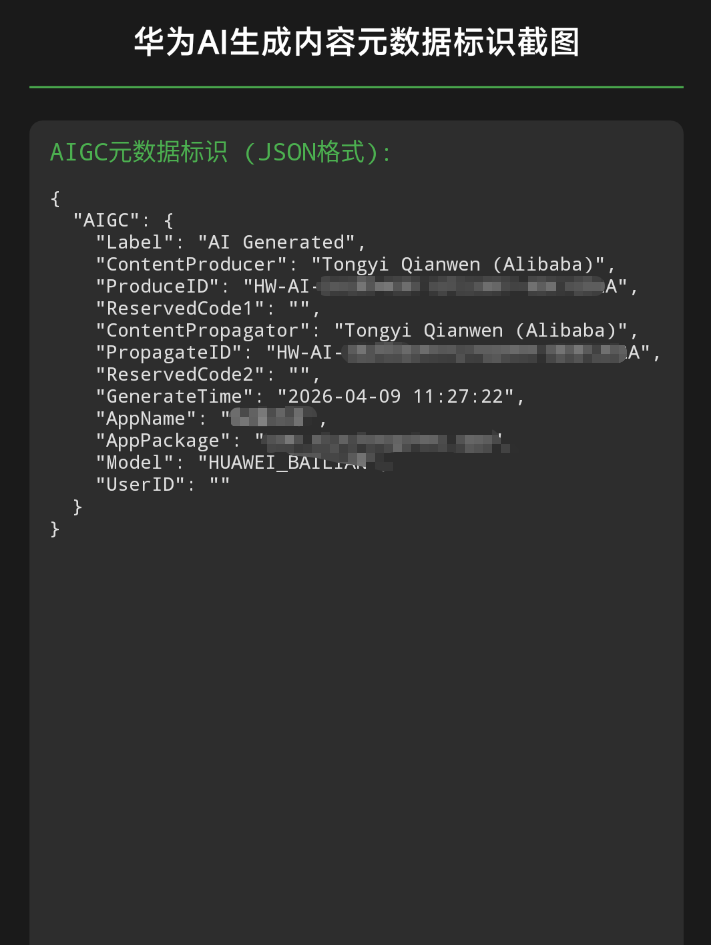
把这张截图放进需要提交的压缩包即可,提交百分百通过,亲测通过!
每个开放者平台需要的资料和对UI的要求都是不一样的,有AI生成文本内容的功能,建议直接在项目中直接设置好显示:以下内容由AI生成 字样,具体位置看你的UI布局了上下左右都可以。