Vue3 + uni-app 混合项目
需求:浏览器和PDA一次提交记录接口兼容上传多张图片,浏览器是正常的,但是pda和安卓设备上上传多张图时,最后一张图覆盖掉了第一张图,最终只能上传一张。
javascript
const submitUpload = async () => {
    if (fileList.value.length === 0) {
        uni.showToast({ title: '请选择图片', icon: 'none' })
        return
    }
    submitLoading.value = true

    try {
        const fd = new FormData();

        // ✅ 正确:追加真正的 File 对象
        fileList.value.forEach((item, index) => {
            if (item.file) {
                console.log(item)
                fd.append('fileImgList', item.file); // 只传 file!
            }
        });

        // 打印看看(现在一定是真正的 File)
        console.log("真实图片列表:", fd.getAll("fileImgList"));

        const res = await uni.request({
            url: `http://${getBaseUrl()}/api/FirstLevelRecord/Add`,
            method: "POST",
            header: {
                "Content-Type": "multipart/form-data",
                Authorization: uni.getStorageSync("token") || ""
            },
            data: fd,
        });

        uni.showToast({ title: "上传成功" });
        closeUpload();
        page.value = 1;
        noMore.value = false;
        getList();
    } catch (e) {
        console.error("失败", e);
        uni.showToast({ title: "上传失败", icon: "none" });
    } finally {
        submitLoading.value = false;
    }
};
尝试别的方法:各种报错
javascript
const submitUpload = async () => {
    if (fileList.value.length === 0) {
        uni.showToast({ title: '请选择图片', icon: 'none' })
        return
    }
    submitLoading.value = true

    try {
        // 把所有图片转 base64
        const base64List = []

        for (const item of fileList.value) {
            const base64 = await new Promise((resolve) => {
                uni.getFileSystemManager().readFile({
                    filePath: item.path,
                    encoding: 'base64',
                    success: (res) => {
                        resolve('data:image/jpeg;base64,' + res.data)
                    }
                })
            })
            base64List.push(base64)
        }

        // 一次性发给后端!!!只发一次请求!!!
        const res = await uni.request({
            url: `http://${getBaseUrl()}/api/FirstLevelRecord/Add`,
            method: 'POST',
            header: {
                Authorization: uni.getStorageSync('token') || '',
                'Content-Type': 'application/json'
            },
            data: {
                images: base64List  // 图片base64数组
            }
        })

        uni.showToast({ title: '上传成功' })
        closeUpload()
        page.value = 1
        noMore.value = false
        getList()

    } catch (e) {
        console.error(e)
        uni.showToast({ title: '上传失败', icon: 'none' })
    } finally {
        submitLoading.value = false
    }
}
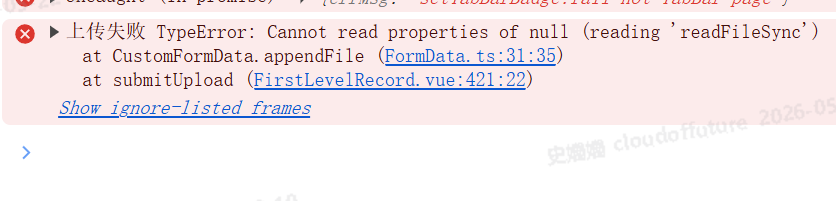
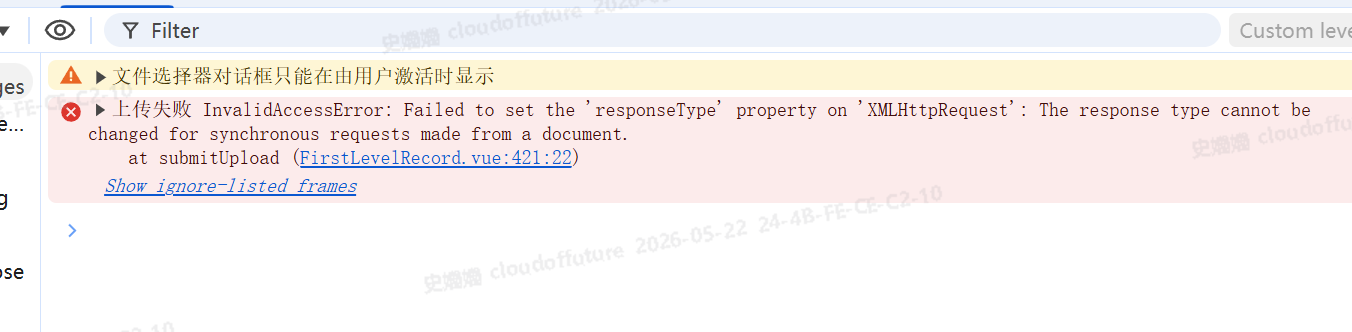
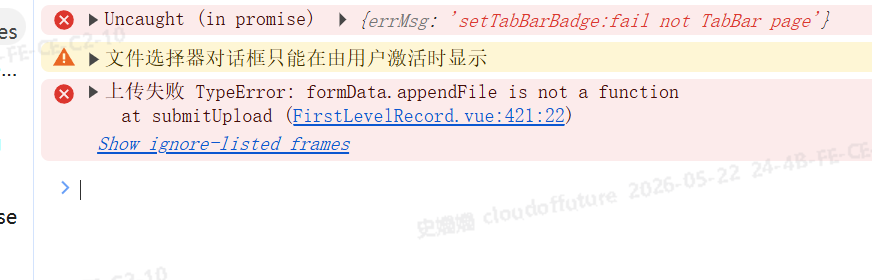
最终解决:安装插件市场的image-tools的pathToBase64
javascript
<template>
    <nav-custom title="一级保养记录"></nav-custom>

    <!-- 上传按钮 -->
    <view class="top-btn">
        <button type="primary" @click="openUpload">上传一级保养记录</button>
    </view>

    <!-- 卡片列表 -->
    <view class="list-box">
        <uni-card :isFull="false" v-for="(item, index) in tableData" :key="index" class="card-item">
            <view class="card-content">
                <view class="row">点检日期:{{ item.inspectionDate }}</view>
                <view class="row">操作员:{{ item.operator }}</view>

                <view class="img-box" v-if="item.fileUrlList && item.fileUrlList.length">
                    <image v-for="(url, idx) in item.fileUrlList" :key="idx" :src="getImgUrl(url)" class="img"
                        mode="aspectFill" @click="previewImage(item.fileUrlList, idx)" />
                </view>
                <view v-else class="no-img">暂无图片</view>
            </view>
        </uni-card>

        <!-- 加载提示 -->
        <view class="loading" v-if="loading">
            加载中...
        </view>
        <view class="no-more" v-if="noMore">
            没有更多数据了
        </view>
    </view>

    <!-- 上传弹窗 -->
    <uni-popup ref="uploadPopup" type="center" :mask-click="true">
        <view class="popup-box">
            <view class="popup-title">上传保养记录</view>
            <view class="upload-box">
                <button type="default" @click="chooseImage">选择/拍照图片</button>
                <view class="preview-list" v-if="fileList.length">
                    <image v-for="(item, idx) in fileList" :key="idx" :src="item.path" class="preview-img"></image>
                </view>
            </view>
            <view class="popup-footer">
                <button @click="closeUpload" plain>取消</button>
                <button type="primary" :loading="submitLoading" @click="submitUpload">
                    提交
                </button>
            </view>
        </view>
    </uni-popup>
</template>

<script setup>
import { ref, reactive, onMounted } from 'vue'
import { onReachBottom, onPullDownRefresh } from '@dcloudio/uni-app'
import {
    useProjectStore
} from '@/store'
import { getBaseUrl } from '@/api/request'
import CustomFormData from '@/common/FormData'
import { pathToBase64 } from '@/uni_modules/mmmm-image-tools/index.js'
const project = useProjectStore().project
const api = project.rest.otherStandAlone
const server = 'http://' + getBaseUrl() + ''
// 分页核心
const tableData = ref([])         // 列表数据
const loading = ref(false)        // 加载中
const noMore = ref(false)         // 没有更多
const page = ref(1)               // 当前页
const size = ref(10)               // 每页条数(PDA用10条最合适)

// 上传
const uploadPopup = ref(null)
const fileList = ref([])
const submitLoading = ref(false)

// 获取列表(支持分页)
const getList = async () => {
    if (noMore.value || loading.value) return
    loading.value = true

    try {
        const res = await api.getFirstLevelRecordList({
            page: page.value,
            size: size.value
        })

        const data = res.data || {}
        const items = data.items || []
        const total = data.totalElements || 0

        if (page.value === 1) {
            tableData.value = items
        } else {
            tableData.value = [...tableData.value, ...items]
        }

        if (items.length < size.value) {
            noMore.value = true
        }

    } catch (e) {
        uni.showToast({ title: '加载失败', icon: 'none' })
    } finally {
        loading.value = false
        // ✅ 关闭下拉刷新圈圈!!!
        uni.stopPullDownRefresh()
    }
}

// 上拉加载更多
onReachBottom(() => {
    if (noMore.value || loading.value) return
    page.value++
    getList()
})


// 下拉刷新
onPullDownRefresh(() => {
    // 重置为第一页
    page.value = 1
    noMore.value = false
    getList() // 刷新数据
})

// 初始化(第一页)
onMounted(() => {
    getList()
})

// 图片预览
const getImgUrl = (url) => server + url
const previewImage = (list, index) => {
    const urls = list.map(it => getImgUrl(it))
    uni.previewImage({ current: index, urls })
}

// 上传相关
const openUpload = () => uploadPopup.value.open()
const closeUpload = () => {
    uploadPopup.value.close()
    fileList.value = []
}

const onFileChange = (e) => fileList.value = e.tempFiles
const onFileRemove = (e) => fileList.value = e.tempFiles

const chooseImage = () => {
    uni.chooseImage({
        count: 5,           // 最多选5张
        sizeType: ['compressed'],
        sourceType: ['album', 'camera'], // ✅ 同时开启 相册 + 拍照
        success: (res) => {
            fileList.value = res.tempFiles.map(it => ({ path: it.path, file: it }))
        }
    })
}


const submitUpload = async () => {
    if (fileList.value.length === 0) {
        uni.showToast({ title: '请选择图片', icon: 'none' })
        return
    }

    submitLoading.value = true

    try {
        const form = new CustomFormData()
        const token = uni.getStorageSync('token') || ''

        // 循环所有图片 → 转 base64 → 转 ArrayBuffer
        for (let i = 0; i < fileList.value.length; i++) {
            const path = fileList.value[i].path

            // 1. 路径转 base64(插件)
            const base64Data = await pathToBase64(path)

            // 2. 去掉头,转 ArrayBuffer
            const base64 = base64Data.split(',')[1]
            const arrayBuffer = uni.base64ToArrayBuffer(base64)

            // 3. 加入表单(多张不会覆盖!)
            form.files.push({
                name: 'fileImgList',
                buffer: arrayBuffer,
                fileName: `maintain_${Date.now()}_${i}.jpg`
            })
        }

        // 发送请求
        const data = form.getData()
        const uploadRes = await uni.request({
            url: `http://${getBaseUrl()}/api/FirstLevelRecord/Add`,
            method: 'POST',
            data: data.buffer,
            header: {
                'Content-Type': data.contentType,
                'Authorization': token
            }
        })

        if (uploadRes.statusCode === 200) {
            uni.showToast({ title: '上传成功' })
            closeUpload()
            page.value = 1
            noMore.value = false
            getList()
        } else {
            uni.showToast({ title: '上传失败', icon: 'none' })
        }

    } catch (e) {
        console.error('上传失败', e)
        uni.showToast({ title: '上传失败', icon: 'none' })
    } finally {
        submitLoading.value = false
    }
}
</script>

<style lang="scss" scoped>
.top-btn {
    padding: 20rpx;
    text-align: right;
}

.list-box {
    padding: 0 20rpx;
}

.card-item {
    margin-bottom: 20rpx;
}

.card-content {
    .row {
        font-size: 28rpx;
        line-height: 44rpx;
    }

    .img-box {
        display: flex;
        flex-wrap: wrap;
        gap: 10rpx;
        margin-top: 10rpx;
    }

    .img {
        width: 100rpx;
        height: 100rpx;
        border-radius: 8rpx;
    }
}

.loading {
    text-align: center;
    padding: 20rpx;
    color: #666;
}

.no-more {
    text-align: center;
    padding: 20rpx;
    color: #999;
}

.popup-box {
    width: 600rpx;
    max-height: 70vh;
    overflow-y: auto;
    background: #fff;
    border-radius: 16rpx;
    padding: 30rpx;
}

.popup-title {
    font-size: 32rpx;
    font-weight: bold;
    text-align: center;
    margin-bottom: 30rpx;
}

.upload-box {
    margin: 20rpx 0;
}

.preview-list {
    display: flex;
    flex-wrap: wrap;
    gap: 10rpx;
    margin-top: 15rpx;
}

.preview-img {
    width: 100rpx;
    height: 100rpx;
    border-radius: 8rpx;
}

.popup-footer {
    display: flex;
    justify-content: flex-end;
    gap: 20rpx;
    margin-top: 30rpx;
}
</style>
FormData.ts
javascript
import mimeMap from './mimeMap'

interface CommonFormData {
  fileManager: any
  data: any
  files: any

  append(name: string, value: any): boolean
  appendFile(name: string, path: any, fileName?: any): boolean
  getData(): any
}

class CustomFormData implements CommonFormData {
  fileManager: any
  data: any
  files: any

  constructor() {
    // this.fileManager = uni.getFileSystemManager()
     this.fileManager = null
    this.data = {}
    this.files = []
  }

  append(name: string, value: any) {
    this.data[name] = value
    return true
  }


async appendFile(name: string, path: string): Promise<void> {
  return new Promise((resolve, reject) => {
    // 全平台最兼容:XMLHttpRequest 老浏览器/PDA 100%支持
    const xhr = new XMLHttpRequest();
    xhr.open('GET', path);
    xhr.responseType = 'arraybuffer';

    xhr.onload = () => {
      const buffer = xhr.response;

      // 安全文件名(后端不报错)
      let fileName;
      if (path.startsWith('blob:')) {
        fileName = `image_${Date.now()}.jpg`;
      } else {
        fileName = path.split('/').pop() || `image_${Date.now()}`;
        if (!fileName.includes('.')) fileName += '.jpg';
      }

      this.files.push({ name, buffer, fileName });
      resolve();
    };

    xhr.onerror = reject;
    xhr.send();
  });
}
  getData() {
    return convert(this.data, this.files)
  }
}

function getFileNameFromPath(path: any) {
  let idx = path.lastIndexOf('/')
  return path.substr(idx + 1)
}

function convert(data: any, files: any) {
  let boundaryKey = 'unimpFormBoundary' + randString() // 数据分割符,一般是随机的字符串
  let boundary = '--' + boundaryKey
  let endBoundary = boundary + '--'

  let postArray: any = []
  //拼接参数
  if (data && Object.prototype.toString.call(data) == '[object Object]') {
    for (let key in data) {
      postArray = postArray.concat(formDataArray(boundary, key, data[key]))
    }
  }
  //拼接文件
  if (files && Object.prototype.toString.call(files) == '[object Array]') {
    for (let i in files) {
      let file = files[i]
      postArray = postArray.concat(formDataArray(boundary, file.name, file.buffer, file.fileName))
    }
  }

  //结尾
  let endBoundaryArray = []
  endBoundaryArray.push(...endBoundary.toUtf8Bytes())
  postArray = postArray.concat(endBoundaryArray)

  return {
    contentType: 'multipart/form-data; boundary=' + boundaryKey,
    buffer: new Uint8Array(postArray).buffer,
  }
}

// 获取随机字符串
function randString() {
  var result = ''
  var chars = '0123456789abcdefghijklmnopqrstuvwxyzABCDEFGHIJKLMNOPQRSTUVWXYZ'
  for (var i = 17; i > 0; --i) result += chars[Math.floor(Math.random() * chars.length)]
  return result
}

function formDataArray(boundary: any, name: string, value: any, fileName?: string) {
  let dataString: any = ''
  let isFile = !!fileName

  dataString += boundary + '\r\n'
  dataString += 'Content-Disposition: form-data; name="' + name + '"'
  if (isFile) {
    dataString += '; filename="' + fileName + '"' + '\r\n'
    dataString += 'Content-Type: ' + getFileMime(fileName || '') + '\r\n\r\n'
  } else {
    dataString += '\r\n\r\n'
    dataString += value
  }

  var dataArray = []
  dataArray.push(...dataString.toUtf8Bytes())

  if (isFile) {
    let fileArray = new Uint8Array(value)
    dataArray = dataArray.concat(Array.prototype.slice.call(fileArray))
  }
  dataArray.push(...'\r'.toUtf8Bytes())
  dataArray.push(...'\n'.toUtf8Bytes())

  return dataArray
}

function getFileMime(fileName: string) {
  let idx = fileName.lastIndexOf('.')
  let index: string = fileName.substr(idx)
  let mime = mimeMap[index]
  return mime ? mime : 'application/octet-stream'
}

function stringToUtf8(string: string) {
  let encoder = new TextEncoder()
  return encoder.encode(string)
}

String.prototype.toUtf8Bytes = function () {
  var str: any = this
  var bytes = []
  for (var i = 0; i < str.length; i++) {
    bytes.push(...str.utf8CodeAt(i))
    if (str.codePointAt(i) > 0xffff) {
      i++
    }
  }
  return bytes
}

String.prototype.utf8CodeAt = function (i: any) {
  var str = this
  var out = [],
    p = 0
  var c = str.charCodeAt(i)
  if (c < 128) {
    out[p++] = c
  } else if (c < 2048) {
    out[p++] = (c >> 6) | 192
    out[p++] = (c & 63) | 128
  } else if ((c & 0xfc00) == 0xd800 && i + 1 < str.length && (str.charCodeAt(i + 1) & 0xfc00) == 0xdc00) {
    // Surrogate Pair
    c = 0x10000 + ((c & 0x03ff) << 10) + (str.charCodeAt(++i) & 0x03ff)
    out[p++] = (c >> 18) | 240
    out[p++] = ((c >> 12) & 63) | 128
    out[p++] = ((c >> 6) & 63) | 128
    out[p++] = (c & 63) | 128
  } else {
    out[p++] = (c >> 12) | 224
    out[p++] = ((c >> 6) & 63) | 128
    out[p++] = (c & 63) | 128
  }
  return out
}

export default CustomFormData
mimeMap.ts
javascript
const mimeMap: Record<string, string> = {
  ".jpg": "image/jpeg",
  ".jpeg": "image/jpeg",
  ".png": "image/png",
  ".gif": "image/gif",
  ".bmp": "image/bmp"
};

export default mimeMap;