欢迎加入开源鸿蒙跨平台社区:
https://openharmonycrossplatform.csdn.net
1. 项目介绍
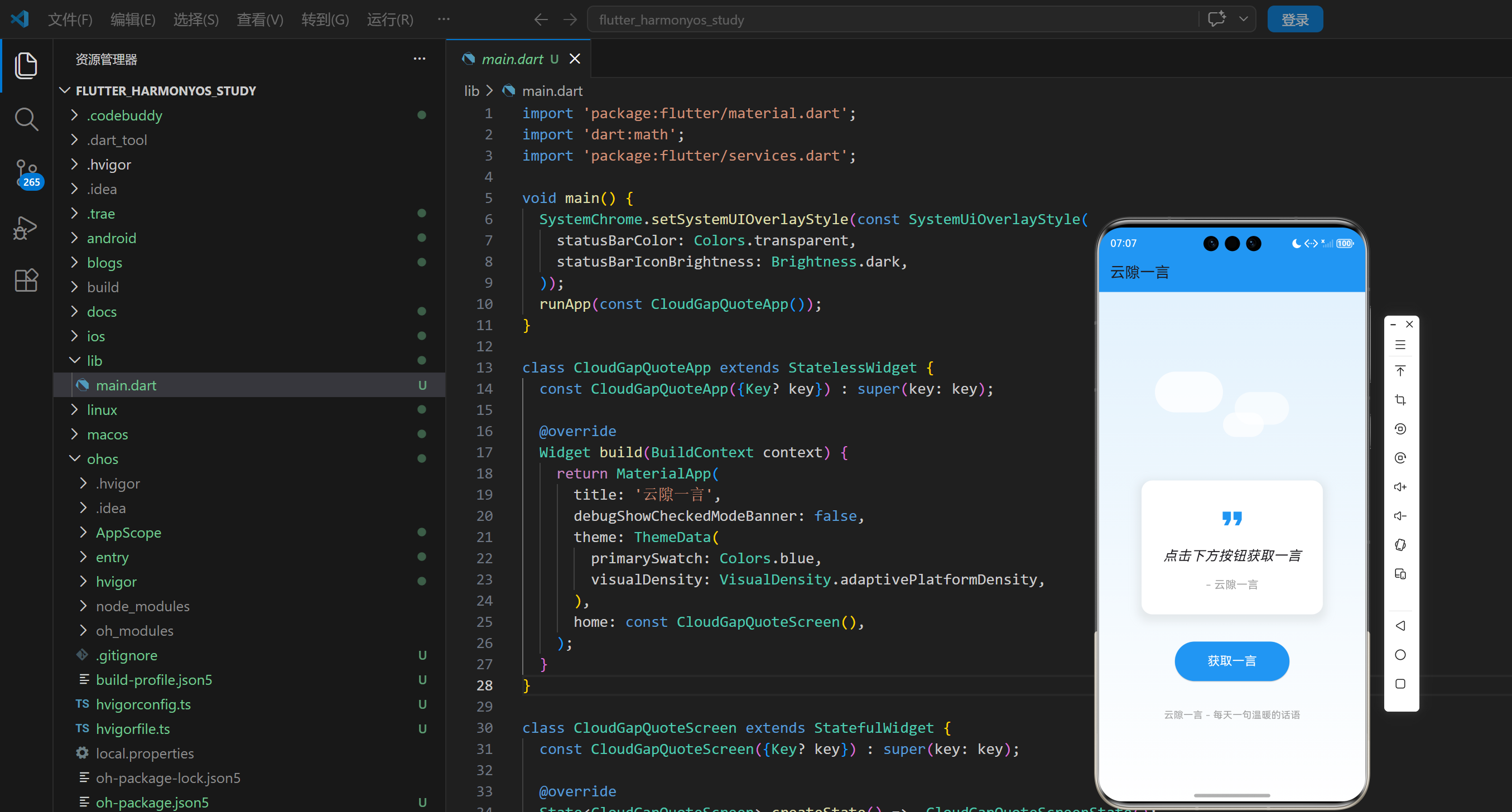
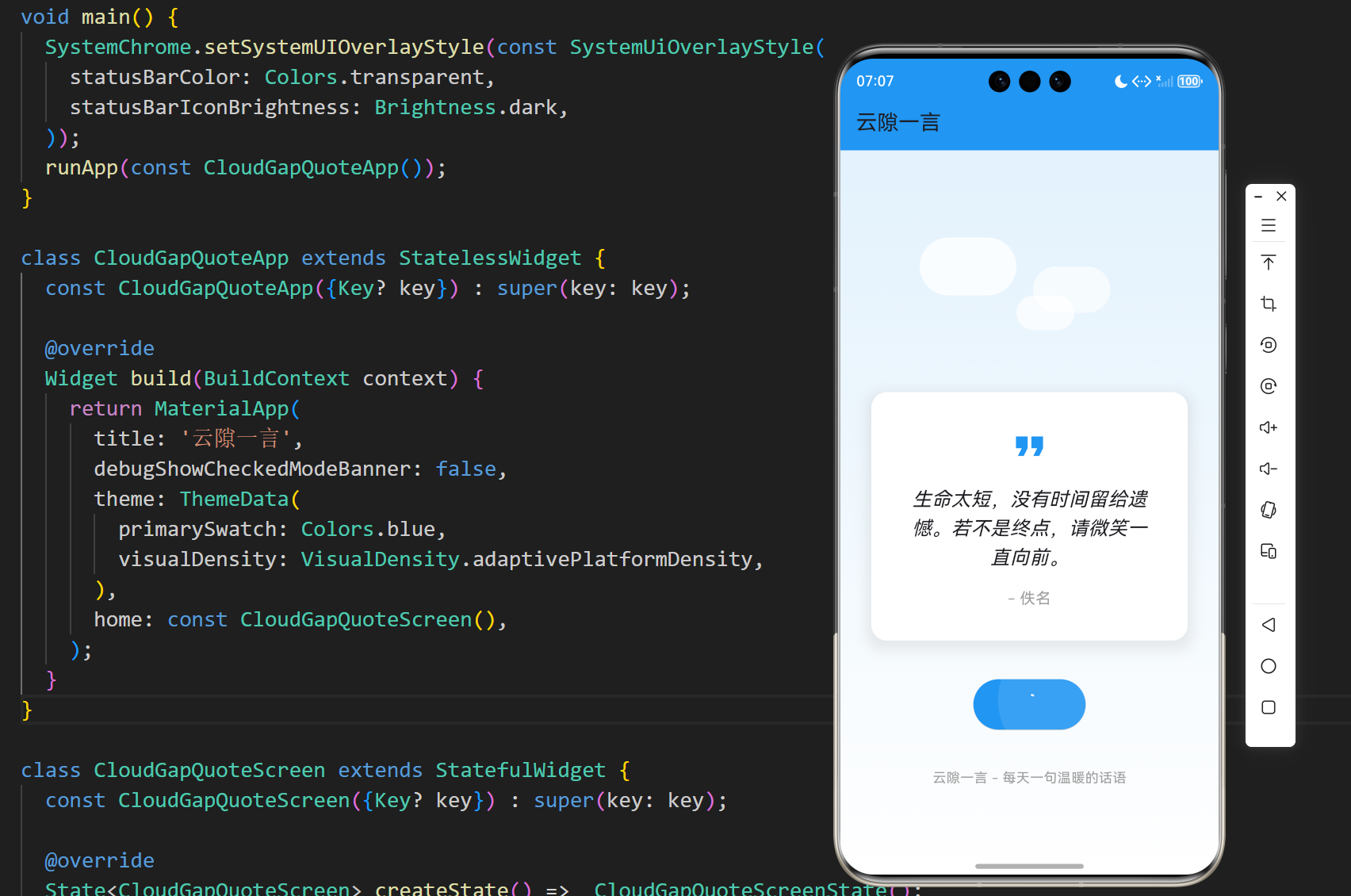
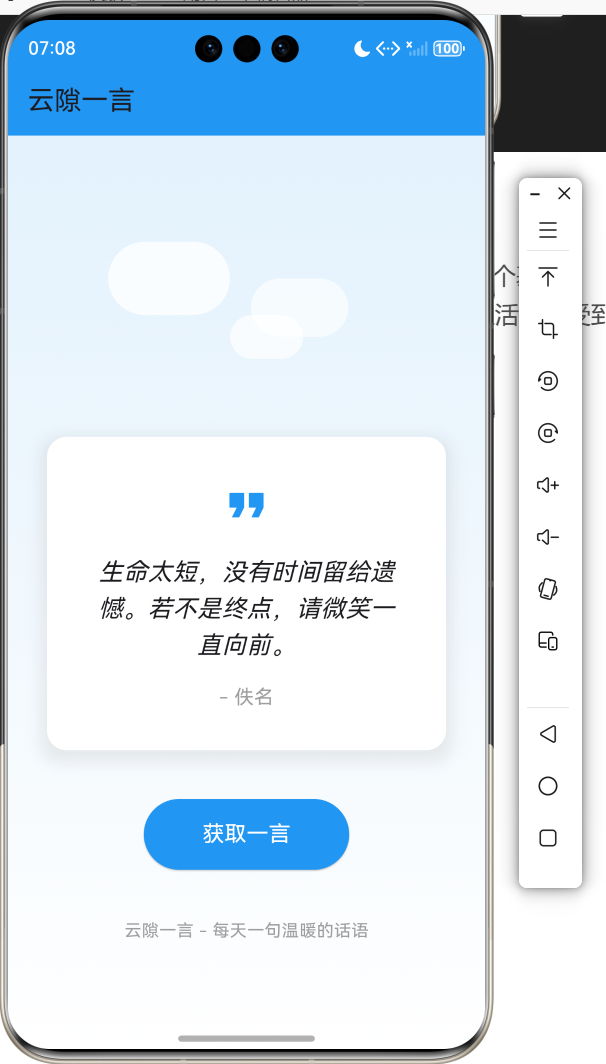
在快节奏的现代生活中,我们常常需要一些温暖的话语来激励自己,或者给我们带来思考。云隙一言是一个基于 Flutter 开发的随机名言应用,它能够为用户提供各种名人名言、哲理语句和励志话语,让用户在忙碌的生活中感受到一丝温暖和启发。本文将详细介绍如何使用 Flutter 实现这个美观实用的随机名言应用。
1.1 项目目标
- 实现一个美观的随机名言应用
- 支持随机显示名言警句
- 提供获取新名言的功能
- 采用清新的界面设计,带有云朵装饰
- 确保在不同平台上的一致性表现
1.2 技术栈
- Flutter:跨平台 UI 框架
- Dart:编程语言
- StatefulWidget:用于管理应用状态
- LinearGradient:用于实现渐变背景
- BoxDecoration:用于实现卡片效果
- Future.delayed:用于模拟网络请求
2. 核心功能设计
2.1 名言管理
- 名言数据:内置20条精选名言警句
- 随机获取:每次点击按钮随机获取一条名言
- 显示格式:显示名言内容和作者
2.2 界面设计
- 渐变背景:从浅蓝色到白色的渐变背景
- 云朵装饰:顶部添加云朵装饰,增强视觉效果
- 卡片式设计:名言以卡片形式展示,带有阴影效果
- 响应式布局:适应不同屏幕尺寸
2.3 交互设计
- 获取按钮:点击按钮获取新的名言
- 加载动画:点击按钮后显示加载动画
- 平滑过渡:名言切换时的平滑过渡效果
2.4 技术实现
- 状态管理:使用 StatefulWidget 管理应用状态
- 数据模型:设计 Quote 类存储名言数据
- 随机算法:使用 Random 类实现随机获取名言
- 异步处理:使用 Future.delayed 模拟网络请求
3. 技术架构
3.1 项目结构
lib/
└── main.dart          # 主应用文件,包含所有代码
3.2 组件结构
CloudGapQuoteApp
└── CloudGapQuoteScreen
    ├── State management (quotes, currentQuote, isRefreshing)
    ├── Quote operations (_refreshQuote)
    ├── UI components
    │   ├── CloudDecoration
    │   ├── Quote card
    │   └── Refresh button
    └── Quote
        ├── content
        └── author
3.3 数据模型
dart
class Quote {
  final String content;
  final String author;

  Quote({required this.content, required this.author});
}
4. 关键代码解析
4.1 状态管理
dart
class _CloudGapQuoteScreenState extends State<CloudGapQuoteScreen> {
  List<Quote> _quotes = [
    Quote(content: '生活不是缺少美,而是缺少发现美的眼睛。', author: '罗丹'),
    Quote(content: '成功是差一点点失败,失败是差一点点成功。', author: '陈安之'),
    Quote(content: '人生就像一场旅行,不必在乎目的地,在乎的是沿途的风景以及看风景的心情。', author: '佚名'),
    Quote(content: '如果你想征服恐惧,不要坐在家里空想,走出去让自己忙起来。', author: '戴尔·卡耐基'),
    Quote(content: '当你感到迷茫时,不要停下脚步,因为前进就是最好的方向。', author: '佚名'),
    Quote(content: '成功的秘诀在于坚持目标,而不是力量。', author: '本杰明·迪斯雷利'),
    Quote(content: '生命太短,没有时间留给遗憾。若不是终点,请微笑一直向前。', author: '佚名'),
    Quote(content: '每一个不曾起舞的日子,都是对生命的辜负。', author: '尼采'),
    Quote(content: '梦想不会逃跑,会逃跑的永远都是自己。', author: '宫崎骏'),
    Quote(content: '你若盛开,清风自来。', author: '三毛'),
    Quote(content: '人生没有彩排,每天都是现场直播。', author: '易中天'),
    Quote(content: '路漫漫其修远兮,吾将上下而求索。', author: '屈原'),
    Quote(content: '不要等待机会,而要创造机会。', author: '萧伯纳'),
    Quote(content: '成功不是将来才有的,而是从决定去做的那一刻起,持续累积而成。', author: '俞敏洪'),
    Quote(content: '你的时间有限,所以不要为别人而活。', author: '史蒂夫·乔布斯'),
    Quote(content: '如果你的面前有阴影,那是因为你的背后有阳光。', author: '佚名'),
    Quote(content: '世界上最快乐的事,莫过于为理想而奋斗。', author: '苏格拉底'),
    Quote(content: '简单的事情重复做,你就是专家;重复的事情用心做,你就是赢家。', author: '佚名'),
    Quote(content: '成功的人不是赢在起点,而是赢在转折点。', author: '佚名'),
    Quote(content: '人生最大的悲哀不是失败,而是从未尝试过。', author: '佚名'),
  ];

  Quote _currentQuote;
  bool _isRefreshing = false;

  _CloudGapQuoteScreenState() : _currentQuote = Quote(content: '点击下方按钮获取一言', author: '云隙一言');

  // ...
}代码解析:
_quotes列表:存储所有名言数据_currentQuote:当前显示的名言_isRefreshing:是否正在刷新的状态- 构造函数:初始化默认名言
4.2 刷新名言
dart
void _refreshQuote() {
  setState(() {
    _isRefreshing = true;
  });

  // 模拟网络请求延迟
  Future.delayed(const Duration(milliseconds: 500), () {
    setState(() {
      final random = Random();
      _currentQuote = _quotes[random.nextInt(_quotes.length)];
      _isRefreshing = false;
    });
  });
}代码解析:
_refreshQuote方法:刷新名言的核心方法- 设置
_isRefreshing为 true,显示加载动画 - 使用
Future.delayed模拟网络请求延迟 - 使用
Random类随机获取一条名言 - 设置
_isRefreshing为 false,隐藏加载动画
4.3 界面构建
dart
@override
Widget build(BuildContext context) {
  return Scaffold(
    appBar: AppBar(
      title: const Text('云隙一言'),
      backgroundColor: Colors.blue.shade500,
    ),
    body: Container(
      decoration: BoxDecoration(
        gradient: LinearGradient(
          begin: Alignment.topCenter,
          end: Alignment.bottomCenter,
          colors: [
            Colors.blue.shade50,
            Colors.white,
          ],
        ),
      ),
      child: Center(
        child: Padding(
          padding: const EdgeInsets.all(32.0),
          child: Column(
            mainAxisAlignment: MainAxisAlignment.center,
            children: [
              // 云朵装饰
              const CloudDecoration(),

              const SizedBox(height: 40),

              // 名言卡片
              Container(
                padding: const EdgeInsets.all(32),
                decoration: BoxDecoration(
                  color: Colors.white,
                  borderRadius: BorderRadius.circular(16),
                  boxShadow: [
                    BoxShadow(
                      color: Colors.grey.withOpacity(0.2),
                      spreadRadius: 5,
                      blurRadius: 10,
                      offset: const Offset(0, 5),
                    ),
                  ],
                ),
                child: Column(
                  crossAxisAlignment: CrossAxisAlignment.center,
                  children: [
                    const Icon(
                      Icons.format_quote,
                      size: 48,
                      color: Colors.blue,
                    ),
                    const SizedBox(height: 16),
                    Text(
                      _currentQuote.content,
                      style: const TextStyle(
                        fontSize: 20,
                        lineHeight: 1.5,
                        fontStyle: FontStyle.italic,
                      ),
                      textAlign: TextAlign.center,
                    ),
                    const SizedBox(height: 16),
                    Text(
                      '- ${_currentQuote.author}',
                      style: const TextStyle(
                        fontSize: 16,
                        color: Colors.grey,
                      ),
                      textAlign: TextAlign.right,
                    ),
                  ],
                ),
              ),

              const SizedBox(height: 40),

              // 刷新按钮
              ElevatedButton(
                onPressed: _isRefreshing ? null : _refreshQuote,
                style: ElevatedButton.styleFrom(
                  backgroundColor: Colors.blue.shade500,
                  foregroundColor: Colors.white,
                  padding: const EdgeInsets.symmetric(horizontal: 48, vertical: 16),
                  shape: RoundedRectangleBorder(
                    borderRadius: BorderRadius.circular(30),
                  ),
                ),
                child: _isRefreshing
                    ? const SizedBox(
                        width: 20,
                        height: 20,
                        child: CircularProgressIndicator(
                          strokeWidth: 2,
                          valueColor: AlwaysStoppedAnimation<Color>(Colors.white),
                        ),
                      )
                    : const Text(
                        '获取一言',
                        style: TextStyle(
                          fontSize: 18,
                        ),
                      ),
              ),

              const SizedBox(height: 40),

              // 底部信息
              Text(
                '云隙一言 - 每天一句温暖的话语',
                style: TextStyle(
                  color: Colors.grey.shade500,
                  fontSize: 14,
                ),
              ),
            ],
          ),
        ),
      ),
    ),
  );
}代码解析:
build方法:构建应用界面- 渐变背景:使用
LinearGradient实现从浅蓝色到白色的渐变 - 云朵装饰:添加
CloudDecoration组件 - 名言卡片:使用
Container和BoxDecoration实现卡片效果 - 刷新按钮:点击后调用
_refreshQuote方法,显示加载动画 - 底部信息:显示应用名称和标语
4.4 云朵装饰
dart
class CloudDecoration extends StatelessWidget {
  const CloudDecoration({Key? key}) : super(key: key);

  @override
  Widget build(BuildContext context) {
    return Stack(
      children: [
        Positioned(
          top: 0,
          left: 50,
          child: _buildCloud(
            size: 100,
            color: Colors.white.withOpacity(0.8),
          ),
        ),
        Positioned(
          top: 30,
          right: 80,
          child: _buildCloud(
            size: 80,
            color: Colors.white.withOpacity(0.6),
          ),
        ),
        Positioned(
          top: 60,
          left: 150,
          child: _buildCloud(
            size: 60,
            color: Colors.white.withOpacity(0.7),
          ),
        ),
      ],
    );
  }

  Widget _buildCloud({required double size, required Color color}) {
    return Container(
      width: size,
      height: size * 0.6,
      decoration: BoxDecoration(
        color: color,
        borderRadius: BorderRadius.circular(size * 0.3),
      ),
    );
  }
}代码解析:
CloudDecoration组件:实现云朵装饰效果Stack和Positioned:用于定位云朵_buildCloud方法:创建云朵形状的容器- 不同大小和透明度的云朵:增强视觉层次感
5. 技术亮点与创新
5.1 视觉设计
- 渐变背景 :使用
LinearGradient实现从浅蓝色到白色的渐变背景,营造清新的氛围 - 云朵装饰:添加云朵装饰,增强应用的主题感
- 卡片式设计:名言以卡片形式展示,带有阴影效果,提升视觉层次
- 响应式布局:适应不同屏幕尺寸
5.2 交互设计
- 加载动画:点击按钮后显示加载动画,提供视觉反馈
- 平滑过渡:名言切换时的平滑过渡效果
- 按钮状态:按钮在加载时禁用,防止重复点击
- 直观的操作:点击按钮即可获取新名言,操作简单直观
5.3 技术实现
- 状态管理 :使用
StatefulWidget管理应用状态,结构清晰 - 数据模型 :设计
Quote类存储名言数据,结构合理 - 随机算法 :使用
Random类实现随机获取名言 - 异步处理 :使用
Future.delayed模拟网络请求,为未来接入真实API做准备
5.4 用户体验
- 简洁美观:界面简洁美观,视觉效果良好
- 操作流畅:按钮点击响应迅速,加载动画平滑
- 内容丰富:内置20条精选名言警句,内容丰富
- 易于使用:操作简单直观,用户容易上手
6. 应用场景与扩展
6.1 应用场景
- 日常激励:每天获取一条励志名言,激励自己
- 学习参考:获取名人名言,作为学习和写作的参考
- 心情调节:在心情低落时,获取温暖的话语,调节心情
- 社交分享:将喜欢的名言分享给朋友
6.2 扩展方向
- 网络API:接入真实的名言API,获取更多名言
- 分类功能:添加名言分类,如励志、哲理、爱情等
- 收藏功能:支持收藏喜欢的名言
- 分享功能:支持将名言分享到社交平台
- 主题切换:支持不同主题风格,如深色模式
- 每日推送:添加每日推送功能,定时发送名言
- 用户贡献:支持用户提交名言
- 多语言支持:添加多语言支持,扩大应用的适用范围
7. 代码优化建议
7.1 性能优化
- 使用 const 构造函数:对于不变的 Widget,使用 const 构造函数,减少不必要的重建
- 优化状态管理 :对于更复杂的应用,可以使用
Provider、Riverpod等状态管理库 - 使用 RepaintBoundary :对于频繁更新的部分,使用
RepaintBoundary包裹,减少不必要的重绘
7.2 代码结构优化
- 组件化:将 UI 组件拆分为更小的、可复用的组件
- 逻辑分离:将业务逻辑与 UI 逻辑分离,提高代码的可维护性
- 参数化:将颜色、字体大小等参数提取为可配置的常量
- 错误处理:添加适当的错误处理
7.3 用户体验优化
- 添加动画效果:添加名言切换的动画效果,提升用户体验
- 触觉反馈:在支持的设备上,添加触觉反馈
- ** accessibility**:添加无障碍支持,提高应用的可访问性
- 网络错误处理:当接入真实API时,添加网络错误处理
7.4 功能优化
- 网络API:接入真实的名言API,获取更多名言
- 分类功能:添加名言分类,如励志、哲理、爱情等
- 收藏功能:支持收藏喜欢的名言
- 分享功能:支持将名言分享到社交平台
8. 测试与调试
8.1 测试策略
- 功能测试:测试获取名言、加载动画等核心功能
- 性能测试:测试应用在不同设备上的性能表现
- 兼容性测试:测试在不同平台、不同屏幕尺寸上的表现
- 用户体验测试:测试应用的易用性和用户体验
8.2 调试技巧
- 使用 Flutter DevTools:利用 Flutter DevTools 分析性能瓶颈和调试问题
- 添加日志:在关键位置添加日志,便于调试
- 使用模拟器:在不同尺寸的模拟器上测试,确保适配性
- 用户测试:邀请用户测试,收集反馈,不断改进
9. 总结与展望
9.1 项目总结
本项目成功实现了一个美观实用的云隙一言应用,主要功能包括:
- 随机显示名言警句
- 点击按钮获取新的名言
- 美观的界面设计,带有云朵装饰
- 平滑的加载动画效果
- 内置20条精选名言警句
9.2 技术价值
- 学习价值:展示了如何使用 Flutter 实现一个完整的随机名言应用
- 实用价值:提供了一个可直接使用的名言获取工具
- 参考价值:为类似功能的开发提供了参考方案
9.3 未来展望
- 网络API:接入真实的名言API,获取更多名言
- 分类功能:添加名言分类,如励志、哲理、爱情等
- 收藏功能:支持收藏喜欢的名言
- 分享功能:支持将名言分享到社交平台
- 主题切换:支持不同主题风格,如深色模式
- 每日推送:添加每日推送功能,定时发送名言
- 用户贡献:支持用户提交名言
- 多语言支持:添加多语言支持,扩大应用的适用范围
10. 附录
10.1 完整代码
dart
import 'package:flutter/material.dart';
import 'dart:math';
import 'package:flutter/services.dart';

void main() {
  SystemChrome.setSystemUIOverlayStyle(const SystemUiOverlayStyle(
    statusBarColor: Colors.transparent,
    statusBarIconBrightness: Brightness.dark,
  ));
  runApp(const CloudGapQuoteApp());
}

class CloudGapQuoteApp extends StatelessWidget {
  const CloudGapQuoteApp({Key? key}) : super(key: key);

  @override
  Widget build(BuildContext context) {
    return MaterialApp(
      title: '云隙一言',
      debugShowCheckedModeBanner: false,
      theme: ThemeData(
        primarySwatch: Colors.blue,
        visualDensity: VisualDensity.adaptivePlatformDensity,
      ),
      home: const CloudGapQuoteScreen(),
    );
  }
}

class CloudGapQuoteScreen extends StatefulWidget {
  const CloudGapQuoteScreen({Key? key}) : super(key: key);

  @override
  State<CloudGapQuoteScreen> createState() => _CloudGapQuoteScreenState();
}

class _CloudGapQuoteScreenState extends State<CloudGapQuoteScreen> {
  List<Quote> _quotes = [
    Quote(content: '生活不是缺少美,而是缺少发现美的眼睛。', author: '罗丹'),
    Quote(content: '成功是差一点点失败,失败是差一点点成功。', author: '陈安之'),
    Quote(content: '人生就像一场旅行,不必在乎目的地,在乎的是沿途的风景以及看风景的心情。', author: '佚名'),
    Quote(content: '如果你想征服恐惧,不要坐在家里空想,走出去让自己忙起来。', author: '戴尔·卡耐基'),
    Quote(content: '当你感到迷茫时,不要停下脚步,因为前进就是最好的方向。', author: '佚名'),
    Quote(content: '成功的秘诀在于坚持目标,而不是力量。', author: '本杰明·迪斯雷利'),
    Quote(content: '生命太短,没有时间留给遗憾。若不是终点,请微笑一直向前。', author: '佚名'),
    Quote(content: '每一个不曾起舞的日子,都是对生命的辜负。', author: '尼采'),
    Quote(content: '梦想不会逃跑,会逃跑的永远都是自己。', author: '宫崎骏'),
    Quote(content: '你若盛开,清风自来。', author: '三毛'),
    Quote(content: '人生没有彩排,每天都是现场直播。', author: '易中天'),
    Quote(content: '路漫漫其修远兮,吾将上下而求索。', author: '屈原'),
    Quote(content: '不要等待机会,而要创造机会。', author: '萧伯纳'),
    Quote(content: '成功不是将来才有的,而是从决定去做的那一刻起,持续累积而成。', author: '俞敏洪'),
    Quote(content: '你的时间有限,所以不要为别人而活。', author: '史蒂夫·乔布斯'),
    Quote(content: '如果你的面前有阴影,那是因为你的背后有阳光。', author: '佚名'),
    Quote(content: '世界上最快乐的事,莫过于为理想而奋斗。', author: '苏格拉底'),
    Quote(content: '简单的事情重复做,你就是专家;重复的事情用心做,你就是赢家。', author: '佚名'),
    Quote(content: '成功的人不是赢在起点,而是赢在转折点。', author: '佚名'),
    Quote(content: '人生最大的悲哀不是失败,而是从未尝试过。', author: '佚名'),
  ];

  Quote _currentQuote;
  bool _isRefreshing = false;

  _CloudGapQuoteScreenState() : _currentQuote = Quote(content: '点击下方按钮获取一言', author: '云隙一言');

  void _refreshQuote() {
    setState(() {
      _isRefreshing = true;
    });

    // 模拟网络请求延迟
    Future.delayed(const Duration(milliseconds: 500), () {
      setState(() {
        final random = Random();
        _currentQuote = _quotes[random.nextInt(_quotes.length)];
        _isRefreshing = false;
      });
    });
  }

  @override
  Widget build(BuildContext context) {
    return Scaffold(
      appBar: AppBar(
        title: const Text('云隙一言'),
        backgroundColor: Colors.blue.shade500,
      ),
      body: Container(
        decoration: BoxDecoration(
          gradient: LinearGradient(
            begin: Alignment.topCenter,
            end: Alignment.bottomCenter,
            colors: [
              Colors.blue.shade50,
              Colors.white,
            ],
          ),
        ),
        child: Center(
          child: Padding(
            padding: const EdgeInsets.all(32.0),
            child: Column(
              mainAxisAlignment: MainAxisAlignment.center,
              children: [
                // 云朵装饰
                const CloudDecoration(),

                const SizedBox(height: 40),

                // 名言卡片
                Container(
                  padding: const EdgeInsets.all(32),
                  decoration: BoxDecoration(
                    color: Colors.white,
                    borderRadius: BorderRadius.circular(16),
                    boxShadow: [
                      BoxShadow(
                        color: Colors.grey.withOpacity(0.2),
                        spreadRadius: 5,
                        blurRadius: 10,
                        offset: const Offset(0, 5),
                      ),
                    ],
                  ),
                  child: Column(
                    crossAxisAlignment: CrossAxisAlignment.center,
                    children: [
                      const Icon(
                        Icons.format_quote,
                        size: 48,
                        color: Colors.blue,
                      ),
                      const SizedBox(height: 16),
                      Text(
                        _currentQuote.content,
                        style: const TextStyle(
                          fontSize: 20,
                          lineHeight: 1.5,
                          fontStyle: FontStyle.italic,
                        ),
                        textAlign: TextAlign.center,
                      ),
                      const SizedBox(height: 16),
                      Text(
                        '- ${_currentQuote.author}',
                        style: const TextStyle(
                          fontSize: 16,
                          color: Colors.grey,
                        ),
                        textAlign: TextAlign.right,
                      ),
                    ],
                  ),
                ),

                const SizedBox(height: 40),

                // 刷新按钮
                ElevatedButton(
                  onPressed: _isRefreshing ? null : _refreshQuote,
                  style: ElevatedButton.styleFrom(
                    backgroundColor: Colors.blue.shade500,
                    foregroundColor: Colors.white,
                    padding: const EdgeInsets.symmetric(horizontal: 48, vertical: 16),
                    shape: RoundedRectangleBorder(
                      borderRadius: BorderRadius.circular(30),
                    ),
                  ),
                  child: _isRefreshing
                      ? const SizedBox(
                          width: 20,
                          height: 20,
                          child: CircularProgressIndicator(
                            strokeWidth: 2,
                            valueColor: AlwaysStoppedAnimation<Color>(Colors.white),
                          ),
                        )
                      : const Text(
                          '获取一言',
                          style: TextStyle(
                            fontSize: 18,
                          ),
                        ),
                ),

                const SizedBox(height: 40),

                // 底部信息
                Text(
                  '云隙一言 - 每天一句温暖的话语',
                  style: TextStyle(
                    color: Colors.grey.shade500,
                    fontSize: 14,
                  ),
                ),
              ],
            ),
          ),
        ),
      ),
    );
  }
}

class Quote {
  final String content;
  final String author;

  Quote({required this.content, required this.author});
}

class CloudDecoration extends StatelessWidget {
  const CloudDecoration({Key? key}) : super(key: key);

  @override
  Widget build(BuildContext context) {
    return Stack(
      children: [
        Positioned(
          top: 0,
          left: 50,
          child: _buildCloud(
            size: 100,
            color: Colors.white.withOpacity(0.8),
          ),
        ),
        Positioned(
          top: 30,
          right: 80,
          child: _buildCloud(
            size: 80,
            color: Colors.white.withOpacity(0.6),
          ),
        ),
        Positioned(
          top: 60,
          left: 150,
          child: _buildCloud(
            size: 60,
            color: Colors.white.withOpacity(0.7),
          ),
        ),
      ],
    );
  }

  Widget _buildCloud({required double size, required Color color}) {
    return Container(
      width: size,
      height: size * 0.6,
      decoration: BoxDecoration(
        color: color,
        borderRadius: BorderRadius.circular(size * 0.3),
      ),
    );
  }
}
10.2 依赖项
- flutter:Flutter 框架
- dart:math:提供 Random 类,用于随机获取名言
- flutter/services.dart:提供 SystemChrome 类,用于设置系统 UI 样式
10.3 运行环境
- Flutter SDK:3.0.0 或更高版本
- Dart SDK:2.17.0 或更高版本
- 支持的平台:Android、iOS、Web、Windows、macOS、Linux