相关链接:
使用的阿里云API官方指导:
😊LangChain 开发2 --- 模型提示和输出解析
参考链接:基于LangChain的LLM应用开发2------模型、提示和输出解析 - 西滨的文章 - 知乎,(注意文章中的LangChain版本过老,且有几处错误影响理解,仅作参考)
解决什么问题:
解决如何让提示词更规范和便捷的问题。
1. 名词解释:
模型 (Models):LLM模型
提示 (Prompts):给模型传递信息,让模型按要求生成我们想要的内容,LangChain中通过ChatPromptTemplate实现。
解析器 (Parsers):将大模型返回的json结果解析成Python的词典对象,LangChain中通过ResponseSchema, StructuredOutputParser实现。
2. 通过直接调用Api的方式来进行文本翻译
一般通过Python的fstring实现prompt的参数化。举例子,如果我想把一段海盗风格的文本内容转化为充满尊重的其他凤凤的语言,就需要这样的提示词:
python
prompt = f"""Translate the text \
that is delimited by triple backticks
into a style that is {style}.
text: ```{customer_email}```
"""
其中 style 为 目标风格,比如 style = """American English in a calm and respectful tone"""
其中 customer_email为文本,只不过是海盗风格的(没展示,下面有)。
把style与customer_email通过fstring给prompt后供LLM解读并分析,代码我就不展示了。
3. 通过LangChain的方式规范输入
我使用的本地LLM,需要部署本地 ollama 框架并下载对应模型,用uv安装必要的包 pyproject.toml内容如下:
[project]
name = "langchain2"
version = "0.1.0"
description = "Add your description here"
requires-python = ">=3.11"
dependencies = [
    "langchain-core==1.2.6",
    "langchain-ollama==1.0.1",
]
代码内容如下:
python
from langchain_ollama import ChatOllama
from langchain_core.output_parsers import StrOutputParser
from langchain_core.prompts import ChatPromptTemplate

output_parser = StrOutputParser()

# 定义模型
llm = ChatOllama(
    model= "phi4-mini:3.8b", # "MadhuryaPasan/qwen3-no-thinking:1.7b-q8_0", phi4-mini:3.8b , functiongemma:270m, lfm2.5-thinking 可用调用工具
    base_url="http://127.0.0.1:11434",  # 默认就是这个,可以不写
    temperature=0,   # 值越大创新能力越强
#     num_predict=512, # 限制模型在一次请求中最多生成多少个 token(词元)
)

template_string = """Translate the text \
that is delimited by triple backticks \
into a style that is {style}. \
text: ```{text}```
"""

# 步骤1. from_template 自己就看懂了输入格式
prompt_template = ChatPromptTemplate.from_template(template_string)
print(prompt_template.messages[0].prompt.input_variables) #['style', 'text']

customer_style = """American English in a calm and respectful tone"""
customer_email = """
Arrr, I be fuming that me blender lid \
flew off and splattered me kitchen walls \
with smoothie! And to make matters worse, \
the warranty don't cover the cost of \
cleaning up me kitchen. I need yer help \
right now, matey!
"""

# 步骤2. format_messages 解析输入
customer_messages = prompt_template.format_messages(
    style=customer_style,
    text=customer_email)

# 构建链:Prompt -> LLM -> 解析文本
# chain = customer_messages | llm | output_parser

if __name__ == "__main__":
    result = llm.invoke(customer_messages)
    print("AI Response: ", result.content)
运行结果:
['style', 'text']
AI Response: I'm really upset because my blender's lid came loose while making a smoothie and ended up spraying all over my kitchen wall(s). To top it off, I'm stuck with paying for clean-up since it's not covered by warranty anymore. Could you please assist me? Thank ye kindly!其中最重要的组件ChatPromptTemplate:
ChatPromptTemplate 可以调用 from_template 从我们提供的字符串中识别出输入输出参数,然后我们直接通过 format_messages 把参数传入进入就可以构造真正的消息了。
我们可以复用上面的prompt_template,只需要调整你想要的提示词风格,就可以实现新的提示词风格转换比如将一段话转换成海盗风格的英语回复:
python
......
service_reply = """Hey there customer, the warranty does not cover cleaning expenses \
for your kitchen because it's your fault that you misused your blender by forgetting \
 to put the lid on before starting the blender. Tough luck! See ya!
"""
service_style_pirate = """a polite tone that speaks in English Pirate"""
service_messages = prompt_template.format_messages(
    style=service_style_pirate,
    text=service_reply)

# print(service_messages[0].content)
service_response = llm.invoke(service_messages)
print(service_response.content)
>>>>>>>>>>>>>>
Ahoy matey,

The guarantee won't shield ye from costs related tae cleanin' yer galley, for it be yer own blunder makin' ye forget tae secure th' lid afore givin' life tae yersel' contraption o'er there. Arrr!

Fair winds to ye! Yarrr!
为什么要使用LangChain的Prompt Template而不直接使用Python的fstring呢?
因为应用越复杂,提示词越长,ChatPromptTemplate 实现了对提示词模板的抽象,更方便管理。
4. LangChain解析器 - 解析输入规范化输出
接下来我们看看,想让LLM分析杂乱的文本输入,然后输出符合期望的JSON格式的输出该怎么处理。
我们要让LLM帮忙处理客户评论,并根据评论输出 json 格式的内容(内容包括否为礼物、送达时间、价格/价值),我们能想到的就是增加提示词嘛:
python
from langchain_ollama import ChatOllama
from langchain_core.prompts import ChatPromptTemplate
import json

# 定义模型
llm = ChatOllama(
    model= "phi4-mini:3.8b", # "MadhuryaPasan/qwen3-no-thinking:1.7b-q8_0", phi4-mini:3.8b , functiongemma:270m, lfm2.5-thinking 可用调用工具
    base_url="http://127.0.0.1:11434",  # 默认就是这个,可以不写
    temperature=0,   # 值越大创新能力越强
    format="json", # 型会输出没有围栏、没有解释文字的纯 JSON。
#     num_predict=512, # 限制模型在一次请求中最多生成多少个 token(词元)
)

customer_review = """\
This leaf blower is pretty amazing.  It has four settings: candle blower, gentle breeze, windy city, and tornado. \
It arrived in two days, just in time for my wife's anniversary present. I think my wife liked it so much she was speechless. \
So far I've been the only one using it, and I've been using it every other morning to clear the leaves on our lawn. \
It's slightly more expensive than the other leaf blowers out there, but I think it's worth it for the extra features.
"""

# 自己需要不胜其烦的在这写下想要的 JSON 格式有哪些内容,且不便维护。
review_template = """\
For the following text, extract the following information:

gift: Was the item purchased as a gift for someone else? \
Answer True if yes, False if not or unknown.

delivery_days: How many days did it take for the product \
to arrive? If this information is not found, output -1.

price_value: Extract any sentences about the value or price,\
and output them as a comma separated Python list.

Format the output as JSON (Only valid JSON、No markdown / no explanation) with the following keys:
gift
delivery_days
price_value

text: {text}
"""
# 步骤1. from_template 指定输入格式要求
prompt_template = ChatPromptTemplate.from_template(review_template)
# print(prompt_template.messages[0].prompt.input_variables)

# 步骤2. format_messages 指定输入内容
messages = prompt_template.format_messages(text=customer_review)

response = llm.invoke(messages)
ai_str = response.content
print(ai_str)

data = json.loads(ai_str)
print(type(data), data.keys())
输出如下:
{
  "gift": true,
  "delivery_days": 2,
  "price_value": [
    "It's slightly more expensive than the other leaf blowers out there"
  ]
}
<class 'dict'> dict_keys(['gift', 'delivery_days', 'price_value'])
注意,这里我使用 phi4-mini:3.8b 和 qwen3-no-thinking:1.7b 两个LLM分别实验,发现phi4-mini:3.8输出为true但是输出带有 JSON Markdown 代码块围栏,但是 qwen3-no-thinking:1.7b 输出为false但是没有代码围栏。但这并不影响json.loads的使用。(且看起来 phi4-mini:3.8b 比 qwen3-no-thinking:1.7b 更胜一筹)
上面的代码中,直接在 review_template 中手动写prompt增加对LLM输出的规范虽然也行,但是不便于维护,且你也不知道提示词写的咋样,所以有了LangChain解析器,他能根据需要自动生成一段格式化提示词文本。
看一下如何使用LangChain的解析器来解析模型的输出结果(langchain-core==1.2.6):
python
from langchain_ollama import ChatOllama
# from langchain_core.output_parsers import StrOutputParser
from langchain_core.prompts import ChatPromptTemplate
from pydantic import BaseModel, Field
from langchain_core.output_parsers import JsonOutputParser
import json

# output_parser = StrOutputParser()

# 定义模型
llm = ChatOllama(
    model= "MadhuryaPasan/qwen3-no-thinking:1.7b-q8_0", # "MadhuryaPasan/qwen3-no-thinking:1.7b-q8_0", phi4-mini:3.8b , functiongemma:270m, lfm2.5-thinking 可用调用工具
    base_url="http://127.0.0.1:11434",  # 默认就是这个,可以不写
    temperature=0,   # 值越大创新能力越强
    format="json", # 型会输出没有围栏、没有解释文字的纯 JSON。
#     num_predict=512, # 限制模型在一次请求中最多生成多少个 token(词元)
)

# 定义你的输出结构
class Answer(BaseModel):
    gift: str = Field(description="Was the item purchased as a gift for someone else? Answer True if yes, False if not or unknown.")
    delivery_days: int = Field(description="How many days did it take for the product to arrive? If this  information is not found, output -1.")
    price_value: str = Field(description="Extract any sentences about the value or price, and output them as a comma separated Python list.")

# 创建解析器
output_parser = JsonOutputParser(pydantic_object=Answer)
# 根据 Pydantic 定义的数据模型结构(Answer 类),自动生成一段格式化提示词文本,用于告诉 LLM 应该输出什么样的 JSON 结构。
format_instructions = output_parser.get_format_instructions()
print(format_instructions)
print('--------------------------111----------------------------')


review_template_2 = """\
For the following text, extract the following information:

text: {text}

{format_instructions}
"""

prompt_template = ChatPromptTemplate.from_template(review_template_2)
# print(prompt_template.messages[0].prompt.input_variables)  # ['format_instructions', 'text']

customer_review = """\
This leaf blower is pretty amazing.  It has four settings: candle blower, gentle breeze, windy city, and tornado. \
It arrived in two days, just in time for my wife's anniversary present. I think my wife liked it so much she was speechless. \
So far I've been the only one using it, and I've been using it every other morning to clear the leaves on our lawn. \
It's slightly more expensive than the other leaf blowers out there, but I think it's worth it for the extra features.
"""

# 将变量填充到提示词模板中,生成最终发送给 LLM 的消息列表
messages = prompt_template.format_messages(text=customer_review, format_instructions=format_instructions)
print(messages[0].content)
print('--------------------------222----------------------------')
response = llm.invoke(messages)
ai_str = response.content
print(ai_str)
print('--------------------------333----------------------------')

output_dict = output_parser.parse(ai_str) # 就得到了Python的词典对象
print(output_dict)
输出 log:
STRICT OUTPUT FORMAT:
- Return only the JSON value that conforms to the schema. Do not include any additional text, explanations, headings, or separators.
- Do not wrap the JSON in Markdown or code fences (no ```or ```json).
- Do not prepend or append any text (e.g., do not write "Here is the JSON:").
- The response must be a single top-level JSON value exactly as required by the schema (object/array/etc.), with no trailing commas or comments.

The output should be formatted as a JSON instance that conforms to the JSON schema below.

As an example, for the schema {"properties": {"foo": {"title": "Foo", "description": "a list of strings", "type": "array", "items": {"type": "string"}}}, "required": ["foo"]} the object {"foo": ["bar", "baz"]} is a well-formatted instance of the schema. The object {"properties": {"foo": ["bar", "baz"]}} is not well-formatted.

Here is the output schema (shown in a code block for readability only --- do not include any backticks or Markdown in your output):
```
{"properties": {"gift": {"description": "Was the item purchased as a gift for someone else? Answer True if yes, False if not or unknown.", "title": "Gift", "type": "string"}, "delivery_days": {"description": "How many days did it take for the product to arrive? If this  information is not found, output -1.", "title": "Delivery Days", "type": "integer"}, "price_value": {"description": "Extract any sentences about the value or price, and output them as a comma separated Python list.", "title": "Price Value", "type": "string"}}, "required": ["gift", "delivery_days", "price_value"]}
```
--------------------------111----------------------------
For the following text, extract the following information:

text: This leaf blower is pretty amazing.  It has four settings: candle blower, gentle breeze, windy city, and tornado. It arrived in two days, just in time for my wife's anniversary present. I think my wife liked it so much she was speechless. So far I've been the only one using it, and I've been using it every other morning to clear the leaves on our lawn. It's slightly more expensive than the other leaf blowers out there, but I think it's worth it for the extra features.


STRICT OUTPUT FORMAT:
- Return only the JSON value that conforms to the schema. Do not include any additional text, explanations, headings, or separators.
- Do not wrap the JSON in Markdown or code fences (no ```or ```json).
- Do not prepend or append any text (e.g., do not write "Here is the JSON:").
- The response must be a single top-level JSON value exactly as required by the schema (object/array/etc.), with no trailing commas or comments.

The output should be formatted as a JSON instance that conforms to the JSON schema below.

As an example, for the schema {"properties": {"foo": {"title": "Foo", "description": "a list of strings", "type": "array", "items": {"type": "string"}}}, "required": ["foo"]} the object {"foo": ["bar", "baz"]} is a well-formatted instance of the schema. The object {"properties": {"foo": ["bar", "baz"]}} is not well-formatted.

Here is the output schema (shown in a code block for readability only --- do not include any backticks or Markdown in your output):
```
{"properties": {"gift": {"description": "Was the item purchased as a gift for someone else? Answer True if yes, False if not or unknown.", "title": "Gift", "type": "string"}, "delivery_days": {"description": "How many days did it take for the product to arrive? If this  information is not found, output -1.", "title": "Delivery Days", "type": "integer"}, "price_value": {"description": "Extract any sentences about the value or price, and output them as a comma separated Python list.", "title": "Price Value", "type": "string"}}, "required": ["gift", "delivery_days", "price_value"]}
```

--------------------------222----------------------------
{"gift": "False", "delivery_days": 2, "price_value": ["It's slightly more expensive than the other leaf blowers out there, but I think it's worth it for the extra features"]}
--------------------------333----------------------------
{'gift': 'False', 'delivery_days': 2, 'price_value': ["It's slightly more expensive than the other leaf blowers out there, but I think it's worth it for the extra features"]}
总结 :通过上面的log我们看到,JsonOutputParser这个解析器的本质就是借助pydantic帮用户更好的生成规范的Prompt然后附加到给LLM发送的消息中,也没啥高级东西。(但提示词的好坏真的对输出结果影响很大)
LangChain 还包括with_structured_output,让你一行代码搞定结构化输出:
但是还是有些区别,这个只规范了输出结果,跟输入没关系,仅适用于"所有输出内容均符合JSON"格式的要求的场合。
python
class AnswerWithJustification(BaseModel):
    """带理由的答案"""
    answer: str
    justification: str = Field(description="答案的理由")

structured_llm = llm.with_structured_output(AnswerWithJustification2, method='json_schema')
result = structured_llm.invoke("一斤砖头和一斤羽毛球哪个重?")
pprint(result)
这种方式虽然代码减少了,但是仅支持 JSON mode 的强模型,有可能模型输出不了JSON,直接就报错了。但是可调试性差,对用户黑盒,看不到中间的交互过程,给LLM的提示词是什么回复是什么你无法监控。
😊LangChain 开发3 --- 记忆
参考博客:基于LangChain的LLM应用开发3------记忆
解决什么问题:
记录在交互过程中的上下文信息,并附加到下一次交互过程,从而让LLM在接下来的回复更精确。
LangChain中提供了如下处理方案:
- 记录指定次数的交互信息。
- 记录指定tocken数量的交互信息。
- 定时将交互信息进行总结,减小上下文大小。
- 记录到向量数据库中
因为我暂时没有使用记忆模块的想法,所以暂时不深入研究。
😊LangChain 开发4 --- 链
参考博客:基于LangChain的LLM应用开发3------记忆
解决什么问题:
当要实现的状态很复杂时如何通过LangGhain更好的构造状态的问题。
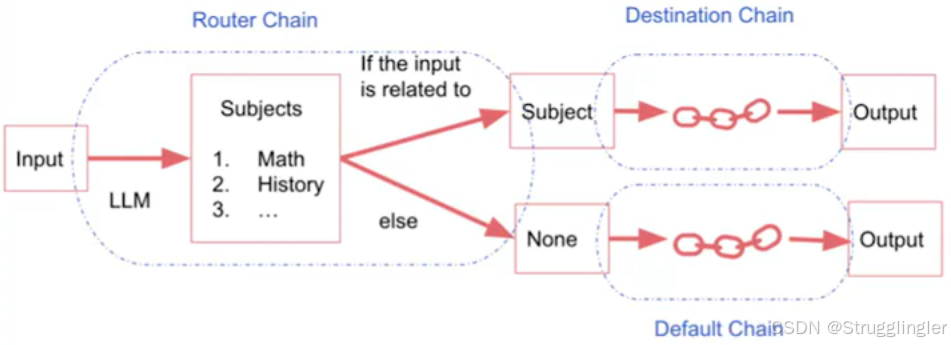
视频介绍了几种链:
LLM chain,Simple Sequential Chain,Sequential Chain,我截下面几张图:
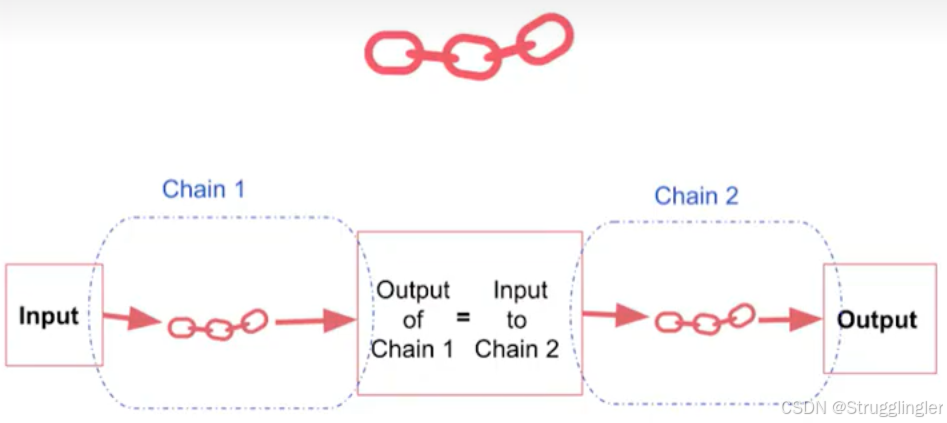
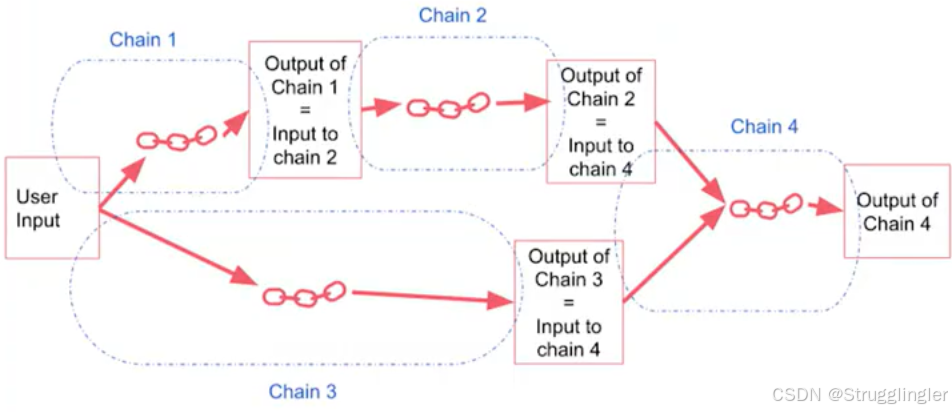
Router Chain:
1. LLM chain 代码
python
from langchain_community.chat_models import ChatTongyi
from langchain_core.prompts import ChatPromptTemplate
from langchain_core.output_parsers import StrOutputParser

# 定义模型
# 使用阿里 Qwen3 系列模型(如 qwen-max, qwen-plus, qwen-turbo)
llm = ChatTongyi(
    model="qwen-turbo",   # qwen-turbo, qwen-max
    temperature=0.1,      # 可适当调高以增加创造性
    max_tokens=2048,      # 可选:限制输出长度
)

# 定义 Prompt
prompt = ChatPromptTemplate.from_template(
    "你是业务咨询顾问,你为生产 {product} 的公司起一个最好的中文名字,只要一个。"
)

# 构建 LCEL 链:Prompt → LLM → 解析为字符串
chain = prompt | llm | StrOutputParser()

# 调用
product = "大号床单套装"
result = chain.invoke({"product": product})
print(result)
2. SequentialChain
SequentialChain 来实现这样的功能:输入产品名称,根据产品名称输出公司名称,然后根据产品名称和公司名称输出一句slogan,代码如下:
from langchain_community.chat_models import ChatTongyi
from langchain_core.prompts import PromptTemplate, ChatPromptTemplate
from langchain_core.output_parsers import StrOutputParser
from langchain_core.runnables import RunnablePassthrough

import os
from dotenv import load_dotenv
load_dotenv()
os.getenv("DASHSCOPE_API_KEY")
# 定义模型
# 使用阿里 Qwen3 系列模型(如 qwen-max, qwen-plus, qwen-turbo)
llm = ChatTongyi(
    model="qwen-turbo",   # qwen-turbo, qwen-max
    temperature=0.1,      # 可适当调高以增加创造性
    max_tokens=100      # 严格限制
)

name_prompt = ChatPromptTemplate.from_template(
    "你是一个品牌命名专家。请为生产 {product} 的公司起一个最好的中文名字。"
    "规则:只输出一个中文名字,4-6个字,不要任何标点、序号、解释或额外文字。"
    "例如:舒梦家纺\n\n产品:{product}\n名字:"
)

# 步骤1:生成公司名
name_chain = (
    name_prompt
    | llm
    | StrOutputParser()
)

slogan_prompt = ChatPromptTemplate.from_template(
    "产品是 {product},公司名为 {company_name}。请为该公司写一句中文 slogan。"
    "规则:只输出唯一的一行中文slogan,不要任何标点、序号、解释或额外文字。"
)
slogan_chain = (
    {"company_name": name_chain, "product": RunnablePassthrough()}
    | slogan_prompt
    | llm
    | StrOutputParser()
)

# 整合:同时输出公司名和 slogan
from langchain_core.runnables import RunnableParallel

full_chain = RunnableParallel(
    company_name=name_chain, # name_chain 的输出为 company_name
    slogan=slogan_chain # slogan_chain 的输出为 slogan
)

# 调用
result = full_chain.invoke("大号床单套装")
print(result)
# 输出: {'company_name': '舒梦家纺', 'slogan': '一夜好眠,从舒梦开始'}
😊LangChain 开发5 --- 基于文档的问答
参考博客:基于LangChain的LLM应用开发5------基于文档的问答 - 西滨的文章 - 知乎
文档问答系统,基于一个PDF,网页或者企业内部文档的文本来帮助回答用户问题。
1. 关键概念-嵌入 Embedding
Embedding 和 向量数据库 是两种强大的前沿技术。嵌入(Embedding)是自然语言处理和机器学习中的一个概念,它将文字或词语转换为一系列数字,通常是一个向量。语义上相似或相关的词在这个数字空间中会比较接近。利用这个向量相似的原理,将想要查询的客户问题转化为向量值,然后查询该向量与知识库中每条知识的相似度,就可以找到最相似的那条知识来回答客户,提高回答的正确性。
python
from langchain_ollama import OllamaEmbeddings
from sklearn.metrics.pairwise import cosine_similarity
import numpy as np


# === 第一步:初始化 Embedding 模型 ===
embeddings = OllamaEmbeddings(
    model="embeddinggemma", # embeddinggemma, qwen3-embedding:0.6b 等必须为向量生成模型
    base_url="http://localhost:11434"
)

# === 第二步:准备你的"知识库"(可以是 FAQ、文档片段等)===
knowledge_base = [
    "退货政策:商品签收后7天内可无理由退货。",
    "发货时间:下单后24小时内发货。",
    "支付方式:支持支付宝、微信、银联。",
    "会员积分:每消费1元积1分,100分可抵1元。",
    "客服电话:400-123-4567,工作日9:00-18:00。"
]

# === 第三步:为知识库生成 embedding 向量(只需做一次)===
print("正在为知识库生成向量...")
kb_vectors = embeddings.embed_documents(knowledge_base)
print(len(kb_vectors))
print(len(kb_vectors[0]))

# Python list计算效率低, Python 的嵌套列表变成高效的 NumPy 矩阵,以便后续用 sklearn 做向量运算。
kb_vectors = np.array(kb_vectors)
print(f"✅ 知识库向量形状: {kb_vectors.shape}")
# 比如输出 (5, 1024) 或类似,5个文档,每个文档用1024维向量表示,这个1024是输出维度,由使用的模型决定

# === 第四步:定义问答函数 ===
def ask_question(query: str) -> tuple:
    # 1. 将用户问题转为向量,embed_query将文章转为list,后被np.array转为1D向量,reshape将 1D → 行向量
    query_vec = np.array(embeddings.embed_query(query)).reshape(1, -1)

    # 2. 计算与知识库每条的余弦相似度
    similarities = cosine_similarity(query_vec, kb_vectors)[0]

    # 3. 找出最相似的条目
    best_idx = np.argmax(similarities)
    best_score = similarities[best_idx]

    # 4. 设定阈值(避免胡答)
    if best_score < 0.5:
        return None, 0.0  # 始终返回元组

    return knowledge_base[best_idx], best_score


# === 第五步:测试几个问题 ===
if __name__ == "__main__":
    questions = [
        "怎么退货?",
        "什么时候发货?",
        "能用微信付款吗?",
        "你们的客服电话是多少?",
        "今天天气怎么样?"   # 无关问题
    ]

    for q in questions:
        print(f"\n❓ 客户问题: {q}")
        answer, score = ask_question(q)  # ✅ 修复:使用正确的函数名
        if answer == None:
            print(f"❌ 回复: 我无法回答您的问题。")
        else:
print(f"✅ 答案: {answer} (相似度: {score:.2f})")5
768
✅ 知识库向量形状: (5, 768)
❓ 客户问题: 怎么退货?
✅ 答案: 退货政策:商品签收后7天内可无理由退货。 (相似度: 0.70)
❓ 客户问题: 什么时候发货?
✅ 答案: 发货时间:下单后24小时内发货。 (相似度: 0.67)
❓ 客户问题: 能用微信付款吗?
✅ 答案: 支付方式:支持支付宝、微信、银联。 (相似度: 0.72)
❓ 客户问题: 你们的客服电话是多少?
✅ 答案: 客服电话:400-123-4567,工作日9:00-18:00。 (相似度: 0.57)
❓ 客户问题: 今天天气怎么样?
❌ 回复: 我无法回答您的问题。2. 基于RAG知识库问答系统(Embedding模型搭配向量数据库)
RAG(Retrieval-Augmented Generation)检索增强生成,核心思想:在 LLM 回复之前,先从外部知识源里 检索 最相关信息,再把这些信息喂给模型进行生成。
LCEL = LangChain Expression Language 是 LangChain ≥ 0.2 版本推出的新一代链式构建语法 ,用 |(管道符)连接组件,实现声明式、可组合、可追踪的 AI 流程。Ollama 本地模型实现 RAG 代码如下:
python
# ======================
# 1. 加载文档(CSV)
# ======================
from langchain_community.document_loaders import CSVLoader #csv文档加载器

file = "OutdoorClothingCatalog_1000.csv"  # 该文档中仅有5行产品信息
loader = CSVLoader(file_path=file, encoding="utf8")
docs = loader.load()

# ======================
# 2. 构建向量数据库(使用 Ollama Embedding)
# ======================
from langchain_ollama import OllamaEmbeddings
from langchain_community.vectorstores import DocArrayInMemorySearch #内存存储的向量数据库,方便测试

embeddings = OllamaEmbeddings(
    model="qwen3-embedding:0.6b",  # 或 "embeddinggemma"
    base_url="http://localhost:11434"
)
# 构造确定相关的文档

# db:内存向量数据库(存储了所有文档的 embedding)
# .as_retriever():把数据库包装成标准检索器(Retriever)
# search_kwargs={"k": 3}:告诉检索器 "每次返回最相似的 3 篇文档"
db = DocArrayInMemorySearch.from_documents(docs, embeddings)
retriever = db.as_retriever(search_kwargs={"k": 1})


# ======================
# 3. 初始化LLM,此处换成Ollama本地的2G以内模型基本无法作答。
# ======================
from langchain_community.chat_models import ChatTongyi
import os
from dotenv import load_dotenv
load_dotenv()
os.getenv("DASHSCOPE_API_KEY")
llm = ChatTongyi(
    model="qwen3-max",
    temperature=0.1,           # 可适当调高以增加创造性
    max_tokens=1024,         # 可选:限制输出长度
)

# ======================
# 4. 构建 LCEL RAG 链
# ======================
from langchain_core.prompts import ChatPromptTemplate
from langchain_core.runnables import RunnablePassthrough
from langchain_core.output_parsers import StrOutputParser

# 定义 Prompt(模仿 "stuff" 链的行为)
prompt = ChatPromptTemplate.from_template(
    """
    You are a professional customer service representative. Answer the user's question based on the following context. If the context does not contain the answer, say "Cannot answer based on the available information."

    context:{context}

    question:{question}

    answer:
    """
)

# 构建 LCEL 链
rag_chain = (
    {"context": retriever, "question": RunnablePassthrough()} # 这个字典结构,会自动将 query 同时传给 retriever 和 RunnablePassthrough(),从而触发检索。
    | prompt
    | llm
    | StrOutputParser()
)

# ======================
# 5. 执行查询
# ======================
query = "Any Swimsuit ?" # qwen3-max,能正常回答,
# query = "列出所有泳装" # qwen3-max,根据现有材料无法作答
# query = "有泳装吗?" # qwen3-max,能正常回答
response = rag_chain.invoke(query)

# ======================
# 6. 在 Jupyter 中显示(可选)
# ======================
try:
    from IPython.display import display, Markdown
    display(Markdown(response))
except ImportError:
    print(response)
运行一下上面的代码,发现估计运行俩小时没结果。为啥呢?因为其在调用大语言模型的时候将文本块的内容拼接到一起再发给大语言模型,这样做的缺点是这样可能会超出LLM的上下文长度。同时发现在上面的llm模型如果替换为本地模型,基本无法对客户的问题作出正确答复。为加快响应速度,我全都改成用阿里云API的方式供参考:
python
import os
from dotenv import load_dotenv
load_dotenv()
os.getenv("DASHSCOPE_API_KEY")
# ======================
# 1. 加载文档(CSV)
# ======================
from langchain_community.document_loaders import CSVLoader #csv文档加载器

file = "OutdoorClothingCatalog_1000.csv"  # 该文档中仅有5行产品信息
loader = CSVLoader(file_path=file, encoding="utf8")
docs = loader.load()

# ======================
# 2. 构建向量数据库(使用 阿里云 embedding 模型)
# ======================
from langchain_community.vectorstores import DocArrayInMemorySearch #内存存储的向量数据库,方便测试

from langchain_openai import OpenAIEmbeddings

embeddings = OpenAIEmbeddings(
    model="text-embedding-v4",  # 阿里云最新 embedding 模型
    openai_api_key=os.getenv("DASHSCOPE_API_KEY"),
    openai_api_base="https://dashscope.aliyuncs.com/compatible-mode/v1",
    # 关键修复:显式指定 dimensions 和 input_type
    dimensions=1024,  # 每行转化成的维度信息
    # openai_api_type = "document", # 可选:document / query
    # 强制使用字符串输入(避免 LangChain 自动包装)
    check_embedding_ctx_length = False  # 避免上下文长度检查干扰
)

# db:内存向量数据库(存储了所有文档的 embedding)
# .as_retriever():把数据库包装成标准检索器(Retriever)
# search_kwargs={"k": 3}:告诉检索器 "每次返回最相似的 3 篇文档"
db = DocArrayInMemorySearch.from_documents(docs, embeddings)
retriever = db.as_retriever(search_kwargs={"k": 1})


# ======================
# 3. 初始化LLM,此处换成Ollama本地的2G以内模型基本无法作答。
# ======================
from langchain_community.chat_models import ChatTongyi

llm = ChatTongyi(
    model="qwen3-max",
    temperature=0.1,           # 可适当调高以增加创造性
    max_tokens=1024,         # 可选:限制输出长度
)

# ======================
# 4. 构建 LCEL RAG 链
# ======================
from langchain_core.prompts import ChatPromptTemplate
from langchain_core.runnables import RunnablePassthrough
from langchain_core.output_parsers import StrOutputParser

# 定义 Prompt(模仿 "stuff" 链的行为)
prompt = ChatPromptTemplate.from_template(
    """
    You are a professional customer service representative. Answer the user's question based on the following context. If the context does not contain the answer, say "Cannot answer based on the available information."

    context:{context}

    question:{question}

    answer:
    """
)

# 构建 LCEL 链
rag_chain = (
    {"context": retriever, "question": RunnablePassthrough()} # 这个字典结构,会自动将 query 同时传给 retriever 和 RunnablePassthrough(),从而触发检索。
    | prompt
    | llm
    | StrOutputParser()
)

# ======================
# 5. 执行查询
# ======================
query = "Any Swimsuit ?" # qwen3-max,能正常回答,
# query = "列出所有泳装" # qwen3-max,根据现有材料无法作答
# query = "有泳装吗?" # qwen3-max,能正常回答
response = rag_chain.invoke(query)

print(response)
未来解决大文档的问题,LangChain 提供其他类型的链类型:map_reduce, refine等等。
3. 深入理解DocArrayInMemorySearch
先看一篇向量数据库的科普文章:AIGC|人人都在说的向量数据库究竟是什么?小白也能读懂 - 知乎,介绍了向量数据库的原理,其中最让我印象深刻的是图片识物。
它是什么:内存向量数据库(Vector Store)
用途 :将文档 + embedding 存入内存,支持语义相似性检索
特点 :极快,不持久程序退出就消失, 基于 docarray 库,它是 LangChain 中 最简单的向量库实现,用于快速验证 RAG 流程。
核心API:
python
from langchain_community.vectorstores import DocArrayInMemorySearch

# (1) 构建:从文档列表 + embedding 模型创建
db = DocArrayInMemorySearch.from_documents(docs, embeddings)

# (2) 检索:找最相似的 k 篇文档
results = db.similarity_search("防晒衬衫", k=3)

# (3) 转为 retriever(用于 LCEL 链)
retriever = db.as_retriever(search_kwargs={"k": 3})

# (4) 支持带分数的检索(返回相似度)
results_with_score = db.similarity_search_with_relevance_scores("防晒衬衫", k=3)向量数据库调试技巧:
python
# 执行一次全量检索
all_docs = db.similarity_search("", k=10000)  # 空查询通常返回全部
print(f"实际存储条目: {len(all_docs)}")
for i, doc in enumerate(all_docs[:2]):
    print(f"[{i}] {repr(doc.page_content[:80])}")

# 检查向量维度(通过 embedding 模型)
test_vec = embeddings.embed_query("test")
print(f"向量维度: {len(test_vec)}")  # 所有向量都是这个维度

# 查看元数据(如果文档有)
sample = db.similarity_search("x", k=1) # k为相似条目数量
if sample:
print("元数据示例:", sample[0].metadata)from langchain_community.vectorstores import DocArrayInMemorySearch
db = DocArrayInMemorySearch.from_documents(docs, embeddings)
retriever = db.as_retriever(search_kwargs={"k": 1})
在上面的代码中,我分别Ctrl + 鼠标左键点击 DocArrayInMemorySearch 与 from_documents,发现会跳跃到不同的文件中。
这让我看不明白为什么他们还能有联系,进一步阻碍了我通过代码看明白其原理的过程,下面是 Ctrl + 鼠标左键DocArrayInMemorySearch的结果:
class DocArrayInMemorySearch(DocArrayIndex):
"""In-memory `DocArray` storage for exact search.
To use it, you should have the ``docarray`` package with version >=0.32.0 installed.
You can install it with `pip install docarray`.
"""
@classmethod
def from_params(
cls,
embedding: Embeddings,
metric: Literal[
"cosine_sim", "euclidian_dist", "sgeuclidean_dist"
] = "cosine_sim",
**kwargs: Any,
) -> DocArrayInMemorySearch:
"""Initialize DocArrayInMemorySearch store.
Args:
embedding (Embeddings): Embedding function.
metric (str): metric for exact nearest-neighbor search.
Can be one of: "cosine_sim", "euclidean_dist" and "sqeuclidean_dist".
Defaults to "cosine_sim".
**kwargs: Other keyword arguments to be passed to the get_doc_cls method.
"""
_check_docarray_import()
from docarray.index import InMemoryExactNNIndex
doc_cls = cls._get_doc_cls(space=metric, **kwargs)
doc_index = InMemoryExactNNIndex[doc_cls]()
return cls(doc_index, embedding)
@classmethod
def from_texts(
cls,
texts: List[str],
embedding: Embeddings,
metadatas: Optional[List[Dict[Any, Any]]] = None,
**kwargs: Any,
) -> DocArrayInMemorySearch:
"""Create an DocArrayInMemorySearch store and insert data.
Args:
texts (List[str]): Text data.
embedding (Embeddings): Embedding function.
metadatas (Optional[List[Dict[Any, Any]]]): Metadata for each text
if it exists. Defaults to None.
**kwargs: Other keyword arguments to be passed to the from_params method.
Returns:
DocArrayInMemorySearch Vector Store
"""
store = cls.from_params(embedding, **kwargs)
store.add_texts(texts=texts, metadatas=metadatas)
return store😊LangChain 开发6 --- 评估
参考博客:基于LangChain的LLM应用开发5------基于文档的问答 - 西滨的文章 - 知乎
跟LangGraph使用的API有出入,暂时没学。
😊LangChain 开发7 --- 代理
这部分讲解如何在LangChain框架下创建并调用自己的tool工具,跟LangGraph上类似。
后续课程
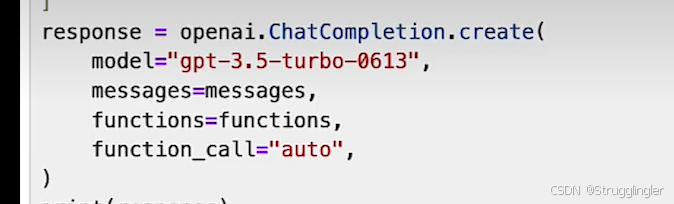
介绍这个openai的API如何使用,什么时候有function calling功能,什么时候没有。funtion_call可选参数有:functiion_call=auto, functiion_call=none, functiion_call={"name": "get_current_wether"}。
😊LangChain的函数,工具和代理(三):LangChain中轻松实现OpenAI函数调用
参考链接:LangChain的函数,工具和代理(三):LangChain中轻松实现OpenAI函数调用 - - 派神 -的文章 - 知乎
解决什么问题:
本章主要讲解如何使用LangChain实现函数调用,因为我已经知道LangGraph实现了函数调用。所以这章内容没有太多总结。
1. 使用pydantic创建Openai的函数描述对象
下面我们使用pyPantic创建一个函数描述对象类:
python
from pydantic import BaseModel, Field
from langchain_community.utils.openai_functions import convert_pydantic_to_openai_function

class WeatherSearch(BaseModel):
    """Call this with an airport code to get the weather at that airport"""
    airport_code: str = Field(description="airport code to get weather for")
接下来我们要使用 langchain 将这个WeatherSearch类转换成openai的函数描述对象:
python
from pprint import pprint
weather_function = convert_pydantic_to_openai_function(WeatherSearch)
pprint(weather_function)
log:
{'description': 'Call this with an airport code to get the weather at that '
                'airport',
 'name': 'WeatherSearch',
 'parameters': {'properties': {'airport_code': {'description': 'airport code '
                                                               'to get weather '
                                                               'for',
                                                'type': 'string'}},
                'required': ['airport_code'],
                'type': 'object'}}
2.强制执行函数调用
3. 使用chain来实现函数调用
4. 使用多个函数
😊LangChain的函数,工具和代理(四):Tagging & Extraction(应用而已)
解决什么问题:
标记,如何为给定的用户输入打标签然后以特定的JSON格式输出。提取,如何从用户输入提取特定的信息为JSON格式。
1. 标记(Tagging)
我们希望llm能够对用户提交的文本信息做出某些方面的评估,比如情感评估(positive, negative, neutral),语言评估(chinese,english,japanese等),并给出一个结构化的输出结果(如json格式)。
要实现"Tagging"功能,我们需要定义一个Pydantic类,然后让langchain将其转换成openai的函数描述变量:
python
#定义pydantic类用以生成openai的函数描述变量
class Tagging(BaseModel):
    """Tag the piece of text with particular info."""
    sentiment: str = Field(description="sentiment of text, should be `pos`, `neg`, or `neutral`")
    language: str = Field(description="language of text (should be ISO 639-1 code)")
Tagging类包含了2给成员变量:sentiment和language,其中sentiment用来判断用户信息的情感包括pos(正面),neg(负面),neutral(中立),language用来判断用户使用的是哪国的语言,并且要符合ISO 639-1 编码规范。下面给出全部代码
python
from langchain_community.chat_models import ChatTongyi
import os
from dotenv import load_dotenv
load_dotenv()
os.getenv("DASHSCOPE_API_KEY")
# 定义模型
# 使用阿里 Qwen3 系列模型(如 qwen-max, qwen-plus, qwen-turbo)
llm = ChatTongyi(
    model="qwen3-max",          # Qwen3 最强版本(支持长上下文、工具调用等)
    temperature=0,           # 可适当调高以增加创造性
    max_tokens=2048,         # 可选:限制输出长度
)

# ---------------------------------------------------------------------------------------

from pydantic import BaseModel, Field
from langchain_community.utils.openai_functions import convert_pydantic_to_openai_function

class Tagging(BaseModel):
    """Tag the piece of text with particular info."""
    sentiment: str = Field(description="sentiment of text, should be `pos`, `neg`, or `neutral`")
    language: str = Field(description="language of text (should be ISO 639-1 code)")

#根据模板创建prompt
from langchain_core.prompts import ChatPromptTemplate
prompt = ChatPromptTemplate.from_messages([
    ("system", "Think carefully, and then tag the text as instructed"),
    ("user", "{input}")
])

# 将用户输入填充到模板中,生成实际消息
# user_input = input("请输入文本: ")
# messages = prompt.invoke({"input": user_input})
# ---------------------------------------------------------------------------------------

# ✅ 关键:使用 bind_tools 绑定 Pydantic 模型(自动转为工具)
llm_with_tool = llm.bind_tools([Tagging], tool_choice="required")  # 强制必须调用

#创建chain
tagging_chain = prompt | llm_with_tool

response = tagging_chain.invoke({"input": "I love shanghai"})
# 打印原始响应(查看是否包含 tool_calls)
print("Raw response:")
print(response)

# 提取工具调用结果(Qwen3 会把结构化数据放在 tool_calls 中)
if hasattr(response, 'tool_calls') and response.tool_calls:
    tool_call = response.tool_calls[0]
    print("\nStructured output from tool call:")
    print("Arguments:", tool_call["args"])
    # 可选:转为 Pydantic 对象
    tagging_result = Tagging(**tool_call["args"])
    print("As Pydantic object:", tagging_result)
else:
    print("\n⚠️ 模型未返回工具调用!可能原因:")
    print("- 模型不支持工具调用")
    print("- 提示词不够明确")
print("- 使用了错误的模型名称")输出:
Raw response:
content='' additional_kwargs={'tool_calls': [{'function': {'arguments': '{"sentiment": "pos", "language": "en"}', 'name': 'Tagging'}, 'id': 'call_9f7c150ebb734acfb4de9c17', 'index': 0, 'type': 'function'}]} response_metadata={'model_name': 'qwen3-max', 'finish_reason': 'tool_calls', 'request_id': '0fb0c1d9-a548-4c26-ab84-4c465e7aa24a', 'token_usage': {'input_tokens': 328, 'output_tokens': 30, 'prompt_tokens_details': {'cached_tokens': 0}, 'total_tokens': 358}} id='lc_run--019cfaac-3446-7f31-9953-96ec100e6f58-0' tool_calls=[{'name': 'Tagging', 'args': {'sentiment': 'pos', 'language': 'en'}, 'id': 'call_9f7c150ebb734acfb4de9c17', 'type': 'tool_call'}] invalid_tool_calls=[]
Structured output from tool call:
Arguments: {'sentiment': 'pos', 'language': 'en'}
As Pydantic object: sentiment='pos' language='en'云端模型与本地模型的区别
我仅仅是把上面的模型换成了本地的 qwen3.5:4b 模型,输出就成了:
Raw response:
content='' additional_kwargs={} response_metadata={'model': 'qwen3.5:4b', 'created_at': '2026-03-17T07:54:51.8825781Z', 'done': True, 'done_reason': 'stop', 'total_duration': 53547342200, 'load_duration': 7495955200, 'prompt_eval_count': 340, 'prompt_eval_duration': 16934876300, 'eval_count': 131, 'eval_duration': 28734436900, 'logprobs': None, 'model_name': 'qwen3.5:4b', 'model_provider': 'ollama'} id='lc_run--019cfac9-8b3b-71c0-a489-48b88f568e87-0' tool_calls=[{'name': 'Tagging', 'args': {'sentiment': 'pos', 'language': 'en'}, 'id': '77da6838-4b20-47ea-afef-96b63a238488', 'type': 'tool_call'}] invalid_tool_calls=[] usage_metadata={'input_tokens': 340, 'output_tokens': 131, 'total_tokens': 471}

Structured output from tool call:
Arguments: {'sentiment': 'pos', 'language': 'en'}
As Pydantic object: sentiment='pos' language='en'
可以看出来云端的模型与本地模型的API协议与本地有所差别,但是 langchain 对返回解析后基本抹平了他们的差别,最后暴露出几个接口:
content: 包含LLM返回的文本信息,如果为空一般为调用工具。
additional_kwargs={...} : 厂商特定的额外字段,LangChain 无法标准化的部分会放在这里。用户不要用这部分
response_metadata={...} : 本次API调用的元信息,其中:
	finish_reason(本地模型没这个字段) :'tool_calls' 这个字段明确表示模型本次生成的结束原因是"需要调用工具"。
id='lc_run-xxx' : LangChain 内部生成的追踪 ID,用于调试、日志、LangSmith 追踪。与 LLM 无关,纯 LangChain 用。
tool_calls=[...] : LangChain 从 additional_kwargs 中提取并解析后的工具调用列表。如果不为空,一定是调用工具。
invalid_tool_calls=[] :返回了格式错误的工具调用(如参数不合法),会放在这里
2. 提取(Extraction)
"提取(Extraction)"与"标记(Tagging)"有点类似,只不过提取不是对用户信息的评估,而是从中抽取出指定的信息。
要实现"Extraction"功能,我们任然需要定义Pydantic类:
python
class Person(BaseModel):
    """Information about a person."""
    name: str = Field(description="person's name")
    age: Optional[int] = Field(description="person's age")

class Information(BaseModel):
    """Information to extract."""
    people: List[Person] = Field(description="List of info about people")
这里我们定义了Person和Information两个类,其中person类包含了2个成员,name和age,其中age是可选的(Optional)即age不是必须的。Information类包含了一个people成员,它一个person的集合(List)。后面我们要利用这个Information类来提取用户信息中的个人信息:姓名,年龄。下面是全部代码:
python
from langchain_community.chat_models import ChatTongyi
import os
from dotenv import load_dotenv
load_dotenv()
os.getenv("DASHSCOPE_API_KEY")
# 定义模型
# 使用阿里 Qwen3 系列模型(如 qwen-max, qwen-plus, qwen-turbo)
llm = ChatTongyi(
    model="qwen3-max",          # Qwen3 最强版本(支持长上下文、工具调用等)
    temperature=0,           # 可适当调高以增加创造性
    max_tokens=2048,         # 可选:限制输出长度
)
# ---------------------------------------------------------------------------------------

from pydantic import BaseModel, Field
from typing import Optional, List
from langchain_community.utils.openai_functions import convert_pydantic_to_openai_function


class Person(BaseModel):
    """Information about a person."""
    name: str = Field(description="person's name")
    age: Optional[int] = Field(description="person's age")


class Information(BaseModel):
    """Information to extract."""
    people: List[Person] = Field(description="List of info about people")


#根据模板创建prompt
from langchain_core.prompts import ChatPromptTemplate
prompt = ChatPromptTemplate.from_messages([
    ("system", "Extract the relevant information, if not explicitly provided do not guess. Extract partial info"),
    ("human", "{input}")
])
# -------------------------------------------------------

# ✅ 关键:使用 bind_tools 绑定 Pydantic 模型(自动转为工具)
llm_with_tool = llm.bind_tools([Information], tool_choice="required")  # 强制必须调用

#创建chain
tagging_chain = prompt | llm_with_tool
user_text = input("请输入要分析的文本: ")  # ← 这行是新增的
response = tagging_chain.invoke({"input": user_text})
# 打印原始响应(查看是否包含 tool_calls)
print("Raw response:")
print(response)

# 提取工具调用结果(Qwen3 会把结构化数据放在 tool_calls 中)
if hasattr(response, 'tool_calls') and response.tool_calls:
    tool_call = response.tool_calls[0]
    print("\nStructured output from tool call:")
    print("Arguments:", tool_call["args"])
    # 可选:转为 Pydantic 对象
    tagging_result = Information(**tool_call["args"])
    print("As Pydantic object:", tagging_result)
else:
    print("\n⚠️ 模型未返回工具调用!可能原因:")
    print("- 模型不支持工具调用")
    print("- 提示词不够明确")
    print("- 使用了错误的模型名称")
输出:
shell
请输入要分析的文本: 小明今年25岁,小红今年44岁
Raw response:
content='' additional_kwargs={'tool_calls': [{'function': {'arguments': '{"people": \n[{"name": "小明", "age": 25}, {"name": "小红", "age": 44}]\n\n}', 'name': 'Information'}, 'id': 'call_920b9e68a3dd4d2ca0209cde', 'index': 0, 'type': 'function'}]} response_metadata={'model_name': 'qwen3-max', 'finish_reason': 'tool_calls', 'request_id': '0c2151e4-2def-4ce2-9721-3a64a8a51389', 'token_usage': {'input_tokens': 368, 'output_tokens': 45, 'prompt_tokens_details': {'cached_tokens': 0}, 'total_tokens': 413}} id='lc_run--019cfaf3-8a1a-7ce1-b846-68cf4a89f1d0-0' tool_calls=[{'name': 'Information', 'args': {'people': [{'name': '小明', 'age': 25}, {'name': '小红', 'age': 44}]}, 'id': 'call_920b9e68a3dd4d2ca0209cde', 'type': 'tool_call'}] invalid_tool_calls=[]

Structured output from tool call:
Arguments: {'people': [{'name': '小明', 'age': 25}, {'name': '小红', 'age': 44}]}
As Pydantic object: people=[Person(name='小明', age=25), Person(name='小红', age=44)]
下面我们再创建一个JSON的键值解析器,这样可以更方便的从LLM的返回信息中过滤出我们需要的内容:
原文中的 JsonKeyOutputFunctionsParser 已经被弃用,如果你想提取指定信息可以使用tool_calls[0]["args"]手动取。
3. 真实场景的应用
从一个网页,使用LangChain文本分隔技术,识别网页内容是什么语言,分析网页内容打关键字,总结全文,并以指定格式输出这叫做打标签。输出文章作者,标题等信息就是提取。感觉最终要的还是提示词,其他的都是工具而已。但是这个工具很特别。很简单。可以帮助我实现如下功能:"从一句话中提取板子信息,以标准格式输出"。
😊LangChain的函数,工具和代理(五):Tools & Routing
解决什么问题:
一种让langchain实现真正意义上函数调用功能。
1. Tools
tools是代理(agent)用来与外界交互的接口。如执行互联网搜索,调用外部api等的能力。下面我们来定义一个函数用来模拟查询天气的函数search,它的逻辑简单只返回一个温度值:
python
#导入langchain的tool
from langchain_core.tools import tool

#添加tool装饰器
@tool
def search(query: str) -> str:
    """Search for weather online"""
    return "42f"

print(f"search.name:{search.name}") # 输出工具名称 search
print(f"search.description:{search.description}") # 工具描述 Search for weather online
print(f"search.args:{search.args}") # 工具参数:{'query': {'title': 'Query', 'type': 'string'}}
这里我们在定义search函数时添加了一个@tool的装饰器,它表示search函数为一个tool,当search函数成为一个tool以后,它就具备了"run"的能力:
#执行函数调用
search.run("sf") # 输出42f下面我们需要对search函数的输入参数做一个类型限制,所以我们需要创建一个pydantic类:
python
from pydantic import BaseModel, Field
class SearchInput(BaseModel):
    query: str = Field(description="Thing to search for")

@tool(args_schema=SearchInput) # 限制 search 函数的输入参数的类型为 SearchInput
def search(query: str) -> str:
    """Search for the weather online."""
    return "42f"
这里我们给装饰器@tool附加了args_schema参数,它的值为SearchInput,这样就可以限制search函数的输入参数的类型了。
接下来我们需要定义一个真实的调用外部api获取天气温度的函数与通过维基百科检索网页的函数,以下是可运行代码,有些包需要装:
python
from langchain_community.chat_models import ChatTongyi
import os
from dotenv import load_dotenv
load_dotenv()
os.getenv("DASHSCOPE_API_KEY")
# 定义模型
# 使用阿里 Qwen3 系列模型(如 qwen-max, qwen-plus, qwen-turbo)
llm = ChatTongyi(
    model="qwen3-max",       # Qwen3 最强版本(支持长上下文、工具调用等)
    temperature=0,           # 可适当调高以增加创造性
    max_tokens=2048,         # 可选:限制输出长度
)

# ---------------------------------------------------------------------------------------
from pydantic import BaseModel, Field
from typing import Optional, List
from langchain_core.tools import tool
import requests
import datetime

# Define the input schema
class OpenMeteoInput(BaseModel):
    latitude: float = Field(..., description="Latitude of the location to fetch weather data for")
    longitude: float = Field(..., description="Longitude of the location to fetch weather data for")

# 查询天气
@tool(args_schema=OpenMeteoInput) # 限制输入信息格式
def get_current_temperature(latitude: float, longitude: float) -> str:
    """Fetch current temperature for given coordinates."""

    BASE_URL = "https://api.open-meteo.com/v1/forecast"

    # Parameters for the request
    params = {
        'latitude': latitude,
        'longitude': longitude,
        'hourly': 'temperature_2m',
        'forecast_days': 1,
    }

    # Make the request
    response = requests.get(BASE_URL, params=params)

    if response.status_code == 200:
        results = response.json()
    else:
        raise Exception(f"API Request failed with status code: {response.status_code}")

    current_utc_time = datetime.datetime.utcnow()
    time_list = [datetime.datetime.fromisoformat(time_str.replace('Z', '+00:00')) for time_str in
                 results['hourly']['time']]
    temperature_list = results['hourly']['temperature_2m']

    closest_time_index = min(range(len(time_list)), key=lambda i: abs(time_list[i] - current_utc_time))
    current_temperature = temperature_list[closest_time_index]

    return f'The current temperature is {current_temperature}°C'

# print(get_current_temperature.args)
# temperature_Beijing = get_current_temperature.run({"latitude": 39, "longitude": 116})
# print(temperature_Beijing)


import os
os.environ["HTTP_PROXY"] = "http://xxxxxxxx.com:8080"
os.environ["HTTPS_PROXY"] = "http://xxxxxxxx.com:8080"
import wikipedia
wikipedia.set_lang("zh")  # 或 "zh-cn"
from wikipedia.exceptions import PageError, DisambiguationError
@tool
def search_wikipedia(query: str) -> str: # 查询网页
    """Run Wikipedia search and get page summaries."""
    page_titles = wikipedia.search(query)
    summaries = []
    for page_title in page_titles[: 3]:
        try:
            wiki_page = wikipedia.page(title=page_title, auto_suggest=False)
            summaries.append(f"Page: {page_title}\nSummary: {wiki_page.summary}")
        except (PageError, DisambiguationError):
            pass
    if not summaries:
        return "No good Wikipedia Search Result was found"
    return "\n\n".join(summaries)
# print(search_wikipedia.run({"query": "langchain"})) # 函数验证代码

# -------------------------------------------------------

# ✅ 关键:使用 bind_tools 绑定 Pydantic 模型(自动转为工具)
tools = [search_wikipedia, get_current_temperature]
llm_with_tool = llm.bind_tools(tools, tool_choice="auto")  # tool_choice="required" 强制必须调用

from langchain_core.prompts import ChatPromptTemplate
# 创建 prompt
prompt = ChatPromptTemplate.from_messages([
    ("system", "You are helpful but sassy assistant"),
    ("user", "{input}"),
])
#创建 chain
tagging_chain = prompt | llm_with_tool
user_text = input("请输入请求: ")  # ← 这行是新增的
response = tagging_chain.invoke({"input": user_text})
# 打印原始响应(查看是否包含 tool_calls)
print("Raw response:")
print(type(response))
print(response)

# 提取工具调用结果(Qwen3 等LLM会把结构化数据放在 tool_calls 中)
if hasattr(response, 'tool_calls') and response.tool_calls:
    tool_call = response.tool_calls[0]
    print("\ntool_calls :", tool_call)
else:
    print("\n⚠️ 模型未返回工具调用!可能原因:")
    print("- 模型不支持工具调用")
    print("- 提示词不够明确")
    print("- 使用了错误的模型名称")
log输出:
请输入请求: 你好
Raw response:
<class 'langchain_core.messages.ai.AIMessage'>
content='哟,终于有人来找我聊天了?😏\n\n你好呀!有什么想问的或者想聊的吗?别光说你好,得有点实质性的内容才行~' additional_kwargs={} response_metadata={'model': 'qwen3.5:4b', 'created_at': '2026-03-18T03:46:34.402444Z', 'done': True, 'done_reason': 'stop', 'total_duration': 29261263300, 'load_duration': 727490400, 'prompt_eval_count': 377, 'prompt_eval_duration': 12303968100, 'eval_count': 92, 'eval_duration': 16168210800, 'logprobs': None, 'model_name': 'qwen3.5:4b', 'model_provider': 'ollama'} id='lc_run--019cff0c-f4cd-73c3-95d8-5ede6ee84194-0' tool_calls=[] invalid_tool_calls=[] usage_metadata={'input_tokens': 377, 'output_tokens': 92, 'total_tokens': 469}
️
模型未返回工具调用!.....

请输入请求: 你好,北京现在气温多少度?
Raw response:
<class 'langchain_core.messages.ai.AIMessage'>
content='' additional_kwargs={} response_metadata={'model': 'qwen3.5:4b', 'created_at': '2026-03-18T03:50:36.849191Z', 'done': True, 'done_reason': 'stop', 'total_duration': 37341033700, 'load_duration': 671890400, 'prompt_eval_count': 384, 'prompt_eval_duration': 14107699600, 'eval_count': 118, 'eval_duration': 22458210900, 'logprobs': None, 'model_name': 'qwen3.5:4b', 'model_provider': 'ollama'} id='lc_run--019cff10-884e-7ea1-b839-738626948a12-0' tool_calls=[{'name': 'get_current_temperature', 'args': {'latitude': 39.9042, 'longitude': 116.4074}, 'id': 'bc5f6651-b1b1-4723-9937-10ee97a502ef', 'type': 'tool_call'}] invalid_tool_calls=[] usage_metadata={'input_tokens': 384, 'output_tokens': 118, 'total_tokens': 502}

tool_calls : {'name': 'get_current_temperature', 'args': {'latitude': 39.9042, 'longitude': 116.4074}, 'id': 'bc5f6651-b1b1-4723-9937-10ee97a502ef', 'type': 'tool_call'}通过不同的提示词,可见当前的response格式为AIMessage,且content有区别,如果没有工具调用,content是非空的,tool_calls字段无数据。如果content为空,一般tool_calls字段就有要调用工具的信息,此时处于大模型决定要调用信息,下一步还需要Agent完成对工具的调用并将结果返回给LLM。(或者手动执行非LLM结果)
LangChain中通过route函数实现了自动执行工具函数的功能(古老的0.1版本中),后来的版本中又进化出了create_tool_calling_agent,AgentExecutor等这样子的接口,类似LangGraph,这个思考 -> 调用工具 -> 再思考 -> 回答"的循环被LangChain接管,帮你减少了代码量,隐藏了多次工具调用的逻辑(有时候一个问题需要多次调用工具),做了错误处理,但后来链太复杂就转向了LangGraph这种图形化配置流程。
2. OpenAPI Specification
OpenAPI Specification (OAS) 绝对可以被视为当前 Agent "Skills"(技能)或 "Tools"(工具)描述的"工业级前身"和"标准化基石"。是 企业级 Agent 连接真实世界 API 的核心标准。逐渐行业标准。详情参考HTTP POST /v1/chat/completions 参考链接:https://github.com/openai/openai-openapi/。
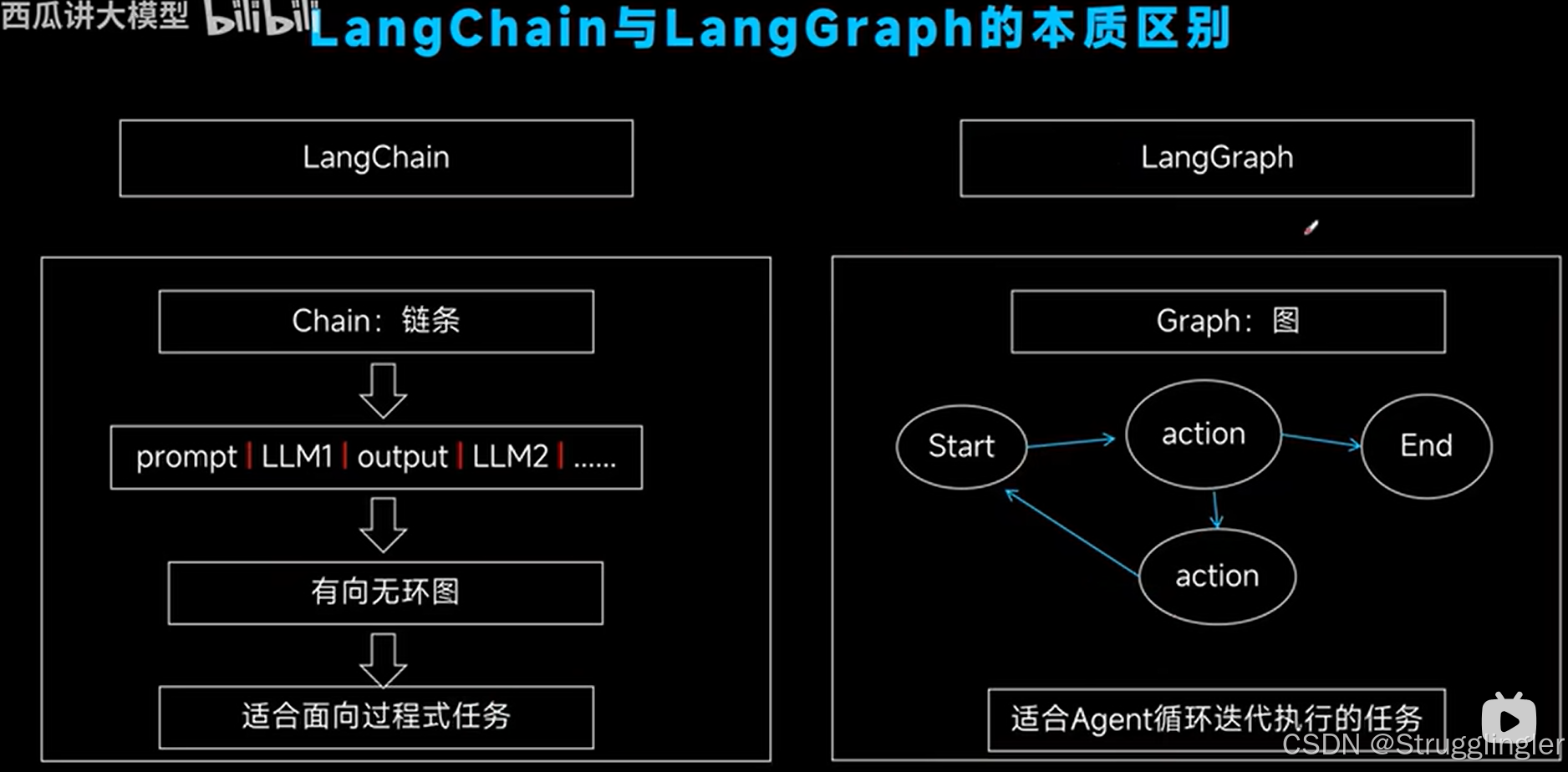
😊从链式思想到图状涌现:万字深度解析 LangChain 与 LangGraph 的思想演变与实战精髓 - 王果ai的文章 - 知乎
博客地址:https://zhuanlan.zhihu.com/p/1957395470147118600
文章系统梳理了LangChain做了什么解决了人们的问题?LangGraph的升级的必然性等等。其中涉及到我没接触过的编码思路。ResearchState 这种节点存储信息。
第五章:实战演练------构建一个带修正循环的研究助手
目标:构建一个自动化研究助手,给他一个主题,他能使用工具自动检索生成内容。且能够评估内容决定是否需要重新搜索补充材料再次生成报告。
设计思路:
-
在各个节点间传输的状态信息(核心数据容器,所有节点共享):
pythonclass ResearchState(TypedDict): topic: str report: str searches :Annotated[List[dict], operator.add] # 使用 Annotated 告诉 LangGraph:当更新这个字段时,使用 operator.add (即列表相加) critique: str # 记录评估意见定义状态类不仅仅是列出字段,字段的类型决定了数据如何合并。
其中无限制的使用
operator.add也会导致问题。如何进一步优化?可以专门设计一个节点对搜索到的内容总结而不是对搜索到的内容全部总结,或者可以存储到专门的外部存储器中。 -
Nodes (节点):
- search 节点:接收
topic,调用搜索工具,将结果存入searches。 generate_report:接收topic和searches,调用 LLM 生成报告,存入report。critique_report:接收topic和report,调用 LLM 对报告进行评估,提出改进意见,存入critique。
评价:这个节点设计很考研对于业务的理解,需要知道的常识:每个节点输入什么输出什么?对文字进行处理和评估是LLM的工作。搜索是工具的工作。然后才是哪些节点放入工具中,
search节点要放入工具,generate_report节点和critique_report节点仅仅是循环过程必须的工作流。 - search 节点:接收
-
Edges (边)
- 入口点 ->
search search->generate_report(固定边)generate_report->critique_report(固定边)critique_report-> ??? (条件边)- 路由逻辑 :检查
critique的内容。 - 如果评估意见是"报告质量很高,无需修改",则路由到
END。 - 如果评估意见指出了不足,则将
critique内容作为新的搜索指令,路由回search节点,开启新一轮循环。(如何给LLM指令让他评估呢?入股让他提意见,他就会一直提意见的)
- 路由逻辑 :检查
- 入口点 ->
-
代码实现骨架
pythonfrom langgraph.graph import StateGraph, END from typing import TypedDict, List # 1. 定义状态 class ResearchState(TypedDict): topic: str report: str searches: List[dict] critique: str # 用于控制循环次数,防止无限循环 revision_number: int # 2. 定义节点 def search_node(state: ResearchState): print("--- 节点: 正在搜索... ---") # ... (此处调用搜索工具,例如 TavilySearchResults) # 将搜索结果更新到 state # ... return {"searches": new_searches, "revision_number": state["revision_number"] + 1} def generate_report_node(state: ResearchState): print("--- 节点: 正在生成报告... ---") # ... (此处调用 LLM,结合 topic 和 searches 生成报告) # ... return {"report": new_report} def critique_report_node(state: ResearchState): print("--- 节点: 正在评估报告... ---") # ... (此处调用 LLM,对报告进行评估) # ... return {"critique": new_critique} # 3. 定义条件边的路由逻辑 def should_continue_router(state: ResearchState): print("--- 路由: 判断是否需要修正... ---") if state["revision_number"] > 3: # 设置最大修正次数 print("--- 达到最大修正次数,结束。 ---") return "end" # 假设 critique LLM 会在评估通过时输出特定词 if "no revision needed" in state["critique"].lower(): print("--- 报告质量达标,结束。 ---") return "end" else: print("--- 报告需要修正,返回搜索。 ---") return "continue" # 4. 构建图 builder = StateGraph(ResearchState) builder.add_node("search", search_node) builder.add_node("generate_report", generate_report_node) builder.add_node("critique_report", critique_report_node) builder.set_entry_point("search") builder.add_edge("search", "generate_report") builder.add_edge("generate_report", "critique_report") builder.add_conditional_edges( "critique_report", should_continue_router, { "continue": "search", # 如果路由函数返回 "continue",则去 search 节点 "end": END # 如果返回 "end",则结束 } ) # 5. 编译并运行 graph = builder.compile() # 运行图,并可视化追踪 # for s in graph.stream({"topic": "人工智能的最新进展", "revision_number": 0}): # print(s)这个例子完美地展示了 LangGraph 的威力。我们构建了一个具有"反思"和"自我修正"能力的智能系统,而其核心逻辑------ 一个带有条件判断的循环,被清晰、直观地用图的形式表达了出来。
其中学到了很多东西,比如state什么时候构建,构建好后每个节点都可以使用。并且节点的返回值交给LangGraph,LangGraph会帮用户管理更新这个状态节点。
关于使用StateGraph创建状态图后,应该使用stream还是用invoke的问题:
stream()- 流式执行,每完成一个节点返回一次,便于调试。- 返回值:生成器(迭代器),每执行完一个节点就返回一次当前状态,返回值是个字典,键是节点名称,值是节点输出。
- 适用场景:需要实时查看每一步的执行过程、中间结果
- 特点:可以看到整个执行流程
invoke()- 一次性执行,直接返回最终结果,不返回中间过程。- 返回值:最终状态(执行完所有节点后的结果)
- 适用场景:只关心最终结果,不需要中间过程
- 特点:简洁高效