文章目录
- 1.TL460-S1-E1相机
-
- [1.1 TL460-S1-E1工作场景](#1.1 TL460-S1-E1工作场景)
- [1.2 TL460-S1-E1 IO线和数据线定义](#1.2 TL460-S1-E1 IO线和数据线定义)
-
- [1.2.1 IO接口定义](#1.2.1 IO接口定义)
- [1.2.2 数据接口线](#1.2.2 数据接口线)
- [1.2.3 TL460-S1-E1相机正面安装方向](#1.2.3 TL460-S1-E1相机正面安装方向)
- [1.2.4 相机结构图纸](#1.2.4 相机结构图纸)
- [1.2.5 TL460-S1-E1相机IO指示灯](#1.2.5 TL460-S1-E1相机IO指示灯)
- [1.3 TL460-S1-E1相机性能指标](#1.3 TL460-S1-E1相机性能指标)
-
- [1.3.1 测量性能](#1.3.1 测量性能)
- 2.TL460-S1-E1相机操作
-
- [2.1 下载看图软件连接相机](#2.1 下载看图软件连接相机)
- [2.2 图漾PercipioViewer软件更改相机IP](#2.2 图漾PercipioViewer软件更改相机IP)
- [2.3 深度图调参](#2.3 深度图调参)
-
- [2.3.1 相机的IR参数](#2.3.1 相机的IR参数)
- [2.3.2 相机的Depth参数](#2.3.2 相机的Depth参数)
- [2.3.3 相机的RGB参数](#2.3.3 相机的RGB参数)
- [2.4 深度图评估](#2.4 深度图评估)
-
- [2.4.1 评估点云](#2.4.1 评估点云)
- [2.4.2 填充空洞](#2.4.2 填充空洞)
- [2.4.3 滤波功能](#2.4.3 滤波功能)
- [2.4.4 时域滤波功能](#2.4.4 时域滤波功能)
- [2.4.5 中值滤波](#2.4.5 中值滤波)
- [2.4.6 调节深度图渲染效果](#2.4.6 调节深度图渲染效果)
- [2.5 保存图像](#2.5 保存图像)
-
- [2.5.1 单张存图](#2.5.1 单张存图)
- [2.5.2 连续存图](#2.5.2 连续存图)
- [2.6 相机保存参数配置](#2.6 相机保存参数配置)
-
- [2.6.1 保存参数限制](#2.6.1 保存参数限制)
- 3.TL460-S1-E1相机SDK相关
-
- [3.1 TYCamera之C++语言SDK(`推荐`)](#3.1 TYCamera之C++语言SDK(
推荐)) - [3.2 TYCamera之ROS1版本(`推荐`)](#3.2 TYCamera之ROS1版本(
推荐)) - [3.3 TYCamera之ROS2版本(`推荐`)](#3.3 TYCamera之ROS2版本(
推荐)) - 3.4 TYCamera之C#语言SDK
- [3.5 TYCamera之Python语言SDK](#3.5 TYCamera之Python语言SDK)
- [3.6 Halcon语言SDK](#3.6 Halcon语言SDK)
- [3.7 VisionPro语言SDK](#3.7 VisionPro语言SDK)
- [3.1 TYCamera之C++语言SDK(`推荐`)](#3.1 TYCamera之C++语言SDK(
- 4.TL460-S1-E1相机内外参说明
-
- [4.1 如何获取TL460-S1-E1相机内参?](#4.1 如何获取TL460-S1-E1相机内参?)
-
- [4.1.1 方法一 运行DumpCalibInfo](#4.1.1 方法一 运行DumpCalibInfo)
- [4.1.2 方法二 运行DumpAllFeature例子](#4.1.2 方法二 运行DumpAllFeature例子)
- [4.1.3 通过PV软件](#4.1.3 通过PV软件)
- [4.2 TL460-S1-E1相机内参说明](#4.2 TL460-S1-E1相机内参说明)
-
- [4.2.1 深度图内参](#4.2.1 深度图内参)
- [4.2.2 彩色图内参/畸变系数/外参](#4.2.2 彩色图内参/畸变系数/外参)
- [4.3 TL460-S1-E1相机光心位置](#4.3 TL460-S1-E1相机光心位置)
- 5.TL460-S1-E1相机常见问题FAQ
-
- [5.1 在黑暗环境下,RGB过暗](#5.1 在黑暗环境下,RGB过暗)
- 6.TL460-S1-E1相机帧率延迟测试结果
-
- [6.1 TL460-S1-E1 Medium模式帧率延迟测试](#6.1 TL460-S1-E1 Medium模式帧率延迟测试)
-
- [6.1.1 分辨率:](#6.1.1 分辨率:)
- [6.1.2 测试项名称说明:](#6.1.2 测试项名称说明:)
- [6.1.3 举例:](#6.1.3 举例:)
- [6.2 TL460-S1-E1 High模式帧率延迟测试](#6.2 TL460-S1-E1 High模式帧率延迟测试)
- 7.TL460-S1-E1相机属性设置
- 8.其他学习资料
1.TL460-S1-E1相机
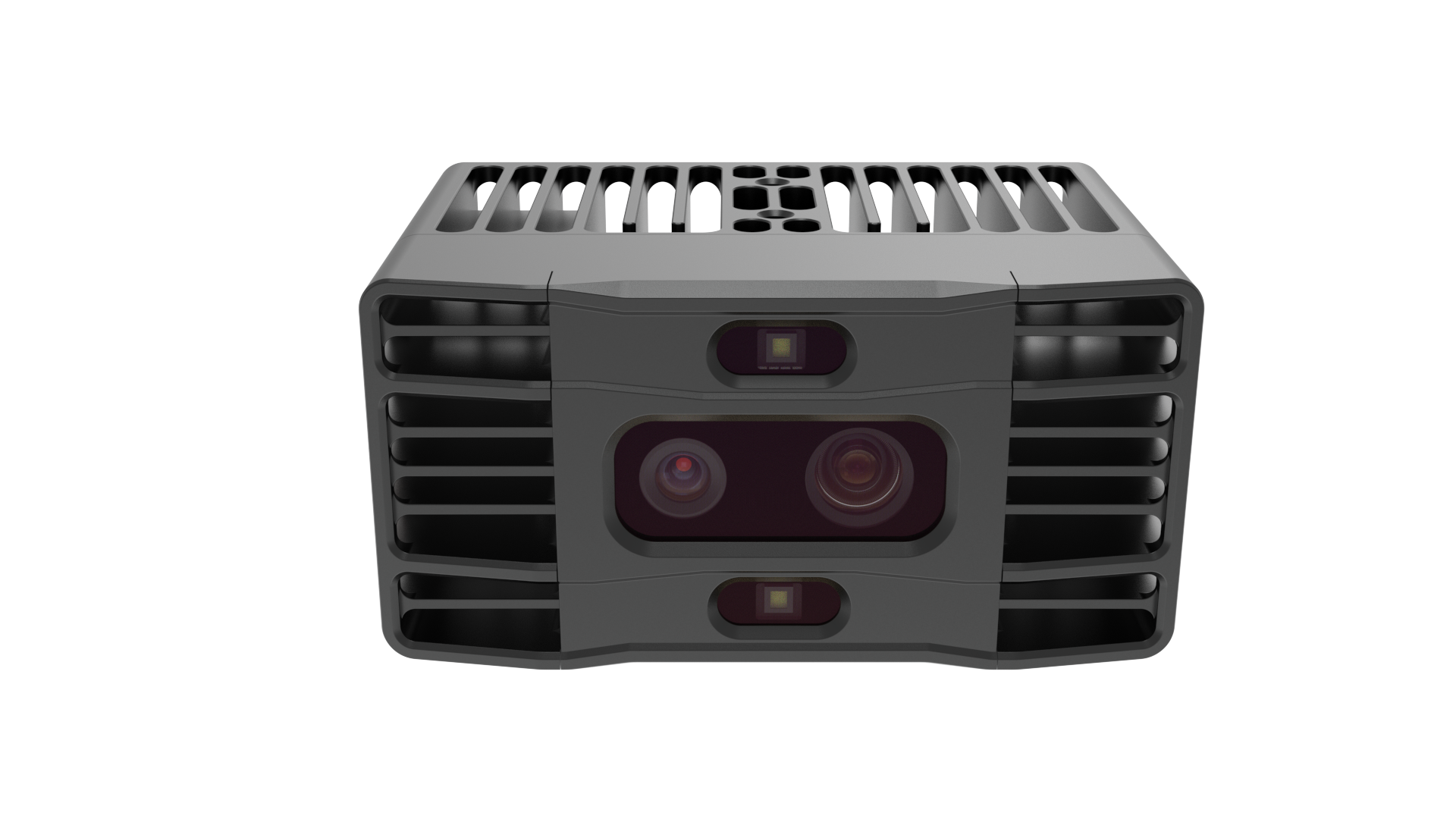
TL460-S1-E1相机外观
1.1 TL460-S1-E1工作场景
适宜场景 :半户外/户外拆垛等
不适宜场景:相机贴地安装,附近有高反物体(如反光柱)场景
1.2 TL460-S1-E1 IO线和数据线定义
1.2.1 IO接口定义
TL460-S1-E1相机的IO引脚定义如下:
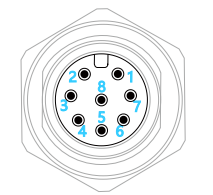
| 序号 | 名称 | 功能描述 | 配套线芯颜色 |
|---|---|---|---|
| 1 | RS485_H | RS485 差分信号_H | 白色 |
| 2 | P_24V | DC or 触发电路电源正 | 棕色 |
| 3 | P_GND | DC or 触发电路电源地 | 绿色 |
| 4 | TRIG_IN | 触发输入信号 | 黄色 |
| 5 | TRIG_OUT | 触发输出信号 | 灰色 |
| 6 | CAN_L | CAN 差分信号_L | 粉色 |
| 7 | CAN_H | CAN 差分信号_H | 蓝色 |
| 8 | RS485_L | RS485 差分信号_L | 红色 |
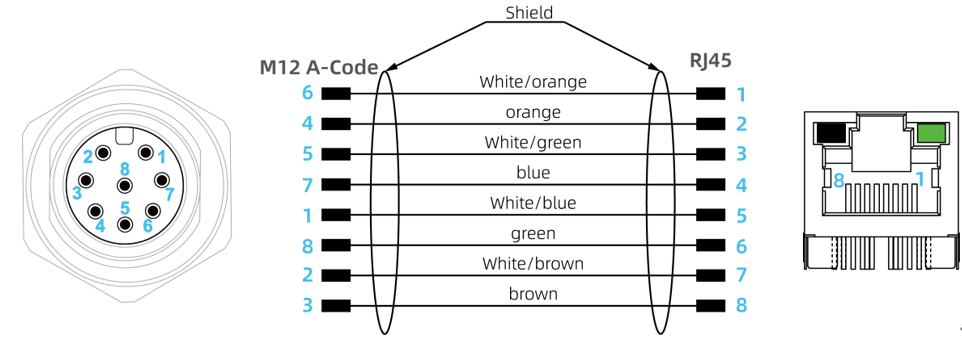
1.2.2 数据接口线
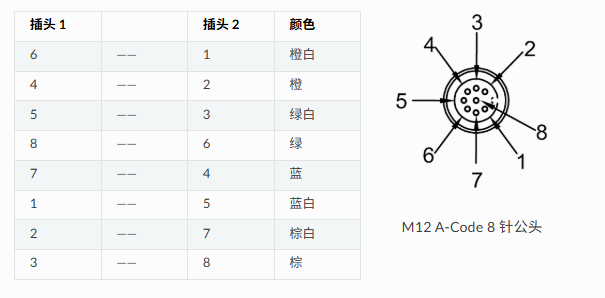
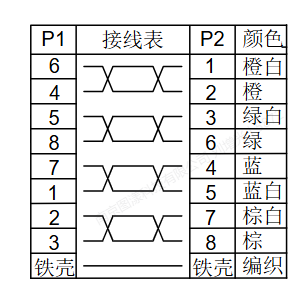
TL460-S1-E1相机数据线如下图:

1.2.3 TL460-S1-E1相机正面安装方向
TL460-S1-E1相机正面安装方向如下:
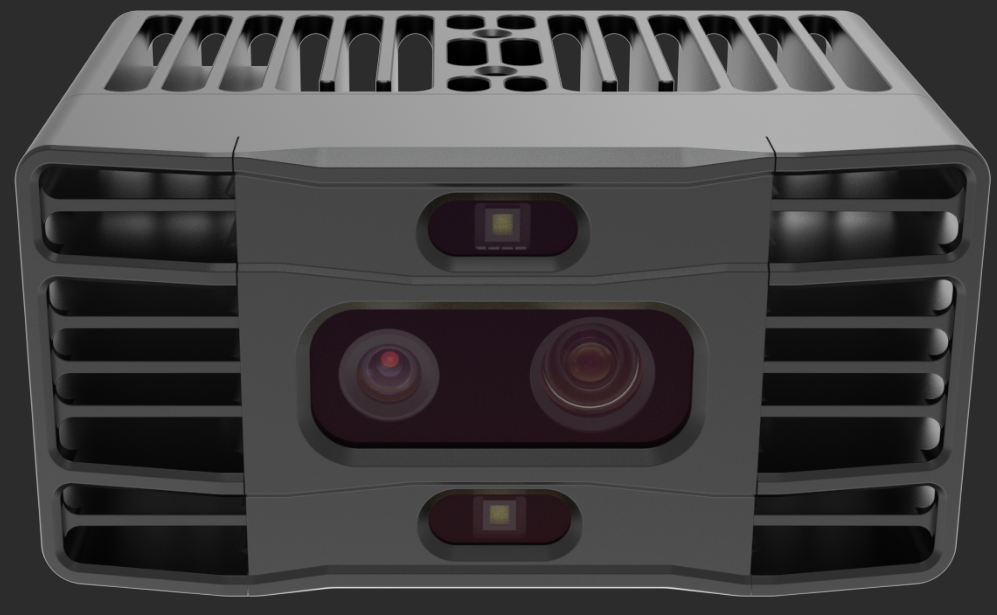
上下两个是发射器,中间左侧是RGB,右侧是IR镜头。
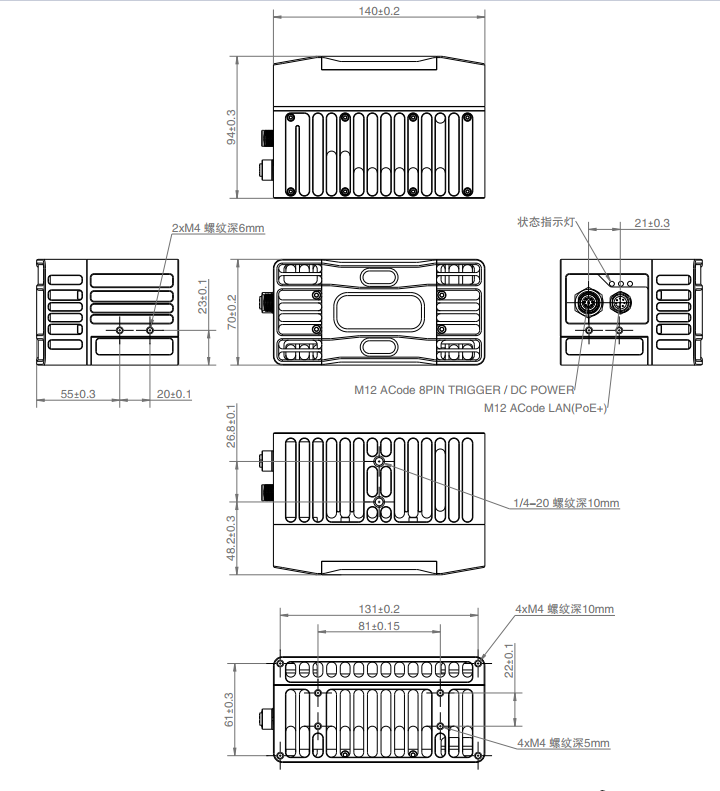
1.2.4 相机结构图纸
1.2.5 TL460-S1-E1相机IO指示灯
TL460-S1-E1相机的状态指示灯如下图:
| 名称 | 颜色 | 功能描述 |
|---|---|---|
| PWR 指示灯 | 红色 | 1Hz 缓慢闪烁:相机工作正常 >1Hz 快速闪烁:固件初始化错误,请查看 -1024 错误码说明 常亮:相机处于死机状态 常灭:相机未通电或处于死机状态 |
| ETH 指示灯 | 绿色 | 常亮:相机工作在千兆以太网模式下 常灭:相机未工作在千兆以太网模式下 |
| ACT 指示灯 | 黄色 | 闪烁:有数据传输 常亮:无数据传输 |
TL460-S1-E1相机指示灯说明
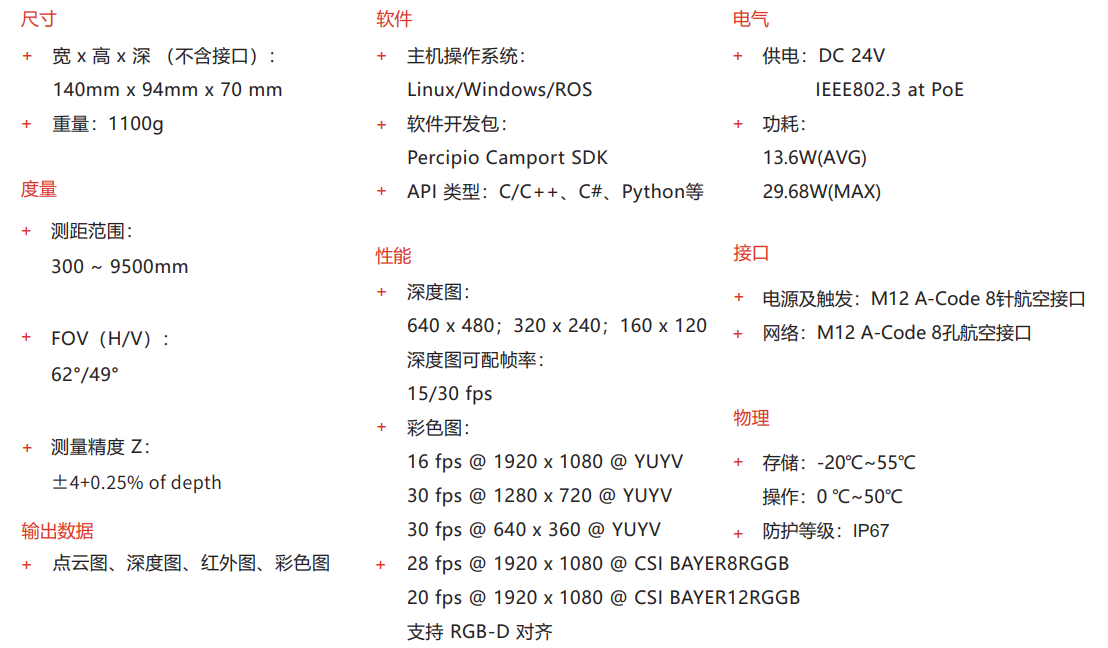
1.3 TL460-S1-E1相机性能指标
TL460-S1-E1相机的性能指标如下:
1.3.1 测量性能
| 参数 | 值 |
|---|---|
| 最大测距范围 | 300 mm ~ 9500 mm |
| 深度视场 | 近视场:360 mm x 273 mm @ 300 mm (H/V:约 62°/49°) 远视场:11416 mm x 8659 mm @ 9500 mm (H/V:约 62°/49°) |
| 彩色视场 | 1911 mm x 1152 mm @ 1500 mm (H/V:约 65°/42°) |
详情可打开如下链接:图漾官网TOF相机规格书
2.TL460-S1-E1相机操作
2.1 下载看图软件连接相机
1.TL460-S1-E1相机,建议搭配图漾官网PercipioViewer看图软件使用,看图软件下载链接:图漾PercipioViewer软件下载链接
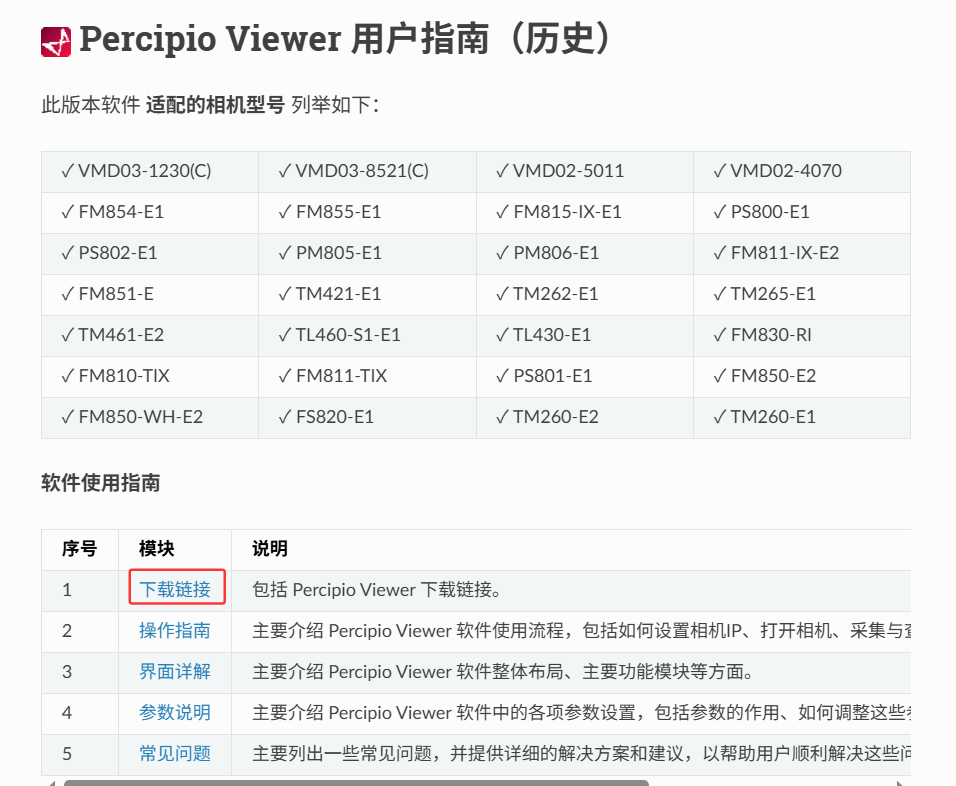
2.PercipioViewer看图软件详细操作,可查看此链接:图漾官网PercipioViewer软件操作手册
2.2 图漾PercipioViewer软件更改相机IP
详细更改相机的IP操作,可打开链接:
2.3 深度图调参
2.3.1 相机的IR参数
PercipioViewer软件参数设置:
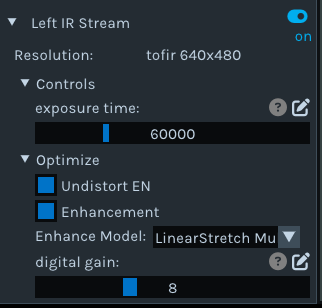
深度图成像质量不好时,建议优先调整左IR的曝光时间。
2.3.2 相机的Depth参数
PercipioViewer软件参数设置:
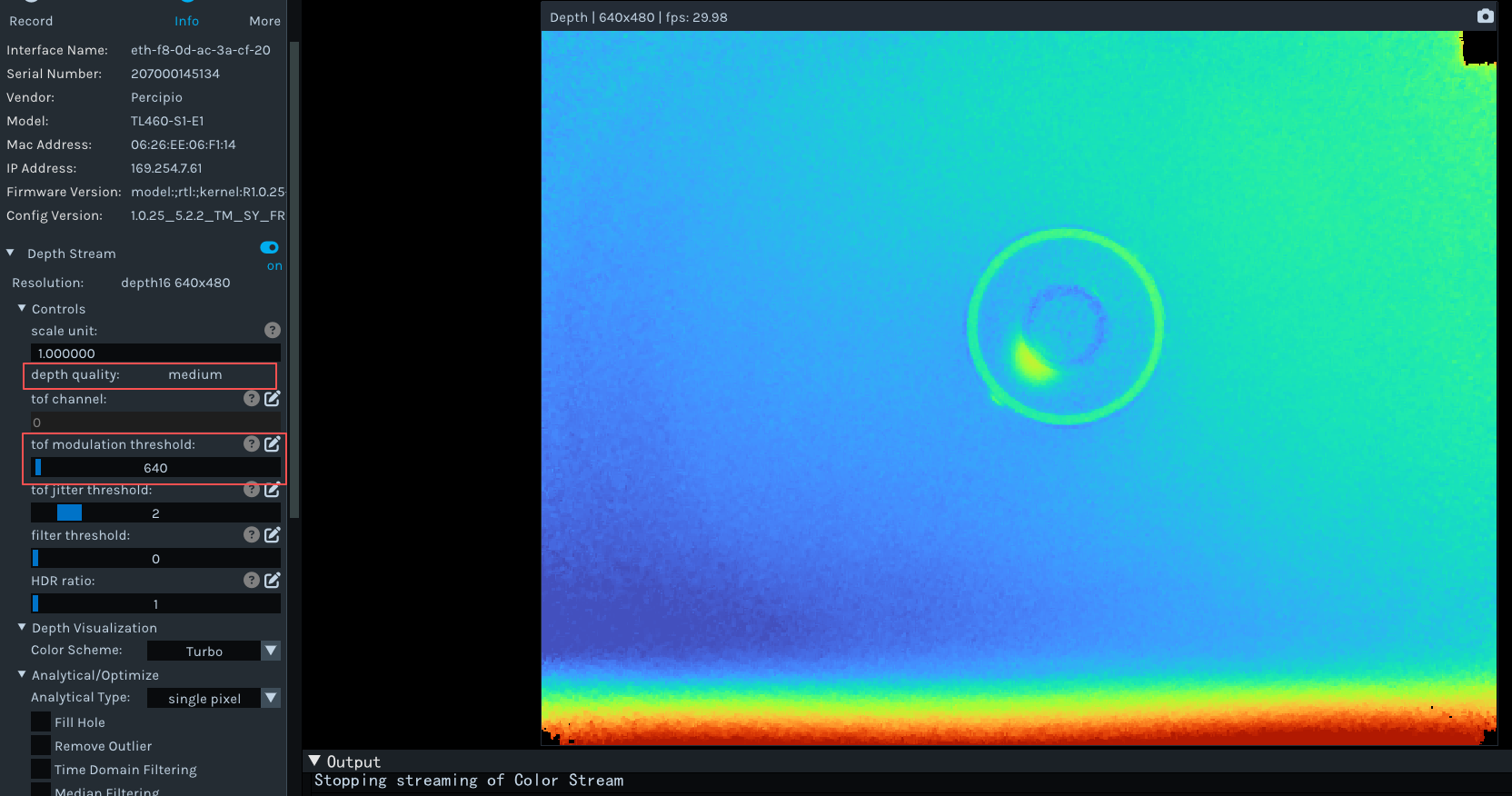
HDR ratio只有在Depth Quality改为High模式时,才生效。
2.3.3 相机的RGB参数
PercipioViewer软件参数设置:
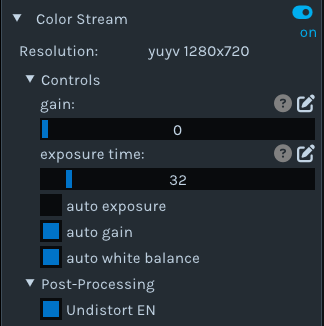
每个参数的作用,可参看链接:相机参数作用
2.4 深度图评估
2.4.1 评估点云
打开深度取图开关,打开下图如下位置:
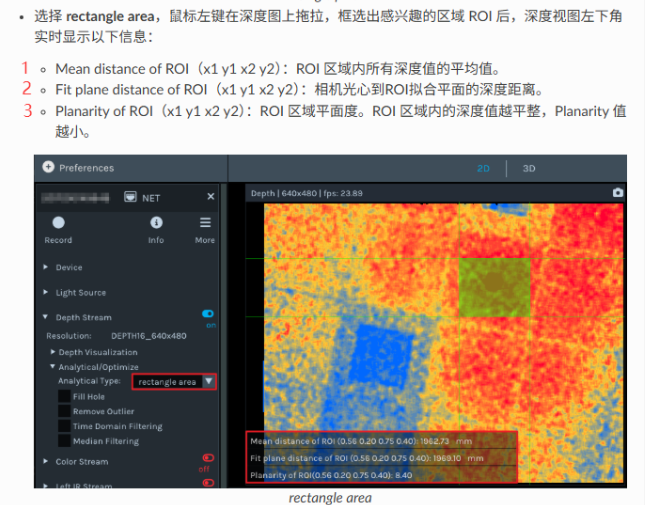
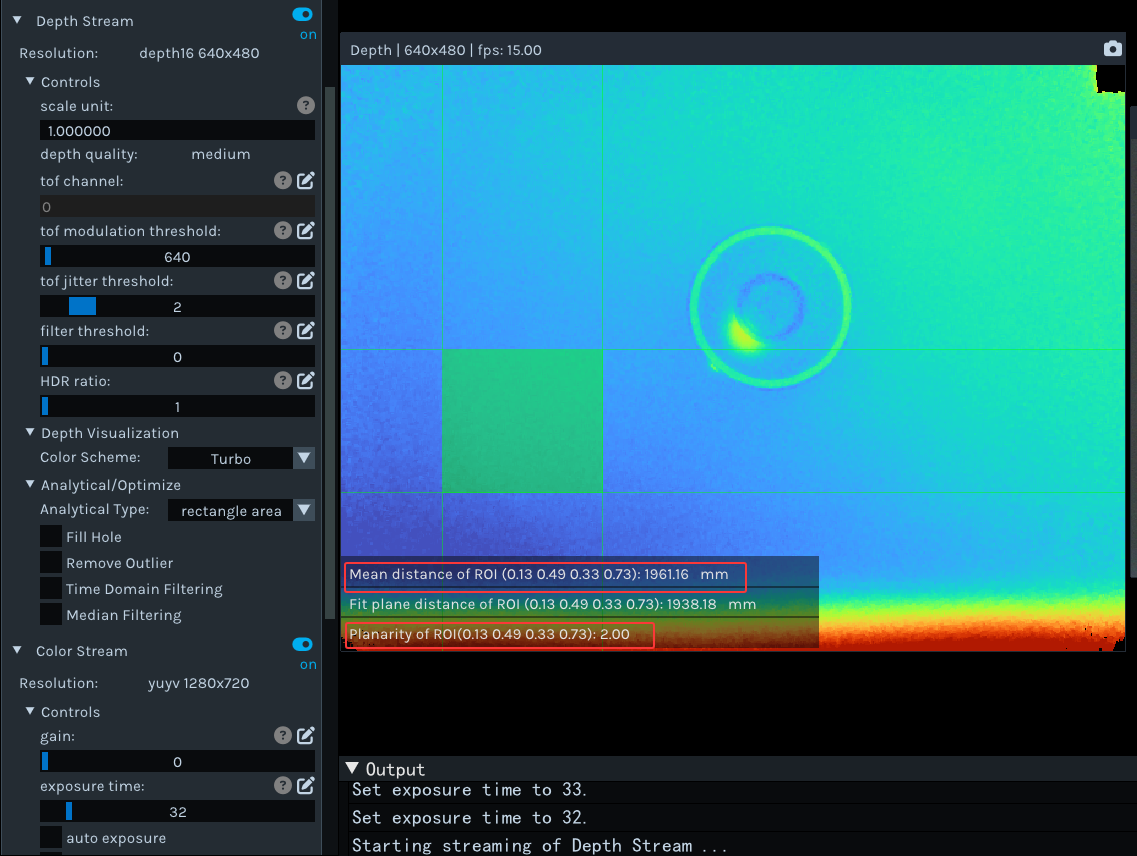
个人建议参考上图中的1和3,2的数值会受到ROI大小和ROI是否平整等因素有关,会波动较大。
2.4.2 填充空洞
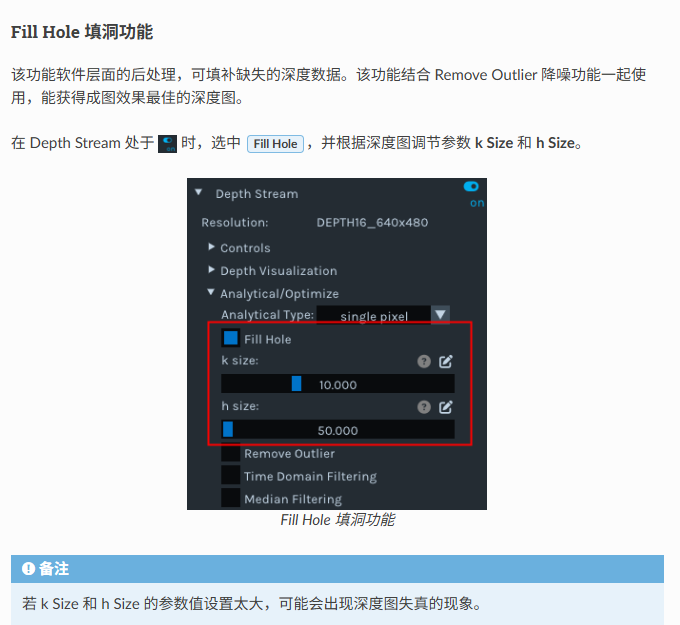
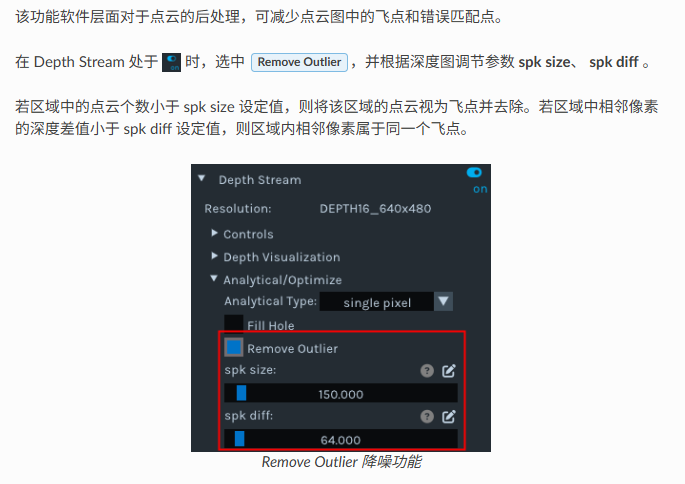
2.4.3 滤波功能
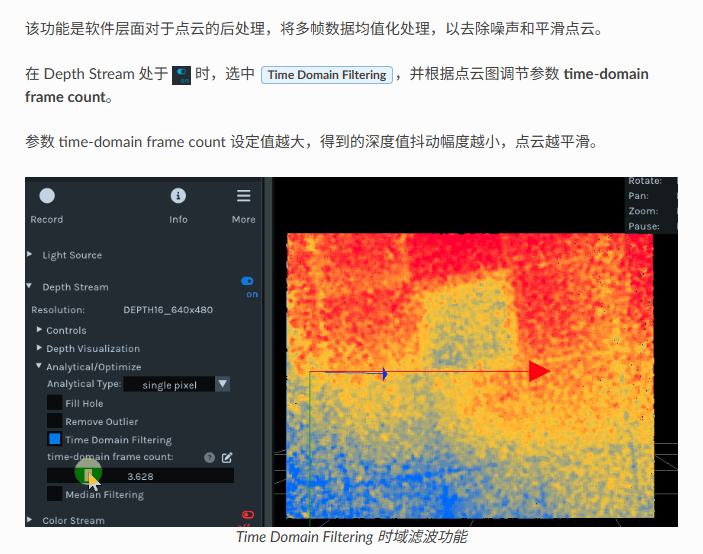
2.4.4 时域滤波功能
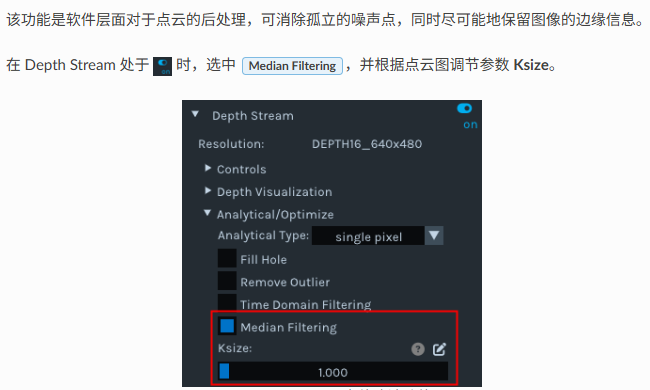
2.4.5 中值滤波
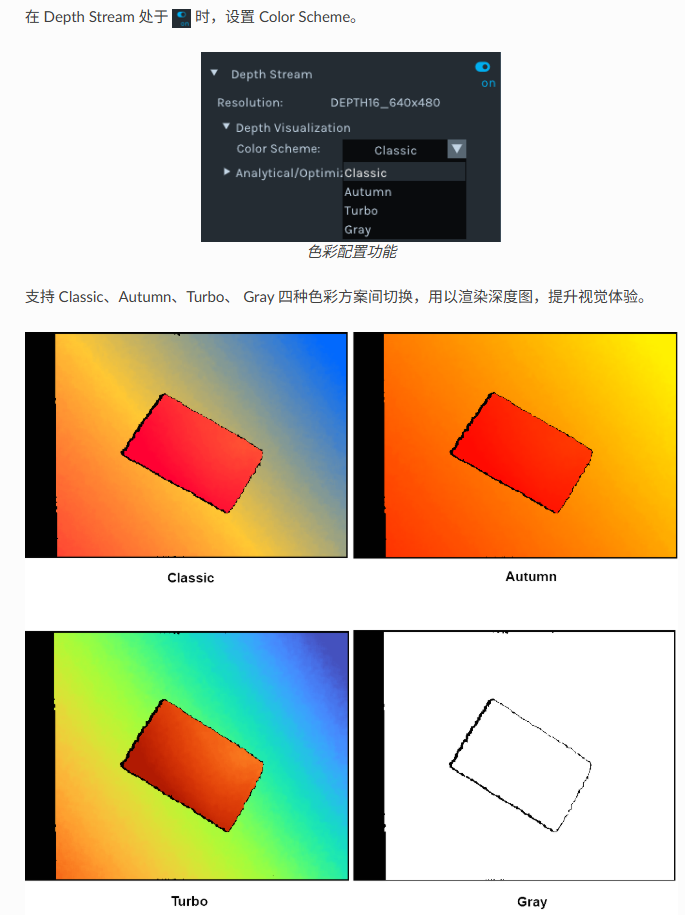
2.4.6 调节深度图渲染效果
个人推荐使用Turto渲染功能,该功能类似Opencv中的colorformap函数。
2.5 保存图像
详细操作和图像格式,可打开链接:图漾看图软件保存图片
2.5.1 单张存图
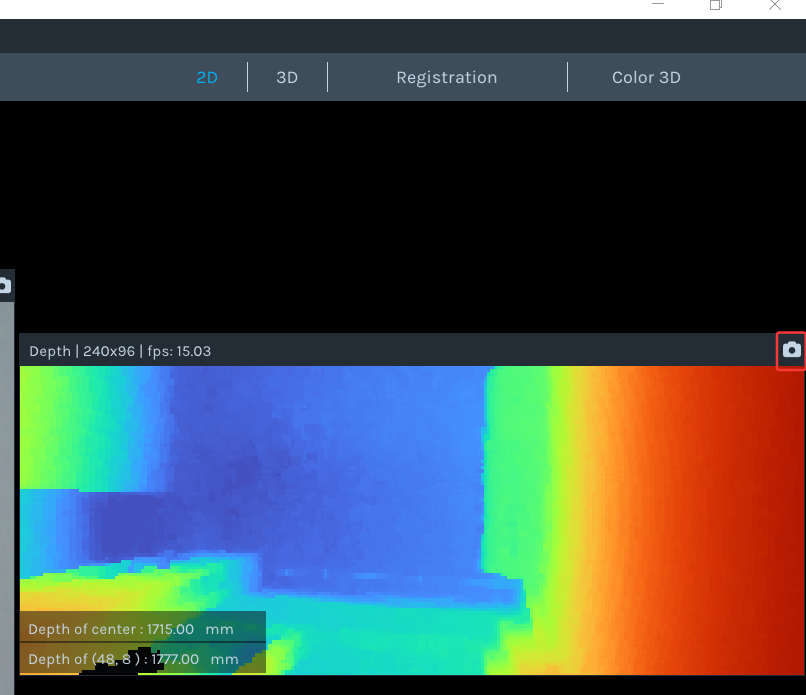
具体操作步骤如下:

2.5.2 连续存图
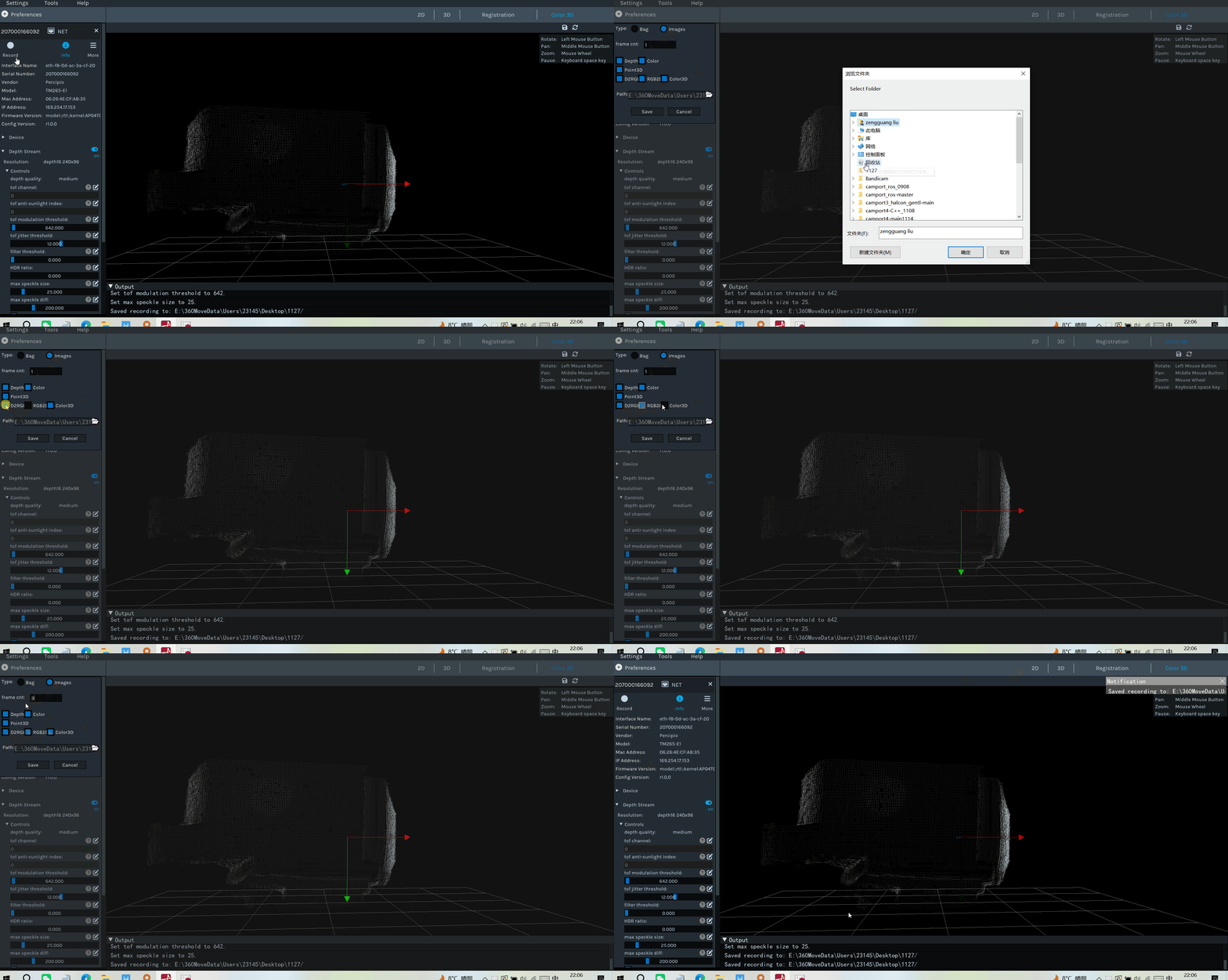
Percipio Viewer 可以按照预设帧数连续保存图像(深度图、彩色图、左右灰度图、深度图映射至彩色图的对齐图、彩色图映射至深度图的对齐图、点云图、深度与彩色对齐后生成的点云图)。
2.6 相机保存参数配置
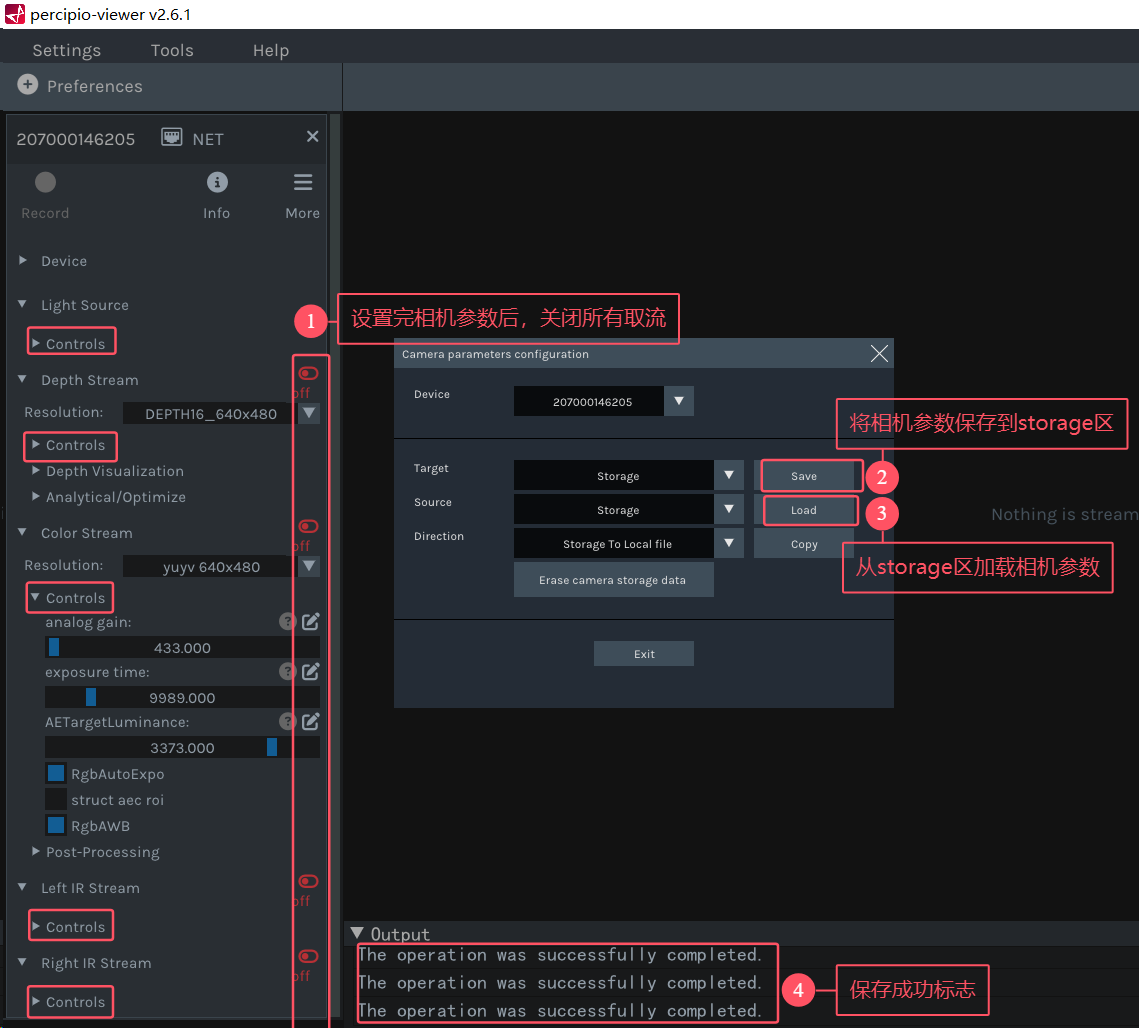
保存相机参数进相机storage区域,具体操作流程如下图:
2.6.1 保存参数限制
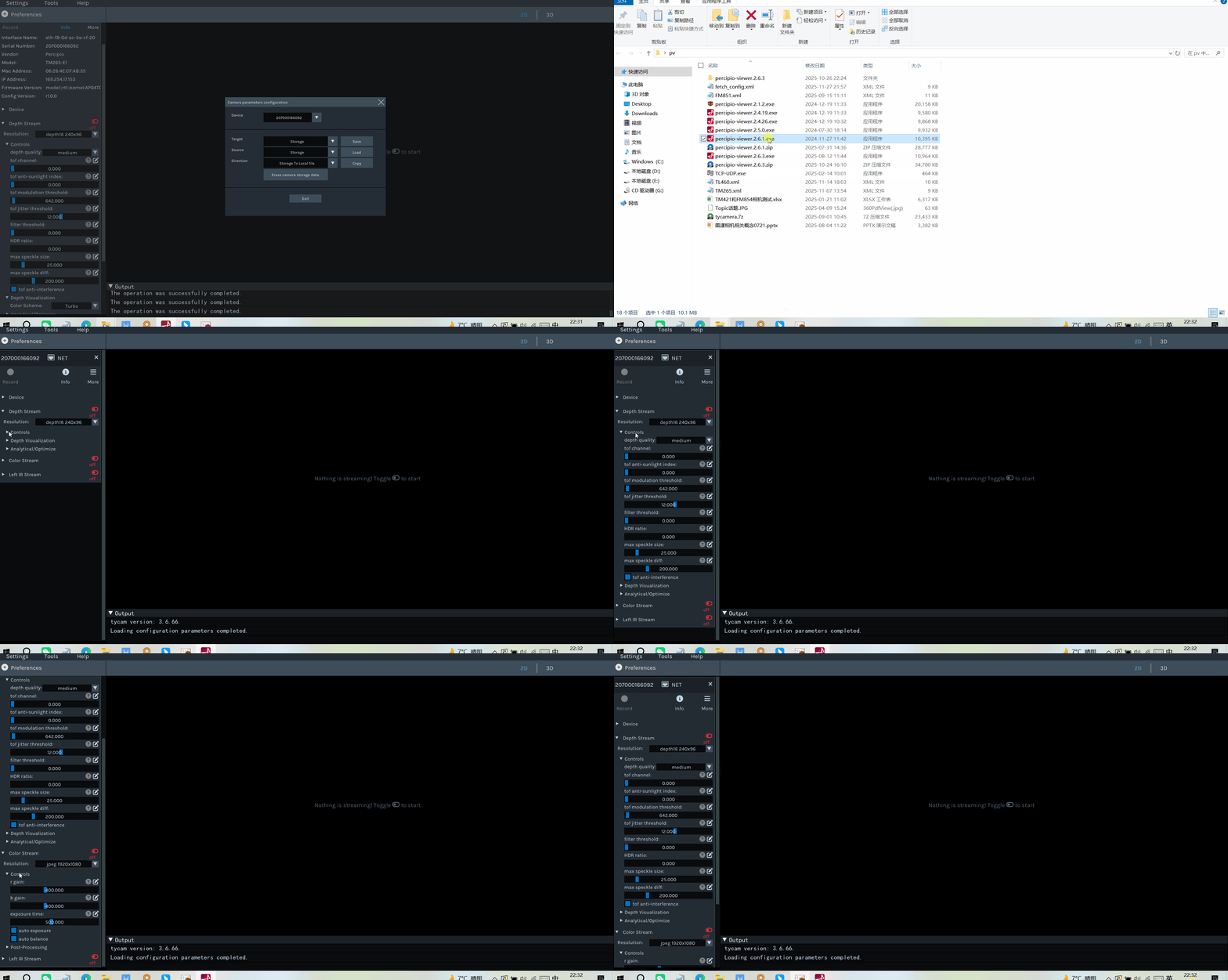
只能保存每个组件control下的属性,其他的参数无法保存进相机里。
3.TL460-S1-E1相机SDK相关
TL460-S1-E1相机,推荐使用的编程语言和SDK版本如下:
3.1 TYCamera之C++语言SDK(推荐)
TL460-S1-E1相机,既可以使用官网3.X.X版本的SDK,也可以使用4.X.X版本的SDK。
具体操作和Sample和案例,可打开如下链接:
官网修改后的C++语言SDK,可参考链接:官网修改后的C++语言的SDK
1.如果只是单纯使用TL460-S1-E1相机,或者其他旧的相机,没有使用GM46X和PMD相机,建议使用3.6.66 版本SDK。
2.如果同时使用TL460-S1-E1和GM46X新相机,个人仍建议使用4.X.X版本中的Sample_V1例子。
3.2 TYCamera之ROS1版本(推荐)
TL460-S1-E1相机,既可以使用官网3.X.X版本的SDK,也可以使用4.X.X版本的SDK。
具体操作和Sample和案例,可打开如下链接:
1.图漾相机-ROS1_SDK_ubuntu_3.X.X版本编译
2.图漾相机-ROS1_SDK_ubuntu 4.X.X版本编译
3.3 TYCamera之ROS2版本(推荐)
TL460-S1-E1相机,既可以使用官网3.X.X版本的SDK,也可以使用4.X.X版本的SDK。
具体操作和Sample和案例,可打开如下链接:
1.图漾相机-ROS2-SDK-Ubuntu 3.X.X版本编译
2.图漾相机-ROS2-SDK-Ubuntu 4.X.X版本编译
1.如果只是单纯使用TM461-E2相机,或其他旧的相机,没有使用GM46X和PMD相机,建议使用3.6.66 版本SDK。
2.如果同时使用TM461-E2和GM46X新相机,建议使用4.1.18及其以上版本SDK。
3.4 TYCamera之C#语言SDK
目前只建议使用3.X.X版本
建议参考以下链接
如果涉及到和GM46X和PMD相机混用的情况,建议使用官网VCamera的SDK。
VCamera的详细操作可打开链接:VCamera 使用指南(C#)
3.5 TYCamera之Python语言SDK
目前只建议使用3.X.X版本
建议参考以下链接:
1.图漾相机------Python 3.X.X版本属性设置
如果涉及到和GM46X和PMD相机混用的情况,建议使用官网VCamera的SDK。
VCamera的详细操作可打开链接:VCamera 使用指南(Python)
3.6 Halcon语言SDK
建议参考以下链接:
1.图漾Halcon版本SDK使用教程【V1.1.X新版本】
3.7 VisionPro语言SDK
建议参考以下链接:
如果使用VisionPro调用TOF相机,请去官网下载最新驱动SDK。
4.TL460-S1-E1相机内外参说明
4.1 如何获取TL460-S1-E1相机内参?
4.1.1 方法一 运行DumpCalibInfo
SDK3.6.52之后版本,新增示例程序,此示例程序可以将相机的标定参数以json文件的形式导出到本地。
编译C++语言中的例子,之后运行Sample_V1文件夹中的DumpCalibInfo 例子,会生成一个json文件,里面记录TL460--S1-E1相机的内外参信息。
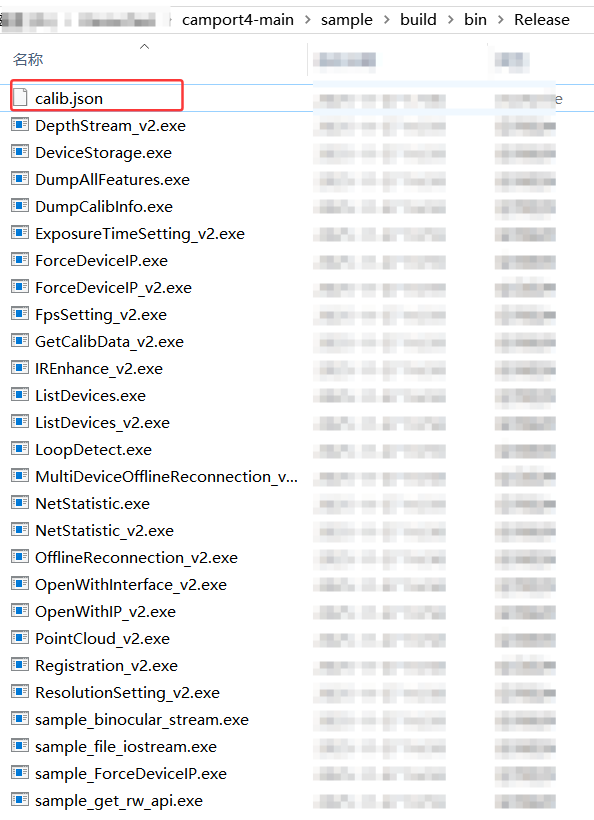
生成的json文件如下图:
cpp
{
	"sn": "207000145134",
	"timestamp": "2026-04-12 12:21:45",
	"depth_calib_info" : {
		"intri": [
		531.241882,
		0.000000,
		303.214355,
		0.000000,
		531.211975,
		237.340317,
		0.000000,
		0.000000,
		1.000000
		],
		"distortion": [
		-0.410287,
		-0.218807,
		0.002498,
		-0.001401,
		0.318380,
		-0.169838,
		-0.407120,
		0.390047,
		0.001913,
		0.000694,
		-0.004274,
		0.000023
		],
		"image_width": 640,
		"image_height": 480,
		"scale_unit": 1.000000
	},
	"color_calib_info" : {
		"intri": [
		1409.721313,
		0.000000,
		975.703369,
		0.000000,
		1408.939331,
		541.189575,
		0.000000,
		0.000000,
		1.000000
		],
		"extri": [
		0.999977,
		0.003591,
		-0.005803,
		29.889338,
		-0.003533,
		0.999944,
		0.009964,
		-0.130331,
		0.005838,
		-0.009944,
		0.999934,
		0.991434,
		0.000000,
		0.000000,
		0.000000,
		1.000000,
		-0.456224
		],
		"distortion": [
		-0.456224,
		-0.212337,
		0.004986,
		-0.002453,
		0.215149,
		-0.190773,
		-0.450214,
		0.293084,
		0.004615,
		-0.000380,
		-0.010916,
		0.001956
		],
		"image_width": 1920,
		"image_height": 1080
	}
}
4.1.2 方法二 运行DumpAllFeature例子
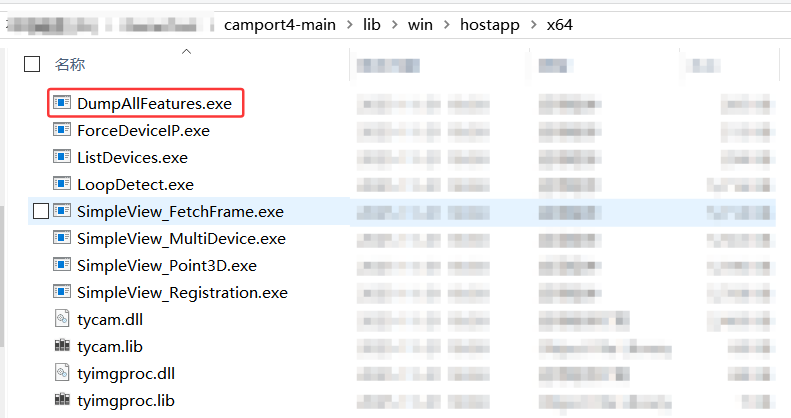
使用官网如下路径下的x64 压缩包,通过鼠标右键+shift键 ,进入到PowerShell界面,运行DumpAllFeatures例子,生成对应内容:
cpp
  TY_COMPONENT_DEPTH_CAM:
         TY_STRUCT_CAM_INTRINSIC: comp(0x10000) feat(0x7000) name(depth intrinsic) access(1) bindComponent(0x0) bindFeature(0x0)
                       531.241882 0.000000 303.214355
                       0.000000 531.211975 237.340317
                       0.000000 0.000000 1.000000
         TY_STRUCT_CAM_DISTORTION: comp(0x10000) feat(0x7006) name(distortion) access(1) bindComponent(0x0) bindFeature(0x0)
                       -0.410287 -0.218807 0.002498 -0.001401
                       0.318380 -0.169838 -0.407120 0.390047
                       0.001913 0.000694 -0.004274 0.000023
         TY_INT_WIDTH: comp(0x10000) feat(0x1104) name(image width) access(1) bindComponent(0x0) bindFeature(0x0)
                       : 640
         TY_INT_HEIGHT: comp(0x10000) feat(0x1105) name(image height) access(1) bindComponent(0x0) bindFeature(0x0)
                       : 480
         TY_ENUM_IMAGE_MODE: comp(0x10000) feat(0x3109) name(image mode) access(3) bindComponent(0x0) bindFeature(0x0)
                       : entry count 3
                       :     value(0x202801e0), desc(depth16 640x480)
                       :     value(0x201400f0), desc(depth16 320x240)
                       :     value(0x200a0078), desc(depth16 160x120)

  TY_COMPONENT_IR_CAM_LEFT:
         TY_STRUCT_CAM_INTRINSIC: comp(0x40000) feat(0x7000) name(intrinsic) access(1) bindComponent(0x0) bindFeature(0x0)
                      531.241882 0.000000 303.214355
                       0.000000 531.211975 237.340317
                       0.000000 0.000000 1.000000
         TY_STRUCT_CAM_DISTORTION: comp(0x40000) feat(0x7006) name(distortion) access(1) bindComponent(0x0) bindFeature(0x0)
                       -0.410287 -0.218807 0.002498 -0.001401
                       0.318380 -0.169838 -0.407120 0.390047
                       0.001913 0.000694 -0.004274 0.000023
         TY_INT_WIDTH: comp(0x40000) feat(0x1104) name(image width) access(1) bindComponent(0x0) bindFeature(0x0)
                       : 640
         TY_INT_HEIGHT: comp(0x40000) feat(0x1105) name(image height) access(1) bindComponent(0x0) bindFeature(0x0)
                       : 480
         TY_ENUM_IMAGE_MODE: comp(0x40000) feat(0x3109) name(image mode) access(3) bindComponent(0x0) bindFeature(0x0)
                      : entry count 2
                       :     value(0x235003c0), desc(mono16 1280x960)
                       :     value(0xa42801e0), desc(tofir 640x480)

  TY_COMPONENT_RGB_CAM_LEFT:
         TY_STRUCT_CAM_INTRINSIC: comp(0x100000) feat(0x7000) name(rgb intrinsic) access(1) bindComponent(0x0) bindFeature(0x0)
                       939.814209 0.000000 650.468933
                       0.000000 939.292908 360.793060
                      0.000000 0.000000 1.000000
         TY_STRUCT_EXTRINSIC_TO_DEPTH: comp(0x100000) feat(0x7001) name(rgb to leftIR extrinsic) access(1) bindComponent(0x0) bindFeature(0x0)
                       0.999977 0.003591 -0.005803 29.889338
                       -0.003533 0.999944 0.009964 -0.130331
                       0.005838 -0.009944 0.999934 0.991434
                       0.000000 0.000000 0.000000 1.000000
         TY_STRUCT_CAM_DISTORTION: comp(0x100000) feat(0x7006) name(distortion) access(1) bindComponent(0x0) bindFeature(0x0)
                       -0.456224 -0.212337 0.004986 -0.002453
                      0.215149 -0.190773 -0.450214 0.293084
                       0.004615 -0.000380 -0.010916 0.001956
         TY_INT_WIDTH: comp(0x100000) feat(0x1104) name(image width) access(1) bindComponent(0x0) bindFeature(0x0)
                       : 1280
         TY_INT_HEIGHT: comp(0x100000) feat(0x1105) name(image height) access(1) bindComponent(0x0) bindFeature(0x0)
                       : 720
         TY_ENUM_IMAGE_MODE: comp(0x100000) feat(0x3109) name(image mode) access(3) bindComponent(0x0) bindFeature(0x0)
                       : entry count 5
                       :     value(0x12780438), desc(bayer8 RGGB 1920x1080)
                       :     value(0x62780438), desc(bayer12 RGGB 1920x1080)
                       :     value(0x22780438), desc(yuyv 1920x1080)
                       :     value(0x225002d0), desc(yuyv 1280x720)
                       :     value(0x22280168), desc(yuyv 640x360)
4.1.3 通过PV软件
具体方法如下:

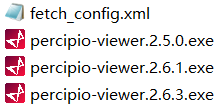
获得的fetch_config.xml文件内容如下:
cpp
<?xml version="1.0" ?>
<config version="1">
    <comprotocol>1.0</comprotocol>

    <component id="0x80000000" addr="0x01000000" name="device" blank="1">
        <feature id="0x5f00" name="SN" rw="1" hide="0">207000145134</feature>
        <feature id="0x5f01" name="vendor" rw="1" hide="0">Percipio</feature>
        <feature id="0x5f02" name="model" rw="1" hide="0">TL460-S1-E1</feature>
        <feature id="0x1202" addr="0x204" name="frame per trigger" rw="3" hide="0" min="1" max="100" inc="1"></feature>
        <feature id="0x7523" addr="0x208" name="struct trigger mode" rw="3" hide="0"></feature>
		<feature addr="0x214" hide="0" id="0x4207" name="trigger out io" rw="2" writableAtRun="1"/>
        <feature id="0x4205" addr="0x20c" name="cmos sync" rw="3" hide="0"></feature>
		<feature absaddr="0x64c" hide="0" id="0x1010" name="persistent IP" rw="3"/>
		<feature absaddr="0x65c" hide="0" id="0x1011" name="persistent netmask" rw="3"/>
		<feature absaddr="0x66c" hide="0" id="0x1012" name="persistent gateway" rw="3"/>
        <feature id="0x3211" addr="0x22c" name="sync type" rw="3" hide="0" volatile="1">
            <entry name="sync type none" value="0"/>
            <entry name="sync type host" value="1"/>
            <entry name="sync type ntp" value="2"/>
        </feature>
        <feature id="0x4212" addr="0x230" name="sync ready" rw="1" hide="0" volatile="1"/>
        <feature addr="0x220" hide="0" id="0x3209" name="stream async" rw="3">
            <entry name="async off" value="0" />
            <entry name="async depth" value="1" />
            <entry name="async rgb" value="2" />
            <entry name="async depth rgb" value="3" />
            <entry name="async all" value="255" />
        </feature>
        <feature addr="0x400020" hide="0" id="0x1014" inc="1" max="10000" min="0" name="packet delay" rw="3"/>
        <feature addr="0x40002c" hide="0" id="0x1017" inc="1" max="1500" min="100" name="packet size" rw="3"/>
        <feature id="0x5f03" name="hardware version" rw="1" hide="0">1.3.0</feature>
        <feature id="0x5f04" name="firmware version" rw="1" hide="0">3.13.50</feature>
        <build>
            <hash>model:;rtl:;kernel:R1.0.25-0-g6231e4fd6e;tycam:R3.6.9-0000007f;gevcam:R3.13.50-20-g783f8a36</hash>
        </build>
        <tech_model>TL460-GTI8-LD-CUT-X3MV5</tech_model>
        <generated_time>2023-11-29T064746</generated_time>
        <calibration_time>2023-11-29T144744</calibration_time>
        <calibration_tag>207000145134</calibration_tag>
		<intpf>AWQAUAACAQAAAA==</intpf>
		<binfile_tag>5.2.2_TM_SY_FRE_END_40</binfile_tag>
		<config_version>1.0.25_5.2.2_TM_SY_FRE_END_40</config_version>
    </component>

    <component id="0x00010000" addr="0x02000000" name="depth">
	    <feature hide="0" id="0x210a" name="scale unit" rw="1">1.0</feature>
        <feature id="0x1104" addr="0x10" name="image width" rw="1" hide="0" volatile="1">640</feature>
        <feature id="0x1105" addr="0x14" name="image height" rw="1" hide="0" volatile="1">480</feature>
        <feature id="0x3109" addr="0x18" name="image mode" rw="3" hide="0">
            <entry value="0x202801e0" name="depth16 640x480"></entry>
            <entry value="0x201400f0" name="depth16 320x240"></entry>
            <entry value="0x200a0078" name="depth16 160x120"></entry>
        </feature>
        <feature id="0x3900" addr="0x508" name="depth quality" rw="3" hide="0">
            <entry name="medium" value= "2"/>
            <entry name="high" value= "4"/>
        </feature>
		<feature id="0x1903" addr="0x0514" name="tof modulation threshold" rw="3" hide="0" min="0" max="65536" inc="1" writableAtRun="1" volatile="1"></feature>
        <feature id="0x1307" addr="0x0324" name="tof jitter threshold" rw="3" hide="0" min="1" max="10" inc="1" writableAtRun="1" volatile="1"></feature>
		<feature id="0x1901" addr="0x050c" name="filter threshold" rw="3" hide="0" min="0" max="100" inc="1" writableAtRun="1"></feature>
        <feature id="0x1902" addr="0x0510" name="tof channel" rw="3" hide="0" min="0" max="4" inc="1"></feature>
		<feature id="0x1306" addr="0x0320" name="HDR ratio" rw="3" hide="0" min="1" max="100" inc="1" writableAtRun="1"></feature>
        <feature id="0x7000" name="depth intrinsic" rw="1" hide="0" >  531.241882 0.000000 303.214355 0.000000 531.211975 237.340317 0.000000 0.000000 1.000000</feature>
        <feature id="0x7006" name="distortion" rw="1" hide="0">  -0.410287 -0.218807 0.002498 -0.001401 0.318380 -0.169838 -0.407120 0.390047 0.001913 0.000694 -0.004274 0.000023</feature>
        <feature id="0x1003" name="intrinsic width" rw="1" hide="1">640</feature>
        <feature id="0x1004" name="intrinsic height" rw="1" hide="1">480</feature>
    </component>

    <component id="0x00040000" addr="0x03000000" name="leftIR">
        <feature id="0x1104" addr="0x10" name="image width" rw="1" hide="0">640</feature>
        <feature id="0x1105" addr="0x14" name="image height" rw="1" hide="0">480</feature>
        <feature id="0x1003" name="intrinsic width" rw="1" hide="1">640</feature>
        <feature id="0x1004" name="intrinsic height" rw="1" hide="1">480</feature>
        <feature id="0x3109" addr="0x18" name="image mode" rw="3" hide="0">
			<entry value="0x235003c0" name="mono16 1280x960"></entry>
			<entry value="0xa42801e0" name="tofir 640x480"></entry>
        </feature>
        <feature hide="0" id="0x7000" name="intrinsic" rw="1">  531.241882 0.000000 303.214355 0.000000 531.211975 237.340317 0.000000 0.000000 1.000000</feature>
        <feature hide="0" id="0x7006" name="distortion" rw="1">  -0.410287 -0.218807 0.002498 -0.001401 0.318380 -0.169838 -0.407120 0.390047 0.001913 0.000694 -0.004274 0.000023</feature>
        <feature id="0x1301" addr="0x304" name="exposure time" rw="3" hide="0" min="60" max="240000" inc="2" writableAtRun="1"></feature>
    </component>

    <component id="0x00100000" addr="0x05000000" name="RGB">
        <feature id="0x1104" addr="0x10" name="image width" rw="1" hide="0" volatile="1">1920</feature>
        <feature id="0x1105" addr="0x14" name="image height" rw="1" hide="0" volatile="1">1080</feature>
        <feature id="0x3109" addr="0x18" name="image mode" rw="3" hide="0">
			<entry value="0x12780438" name="bayer8 RGGB 1920x1080"></entry>
            <entry value="0x62780438" name="bayer12 RGGB 1920x1080"></entry>
            <entry value="0x22780438" name="yuyv 1920x1080"></entry>
            <entry value="0x225002d0" name="yuyv 1280x720"></entry>
            <entry value="0x22280168" name="yuyv 640x360"></entry>
        </feature>
        <feature id="0x1301" addr="0x304" name="exposure time" rw="3" hide="0" inc="1" min="1" max="338" writableAtRun="1"></feature>
        <feature id="0x1303" addr="0x310" name="gain" rw="3" hide="0" inc="1" min="0" max="238"  writableAtRun="1"></feature>
        <feature id="0x4302" addr="0x30c" name="auto gain" rw="3" hide="0" writableAtRun="1"></feature>
        <feature id="0x4300" addr="0x300" name="auto exposure" rw="3" hide="0" writableAtRun="1"></feature>
        <feature id="0x4304" addr="0x314" name="auto white balance" rw="3" hide="0" writableAtRun="1"></feature>
        <feature id="0x7305" addr="0x224" name="struct aec roi" rw="3" hide="0" writableAtRun="1"></feature>
        <feature id="0x1003" name="intrinsic width" rw="1" hide="1">1920</feature>
        <feature id="0x1004" name="intrinsic height" rw="1" hide="1">1080</feature>
        <feature hide="0" id="0x7000" name="rgb intrinsic" rw="1"> 1409.721313 0.000000 975.703369 0.000000 1408.939331 541.189575 0.000000 0.000000 1.000000</feature>
        <feature hide="0" id="0x7001" name="rgb to leftIR extrinsic" rw="1"> 0.999977 0.003591 -0.005803 29.889338 -0.003533 0.999944 0.009964 -0.130331 0.005838 -0.009944 0.999934 0.991434 0.000000 0.000000 0.000000 1.000000</feature>
        <feature hide="0" id="0x7006" name="distortion" rw="1"> -0.456224 -0.212337 0.004986 -0.002453 0.215149 -0.190773 -0.450214 0.293084 0.004615 -0.000380 -0.010916 0.001956</feature>
    </component>
</config>相机的fetch_config.xml属性说明,请打开如下链接:属性说明
4.2 TL460-S1-E1相机内参说明
运行DumpAllFeatures例子,具体方法参考4.1章节方法二,打印出来的内参如下:
cpp
  TY_COMPONENT_DEPTH_CAM:
         TY_STRUCT_CAM_INTRINSIC: comp(0x10000) feat(0x7000) name(depth intrinsic) access(1) bindComponent(0x0) bindFeature(0x0)
                       531.241882 0.000000 303.214355
                       0.000000 531.211975 237.340317
                       0.000000 0.000000 1.000000
         TY_STRUCT_CAM_DISTORTION: comp(0x10000) feat(0x7006) name(distortion) access(1) bindComponent(0x0) bindFeature(0x0)
                       -0.410287 -0.218807 0.002498 -0.001401
                       0.318380 -0.169838 -0.407120 0.390047
                       0.001913 0.000694 -0.004274 0.000023
         TY_INT_WIDTH: comp(0x10000) feat(0x1104) name(image width) access(1) bindComponent(0x0) bindFeature(0x0)
                       : 640
         TY_INT_HEIGHT: comp(0x10000) feat(0x1105) name(image height) access(1) bindComponent(0x0) bindFeature(0x0)
                       : 480
         TY_ENUM_IMAGE_MODE: comp(0x10000) feat(0x3109) name(image mode) access(3) bindComponent(0x0) bindFeature(0x0)
                       : entry count 3
                       :     value(0x202801e0), desc(depth16 640x480)
                       :     value(0x201400f0), desc(depth16 320x240)
                       :     value(0x200a0078), desc(depth16 160x120)

  TY_COMPONENT_IR_CAM_LEFT:
         TY_STRUCT_CAM_INTRINSIC: comp(0x40000) feat(0x7000) name(intrinsic) access(1) bindComponent(0x0) bindFeature(0x0)
                      531.241882 0.000000 303.214355
                       0.000000 531.211975 237.340317
                       0.000000 0.000000 1.000000
         TY_STRUCT_CAM_DISTORTION: comp(0x40000) feat(0x7006) name(distortion) access(1) bindComponent(0x0) bindFeature(0x0)
                       -0.410287 -0.218807 0.002498 -0.001401
                       0.318380 -0.169838 -0.407120 0.390047
                       0.001913 0.000694 -0.004274 0.000023
         TY_INT_WIDTH: comp(0x40000) feat(0x1104) name(image width) access(1) bindComponent(0x0) bindFeature(0x0)
                       : 640
         TY_INT_HEIGHT: comp(0x40000) feat(0x1105) name(image height) access(1) bindComponent(0x0) bindFeature(0x0)
                       : 480
         TY_ENUM_IMAGE_MODE: comp(0x40000) feat(0x3109) name(image mode) access(3) bindComponent(0x0) bindFeature(0x0)
                      : entry count 2
                       :     value(0x235003c0), desc(mono16 1280x960)
                       :     value(0xa42801e0), desc(tofir 640x480)

 TY_COMPONENT_RGB_CAM_LEFT:
  TY_STRUCT_CAM_INTRINSIC: comp(0x100000) feat(0x7000) name(rgb intrinsic) access(1) bindComponent(0x0) bindFeature(0x0)
    1409.721313 0.000000 975.703369
    0.000000 1408.939331 541.139575
    0.000000 0.000000 1.000000
  TY_STRUCT_EXTRINSIC_TO_DEPTH: comp(0x100000) feat(0x7001) name(rgb to leftIR extrinsic) access(1) bindComponent(0x0) bindFeature(0x0)
    0.999977 0.003591 -0.005803 29.889338
    -0.003533 0.999944 0.009964 -0.130331
    0.005838 -0.009944 0.999934 0.991434
    0.000000 0.000000 0.000000 1.000000
  TY_STRUCT_CAM_DISTORTION: comp(0x100000) feat(0x7006) name(distortion) access(1) bindComponent(0x0) bindFeature(0x0)
    -0.456224 -0.212337 0.004986 -0.002453
    0.215149 -0.190773 -0.450214 0.293084
    0.004615 -0.000380 -0.010916 0.001956
  TY_INT_WIDTH: comp(0x100000) feat(0x1104) name(image width) access(1) bindComponent(0x0) bindFeature(0x0)
    : 1920
  TY_INT_HEIGHT: comp(0x100000) feat(0x1105) name(image height) access(1) bindComponent(0x0) bindFeature(0x0)
    : 1080
  TY_ENUM_IMAGE_MODE: comp(0x100000) feat(0x3109) name(image mode) access(3) bindComponent(0x0) bindFeature(0x0)
    : entry count 5
      : value(0x12780438), desc(bayer8 RGBB 1920x1080)
      : value(0x62780438), desc(bayer12 RGBB 1920x1080)
      : value(0x22780438), desc(yuyv 1920x1080)
      : value(0x225002d0), desc(yuyv 1280x720)
      : value(0x22230168), desc(yuyv 640x360)
  TY_BOOL_AUTO_EXPOSURE: comp(0x100000) feat(0x4300) name(auto exposure) access(3) bindComponent(0x0) bindFeature(0x0)
    : 0
  TY_INT_EXPOSURE_TIME: comp(0x100000) feat(0x1301) name(exposure time) access(3) bindComponent(0x0) bindFeature(0x0)
    : 32
  TY_BOOL_AUTO_GAIN: comp(0x100000) feat(0x4302) name(auto gain) access(3) bindComponent(0x0) bindFeature(0x0)
    : 1
  TY_INT_GAIN: comp(0x100000) feat(0x1303) name(gain) access(3) bindComponent(0x0) bindFeature(0x0)
    : 0
  TY_BOOL_AUTO_AWB: comp(0x100000) feat(0x4304) name(auto white balance) access(3) bindComponent(0x0) bindFeature(0x0)
4.2.1 深度图内参
cpp
  TY_COMPONENT_DEPTH_CAM:
         TY_STRUCT_CAM_INTRINSIC: comp(0x10000) feat(0x7000) name(depth intrinsic) access(1) bindComponent(0x0) bindFeature(0x0)
                       531.241882 0.000000 303.214355
                       0.000000 531.211975 237.340317
                       0.000000 0.000000 1.000000
         TY_STRUCT_CAM_DISTORTION: comp(0x10000) feat(0x7006) name(distortion) access(1) bindComponent(0x0) bindFeature(0x0)
                       -0.410287 -0.218807 0.002498 -0.001401
                       0.318380 -0.169838 -0.407120 0.390047
                       0.001913 0.000694 -0.004274 0.000023
         TY_INT_WIDTH: comp(0x10000) feat(0x1104) name(image width) access(1) bindComponent(0x0) bindFeature(0x0)
                       : 640
         TY_INT_HEIGHT: comp(0x10000) feat(0x1105) name(image height) access(1) bindComponent(0x0) bindFeature(0x0)
                       : 480
         TY_ENUM_IMAGE_MODE: comp(0x10000) feat(0x3109) name(image mode) access(3) bindComponent(0x0) bindFeature(0x0)
                       : entry count 3
                       :     value(0x202801e0), desc(depth16 640x480)
                       :     value(0x201400f0), desc(depth16 320x240)
                       :     value(0x200a0078), desc(depth16 160x12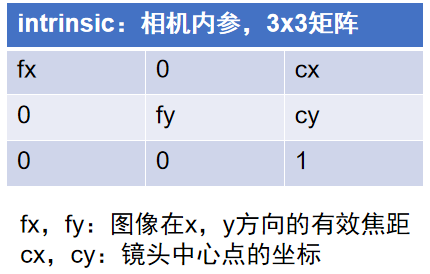
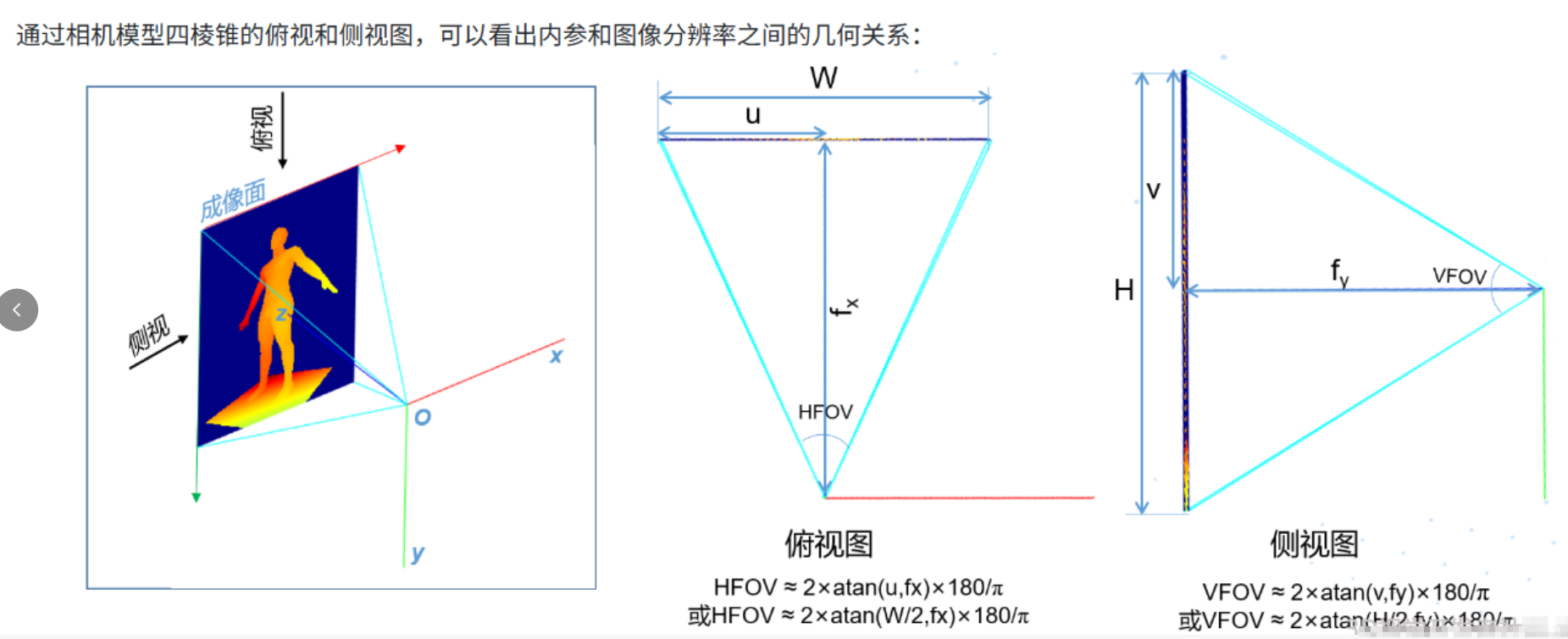
1.cx和cy通常大约是图像分辨率W和H的一半,得出TL460-S1-E1-E1相机深度图出厂标定分辨率为640x480 。
2.通过此处,发现图漾相机的TOF相机,深度图也是需要进行畸变校正的
4.2.2 彩色图内参/畸变系数/外参
cpp
TY_COMPONENT_RGB_CAM_LEFT:
  TY_STRUCT_CAM_INTRINSIC: comp(0x100000) feat(0x7000) name(rgb intrinsic) access(1) bindComponent(0x0) bindFeature(0x0)
    1409.721313 0.000000 975.703369
    0.000000 1408.939331 541.139575
    0.000000 0.000000 1.000000
  TY_STRUCT_EXTRINSIC_TO_DEPTH: comp(0x100000) feat(0x7001) name(rgb to leftIR extrinsic) access(1) bindComponent(0x0) bindFeature(0x0)
    0.999977 0.003591 -0.005803 29.889338
    -0.003533 0.999944 0.009964 -0.130331
    0.005838 -0.009944 0.999934 0.991434
    0.000000 0.000000 0.000000 1.000000
  TY_STRUCT_CAM_DISTORTION: comp(0x100000) feat(0x7006) name(distortion) access(1) bindComponent(0x0) bindFeature(0x0)
    -0.456224 -0.212337 0.004986 -0.002453
    0.215149 -0.190773 -0.450214 0.293084
    0.004615 -0.000380 -0.010916 0.001956
  TY_INT_WIDTH: comp(0x100000) feat(0x1104) name(image width) access(1) bindComponent(0x0) bindFeature(0x0)
    : 1920
  TY_INT_HEIGHT: comp(0x100000) feat(0x1105) name(image height) access(1) bindComponent(0x0) bindFeature(0x0)
    : 1080
  TY_ENUM_IMAGE_MODE: comp(0x100000) feat(0x3109) name(image mode) access(3) bindComponent(0x0) bindFeature(0x0)
    : entry count 5
      : value(0x12780438), desc(bayer8 RGBB 1920x1080)
      : value(0x62780438), desc(bayer12 RGBB 1920x1080)
      : value(0x22780438), desc(yuyv 1920x1080)
      : value(0x225002d0), desc(yuyv 1280x720)
      : value(0x22230168), desc(yuyv 640x360)
  TY_BOOL_AUTO_EXPOSURE: comp(0x100000) feat(0x4300) name(auto exposure) access(3) bindComponent(0x0) bindFeature(0x0)
    : 0
  TY_INT_EXPOSURE_TIME: comp(0x100000) feat(0x1301) name(exposure time) access(3) bindComponent(0x0) bindFeature(0x0)
    : 32
  TY_BOOL_AUTO_GAIN: comp(0x100000) feat(0x4302) name(auto gain) access(3) bindComponent(0x0) bindFeature(0x0)
    : 1
  TY_INT_GAIN: comp(0x100000) feat(0x1303) name(gain) access(3) bindComponent(0x0) bindFeature(0x0)
    : 0
TY_BOOL_AUTO_AWB: comp(0x100000) feat(0x4304) name(auto white balance) access(3) bindComponent(0x0) bindFeature(0x0)1.cx和cy通常大约是图像分辨率W和H的一半,得出TM461-E2相机深度图出厂标定分辨率为1920x1080
2.彩色图相机的畸变系数如下:

3.彩色图相机的外参如下:
cpp
  TY_STRUCT_EXTRINSIC_TO_DEPTH: comp(0x100000) feat(0x7001) name(rgb to leftIR extrinsic) access(1) bindComponent(0x0) bindFeature(0x0)
    0.999977 0.003591 -0.005803 29.889338
    -0.003533 0.999944 0.009964 -0.130331
    0.005838 -0.009944 0.999934 0.991434
    0.000000 0.000000 0.000000 1.000000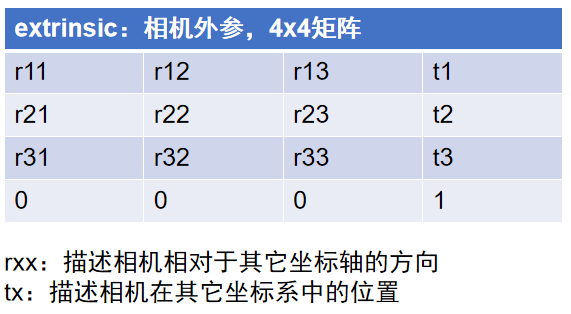
4.3 TL460-S1-E1相机光心位置
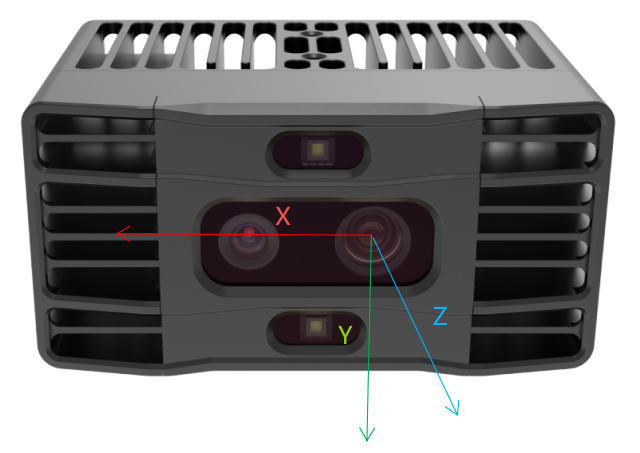
同时通过RGB外参,可得知RGB至左IR应该在30mm左右。
cpp
  TY_STRUCT_EXTRINSIC_TO_DEPTH: comp(0x100000) feat(0x7001) name(rgb to leftIR extrinsic) access(1) bindComponent(0x0) bindFeature(0x0)
    0.999977 0.003591 -0.005803 29.889338
    -0.003533 0.999944 0.009964 -0.130331
    0.005838 -0.009944 0.999934 0.991434
    0.000000 0.000000 0.000000 1.000000
5.TL460-S1-E1相机常见问题FAQ
5.1 在黑暗环境下,RGB过暗
这个时候,建议使用tofir 640x480格式,之后选择后处理模式
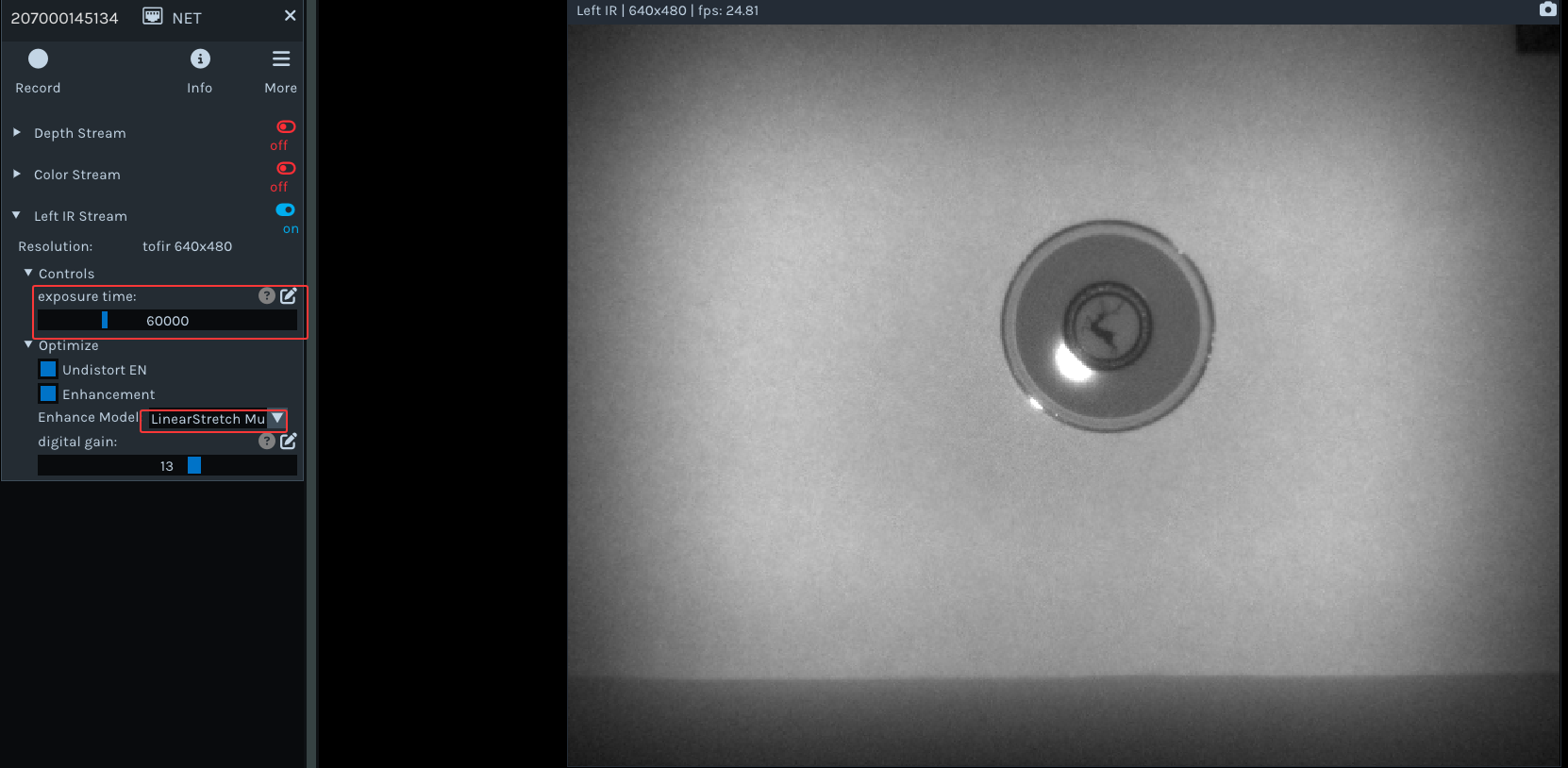
实测下来,只有基于LinearStretchStdProcesser标准差和NoLinearStretchHistProcesser直方图的线性拉伸这两种较为有效。
-
LinearStretchProcesser:线性拉伸func:result=(src-min(src))* 255.0 / (max(src) - min(src))
-
LinearStretchMultiProcesser:通过扩展比例对图像的像素值进行线性变换func:result=src*multi_expandratio
-
LinearStretchStdProcesser:基于标准差的线性拉伸func:result=src*255.0/(std_expandratio*std(src))
-
NoLinearStretchLog2Processer:基于对数变换的非线性拉伸func:result=log_expandratio * log2(src)
-
NoLinearStretchHistProcesser:基于直方图的非线性拉伸func:result=equalizeHist(src)
6.TL460-S1-E1相机帧率延迟测试结果
6.1 TL460-S1-E1 Medium模式帧率延迟测试
| 指标 | 说明 |
|---|---|
| DelayTime(延迟时间) | 指相机在软触发模式下,从上位机发送软触发指令到接收图像之间的时间间隔 |
| FPS(帧率) | 指相机设置在自由采集模式下,上位机每秒采集的图像帧数 |
DepthQuality=Medium下帧率延迟测试结果如下所示:
| 数据流组合 | 分辨率 | 延迟时间测试项 | 单位:ms | 帧率测试项 | 单位:FPS |
|---|---|---|---|---|---|
| Depth | 640x480 | 480P_DepthDelayTime | 141 | 480P_DepthFPS | 29.1036 |
| Depth | 320x240 | 240P_DepthDelayTime | 113 | 240P_DepthFPS | 30.021 |
| Depth | 160x120 | 120P_DepthDelayTime | 94 | 120P_DepthFPS | 30.0752 |
| IR | 1280x960 | LeftIRDelayTime(MONO16) | 131 | LeftIRFPS(MONO16) | 25.68713 |
| IR | 640x480 | LeftIRDelayTime(TOF_IR_MONO16) | 127 | LeftIRFPS(TOF_IR_MONO16) | 25.920166 |
| RGB | 1920x1080 | 1080P_RGBDelayTime(BAYER8RGGB) | 72 | 1080P_RGBFPS(BAYER8RGGB) | 28.2167 |
| RGB | 1920x1080 | 1080P_RGBDelayTime(BAYER12RGGB) | 71 | 1080P_RGBFPS(BAYER12RGGB) | 20.271641 |
| RGB | 1920x1080 | 1080P_RGBDelayTime(YUYV) | 69 | 1080P_RGBFPS(YUYV) | 16.10306 |
| RGB | 1280x720 | 720P_RGBDelayTime(YUYV) | 72 | 720P_RGBFPS(YUYV) | 29.985 |
| RGB | 640x360 | 360P_RGBDelayTime(YUYV) | 74 | 360P_RGBFPS(YUYV) | 30.003 |
| RGB+DEPTH | 1920x1080+640x480 | 1080P_480P_RDDelayTime(BAYER8RGGB) | 165 | 1080P_480P_RDFPS(BAYER8RGGB) | 15.006 |
| RGB+DEPTH | 1280x720+640x480 | 720P_480P_RDDelayTime | 162 | 720P_480P_RDFPS | 14.9813 |
| RGB+DEPTH | 640x360+640x480 | 360P_480P_RDDelayTime | 147 | 360P_480P_RDFPS | 14.9903 |
| DEPTH+IR | 640x480+640x480 | 480P_DLRDelyTime | 179 | 480P_DLRFS | 21.5796 |
| DEPTH+IR | 640x480+640x480 | 240P_DLRDelyTime | 146 | 240P_DLRFS | 25.3678 |
| DEPTH+IR | 640x480+640x480 | 120P_DLRDelyTime | 138 | 120P_DLRFS | 25.9673 |
| RGB+DEPTH+IR | 1920x1080+640x480+640x480 | 1080_480P_ALLDelayTime(BAYER8RGGB) | 201 | 1080_480P_ALLFPS(BAYER8RGGB) | 14.5349 |
| RGB+DEPTH+IR | 1280x720+640x480+640x480 | 720_480P_ALLDelayTime(YUYV) | 202 | 720_480P_ALLFPS(YUYV) | 15.0263 |
| RGB+DEPTH+IR | 640x360+640x480+640x480 | 360_480P_ALLDelayTime(YUYV) | 180 | 360_480P_ALLFPS(YUYV) | 15.0421 |
Medium模式下帧率延迟测试结果
6.1.1 分辨率:
- 960P: 1280x960
- 480P: 640x480
- 240P: 320x240
6.1.2 测试项名称说明:
| 标识 | 说明 |
|---|---|
| (x)_RD | 指深度图像和彩色图像同时采集 |
| (x)_DLR | 指深度图像和左右红外图像同时采集 |
| (x)_RGBIR | 指彩色图像和左右红外图像同时采集 |
| (x)_ALL | 指彩色图像、深度图像和左右红外图像同时采集 |
6.1.3 举例:
- 960P_RD:表示对高分辨率相机进行深度图像和彩色图像同时采集测试
- 480P_DLR:表示对中分辨率相机进行深度图像和左右红外图像同时采集测试
6.2 TL460-S1-E1 High模式帧率延迟测试
DepthQuality=High下帧率测试结果如下所示:
| 数据流组合 | 分辨率+格式 | 延迟时间测试项 | 单位ms | 帧率测试项 | 单位FPS |
|---|---|---|---|---|---|
| Depth | 640x480 | 480P_DepthDelayTime | 240 | 480P_DepthFPS | 15.022 |
| Depth | 320x240 | 240P_DepthDelayTime | 199 | 240P_DepthFPS | 15.0195 |
| Depth | 160x120 | 120P_DepthDelayTime | 176 | 120P_DepthFPS | 15.0308 |
| IR | 1280x960 | LeftIRDelayTime(MONO16) | 204 | LeftIRFPS(MONO16) | 15.0015 |
| IR | 640x480 | LeftIRDelayTime(TOF_IR_MONO16) | 204 | LeftIRFPS(TOF_IR_MONO16) | 15.0083 |
| RGB | 1920x1080 | 1080P_RGBDelayTime(BAYER8RGGB) | 72 | 1080P_RGBFPS(BAYER8RGGB) | 28.1373 |
| RGB | 1920x1080 | 1080P_RGBDelayTime(BAYER12RGGB) | 71 | 1080P_RGBFPS(BAYER12RGGB) | 20.2716 |
| RGB | 1920x1080 | 1080P_RGBDelayTime(YUYV) | 69 | 1080P_RGBFPS(YUYV) | 16.10306 |
| RGB | 1280x720 | 720P_RGBDelayTime(YUYV) | 67 | 720P_RGBFPS(YUYV) | 30.1386 |
| RGB | 640x360 | 360P_RGBDelayTime(YUYV) | 76 | 360P_RGBFPS(YUYV) | 30.012 |
| RGB+DEPTH | 1920x1080+640x480 | 1080P_480P_RDDelayTime(BAYER8RGGB) | 271 | 1080P_480P_RDFPS(BAYER8RGGB) | 11.1086 |
| RGB+DEPTH | 1280x720+640x480 | 720P_480P_RDDelayTime | 268 | 720P_480P_RDFPS | 10.9685 |
| RGB+DEPTH | 640x360+640x480 | 360P_480P_RDDelayTime | 245 | 360P_480P_RDFPS | 11.3495 |
| DEPTH+IR | 640x480+640x480 | 480P_DLRDelayTime | 277 | 480P_DLRFS | 11.1297 |
| DEPTH+IR | 640x480+640x480 | 240P_DLRDelayTime | 216 | 240P_DLRFS | 15.0038 |
| DEPTH+IR | 640x480+640x480 | 120P_DLRDelayTime | 208 | 120P_DLRFS | 15.0038 |
| RGB+DEPTH+IR | 1920x1080+640x480+640x480 | 1080_480P_ALLDelayTime(BAYER8RGGB) | 304 | 1080_480P_ALLFPS(BAYER8RGGB) | 10.9565 |
| RGB+DEPTH+IR | 1280x720+640x480+640x480 | 720_480P_ALLDelayTime(YUYV) | 302 | 720_480P_ALLFPS(YUYV) | 10.7296 |
| RGB+DEPTH+IR | 640x360+640x480+640x480 | 360_480P_ALLDelayTime(YUYV) | 281 | 360_480P_ALLFPS(YUYV) | 11.1062 |
High模式下帧率测试结果
7.TL460-S1-E1相机属性设置
| 组件 | 属性 | 设置方式举例 | 支持参数 |
|---|---|---|---|
| TY_COMPONENT_RGB_CAM | TY_ENUM_IMAGE_MODE | TYSetEnum(hDevice, TY_COMPONENT_RGB_CAM, TY_ENUM_IMAGE_MODE, TY_IMAGE_MODE_YUYV_1920x1080); | TY_IMAGE_MODE_CSI_BAYER12RGGB_1920x1080 TY_IMAGE_MODE_BAYER8RGGB_1920x1080 TY_IMAGE_MODE_YUYV_1920x1080 TY_IMAGE_MODE_YUYV_1280x720 TY_IMAGE_MODE_YUYV_640x360 |
| TY_STRUCT_AEC_ROI | TY_AEC_ROI_PARAM aec_roi_param; aec_roi_param.x = 0; aec_roi_param.y = 0; aec_roi_param.w = 100; aec_roi_param.h = 110; ASSERT_OK(TYSetStruct(hDevice, TY_COMPONENT_RGB_CAM, TY_STRUCT_AEC_ROI, &aec_roi_param, sizeof(TY_AEC_ROI_PARAM))); | 长宽范围在设置的分辨率范围内 (x、y)为矩形左上角坐标, w、h为矩形宽和高, w、h不能超过当前分辨率的宽高 | |
| TY_BOOL_AUTO_GAIN | TYSetBool(hDevice, TY_COMPONENT_RGB_CAM, TY_BOOL_AUTO_GAIN, true); | true / false | |
| TY_BOOL_AUTO_AWB | TYSetBool(hDevice, TY_COMPONENT_RGB_CAM, TY_BOOL_AUTO_AWB, true); | true / false | |
| TY_BOOL_AUTO_EXPOSURE | TYSetBool(hDevice, TY_COMPONENT_RGB_CAM, TY_BOOL_AUTO_EXPOSURE, true); | true / false | |
| TY_INT_GAIN | TYSetInt(hDevice, TY_COMPONENT_RGB_CAM, TY_INT_GAIN, 4); | 0-238 | |
| TY_INT_EXPOSURE_TIME | TYSetInt(hDevice, TY_COMPONENT_RGB_CAM, TY_INT_EXPOSURE_TIME, value); | 1-338 | |
| TY_COMPONENT_IR_CAM_LEFT | TY_ENUM_IMAGE_MODE | TYSetEnum(hDevice, TY_COMPONENT_IR_CAM_LEFT, TY_ENUM_IMAGE_MODE, TY_IMAGE_MODE_TOF_IR_MONO16); | TY_IMAGE_MODE_MONO16_1280x960 TY_IMAGE_MODE_TOF_IR_MONO16_640x480 |
| TY_INT_EXPOSURE_TIME | TYSetInt(hDevice, TY_COMPONENT_IR_CAM_LEFT, TY_INT_EXPOSURE_TIME,value); | 60-240000 | |
| TY_COMPONENT_DEPTH | TY_ENUM_DEPTH_QUALITY | TYSetEnum(hDevice, TY_COMPONENT_DEPTH_CAM, TY_ENUM_DEPTH_QUALITY, TY_DEPTH_QUALITY_MEDIUM); | MEDIUM/HIGH |
| TY_ENUM_IMAGE_MODE | TYSetEnum(hDevice, TY_COMPONENT_DEPTH_CAM, TY_ENUM_IMAGE_MODE, TY_IMAGE_MODE_DEPTH16_640x480); | 640x480\320x240\160x120 | |
| TY_INT_TOF_CHANNEL | TYSetInt(hDevice, TY_COMPONENT_DEPTH_CAM, TY_INT_TOF_CHANNEL, value); | 0-4,默认:0 | |
| TY_INT_FILTER_THRESHOLD | TYSetInt(hDevice, TY_COMPONENT_DEPTH_CAM, TY_INT_FILTER_THRESHOLD, value); | 0-100 ,默认:0 ,不打开 | |
| TY_INT_TOF_MODULATION_THRESHOLD | TYSetInt(hDevice, TY_COMPONENT_DEPTH_CAM, TY_INT_TOF_MODULATION_THRESHOLD, value); | 0-65536,默认:640 | |
| TY_INT_HDR_RADIO | TYSetInt(hDevice, TY_COMPONENT_DEPTH_CAM, TY_INT_HDR_RADIO,value); | 1-100,默认:1 | |
| TY_INT_TOF_JITTER_THRESHOLD | TYSetInt(hDevice, TY_COMPONENT_DEPTH_CAM, TY_INT_TOF_JITTER_THRESHOLD,value); | 1-10,默认:1 | |
| TY_COMPONENT_DEVICE | TY_INT_PACKET_DELAY | TYSetInt(hDevice, TY_COMPONENT_DEVICE, TY_INT_PACKET_DELAY, value); | 0-10000,默认:100,单位:微秒 |
| TY_INT_PACKET_SIZE | TYSetInt(hDevice, TY_COMPONENT_DEVICE, TY_INT_PACKET_SIZE, value); | 100-1500 | |
| TY_BOOL_KEEP_ALIVE_ONOFF | TYSetBool(hDevice, TY_COMPONENT_DEVICE, TY_BOOL_KEEP_ALIVE_ONOFF, false); | true / false | |
| TY_INT_KEEP_ALIVE_TIMEOUT | TYSetInt(hDevice, TY_COMPONENT_DEVICE, TY_INT_KEEP_ALIVE_TIMEOUT, value); | 2000-30000,单位:毫秒 | |
| TY_ENUM_TIME_SYNC_TYPE | TYSetEnum(hDevice, TY_COMPONENT_DEVICE, TY_ENUM_TIME_SYNC_TYPE, TY_TIME_SYNC_TYPE_NTP); | TY_TIME_SYNC_TYPE_NTP TY_TIME_SYNC_TYPE_HOST TY_TIME_SYNC_TYPE_NONE | |
| TY_BOOL_GVSP_RESEND | TYSetEnum(hDevice, TY_COMPONENT_DEVICE, TY_BOOL_GVSP_RESEND, true); | true / false | |
| TY_BOOL_CMOS_SYNC | TYSetBool(hDevice, TY_COMPONENT_DEVICE, TY_BOOL_CMOS_SYNC, true); | true / false | |
| TY_STRUCT_TRIGGER_PARAM | TY_TRIGGER_PARAM trigger; trigger.mode = TY_TRIGGER_MODE_SLAVE; ASSERT_OK(TYSetStruct(hDevice, TY_COMPONENT_DEVICE, TY_STRUCT_TRIGGER_PARAM, &trigger, sizeof(trigger))); | 自由采集(TY_TRIGGER_MODE_OFF)、 软(硬)触发(TY_TRIGGER_MODE_SLAVE) | |
| TY_BOOL_TRIGGER_OUT_IO | TYSetBool(hDevice, TY_COMPONENT_DEVICE, TY_BOOL_TRIGGER_OUT_IO , true); | true / false |
8.其他学习资料
7.TOF系统
8. 图漾官网相机规格书
9.深度图滤波