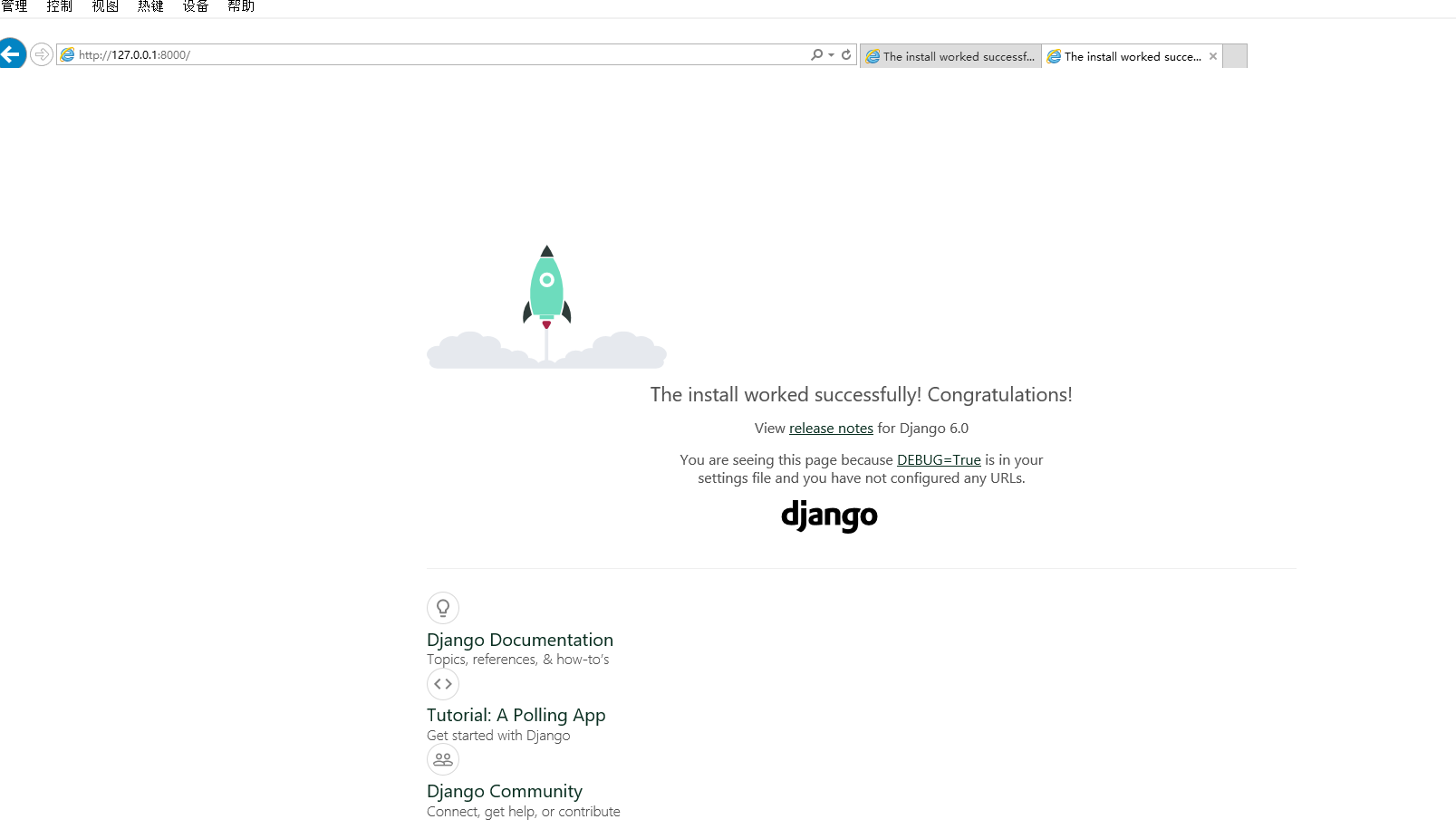
django+postgresql创建第一个网站
1.安装python
2.安装postgresql数据库
"D:\pgsql\bin\initdb.exe" -D "D:\pgsql\data" -U postgres -E UTF8 --locale=chs_CNS

"D:\pgsql\bin\pg_ctl" register -N "postgresql-16" -U "NT AUTHORITY\NetworkService" -D "D:\pgsql\data" -w
3.安装django
D:\Python\Django>py -m pip install Django==6.0.4
Collecting Django==6.0.4
  Downloading django-6.0.4-py3-none-any.whl.metadata (3.9 kB)
Collecting asgiref>=3.9.1 (from Django==6.0.4)
  Downloading asgiref-3.11.1-py3-none-any.whl.metadata (9.3 kB)
Collecting sqlparse>=0.5.0 (from Django==6.0.4)
  Downloading sqlparse-0.5.5-py3-none-any.whl.metadata (4.7 kB)
Collecting tzdata (from Django==6.0.4)
  Downloading tzdata-2026.1-py2.py3-none-any.whl.metadata (1.4 kB)
Downloading django-6.0.4-py3-none-any.whl (8.4 MB)
   ---------------------------------------- 8.4/8.4 MB 15.3 MB/s  0:00:00
Downloading asgiref-3.11.1-py3-none-any.whl (24 kB)
Downloading sqlparse-0.5.5-py3-none-any.whl (46 kB)
Downloading tzdata-2026.1-py2.py3-none-any.whl (348 kB)
Installing collected packages: tzdata, sqlparse, asgiref, Django
   ---------- ----------------------------- 1/4 [sqlparse]  WARNING: The script sqlformat.exe is installed in 'D:\Python\Python313\Scripts' which is not on PATH.
  Consider adding this directory to PATH or, if you prefer to suppress this warning, use --no-warn-script-location.
   ------------------------------ --------- 3/4 [Django]  WARNING: The script django-admin.exe is installed in 'D:\Python\Python313\Scripts' which is not on PATH.
  Consider adding this directory to PATH or, if you prefer to suppress this warning, use --no-warn-script-location.
Successfully installed Django-6.0.4 asgiref-3.11.1 sqlparse-0.5.5 tzdata-2026.1
4.置环境变量
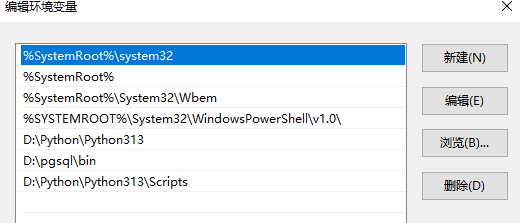
安装完成后,您可以通过在命令提示符中执行django-admin --version来验证您的 Django 安装。
C:\Windows\system32>django-admin --version
6.0.4

C:\Windows\system32>
启动服务
D:\Python\Django\HelloWorld>python manage.py runserver 0.0.0.0:8080
Watching for file changes with StatReloader
Performing system checks...

System check identified no issues (0 silenced).

You have 18 unapplied migration(s). Your project may not work properly until you apply the migrations for app(s): admin, auth, contenttypes, sessions.
Run 'python manage.py migrate' to apply them.
April 14, 2026 - 10:44:33
Django version 6.0.4, using settings 'HelloWorld.settings'
Starting development server at http://0.0.0.0:8080/
Quit the server with CTRL-BREAK.

WARNING: This is a development server. Do not use it in a production setting. Use a production WSGI or ASGI server instead.
For more information on production servers see: https://docs.djangoproject.com/en/6.0/howto/deployment/
按照提示迁移
D:\Python\Django\HelloWorld>python manage.py migrate
Operations to perform:
  Apply all migrations: admin, auth, contenttypes, sessions
Running migrations:
  Applying contenttypes.0001_initial... OK
  Applying auth.0001_initial... OK
  Applying admin.0001_initial... OK
  Applying admin.0002_logentry_remove_auto_add... OK
  Applying admin.0003_logentry_add_action_flag_choices... OK
  Applying contenttypes.0002_remove_content_type_name... OK
  Applying auth.0002_alter_permission_name_max_length... OK
  Applying auth.0003_alter_user_email_max_length... OK
  Applying auth.0004_alter_user_username_opts... OK
  Applying auth.0005_alter_user_last_login_null... OK
  Applying auth.0006_require_contenttypes_0002... OK
  Applying auth.0007_alter_validators_add_error_messages... OK
  Applying auth.0008_alter_user_username_max_length... OK
  Applying auth.0009_alter_user_last_name_max_length... OK
  Applying auth.0010_alter_group_name_max_length... OK
  Applying auth.0011_update_proxy_permissions... OK
  Applying auth.0012_alter_user_first_name_max_length... OK
  Applying sessions.0001_initial... OK
启动成功
D:\Python\Django\HelloWorld>python manage.py runserver
Watching for file changes with StatReloader
Performing system checks...

System check identified no issues (0 silenced).
April 14, 2026 - 10:50:14
Django version 6.0.4, using settings 'HelloWorld.settings'
Starting development server at http://127.0.0.1:8000/
Quit the server with CTRL-BREAK.

WARNING: This is a development server. Do not use it in a production setting. Use a production WSGI or ASGI server instead.
For more information on production servers see: https://docs.djangoproject.com/en/6.0/howto/deployment/
[14/Apr/2026 10:50:26] "GET / HTTP/1.1" 200 12068
Not Found: /favicon.ico
[14/Apr/2026 10:50:26] "GET /favicon.ico HTTP/1.1" 404 2212
[14/Apr/2026 10:50:33] "GET / HTTP/1.1" 200 12068
Not Found: /favicon.ico
[14/Apr/2026 10:50:33] "GET /favicon.ico HTTP/1.1" 404 2212
服务启动成功