该文章衔接Spring Security的前4个章节。
项目应用
首先
添加redis的依赖
<!--Spring Boot-redis的依赖包-->
		<dependency>
			<groupId>org.springframework.boot</groupId>
			<artifactId>spring-boot-starter-data-redis</artifactId>
		</dependency>
yml配置:
  #redis配置
 spring:
    data:
      redis:
        host: 127.0.0.1
        database: 0
        password: 123456
        port: 6379
在认证成功处理器中使用


处理redis中乱码
但是我们发现认证成功后存储到redis中的值有乱码,不方便我们查看:
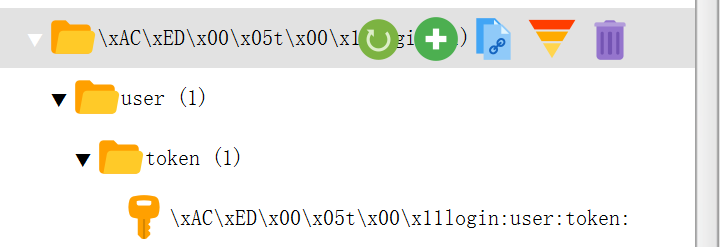
这是因为存储的时候默认以jdk的Key序列化器:JdkSerializationRedisSerializer后存储的,看到是二进制数据,但是不影响我们读取。怎么处理这样的数据呢?只需要默认更改序列化的方式就可以了:
添加一个redis的配置类
package com.sy.config;

import org.springframework.cache.annotation.CachingConfigurerSupport;
import org.springframework.context.annotation.Bean;
import org.springframework.context.annotation.Configuration;
import org.springframework.data.redis.connection.RedisConnectionFactory;
import org.springframework.data.redis.core.RedisTemplate;
import org.springframework.data.redis.serializer.RedisSerializer;

@Configuration
public class RedisConfig{
    @Bean
    public RedisTemplate<Object, Object> redisTemplate(RedisConnectionFactory connectionFactory) {

        RedisTemplate<Object, Object> redisTemplate = new RedisTemplate<>();

        //默认的Key序列化器为:JdkSerializationRedisSerializer
        redisTemplate.setKeySerializer(RedisSerializer.string());
        redisTemplate.setHashKeySerializer(RedisSerializer.string());
        //一般value就不需要序列化了

        redisTemplate.setConnectionFactory(connectionFactory);

        return redisTemplate;
    }
}
结果就变成这样了:
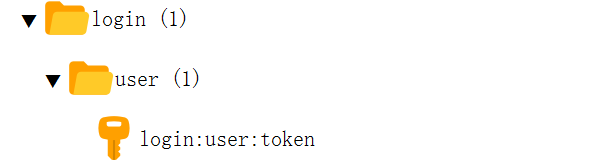
方便查看。
请求携带token
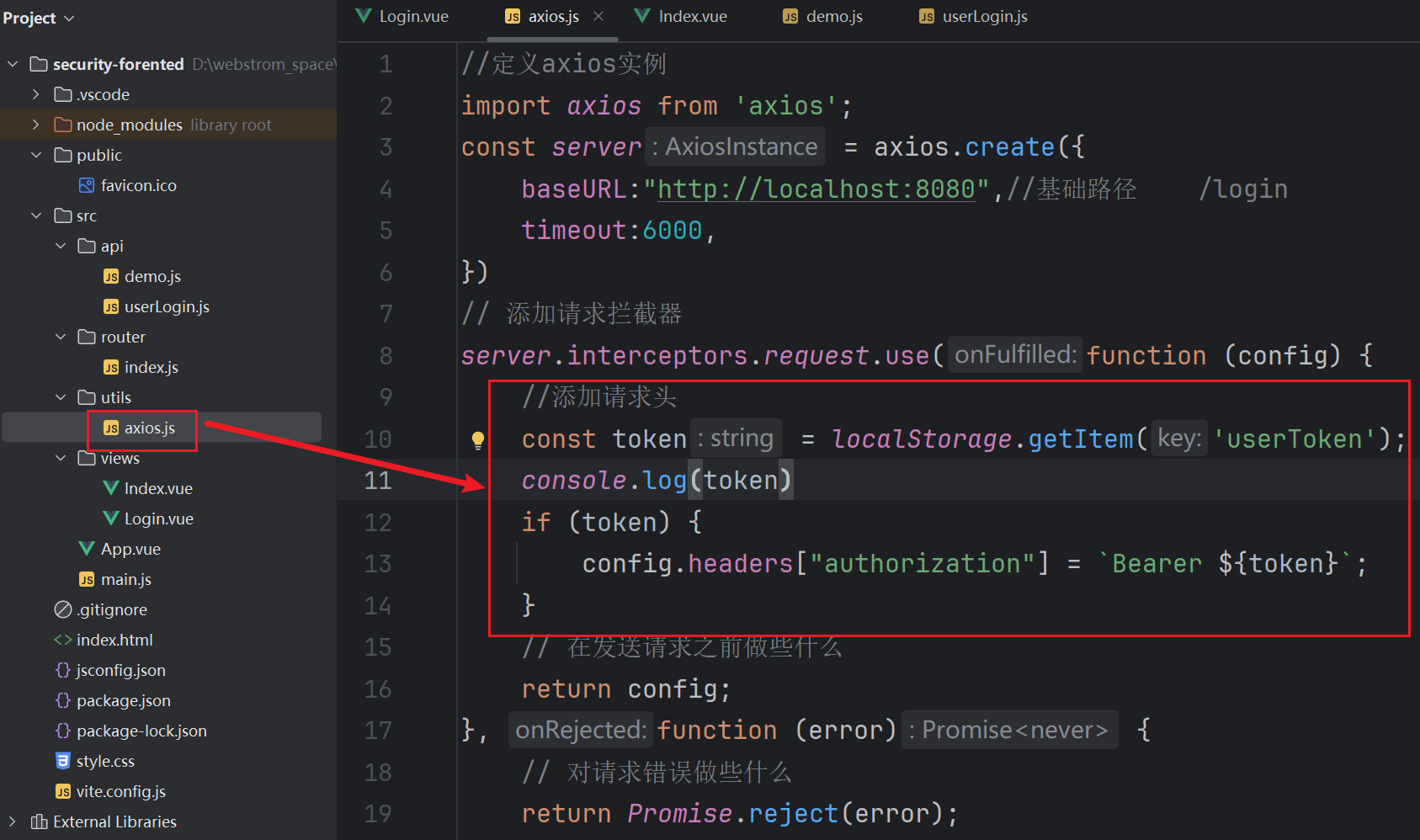
怎么能够保证每次请求携带这个服务器生成的token呢?这个时候我们立马就想到了axios的拦截器,该拦截器包括请求拦截器和响应拦截器,我们在请求拦截器中获取之前在浏览器上存储的token,然后加入到对应的请求头中就好了,这样就避免了,我们每次发送请求还需要手动的添加这个请求头。
过滤器获取请求头
但是又面临一个问题?我们应该怎么获取这个请求头呢?什么时候获取呢?以为以后每次请求都会发送这个请求头,如果我们写在对应的Controller中,那么每个controller的每个方法中都需要获取并验证,对吧!
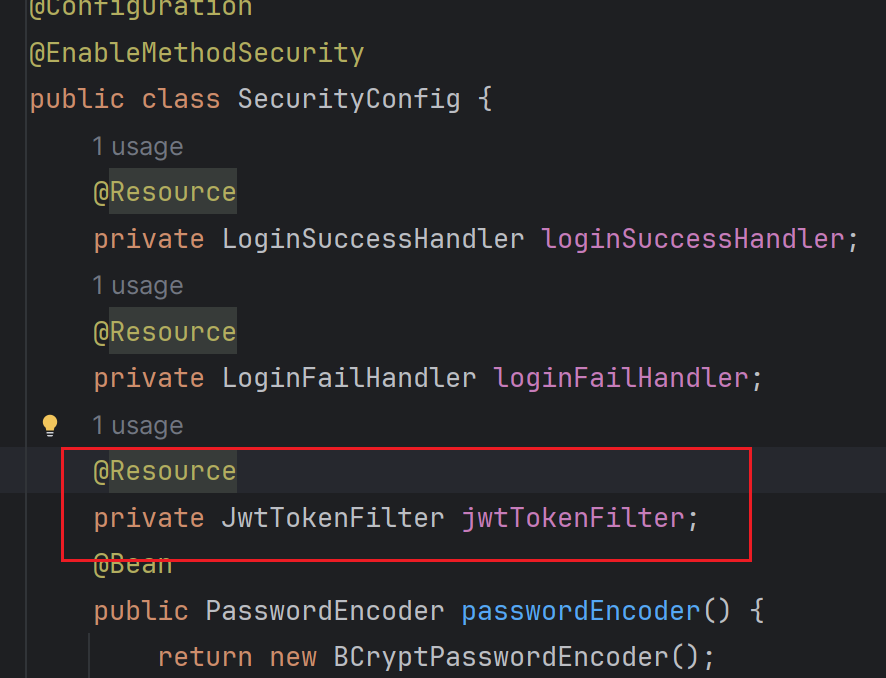
这个时候,我们想到了过滤器,我们可以定义个过滤器,在这个过滤器中来获取请求头,验证这个token是否一致,同时因为spring security底层也是很多的过滤器链,定义完成后,加入到安全框架的过滤器链中就好了。
需要注意的是:去登录是不需要验证的,所以需要直接放行,我们这里继承OncePerRequestFilter,而不是我们之前学习的实现Filter因为需要类型转换(request,response)

package com.sy.filter;

import cn.hutool.json.JSONObject;
import cn.hutool.json.JSONUtil;
import cn.hutool.jwt.JWT;
import cn.hutool.jwt.JWTPayload;
import cn.hutool.jwt.JWTUtil;
import com.sy.entity.TUser;
import com.sy.util.Result;
import jakarta.annotation.Resource;
import jakarta.servlet.FilterChain;
import jakarta.servlet.ServletException;
import jakarta.servlet.http.HttpServletRequest;
import jakarta.servlet.http.HttpServletResponse;
import lombok.Data;
import org.springframework.beans.factory.annotation.Value;
import org.springframework.data.redis.core.RedisTemplate;
import org.springframework.security.authentication.UsernamePasswordAuthenticationToken;
import org.springframework.security.core.context.SecurityContext;
import org.springframework.security.core.context.SecurityContextHolder;
import org.springframework.stereotype.Component;
import org.springframework.util.StringUtils;
import org.springframework.web.filter.OncePerRequestFilter;

import java.io.IOException;
import java.io.PrintWriter;
import java.nio.charset.StandardCharsets;

@Component
@Data
public class JwtTokenFilter extends OncePerRequestFilter {
    @Value("${jwt.secrt}")
    private String secrt;
    @Resource
    private RedisTemplate<String, Object> redisTemplate;

    @Override
    protected void doFilterInternal(HttpServletRequest request, HttpServletResponse response, FilterChain filterChain) throws ServletException, IOException {
        //解决乱码
        request.setCharacterEncoding("utf-8");
        response.setContentType("application/json;charset=utf-8");
        //获取请求路径
        String uri = request.getRequestURI();//因为此时我们项目的上下问名称为 /,所以获取的路径为 /xx/xx
        //如果路径是登录页面的路径直接放行
        if ("/user/login".equals(uri)) {
            filterChain.doFilter(request, response);
        } else {
            //否则需要验证了
            //1.获取token
            String authorization = request.getHeader("authorization");
            String token = authorization.substring(6);
            if (!StringUtils.hasText(token)) {
                //返回给前端对应的错误信息
                response.getWriter().print(JSONUtil.toJsonStr(Result.fail("token不存在", 505)));
            } else {
                //验证token
                boolean verify = false;
                try {
                    verify = JWTUtil.verify(token, secrt.getBytes(StandardCharsets.UTF_8));
                } catch (Exception e) {
                    e.printStackTrace();
                }
                if (!verify) {
                    //验证错误,返回错误信息
                    response.getWriter().print(JSONUtil.toJsonStr(Result.fail("token不合法", 506)));

                } else {
                    //否则和redis中的token对比一下
                    //获取redis中token
                    //hash中的key我们当时存储的是用户id怎么获取呢?
                    //通过jwt解析呀
                    JSONObject payloads = JWTUtil.parseToken(token).getPayloads();
                    String tuser_json = payloads.get("tuser", String.class);
                    //将json字符串转换为对象
                    TUser tuser = JSONUtil.toBean(tuser_json, TUser.class);
                    String redis_token = (String) redisTemplate.opsForHash().get("login:user:token", String.valueOf(tuser.getId()));
                    if (!token.equals(redis_token)) {
                        response.getWriter().print(JSONUtil.toJsonStr(Result.fail("token校验错误", 507)));

                    } else {

                        //同时将认证信息添加到security上下文
                        UsernamePasswordAuthenticationToken upat =
                                new UsernamePasswordAuthenticationToken(
                                        tuser,//这里什么都包含了
                                        null, null
                                );
                        SecurityContextHolder.getContext().setAuthentication(upat);
                        //放行
                        filterChain.doFilter(request, response);

                    }
                }
            }

        }

    }
}
添加到过滤器链中
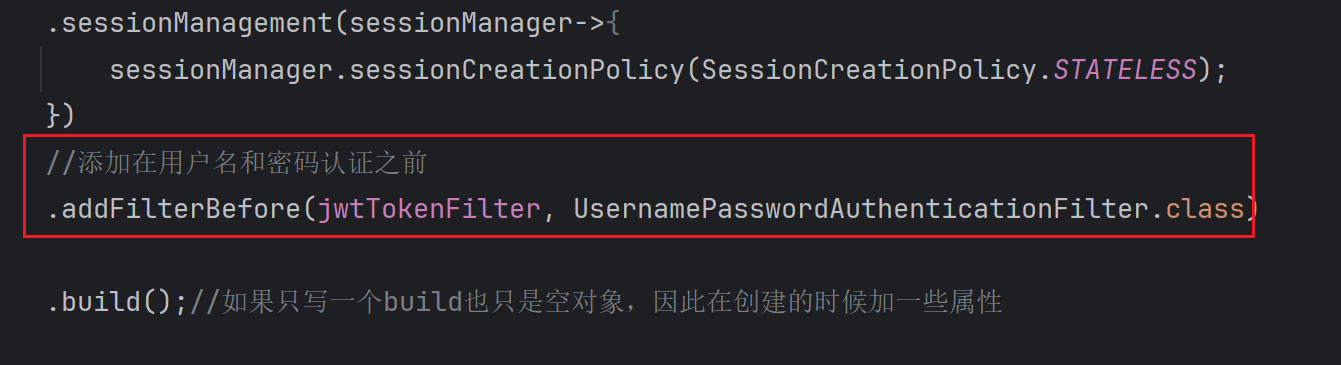
在一次认证通过后发送访问Index页面
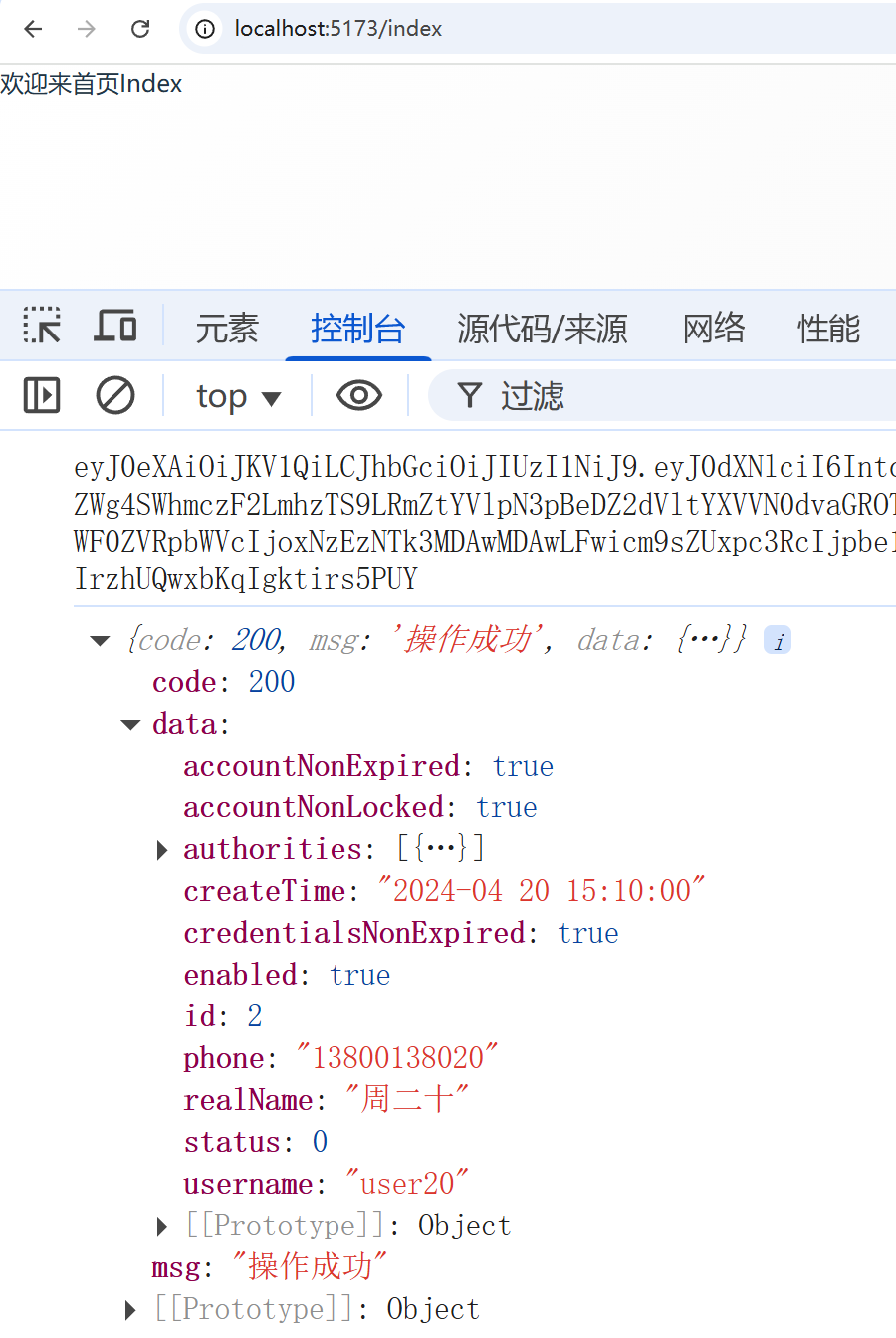
成功了。
重启项目如何让token失效
因为JWT无状态,重启项目后,jwt并没有失效,依然可以访问后端的接口;
原因是,你重启后端springboot项目后,前端sessionStorage中token没有失效,后端redis中的token也没有失效
解决办法:
1、把jwt存入redis中并设置一个过期时间,到期后jwt自动失效;(30分钟失效)
2、实现一个退出功能,用户点击退出登录,让jwt失效;(用户如果不点击退出)
3、服务关闭/重启,删除redis的所有jwt,而不是某一个用户的;
这个时候使用监听器解决,监听项目的关闭事件就可以了
package com.sy.listener;

import jakarta.annotation.Resource;
import org.springframework.context.ApplicationListener;
import org.springframework.context.event.ContextClosedEvent;
import org.springframework.data.redis.core.RedisTemplate;
import org.springframework.stereotype.Component;

@Component
public class ApplicationShutdownListener implements ApplicationListener<ContextClosedEvent> {
    @Resource
    private RedisTemplate<String,Object> redisTemplate;
    @Override
    public void onApplicationEvent(ContextClosedEvent event) {
        redisTemplate.delete("login:user:token");
    }
}
权限授予
和我们之前讲的一样,现在这里就说一个,万一没有权限怎么办呢?
我们去配置一个无权限的配置

和我们之前的成功失败的处理器是一样的
注意:
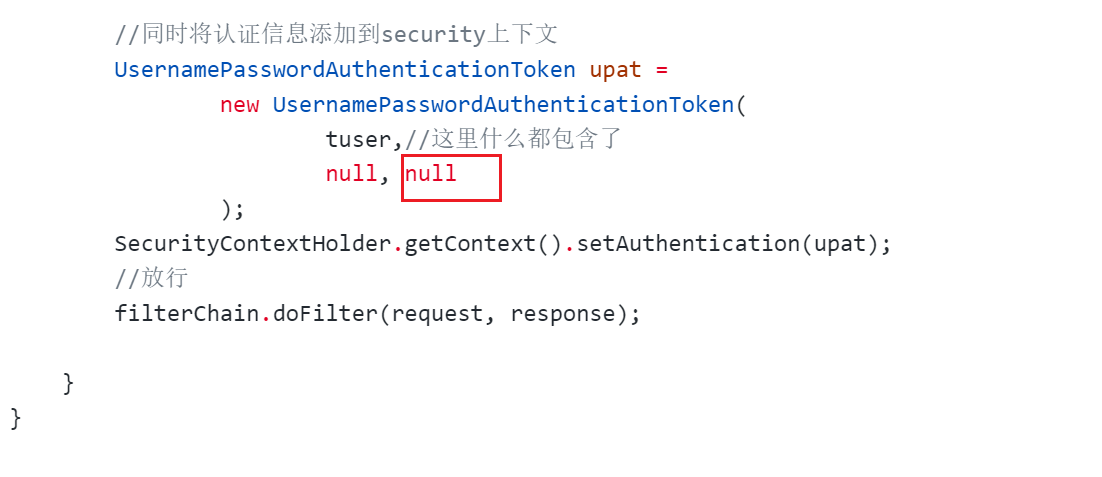
标注的地方就不能为空了,
tuser.getAuthorities()就可以了。