前置文章【LLM说: 给我Tools,我来安排工作流(Agentic workflows)】
在全栈开发中,我们经常需要调用接口,或者说微服务中我们通过RPC的方式调用远程服务,而在Agent应用开发中,我们将接口封装为工具(Tools)暴露出来给LLM使用
把工具(Tools)看作代理的执行器(actuators):你给出一条自然语言指令(例如"查看老板发来的未读邮件并礼貌回复"),模型就会选择调用哪些工具以及按什么顺序来完成任务。
背景说明
Agentic workflow可以执行与邮件管理相关的各种任务,包括发送邮件、搜索特定发件人的邮件以及删除邮件。使用用自然语言指令来操作------例如"查看老板发来的未读邮件"或"删除那封'欢乐时光'邮件"------它选择合适的工具并完成任务。
使用一个模拟的邮件后端来模拟真实的邮件交互。你可以把它当作一个个人沙箱邮件收件箱:其中已预先加载了一些邮件,方便你在不发送真实邮件的情况下进行模拟。
| Layer | Purpose |
|---|---|
| FastAPI | Exposes REST endpoints |
| SQLite + SQLAlchemy | Stores and queries emails locally |
| Pydantic | Ensures inputs and outputs are valid |
| AISuite tools | Bridge between the LLM and the service |
该服务提供了若干路由,用于模拟常见的邮件操作。稍后,这些路由将被封装成工具,以便助手能够自动使用它们
| Endpoint | Description |
|---|---|
POST /send |
Send a new email |
GET /emails |
List all emails |
GET /emails/unread |
Show only unread emails |
GET /emails/{id} |
Fetch a specific email by ID |
GET /emails/search?q=... |
Search emails by keyword |
GET /emails/filter |
Filter by recipient or date range |
PATCH /emails/{id}/read |
Mark an email as read |
PATCH /emails/{id}/unread |
Mark an email as unread |
DELETE /emails/{id} |
Delete an email by ID |
GET /reset_database |
Reset emails to initial state (for testing) |
思维转变:API接口到工具
在全栈开发中,我们经常需要调用接口,或者说微服务中我们通过RPC的方式调用远程服务,而在Agent应用开发中,我们将接口封装为工具(Tools)暴露出来给LLM使用
把工具(Tools)看作代理的执行器(actuators):你给出一条自然语言指令(例如"查看老板发来的未读邮件并礼貌回复"),模型就会选择调用哪些工具以及按什么顺序来完成任务。
设计提示
- 保持工具文档字符串简短、指令性强,且针对具体操作。
- 返回一致、紧凑的 JSON 格式,以便模型能够串联结果。
- 每个工具最好只承担一个明确的职责(单一路由、单一效果)。
python
def list_all_emails() -> list:
    """
    Fetch all emails stored in the system, ordered from newest to oldest.

    Returns:
        List[dict]: A list of all emails including read and unread,
        each represented as a dictionary with keys:
        - id
        - sender
        - recipient
        - subject
        - body
        - timestamp
        - read (boolean)
    """
return requests.get(f"{BASE_URL}/emails").json()| Tool Function | Action |
|---|---|
list_all_emails() |
Fetch all emails, newest first |
list_unread_emails() |
Retrieve only unread emails |
search_emails(query) |
Search by keyword in subject, body, or sender |
filter_emails(...) |
Filter by recipient and/or date range |
get_email(email_id) |
Fetch a specific email by ID |
mark_email_as_read(id) |
Mark an email as read |
mark_email_as_unread(id) |
Mark an email as unread |
send_email(...) |
Send a new (simulated) email |
delete_email(id) |
Delete an email by ID |
search_unread_from_sender(addr) |
Return unread emails from a given sender (e.g., boss@email.com) |
LLM+Emails Tools
提示词
python
def build_prompt(request_: str) -> str:
    return f"""
- You are an AI assistant specialized in managing emails.
- You can perform various actions such as listing, searching, filtering, and manipulating emails.
- Use the provided tools to interact with the email system.
- Never ask the user for confirmation before performing an action.
- If needed, my email address is "you@email.com" so you can use it to send emails or perform actions related to my account.

{request_.strip()}
"""
python
example_prompt = build_prompt("Delete the Happy Hour email")

"""
- You are an AI assistant specialized in managing emails.
- You can perform various actions such as listing, searching, filtering, and manipulating emails.
- Use the provided tools to interact with the email system.
- Never ask the user for confirmation before performing an action.
- If needed, my email address is "you@email.com" so you can use it to send emails or perform actions related to my account.

Delete the Happy Hour email
"""
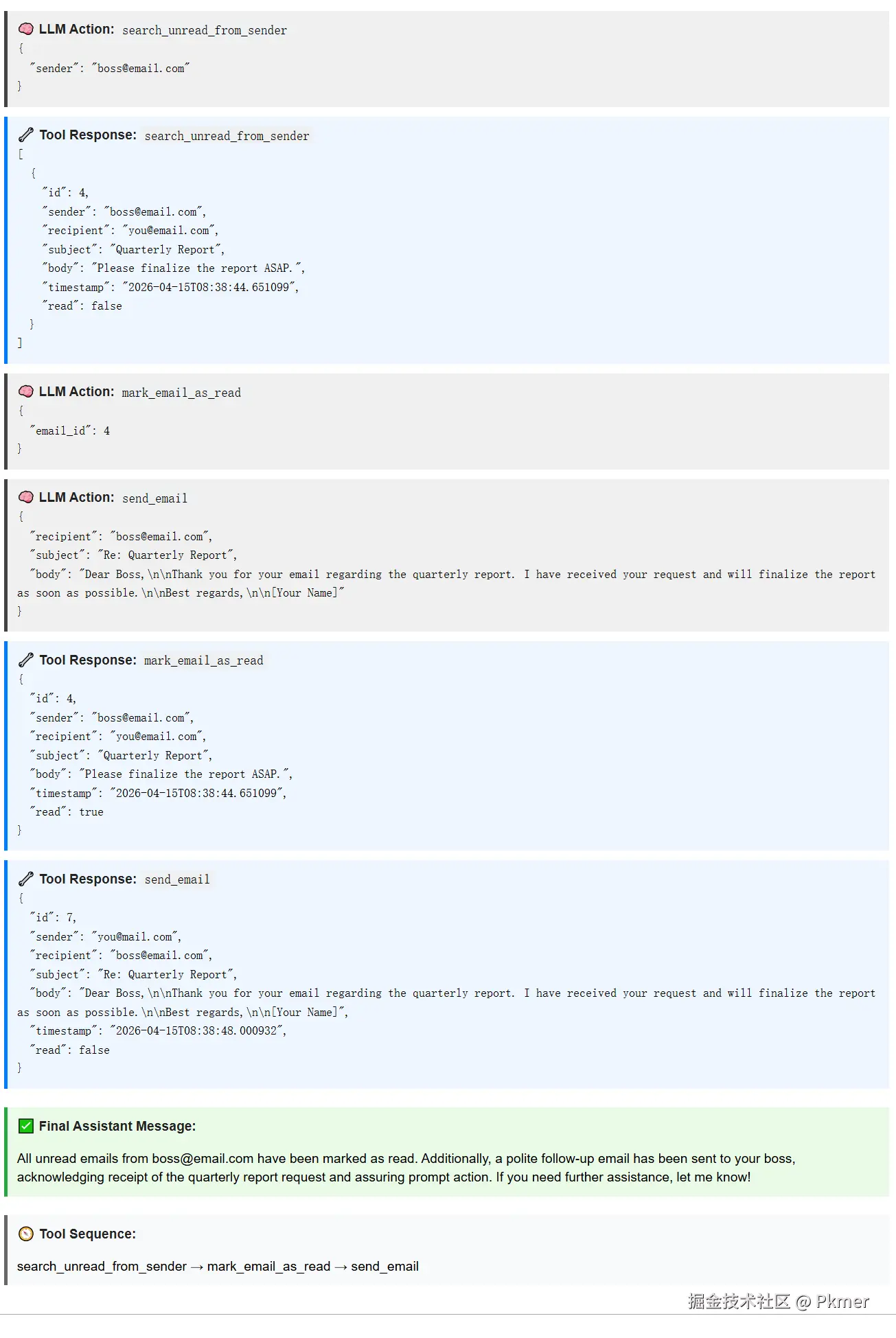
场景1: 工具自主决策
提示词
Check for unread emails from
boss@email.com, mark them as read, and send a polite follow-up
LLM自动决策的Agentic Workflow:
- 代理解析你的指令。
- 它选择合适的工具(
search_unread_from_sender→mark_email_as_read→send_email)。 - 它自动执行每个操作,无需请求确认。
python
# Try your own requests
prompt_ = build_prompt("Check for unread emails from boss@email.com, mark them as read, and send a polite follow-up.")

response = client.chat.completions.create(
    model="openai:gpt-4.1", # LLM
    messages=[{"role": "user", "content": (
        prompt_
    )}],
    tools=[ # list of tools that the LLM can access
        email_tools.search_unread_from_sender,
        email_tools.list_unread_emails,
        email_tools.search_emails,
        email_tools.get_email,
        email_tools.mark_email_as_read,
        email_tools.send_email
    ],
    max_turns=5,
)

display_functions.pretty_print_chat_completion(response)
执行流程,可以看到工具的输入和输出。
🔍场景2: 未提供相关的工具
the tools you make available directly determine what the agent can do
你提供的工具直接决定了代理能做什么
这里我们要Agent助手帮我们删除一封邮件,但是我们并没有将工具暴露给LLM
python
# Try with a request that may call an unavailable tool
prompt_ = build_prompt("Delete alice@work.com email")

response = client.chat.completions.create(
    model="openai:o4-mini",
    messages=[{"role": "user", "content": (
        prompt_
    )}],
    tools=[ # 🔍没有提供删除的工具
        email_tools.search_unread_from_sender,
        email_tools.list_unread_emails,
        email_tools.search_emails,
        email_tools.get_email,
        email_tools.mark_email_as_read,
        email_tools.send_email
    ],
    max_turns=5
)

display_functions.pretty_print_chat_completion(response)
提供相关的删除工具
python
prompt_ = build_prompt("Delete alice@work.com email")

response = client.chat.completions.create(
    model="openai:o4-mini",
    messages=[{"role": "user", "content": (
        prompt_
    )}],
    tools=[
        email_tools.search_unread_from_sender,
        email_tools.list_unread_emails,
        email_tools.search_emails,
        email_tools.get_email,
        email_tools.mark_email_as_read,
        email_tools.send_email,
        email_tools.delete_email #  🔍提供删除的工具
    ],
    max_turns=5
)

display_functions.pretty_print_chat_completion(response)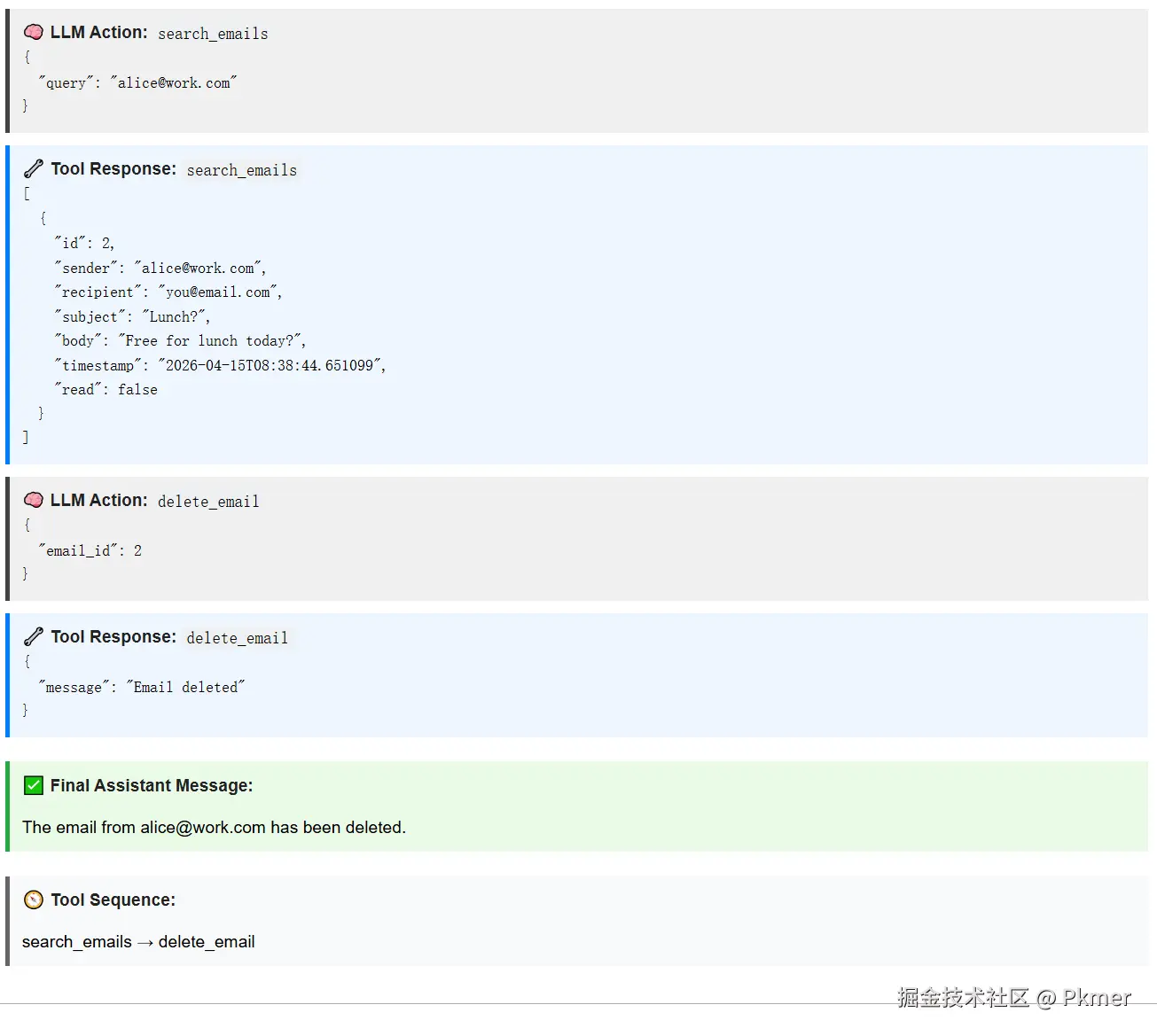
场景3 根据关键字删除邮件
搜索该消息并将其从收件箱中删除
python
prompt_ = build_prompt("Delete the happy hour email")

response = client.chat.completions.create(
    model="openai:o4-mini",
    messages=[{"role": "user", "content": (
        prompt_
    )}],
    tools=[
        email_tools.search_unread_from_sender,
        email_tools.list_unread_emails,
        email_tools.search_emails,
        email_tools.get_email,
        email_tools.mark_email_as_read,
        email_tools.send_email,
        email_tools.delete_email
    ],
    max_turns=5
)

display_functions.pretty_print_chat_completion(response)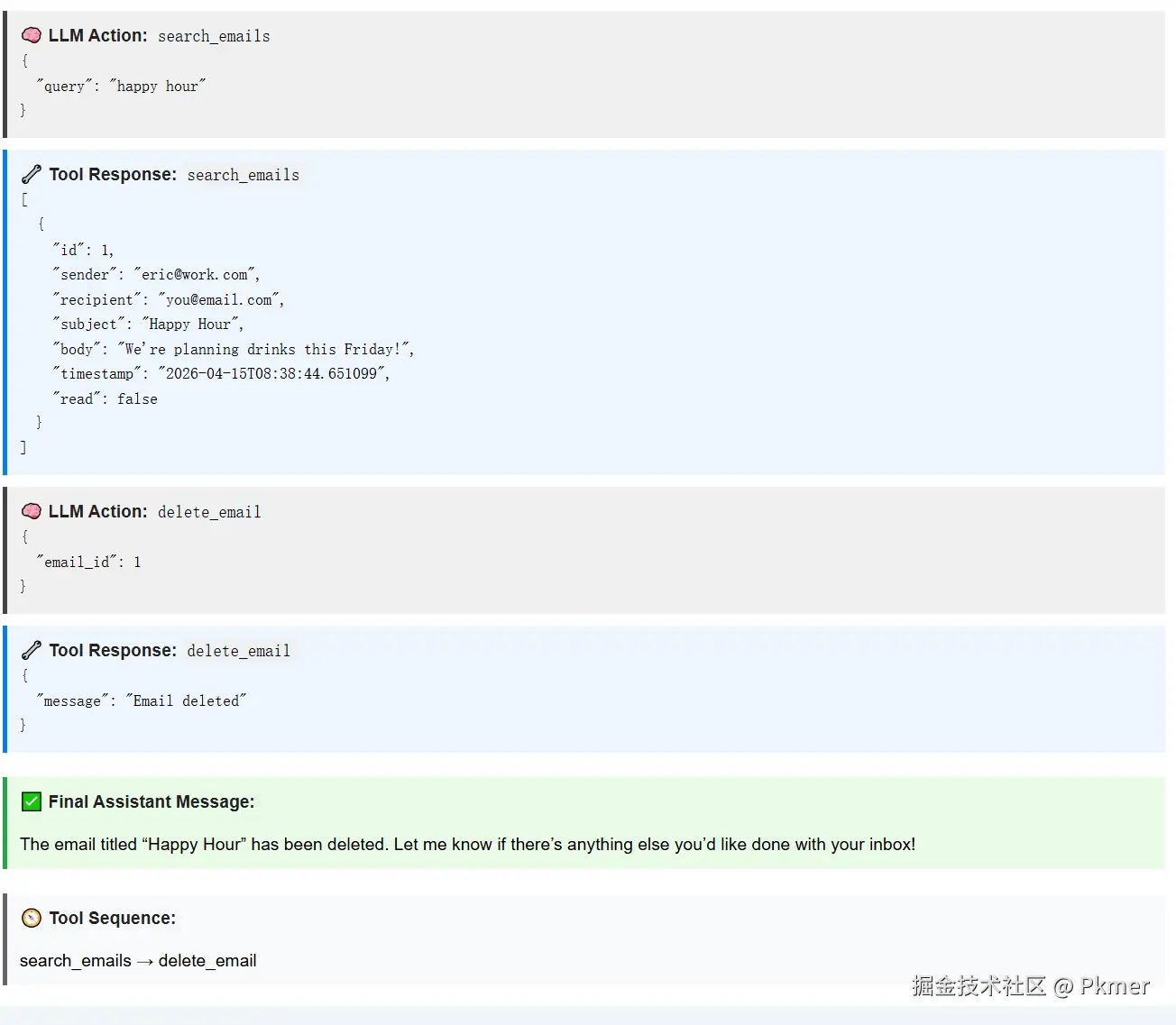
用到的相关工具:
这里原本的代码
search_emails参数的描述是:query (str): A keyword or phrase to search for.但是LLM总是传递json字符串,我加了一个Not Json.,变成query (str): A keyword or phrase to search for Not Json.。看来大模型在传参数上面也不是很智能。还是需要描述清楚。
python
def search_emails(query: str) -> list:
    """
    Search emails containing the query in subject, body, or sender.

    Args:
        query (str): A keyword or phrase to search for Not Json.

    Returns:
        List[dict]: A list of emails matching the query string.
    """
    return requests.get(f"{BASE_URL}/emails/search", params={"q": query}).json()

def delete_email(email_id: int) -> dict:
    """
    Delete an email by its ID.

    Args:
        email_id (int): The ID of the email to delete.

    Returns:
        dict: A confirmation message: {"message": "Email deleted"}
    """
    return requests.delete(f"{BASE_URL}/emails/{email_id}").json()
后端的实现
python
@app.get("/emails/search", response_model=List[EmailOut])
def search_emails(
    q: str = Query(..., description="Keyword to search in subject/body/sender"),
    db: Session = Depends(get_db),
):
    return db.query(Email).filter(
        (Email.subject.ilike(f"%{q}%")) |
        (Email.body.ilike(f"%{q}%")) |
        (Email.sender.ilike(f"%{q}%"))
    ).order_by(Email.timestamp.desc()).all()

@app.delete("/emails/{email_id}")
def delete_email(email_id: int, db: Session = Depends(get_db)):
    email = db.query(Email).filter(Email.id == email_id).first()
    if not email:
        raise HTTPException(status_code=404, detail="Email not found")
    db.delete(email)
    db.commit()
    return {"message": "Email deleted"}
小结
提供工具给LLM用,工具直接决定了Agent能做什么。LLM能够自主安排了流程,而且能够选择相应的工具。
感觉业务的CRUD的调用,给LLM自己决策去调用了。不过这只是简单业务的应用场景,复杂的应用场景还有待实践,但是核心原理已经掌握。