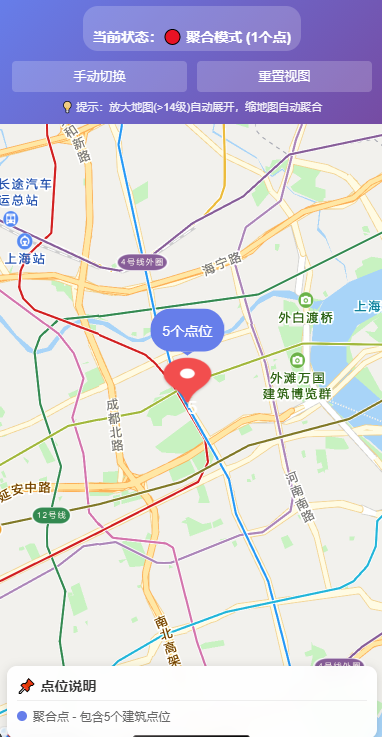
展示:
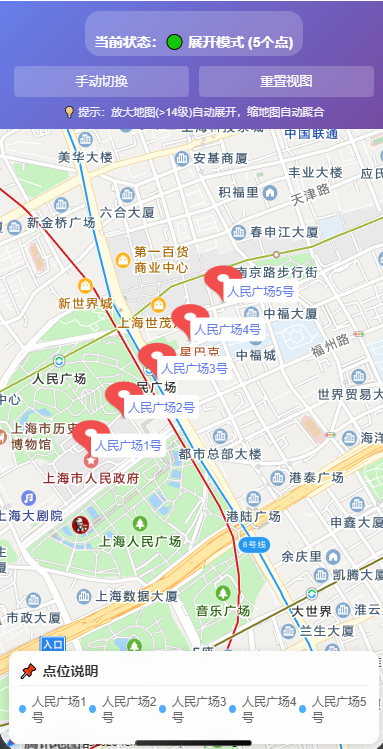
放大地图后:
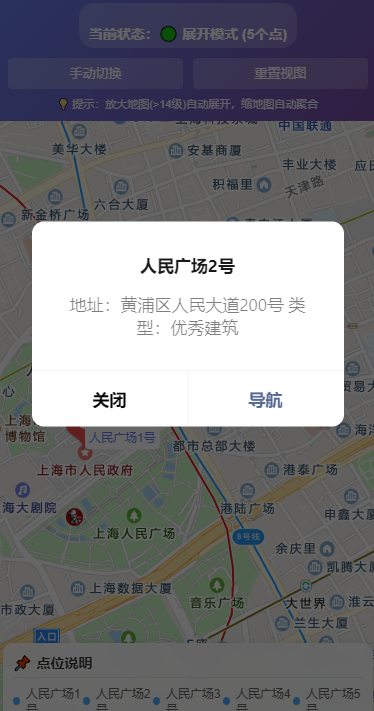
点开某一个详情:
js:
Page({
  data: {
    // 地图中心点(上海)
    latitude: 31.230416,
    longitude: 121.473701,
    scale: 12,  // 初始缩放级别

    // 原始点位数据(5个点位,分布在两个区域)
    points: [],

    // 地图标记点
    markers: [],

    // 聚合阈值:缩放级别大于14时展开
    expandZoomLevel: 14,

    // 当前缩放级别
    currentScale: 12,

    // 聚合状态
    clusters: []  // 存储聚合点信息
  },

  onLoad() {
    // 生成5个不规则分布的点位
    this.generateTestPoints();
    // 初始化聚合
    this.updateMarkers();
  },

  onReady() {
    // 创建地图上下文
    this.mapCtx = wx.createMapContext('clusterMap', this);
  },

  // 生成5个不规则分布的点位(3个在一堆,2个在另一堆)
  generateTestPoints() {
    const points = [
      // 第一组:人民广场区域(3个密集点)
      {
        id: 1,
        name: '人民广场1号',
        address: '黄浦区人民大道100号',
        latitude: 31.230416,
        longitude: 121.473701,
        type: '文保单位',
        group: 'A'
      },
      {
        id: 2,
        name: '人民广场2号',
        address: '黄浦区人民大道200号',
        latitude: 31.231016,  // 距离1号约60米
        longitude: 121.474301,
        type: '优秀建筑',
        group: 'A'
      },
      {
        id: 3,
        name: '人民广场3号',
        address: '黄浦区人民大道300号',
        latitude: 31.230816,  // 距离1号约40米
        longitude: 121.474701,
        type: '文保单位',
        group: 'A'
      },

      // 第二组:外滩区域(2个密集点)
      {
        id: 4,
        name: '外滩1号',
        address: '黄浦区中山东一路1号',
        latitude: 31.239819,
        longitude: 121.485371,
        type: '优秀建筑',
        group: 'B'
      },
      {
        id: 5,
        name: '外滩2号',
        address: '黄浦区中山东一路2号',
        latitude: 31.240419,  // 距离4号约60米
        longitude: 121.485971,
        type: '文保单位',
        group: 'B'
      },
      {
        id: 6,
        name: '外滩6号',
        address: '黄浦区中山东一路6号',
        latitude: 31.250419,  // 距离4号约60米
        longitude: 121.486371,
        type: '文保单位',
        group: 'C'
      }
    ];

    this.setData({ points });
    console.log('生成了5个不规则分布的点位');
    console.log('A组(人民广场):3个点');
    console.log('B组(外滩):2个点');
  },

  // 根据缩放级别更新标记点
  updateMarkers() {
    const { points, currentScale, expandZoomLevel } = this.data;

    // 判断是否需要展开
    const shouldExpand = currentScale >= expandZoomLevel;

    let markers = [];
    let clusters = [];

    if (shouldExpand) {
      // 放大地图:显示5个单独的点位
      console.log('放大地图,显示5个单独点位');
      markers = points.map(point => this.createSingleMarker(point));
      this.setData({ clusters: [] });
    } else {
      // 缩小时:计算聚合点(自动识别密集区域)
      console.log('缩地图,执行智能聚合');
      const clusterGroups = this.calculateClusters(points, 200); // 200米内算一组
      clusters = clusterGroups;
      markers = clusterGroups.map(group => this.createClusterMarker(group));
      this.setData({ clusters });
      console.log(`聚合为${clusterGroups.length}个聚合点`);
      clusterGroups.forEach((group, idx) => {
        console.log(`聚合点${idx+1}: 包含${group.points.length}个点`);
      });
    }

    this.setData({ markers });
    console.log(`当前标记点数量:${markers.length}`);
  },

  // 智能聚合算法(自动识别密集区域)
  calculateClusters(points, radius = 200) {
    const clusters = [];
    const used = new Set();

    points.forEach(point => {
      if (used.has(point.id)) return;

      // 找到当前点周围半径内的所有点
      const clusterPoints = [point];
      used.add(point.id);

      points.forEach(otherPoint => {
        if (used.has(otherPoint.id)) return;

        const distance = this.calculateDistance(
          point.latitude, point.longitude,
          otherPoint.latitude, otherPoint.longitude
        );

        if (distance <= radius) {
          clusterPoints.push(otherPoint);
          used.add(otherPoint.id);
        }
      });

      // 计算聚合中心
      let totalLat = 0, totalLng = 0;
      clusterPoints.forEach(p => {
        totalLat += p.latitude;
        totalLng += p.longitude;
      });

      clusters.push({
        id: `cluster_${Date.now()}_${Math.random()}`,
        latitude: totalLat / clusterPoints.length,
        longitude: totalLng / clusterPoints.length,
        count: clusterPoints.length,
        points: clusterPoints,
        centerPoint: clusterPoints[0]
      });
    });

    return clusters;
  },

  // 创建聚合标记点
  createClusterMarker(cluster) {
    const count = cluster.count;
    // 根据数量设置不同颜色
    const colors = {
      2: '#4facfe',
      3: '#f093fb',
      4: '#fa709a',
      5: '#43e97b'
    };
    const bgColor = colors[count] || '#667eea';

    return {
      id: cluster.id,
      latitude: cluster.latitude,
      longitude: cluster.longitude,
      count: count,
      points: cluster.points,
      isCluster: true,
      width: 50,
      height: 50,
      callout: {
        content: `${count}个点位`,
        color: '#ffffff',
        fontSize: 14,
        borderRadius: 25,
        bgColor: bgColor,
        padding: 12,
        display: 'ALWAYS'
      },
      label: {
        content: `${count}`,
        color: '#ffffff',
        fontSize: 18,
        fontWeight: 'bold',
        anchorX: 0,
        anchorY: -8
      }
    };
  },

  // 创建单个标记点
  createSingleMarker(point) {
    // 根据组别设置不同图标颜色
    const groupColors = {
      'A': '#f093fb',  // 人民广场区域粉色
      'B': '#4facfe'   // 外滩区域蓝色
    };
    const bgColor = groupColors[point.group] || '#667eea';

    return {
      id: point.id,
      latitude: point.latitude,
      longitude: point.longitude,
      count: 1,
      points: [point],
      isCluster: false,
      width: 40,
      height: 40,
      callout: {
        content: point.name,
        color: '#333333',
        fontSize: 12,
        borderRadius: 8,
        bgColor: '#ffffff',
        padding: 8,
        display: 'BYCLICK'
      },
      label: {
        content: point.name,
        color: bgColor,
        fontSize: 12,
        anchorX: 0,
        anchorY: -25,
        bgColor: '#ffffff',
        padding: 4,
        borderRadius: 4
      }
    };
  },

  // 计算两点距离(米)
  calculateDistance(lat1, lng1, lat2, lng2) {
    const radLat1 = lat1 * Math.PI / 180.0;
    const radLat2 = lat2 * Math.PI / 180.0;
    const a = radLat1 - radLat2;
    const b = lng1 * Math.PI / 180.0 - lng2 * Math.PI / 180.0;
    const s = 2 * Math.asin(Math.sqrt(
      Math.pow(Math.sin(a / 2), 2) +
      Math.cos(radLat1) * Math.cos(radLat2) * Math.pow(Math.sin(b / 2), 2)
    ));
    return s * 6378137;
  },

  // 地图变化事件
  onMapChange(e) {
    if (e.type === 'end') {
      const newScale = e.detail.scale;
      const oldScale = this.data.currentScale;

      console.log(`缩放级别变化:${oldScale} → ${newScale}`);

      this.setData({ currentScale: newScale });

      // 缩放级别变化超过阈值时,重新更新标记点
      const wasExpanded = oldScale >= this.data.expandZoomLevel;
      const isExpanded = newScale >= this.data.expandZoomLevel;

      if (wasExpanded !== isExpanded) {
        this.updateMarkers();

        // 显示提示
        if (isExpanded) {
          wx.showToast({
            title: '已展开为5个单独点位',
            icon: 'success',
            duration: 1500
          });
        } else {
          const clusterCount = this.data.markers.length;
          wx.showToast({
            title: `已聚合为${clusterCount}个点位`,
            icon: 'success',
            duration: 1500
          });
        }
      }
    }
  },

  // 点击标记点
  onMarkerTap(e) {
    const markerId = e.markerId;
    const marker = this.data.markers.find(m => m.id === markerId);

    if (!marker) return;

    if (marker.isCluster) {
      // 点击聚合点:显示该区域点位列表
      const points = marker.points;
      const itemList = points.map(p => p.name);

      wx.showActionSheet({
        itemList: itemList,
        success: (res) => {
          const selectedPoint = points[res.tapIndex];
          this.showPointDetail(selectedPoint);
        }
      });
    } else {
      // 点击单个点:显示详情
      this.showPointDetail(marker.points[0]);
    }
  },

  // 显示点位详情
  showPointDetail(point) {
    wx.showModal({
      title: point.name,
      content: `地址:${point.address}\n类型:${point.type}`,
      confirmText: '导航',
      cancelText: '关闭',
      success: (res) => {
        if (res.confirm) {
          wx.openLocation({
            latitude: point.latitude,
            longitude: point.longitude,
            name: point.name,
            address: point.address,
            scale: 18
          });
        }
      }
    });
  },

  // 手动切换聚合/展开
  toggleAggregation() {
    const { currentScale, expandZoomLevel } = this.data;
    const isExpanded = currentScale >= expandZoomLevel;

    if (isExpanded) {
      // 当前展开,切换到聚合
      this.setData({ scale: 12, currentScale: 12 });
      setTimeout(() => {
        this.updateMarkers();
        const clusterCount = this.data.markers.length;
        wx.showToast({
          title: `已聚合为${clusterCount}个区域`,
          icon: 'success'
        });
      }, 100);
    } else {
      // 当前聚合,切换到展开
      this.setData({ scale: 16, currentScale: 16 });
      setTimeout(() => {
        this.updateMarkers();
        wx.showToast({ title: '已展开为5个单独点位', icon: 'success' });
      }, 100);
    }
  },

  // 重置视图
  resetView() {
    this.setData({
      latitude: 31.235416,  // 中心点设在两个聚合区域中间
      longitude: 121.479701,
      scale: 12,
      currentScale: 12
    });
    this.updateMarkers();
    wx.showToast({ title: '已重置视图', icon: 'none' });
  },

  // 获取当前聚合状态描述
  getClusterDescription() {
    const { markers, currentScale, expandZoomLevel } = this.data;
    if (currentScale >= expandZoomLevel) {
      return '已展开 - 5个单独点位';
    } else {
      return `已聚合 - ${markers.length}个区域 (${markers.map(m => `${m.count}个点`).join(' + ')})`;
    }
  }
});
wxml:
<view class="container">
  <!-- 顶部控制栏 -->
  <view class="control-bar">
    <view class="status">
      <text class="status-text">{{getClusterDescription()}}</text>
    </view>

    <view class="buttons">
      <button class="btn" bindtap="toggleAggregation">手动切换</button>
      <button class="btn" bindtap="resetView">重置视图</button>
    </view>

    <view class="tip-text">
      💡 初始状态:3个点(人民广场) + 2个点(外滩) 分别聚合
    </view>
  </view>

  <!-- 地图组件 -->
  <map
    id="clusterMap"
    class="map"
    latitude="{{latitude}}"
    longitude="{{longitude}}"
    scale="{{scale}}"
    markers="{{markers}}"
    show-location
    bindmarkertap="onMarkerTap"
    bindregionchange="onMapChange"
    enable-zoom
    enable-scroll
    enable-rotate
  />

  <!-- 点位说明浮层 -->
  <view class="info-card">
    <view class="info-title">📍 点位分布</view>
    <view class="info-content">
      <view class="group-a">
        <view class="group-title">🔴 A组 - 人民广场区域(3个密集点)</view>
        <view class="point-list">
          <text>• 人民广场1号</text>
          <text>• 人民广场2号</text>
          <text>• 人民广场3号</text>
        </view>
      </view>
      <view class="group-b">
        <view class="group-title">🔵 B组 - 外滩区域(2个密集点)</view>
        <view class="point-list">
          <text>• 外滩1号</text>
          <text>• 外滩2号</text>
        </view>
      </view>
    </view>
  </view>
</view>
wxss:
.container {
  width: 100%;
  height: 100vh;
  display: flex;
  flex-direction: column;
  background-color: #f5f5f5;
}

.control-bar {
  background: linear-gradient(135deg, #667eea 0%, #764ba2 100%);
  padding: 20rpx 30rpx;
  color: #fff;
}

.status {
  text-align: center;
  margin-bottom: 20rpx;
}

.status-text {
  font-size: 28rpx;
  font-weight: bold;
  background-color: rgba(255, 255, 255, 0.2);
  padding: 10rpx 20rpx;
  border-radius: 30rpx;
  display: inline-block;
}

.buttons {
  display: flex;
  gap: 20rpx;
  margin-bottom: 15rpx;
}

.btn {
  flex: 1;
  height: 60rpx;
  line-height: 60rpx;
  font-size: 26rpx;
  background-color: rgba(255, 255, 255, 0.2);
  color: #fff;
  border-radius: 8rpx;
  padding: 0;
  border: none;
}

.btn::after {
  border: none;
}

.tip-text {
  font-size: 22rpx;
  text-align: center;
  opacity: 0.9;
}

.map {
  flex: 1;
  width: 100%;
}

.info-card {
  position: fixed;
  bottom: 20rpx;
  left: 20rpx;
  right: 20rpx;
  background-color: rgba(255, 255, 255, 0.95);
  border-radius: 20rpx;
  padding: 20rpx;
  box-shadow: 0 4rpx 20rpx rgba(0, 0, 0, 0.15);
  backdrop-filter: blur(10px);
}

.info-title {
  font-size: 28rpx;
  font-weight: bold;
  color: #333;
  margin-bottom: 15rpx;
  padding-bottom: 10rpx;
  border-bottom: 1rpx solid #eee;
}

.info-content {
  font-size: 24rpx;
}

.group-a, .group-b {
  margin-bottom: 20rpx;
}

.group-title {
  font-size: 26rpx;
  font-weight: bold;
  margin-bottom: 10rpx;
}

.group-a .group-title {
  color: #f093fb;
}

.group-b .group-title {
  color: #4facfe;
}

.point-list {
  display: flex;
  flex-direction: column;
  gap: 8rpx;
  padding-left: 20rpx;
  color: #666;
}