目录
前言
在上一篇我们学习了字节流,但是字节流在处理纯文本(尤其是包含中文的文本)时,纯粹的字节流很容易引发乱码问题,字符流的出现让我们可以解决中文乱码的问题。
一、字符集(ASCII、GBK、Unicode)
-
ASCII :美国人发明的,只包含英文字母、数字和符号。一个字符占 1 个字节 。
-
GBK :中国人 为了显示汉字发明的标准。在这个标准里,英文占 1 个字节,中文占 2 个字节 。
-
GBK字符集完全兼容ASCII字符集;
-
一个英文占一个字节,二进制第一位是0;
-
一个中文占两个字节,二进制高位的第一个字节是1。
-
-
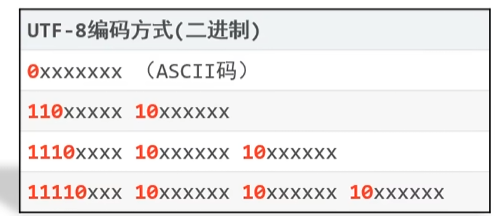
Unicode (UTF-8)⭐⭐⭐:万国码,目前互联网最通用的标准。在 UTF-8编码下,英文占 1 个字节,中文占 3 个字节。
二、Java中编码和解码的方式
1.Java中编码的方法
| String类中的方法 | 说明 |
|---|---|
| public byte\[\] getBytes() | 使用默认方式进行编码 |
| public byte\[\] getBytes(String charsetName) | 使用指定方式进行编码 |
2.Java中解码的方式
| String类中的方法 | 说明 |
| String (byte\[\] bytes) | 使用默认方式进行解码 |
| String (byte\[\] bytes, String charsetName) | 使用指定方式进行解码 |
|---|
3.案例
java
public class Test {
    public static void main(String[] args) throws UnsupportedEncodingException {
        //编码
        String str1 = "你好Java";
        byte[] bytes1 = str1.getBytes();
        System.out.println(Arrays.toString(bytes1));

        byte[] bytes2 = str1.getBytes("GBK");
        System.out.println(Arrays.toString(bytes2));

        //解码
        String str2 = new String(bytes1);
        System.out.println(str2);

        String str3 = new String(bytes2);
        System.out.println(str3);
    }
}
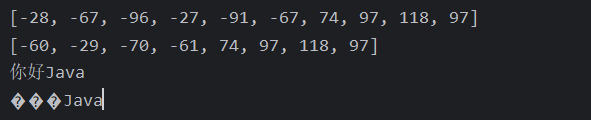
运行结果:
第一行使用UTF-8,对应三个字节为一个中文,正数一个字节为一个英文
第二行使用GBK,对应两个字节为一个中文,正数一个字节为一个英文
三、FileReader
为了解决字节流读取文本的痛点,Java 推出了字符流。
核心公式:字符流 = 字节流 + 字符集(编码表)
字符流在底层依然是在搬运字节,但它非常聪明:它会根据指定的默认操作系统的环境编码,通常是 UTF-8,自动判断读取几个字节拼成一个完整的字符。遇到英文读 1 个,遇到中文读 3 个,绝不劈开汉字。
核心流程:
①创建字符输入流对象
| 构造方法 | 说明 |
|---|---|
| public FileReader(File file) | 创建字符输入流关联本地文件 |
| public FileReader(String pathName) | 创建字符输入流关联本地文件 |
细节:如果文件不存在,则直接报错。
②读取数据
| 成员方法 | 说明 |
| public int read() | 读取数据,读到末尾返回-1 |
| public int read(**char\[\]**buffer) | 读取多个数据,读到末尾返回-1 |
|---|
③释放资源
1.空参read方法
java
public class Test {
    public static void main(String[] args) throws IOException {
        FileReader fr = new FileReader("src\\a.txt");

        int ch;
        while((ch = fr.read()) != -1){
            System.out.print((char)ch);
        }
        fr.close();
    }
}
运行结果:

2.带参read方法
注意:要创建char类型的数组。
java
public class Test02 {
    public static void main(String[] args) throws IOException {
        FileReader fr = new FileReader("src\\a.txt");

        char[] chars = new char[2];//一次读取两个字符

        int len;

        while((len = fr.read(chars)) != -1){
            String str = new String(chars, 0, len);
            System.out.print(str);
        }

        fr.close();
    }
}
运行结果:

总结
1、空参read方法,只读取到字符的十进制,需要我们自己来进行一次强制类型转换为char。
2、带参read方法,相当于空参read方法加上强制类型转换。
四、FileWriter
1.构造方法
| 构造方法 | 说明 |
|---|---|
| public FileWriter(File file) | 创建字符输出流关联本地文件 |
| public FileWriter(String pathName) | 创建字符输出流关联本地文件 |
| public FileWriter(File file, boolean append) | 创建字符输出流关联本地文件,续写 |
| public FileWriter(String pathName, boolean append) | 创建字符输出流关联本地文件,续写 |
2.成员方法
| 成员方法 | 说明 |
|---|---|
| void write(int c) | 写出一个字符 |
| void write(String str) | 写出一个字符串 |
| void write(String str, int off, int len) | 写出一个字符串的一部分 |
| void write(char\[\] cbuf) | 写出一个字符数组 |
| void write(char\[\] cbuf, int off, int len) | 写出一个字符数组的一部分 |
3.案例
java
public class FileWriterDemo01 {
    public static void main(String[] args) throws IOException {
        FileWriter fw = new FileWriter("src\\b.txt");

        fw.write("Unicode (UTF-8):万国码,目前互联网最通用的标准。\n" +
                "在 UTF-8 编码下,英文占 1 个字节,中文占 3 个字节。");

        fw.close();
    }
}
写入结果:

总结
-
图片、视频、音频、压缩包 ➡️ 字节流 (
FileInputStream/FileOutputStream) -
Word、Excel ➡️ 字节流 (它们不是纯文本,是富文本格式)
-
TXT、Java 源码、XML、JSON 等纯文本 ➡️ 字符流 (
FileReader/FileWriter)
💕❤️😘