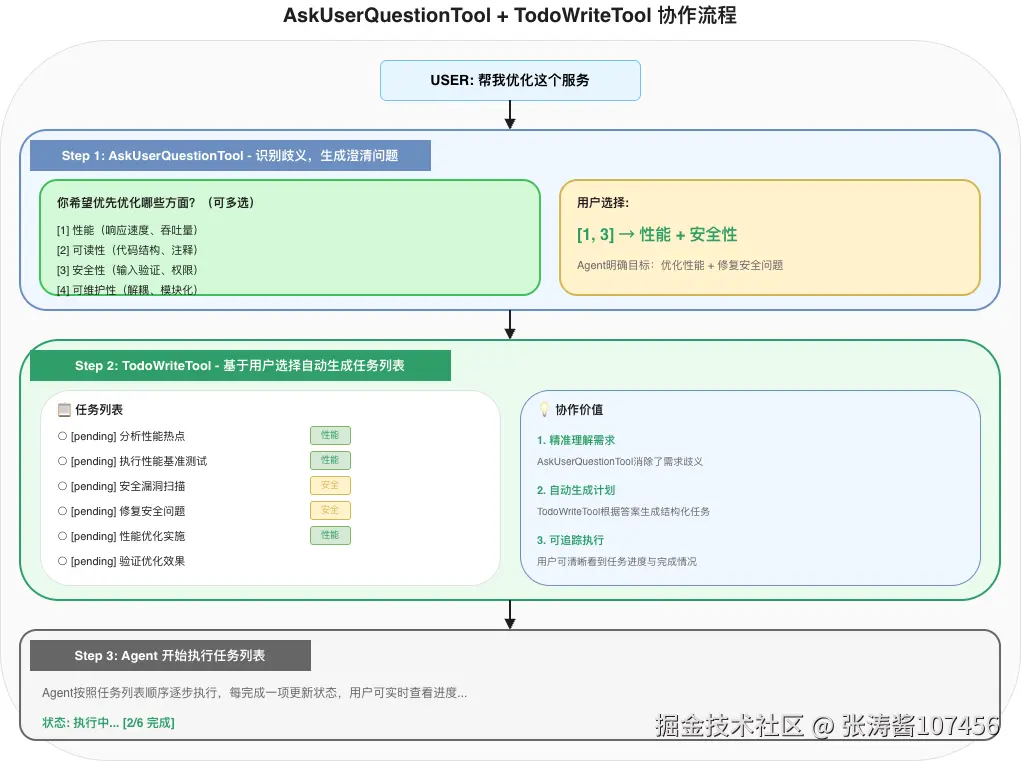
Agent如何在执行过程中"停下来问用户"?AskUserQuestionTool给出了标准化的答案------一种结构化的问答协议,让Agent能够主动发起交互、获取用户决策,从而实现人机协作的最佳实践。
环境准备
本文示例代码基于以下技术栈:
| 组件 | 版本要求 |
|---|---|
| JDK | 17+ |
| Spring Boot | 3.2+ |
| Spring AI | 2.0.0-M3+ |
| spring-ai-agent-utils | 0.7.0 |
Maven依赖:
xml
<dependencies>
    <!-- Spring AI 核心 -->
    <dependency>
        <groupId>org.springframework.ai</groupId>
        <artifactId>spring-ai-core</artifactId>
        <version>2.0.0-M3</version>
    </dependency>

    <!-- Spring AI Agent Utils -->
    <dependency>
        <groupId>org.springaicommunity</groupId>
        <artifactId>spring-ai-agent-utils</artifactId>
        <version>0.7.0</version>
    </dependency>
</dependencies>
💡 提示:部分示例需要Jansi库支持终端彩色输出,可添加依赖:
xml<dependency> <groupId>org.fusesource.jansi</groupId> <artifactId>jansi</artifactId> <version>2.4.0</version> </dependency>
一、核心问题:为什么需要AskUserQuestionTool?
1.1 传统AI交互的困境
场景:用户请求"帮我优化这段代码"
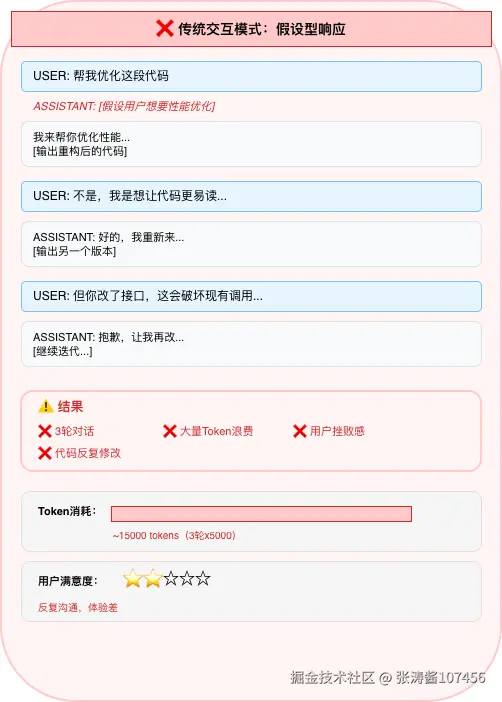
问题根源:
- 假设驱动:Agent基于不完整信息做出判断
- 单向输出:缺乏双向确认机制
- 迭代成本高:每次迭代消耗上下文窗口
1.2 AskUserQuestionTool的设计哲学
核心理念:将"假设-执行-修正"转变为"询问-确认-执行"
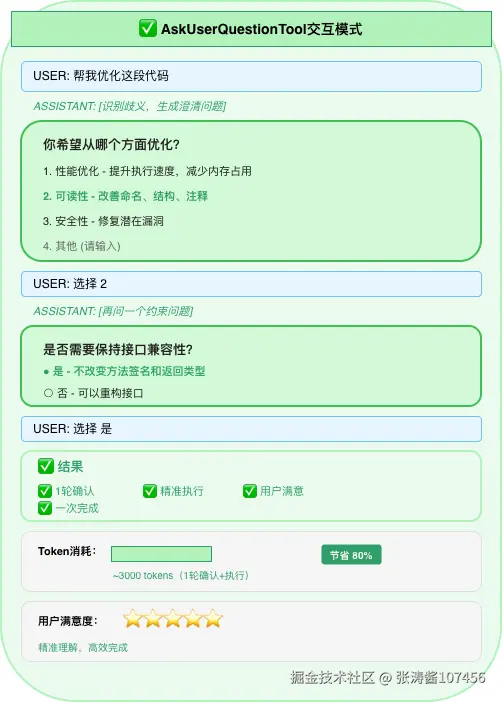
关键价值:
- 减少迭代:前置澄清,避免方向性错误
- 提升信任:用户感受到Agent的"理解"与"尊重"
- 节省Token:减少无效输出和多次修正
二、数据结构详解
2.1 核心类图
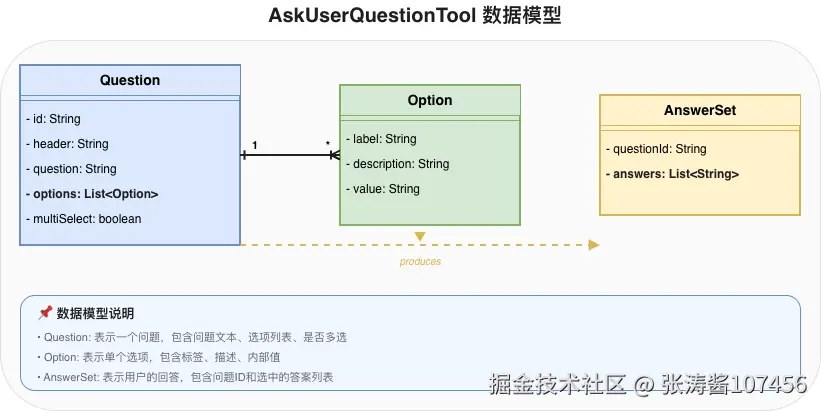
2.2 Question类详解
java
public record Question(
    String id,              // 问题唯一标识
    String header,          // 问题标题(简短摘要)
    String question,        // 完整问题文本
    List<Option> options,   // 预设选项列表
    boolean multiSelect     // 是否允许多选
) {
    // 便捷工厂方法
    public static Question single(String id, String header, String question,
                                  List<Option> options) {
        return new Question(id, header, question, options, false);
    }

    public static Question multiple(String id, String header, String question,
                                    List<Option> options) {
        return new Question(id, header, question, options, true);
    }
}字段说明:
| 字段 | 类型 | 必需 | 说明 |
|---|---|---|---|
id |
String | ✅ | 问题标识,用于关联答案 |
header |
String | ✅ | 简短标题,用于UI展示 |
question |
String | ✅ | 完整问题描述 |
options |
List<Option> | ✅ | 预设选项(至少1个) |
multiSelect |
boolean | ❌ | 默认false(单选) |
2.3 Option类详解
java
public record Option(
    String label,           // 选项标签(显示给用户)
    String description,     // 选项描述(解释后果)
    String value            // 选项值(返回给Agent)
) {
    // 简便构造方法
    public Option(String label, String value) {
        this(label, null, value);
    }

    public Option(String label, String description, String value) {
        this.label = label;
        this.description = description;
        this.value = value;
    }
}设计要点:
label:用户可见的简短文本(如"性能优化")description:帮助用户理解选择后果的详细说明value:返回给Agent的标准化值,便于程序处理
2.4 LLM生成的Tool调用示例
当Agent需要询问用户时,会调用AskUserQuestionTool:
json
{
  "name": "ask_user_question",
  "arguments": {
    "questions": [
      {
        "id": "optimization_type",
        "header": "优化方向",
        "question": "你希望从哪个方面优化代码?",
        "multiSelect": false,
        "options": [
          {
            "label": "性能优化",
            "description": "提升执行速度,减少内存占用,可能需要重构算法",
            "value": "performance"
          },
          {
            "label": "可读性",
            "description": "改善命名、代码结构、添加注释,不改变逻辑",
            "value": "readability"
          },
          {
            "label": "安全性",
            "description": "修复潜在安全漏洞,如SQL注入、XSS等",
            "value": "security"
          }
        ]
      },
      {
        "id": "compatibility",
        "header": "兼容性",
        "question": "是否需要保持接口兼容性?",
        "multiSelect": false,
        "options": [
          {
            "label": "是",
            "description": "不改变方法签名和返回类型",
            "value": "compatible"
          },
          {
            "label": "否",
            "description": "可以重构接口,需要同步修改调用方",
            "value": "breaking"
          }
        ]
      }
    ]
  }
}
三、QuestionHandler接口与实现
3.1 接口定义
java
@FunctionalInterface
public interface QuestionHandler {
    /**
     * 处理问题列表,返回用户答案
     *
     * @param questions Agent生成的问题列表
     * @return 问题ID到答案列表的映射
     */
    Map<String, List<String>> handle(List<Question> questions);
}
3.2 实现模式一:控制台交互
适用场景:CLI工具、开发调试
java
public class ConsoleQuestionHandler implements QuestionHandler {

    private final Scanner scanner;
    private final PrintStream out;

    public ConsoleQuestionHandler() {
        this(new Scanner(System.in), System.out);
    }

    @Override
    public Map<String, List<String>> handle(List<Question> questions) {
        Map<String, List<String>> answers = new LinkedHashMap<>();

        for (Question q : questions) {
            out.println();
            out.println(Ansi.colorize("┌" + "─".repeat(60) + "┐", Ansi.Color.CYAN));
            out.println(Ansi.colorize("│ " + q.header(), Ansi.Color.CYAN));
            out.println(Ansi.colorize("├" + "─".repeat(60) + "┤", Ansi.Color.CYAN));
            out.println(Ansi.colorize("│ " + wrapText(q.question(), 58), Ansi.Color.WHITE));
            out.println(Ansi.colorize("└" + "─".repeat(60) + "┘", Ansi.Color.CYAN));
            out.println();

            // 显示选项
            for (int i = 0; i < q.options().size(); i++) {
                Option opt = q.options().get(i);
                String marker = q.multiSelect() ? "☐" : "○";
                out.printf("  %s %d. %s\n", marker, i + 1,
                          Ansi.colorize(opt.label(), Ansi.Color.YELLOW));

                if (opt.description() != null) {
                    out.printf("     %s\n",
                              Ansi.colorize(opt.description(), Ansi.Color.WHITE));
                }
            }

            // 其他选项
            out.printf("\n  %s 其他: 直接输入文本\n",
                      q.multiSelect() ? "☐" : "○");

            // 读取答案
            List<String> selected = readAnswer(q);
            answers.put(q.id(), selected);
        }

        return answers;
    }

    private List<String> readAnswer(Question q) {
        while (true) {
            out.print("\n请选择: ");
            String input = scanner.nextLine().trim();

            // 解析数字选择
            if (input.matches("\\d+(,\\s*\\d+)*")) {
                List<String> selected = parseNumberSelection(input, q);
                if (selected != null) {
                    return selected;
                }
            }

            // 非数字,作为自定义文本
            if (!input.isEmpty()) {
                return List.of(input);
            }

            out.println("无效输入,请重新选择。");
        }
    }

    private List<String> parseNumberSelection(String input, Question q) {
        String[] parts = input.split(",\\s*");
        List<String> values = new ArrayList<>();

        for (String part : parts) {
            int index = Integer.parseInt(part) - 1;
            if (index < 0 || index >= q.options().size()) {
                out.println("无效选项: " + (index + 1));
                return null;
            }
            if (!q.multiSelect() && values.size() > 0) {
                out.println("此问题只能单选");
                return null;
            }
            values.add(q.options().get(index).value());
        }

        return values;
    }
}
3.3 实现模式二:Web界面
适用场景:Web应用、集成到现有系统
java
@RestController
@RequestMapping("/api/questions")
public class QuestionController {

    private final Map<String, CompletableFuture<Map<String, List<String>>>> pendingQuestions =
        new ConcurrentHashMap<>();

    private final QuestionHandler questionHandler;

    @PostMapping("/ask")
    public ResponseEntity<QuestionSession> askQuestions(
            @RequestBody List<Question> questions) {

        String sessionId = UUID.randomUUID().toString();
        CompletableFuture<Map<String, List<String>>> future = new CompletableFuture<>();
        pendingQuestions.put(sessionId, future);

        // 返回会话ID,前端轮询或WebSocket获取问题
        return ResponseEntity.ok(new QuestionSession(sessionId, questions));
    }

    @PostMapping("/answer/{sessionId}")
    public ResponseEntity<Void> submitAnswers(
            @PathVariable String sessionId,
            @RequestBody Map<String, List<String>> answers) {

        CompletableFuture<Map<String, List<String>>> future =
            pendingQuestions.remove(sessionId);

        if (future != null) {
            future.complete(answers);
            return ResponseEntity.ok().build();
        }

        return ResponseEntity.notFound().build();
    }

    // QuestionHandler实现,等待前端响应
    public QuestionHandler webQuestionHandler() {
        return questions -> {
            String sessionId = UUID.randomUUID().toString();
            CompletableFuture<Map<String, List<String>>> future = new CompletableFuture<>();
            pendingQuestions.put(sessionId, future);

            try {
                // 等待前端提交答案,超时5分钟
                return future.get(5, TimeUnit.MINUTES);
            } catch (TimeoutException e) {
                throw new RuntimeException("用户响应超时");
            }
        };
    }
}前端组件示例(React):
jsx
function QuestionPanel({ sessionId, questions, onSubmit }) {
  const [answers, setAnswers] = useState({});

  const handleSelect = (questionId, value, isMultiSelect) => {
    if (isMultiSelect) {
      setAnswers(prev => ({
        ...prev,
        [questionId]: prev[questionId]?.includes(value)
          ? prev[questionId].filter(v => v !== value)
          : [...(prev[questionId] || []), value]
      }));
    } else {
      setAnswers(prev => ({
        ...prev,
        [questionId]: [value]
      }));
    }
  };

  const handleCustomInput = (questionId, text) => {
    setAnswers(prev => ({
      ...prev,
      [questionId]: [text]
    }));
  };

  return (
    <div className="question-panel">
      {questions.map(q => (
        <div key={q.id} className="question-card">
          <h3>{q.header}</h3>
          <p>{q.question}</p>

          <div className="options">
            {q.options.map((opt, idx) => (
              <label key={idx} className="option">
                <input
                  type={q.multiSelect ? "checkbox" : "radio"}
                  name={q.id}
                  checked={answers[q.id]?.includes(opt.value)}
                  onChange={() => handleSelect(q.id, opt.value, q.multiSelect)}
                />
                <span className="label">{opt.label}</span>
                {opt.description && (
                  <span className="description">{opt.description}</span>
                )}
              </label>
            ))}
          </div>

          <input
            type="text"
            placeholder="或输入自定义答案..."
            onChange={(e) => handleCustomInput(q.id, e.target.value)}
          />
        </div>
      ))}

      <button onClick={() => onSubmit(answers)}>确认</button>
    </div>
  );
}
3.4 实现模式三:消息平台集成
适用场景:钉钉、Slack、Telegram等IM平台
钉钉集成示例:
java
@Service
public class DingTalkQuestionHandler implements QuestionHandler {

    private final DingTalkClient dingTalkClient;
    private final String webhookUrl;

    @Override
    public Map<String, List<String>> handle(List<Question> questions) {
        Map<String, List<String>> answers = new LinkedHashMap<>();

        for (Question q : questions) {
            // 构建钉钉Interactive Card
            InteractiveCard card = buildInteractiveCard(q);

            // 发送消息
            String messageId = dingTalkClient.sendInteractiveCard(
                webhookUrl, card);

            // 等待回调
            List<String> answer = waitForCallback(messageId, q.id());
            answers.put(q.id(), answer);
        }

        return answers;
    }

    private InteractiveCard buildInteractiveCard(Question q) {
        return InteractiveCard.builder()
            .title(q.header())
            .text(q.question())
            .btnOrientation("1")  // 竖直排列
            .buttons(q.options().stream()
                .map(opt -> InteractiveButton.builder()
                    .title(opt.label())
                    .actionURL("/callback/answer?qid=" + q.id() +
                               "&value=" + opt.value())
                    .build())
                .collect(Collectors.toList()))
            .build();
    }

    private List<String> waitForCallback(String messageId, String questionId) {
        CompletableFuture<List<String>> future = new CompletableFuture<>();

        // 注册回调等待器
        callbackRegistry.put(messageId + ":" + questionId, future);

        try {
            return future.get(10, TimeUnit.MINUTES);
        } catch (TimeoutException e) {
            return List.of("用户响应超时");
        }
    }

    // 回调处理端点
    @PostMapping("/callback/answer")
    public void handleCallback(
            @RequestParam String qid,
            @RequestParam String value,
            @RequestParam String messageId) {

        String key = messageId + ":" + qid;
        CompletableFuture<List<String>> future = callbackRegistry.remove(key);

        if (future != null) {
            future.complete(List.of(value));
        }
    }
}
四、用户体验设计原则
4.1 问题设计原则
原则一:问题要具体且有指导性
❌ 错误示例:
json
{
  "question": "你想要什么?",
  "options": [
    {"label": "A", "value": "a"},
    {"label": "B", "value": "b"}
  ]
}
✅ 正确示例:
json
{
  "question": "检测到代码中存在潜在的N+1查询问题。你希望如何处理?",
  "options": [
    {
      "label": "添加JOIN FETCH",
      "description": "修改查询语句,一次性加载关联数据。适用于查询为主的场景。",
      "value": "join_fetch"
    },
    {
      "label": "添加@EntityGraph",
      "description": "使用JPA的EntityGraph配置。适用于配置驱动的场景。",
      "value": "entity_graph"
    },
    {
      "label": "添加缓存",
      "description": "使用Spring Cache缓存关联数据。适用于数据变化不频繁的场景。",
      "value": "cache"
    }
  ]
}
原则二:控制问题数量
- 理想:1-2个问题
- 可接受:3-4个问题
- 避免:超过5个问题
当需要更多信息时,考虑:
- 渐进式询问:先问最关键的,后续根据回答再追问
- 默认值策略:为次要问题提供合理默认值
原则三:提供"其他"选项
用户可能的需求超出预设范围,始终保留自由输入通道:
java
Question.withOtherOption(
    "id", "标题", "问题内容",
    List.of(
        new Option("选项1", "value1"),
        new Option("选项2", "value2")
    )
);
4.2 选项设计原则
原则一:选项互斥且完备
选项之间不应有重叠,且应覆盖主要场景:
❌ 错误示例:
json
{
  "options": [
    {"label": "性能优化", "value": "perf"},
    {"label": "提升速度", "value": "speed"},   // 与"性能优化"重叠
    {"label": "减少内存", "value": "memory"}   // 与"性能优化"重叠
  ]
}
✅ 正确示例:
json
{
  "options": [
    {"label": "性能优化(整体)", "description": "全面提升性能表现", "value": "performance"},
    {"label": "代码重构", "description": "改善代码结构,不影响功能", "value": "refactor"},
    {"label": "安全加固", "description": "修复安全漏洞", "value": "security"}
  ]
}
原则二:描述后果而非方法
让用户理解选择的"影响",而非技术细节:
❌ 错误示例:
json
{
  "label": "使用Redis缓存",
  "description": "配置RedisTemplate和@Cacheable注解"  // 技术细节
}
✅ 正确示例:
json
{
  "label": "添加缓存",
  "description": "查询结果将被缓存5分钟,可显著提升响应速度,但数据可能有延迟"  // 后果
}
4.3 响应时间设计
| 场景 | 超时设置 | 超时处理 |
|---|---|---|
| CLI交互 | 无限制 | 用户Ctrl+C退出 |
| Web界面 | 5分钟 | 提示"会话已过期,请重新发起" |
| IM平台 | 10分钟 | 发送提醒消息或使用默认值 |
五、与MCP Elicitation的关系
5.1 概念对比
| 特性 | AskUserQuestionTool | MCP Elicitation |
|---|---|---|
| 触发方 | Agent本地决定 | MCP Server发起 |
| 数据格式 | 预定义选项(简化) | JSON Schema(灵活) |
| 交互位置 | Agent侧 | MCP Server侧 |
| 适用场景 | Agent需要用户输入 | 服务端需要用户授权 |
| 协议依赖 | Spring AI原生 | MCP协议 |
5.2 MCP Elicitation示例
java
// MCP Server端点
@PostMapping("/mcp/elicitation")
public ElicitationResponse requestUserInput(
        @RequestBody ElicitationRequest request) {

    // 返回JSON Schema定义的表单
    return ElicitationResponse.builder()
        .message("需要你的授权")
        .requestedSchema(Map.of(
            "type", "object",
            "properties", Map.of(
                "apiKey", Map.of(
                    "type", "string",
                    "title", "API密钥",
                    "description", "请输入你的API密钥以继续"
                ),
                "remember", Map.of(
                    "type", "boolean",
                    "title", "记住此密钥",
                    "default", true
                )
            ),
            "required", List.of("apiKey")
        ))
        .build();
}
5.3 组合使用
Spring AI支持同时使用两者:
java
@Configuration
public class AgentConfig {

    // AskUserQuestionTool: Agent本地交互
    @Bean
    public AskUserQuestionTool askUserQuestionTool() {
        return AskUserQuestionTool.builder()
            .questionHandler(new ConsoleQuestionHandler())
            .build();
    }

    // MCP Elicitation: MCP Server需要用户输入
    @Bean
    public McpClient mcpClient() {
        return McpClient.builder()
            .serverUrl("http://mcp-server:8080")
            .elicitationHandler(this::handleMcpElicitation)
            .build();
    }

    private Map<String, Object> handleMcpElicitation(
            ElicitationRequest request) {
        // 将MCP Elicitation转发给用户
        System.out.println(request.getMessage());
        // 收集用户输入...
        return Map.of("apiKey", "user-input-key");
    }
}
六、最佳实践与踩坑指南
6.1 常见问题
| 问题 | 原因 | 解决方案 |
|---|---|---|
| 问题不被触发 | Tool未正确注册 | 确保AskUserQuestionTool在defaultTools中 |
| 用户响应超时 | 超时设置过短 | 根据场景调整超时时间 |
| 选项过多难以选择 | 设计不当 | 分组或分步询问 |
| 自定义输入无法处理 | 未处理非选项输入 | handler中添加自由文本处理逻辑 |
6.2 性能优化
异步处理:避免阻塞Agent主线程
java
public class AsyncQuestionHandler implements QuestionHandler {

    private final ExecutorService executor = Executors.newCachedThreadPool();
    private final QuestionHandler delegate;

    @Override
    public Map<String, List<String>> handle(List<Question> questions) {
        // 异步等待用户响应
        CompletableFuture<Map<String, List<String>>> future =
            CompletableFuture.supplyAsync(() -> delegate.handle(questions), executor);

        try {
            return future.get(5, TimeUnit.MINUTES);
        } catch (TimeoutException e) {
            // 超时返回默认值或抛出异常
            return getDefaultAnswers(questions);
        }
    }
}
6.3 测试策略
单元测试QuestionHandler:
java
class ConsoleQuestionHandlerTest {

    @Test
    void shouldParseSingleSelection() {
        // 模拟用户输入
        String simulatedInput = "2\n";  // 选择第二个选项
        InputStream in = new ByteArrayInputStream(simulatedInput.getBytes());
        Scanner scanner = new Scanner(in);

        QuestionHandler handler = new ConsoleQuestionHandler(scanner, System.out);

        Question question = Question.single(
            "test", "测试", "请选择",
            List.of(
                new Option("选项A", "a"),
                new Option("选项B", "b")
            )
        );

        Map<String, List<String>> answers = handler.handle(List.of(question));

        assertThat(answers.get("test")).containsExactly("b");
    }

    @Test
    void shouldParseMultiSelection() {
        String simulatedInput = "1,3\n";  // 选择第一和第三个
        InputStream in = new ByteArrayInputStream(simulatedInput.getBytes());
        Scanner scanner = new Scanner(in);

        // ... 类似上面
    }

    @Test
    void shouldHandleCustomInput() {
        String simulatedInput = "自定义答案\n";
        // ...
    }
}集成测试AskUserQuestionTool:
java
@SpringBootTest
class AskUserQuestionToolIntegrationTest {

    @Autowired
    ChatClient chatClient;

    @Test
    void shouldAskQuestionWhenUncertain() {
        // 模拟QuestionHandler返回预设答案
        Map<String, List<String>> mockAnswers = Map.of(
            "optimization_type", List.of("readability")
        );

        QuestionHandler mockHandler = questions -> mockAnswers;

        ChatClient testClient = ChatClient.builder(chatModel)
            .defaultTools(AskUserQuestionTool.builder()
                .questionHandler(mockHandler)
                .build())
            .build();

        String response = testClient.prompt()
            .user("帮我优化这段代码")
            .call()
            .content();

        // 验证响应包含可读性优化的内容
        assertThat(response).contains("可读性");
    }
}
七、总结
AskUserQuestionTool将Agent从"假设型响应者"转变为"协作型伙伴",其核心价值在于:
- 前置澄清 → 减少迭代,避免方向性错误
- 结构化交互 → 标准化问题格式,便于多端适配
- 用户控制 → 让用户掌握决策权,提升信任感
- Token节省 → 一次确认胜过多次修正
适用场景判断:
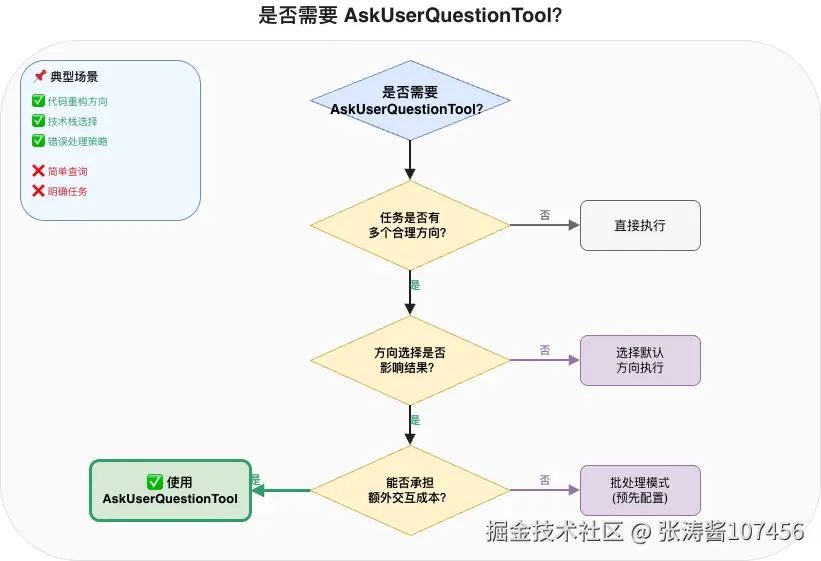
与Skills的协作:Skills可以指导何时使用AskUserQuestionTool:
markdown
---
name: code-optimizer
description: Code optimization expert. Ask about optimization goals before proceeding.
---

When optimizing code, ALWAYS ask the user about their primary goal:
- Performance (speed/memory)
- Readability
- Security
- Compatibility

Use AskUserQuestionTool to clarify before making changes.
7.5 与TodoWriteTool的协作
当用户的选择会影响任务列表时,AskUserQuestionTool可以触发TodoWriteTool的更新:
java
@Component
public class QuestionAwareTodoHandler {

    private final TodoWriteTool todoWriteTool;

    /**
     * 根据用户回答动态调整任务列表
     */
    public void handleQuestionImpact(String questionId, List<String> answers) {
        switch (questionId) {
            case "optimization_type" -> handleOptimizationChoice(answers);
            case "deployment_target" -> handleDeploymentChoice(answers);
            // ... 其他问题类型
        }
    }

    private void handleOptimizationChoice(List<String> choices) {
        List<TodoItem> newTasks = new ArrayList<>();

        if (choices.contains("performance")) {
            // 用户选择性能优化,添加性能相关任务
            newTasks.add(TodoItem.builder()
                .id("perf-benchmark")
                .content("执行性能基准测试")
                .status(TodoStatus.PENDING)
                .build());
            newTasks.add(TodoItem.builder()
                .id("perf-profile")
                .content("分析性能热点")
                .status(TodoStatus.PENDING)
                .build());
        }

        if (choices.contains("security")) {
            // 用户选择安全加固,添加安全相关任务
            newTasks.add(TodoItem.builder()
                .id("security-scan")
                .content("执行安全扫描")
                .status(TodoStatus.PENDING)
                .build());
        }

        // 合并新任务到现有列表
        if (!newTasks.isEmpty()) {
            todoWriteTool.addItems(newTasks);
        }
    }
}集成示例:
java
@Configuration
public class QuestionTodoIntegration {

    @Bean
    public AskUserQuestionTool askUserQuestionTool(
            QuestionAwareTodoHandler todoHandler) {
        return AskUserQuestionTool.builder()
            .questionHandler(new ConsoleQuestionHandler())
            .onAnswerReceived((questionId, answers) -> {
                // 用户回答后,通知TodoHandler
                todoHandler.handleQuestionImpact(questionId, answers);
            })
            .build();
    }
}典型场景: