Vue3 + Trilab:打造高扩展性三维可视化插件化框架实战指南
本文深度解析基于Vue3和Trilab引擎的插件化三维可视化框架设计与实现,涵盖架构设计、核心代码、性能优化等完整解决方案。
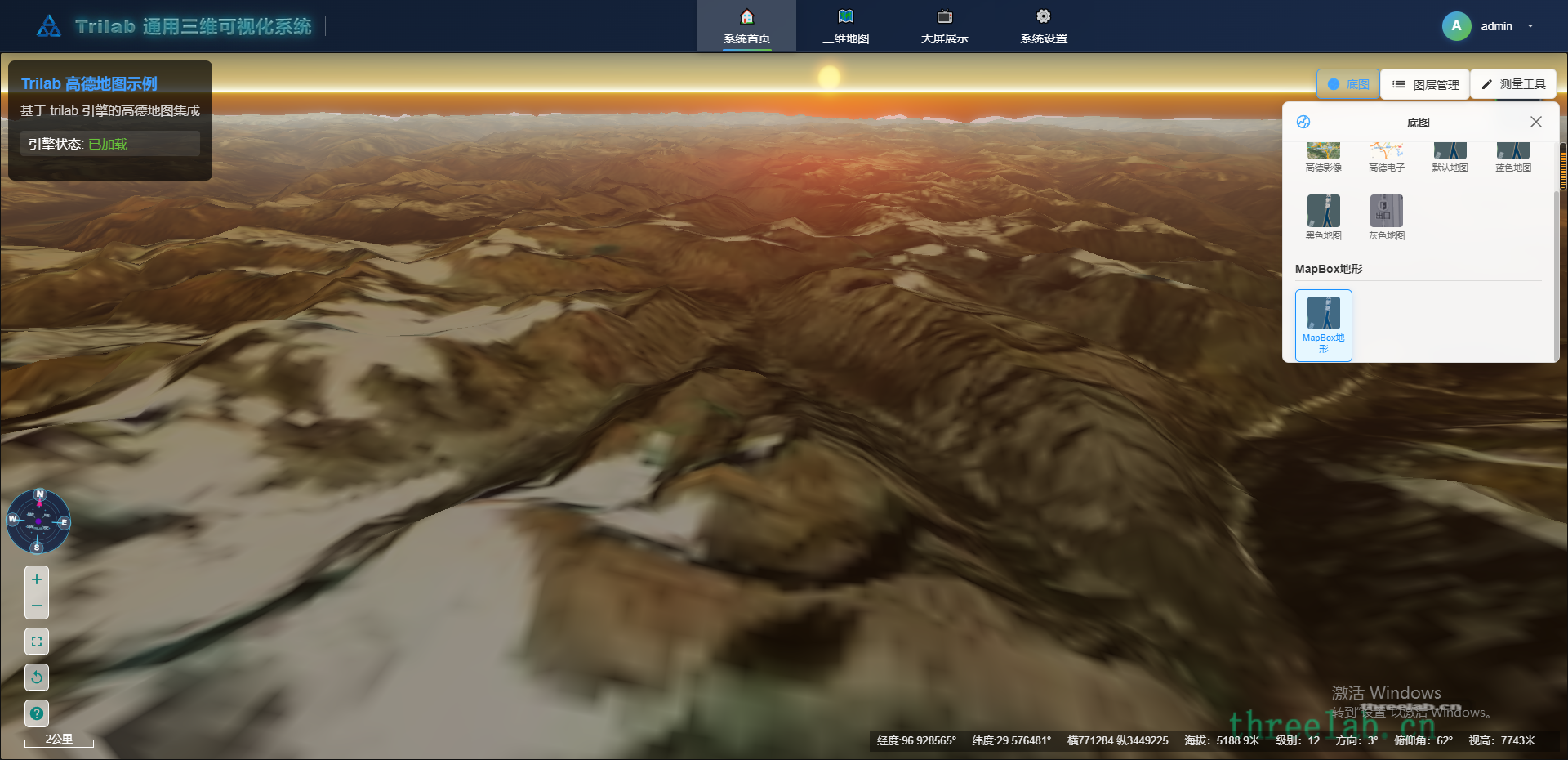
引言:为什么需要插件化三维可视化框架?
随着数字孪生、智慧城市、工业互联网等领域的快速发展,三维可视化技术已成为各行业数字化转型的核心需求。然而,传统的单体应用架构面临诸多挑战:
- 功能耦合度高:新功能开发需要修改核心代码
- 维护成本大:系统复杂度随功能增加呈指数级增长
- 技术栈固化:难以适应快速变化的技术趋势
- 团队协作难:多人开发时容易产生代码冲突
插件化架构正是解决这些痛点的最佳实践。本文将分享我们基于Vue3和Trilab引擎构建的高扩展性三维可视化框架的完整实现方案。
技术栈选型与优势分析
核心技术栈
- 前端框架:Vue 3 + Composition API + TypeScript
- 三维引擎:Trilab三维可视化引擎
- 构建工具:Vite 5.0 + Rollup
- 状态管理:Pinia + 自定义插件状态管理
- 样式方案:Tailwind CSS + CSS3动画
技术优势对比
| 技术方案 | 优势 | 适用场景 |
|---|---|---|
| Vue3 + Composition API | 响应式性能优秀,代码组织清晰 | 复杂状态管理应用 |
| Trilab引擎 | 国产化支持好,性能稳定 | 大规模三维场景渲染 |
| 插件化架构 | 高扩展性,易于维护 | 多团队协作开发 |
整体架构设计:分层与解耦
架构分层示意图
┌─────────────────────────────────────────┐
│   应用层 (App Layer)                    │
│   • 路由管理                            │
│   • 主题配置                            │
│   • 用户权限                            │
├─────────────────────────────────────────┤
│   插件管理层 (Plugin Manager)           │
│   • 插件生命周期管理                    │
│   • 动态组件注册                        │
│   • 插件间通信                          │
├─────────────────────────────────────────┤
│   业务组件层 (Business Components)      │
│   • 地图控制组件                        │
│   • 图层管理组件                        │
│   • 测量工具组件                        │
├─────────────────────────────────────────┤
│   三维引擎层 (3D Engine)                │
│   • Trilab引擎封装                     │
│   • 场景管理                           │
│   • 渲染优化                           │
└─────────────────────────────────────────┘
核心设计理念
- 单一职责原则:每个插件只负责一个特定功能
- 开闭原则:对扩展开放,对修改关闭
- 依赖倒置:插件不直接依赖具体实现,而是依赖抽象接口
插件系统核心实现
插件管理器 (PluginManager.js)
typescript
// 插件管理器核心类
export class PluginManager {
  private plugins: Map<string, BasePlugin> = new Map()
  private pluginConfigs: Map<string, PluginConfig> = new Map()
  private pluginComponents: Map<string, Component> = new Map()

  // 插件生命周期管理
  public async initialize(): Promise<void> {
    await this.loadPluginConfigs()
    await this.loadEnabledPlugins()
    await this.initializePlugins()
  }

  // 动态加载插件
  public async loadPlugin(config: PluginConfig): Promise<void> {
    try {
      const pluginModule = await import(/* @vite-ignore */ config.path)
      const pluginClass = pluginModule.default || pluginModule
      const plugin = new pluginClass(config)

      await plugin.initialize()
      this.plugins.set(config.id, plugin)

      console.log(`✅ 插件加载成功: ${config.name}`)
    } catch (error) {
      console.error(`❌ 插件加载失败: ${config.name}`, error)
    }
  }

  // 获取插件组件
  public getPluginComponent(pluginId: string): Component | undefined {
    return this.pluginComponents.get(pluginId)
  }
}
基础插件接口定义
typescript
// 插件基础接口
export abstract class BasePlugin {
  public id: string
  public name: string
  public version: string
  public isInitialized: boolean = false
  public isActive: boolean = false

  constructor(config: PluginConfig) {
    this.id = config.id
    this.name = config.name
    this.version = config.version || '1.0.0'
  }

  // 插件初始化(必须实现)
  abstract initialize(): Promise<void>

  // 插件激活
  async onActivate(): Promise<void> {
    this.isActive = true
    console.log(`🔌 插件激活: ${this.name}`)
  }

  // 插件停用
  async onDeactivate(): Promise<void> {
    this.isActive = false
    console.log(`🔌 插件停用: ${this.name}`)
  }

  // 插件销毁
  async destroy(): Promise<void> {
    await this.onDeactivate()
    console.log(`🗑️ 插件销毁: ${this.name}`)
  }
}
实战案例:仪表盘插件完整实现
仪表盘插件类 (DashboardPlugin.ts)
typescript
import { BasePlugin } from './BasePlugin'
import type { PluginConfig } from '../types'

export class DashboardPlugin extends BasePlugin {
  private components: Record<string, any> = {}

  async initialize(): Promise<void> {
    await super.initialize()

    // 动态导入组件(按需加载)
    const [{ default: DashboardButton }, { default: DashboardPanel }] = await Promise.all([
      import('./components/DashboardButton.vue'),
      import('./components/DashboardPanel.vue')
    ])

    // 注册组件到插件管理器
    this.components = {
      button: DashboardButton,
      panel: DashboardPanel
    }

    // 发布插件就绪事件
    this.dispatchPluginReadyEvent()

    this.isInitialized = true
    console.log(`📊 仪表盘插件初始化完成`)
  }

  private dispatchPluginReadyEvent(): void {
    const event = new CustomEvent('plugin:components:ready', {
      detail: {
        pluginId: this.id,
        components: this.components,
        config: this.config
      }
    })
    window.dispatchEvent(event)
  }

  // 自定义业务方法
  public showDashboard(): void {
    // 显示仪表盘逻辑
    console.log('显示仪表盘')
  }

  public hideDashboard(): void {
    // 隐藏仪表盘逻辑
    console.log('隐藏仪表盘')
  }
}
Vue3动态组件渲染系统
vue
<template>
  <!-- 主应用容器 -->
  <div class="app-container">
    <!-- Trilab三维场景 -->
    <div id="trilab-container" ref="trilabContainer"></div>

    <!-- 插件组件动态渲染区域 -->
    <div class="plugin-components-container">
      <!-- 动态渲染所有已注册的插件组件 -->
      <div
        v-for="pluginComponent in pluginComponents"
        :key="pluginComponent.id"
        :class="pluginComponent.containerClass"
        :style="pluginComponent.containerStyle"
      >
        <component
          :is="pluginComponent.component"
          v-if="pluginComponent.component"
          v-bind="pluginComponent.props"
        />
      </div>
    </div>
  </div>
</template>

<script setup lang="ts">
import { ref, shallowRef, onMounted, onUnmounted } from 'vue'
import { PluginManager } from './plugins/PluginManager'

// 插件组件管理
const pluginComponents = ref<PluginComponent[]>([])
const pluginManager = new PluginManager()

// 组件注册函数
const registerPluginComponent = (
  id: string,
  component: any,
  config: ComponentConfig = {}
) => {
  const pluginComponent: PluginComponent = {
    id,
    component: shallowRef(component),
    containerClass: config.containerClass || '',
    containerStyle: config.containerStyle || {},
    props: config.props || {}
  }

  pluginComponents.value.push(pluginComponent)
}

// 监听插件组件就绪事件
const handlePluginComponentsReady = (event: CustomEvent) => {
  const { pluginId, components, config } = event.detail

  // 注册插件提供的所有组件
  Object.entries(components).forEach(([componentName, component]) => {
    const componentId = `${pluginId}-${componentName}`
    registerPluginComponent(componentId, component, config)
  })
}

onMounted(async () => {
  // 监听插件事件
  window.addEventListener('plugin:components:ready', handlePluginComponentsReady)

  // 初始化插件系统
  await pluginManager.initialize()

  // 初始化Trilab引擎
  await initTrilabEngine()
})

onUnmounted(() => {
  // 清理事件监听
  window.removeEventListener('plugin:components:ready', handlePluginComponentsReady)

  // 销毁插件管理器
  pluginManager.destroy()
})
</script>

<style scoped>
.app-container {
  position: relative;
  width: 100vw;
  height: 100vh;
  overflow: hidden;
}

#trilab-container {
  width: 100%;
  height: 100%;
}

.plugin-components-container {
  position: absolute;
  top: 0;
  left: 0;
  width: 100%;
  height: 100%;
  z-index: 1000;
  pointer-events: none; /* 允许点击穿透 */
}

.plugin-components-container > div {
  pointer-events: auto; /* 组件内部可交互 */
}
</style>
性能优化策略与实践
1. 懒加载与代码分割
typescript
// 按需加载插件配置
export const lazyLoadPlugin = async (pluginId: string) => {
  // 动态导入插件模块
  const pluginModule = await import(
    /* webpackChunkName: "plugin-[request]" */
    `@/plugins/${pluginId}/index.ts`
  )
  return pluginModule.default
}

// 路由级别的代码分割
const routes = [
  {
    path: '/dashboard',
    name: 'Dashboard',
    component: () => import('@/views/Dashboard.vue'),
    meta: {
      requiresAuth: true,
      preload: true // 标记为需要预加载
    }
  }
]
2. 内存管理与性能监控
typescript
// 性能监控装饰器
function performanceMonitor(target: any, propertyName: string, descriptor: PropertyDescriptor) {
  const method = descriptor.value

  descriptor.value = async function (...args: any[]) {
    const startTime = performance.now()

    try {
      const result = await method.apply(this, args)
      const endTime = performance.now()

      console.log(`⏱️ ${propertyName} 执行时间: ${(endTime - startTime).toFixed(2)}ms`)

      return result
    } catch (error) {
      const endTime = performance.now()
      console.error(`❌ ${propertyName} 执行失败,耗时: ${(endTime - startTime).toFixed(2)}ms`, error)
      throw error
    }
  }

  return descriptor
}

// 在插件方法上使用性能监控
class OptimizedPlugin extends BasePlugin {
  @performanceMonitor
  async initialize() {
    // 初始化逻辑
  }
}
插件配置管理与热更新
配置文件示例 (plugins.config.json)
json
{
  "plugins": {
    "dashboard": {
      "enabled": true,
      "name": "智能仪表盘",
      "version": "1.2.0",
      "path": "./plugins/dashboard/index.ts",
      "config": {
        "position": "bottom-right",
        "theme": "dark",
        "autoStart": true
      }
    },
    "layer-manager": {
      "enabled": true,
      "name": "图层管理器",
      "version": "1.1.0",
      "path": "./plugins/layer-manager/index.ts",
      "config": {
        "collapsible": true,
        "defaultExpanded": false
      }
    },
    "measurement-tool": {
      "enabled": false,
      "name": "测量工具",
      "version": "1.0.0",
      "path": "./plugins/measurement-tool/index.ts",
      "config": {
        "precision": 2,
        "units": "meters"
      }
    }
  }
}
热更新配置监听
typescript
// 配置文件热更新监听
export class ConfigManager {
  private config: PluginConfigMap = {}
  private watcher: FileSystemWatcher | null = null

  async watchConfigChanges(configPath: string): Promise<void> {
    if (import.meta.hot) {
      // Vite开发环境热更新
      import.meta.hot.accept(configPath, (newConfig) => {
        this.handleConfigUpdate(newConfig)
      })
    } else {
      // 生产环境轮询检查
      this.startPolling(configPath)
    }
  }

  private handleConfigUpdate(newConfig: PluginConfigMap): void {
    const changes = this.detectConfigChanges(this.config, newConfig)

    changes.added.forEach(plugin => {
      console.log(`🆕 新增插件: ${plugin.name}`)
      this.loadPlugin(plugin)
    })

    changes.removed.forEach(plugin => {
      console.log(`🗑️ 移除插件: ${plugin.name}`)
      this.unloadPlugin(plugin.id)
    })

    changes.updated.forEach(({ oldConfig, newConfig }) => {
      console.log(`🔄 更新插件配置: ${newConfig.name}`)
      this.updatePluginConfig(newConfig.id, newConfig)
    })

    this.config = newConfig
  }
}
实际应用场景与扩展
1. 智慧城市可视化平台
- 插件示例:交通流量监控、环境监测、安防布控
- 技术特点:实时数据接入、大规模场景渲染
- 性能要求:高帧率、低延迟、多数据源融合
2. 工业数字孪生系统
- 插件示例:设备监控、工艺流程模拟、故障预警
- 技术特点:高精度模型、物理仿真、实时交互
- 扩展需求:第三方系统集成、自定义分析工具
3. 教育培训模拟平台
- 插件示例:虚拟实验、交互式教学、考核评估
- 技术特点:丰富的交互方式、多媒体支持
- 用户体验:直观易用、响应迅速
部署与运维最佳实践
Docker容器化部署
dockerfile
# Dockerfile
FROM node:18-alpine

WORKDIR /app

# 复制依赖文件
COPY package*.json ./
COPY vite.config.ts ./

# 安装依赖
RUN npm ci --only=production

# 复制源代码
COPY . .

# 构建应用
RUN npm run build

# 使用nginx服务静态文件
FROM nginx:alpine
COPY --from=0 /app/dist /usr/share/nginx/html
COPY nginx.conf /etc/nginx/nginx.conf

EXPOSE 80
CMD ["nginx", "-g", "daemon off;"]
CI/CD流水线配置
yaml
# .github/workflows/deploy.yml
name: Deploy to Production

on:
  push:
    branches: [ main ]

jobs:
  deploy:
    runs-on: ubuntu-latest

    steps:
    - uses: actions/checkout@v3

    - name: Setup Node.js
      uses: actions/setup-node@v3
      with:
        node-version: '18'
        cache: 'npm'

    - name: Install dependencies
      run: npm ci

    - name: Run tests
      run: npm test

    - name: Build application
      run: npm run build

    - name: Deploy to server
      uses: appleboy/ssh-action@v0.1.3
      with:
        host: ${{ secrets.SERVER_HOST }}
        username: ${{ secrets.SERVER_USER }}
        key: ${{ secrets.SERVER_SSH_KEY }}
        script: |
          cd /opt/app
          docker-compose down
          docker-compose up -d
总结与展望
技术成果总结
- 架构创新:实现了真正意义上的插件化三维可视化框架
- 性能优异:通过懒加载、代码分割等技术优化加载性能
- 扩展性强:支持动态插件加载、热更新配置管理
- 开发友好:提供完整的TypeScript类型定义和开发工具链
未来发展方向
- 微前端集成:支持多个团队独立开发部署插件
- AI能力融合:集成机器学习模型实现智能分析
- 云原生部署:基于Kubernetes的弹性伸缩架构
- 低代码平台:可视化配置插件和业务流程
开源贡献
本项目已开源,欢迎社区贡献:
- GitHub仓库:https://github.com/AivoGenX/trilab-vue-project.git
- Gitee仓库:https://gitee.com/minimapv/trilab-vue-project
- 项目演示地址:https://threelab.cn/project/vue/
- 官网地址:https://threelab.cn/
- 问题反馈:https://github.com/AivoGenX/trilab-vue-project/issues
技术标签 :#Vue3 #三维可视化 #插件化架构 #Trilab引擎 #前端架构 #性能优化 #TypeScript #微前端
作者 :Trilab技术团队
发布日期 :2026年4月
版权声明:本文采用CC BY-NC-SA 4.0协议
如果本文对您有帮助,欢迎点赞、收藏、关注!如有技术问题,欢迎在评论区留言讨论。