边距
// 只给 顶部 加边距 padding: EdgeInsets.only(top: 20), // 只给 左边 padding: EdgeInsets.only(left: 15), // 只给 底部 padding: EdgeInsets.only(bottom: 10), // 只给 右边 padding: EdgeInsets.only(right: 5), padding: EdgeInsets.only( top: 10, // 上 left: 20, // 左 bottom: 5, // 下 right: 0, // 右 ), // 上下:10,左右:20 padding: EdgeInsets.symmetric( vertical: 10, // 上下 horizontal: 20, // 左右 ), // 上下左右都是 15 padding: EdgeInsets.all(15),
圆角
Dart// 单独指定圆角 borderRadius: BorderRadius.only( topLeft: Radius.circular(10), bottomRight: Radius.circular(10), topRight: Radius.circular(12), bottomRight: Radius.circular(12), ) // 全部指定 BorderRadius.circular(12) // 没有圆角 borderRadius: BorderRadius.zero // 只有顶部两个角圆角 BorderRadius.vertical(top: Radius.circular(15)) // 只有底部两个角圆角 BorderRadius.vertical(bottom: Radius.circular(20)) // 左侧两个角圆角 BorderRadius.horizontal(left: Radius.circular(10)) // 右侧两个角圆角 BorderRadius.horizontal(right: Radius.circular(10)) // 统一设置圆角 BorderRadius.all(Radius.circular(10)) BorderRadius.all(Radius.elliptical(20, 10))
边框
Dart// 统一设置 border: Border.all( color: Colors.black, // 边框颜色 width: 2, // 边框宽度 style: BorderStyle.solid, // 边框样式(默认就是实线) ) // 单独设置 border: Border( top: BorderSide(color: Colors.red, width: 2), // 上边框 bottom: BorderSide(color: Colors.blue, width: 3), // 下边框 left: BorderSide(color: Colors.green, width: 1), // 左边框 right: BorderSide.none, // 右边框:无边框 ) // 对称边框 左右一样 + 上下一样 border: Border.symmetric( horizontal: BorderSide(color: Colors.purple, width: 2), // 左、右 vertical: BorderSide(color: Colors.orange, width: 1), // 上、下 ) // 无边框 border: Border.none
1、Container
用于容纳单个子组件的容器组件。集成了若干个单子组件的功能,如内外边距、形变、装饰、约束等...
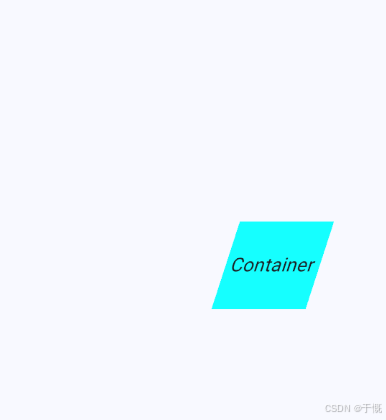
变换性+约束性
import 'dart:math';

import 'package:flutter/material.dart';

class ContainerPage extends StatelessWidget {
  const ContainerPage({super.key});

  @override
  Widget build(BuildContext context) {
    return Scaffold(
      appBar: AppBar(title: const Text('Container')),
      body: Center(
        // 垂直水平居中
        child: Container(
          //容器
          alignment: Alignment.center, // 水平垂直居中
          color: Colors.cyanAccent,
          width: 150,
          height: 150 * 0.618,
          transform: Matrix4.skew(-pi / 10, 0)
            ..translateByDouble(100.0, 0.0, 0.0, 1.0),
          constraints: BoxConstraints(
            // 约束性
            minWidth: 100,
            maxWidth: 100,
            minHeight: 20,
            maxHeight: 100,
          ),
          child: const Text("Container", style: TextStyle(fontSize: 20)),
        ),
      ),
    );
  }
}
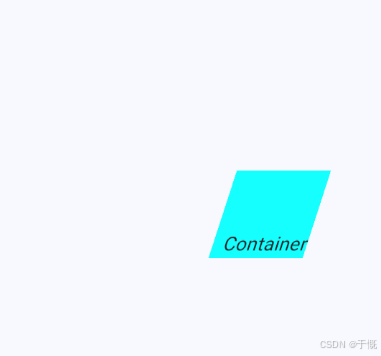
对子组件对齐定位
import 'dart:math';

import 'package:flutter/material.dart';

class ContainerPage extends StatelessWidget {
  const ContainerPage({super.key});

  @override
  Widget build(BuildContext context) {
    return Scaffold(
      appBar: AppBar(title: const Text('Container')),
      body: Center(
        // 垂直水平居中
        child: Container(
          //容器
          alignment: Alignment.bottomRight, // 对子组件对齐定位
          color: Colors.cyanAccent,
          width: 150,
          height: 150 * 0.618,
          transform: Matrix4.skew(-pi / 10, 0)
            ..translateByDouble(100.0, 0.0, 0.0, 1.0),
          constraints: BoxConstraints(
            // 约束性
            minWidth: 100,
            maxWidth: 100,
            minHeight: 20,
            maxHeight: 100,
          ),
          child: const Text("Container", style: TextStyle(fontSize: 20)),
        ),
      ),
    );
  }
}
控制宽高内外间距(默认border-box)
 Container(
          //容器
          alignment: Alignment.bottomRight, // 对子组件对齐定位
          color: Colors.cyanAccent,
          width: 150,
          height: 150 * 0.618,
          padding: EdgeInsets.all(10), // 内边距
          margin: EdgeInsets.all(10), // 外边距
          transform: Matrix4.skew(-pi / 10, 0)
            ..translateByDouble(100.0, 0.0, 0.0, 1.0),
          constraints: BoxConstraints(
            // 约束性
            minWidth: 100,
            maxWidth: 100,
            minHeight: 20,
            maxHeight: 100,
          ),
          child: const Text("Container", style: TextStyle(fontSize: 20)),
        ),
边距的用法
// 只给 顶部 加边距
padding: EdgeInsets.only(top: 20),

// 只给 左边
padding: EdgeInsets.only(left: 15),

// 只给 底部
padding: EdgeInsets.only(bottom: 10),

// 只给 右边
padding: EdgeInsets.only(right: 5),

padding: EdgeInsets.only(
  top: 10,    // 上
  left: 20,   // 左
  bottom: 5,  // 下
  right: 0,   // 右
),

// 上下:10,左右:20
padding: EdgeInsets.symmetric(
  vertical: 10, // 上下
  horizontal: 20, // 左右
),

// 上下左右都是 15
padding: EdgeInsets.all(15),
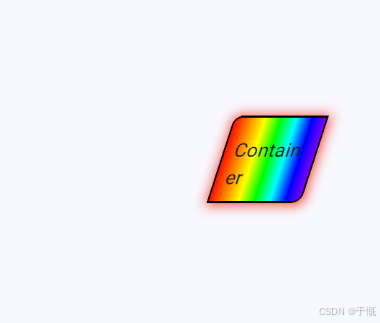
装饰(渐变色、圆角、阴影)
Dartimport 'dart:math'; import 'package:flutter/material.dart'; class ContainerPage extends StatelessWidget { const ContainerPage({super.key}); @override Widget build(BuildContext context) { return Scaffold( appBar: AppBar(title: const Text('Container')), body: Center( // 垂直水平居中 child: Container( //容器 alignment: Alignment.bottomRight, // 对子组件对齐定位 // color: Colors.cyanAccent, width: 150, height: 150 * 0.618, padding: EdgeInsets.all(10), // 内边距 margin: EdgeInsets.all(10), // 外边距 transform: Matrix4.skew(-pi / 10, 0) ..translateByDouble(100.0, 0.0, 0.0, 1.0), constraints: BoxConstraints( // 约束性 minWidth: 100, maxWidth: 100, minHeight: 20, maxHeight: 100, ), decoration: BoxDecoration( gradient: LinearGradient( stops: [0.0, 1 / 6, 2 / 6, 3 / 6, 4 / 6, 5 / 6, 1.0], colors: [ 0xffff0000, 0xffFF7F00, 0xffFFFF00, 0xff00FF00, 0xff00FFFF, 0xff0000FF, 0xff8B00FF, ].map((e) => Color(e)).toList(), ), borderRadius: BorderRadius.only( topLeft: Radius.circular(10), bottomRight: Radius.circular(10), ), boxShadow: [ BoxShadow( color: Colors.red, offset: Offset(1, 1), blurRadius: 10, spreadRadius: 1, ), ], border: Border.all( color: Colors.black, // 边框颜色 width: 2, // 边框宽度 style: BorderStyle.solid, // 边框样式(默认就是实线) ), ), child: const Text("Container", style: TextStyle(fontSize: 20)), ), ), ); } }
2、Text
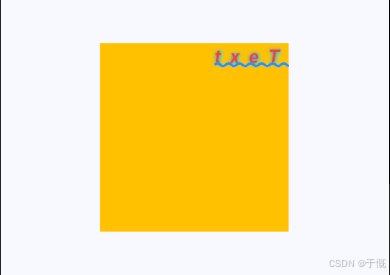
基本样式
child: const Text(
            "Text",
            textAlign: TextAlign.left, // 文字居中
            style: TextStyle(
              fontSize: 20,
              color: Colors.red,
              fontWeight: FontWeight.bold,
              fontStyle: FontStyle.italic,
              letterSpacing: 10, // 字距
            ),
          ),
文字方向
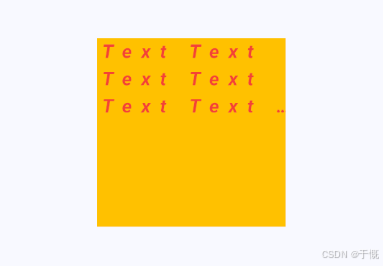
Text(
  // 1. 生成 1000 个 "Text" 单词,用空格连接成一长串文字
  List.filled(1000, 'Text').join(' '),

  textAlign: TextAlign.start, // 文字对齐:默认靠左(start=开始位置)
  // textDirection: TextDirection.rtl, // 文字方向:从右向左(仅排版,不反转文字)

  maxLines: 3, // 最大显示 3 行
  overflow: TextOverflow.ellipsis, // 超出 3 行 → 末尾显示 ...

  style: TextStyle(
    fontSize: 20,        // 字体大小
    color: Colors.red,   // 颜色:红色
    fontWeight: FontWeight.bold, // 加粗
    fontStyle: FontStyle.italic, // 斜体
    letterSpacing: 10,  // 字间距(非常大,10逻辑像素)
  ),
),
装饰线
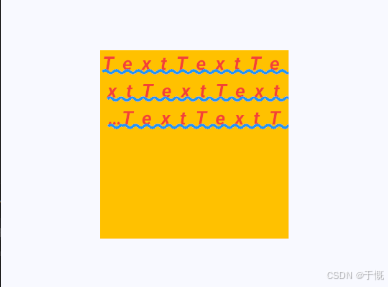
TextStyle(
  decoration: TextDecoration.underline,    // 下划线
  decorationThickness: 3,                  // 线粗 3
  decorationStyle: TextDecorationStyle.wavy, // 波浪线
  decorationColor: Colors.blue,            // 线颜色:蓝色
),
文字溢出
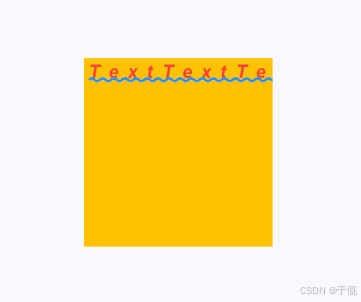
softWrap: false, // 是否换行 设置了maxLines后,会自动换行
overflow: TextOverflow.clip, // 超出部分 ellipsis 省略号 clip 裁剪 visible 显示
文字阴影
shadows: [
  Shadow(
    color: Colors.cyanAccent,  // 阴影颜色:青色
    offset: Offset(1, 1),      // 阴影偏移:向右 1,向下 1
    blurRadius: 10,            // 模糊半径:10(越大约模糊)
  ),
  Shadow(
    color: Colors.blue,        // 阴影颜色:蓝色
    offset: Offset(-0.1, 0.1),// 阴影偏移:向左 0.1,向下 0.1
    blurRadius: 10,            // 模糊半径:10
  ),
],
文字反转
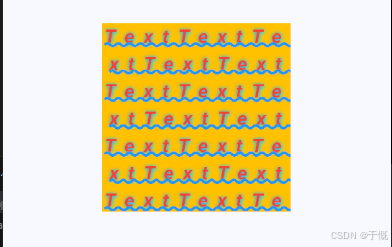
List.filled(1, 'Text').join('').split('').reversed.join(),
textDirection: TextDirection.rtl, // 文字方向: 从右向左 只是定位,并不是文字反转显示
3、GestureDetector
组件手势事件的检测器,可接受点击、长按、双击,按下、松开、移动等事件,并可以获取触点信息。
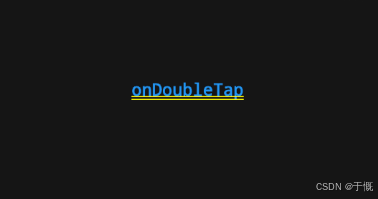
点击、长按、双击
import 'package:flutter/material.dart';

class GesturePage extends StatefulWidget {
  const GesturePage({super.key});

  @override
  State<GesturePage> createState() => _CustomGestureDetectorState();
}

class _CustomGestureDetectorState extends State<GesturePage> {
  String _info = ''; // 存储当前手势状态

  @override
  Widget build(BuildContext context) {
    return GestureDetector(
      // 点击事件
      onTap: () => setState(() => _info = 'onTap'),
      // 双击事件
      onDoubleTap: () => setState(() => _info = 'onDoubleTap'),
      // 长按事件
      onLongPress: () => setState(() => _info = 'onLongPress'),

      child: Container(
        alignment: Alignment.center,
        width: 300,
        height: 300 * 0.4, // 120
        color: Colors.grey.withAlpha(33),
        child: Text(
          _info.isEmpty ? '请进行手势操作' : _info,
          style: const TextStyle(fontSize: 18, color: Colors.blue),
        ),
      ),
    );
  }
}
拖拽
import 'package:flutter/material.dart';

class GesturePage extends StatefulWidget {
  const GesturePage({super.key});

  @override
  State<GesturePage> createState() => _CustomGestureDetectorState();
}

class _CustomGestureDetectorState extends State<GesturePage> {
  String _info = ''; // 存储当前手势状态
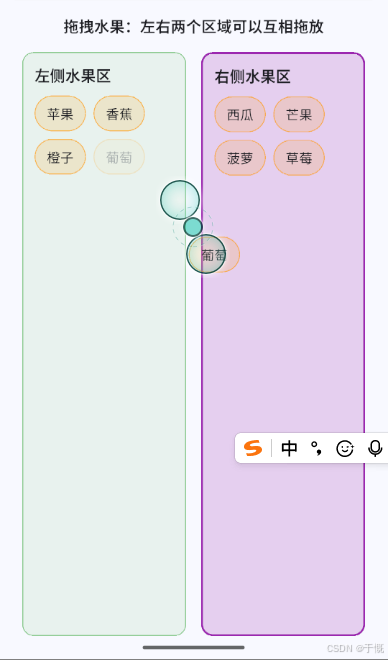
  final List<String> _leftFruits = ['苹果', '香蕉', '橙子', '葡萄', '草莓'];
  final List<String> _rightFruits = ['西瓜', '芒果', '菠萝'];

  void _moveFruit(String fruit, {required bool toLeft}) {
    setState(() {
      _leftFruits.remove(fruit);
      _rightFruits.remove(fruit);
      if (toLeft) {
        _leftFruits.add(fruit);
      } else {
        _rightFruits.add(fruit);
      }
    });
  }

  Widget _buildFruitItem(String fruit) {
    return Draggable<String>(
      data: fruit,
      feedback: Material(
        // 拖拽时显示的反馈(被拖拽的物品)
        color: Colors.transparent,
        child: _FruitChip(label: fruit, color: Colors.orange),
      ),
      childWhenDragging: Opacity(
        opacity: 0.3,
        child: _FruitChip(label: fruit, color: Colors.orange),
      ),
      child: _FruitChip(label: fruit, color: Colors.orange),
    );
  }

  Widget _buildDropZone({
    required String title,
    required List<String> fruits,
    required bool acceptToLeft,
    required Color color,
  }) {
    return Expanded(
      child: DragTarget<String>(
        onWillAcceptWithDetails: (details) => true, // 是否接受拖拽
        onAcceptWithDetails: (details) {
          // 拖拽完成
          _moveFruit(details.data, toLeft: acceptToLeft);
        },
        builder: (context, candidateData, rejectedData) {
          // context:当前构建上下文(所有 builder 都有)
          // candidateData:当前区域有可被接受的拖拽物品
          // rejectedData:正在悬停但不被接受的数据列表
          final isHovering = candidateData.isNotEmpty;
          return AnimatedContainer(
            duration: const Duration(milliseconds: 150),
            margin: const EdgeInsets.all(8),
            padding: const EdgeInsets.all(12),
            decoration: BoxDecoration(
              color: isHovering
                  ? color.withValues(alpha: 0.2)
                  : color.withValues(alpha: 0.1),
              borderRadius: BorderRadius.circular(12),
              border: Border.all(
                color: isHovering ? color : color.withValues(alpha: 0.6),
                width: isHovering ? 2 : 1,
              ),
            ),
            child: Column(
              crossAxisAlignment: CrossAxisAlignment.start,
              children: [
                Text(
                  title,
                  style: const TextStyle(
                    fontSize: 16,
                    fontWeight: FontWeight.w600,
                  ),
                ),
                const SizedBox(height: 10),
                Expanded(
                  child: SingleChildScrollView(
                    child: Wrap(
                      spacing: 8,
                      runSpacing: 8,
                      children: fruits.map(_buildFruitItem).toList(),
                    ),
                  ),
                ),
              ],
            ),
          );
        },
      ),
    );
  }

  @override
  Widget build(BuildContext context) {
    return Scaffold(
      appBar: AppBar(title: const Text('Gesture & Drag Demo')),
      body: Padding(
        padding: const EdgeInsets.all(16),
        child: Column(
          children: [
            const Text(
              '拖拽水果:左右两个区域可以互相拖放',
              style: TextStyle(fontSize: 16, fontWeight: FontWeight.w600),
            ),
            const SizedBox(height: 8),
            Expanded(
              child: Row(
                children: [
                  _buildDropZone(
                    title: '左侧水果区',
                    fruits: _leftFruits,
                    acceptToLeft: true,
                    color: Colors.green,
                  ),
                  _buildDropZone(
                    title: '右侧水果区',
                    fruits: _rightFruits,
                    acceptToLeft: false,
                    color: Colors.purple,
                  ),
                ],
              ),
            ),
          ],
        ),
      ),
    );
  }
}

class _FruitChip extends StatelessWidget {
  const _FruitChip({required this.label, required this.color});

  final String label;
  final Color color;

  @override
  Widget build(BuildContext context) {
    return Container(
      padding: const EdgeInsets.symmetric(horizontal: 12, vertical: 8),
      decoration: BoxDecoration(
        color: color.withValues(alpha: 0.15),
        borderRadius: BorderRadius.circular(20),
        border: Border.all(color: color.withValues(alpha: 0.6)),
      ),
      child: Text(label, style: const TextStyle(fontSize: 14)),
    );
  }
}
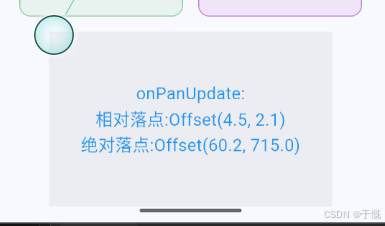
触控位置
GestureDetector(
              onPanDown: (detail) => setState(
                () => _info =
                    'onPanDown:\n相对落点:${detail.localPosition}\n绝对落点:${detail.globalPosition}',
              ),
              onPanStart: (detail) => setState(
                () => _info =
                    'onPanStart:\n相对落点:${detail.localPosition}\n绝对落点:${detail.globalPosition}',
              ),
              onPanUpdate: (detail) => setState(
                () => _info =
                    'onPanUpdate:\n相对落点:${detail.localPosition}\n绝对落点:${detail.globalPosition}',
              ),
              onPanEnd: (detail) => setState(
                () => _info =
                    'onPanEnd:\n初速度:${detail.primaryVelocity}\n最终速度:${detail.velocity}',
              ),
              onPanCancel: () => setState(() => _info = 'onPanCancel'),
              child: Container(
                alignment: Alignment.center,
                width: 300,
                height: 300 * 0.618,
                color: Colors.grey.withAlpha(33),
                child: Text(
                  _info,
                  style: const TextStyle(fontSize: 18, color: Colors.blue),
                  textAlign: TextAlign.center,
                ),
              ),
            ),