Git 修改地址
1、直接修改远程仓库地址
git remote set-url origin url2、删除本地远程仓库地址,然后添加新的仓库地址
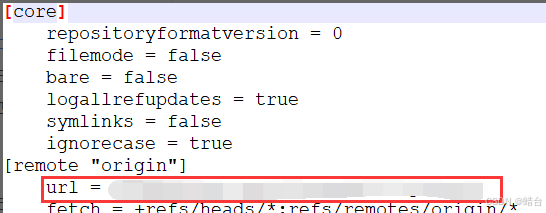
git remote rm origin git remote add origin url3、修改配置文件
每个仓库在初始化时,都会有一个 .git 的隐藏目录,修改其中的 config 文件中的 url
4、查看远程仓库地址
通过上边修改配置文件,我们知道可以从配置文件中查看远程仓库的地址,同时我们也可以用下边的命令来查看
git remote -v在终端上显示GIT信息
如图显分支信息
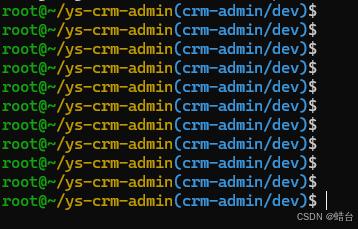
第一种方案:
首先查看是否存在~/.bash_profile这个文件
终端指令
$~/.bash_profile如果没有创建
$touch ~/.bash_profile然后修改~/.bash_profile,在文件最后添加
# Git branch in prompt.
parse_git_branch() {
    git branch 2> /dev/null | sed -e '/^[^*]/d' -e 's/* \(.*\)/ (\1)/'
}
export PS1="\u@\h \W\[\033[32m\]\$(parse_git_branch)\[\033[00m\] $ "
第二种方案:
修改.bashrc脚本,在.bashrc脚本中添加
function git_branch {
   branch="`git branch 2>/dev/null | grep "^\*" | sed -e "s/^\*\ //"`"
   if [ "${branch}" != "" ];then
       if [ "${branch}" = "(no branch)" ];then
           branch="(`git rev-parse --short HEAD`...)"
       fi
       echo " ($branch)"
   fi
}
export PS1='\u@\h \[\033[01;36m\]\W\[\033[01;32m\]$(git_branch)\[\033[00m\] \$ '
或是使用 git-prompt.sh
window gitbash 使用
修改git终端闪烁的问题:
#第一种方式:在~/.inputrc(如果不存在就创建)中添加
set bell-style none
#第二种方式:修改git/etc/inputrc文件
#none, visible or audible
#set bell-style visible
set bell-style none
修改gitbash 头信息内容
## git/etc/bash.bashrc 文件中添加
export PS1="\[\033[32m\]root@~\[\033[33m\]/\W\[\033[36m\]\$(__git_ps1 '(%s)')\[\033[0m\]\$ "

source /etc/bash.bashrc
Git commit 模板设置
1.设置模板路径,其中path就是commit模板路径
git config --global commit.template path2.设置模板使用什么软件打开
git config --global core.editor [编辑器名字]比如
git config --global core.editor text

fix(<模块>): <描述>

#<具体描述>

#<问题单号>

# type 字段包含:
# feat:新功能(feature)
# fix:修补bug
# docs:文档(documentation)
# style: 格式(不影响代码运行的变动)
# refactor:重构(即不是新增功能,也不是修改bug的代码变动)
# test:增加测试
# chore:构建过程或辅助工具的变动
# scope:用于说明 commit 影响的范围,比如数据层、控制层、视图层等等。
# subject:是 commit 目的的简短描述,不超过50个字符
# Body:部分是对本次 commit 的详细描述,可以分成多行
# Footer:用来关闭 Issue或以BREAKING CHANGE开头,后面是对变动的描述、以及变动理由和迁移方法
使用示例:
(a.)在/home/xxx目录下创建一个commit.template文件
vim commit.template

【模块名称】:
【修改描述】:
【问题/需求单号】:
(b.)设置模板路径
git config --global commit.template /home/xxx/commit.template(c.)设置编辑器
git config --global core.editor vim //这里设置vim,也可以设置text,egit等其他编辑器(d.)修改文件,执行
git add .                 // 添加工作区的修改文件到缓存区
git commit                // 该命令会自动弹出如下弹框,只需编辑后面的内容即可
git push origin dev       // 推送到远端仓库
gitlab merge 模板
(1.) 在项目的根目录下创建目录:
.gitlab/merge_request_templates(2.)在上述目录中添加模板,文件需要为md格式,如:
fixbugs-template.md //修改bugs模板
feature-template.md //新增特性模板
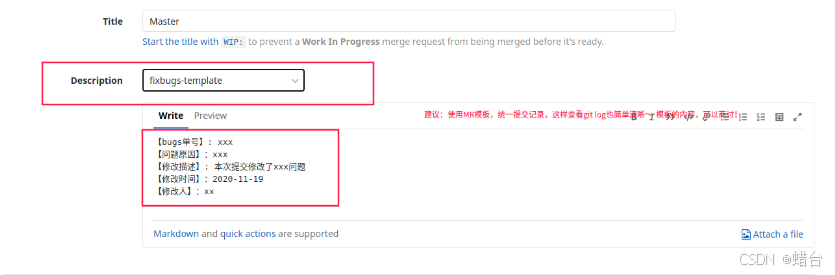
(3.)模板内容参考
【bugs单号】: xxx
【问题原因】:xxx
【修改描述】: 本次提交修改了xxx问题
【修改时间】:2020-11-19
【修改人】:xx
(4.)合并时选择对应的模板
#查看GIT所有配置的命令
git config --list
# 查看GIT全局配置的命令:
git config --global --list
#添加GIT全局配置(HTTPS代理) --system
git config --global https.proxy http://10.224.10.252:808
#删除GIT全局配置
git config --unset --global https.proxy
#  配置GIT第三方编辑器
git config --global core.editor D:/Notepad++/notepad++.exe