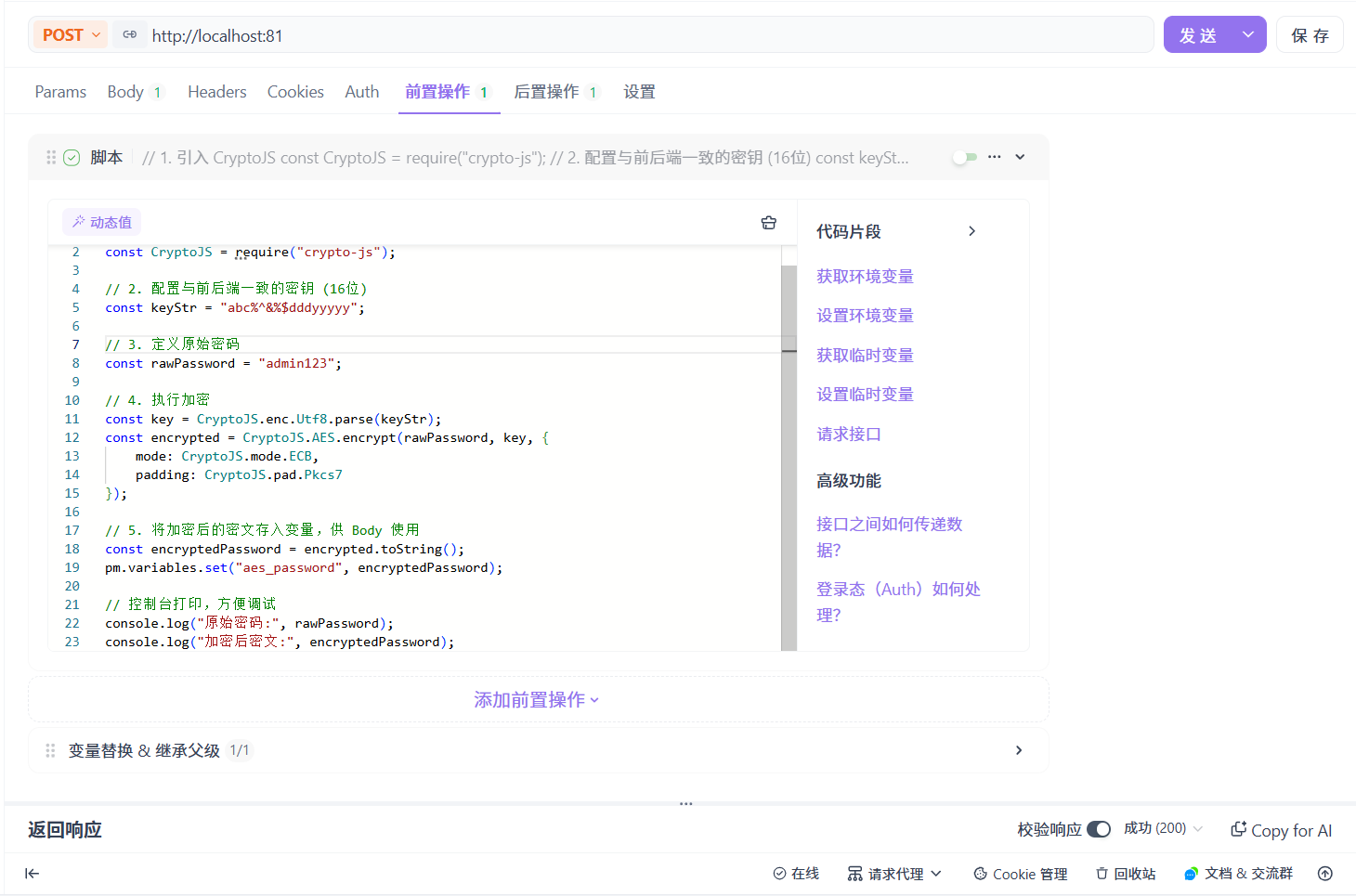
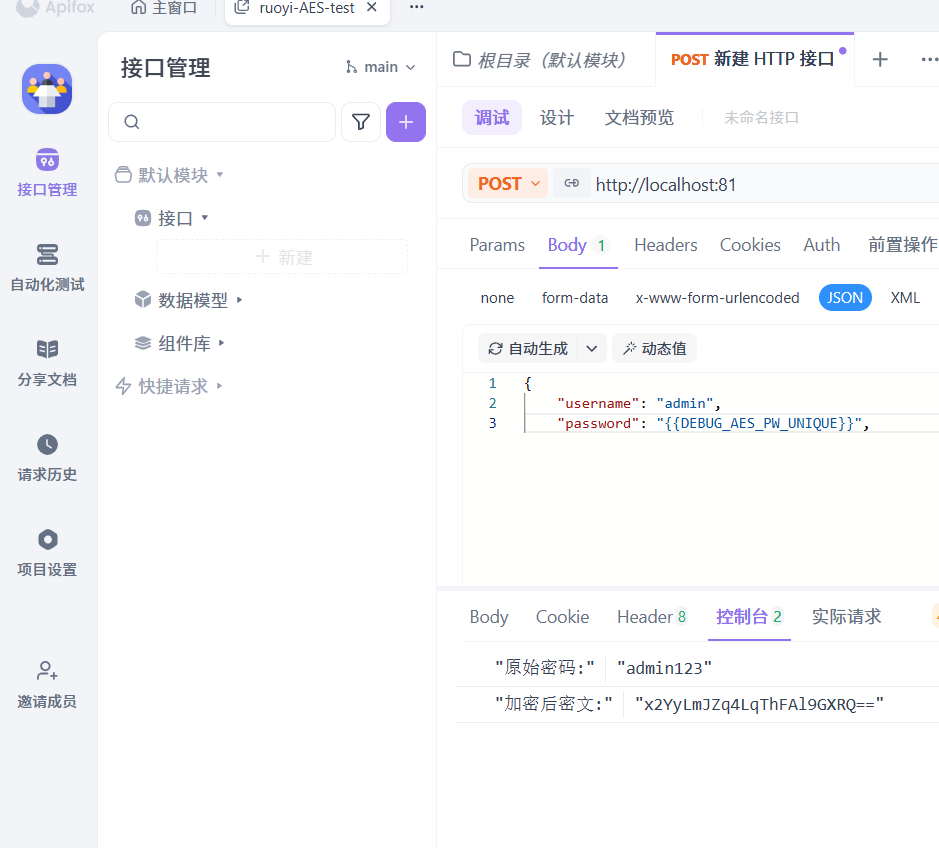
1. 前端 Vue 中实现 AES 加密
(1) 安装依赖
在若依前端项目根目录下执行以下命令安装加密库:

(2) 创建 AES 工具文件
在 src/utils/ 目录下新建 AES.js 文件,内容如下:
javascript
import CryptoJS from 'crypto-js';

// 密钥  与后端保持一致,随机生成
const keyStr = "abc%^&%$dddyyyyy";

export function encrypt(word) {
  const key = CryptoJS.enc.Utf8.parse(keyStr);
  const srcs = CryptoJS.enc.Utf8.parse(word);
  const encrypted = CryptoJS.AES.encrypt(srcs, key, {
    mode: CryptoJS.mode.ECB,
    padding: CryptoJS.pad.Pkcs7
  });
  return encrypted.toString(); // 返回 Base64 编码的密文
}
3) 修改登录组件
在登录页面(src/views/login.vue)中引入并调用加密函数:
html
<script>

// 新增AES加密函数引入

import { getCodeImg } from "@/api/login";
import Cookies from "js-cookie";
import { encrypt, decrypt } from '@/utils/jsencrypt'
import { encrypt as aesEncrypt } from '@/utils/AES.js';
export default {
  name: "Login",
  data() {
    return {
      codeUrl: "",
      loginForm: {
        username: "admin",
        password: "admin123",
        rememberMe: false,
        code: "",
        uuid: ""
      },
      loginRules: {
        username: [
          { required: true, trigger: "blur", message: "请输入您的账号" }
        ],
        password: [
          { required: true, trigger: "blur", message: "请输入您的密码" }
        ],
        code: [{ required: true, trigger: "change", message: "请输入验证码" }]
      },
      loading: false,
      captchaOnOff: true,
      register: false,
      redirect: undefined
    };
  },
  watch: {
    $route: {
      handler: function(route) {
        this.redirect = route.query && route.query.redirect;
      },
      immediate: true
    }
  },
  created() {
    this.getCode();
    this.getCookie();
  },
  methods: {
    getCode() {
      getCodeImg().then(res => {
        this.captchaOnOff = res.captchaOnOff === undefined ? true : res.captchaOnOff;
        if (this.captchaOnOff) {
          this.codeUrl = "data:image/gif;base64," + res.img;
          this.loginForm.uuid = res.uuid;
        }
      });
    },
    getCookie() {
      const username = Cookies.get("username");
      const password = Cookies.get("password");
      const rememberMe = Cookies.get('rememberMe')
      this.loginForm = {
        username: username === undefined ? this.loginForm.username : username,
        password: password === undefined ? this.loginForm.password : decrypt(password),
        rememberMe: rememberMe === undefined ? false : Boolean(rememberMe)
      };
    },

    // 在发送请求前对密码进行AES加密,并处理登录失败时的密码回滚
    handleLogin() {
      this.$refs.loginForm.validate(valid => {
        if (valid) {
          this.loading = true;

          // 保存原始密码--用于记住密码和错误回滚
          const rawPassword = this.loginForm.password;
          // 执行AES加密
          this.loginForm.password = aesEncrypt(rawPassword);

          if (this.loginForm.rememberMe) {
            // 记住密码仍使用原jsencrypt加密(非AES)
            Cookies.set("username", this.loginForm.username, { expires: 30 });
            Cookies.set("password", encrypt(rawPassword), { expires: 30 });
            Cookies.set('rememberMe', this.loginForm.rememberMe, { expires: 30 });
          } else {
            Cookies.remove("username");
            Cookies.remove("password");
            Cookies.remove('rememberMe');
          }

          // 发送加密后的密码到后端
          this.$store.dispatch("Login", this.loginForm).then(() => {
            this.$router.push({ path: this.redirect || "/" }).catch(()=>{});
          }).catch(() => {
            this.loading = false;
            if (this.captchaOnOff) {
              this.getCode();
            }
            // 登录失败时恢复原始密码--避免显示密文
            this.loginForm.password = rawPassword;
          });
        }
      });
    }
  }
};
</script>
2. 后端 Java 实现 AES 解密
(1) 添加 AES 工具类
在 com.ruoyi.common.utils 包下创建 AESUtil.java
java
package com.ruoyi.common.utils;

import javax.crypto.Cipher;
import javax.crypto.spec.SecretKeySpec;
import java.util.Base64;

/**
 * AES 加解密工具类(ECB 模式,PKCS5Padding)
 * 参考 PPT:密钥 KEY = "abc%^&%$dddyyyyy"(自动截取前16字节)
 * 注意:前端需使用相同密钥、相同模式(ECB + PKCS7/PKCS5)加密
 */
public class AESUtil {

    // 自定义密钥,长度必须为16字节(AES-128)
    private static final String KEY = "abc%^&%$dddyyyyy";

    // 静态密钥字节数组--避免每次重复转换
    private static final byte[] KEY_BYTES;

    static {
        // 确保密钥为16字节:取前16字节
        KEY_BYTES = KEY.getBytes(java.nio.charset.StandardCharsets.UTF_8);
        if (KEY_BYTES.length != 16) {
            throw new RuntimeException("AES密钥长度必须为16字节!当前密钥UTF-8编码后长度:" + KEY_BYTES.length);
        }
    }

    /**
     * AES 加密(ECB模式,PKCS5Padding)
     *
     * @param plainText 明文字符串
     * @return Base64编码的密文字符串
     */
    public static String encrypt(String plainText) throws Exception {
        if (plainText == null || plainText.isEmpty()) {
            return "";
        }

        Cipher cipher = Cipher.getInstance("AES/ECB/PKCS5Padding");
        SecretKeySpec secretKey = new SecretKeySpec(KEY_BYTES, "AES");
        cipher.init(Cipher.ENCRYPT_MODE, secretKey);

        byte[] encrypted = cipher.doFinal(plainText.getBytes(java.nio.charset.StandardCharsets.UTF_8));
        return Base64.getEncoder().encodeToString(encrypted); // Base64编码输出
    }

    /**
     * AES 解密(ECB模式,PKCS5Padding)
     *
     * @param encryptedText Base64编码的密文字符串
     * @return 解密后的明文字符串
     */
    public static String decrypt(String encryptedText) throws Exception {
        if (encryptedText == null || encryptedText.isEmpty()) {
            return "";
        }

        Cipher cipher = Cipher.getInstance("AES/ECB/PKCS5Padding");
        SecretKeySpec secretKey = new SecretKeySpec(KEY_BYTES, "AES");
        cipher.init(Cipher.DECRYPT_MODE, secretKey);

        byte[] encryptedBytes = Base64.getDecoder().decode(encryptedText);
        byte[] decrypted = cipher.doFinal(encryptedBytes);
        return new String(decrypted, java.nio.charset.StandardCharsets.UTF_8);
    }

    //以下为测试用
    public static void main(String[] args) throws Exception {
        String original = "admin123";
        String encrypted = encrypt(original);
        System.out.println("明文: " + original);
        System.out.println("密文: " + encrypted);
        String decrypted = decrypt(encrypted);
        System.out.println("解密: " + decrypted);
        System.out.println("解密成功: " + original.equals(decrypted));
    }
}
(2) 修改登录接口
在 SysLoginController.java 的 /login 接口中解密密码:
java
package com.ruoyi.web.controller.system;

import java.util.List;
import java.util.Set;
//用于异常处理
import javax.crypto.BadPaddingException;
import javax.crypto.IllegalBlockSizeException;


import org.springframework.beans.factory.annotation.Autowired;
import org.springframework.web.bind.annotation.GetMapping;
import org.springframework.web.bind.annotation.PostMapping;
import org.springframework.web.bind.annotation.RequestBody;
import org.springframework.web.bind.annotation.RestController;

import com.ruoyi.common.constant.Constants;
import com.ruoyi.common.core.domain.AjaxResult;
import com.ruoyi.common.core.domain.entity.SysMenu;
import com.ruoyi.common.core.domain.entity.SysUser;
import com.ruoyi.common.core.domain.model.LoginBody;
import com.ruoyi.common.utils.SecurityUtils;
// 导入AES解密工具类
import com.ruoyi.common.utils.AESUtil;
// ===================================
import com.ruoyi.framework.web.service.SysLoginService;
import com.ruoyi.framework.web.service.SysPermissionService;
import com.ruoyi.system.service.ISysMenuService;

/**
 * 登录验证
 *
 * @author ruoyi
 */
@RestController
public class SysLoginController
{
    @Autowired
    private SysLoginService loginService;

    @Autowired
    private ISysMenuService menuService;

    @Autowired
    private SysPermissionService permissionService;

    /**
     * 登录方法
     *
     * @param loginBody 登录信息
     * @return 结果
     */
    @PostMapping("/login")
    public AjaxResult login(@RequestBody LoginBody loginBody)
    {
        // AES解密密码逻辑
        String decryptedPassword = null;
        try {
            System.out.println("收到前端加密密码: [" + loginBody.getPassword() + "]");
            // 使用AES工具类解密前端传来的加密密码
            decryptedPassword = AESUtil.decrypt(loginBody.getPassword());
            System.out.println("解密后的明文密码: [" + decryptedPassword + "]");
        } catch (BadPaddingException | IllegalBlockSizeException e) {
            System.err.println("AES解密失败 (Padding/BlockSize): " + e.getMessage());
            // 捕获解密失败异常
            return AjaxResult.error("密码解密失败,请检查加密参数");
        } catch (Exception e) {
            System.err.println("AES系统解密异常: " + e.getMessage());
            e.printStackTrace();
            // 捕获其他异常
            return AjaxResult.error("系统解密异常:" + e.getMessage());
        }


        AjaxResult ajax = AjaxResult.success();
        // 生成令牌
        String token = loginService.login(
                loginBody.getUsername(),
                decryptedPassword,
                loginBody.getCode(),
                loginBody.getUuid()
        );
        ajax.put(Constants.TOKEN, token);
        return ajax;
    }

    /**
     * 获取用户信息
     *
     * @return 用户信息
     */
    @GetMapping("getInfo")
    public AjaxResult getInfo()
    {
        SysUser user = SecurityUtils.getLoginUser().getUser();
        // 角色集合
        Set<String> roles = permissionService.getRolePermission(user);
        // 权限集合
        Set<String> permissions = permissionService.getMenuPermission(user);
        AjaxResult ajax = AjaxResult.success();
        ajax.put("user", user);
        ajax.put("roles", roles);
        ajax.put("permissions", permissions);
        return ajax;
    }

    /**
     * 获取路由信息
     *
     * @return 路由信息
     */
    @GetMapping("getRouters")
    public AjaxResult getRouters()
    {
        Long userId = SecurityUtils.getUserId();
        List<SysMenu> menus = menuService.selectMenuTreeByUserId(userId);
        return AjaxResult.success(menuService.buildMenus(menus));
    }
}
3. APIfox调试配置
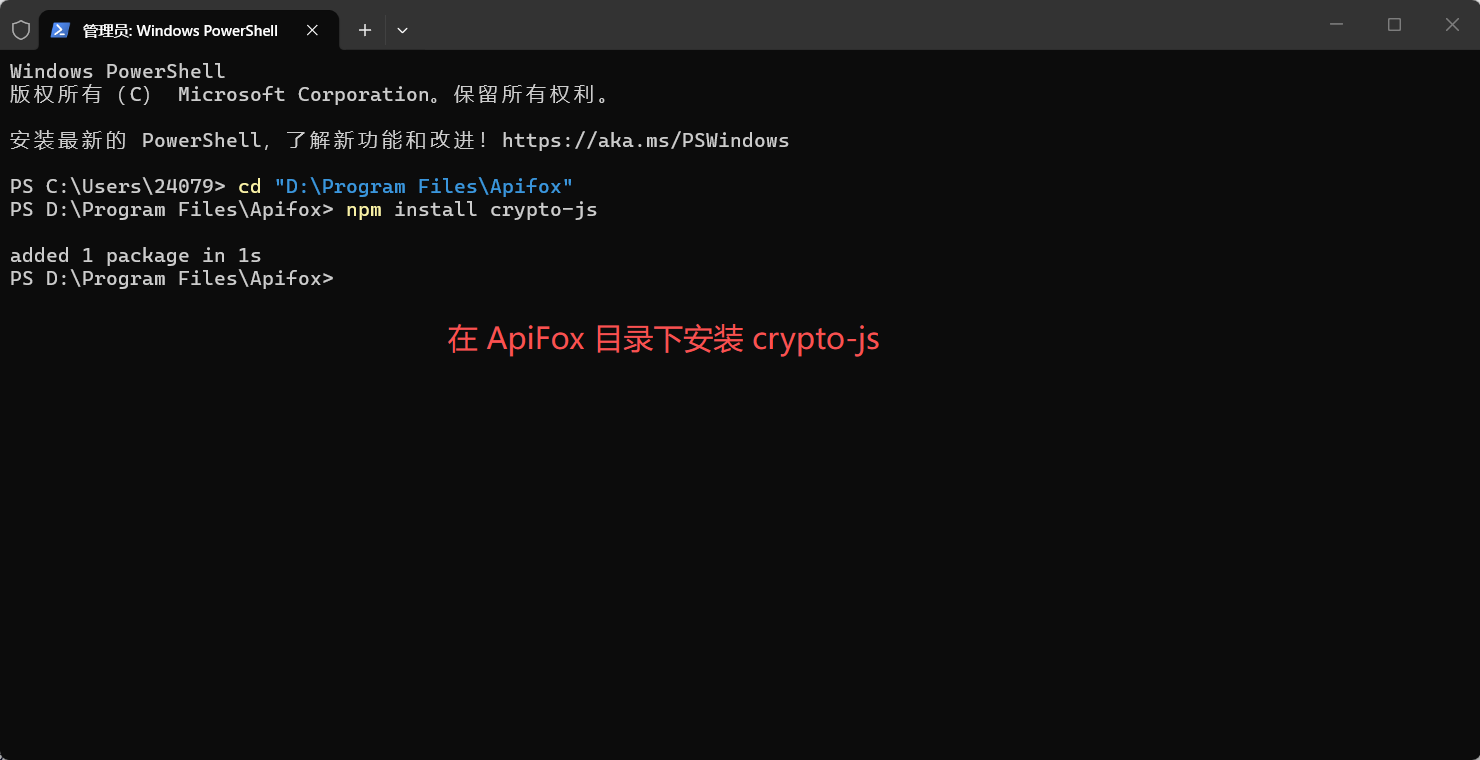
(1)在 ApiFox 目录下安装 crypto-js
(2)配置请求体 (Body)