1. 版本控制工具
集中式版本控制
- 版本库放在中央服务器
- 团队成员先下载代码,再提交修改
- 必须联网
- 代表:SVN、CVS
分布式版本控制
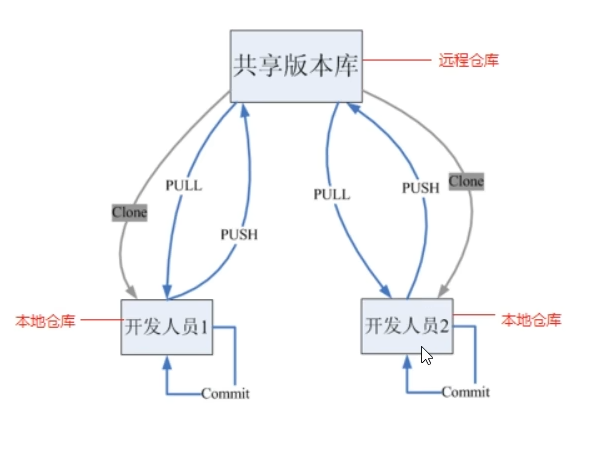
- 每个人本地都有完整版本库
- 平时开发不依赖网络
- 协作时通过推送、拉取同步代码
- 代表:Git
2. Git 简介
- Git 是一个开源的分布式版本控制工具
- 最初用于管理 Linux 内核代码
- 分布式的特点:版本保存在每个开发者电脑上
3. Git 工作流程
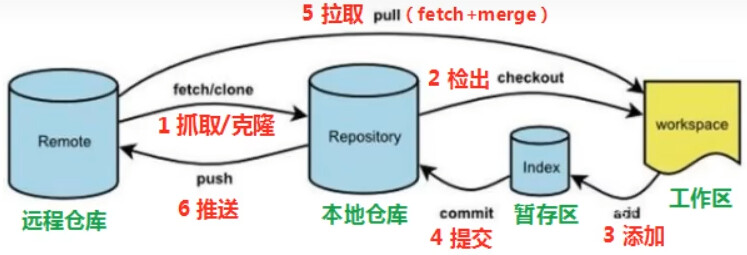
- clone:克隆远程仓库到本地
- checkout:切换分支
- add:添加到暂存区
- commit:提交到本地仓库
- fetch:抓取远程更新,不合并
- pull:拉取并自动合并
- push:推送到远程仓库
pull = fetch + merge
4. Git Bash 常用命令
bash
ls      # 查看目录
ll      # 查看详细信息
cat     # 查看文件内容
touch   # 创建文件
vi      # 编辑文件
5. Git 基本配置
设置用户信息
bash
git config --global user.name "用户名"
git config --global user.email "邮箱"
查看用户信息
bash
git config --global user.name
git config --global user.email
设置别名
在 .bashrc 中写:
bash
alias gs="git status"
alias gl="git log --oneline"
6. 解决 Git Bash 中文乱码
bash
git config --global core.quotepath false在 bash.bashrc 中加入:
bash
LANG="zh_CN.UTF-8"
LC_ALL="zh_CN.UTF-8"
7. 创建本地仓库
bash
git init- 当前目录会生成
.git文件夹 .git是 Git 仓库核心目录
8. 基本操作
查看状态
bash
git status添加到暂存区
bash
git add <文件名>
git add .
提交到本地仓库
bash
git commit -m "注释"查看日志
bash
git log
git log --all --pretty=oneline --abbrev-commit --graph
版本回退
bash
git reset --hard <Commit-ID>查看操作记录
bash
git reflog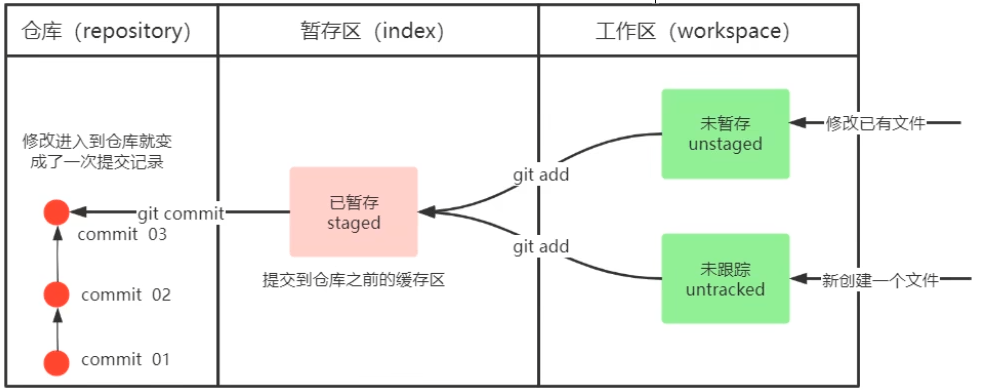
9. 忽略文件
使用 .gitignore 文件:
bash
*.log
node_modules/
dist/
10. 分支操作
查看分支
bash
git branch创建分支
bash
git branch <branch.name>切换分支
bash
git checkout <branch.name>创建并切换分支
bash
git checkout -b <branch.name>删除分支
bash
git branch -d <branch.name>
git branch -D <branch.name>
合并分支
bash
git merge <branch.name>11. 冲突解决
冲突出现时:
- 手动修改冲突内容
- 添加到暂存区
- 提交
bash
git add .
git commit -m "解决冲突"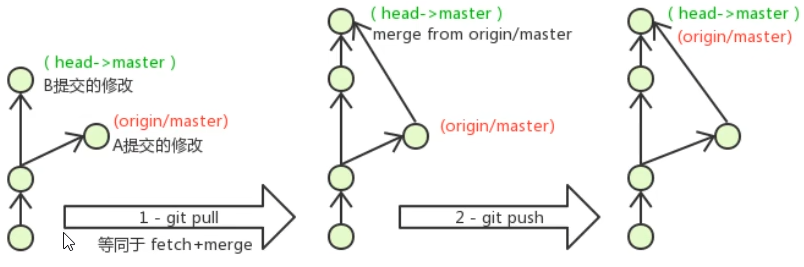
12. 常见分支
- master:主分支、生产分支
- develop:开发主分支
- feature/xxx:功能开发分支
- hotfix/xxx:线上 Bug 修复分支
- 其他:
test、pre
13. 远程仓库
常见平台:
- GitHub
- Gitee
- GitLab
14. SSH 公钥配置
生成公钥
bash
ssh-keygen -t rsa公钥位置
bash
~/.ssh/id_rsa.pub把公钥内容添加到远程仓库平台即可。
15. 远程仓库操作
添加远程仓库
bash
git remote add origin <ssh_url>查看远程仓库
bash
git remote
git remote -v
推送
bash
git push
git push origin <branch.name>
git push --set-upstream origin <branch.name>
查看关联关系
bash
git branch -vv克隆仓库
bash
git clone <url>
git clone <url> <name>
抓取更新
bash
git fetch
git fetch <remote.name> <branch.name>
拉取更新
bash
git pull
git pull <remote.name> <branch.name>
16. 重点速记
核心命令
bash
git clone
git checkout
git add
git commit
git log
git pull
git push
git merge
常用流程
克隆 → 修改 → add → commit → pull → push