今天来解决一下亚博的super镜像的vnc一直不好用的问题
-1、前因
首先是Ubuntu22.04,离开了方便快捷的树莓派,要开始玩jetson orin nano了,然而自带的nvc是不好用的,我又不想直接用屏幕连着小车调试,太费劲。所以来鼓捣一下vnc顺便记录下写写文档。
这个是老问题,他家的镜像从我用Ubuntu20.04的时候就vnc不好用,但当时忙着搞别的,而且摄像头的视频流可以引出来,我就没想着修复。但是现在要搞SLAM了,这东西必须修复,迫在眉睫。
0、扩分区
刚拿到系统先扩一下没识别到剩余容量的分区,要不然没地方放训练集了
bash
# 1. 安装必要工具
sudo apt install cloud-guest-utils -y

# 2. 扩展分区(注意:nvme0n1p1 的 "1" 是分区号)
sudo growpart /dev/nvme0n1 1

# 3. 扩展文件系统
sudo resize2fs /dev/nvme0n1p1

# 4. 验证
df -h
1、查一下亚博镜像安装的是哪个vnc占着端口
ok首先看下现在安装的是哪个vnc,占用了5900端口(本来随便安装一个就ok,结果亚博自己安装了一个vnc还能不好用)
bash
jetson@yahboom:~$ vncserver -list
-bash: vncserver: command not found
jetson@yahboom:~$ ss -tulnp | grep 590
tcp   LISTEN 0      10                 *:5900             *:*    users:(("gnome-remote-de",pid=2068,fd=23))
jetson@yahboom:~$ netstat -lntp | grep 590
(Not all processes could be identified, non-owned process info
 will not be shown, you would have to be root to see it all.)
tcp6       0      0 :::5900                 :::*                    LISTEN      2068/gnome-remote-d
ok,确认是 GNOME Remote Desktop,那么确认一下状态
bash
# 查看 GNOME Remote Desktop 服务状态
jetson@yahboom:~$ systemctl --user status gnome-remote-desktop.service
● gnome-remote-desktop.service - GNOME Remote Desktop
     Loaded: loaded (/usr/lib/systemd/user/gnome-remote-desktop.service; enabled; vendor preset: enabled)
     Active: active (running) since Fri 2026-04-17 13:21:24 CST; 47min ago
   Main PID: 40979 (gnome-remote-de)
      Tasks: 5 (limit: 3987)
     Memory: 20.9M
        CPU: 253ms
     CGroup: /user.slice/user-1000.slice/user@1000.service/app.slice/gnome-remote-desktop.service
             └─40979 /usr/libexec/gnome-remote-desktop-daemon

Apr 17 13:21:24 yahboom systemd[1196]: Starting GNOME Remote Desktop...
Apr 17 13:21:24 yahboom systemd[1196]: Started GNOME Remote Desktop.
Apr 17 13:21:24 yahboom gnome-remote-de[40979]: Failed to query number of modifiers for format 875708993
Apr 17 13:21:24 yahboom gnome-remote-de[40979]: Failed to query number of modifiers for format 875708993
Apr 17 13:21:25 yahboom gnome-remote-desktop-daemon[40979]: Cannot load libnvidia-encode.so.1
Apr 17 13:21:25 yahboom gnome-remote-de[40979]: RDP server started
2、主要错误分析
"Failed to query number of modifiers for format 875708993" - 这是一个警告信息,通常不影响远程桌面的基本功能,可能与特定的视频格式处理有关。而"Cannot load libnvidia-encode.so.1" - 这是关键错误,表明 GNOME Remote Desktop 无法加载 NVIDIA 硬件编码库,这会影响远程桌面的硬件加速性能。
libnvidia-encode.so.1是 NVIDIA 显卡驱动的一部分,用于硬件视频编码加速。该错误通常由以下原因导致
- NVIDIA 驱动未安装或安装不完整
- 库文件不在系统库搜索路径中
- 环境变量 LD_LIBRARY_PATH未正确配置
先检查下navidia驱动
bash
jetson@yahboom:~$ nvidia-smi
Fri Apr 17 14:13:51 2026
+---------------------------------------------------------------------------------------+
| NVIDIA-SMI 540.4.0                Driver Version: 540.4.0      CUDA Version: 12.6     |
|-----------------------------------------+----------------------+----------------------+
| GPU  Name                 Persistence-M | Bus-Id        Disp.A | Volatile Uncorr. ECC |
| Fan  Temp   Perf          Pwr:Usage/Cap |         Memory-Usage | GPU-Util  Compute M. |
|                                         |                      |               MIG M. |
|=========================================+======================+======================|
|   0  Orin (nvgpu)                  N/A  | N/A              N/A |                  N/A |
| N/A   N/A  N/A               N/A /  N/A | Not Supported        |     N/A          N/A |
|                                         |                      |                  N/A |
+-----------------------------------------+----------------------+----------------------+

+---------------------------------------------------------------------------------------+
| Processes:                                                                            |
|  GPU   GI   CI        PID   Type   Process name                            GPU Memory |
|        ID   ID                                                             Usage      |
|=======================================================================================|
|  No running processes found                                                           |
+---------------------------------------------------------------------------------------+
现在看到驱动已安装,但服务还是报错,那问题很可能出在库文件的路径上。GNOME Remote Desktop服务可能没有找到这个特定的编码库。
查找编码库文件,首先确认系统上是否存在该文件:
bash
jetson@yahboom:~$ find /usr/lib -name "*libnvidia-encode*" 2>/dev/null
jetson@yahboom:~$
jetson@yahboom:~$ sudo find / -name "libnvidia-encode.so*" 2>/dev/null
jetson@yahboom:~$
未找到库文件
这意味着 NVIDIA 视频编码包未安装
3、找到问题是对应视频解码包未安装,尝试解决
bash
# 首先更新软件包列表
sudo apt update
# 搜索可用的编码包
apt search libnvidia-encode
# 通常包名类似 'nvidia-l4t-3d-core' 或 'nvidia-l4t-multimedia'
# 例如:
sudo apt install nvidia-l4t-multimedia
但是还是首先确认下本机jetson的cuda版本和已安装的驱动吧
bash
jetson@yahboom:~$ cat /proc/driver/nvidia/version
NVRM version: NVIDIA UNIX Open Kernel Module for aarch64  540.4.0  Release Build  (buildbrain@mobile-u64-6336-d8000)  Tue Jan  7 17:35:12 PST 2025
GCC version:  collect2: error: ld returned 1 exit status
jetson@yahboom:~$ dpkg -l | grep "libnvidia-encode"
jetson@yahboom:~$ find /usr/lib -name "libnvidia-encode.so*" 2>/dev/null
jetson@yahboom:~$ ls -la /usr/lib/aarch64-linux-gnu/ | grep nvidia
lrwxrwxrwx   1 root root        17 Jan  8  2025 libcuda.so -> nvidia/libcuda.so
lrwxrwxrwx   1 root root        67 Aug 22  2025 libilmClient.so.2.3.2 -> /usr/lib/aarch64-linux-gnu/nvidia/weston-13.0/libilmClient.so.2.3.2
lrwxrwxrwx   1 root root        67 Aug 22  2025 libilmCommon.so.2.3.2 -> /usr/lib/aarch64-linux-gnu/nvidia/weston-13.0/libilmCommon.so.2.3.2
lrwxrwxrwx   1 root root        68 Aug 22  2025 libilmControl.so.2.3.2 -> /usr/lib/aarch64-linux-gnu/nvidia/weston-13.0/libilmControl.so.2.3.2
lrwxrwxrwx   1 root root        66 Aug 22  2025 libilmInput.so.2.3.2 -> /usr/lib/aarch64-linux-gnu/nvidia/weston-13.0/libilmInput.so.2.3.2
lrwxrwxrwx   1 root root        23 Jan  8  2025 libnvcucompat.so -> nvidia/libnvcucompat.so
lrwxrwxrwx   1 root root        20 Jan  8  2025 libnvcudla.so -> nvidia/libnvcudla.so
lrwxrwxrwx   1 root root        32 Dec  4  2024 libnvidia-container-go.so.1 -> libnvidia-container-go.so.1.17.3
-rw-r--r--   1 root root   2955024 Dec  4  2024 libnvidia-container-go.so.1.17.3
lrwxrwxrwx   1 root root        29 Dec  4  2024 libnvidia-container.so.1 -> libnvidia-container.so.1.17.3
-rwxr-xr-x   1 root root    175248 Dec  4  2024 libnvidia-container.so.1.17.3
lrwxrwxrwx   1 root root        19 Jan  8  2025 libv4l2.so.0.0.999999 -> nvidia/libnvv4l2.so
lrwxrwxrwx   1 root root        25 Jan  8  2025 libv4lconvert.so.0.0.999999 -> nvidia/libnvv4lconvert.so
lrwxrwxrwx   1 root root        61 Aug 22  2025 libwayland-client.so.0 -> /usr/lib/aarch64-linux-gnu/nvidia/libwayland-client.so.0.22.0
lrwxrwxrwx   1 root root        61 Aug 22  2025 libwayland-cursor.so.0 -> /usr/lib/aarch64-linux-gnu/nvidia/libwayland-cursor.so.0.22.0
lrwxrwxrwx   1 root root        58 Aug 22  2025 libwayland-egl.so.1 -> /usr/lib/aarch64-linux-gnu/nvidia/libwayland-egl.so.1.22.0
lrwxrwxrwx   1 root root        61 Aug 22  2025 libwayland-server.so.0 -> /usr/lib/aarch64-linux-gnu/nvidia/libwayland-server.so.0.22.0
lrwxrwxrwx   1 root root        63 Aug 22  2025 libweston-13.so.0 -> /usr/lib/aarch64-linux-gnu/nvidia/weston-13.0/libweston-13.so.0
drwxr-xr-x   3 root root     20480 Jan 21  2025 nvidia
lrwxrwxrwx   1 root root         6 Dec 13  2024 tegra -> nvidia
jetson@yahboom:~$ lsmod | grep nvidia
nvidia_drm             94208  1
nvidia_modeset       1261568  7 nvidia_drm
nvidia               1458176  13 nvidia_modeset
nvidia_vrs_pseq        16384  0
tegra_dce              98304  2 nvidia
tsecriscv              32768  1 nvidia
drm_kms_helper        278528  3 tegra_drm,nvidia_drm
host1x_nvhost          40960  8 nvhost_isp5,nvhost_nvcsi_t194,nvidia,tegra_camera,nvhost_capture,nvhost_nvcsi,nvhost_vi5,nvidia_modeset
nvidia_p2p             20480  0
host1x                180224  6 host1x_nvhost,host1x_fence,nvgpu,tegra_drm,nvidia_drm,nvidia_modeset
mc_utils               16384  3 nvidia,nvgpu,tegra_camera_platform
drm                   602112  24 drm_kms_helper,nvidia,tegra_drm,nvidia_drm
当前状态分析
驱动版本:540.4.0(确认)
已安装的编码库:无(dpkg -l | grep "libnvidia-encode"无输出)
库文件位置:系统中不存在 libnvidia-encode.so*文件
驱动模块:已正常加载(nvidia、nvidia_modeset等模块存在)
方案一:安装最接近的编码库版本(推荐)
由于驱动是 540.4.0,而可用包中没有 540 版本,所以先安装 535 版本试试:
bash
sudo apt install libnvidia-encode-535结果失败了
bash
jetson@yahboom:~$ sudo apt install libnvidia-encode-535
Reading package lists... Done
Building dependency tree... Done
Reading state information... Done
The following packages were automatically installed and are no longer required:
  busybox-initramfs cpio gir1.2-gst-plugins-bad-1.0 initramfs-tools initramfs-tools-bin initramfs-tools-core
  klibc-utils libavcodec58 libavfilter7 libavformat58 libavutil-dev libavutil56 libdc1394-dev
  libdjvulibre-dev libgdcm-dev libgphoto2-dev libilmbase-dev libklibc liblqr-1-0-dev libmagick++-6-headers
  libmagick++-6.q16-8 libmagickcore-6-arch-config libmagickcore-6-headers libmagickwand-6-headers
  libopenexr-dev libpostproc55 libraw1394-dev librsvg2-dev libssh-gcrypt-4 libswresample3 libswscale5
  libvdpau1 linux-base mercurial mercurial-common python3-bloom python3-colcon-mixin python3-rosdistro
  python3-vcstool python3-vcstools
Use 'sudo apt autoremove' to remove them.
The following additional packages will be installed:
  libnvidia-compute-535 libnvidia-decode-535
The following NEW packages will be installed:
  libnvidia-compute-535 libnvidia-decode-535 libnvidia-encode-535
0 upgraded, 3 newly installed, 0 to remove and 874 not upgraded.
Need to get 42.1 MB of archives.
After this operation, 178 MB of additional disk space will be used.
Do you want to continue? [Y/n] y
Get:1 http://mirrors.tuna.tsinghua.edu.cn/ubuntu-ports jammy-updates/restricted arm64 libnvidia-compute-535 arm64 535.288.01-0ubuntu0.22.04.1 [40.1 MB]
Get:2 http://mirrors.tuna.tsinghua.edu.cn/ubuntu-ports jammy-updates/restricted arm64 libnvidia-decode-535 arm64 535.288.01-0ubuntu0.22.04.1 [1,912 kB]
Get:3 http://mirrors.tuna.tsinghua.edu.cn/ubuntu-ports jammy-updates/restricted arm64 libnvidia-encode-535 arm64 535.288.01-0ubuntu0.22.04.1 [97.5 kB]
Fetched 42.1 MB in 5s (7,867 kB/s)
debconf: delaying package configuration, since apt-utils is not installed
Selecting previously unselected package libnvidia-compute-535:arm64.
(Reading database ... 298118 files and directories currently installed.)
Preparing to unpack .../libnvidia-compute-535_535.288.01-0ubuntu0.22.04.1_arm64.deb ...

Progress: [  0%] [.........................................................................................]
Unpacking libnvidia-compute-535:arm64 (535.288.01-0ubuntu0.22.04.1) .......................................]
dpkg: error processing archive /var/cache/apt/archives/libnvidia-compute-535_535.288.01-0ubuntu0.22.04.1_arm64.deb (--unpack):
 trying to overwrite '/usr/lib/aarch64-linux-gnu/libcuda.so', which is also in package nvidia-l4t-cuda 36.4.3-20250107174145
Selecting previously unselected package libnvidia-decode-535:arm64.
Preparing to unpack .../libnvidia-decode-535_535.288.01-0ubuntu0.22.04.1_arm64.deb ...

Unpacking libnvidia-decode-535:arm64 (535.288.01-0ubuntu0.22.04.1) ........................................]

Selecting previously unselected package libnvidia-encode-535:arm64.........................................]
Preparing to unpack .../libnvidia-encode-535_535.288.01-0ubuntu0.22.04.1_arm64.deb ...

Unpacking libnvidia-encode-535:arm64 (535.288.01-0ubuntu0.22.04.1) ........................................]

Errors were encountered while processing:###########.......................................................]
 /var/cache/apt/archives/libnvidia-compute-535_535.288.01-0ubuntu0.22.04.1_arm64.deb
E: Sub-process /usr/bin/dpkg returned an error code (1)
根据错误信息,安装 libnvidia-encode-535 时,libnvidia-compute-535 尝试覆盖 /usr/lib/aarch64-linux-gnu/libcuda.so文件,但该文件已经被 nvidia-l4t-cuda 包占用。这是因为 Jetson 平台使用了 NVIDIA 的 L4T(Linux for Tegra)驱动包,与标准的 Ubuntu NVIDIA 驱动包冲突。
那么尝试安装安装 Jetson L4T 多媒体包首先修复之前损坏的依赖,并移除冲突的包
bash
jetson@yahboom:~$ sudo apt --fix-broken install
Reading package lists... Done
Building dependency tree... Done
Reading state information... Done
Correcting dependencies... Done
The following packages were automatically installed and are no longer required:
  busybox-initramfs cpio gir1.2-gst-plugins-bad-1.0 initramfs-tools
  initramfs-tools-bin initramfs-tools-core klibc-utils libavcodec58
  libavfilter7 libavformat58 libavutil-dev libavutil56 libdc1394-dev
  libdjvulibre-dev libgdcm-dev libgphoto2-dev libilmbase-dev libklibc
  liblqr-1-0-dev libmagick++-6-headers libmagick++-6.q16-8
  libmagickcore-6-arch-config libmagickcore-6-headers libmagickwand-6-headers
  libopenexr-dev libpostproc55 libraw1394-dev librsvg2-dev libssh-gcrypt-4
  libswresample3 libswscale5 libvdpau1 linux-base mercurial mercurial-common
  python3-bloom python3-colcon-mixin python3-rosdistro python3-vcstool
  python3-vcstools
Use 'sudo apt autoremove' to remove them.
The following additional packages will be installed:
  libnvidia-compute-535
The following NEW packages will be installed:
  libnvidia-compute-535
0 upgraded, 1 newly installed, 0 to remove and 874 not upgraded.
(Reading database ... 298136 files and directories currently installed.)
Preparing to unpack .../libnvidia-compute-535_535.288.01-0ubuntu0.22.04.1_arm64.deb ...
Progress: [  0%] [..........................................................]
Unpacking libnvidia-compute-535:arm64 (535.288.01-0ubuntu0.22.04.1) ........]
dpkg: error processing archive /var/cache/apt/archives/libnvidia-compute-535_535.288.01-0ubuntu0.22.04.1_arm64.deb (--unpack):
 trying to overwrite '/usr/lib/aarch64-linux-gnu/libcuda.so', which is also in package nvidia-l4t-cuda 36.4.3-20250107174145
Errors were encountered while processing:
 /var/cache/apt/archives/libnvidia-compute-535_535.288.01-0ubuntu0.22.04.1_arm64.deb
E: Sub-process /usr/bin/dpkg returned an error code (1)
jetson@yahboom:~$ sudo apt remove libnvidia-decode-535 libnvidia-encode-535
Reading package lists... Done
Building dependency tree... Done
Reading state information... Done
The following packages were automatically installed and are no longer required:
  busybox-initramfs cpio gir1.2-gst-plugins-bad-1.0 initramfs-tools
  initramfs-tools-bin initramfs-tools-core klibc-utils libavcodec58
  libavfilter7 libavformat58 libavutil-dev libavutil56 libdc1394-dev
  libdjvulibre-dev libgdcm-dev libgphoto2-dev libilmbase-dev libklibc
  liblqr-1-0-dev libmagick++-6-headers libmagick++-6.q16-8
  libmagickcore-6-arch-config libmagickcore-6-headers libmagickwand-6-headers
  libopenexr-dev libpostproc55 libraw1394-dev librsvg2-dev libssh-gcrypt-4
  libswresample3 libswscale5 libvdpau1 linux-base mercurial mercurial-common
  python3-bloom python3-colcon-mixin python3-rosdistro python3-vcstool
  python3-vcstools
Use 'sudo apt autoremove' to remove them.
The following packages will be REMOVED:
  libnvidia-decode-535 libnvidia-encode-535
0 upgraded, 0 newly installed, 2 to remove and 874 not upgraded.
2 not fully installed or removed.
After this operation, 10.5 MB disk space will be freed.
Do you want to continue? [Y/n] y
(Reading database ... 298136 files and directories currently installed.)
Removing libnvidia-encode-535:arm64 (535.288.01-0ubuntu0.22.04.1) ...

Progress: [  0%] [..........................................................]
Removing libnvidia-decode-535:arm64 (535.288.01-0ubuntu0.22.04.1) ..........]

Processing triggers for libc-bin (2.35-0ubuntu3.8) ...##....................]
jetson@yahboom:~$
检查nvidia-l4t-multimedia包是否提供了libnvidia-encode.so.1。
如果没有,尝试安装其他L4T包,或者从已安装的L4T驱动中查找编码库。
bash
jetson@yahboom:~$ dpkg -L nvidia-l4t-multimedia | grep -i encode
/usr/lib/aarch64-linux-gnu/nvidia/libnvvideoencode_ppe.so显然找到了一个libnvvideoencode_ppe.so ,但是,GNOME Remote Desktop 期望的是 libnvidia-encode.so
bash
jetson@yahboom:~$ dpkg -L nvidia-l4t-multimedia | grep -i "\.so" | grep -i encode
/usr/lib/aarch64-linux-gnu/nvidia/libnvvideoencode_ppe.so
jetson@yahboom:~$
jetson@yahboom:~$ find /usr -name "*encode*.so" 2>/dev/null
/usr/lib/aarch64-linux-gnu/nvidia/libnvvideoencode_ppe.so
/usr/lib/aarch64-linux-gnu/nvidia/libnvcam_imageencoder.so
/usr/lib/python3/dist-packages/fastbencode/_bencode_pyx.cpython-310-aarch64-linux-gnu.so
/usr/local/lib/python3.10/dist-packages/sklearn/preprocessing/_target_encoder_fast.cpython-310-aarch64-linux-gnu.so
显然没有其他video字眼的so包,那么我们尝试创建符号链接
bash
# 创建符号链接
jetson@yahboom:~$ sudo ln -s /usr/lib/aarch64-linux-gnu/nvidia/libnvvideoencode_ppe.so /usr/lib/aarch64-linux-gnu/libnvidia-encode.so.1
# 验证符号链接
jetson@yahboom:~$ ls -la /usr/lib/aarch64-linux-gnu/libnvidia-encode.so.1
lrwxrwxrwx 1 root root 57 Apr 17 14:40 /usr/lib/aarch64-linux-gnu/libnvidia-encode.so.1 -> /usr/lib/aarch64-linux-gnu/nvidia/libnvvideoencode_ppe.so
ok,连接上了,那么也是直接重启一下vnc
bash
jetson@yahboom:~$ systemctl --user restart gnome-remote-desktop.service
jetson@yahboom:~$ systemctl --user status gnome-remote-desktop.service
● gnome-remote-desktop.service - GNOME Remote Desktop
     Loaded: loaded (/usr/lib/systemd/user/gnome-remote-desktop.service; enable>
     Active: active (running) since Fri 2026-04-17 14:41:36 CST; 430ms ago
   Main PID: 107053 (gnome-remote-de)
      Tasks: 7 (limit: 3987)
     Memory: 11.5M
        CPU: 242ms
     CGroup: /user.slice/user-1000.slice/user@1000.service/app.slice/gnome-remo>
             └─107053 /usr/libexec/gnome-remote-desktop-daemon

Apr 17 14:41:36 yahboom systemd[1196]: Starting GNOME Remote Desktop...
Apr 17 14:41:36 yahboom systemd[1196]: Started GNOME Remote Desktop.
Apr 17 14:41:36 yahboom gnome-remote-de[107053]: Failed to query number of modi>
Apr 17 14:41:36 yahboom gnome-remote-de[107053]: Failed to query number of modi>
Apr 17 14:41:36 yahboom gnome-remote-desktop-daemon[107053]: Cannot load NvEnco>
Apr 17 14:41:36 yahboom gnome-remote-desktop-daemon[107053]: GLib (gthread-posi>
lines 1-16/16 (END)
但是改完这个链接库之后,一vnc客户端连接,vnc服务端就崩溃了
bash
jetson@yahboom:~$ systemctl --user status gnome-remote-desktop.service
× gnome-remote-desktop.service - GNOME Remote Desktop
     Loaded: loaded (/usr/lib/systemd/user/gnome-remote-desktop.service; enable>
     Active: failed (Result: core-dump) since Fri 2026-04-17 14:48:20 CST; 20s >
    Process: 111868 ExecStart=/usr/libexec/gnome-remote-desktop-daemon (code=du>
   Main PID: 111868 (code=dumped, signal=ABRT)
        CPU: 257ms

Apr 17 14:48:20 yahboom systemd[1196]: gnome-remote-desktop.service: Scheduled >
Apr 17 14:48:20 yahboom systemd[1196]: Stopped GNOME Remote Desktop.
Apr 17 14:48:20 yahboom systemd[1196]: gnome-remote-desktop.service: Start requ>
Apr 17 14:48:20 yahboom systemd[1196]: gnome-remote-desktop.service: Failed wit>
Apr 17 14:48:20 yahboom systemd[1196]: Failed to start GNOME Remote Desktop.这个failed 看得我心里拔凉拔凉的,ok我也是直接把符号链接取消了好吧
bash
# 移除之前创建的符号链接
sudo rm /usr/lib/aarch64-linux-gnu/libnvidia-encode.so.1
好家伙,敬酒不吃吃罚酒,ok这边也是直接禁用了GNOME Remote Desktop,换一个兼容性更强的
bash
jetson@yahboom:~$ systemctl --user disable gnome-remote-desktop.service
Removed /home/jetson/.config/systemd/user/gnome-session.target.wants/gnome-remote-desktop.service.
jetson@yahboom:~$ systemctl --user mask gnome-remote-desktop.service
Created symlink /home/jetson/.config/systemd/user/gnome-remote-desktop.service → /dev/null.
jetson@yahboom:~$ systemctl --user stop gnome-remote-desktop.service
jetson@yahboom:~$ systemctl --user status gnome-remote-desktop.service
○ gnome-remote-desktop.service
     Loaded: masked (Reason: Unit gnome-remote-desktop.service is masked.)
     Active: inactive (dead)

Apr 17 14:56:49 yahboom gnome-remote-de[116225]: VNC server stopped
Apr 17 14:57:04 yahboom systemd[1196]: Stopping GNOME Remote Desktop...
Apr 17 14:57:04 yahboom systemd[1196]: Stopped GNOME Remote Desktop.
Apr 17 14:57:04 yahboom systemd[1196]: Starting GNOME Remote Desktop...
Apr 17 14:57:04 yahboom systemd[1196]: Started GNOME Remote Desktop.
Apr 17 14:57:04 yahboom gnome-remote-de[118005]: Failed to query number of modi>
Apr 17 14:57:04 yahboom gnome-remote-de[118005]: Failed to query number of modi>
Apr 17 14:57:51 yahboom systemd[1196]: gnome-remote-desktop.service: Current co>
Apr 17 14:58:35 yahboom systemd[1196]: Stopping gnome-remote-desktop.service...
Apr 17 14:58:35 yahboom systemd[1196]: Stopped gnome-remote-desktop.service.
4、这边也是直接换一个vnc服务器
首先安装下
bash
# 1. 安装 x11vnc
sudo apt update && sudo apt install x11vnc -y

# 2. 设置密码
x11vnc -storepasswd
然后临时启用一下,测试一下
bash
jetson@yahboom:~$ x11vnc -forever -shared -rfbauth ~/.vnc/passwd -display :0
17/04/2026 15:04:12 passing arg to libvncserver: -rfbauth
17/04/2026 15:04:12 passing arg to libvncserver: /home/jetson/.vnc/passwd
17/04/2026 15:04:12 x11vnc version: 0.9.16 lastmod: 2019-01-05  pid: 122723
17/04/2026 15:04:12 Using X display :0
17/04/2026 15:04:12 rootwin: 0x190 reswin: 0x2e00001 dpy: 0xf369bb00
17/04/2026 15:04:12
17/04/2026 15:04:12 ------------------ USEFUL INFORMATION ------------------
17/04/2026 15:04:12 X DAMAGE available on display, using it for polling hints.
17/04/2026 15:04:12   To disable this behavior use: '-noxdamage'
17/04/2026 15:04:12
17/04/2026 15:04:12   Most compositing window managers like 'compiz' or 'beryl'
17/04/2026 15:04:12   cause X DAMAGE to fail, and so you may not see any screen
17/04/2026 15:04:12   updates via VNC.  Either disable 'compiz' (recommended) or
17/04/2026 15:04:12   supply the x11vnc '-noxdamage' command line option.
17/04/2026 15:04:12
17/04/2026 15:04:12 Wireframing: -wireframe mode is in effect for window moves.
17/04/2026 15:04:12   If this yields undesired behavior (poor response, painting
17/04/2026 15:04:12   errors, etc) it may be disabled:
17/04/2026 15:04:12    - use '-nowf' to disable wireframing completely.
17/04/2026 15:04:12    - use '-nowcr' to disable the Copy Rectangle after the
17/04/2026 15:04:12      moved window is released in the new position.
17/04/2026 15:04:12   Also see the -help entry for tuning parameters.
17/04/2026 15:04:12   You can press 3 Alt_L's (Left "Alt" key) in a row to
17/04/2026 15:04:12   repaint the screen, also see the -fixscreen option for
17/04/2026 15:04:12   periodic repaints.
17/04/2026 15:04:12
17/04/2026 15:04:12 XFIXES available on display, resetting cursor mode
17/04/2026 15:04:12   to: '-cursor most'.
17/04/2026 15:04:12   to disable this behavior use: '-cursor arrow'
17/04/2026 15:04:12   or '-noxfixes'.
17/04/2026 15:04:12 using XFIXES for cursor drawing.
17/04/2026 15:04:12 GrabServer control via XTEST.
17/04/2026 15:04:12
17/04/2026 15:04:12 Scroll Detection: -scrollcopyrect mode is in effect to
17/04/2026 15:04:12   use RECORD extension to try to detect scrolling windows
17/04/2026 15:04:12   (induced by either user keystroke or mouse input).
17/04/2026 15:04:12   If this yields undesired behavior (poor response, painting
17/04/2026 15:04:12   errors, etc) it may be disabled via: '-noscr'
17/04/2026 15:04:12   Also see the -help entry for tuning parameters.
17/04/2026 15:04:12   You can press 3 Alt_L's (Left "Alt" key) in a row to
17/04/2026 15:04:12   repaint the screen, also see the -fixscreen option for
17/04/2026 15:04:12   periodic repaints.
17/04/2026 15:04:12
17/04/2026 15:04:12 XKEYBOARD: number of keysyms per keycode 7 is greater
17/04/2026 15:04:12   than 4 and 51 keysyms are mapped above 4.
17/04/2026 15:04:12   Automatically switching to -xkb mode.
17/04/2026 15:04:12   If this makes the key mapping worse you can
17/04/2026 15:04:12   disable it with the "-noxkb" option.
17/04/2026 15:04:12   Also, remember "-remap DEAD" for accenting characters.
17/04/2026 15:04:12
17/04/2026 15:04:12 X FBPM extension not supported.
17/04/2026 15:04:12 X display is capable of DPMS.
17/04/2026 15:04:12 --------------------------------------------------------
17/04/2026 15:04:12
17/04/2026 15:04:12 Default visual ID: 0x21
17/04/2026 15:04:12 Read initial data from X display into framebuffer.
17/04/2026 15:04:12 initialize_screen: fb_depth/fb_bpp/fb_Bpl 24/32/4096
17/04/2026 15:04:12
17/04/2026 15:04:12 X display :0 is 32bpp depth=24 true color
17/04/2026 15:04:12
17/04/2026 15:04:12 Autoprobing TCP port
17/04/2026 15:04:12 Autoprobing selected TCP port 5900
17/04/2026 15:04:12 Autoprobing TCP6 port
17/04/2026 15:04:12 Autoprobing selected TCP6 port 5900
17/04/2026 15:04:12 listen6: bind: Address already in use
17/04/2026 15:04:12 Not listening on IPv6 interface.
17/04/2026 15:04:12
17/04/2026 15:04:12 Xinerama is present and active (e.g. multi-head).
17/04/2026 15:04:12 Xinerama: number of sub-screens: 1
17/04/2026 15:04:12 Xinerama: no blackouts needed (only one sub-screen)
17/04/2026 15:04:12
17/04/2026 15:04:12 fb read rate: 460 MB/sec
17/04/2026 15:04:12 fast read: reset -wait  ms to: 10
17/04/2026 15:04:12 fast read: reset -defer ms to: 10
17/04/2026 15:04:12 The X server says there are 10 mouse buttons.
17/04/2026 15:04:12 screen setup finished.
17/04/2026 15:04:12

The VNC desktop is:      yahboom:0
PORT=5900

******************************************************************************
Have you tried the x11vnc '-ncache' VNC client-side pixel caching feature yet?

The scheme stores pixel data offscreen on the VNC viewer side for faster
retrieval.  It should work with any VNC viewer.  Try it by running:

    x11vnc -ncache 10 ...

One can also add -ncache_cr for smooth 'copyrect' window motion.
More info: http://www.karlrunge.com/x11vnc/faq.html#faq-client-caching
ok,也是成功5900上跑起来新的vnc服务器了
5、如何回撤
刚才mask了这个server,但是如何恢复呢
很简单
bash
# 取消屏蔽服务
systemctl --user unmask gnome-remote-desktop.service

# 启用服务
systemctl --user enable gnome-remote-desktop.service

# 启动服务
systemctl --user start gnome-remote-desktop.service

# 验证服务状态
systemctl --user status gnome-remote-desktop.service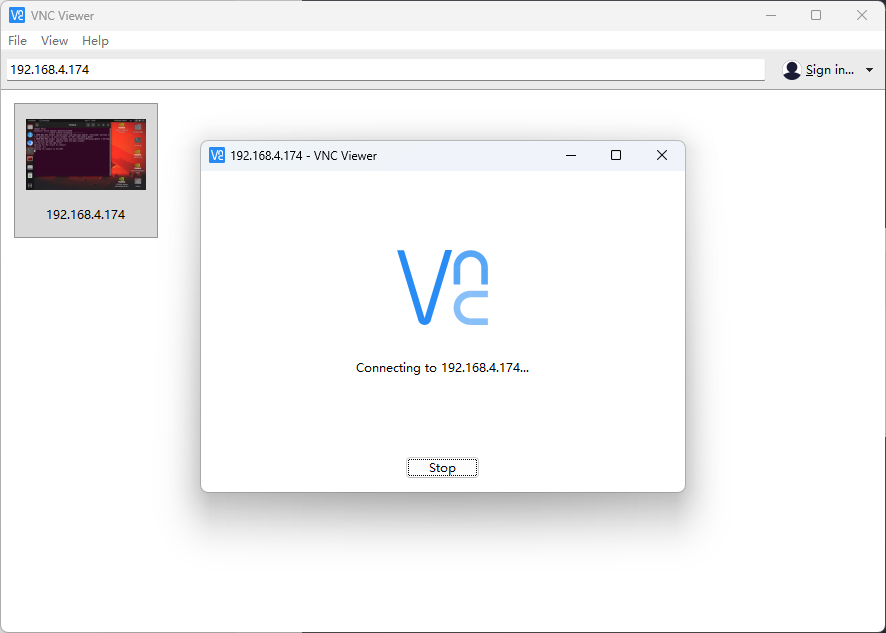
ok,那么也是直接不好使,并且超时了,gnome-remote-desktop的兼容性 就是一坨,真是不堪折磨
成功封印了gnome-remote-desktop之后,我们也是把x11vnc设置一下开机自启动
6、x11vnc设置开机自启动
bash
jetson@yahboom:~$ mkdir -p ~/.config/systemd/user
jetson@yahboom:~$ sudo vim ~/.config/systemd/user/x11vnc.service
x11vnc.service 中的内容为
bash
[Unit]
Description=x11vnc VNC Server
After=graphical-session.target
Requires=graphical-session.target

[Service]
Type=simple
# 简化参数,使用直接密码
ExecStart=/usr/bin/x11vnc -display :0 -auth guess -forever -shared -passwd 88888888 -rfbport 5900
Restart=on-failure
RestartSec=5
Environment="DISPLAY=:0"
Environment="XAUTHORITY=/home/jetson/.Xauthority"

[Install]
WantedBy=default.target
紧接着添加用户服务,注意不要用sudo
bash
jetson@yahboom:~$ systemctl --user daemon-reload
jetson@yahboom:~$ systemctl --user enable x11vnc.service
Created symlink /home/jetson/.config/systemd/user/default.target.wants/x11vnc.service → /home/jetson/.config/systemd/user/x11vnc.service.
jetson@yahboom:~$ systemctl --user start x11vnc.service
jetson@yahboom:~$ systemctl --user status x11vnc.service
● x11vnc.service - x11vnc VNC Server for Jetson
     Loaded: loaded (/home/jetson/.config/systemd/user/x11vnc.service; enabled; vendo>
     Active: active (running) since Fri 2026-04-17 15:32:58 CST; 4s ago
   Main PID: 142462 (x11vnc)
      Tasks: 2 (limit: 3987)
     Memory: 6.6M
        CPU: 589ms
     CGroup: /user.slice/user-1000.slice/user@1000.service/app.slice/x11vnc.service
             ├─142462 /usr/bin/x11vnc -display :0 -auth guess -forever -shared -rfbau>
             └─142473 /usr/bin/x11vnc -display :0 -auth guess -forever -shared -rfbau>

Apr 17 15:32:59 yahboom x11vnc[142473]: 17/04/2026 15:32:59
Apr 17 15:32:59 yahboom x11vnc[142473]: The VNC desktop is:      yahboom:0
Apr 17 15:32:59 yahboom x11vnc[142473]: PORT=5900
Apr 17 15:32:59 yahboom x11vnc[142473]: *********************************************>
Apr 17 15:32:59 yahboom x11vnc[142473]: Have you tried the x11vnc '-ncache' VNC clien>
Apr 17 15:32:59 yahboom x11vnc[142473]: The scheme stores pixel data offscreen on the>
Apr 17 15:32:59 yahboom x11vnc[142473]: retrieval.  It should work with any VNC viewe>
Apr 17 15:32:59 yahboom x11vnc[142473]:     x11vnc -ncache 10 ...
Apr 17 15:32:59 yahboom x11vnc[142473]: One can also add -ncache_cr for smooth 'copyr>
Apr 17 15:32:59 yahboom x11vnc[142473]: More info: http://www.karlrunge.com/x11vnc/fa>
lines 1-21/21 (END)
然后直接sudo reboot重启看下效果
bash
--------------------------------------------------------
ROS_DOMAIN_ID: 77 | ROS: humble
my_robot_type: x3 | my_lidar: a1 | my_camera: astraplus
--------------------------------------------------------
jetson@yahboom:~$ systemctl --user status x11vnc.service
● x11vnc.service - x11vnc VNC Server for Jetson
     Loaded: loaded (/home/jetson/.config/systemd/user/x11vnc.service; enabled; vendo>
     Active: active (running) since Fri 2026-04-17 15:34:28 CST; 34s ago
   Main PID: 1412 (x11vnc)
      Tasks: 2 (limit: 3987)
     Memory: 11.6M
        CPU: 829ms
     CGroup: /user.slice/user-1000.slice/user@1000.service/app.slice/x11vnc.service
             ├─1412 /usr/bin/x11vnc -display :0 -auth guess -forever -shared -rfbauth>
             └─2356 /usr/bin/x11vnc -display :0 -auth guess -forever -shared -rfbauth>

Apr 17 15:34:32 yahboom x11vnc[2356]: Have you tried the x11vnc '-ncache' VNC client->
Apr 17 15:34:32 yahboom x11vnc[2356]: The scheme stores pixel data offscreen on the V>
Apr 17 15:34:32 yahboom x11vnc[2356]: retrieval.  It should work with any VNC viewer.>
Apr 17 15:34:32 yahboom x11vnc[2356]:     x11vnc -ncache 10 ...
Apr 17 15:34:32 yahboom x11vnc[2356]: One can also add -ncache_cr for smooth 'copyrec>
Apr 17 15:34:32 yahboom x11vnc[2356]: More info: http://www.karlrunge.com/x11vnc/faq.>
Apr 17 15:34:33 yahboom x11vnc[2356]: 17/04/2026 15:34:33 check_xrandr_event():
Apr 17 15:34:33 yahboom x11vnc[2356]: 17/04/2026 15:34:33 Detected XRANDR event at lo>
Apr 17 15:34:33 yahboom x11vnc[2356]: 17/04/2026 15:34:33 check_xrandr_event: no chan>
Apr 17 15:34:33 yahboom x11vnc[2356]: 17/04/2026 15:34:33 check_xrandr_event: enablin>
lines 1-21/21 (END)
ok也是直接成功了