本文基于在 tpc_c_cplusplus + Lycium 下将 OpenSSH 9.9p2 适配到
OpenHarmony的实践。详细介绍了如何使用 Lycium(OpenHarmony 社区的三方库移植框架)这个三方库及命令行移植框架移植著名的OpenSSH开源工具。
相关资源地址:
开源鸿蒙通用三方库社区地址:https://gitcode.com/oh-tpc
tpc_c_cplusplus框架介绍地址:https://gitcode.com/openharmony-sig/tpc_c_cplusplus
lycium_plusplus框架地址:https://gitcode.com/OpenHarmonyPCDeveloper/lycium_plusplus
OpenHarmony PC Developer 社区:https://gitcode.com/OpenHarmonyPCDeveloper
构建成功截图:
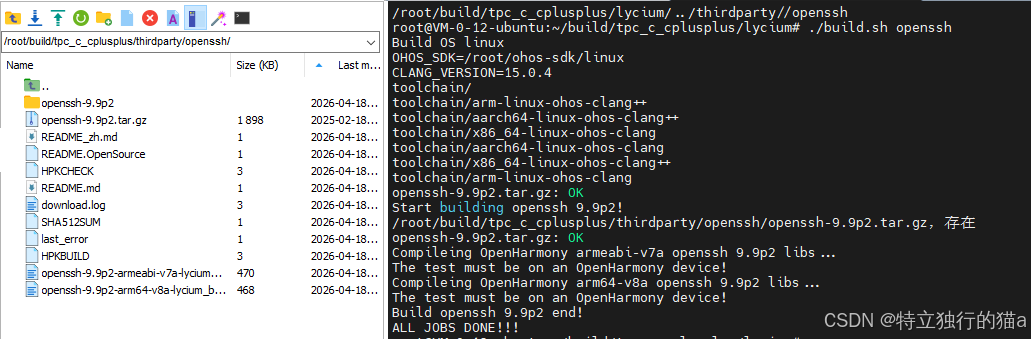
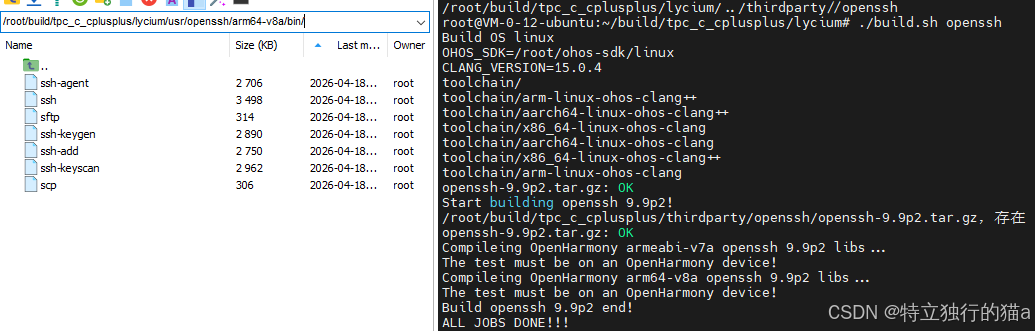
构建产物 :
二进制可执行文件ssh、sftp、ssh-keygen、scp等。
一、OpenSSH 是什么
OpenSSH (Open Secure Shell)是 SSH 协议 的主流开源实现,由 OpenBSD 项目维护的 Portable OpenSSH 可在 Linux、BSD、macOS 等多种 Unix 类系统上编译运行。其核心组件包括:
| 组件 | 作用 |
|---|---|
| ssh | SSH 客户端,远程登录、端口转发等 |
| sshd | SSH 服务端守护进程 |
| scp / sftp | 基于 SSH 的安全文件传输 |
| ssh-keygen / ssh-agent 等 | 密钥管理与辅助工具 |
协议层面提供加密信道、主机密钥校验、用户认证(密码、公钥等),广泛用于远程运维与加密传输。
openSSH的github仓 :https://github.com/openssh/openssh-portable
openSSH主页地址 :https://www.openssh.org/
在 鸿蒙 PC / OpenHarmony 场景下,通常通过 Lycium 等交叉编译框架,把 portable OpenSSH 编成 armeabi-v7a / arm64-v8a 等 ABI 的可执行文件,再集成到系统或用于设备侧验证;若应用仅需 SSH 协议库 ,也可优先考虑 libssh2 等库形态方案。
Lycium框架是什么?
它是一个专门为OpenHarmony打造的"自动代工厂"。
在没有这类框架时,你要移植一个开源软件(如 OpenSSH),需要自己手动改环境变量、写 ./configure 参数、处理依赖库路径,非常痛苦且容易出错。Lycium 把这些流程标准化了。
当你执行 Lycium 的编译命令时,它在后台帮你跑了这几件事:
- 环境初始化:自动把鸿蒙 SDK 里的编译器(如 clang)、链接器(如 ld)配置好。
- 依赖管理:如果你编译 OpenSSH 依赖 OpenSSL,Lycium 会先检查 OpenSSL 编好没,没编好就先跳过去编 OpenSSL。
- 路径转换:它会自动处理 --host=arm64-linux-ohos 等复杂的交叉编译参数。
- 产物收集:编译完后,它把 .so 和执行文件统一收集到一个目录下(比如你看到的 $LYCIUM_ROOT/usr),方便你直接拷贝到板子上。
Lycium框架地址: https://gitcode.com/OpenHarmonyPCDeveloper/lycium_plusplus
二、鸿蒙 PC 侧移植的总体思路
- 源码 :使用官方 Portable 压缩包(如
openssh-9.9p2.tar.gz),与 SHA512SUM 校验配套。 - 依赖 :OpenSSH 依赖 OpenSSL(libcrypto 等) 与 zlib ,须先于 OpenSSH 在 Lycium 中安装到约定前缀(如
lycium/usr/openssl/<ARCH>、lycium/usr/zlib/<ARCH>)。 - 工具链 :使用 OHOS NDK 中的
aarch64-linux-ohos-clang、arm-linux-ohos-clang等,由 Lycium 的envset.sh注入 CC、CFLAGS、LDFLAGS 等。 - 配置 :使用 Autoconf
./configure,而不是误走 CMake 分支;--host使用与 musl 一致的三元组(如aarch64-linux-musl、arm-linux-musleabihf),并显式--with-ssl-dir/--with-zlib。 - 安装 :交叉环境常用
make install-nosysconf,避免在构建机创建 ssh 系统用户或写/etc/ssh。 - 验证 :构建产物以 可执行文件 为主;可在真机/模拟器上用 hdc 推送后执行
ssh -V等做冒烟验证;Lycium 侧用 HPKCHECK 做产物存在性检查。
三、在 tpc_c_cplusplus + Lycium 中的目录与脚本职责
典型目录结构示例:
text
thirdparty/openssh/
├── HPKBUILD          # 下载、解压、configure、make、install 逻辑
├── HPKCHECK          # 设备/CI 侧检查(如二进制是否存在)
├── SHA512SUM         # 源码包 SHA512 校验
├── README.md / README_zh.md
├── README.OpenSource # 开源说明 JSON
└── docs/
    ├── hap_integrate.md
    └── porting_openssh_ohos.md  # 本文
3.1 HPKBUILD 编写
完整构建脚本如下:
bash
# Copyright (c) 2024 Huawei Device Co., Ltd.
# Licensed under the Apache License, Version 2.0 (the "License");
# you may not use this file except in compliance with the License.
# You may obtain a copy of the License at
#
#     http://www.apache.org/licenses/LICENSE-2.0
#
# Unless required by applicable law or agreed to in writing, software
# distributed under the License is distributed on an "AS IS" BASIS,
# WITHOUT WARRANTIES OR CONDITIONS OF ANY KIND, either express or implied.
# See the License for the specific language governing permissions and
# limitations under the License.

# Contributor: csdn猫哥 <534117529@qq.com>
# Maintainer: csdn猫哥 <534117529@qq.com>

pkgname=openssh
pkgver=9.9p2
pkgrel=0
pkgdesc="OpenSSH is the premier connectivity tool for remote login with the SSH protocol."
url="https://openssh.com"
archs=("armeabi-v7a" "arm64-v8a")
license=("BSD-style")
depends=("openssl" "zlib")
makedepends=()

# 修正为官方 CDN 压缩包路径
source="https://cdn.openbsd.org/pub/OpenBSD/OpenSSH/portable/openssh-9.9p2.tar.gz"

downloadpackage=true   # 启用下载
autounpack=true        # 启用自动解压
builddir=openssh-$pkgver
packagename=openssh-$pkgver.tar.gz

patchflag=false
cloneFlag=false        # 使用压缩包,不再需要 git clone

buildtools="configure"

source envset.sh
host=

prepare() {
    if [ $ARCH == "armeabi-v7a" ]
    then
        setarm32ENV
        # 与 OHOS(musl) 一致的三元组,避免按 glibc 探测;config.sub 可识别 *-linux-musl*
        host=arm-linux-musleabihf
    elif [ $ARCH == "arm64-v8a" ]
    then
        setarm64ENV
        host=aarch64-linux-musl
    else
        echo "${ARCH} not support"
        return -1
    fi

    cd $builddir
    if [ ! -f "configure" ]; then
        autoreconf -vif >> $publicbuildlog 2>&1
    fi
    cd $OLDPWD
    mkdir -p $builddir/$ARCH-build
}

build() {
    cd $builddir/$ARCH-build || return 1

    zroot=$LYCIUM_ROOT/usr/zlib/$ARCH
    sslroot=$LYCIUM_ROOT/usr/openssl/$ARCH

    ssl_ldflags="-L${sslroot}/lib"
    if [ -d "${sslroot}/lib64" ]; then
        ssl_ldflags="$ssl_ldflags -L${sslroot}/lib64"
    fi

    PKG_CONFIG_LIBDIR="${pkgconfigpath}" \
    CPPFLAGS="-DOPENSSL_API_COMPAT=0x10100000L $CPPFLAGS -I${sslroot}/include -I${zroot}/include" \
    LDFLAGS="$LDFLAGS $ssl_ldflags -L${zroot}/lib" \
    LIBS="-lcrypto -lz $LIBS" \
    CFLAGS="$CFLAGS -Wno-unused-command-line-argument" \
    ../configure "$@" --host=$host \
        --with-zlib=$zroot \
        --with-ssl-dir=$sslroot \
        --without-openssl-header-check \
        --disable-strip \
        --disable-etc-default-login \
        --with-libs \
        --without-pam \
        --without-shadow \
        --disable-utmp \
        --disable-utmpx \
        --with-sandbox=no >> $buildlog 2>&1

    cfg_ret=$?
    if [ $cfg_ret -ne 0 ]; then
        echo "$pkgname configure failed (exit $cfg_ret), see $buildlog"
        cd $OLDPWD
        return $cfg_ret
    fi

    ${MAKE} -j$(nproc) >> $buildlog 2>&1
    mk_ret=$?
    if [ $mk_ret -ne 0 ]; then
        echo "$pkgname make failed (exit $mk_ret), see $buildlog"
    fi
    cd $OLDPWD
    return $mk_ret
}

package() {
    cd $builddir/$ARCH-build
    ${MAKE} install-nosysconf >> $buildlog 2>&1
    ret=$?
    cd $OLDPWD
    unset host
    if [ $ARCH == "armeabi-v7a" ]
    then
        unsetarm32ENV
    elif [ $ARCH == "arm64-v8a" ]
    then
        unsetarm64ENV
    else
        echo "${ARCH} not support"
        return -1
    fi
    return $ret
}

check() {
    echo "The test must be on an OpenHarmony device!"
}

cleanbuild() {
    rm -rf ${PWD}/$builddir
}
3.2 HPKBUILD 编写要点
bash
# Copyright (c) 2024 Huawei Device Co., Ltd.
# Licensed under the Apache License, Version 2.0 (the "License");
# Contributor: csdn猫哥 <534117529@qq.com>
# Maintainer: csdn猫哥 <534117529@qq.com>

source HPKBUILD > /dev/null 2>&1
logfile=${LYCIUM_THIRDPARTY_ROOT}/${pkgname}/${pkgname}_${ARCH}_${OHOS_SDK_VER}_test.log

checkprepare() {
    return 0
}

# 在 OpenHarmony 设备或 CI 环境校验安装产物;不在构建机执行交叉二进制
openharmonycheck() {
    res=0
    prefix_inst=$LYCIUM_ROOT/usr/$pkgname/$ARCH
    bdir=$builddir/$ARCH-build

    echo "--- OpenSSH $pkgver post-build check ($ARCH) ---" > "${logfile}" 2>&1

    ssh_bin=""
    sshd_bin=""
    for d in "$prefix_inst" "$bdir"; do
        if [ -z "$ssh_bin" ]; then
            if [ -x "$d/bin/ssh" ]; then
                ssh_bin="$d/bin/ssh"
            elif [ -x "$d/ssh" ]; then
                ssh_bin="$d/ssh"
            fi
        fi
        if [ -z "$sshd_bin" ]; then
            if [ -x "$d/sbin/sshd" ]; then
                sshd_bin="$d/sbin/sshd"
            elif [ -x "$d/libexec/sshd" ]; then
                sshd_bin="$d/libexec/sshd"
            elif [ -x "$d/sshd" ]; then
                sshd_bin="$d/sshd"
            fi
        fi
    done

    if [ -n "$ssh_bin" ] && [ -n "$sshd_bin" ]; then
        echo "ssh: $ssh_bin" >> "${logfile}" 2>&1
        echo "sshd: $sshd_bin" >> "${logfile}" 2>&1
        echo "openssh binaries present: OK" >> "${logfile}" 2>&1
    else
        echo "openssh check failed: missing ssh or sshd (install dir: $prefix_inst, build: $bdir)" >> "${logfile}" 2>&1
        res=1
    fi

    # 可选:在真机/模拟器上通过 hdc 执行版本自检(需自行推送依赖 so)
    # hdc file send "$ssh_bin" /data/local/tmp/ssh
    # hdc shell "chmod 755 /data/local/tmp/ssh && /data/local/tmp/ssh -V" >> "${logfile}" 2>&1

    return $res
}-
元数据
pkgname、pkgver、archs、license、depends(如openssl、zlib)。makedepends只写宿主机可执行工具名 (由lycium/script/build_hpk.sh里which检查);不要把zlib/openssl写进makedepends,否则会被当成「系统命令」要求安装,误报「请先安装 zlib 命令」。
-
源码与校验
source、packagename、downloadpackage、autounpack。SHA512SUM中的文件名必须与packagename一致 (例如openssh-9.9p2.tar.gz),不能混用其它包的条目(曾出现误写acl-2.1.0.zip导致sha512sum: No such file)。
-
构建类型:必须声明
configure- Lycium 的
build_hpk.sh中:若未设置buildtools="configure",会走 CMake 分支,向build传入-DCMAKE_...,与 OpenSSH 的./configure流程不符,易导致后续失败或行为混乱。 - 正确写法:
buildtools="configure",这样会调用configuredependpath,buildargs变为--prefix=...,与../configure "$@"衔接。
- Lycium 的
-
交叉环境与
--hostsource envset.sh,在prepare()里按$ARCH调用setarm32ENV/setarm64ENV,并设置host=(与 OHOS musl 一致时可用arm-linux-musleabihf、aarch64-linux-musl)。- 不要使用未定义的
$HOST,否则会出现--host=为空,configure 失败。
-
configure参数建议(按实际裁剪)"$@":承接 Lycium 传入的--prefix,避免手写重复 prefix。--with-zlib=、--with-ssl-dir=:指向$LYCIUM_ROOT/usr/zlib/$ARCH、$LYCIUM_ROOT/usr/openssl/$ARCH。CPPFLAGS/LDFLAGS:增加 openssl、zlib 的 include / lib(含 lib64),便于链接探测通过。- 交叉 + OpenSSL 3:可设
CPPFLAGS=-DOPENSSL_API_COMPAT=0x10100000L,并加--without-openssl-header-check,避免无法运行测试程序时的头/库一致性误判。 - 嵌入式/无 PAM、无 utmp:
--without-pam、--without-shadow、--disable-utmp、--disable-utmpx等可减少对宿主特性的依赖。 - 若暂不需要复杂沙箱:
--with-sandbox=no可简化交叉环境下的行为(上线前可按安全需求再评估)。 LIBS=-lcrypto -lz等可在 configure 阶段帮助 libcrypto 链接测试。
-
build()/package()- 在
$builddir/$ARCH-build下执行../configure ... >> $buildlog,再make。 - 区分 configure 失败 与 make 失败 的日志提示,便于查
openssh-*-<ARCH>-lycium_build.log。 package()使用install-nosysconf;结束后unsetarm*ENV,避免影响下一架构。
- 在
3.3 HPKCHECK 编写要点
source HPKBUILD,定义logfile(含pkgname、ARCH、OHOS_SDK_VER)。- 可选
checkprepare()(无准备则return 0)。 openharmonycheck():OpenSSH 产物是ssh/sshd等二进制 ,不宜在 x86 构建机上直接执行 ARM 程序;可检查:- 安装前缀
$LYCIUM_ROOT/usr/openssh/$ARCH/bin/ssh、sbin/sshd(或libexec/sshd); - 若尚未 install,则检查
$builddir/$ARCH-build/ssh、./sshd。
- 安装前缀
- 真机验证可保留注释掉的
hdc file send+hdc shell ... ssh -V示例。
3.3 其它文件
README.OpenSource:JSON 中填写 名称、版本、License 链接、上游 URL、维护者。README_zh.md/README.md:版本、依赖、构建顺序、与约束文档的链接。docs/hap_integrate.md:说明 Lycium 输出路径、与 libssh2 等库的差异、HAP 与系统集成的注意点。
3.4 推荐编译顺序(命令级)
在 lycium 目录:
shell
./build.sh zlib openssl openssh或先保证 lycium/usr/zlib/<ARCH> 、lycium/usr/openssl/<ARCH> 已存在,再单独:
shell
./build.sh openssh四、本次移植中遇到的问题(FAQ)
| 现象 | 原因 | 处理 |
|---|---|---|
sha512sum: acl-2.1.0.zip: No such file,SHA512 校验失败 |
SHA512SUM 写错包名/条目 ,与当前下载的 openssh-9.9p2.tar.gz 不一致 |
按官方包重新计算并写入 openssh-9.9p2.tar.gz 的 SHA512 一行 |
| 「请先安装 zlib 命令」 且退出 | makedepends=("openssl","zlib") 被 checkmakedepends 用 which 当成宿主机命令 检查,系统 PATH 里没有名为 zlib 的命令 |
makedepends=() ;库依赖只放在 depends,由 Lycium 依赖顺序编译 |
| 未编 zlib 时路径不存在 | 工程内缺少 thirdparty/zlib 配方时,--with-zlib=$LYCIUM_ROOT/usr/zlib/... 无对应目录 |
增加 zlib 的 HPKBUILD (如 CMake + CMAKE_INSTALL_PREFIX=$LYCIUM_ROOT/usr/zlib/$ARCH ),并先编 zlib |
ERROR during : build -DCMAKE_... |
未设 buildtools="configure" ,走了 CMake 分支 |
设置 buildtools="configure" |
openssh configure error 或 --host= 异常 |
未 source envset.sh ,$HOST/$host 未设 |
在 prepare() 中设 host 并 setarm*ENV ;configure 使用 "$@" --host=$host |
| configure/make 仍偶发失败 | OpenSSL 3、无 utmp/PAM、沙箱探测等与交叉环境不匹配 | 按需增加 OPENSSL_API_COMPAT 、--without-openssl-header-check 、--without-pam 、--disable-utmp 、--with-sandbox=no 等;并保证 SSL/ZLIB 的 lib/lib64 与头文件路径 |
五、真机验证
OpenSSH 集成说明(Lycium / OpenHarmony)
OpenSSH portable 产物以可执行程序 为主(ssh、sshd、scp、sftp、ssh-keygen 等),与以 .so 形式供应用链接的库类三方件用法不同:常见场景为系统组件集成 或通过 hdc 在设备上验证,而不是在 HAP 内直接 target_link_libraries(ssh)。
-
获取本仓库后,三方库目录为:
texttpc_c_cplusplus/thirdparty/openssh ├── docs │ └── hap_integrate.md ├── HPKBUILD ├── HPKCHECK ├── SHA512SUM ├── README.OpenSource ├── README.md └── README_zh.md -
在 lycium 目录下先编依赖再编本库(示例):
shellcd lycium ./build.sh zlib openssl openssh -
编译成功后,安装前缀一般为:
textlycium/usr/openssh/<ARCH>/ ├── bin/ # ssh, scp, sftp, ssh-keygen 等 ├── sbin/ # sshd(若 configure 安装到 sbin) ├── libexec/ # 部分版本下的辅助程序 └── share/ # 手册等(视配置而定)其中
<ARCH>为armeabi-v7a或arm64-v8a。
设备侧验证
-
将
bin/、sbin/下所需二进制及 openssl、zlib 等运行所需.so推送到设备可执行路径(例如/data/local/tmp/,如果真机系统已自带这些库如openssl和zlib库, 则该步骤省略)。 -
使用
hdc shell执行(示例):shellchmod 755 /data/local/tmp/ssh /data/local/tmp/sshd /data/local/tmp/ssh -V -
sshd 需在设备上配置 host key、监听地址与权限目录,并满足系统安全策略;具体以目标系统文档为准。
六、经验小结
- 先对齐 Lycium 语义 :
dependsvsmakedepends、buildtools=configure、SHA512SUM文件名,可规避大量「表面像环境问题、实为脚本语义错误」的故障。 - 再对齐交叉编译语义 :工具链环境 、
--host与 musl/OHOS 、OpenSSL/zlib 的 prefix 与链接。 - OpenSSH 是「程序集」而非单一
.so:文档与 HPKCHECK 应围绕二进制产物与设备侧验证 来写,与 libssh2 等库的集成文档区分开。 - 排障时优先查看 :
thirdparty/openssh/openssh-<ver>-<ARCH>-lycium_build.log,结合脚本里区分 configure / make 的提示,可快速定位。
七、参考与延伸阅读
- OpenSSH 官网与发行说明:https://www.openssh.com/
- Portable 源码镜像(示例):
https://cdn.openbsd.org/pub/OpenBSD/OpenSSH/portable/ - 同仓库内可参考脚本:
thirdparty/gzip/HPKBUILD(configure + envset)、thirdparty/libssh2/HPKCHECK(测试目录)、lycium/script/build_hpk.sh(checkmakedepends、configuredependpath行为) - 同目录集成说明:<hap_integrate.md>
最后,欢迎加入开源鸿蒙开发者社区交流:https://harmonypc.csdn.net/