一、引言
Spring Boot 3.4 带来了显著的性能提升、可观察性增强和开发体验改进。但在升级过程中,某些变更需要特别注意,以确保应用程序继续正常运行。本指南将深入介绍最重要的变更,并提供代码示例以帮助您顺利完成过渡。
二、主要变更和增强功能
2.1 RestClient 和 RestTemplate
2.1.1 新特性
自动配置支持:RestClient 和 RestTemplate 现在支持多种 HTTP 客户端的自动配置,不再需要手动配置 RestClient.builder() 包括:
Apache HTTP Components
Jetty Client
Reactor Netty 的 HttpClient
JDK 的 HttpClient
2.1.2 客户端优先级顺序
Apache HTTP Components (HttpComponentsClientHttpRequestFactory)
Jetty Client (JettyClientHttpRequestFactory)
Reactor Netty HttpClient (ReactorClientHttpRequestFactory)
JDK HttpClient (JdkClientHttpRequestFactory)
简单的 JDK HttpURLConnection (SimpleClientHttpRequestFactory)
2.1.3 配置示例
# 1. 使用 http-components
spring.http.client.factory=http-components

# 2. 使用 jetty
spring.http.client.factory=jetty

# 3. 禁用重定向
spring.http.client.redirects=dont-follow
2.1.4 自定义客户端示例
@Bean
public HttpComponentsClientHttpRequestFactorvBuilder httoComponentsClientHttpRequestFactoryBuilder() {
	return ClientHttpRequestFactoryBuilder.httpComponents()
		.withDefaultRequestConfigCustomizer(bilder -> builder,setProtocolUpgradeEnabled(false));
}
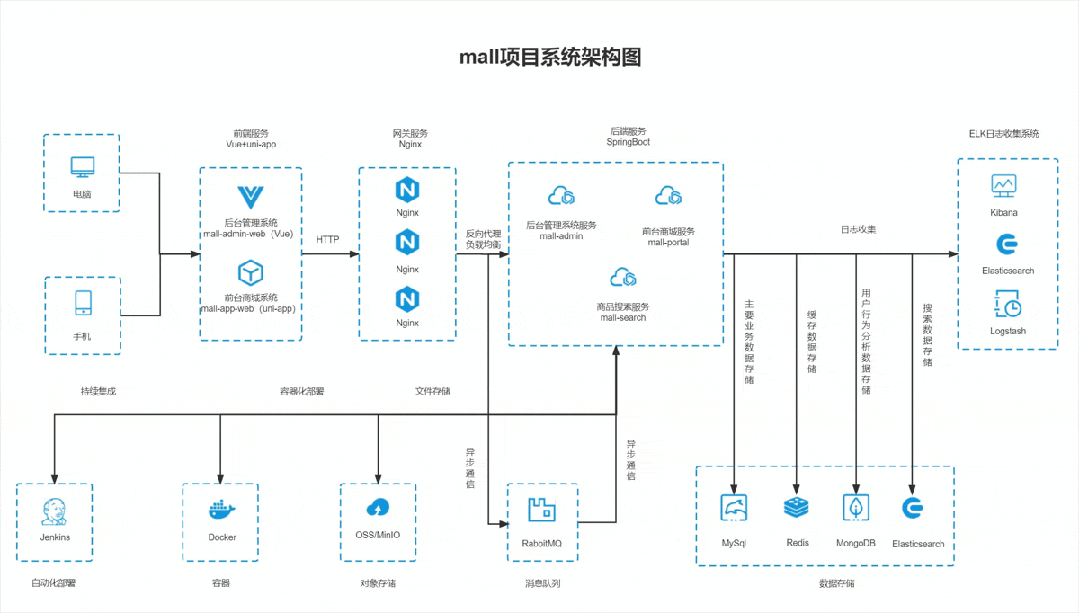
这或许是一个对你有用的开源项目,mall项目是一套基于 SpringBoot3 + Vue 的电商系统(Github标星60K),后端支持多模块和 2024最新微服务架构 ,采用Docker和K8S部署。包括前台商城项目和后台管理系统,能支持完整的订单流程!涵盖商品、订单、购物车、权限、优惠券、会员、支付等功能!
Boot项目:https://github.com/macrozheng/mall
Cloud项目:https://github.com/macrozheng/mall-swarm
视频教程:https://www.macrozheng.com/video/
项目演示:
2.2 配置属性的 Bean 验证
2.2.1 主要变更
验证现在严格遵循 Bean Validation 规范
只有在字段上标注了 @Valid 注解时才会对嵌套属性进行验证
2.2.2 改造示例
修改前:
@ConfigurationProperties(prefix = "pig")
@Validated
public class GatewayConfigProperties {
    private SwaggerProperties swagger;
}
修改后:
@ConfigurationProperties(prefix = "pig")
@Validated
public class GatewayConfigProperties {
    @Valid  // 添加此注解
    private SwaggerProperties swagger;
}
2.3 优雅关闭功能
2.3.1 默认特性
所有嵌入式 Web 服务器现在默认启用优雅关闭
包括:Jetty、Reactor Netty、Tomcat、Undertow
2.3.2 配置方法
禁用优雅关闭:
server.shutdown=immediate2.4 结构化日志记录
2.4.1 支持的格式
Elastic Common Schema (ECS)
{"@timestamp":"2024-01-01T10:15:00.067462556Z","log.level":"INFO","process.pid":39599,"process.thread.name":"main","service.name":"simple","log.logger":"org.example.Application","message":"No active profile set, falling back to 1 default profile: "default"","ecs.version":"8.11"}Graylog Extended Log Format (GELF)
{"version":"1.1","short_message":"No active profile set, falling back to 1 default profile: "default"","timestamp":1725958035.857,"level":6,"_level_name":"INFO","_process_pid":47649,"_process_thread_name":"main","_log_logger":"org.example.Application"}Logstash
{"@timestamp":"2024-01-01T10:15:00.111037681+02:00","@version":"1","message":"No active profile set, falling back to 1 default profile: "default"","logger_name":"org.example.Application","thread_name":"main","level":"INFO","level_value":20000}2.4.2 配置方法
启用 ECS 格式:
# 文件输出使用 ECS 格式
logging.structured.format.file=ecs

# 控制台输出使用 ECS 格式
logging.structured.format.console=ecs
2.5 可观察性改进
2.5.1 应用程序分组
# 设置应用程序组
spring.application.group=order-processing

# 在日志中包含组信息
logging.include-application.group=true
2.5.2 OTLP 跟踪增强
# 启用 gRPC 传输
management.otlp.tracing.transport=grpc

# 设置端点
management.otlp.tracing.endpoint=grpc://otel-collector:4317
三、依赖版本升级
3.1 Spring 核心框架
Spring Framework -> 6.2
Spring Data -> 2024.1
Spring Security -> 6.4
Spring Batch -> 5.2
3.2 第三方库
Hibernate -> 6.6
Jackson -> 2.18.0
Micrometer -> 1.14
Reactor -> 2024.0
Testcontainers -> 1.20.3
3.3 Maven 配置示例
<parent>
    <groupId>org.springframework.boot</groupId>
    <artifactId>spring-boot-starter-parent</artifactId>
    <version>3.4.0</version>
    <relativePath/>
</parent>
四、测试功能增强
4.1 MockMvc 的 AssertJ 支持
@Autowired
private MockMvcTester mockMvcTester;

@Test
void testEndpoint() throws Exception {
    mockMvcTester.get("/api/data")
        .andExpect(status().isOk())
        .andExpect(jsonPath("$.name").value("Sample Data"));
}
五、废弃特性处理
5.1 已废弃的配置
修改前:
management.endpoints.enabled-by-default=false
management.endpoint.health.enabled=true
修改后:
management.endpoints.access.default=none
management.endpoint.health.access=read-only