工具链介绍
| 工具 | 用途 | 输出格式 |
|---|---|---|
| Architecture Diagram Generator | 根据代码/配置自动生成架构图 | HTML/SVG |
| Excalidraw | 手绘风格图表编辑 | .excalidraw / PNG / SVG |
| 飞书画板 | 团队协作、可编辑的架构图 | 飞书原生格式 |
步骤 1:生成 HTML 架构图
使用 Architecture Diagram Generator 生成 architecture-diagram.html:
技能安装:
cd ~/.claude/skills
git clone https://github.com/cocoon-ai/architecture-diagram-generator.git
bash
# 示例:/architecture-diagram 帮我生成架构图,输出 HTML 文件步骤 2:使用Excalidraw将html转换为Mermaid 代码
技能安装:
cd ~/.claude/skills
git clone https://github.com/LAMZANJYU/excalidraw-claude-code-skill.git
bash
# 示例:/excalidraw-claude-code-skill 将 @../architecture-diagram.html 转成Mermaid步骤 3:插入飞书
-
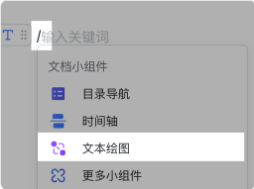
在飞书文档的空白行,输入 /,然后在弹出的菜单里选择 文本绘图
-
切换到代码模式
-
粘贴你的 Mermaid 代码,把之前的架构图代码粘贴进去,飞书会自动渲染成图。
常见问题 FAQ
Q1:Mermaid代码不生效?
1、检查粘贴内容是否完整,不需要 mermaid 和 这两行。
Q2:Mermaid代码换行失败 怎么办?
1、<\br> 替换 \n 来表示换行。