在运动健康类应用中,用户跑步或骑行时往往不方便一直盯着手机屏幕。语音播报能够将运动数据、状态提醒、安全预警等信息实时"读"出来,让用户专注于运动本身。本文分享一个可扩展的语音播报系统设计,支持优先级队列、打断策略、防重复冷却等特性。
一、为什么需要语音播报?
语音播报的初衷很简单:把信息读出来。最初只是为了配合 GPS 信号强度显示,在 UI 上画了几个信号格,觉得太死板,于是顺手加了一个"GPS信号弱"的语音提示。测试时发现:信号一旦持续弱,就会每隔几秒播报一次,非常烦人。
这让我意识到:简单的"播报"远远不够,必须从用户体验和交互角度重新设计一个独立的语音播报模块。
于是开始了迭代:
- 第一版:能播就行。把所有需要播的文字丢给 TTS 引擎,它就能读出来。测试时发现:用户明明按了暂停,过了几秒才听到"运动已暂停"------因为当时正在播配速数据。等用户想继续运动,又等了半天才听到"继续运动"。体验非常割裂。
- 第二版:加入优先级。让用户操作(开始/暂停/恢复/结束)排到队列前面。但问题依然存在:如果当前正在播恶劣天气预警(高优先级),用户点击暂停,还是要等天气预警播完才能听到反馈。操作已经结束,语音才姗姗来迟。
- 第三版 :引入强制打断。用户操作永远最高优先级,无论当前在播什么,立即停止并播报用户操作反馈。同时,为 GPS 信号弱增加状态标记和冷却时间,避免持续弱信号时反复播报。
经过三轮迭代,最终以用户交互为最高优先级,彻底解决了响应延迟、重复播报、打断混乱等问题。下面分享这个最终版的语音播报系统设计。
二、功能需求与播报文字
| 播报内容 | 触发时机 | 优先级 | 防重复策略 | 播报文字示例 |
|---|---|---|---|---|
| 倒计时数字 | 点击开始运动 | 最高(用户操作) | 无 | 3 → 2 → 1 |
| 倒计时"开始" | 倒计时结束 | 最高(用户操作) | 无 | 开始 |
| 开始运动 | 倒计时结束后 | 最高(用户操作) | 无 | 开始跑步,请注意安全 |
| 暂停运动 | 用户点击暂停 | 最高(用户操作) | 无 | 运动已暂停 |
| 恢复运动 | 用户点击恢复 | 最高(用户操作) | 无 | 继续运动 |
| 结束运动 | 用户点击结束 | 最高(用户操作) | 无 | 运动结束,距离5.2公里,时长30分15秒,平均配速5分48秒 |
| 恶劣天气预警 | 天气信息更新 | 高 | 60秒内不重复 | 正在下雨,路面湿滑,请注意安全 |
| GPS信号弱 | 卫星状态从好变差 | 正常 | 只播一次,信号恢复后重置,30秒冷却 | GPS信号较弱,可能影响轨迹精度 |
| 好天气信息 | 运动开始时 | 正常 | 60秒内不重复 | 当前晴天,温度23度,天气舒适,适合运动 |
| 每公里里程碑 | 距离增加1km | 低 | 无 | 第5公里,用时5分30秒 |
| 周期性数据 | 每60秒 | 低 | 间隔控制 | 已运动30分钟,距离5.2公里,平均配速5分48秒 |
运行效果
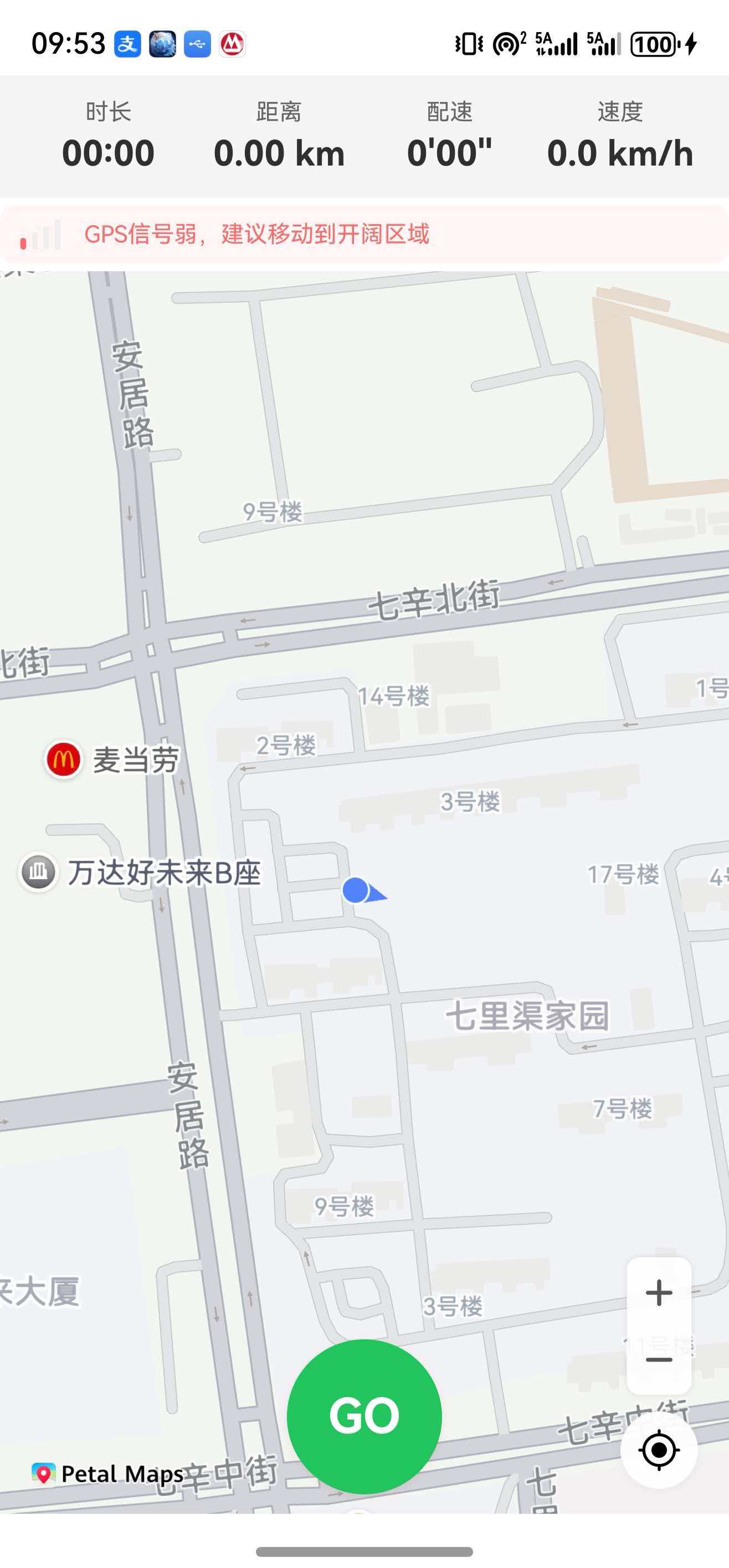
下载代码,真机运行即可体验语音播报功能。我家GPS信号老弱了,信号好了那一行提示就会消失,关于如何检测GPS信号是定位模块中注册回调信号信息。天气播报是我写的模拟数据只是测试用的。
三、技术选型
- 鸿蒙 TTS :
@kit.CoreSpeechKit提供文本转语音能力 - 设计模式:单例模式(全局唯一实例)+ 优先级队列
- 打断策略:用户操作强制打断;高优先级可打断低优先级;同优先级不打断
四、核心设计
4.1 优先级定义
javascript
export enum SpeechPriority {
  HIGH = 0,    // 最高:用户操作(开始/暂停/恢复/结束/倒计时)、安全事件、恶劣天气
  NORMAL = 1,  // 正常:GPS信号、好天气信息
  LOW = 2      // 低:周期播报、里程碑
}
4.2 队列与打断逻辑
- 新播报入队时按优先级插入(数字小的在前)
- 用户操作(开始/暂停/恢复/结束/倒计时)强制打断任何正在播放的内容
- 非用户操作:仅当新播报优先级严格低于当前播放优先级时才打断(例如 NORMAL 打断 LOW,HIGH 打断 NORMAL 和 LOW)
- 同优先级不打断,避免频繁插队
javascript
// 核心打断逻辑
if (this.isSpeaking) {
  if (isUserAction) {
    this.stopCurrent();                // 用户操作强制打断
    this.isSpeaking = false;
  } else if (priority < this.currentPlayingPriority) {
    this.stopCurrent();                // 高优先级打断低优先级
    this.isSpeaking = false;
  }
}
4.3 防重复与冷却机制
- GPS信号弱 :使用
hasAnnouncedGpsWeak标记当前弱信号周期是否已播报。信号从好变差时播报一次;信号恢复后重置标记;若恢复后再次变弱,且距离上次播报超过30秒,才会再次播报。 - 天气播报:运动开始时强制播报一次;非开始时需间隔60秒才重复播报。
- 周期性播报 :通过
lastPeriodicTime记录上次播报时间,达到设定间隔才播报。 - 里程碑 :通过
lastMilestoneKm记录已播报的公里数,每公里只播一次。
五、完整代码(SpeechManager.ts)
javascript
import { textToSpeech } from '@kit.CoreSpeechKit';
import { BusinessError } from '@kit.BasicServicesKit';
import { SportData } from '../models/SportData';
import { SatelliteSignalQuality } from '../models/SatelliteStatusInfo';
import { FormatUtils } from '../utils/FormatUtils';
import { SpeechPriority } from '../models/SpeechPriority';
import { WeatherInfo } from '../models/WeatherInfo';

/**
 * 播报队列项
 */
interface QueueItem {
  text: string;
  priority: SpeechPriority;
}

/**
 * 语音播报管理器(单例)
 */
export class SpeechManager {
  private static instance: SpeechManager;
  private ttsEngine?: textToSpeech.TextToSpeechEngine;
  private isSpeaking: boolean = false;
  private isEnabled: boolean = true;
  private queue: QueueItem[] = [];
  private currentPlayingPriority: SpeechPriority = SpeechPriority.NORMAL;

  // 状态记录(用于防重复)
  private lastGpsWeakTime: number = 0;                       // 上次GPS弱播报时间戳
  private hasAnnouncedGpsWeak: boolean = false;              // 本次弱信号周期是否已播报
  private lastPeriodicTime: number = 0;                      // 上次周期性播报时间戳
  private lastMilestoneKm: number = 0;                       // 上次播报的里程碑公里数
  private lastWeatherTime: number = 0;                       // 上次天气播报时间戳
  private periodicIntervalSec: number = 60;                  // 周期性播报间隔(秒)

  // 冷却时间(毫秒)
  private readonly GPS_COOLDOWN: number = 30000;
  private readonly WEATHER_COOLDOWN: number = 60000;

  private constructor() {}

  /**
   * 获取单例实例
   */
  static getInstance(): SpeechManager {
    if (!SpeechManager.instance) {
      SpeechManager.instance = new SpeechManager();
    }
    return SpeechManager.instance;
  }

  /**
   * 初始化TTS引擎
   */
  async init(): Promise<boolean> {
    try {
      console.info('[SpeechManager] 开始初始化TTS引擎');
      const initParams: textToSpeech.CreateEngineParams = {
        language: 'zh-CN',
        person: 13,
        online: 1,
        extraParams: { "name": "SportTrackEngine" }
      };
      this.ttsEngine = await textToSpeech.createEngine(initParams);
      console.info('[SpeechManager] TTS引擎创建成功');

      const listener: textToSpeech.SpeakListener = {
        onStart: (requestId: string): void => {
          console.info(`[SpeechManager] 播报开始: ${requestId}`);
        },
        onData: (requestId: string, audio: ArrayBuffer): void => {
          // 不需要处理音频数据
        },
        onComplete: (requestId: string): void => {
          console.info(`[SpeechManager] 播报完成: ${requestId}`);
          this.isSpeaking = false;
          this.processQueue();
        },
        onStop: (requestId: string): void => {
          console.info(`[SpeechManager] 播报停止: ${requestId}`);
          this.isSpeaking = false;
          this.processQueue();
        },
        onError: (requestId: string, errorCode: number, errorMessage: string): void => {
          console.error(`[SpeechManager] TTS错误: ${errorCode}, ${errorMessage}`);
          this.isSpeaking = false;
          this.processQueue();
        }
      };
      this.ttsEngine.setListener(listener);

      console.info('[SpeechManager] 初始化成功');
      return true;
    } catch (err) {
      const error = err as BusinessError;
      console.error(`[SpeechManager] 初始化失败: ${error.code}`);
      this.isEnabled = false;
      return false;
    }
  }

  /**
   * 添加播报到队列
   * 规则:
   * - 用户操作(开始/暂停/恢复/结束/倒计时)→ 最高优先级,强制打断
   * - 非用户操作:新优先级 < 当前优先级时打断
   */
  private speak(text: string, priority: SpeechPriority = SpeechPriority.NORMAL, isUserAction: boolean = false): void {
    if (!this.isEnabled || !this.ttsEngine) {
      console.warn(`[SpeechManager] 无法播报: isEnabled=${this.isEnabled}, hasEngine=${!!this.ttsEngine}`);
      return;
    }

    const item: QueueItem = { text, priority };
    console.info(`[SpeechManager] 准备播报: "${text}", 优先级: ${priority}, 用户操作: ${isUserAction}`);

    // 检查是否需要打断当前播报
    if (this.isSpeaking) {
      // 用户操作:强制打断任何播报
      if (isUserAction) {
        console.info(`[SpeechManager] 用户操作,强制打断当前播报`);
        this.stopCurrent();
        this.isSpeaking = false;
      }
      // 非用户操作:高优先级打断低优先级
      else if (priority < this.currentPlayingPriority) {
        console.info(`[SpeechManager] 高优先级打断: ${priority} < ${this.currentPlayingPriority}`);
        this.stopCurrent();
        this.isSpeaking = false;
      }
    }

    // 按优先级插入队列(数字小的优先)
    let inserted: boolean = false;
    for (let i = 0; i < this.queue.length; i++) {
      if (priority < this.queue[i].priority) {
        this.queue.splice(i, 0, item);
        inserted = true;
        console.info(`[SpeechManager] 插队到位置: ${i}`);
        break;
      }
    }
    if (!inserted) {
      this.queue.push(item);
      console.info(`[SpeechManager] 添加到队列末尾`);
    }

    this.processQueue();
  }

  /**
   * 处理播报队列
   */
  private processQueue(): void {
    if (this.isSpeaking) {
      return;
    }
    if (this.queue.length === 0) {
      return;
    }
    if (!this.ttsEngine) {
      console.warn(`[SpeechManager] TTS引擎未初始化`);
      return;
    }

    this.isSpeaking = true;
    const item: QueueItem = this.queue.shift()!;
    this.currentPlayingPriority = item.priority;
    console.info(`[SpeechManager] 开始播报: "${item.text}" (优先级=${item.priority})`);

    const extraParam: Record<string, Object> = {
      "speed": 1.0,
      "volume": 1.5,
      "playType": 1
    };

    const speakParams: textToSpeech.SpeakParams = {
      requestId: Date.now().toString(),
      extraParams: extraParam
    };

    try {
      this.ttsEngine.speak(item.text, speakParams);
    } catch (err) {
      console.error(`[SpeechManager] 播报异常: "${item.text}"`);
      this.isSpeaking = false;
      this.processQueue();
    }
  }

  /**
   * 停止当前播报
   */
  private stopCurrent(): void {
    this.ttsEngine?.stop();
  }

  /**
   * 清空播报队列
   */
  private clearQueue(): void {
    this.queue = [];
    this.isSpeaking = false;
  }

  // ==================== 倒计时播报(用户操作,最高优先级) ====================

  /**
   * 播报倒计时文字
   */
  speakCountdownText(text: string): void {
    this.speak(text, SpeechPriority.HIGH, true);
  }

  // ==================== 安全事件(高优先级) ====================

  /**
   * 安全事件播报(恶劣天气、前方危险等)
   */
  announceSafetyEvent(message: string): void {
    console.info(`[SpeechManager] 安全事件: ${message}`);
    this.speak(message, SpeechPriority.HIGH, false);
  }

  // ==================== 用户操作(最高优先级,强制打断) ====================

  /**
   * 开始运动播报
   */
  announceStart(sportType: string): void {
    const text = `开始${sportType},请注意安全`;
    this.speak(text, SpeechPriority.HIGH, true);
    this.lastPeriodicTime = Date.now();
    this.lastMilestoneKm = 0;
  }

  /**
   * 暂停运动播报
   */
  announcePause(): void {
    this.speak('运动已暂停', SpeechPriority.HIGH, true);
  }

  /**
   * 恢复运动播报
   */
  announceResume(): void {
    this.speak('继续运动', SpeechPriority.HIGH, true);
    this.lastPeriodicTime = Date.now();
  }

  /**
   * 结束运动播报
   */
  announceStop(data: SportData): void {
    const distance: string = FormatUtils.formatDistanceForSpeech(data.distance);
    const duration: string = FormatUtils.formatDurationForSpeech(data.duration);
    const pace: string = FormatUtils.formatPaceForSpeech(data.avgPace);
    const text: string = `运动结束,距离${distance},时长${duration},平均配速${pace}`;
    this.speak(text, SpeechPriority.HIGH, true);
  }

  // ==================== 非用户操作(排队) ====================

  /**
   * GPS信号播报
   */
  announceGpsWeak(quality: SatelliteSignalQuality, isWeakNow: boolean): void {
    const now: number = Date.now();

    if (isWeakNow && !this.hasAnnouncedGpsWeak && now - this.lastGpsWeakTime > this.GPS_COOLDOWN) {
      this.lastGpsWeakTime = now;
      this.hasAnnouncedGpsWeak = true;
      this.speak('GPS信号较弱,可能影响轨迹精度', SpeechPriority.NORMAL, false);
    } else if (!isWeakNow && this.hasAnnouncedGpsWeak) {
      this.hasAnnouncedGpsWeak = false;
    }
  }

  /**
   * 天气播报
   * 恶劣天气 → 高优先级
   * 好天气 → 正常优先级
   */
  announceWeather(weather: WeatherInfo, isStart: boolean = false): void {
    const now: number = Date.now();

    if (!isStart && now - this.lastWeatherTime < this.WEATHER_COOLDOWN) {
      return;
    }

    this.lastWeatherTime = now;
    let text: string = '';

    // 恶劣天气(高优先级)
    if (weather.isSevere) {
      if (weather.condition.includes('雨')) {
        text = '正在下雨,路面湿滑,请注意安全';
      } else if (weather.condition.includes('雪')) {
        text = '正在下雪,路面湿滑,请注意安全';
      } else if (weather.windSpeed > 30) {
        text = `风力较大,风速${weather.windSpeed}公里每小时,请注意安全`;
      } else {
        text = `当前${weather.condition},温度${weather.temperature}度,适合运动`;
      }
      this.speak(text, SpeechPriority.HIGH, false);
      return;
    }

    // 好天气(正常优先级)
    let comfort: string = '';
    if (weather.temperature >= 15 && weather.temperature <= 25 && weather.windSpeed <= 15) {
      comfort = ',天气舒适,适合运动';
    } else if (weather.temperature > 30) {
      comfort = ',天气较热,请注意补水';
    } else if (weather.temperature < 5) {
      comfort = ',天气较冷,请注意保暖';
    } else if (weather.windSpeed > 20) {
      comfort = ',风力较大,请注意防风';
    }

    text = `当前${weather.condition},温度${weather.temperature}度${comfort}`;
    this.speak(text, SpeechPriority.NORMAL, false);
  }

  /**
   * 运动数据播报(低优先级)
   */
  announceSportData(data: SportData): void {
    // 里程碑(每公里)
    const currentKm: number = Math.floor(data.distance / 1000);
    if (currentKm > this.lastMilestoneKm && currentKm > 0) {
      this.lastMilestoneKm = currentKm;
      const pace: string = FormatUtils.formatPaceForSpeech(data.avgPace);
      this.speak(`第${currentKm}公里,用时${pace}`, SpeechPriority.LOW, false);
      return;
    }

    // 周期性播报
    const now: number = Date.now();
    if (now - this.lastPeriodicTime >= this.periodicIntervalSec * 1000) {
      this.lastPeriodicTime = now;
      const distance: string = FormatUtils.formatDistanceForSpeech(data.distance);
      const duration: string = FormatUtils.formatDurationForSpeech(data.duration);
      const pace: string = FormatUtils.formatPaceForSpeech(data.avgPace);
      this.speak(`已运动${duration},距离${distance},平均配速${pace}`, SpeechPriority.LOW, false);
    }
  }

  /**
   * 启用/禁用语音播报
   */
  setEnabled(enabled: boolean): void {
    console.info(`[SpeechManager] 语音播报: ${enabled ? '启用' : '禁用'}`);
    this.isEnabled = enabled;
    if (!enabled) {
      this.clearQueue();
      this.stopCurrent();
    }
  }

  /**
   * 设置周期性播报间隔(秒)
   */
  setPeriodicInterval(seconds: number): void {
    this.periodicIntervalSec = seconds;
  }

  /**
   * 销毁
   */
  destroy(): void {
    this.clearQueue();
    this.stopCurrent();
    if (this.ttsEngine) {
      this.ttsEngine.shutdown();
      this.ttsEngine = undefined;
    }
  }
}
六、与倒计时组件联动
倒计时组件通过 onNumberChange 回调通知语音管理器:
javascript
CountdownOverlay({
  isActive: this.isCountdownActive,
  onNumberChange: (text: string) => {
    this.speechManager.speakCountdownText(text);
  },
  onFinish: () => {
    this.isCountdownActive = false;
    this.startTracking();
  }
})
七、在运动页面中集成(基础版)
运动页面 Index 中直接初始化语音播报的方式,适合简单场景(例如用户不会长时间后台运动):
javascript
private speechManager = SpeechManager.getInstance();
 await this.speechManager.init();           // 页面加载时初始化
 this.speechManager.setPeriodicInterval(60);
this.speechManager.setEnabled(false);      // 页面不可见时禁用播报
 this.speechManager.setEnabled(true);       // 页面可见时恢复播报
 this.speechManager.destroy();              // 页面销毁时释放资源
说明 :
SpeechManager内部默认isEnabled = true,因此无需额外调用setEnabled(true)开启。上述代码中的setEnabled(false/true)是为了在页面切后台时静音,回到前台时恢复。结合应用使用场景在index页面中做这些不合适: 语音播报如果只是点击按钮播报还有开始运动这些可以把语音播报写到运动页面。但是我当前不仅仅是播报交互,还有运动数据进入后台阶段性播报。此时我们要考虑全场景。
八、推荐全场景:应用级初始化
上述基础版在页面进出时会重复创建/销毁 TTS 引擎,存在两个问题:
- 用户从运动页面跳转到其他页面再返回,引擎需重新初始化,导致播报延迟。
- 如果运动在后台持续(例如后台定位),页面销毁后引擎也被销毁,无法播报运动数据。
推荐方案 :将语音播报的初始化和销毁提升到应用级别(EntryAbility),如果需要页面仅控制启用/禁用。这样引擎在应用生命周期内只初始化一次,且后台运动时仍能正常播报。语音默认开启,无需页面额外设置总开关。
1. 在 EntryAbility 中初始化与销毁
javascript
// EntryAbility.ets
import { SpeechManager } from '../common/managers/SpeechManager';

export default class EntryAbility extends UIAbility {
  async onCreate(want: Want, launchParam: AbilityConstant.LaunchParam): Promise<void> {
    // 异步初始化语音播报,不阻塞启动
    SpeechManager.getInstance().init().catch(err => {
      hilog.error(0x0000, 'Speech', 'init failed: %s', err.message);
    });
  }

  onDestroy(): void {
    SpeechManager.getInstance().destroy();    // 应用销毁时释放资源
  }
}
2. 页面中仅控制启用/禁用(无需 init 和 destroy)
javascript
// Index.ets
private speechManager = SpeechManager.getInstance();

aboutToAppear() {
  // 无需调用 init,引擎已就绪
  this.speechManager.setPeriodicInterval(60);
}

// 运动数据更新时,仅当运动进行中且未暂停才触发播报
onLocationUpdate() {
   // 语音播报:周期性运动数据
    this.speechManager.announceSportData(this.sportData);
}
九、踩坑经验
| 问题 | 原因 | 解决方案 |
|---|---|---|
| 多个播报同时抢 | 没有队列管理 | 引入优先级队列,串行播报 |
| 天气播报频繁 | 每次卫星更新都触发 | 增加冷却时间(60秒) |
| 用户操作被安全事件阻塞 | 优先级低无法打断 | 用户操作强制打断任何播报 |
| GPS信号弱反复播报 | 没有状态记录 | 使用 hasAnnouncedGpsWeak 标记,信号恢复后重置 |
| 信号恢复后再次变弱仍快速播报 | 缺少冷却 | 增加30秒冷却时间 GPS_COOLDOWN |
十、总结
语音播报系统是运动健康应用的重要组成部分,通过合理设计优先级队列、打断策略和防重复机制,可以保证用户体验流畅且信息及时。本文实现的 SpeechManager 采用单例模式,既支持页面级简单集成(基础版),也推荐应用级全局初始化(优化版)以适应全场景需求。无论采用哪种集成方式,语音播报默认都是开启状态,无需额外设置。可根据实际场景选择最合适的方案,别忘了销毁资源不用的时候。
如果觉得本文对你有帮助,请点赞、收藏、转发,谢谢!