进程间的通信-管道
- 一、进程间通信(IPC)的说明
- 二、进程间通信之管道
-
- [1、匿名管道 pipe](#1、匿名管道 pipe)
- 2、具名(有名)管道
-
- [a、 具名管道FIFO概述](#a、 具名管道FIFO概述)
- [b、 函数接口](#b、 函数接口)
- 特点:
- 示例代码:有名管道两个进程间的单向通信
- 示例代码:有名管道两个进程间的双向通信
一、进程间通信(IPC)的说明
在Linux/Unix系统中,进程间通信方式(Inter-Process Comunication)通常有如下若干中方式:
- 管道
- 匿名管道 pipe:适用于亲缘关系进程间的、一对一的通信
- 具名管道 fifo :适用于任何进程间的一对一、多对一的通信
- 套接字 socket:适用于跨网络的进程间通信
- 信号:异步通信方式
- system-V IPC对象
- 共享内存:效率最高的通信方式
- 消息队列:相当于带标签的增强版管道
- 信号量组:也称为信号灯,用来协调进程间或线程间的执行进度
- POSIX信号量
- POSIX匿名信号量:适用于多线程,参数简单,接口明晰
- POSIX具名信号量:适用于多进程,参数简单,接口明晰
这些通信机制统称IPC,它们各有特色,各有适用的场合。
二、进程间通信之管道
1、匿名管道 pipe
a、基本逻辑
\quad 不管是匿名管道还是具名管道,在Linux系统下都属于文件的范畴,区别是匿名管道没有名称,因此无法使用open创建或打开,事实上匿名管道有自己独特的创建接口,但其读写方式与普通的文件一样,支持read()/write()操作。
\quad 管道文件事实上还包括网络编程中的核心概念套接字,所谓的管道指的是这些文件不能进行"定位",只能顺序对其读写数据,就像一根水管,拧开水龙头不断读取,就可以源源不断读到水管中的数据,但如果没有水出来那只能继续等待,不能试图"跳过"部分文件去读写水管的中间地带,这是管道的最基本的特性。
b、函数接口
第一个:创建无名管道
c
#include <unistd.h>

int pipe(int fildes[2]);
返回值:成功0  失败-1
  参数:fildes[0]  读端的文件描述符
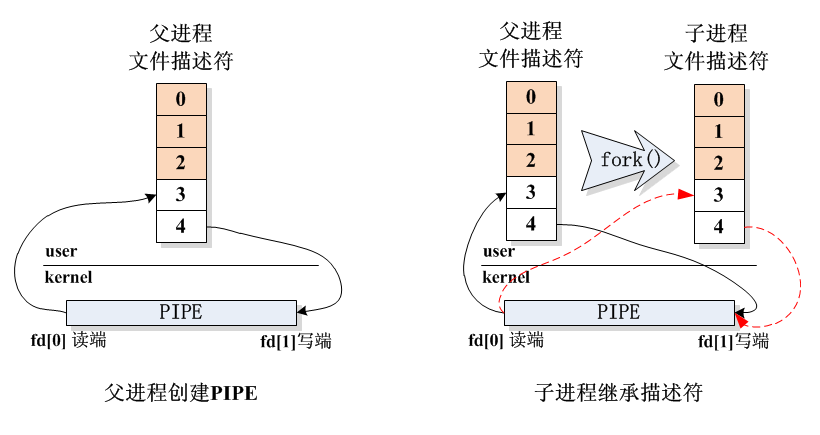
fildes[1] 写端的文件描述符- 注意1: 由于匿名管道拥有两个文件描述符,一个专用于读fd0,一个专用于写fd1,因此上述接口需要传递一个至少包含两个整型元素的数组过去,用来存放这两个特定的描述符。
- 注意2: 匿名管道描述符,只能通过继承的方式传递给后代进程,因此只能用于亲缘进程间的通信,由于没有文件名,其他非亲缘进程无法获取匿名管道的描述符。
- 注意3: 不能有多个进程同时对匿名管道进行写操作,否则数据有可能被覆盖。
总结一句话,匿名管道适用于一对一的、具有亲缘关系的进程间的通信。
下面以父子进程使用匿名管道通信的例子对PIPE的使用加以说明,假设父进程先创建一条匿名管道,然后产生一个子进程,此时子进程自然继承了这条管道的读写端描述符,进而它们就可以通信了。
特点:
第一:无名管道有固定的读写端,不能弄错
第二:如果无名管道没有进程写入数据,那么read读取管道信息会阻塞
第三:只能用于具有血缘关系父子,兄弟进程之间通信
c、管道的读写特性
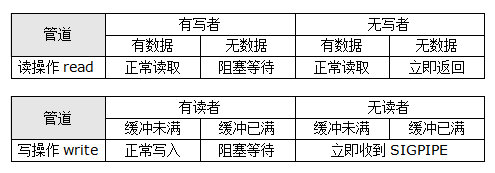
\quad 当我们对一个管道文件(包括匿名管道、具名管道和网络socket)进行读写操作时,我们需要知道将会发生什么,比如读一个空管道会怎么样?对一个缓冲区已满的管道执行写入操作会怎么样等等,可以对这些读写操作做一个统一的整理。
- 术语约定:
- 读者: 对管道拥有读权限的进程
- 写者: 对管道拥有写权限的进程
注意,所谓的读者、写者不是只正在读或者正在写的进程,而是只要拥有读写权限就称为管道的读者写者,比如如下进程关闭了匿名管道的读端,因此它只能称为匿名管道的写者:
c
// 创建匿名管道
int fd[2];
pipe(fd);

// 关闭读端,剩下写端
close(fd[0]);
又如下面这个进程,使用读写权限打开了具名管道,因此该进程既是读者也是写者:
c
int fd = open("fifo", O_RDWR);下面是读写特性对照表:
d、管道的阻塞特性
\quad 仔细看管道读写特性的表会发现,当试图读取一个空管道,或者试图写入一个缓冲区已满的管道时,读写操作默认会进入所谓"阻塞(se)"的状态。所谓的阻塞实际上就是系统将该进程挂起,等待资源就绪再继续调度的一种状态,这种阻塞的状态有利于系统中别的进程可高效地使用闲置CPU资源,提高系统的吞吐量。
对于阻塞而言,有如下特性需要记忆:
- 普通文件,默认是非阻塞的,且不可修改。
- 管道文件,默认是阻塞的,可修改。
以下是设置管道文件阻塞特性的代码:
c
#include <stdio.h>
#include <stdlib.h>
#include <unistd.h>
#include <fcntl.h>
#include <sys/wait.h>

int main()
{
    // 管道默认为阻塞
    int fd[2];
    pipe(fd);

    // 1,将管道设置为非阻塞
    long flag = fcntl(fd[0], F_GETFL);
    flag |= O_NONBLOCK;
    fcntl(fd[0], F_SETFL, flag);

    int n;
    char buf[20];

    // 此处,读不到数据将立即返回
    n = read(fd[0], buf, 20);
    if(n < 0)
        perror("read failed");

    // 2,将管道重新设置为阻塞
    flag = fcntl(fd[0], F_GETFL);
    flag &= ~O_NONBLOCK;
    fcntl(fd[0], F_SETFL, flag);

    // 此处,读不到数据将持续等待
    n = read(fd[0], buf, 20);
    if(n < 0)
        perror("read failed");

    return 0;
}
注意:
管道打开时,必须同时有读者和写者,否则 open 也会阻塞。
示例代码:无名管道的使用
c
#include <stdio.h>
#include <stdlib.h>
#include <unistd.h>
#include <string.h>

/*
    进程间通信:无名管道的使用
    无名管道用于父子进程间的通信
    单向通信,父进程从键盘输入字符串发送给子进程
*/

int main(int argc, char const *argv[])
{
    // 无名管道的文件描述符 pipefd[0]:读端,pipefd[1]:写端
    int pipefd[2];
    pid_t pid;
    char buf[1024];

    if (pipe(pipefd) == -1)
    {
        perror("创建无名管道失败");
        exit(1);
    }

    // 创建子线程
    pid = fork();

    if (pid > 0) // 父进程
    {
        while (1)
        {
            printf("请输入字符串:");
            memset(buf, 0, sizeof(buf));
            scanf("%s", buf);
            // 把键盘输入的信息写入到无名管道
            write(pipefd[1], buf, sizeof(buf));
        }
    }
    else if (pid == 0) // 子进程
    {
        while (1)
        {
            memset(buf, 0, sizeof(buf));
            // 从管道中读取信息
            read(pipefd[0], buf, sizeof(buf));
            printf("子进程接收到信息:%s\n", buf);
        }
    }

    return 0;
}
示例代码:无名管道间的双向通信
c
#include <stdio.h>
#include <stdlib.h>
#include <unistd.h>
#include <string.h>
#include <sys/wait.h>

/*
    进程间通信:无名管道的使用
    无名管道用于父子进程间的通信
    双向通信
*/

int main()
{
    pid_t id;
    int ret;
    //定义数组,保存读端和写端的文件描述符
    int fd[2]; //fd[0]对应读端  fd[1]对应写端
    int otherfd[2];
    //定义数组
    char buf[100];
    char otherbuf[100];
    //创建两个无名管道
    ret=pipe(fd);
    if(ret==-1)
    {
        perror("创建第一个无名管道失败了\n");
        return -1;
    }
    ret=pipe(otherfd);
    if(ret==-1)
    {
        perror("创建第二个无名管道失败了\n");
        return -1;
    }
    //创建子进程
    id=fork();
    if(id>0) //父进程
    {
        while(1)
        {
            printf("父进程:父进程输入要发送给子进程的信息!\n");
            bzero(buf,100);
            bzero(otherbuf,100);
            scanf("%s",buf);
            //把键盘输入的信息写入到无名管道
            write(fd[1],buf,strlen(buf));
            if(strcmp(buf,"quit")==0)
                break;

            //从无名管道里面读取信息
            read(otherfd[0],otherbuf,100);
            if(strcmp(otherbuf,"quit")==0)
                break;
            printf("父进程:子进程回复的信息是: %s\n",otherbuf);
        }
    }
    else if(id==0) //子进程
    {
        while(1)
        {
            bzero(buf,100);
            bzero(otherbuf,100);
            //读取无名管道中的信息
            read(fd[0],buf,100);
            if(strcmp(buf,"quit")==0)
                exit(0);
            printf("子进程:父进程给我发送的信息是: %s\n",buf);

            //子进程给父进程发送信息
            printf("子进程:请输入要发送给父进程的信息!\n");
            scanf("%s",otherbuf);
            write(otherfd[1],otherbuf,strlen(otherbuf));
            if(strcmp(otherbuf,"quit")==0)
                exit(0);
        }
    }

    //关闭无名管道
    close(fd[0]);
    close(fd[1]);
    close(otherfd[0]);
    close(otherfd[1]);
    wait(NULL);
    return 0;
}
2、具名(有名)管道
a、 具名管道FIFO概述
\quad 具名管道是跟匿名管道相对而言的,从外在形态上来看,具名管道更接近普通文件,有文件名、可以open打开、支持read()/write()等读写操作。
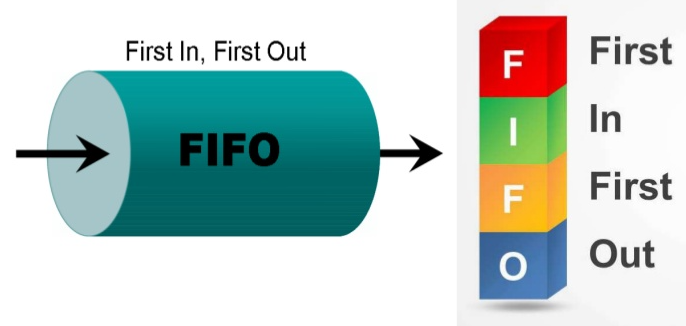
\quad 具名管道通常又被称为FIFO(First In First Out),这其实所所有管道的基本特性,那就是放入的数据都是按顺序被读出,即所谓先进先出的逻辑。
当然,管道并不是普通文件,具名管道特性:
- 与PIPE一样不支持定位操作lseek()
- 与PIPE一样秉持相同的管道读写特性
- 使用专门的接口来创建:mkfifo()(匿名管道是pipe())
- 在文件系统中有对应节点,支持使用 open() 打开管道(匿名管道不具备)
- 支持多路同时写入(匿名管道不具备)
b、 函数接口
第一个:创建有名管道
c
#include <sys/types.h>
#include <sys/stat.h>
 int mkfifo(const char *pathname, mode_t mode);
     返回值:成功 0  失败 -1
       参数:pathname --》你想要创建的有名管道的路径名
             mode --》权限 0777
第二个:使用有名管道
c
open() read() write() close()- 注意1:pathname即具名管道的名称,若是新建的管道文件,则需保证创建路径位于Linux系统内,尤其是虚拟机中操作的时候,不可将管道文件创建在共享文件夹中,因为共享文件夹是windows系统,不支持管道文件。
- 注意2:mode是文件权限模式,例如0666,注意权限须为八进制,且实际管道的权限还受系统 umask 的影响。
- 注意3:具名管道一旦没有任何读者和写者,系统判定管道处于空闲状态,会释放管道中的所有数据。
特点:
第一:有名管道没有固定的读写端
第二:如果有名管道没有进程写入数据,那么read读取管道信息会阻塞
第三:有名管道的适用范围更广,既能用于父子,兄弟进程之间通信,也能用于没有任何血缘关系进程间通信
第四:有名管道只能在纯粹的linux环境中创建
进程1写入内容到管道中然后退出,运行进程2读取内容是读取不了的,有名管道只用于通信,不保存数据
示例代码:有名管道两个进程间的单向通信
c
// p1 向FIFO写入
#include <stdio.h>
#include <stdlib.h>
#include <unistd.h>
#include <sys/types.h>
#include <sys/stat.h>
#include <fcntl.h>
#include <string.h>
#include <signal.h>

static int fd = -1;

void fun(int sig)
{
    printf("收到信号:%d\n", sig);
    close(fd);
    printf("管道已关闭\n");
    exit(0);
}

int main(int argc, char const *argv[])
{
    char buf[1024] = {0};
    // 判断有名管道是否存在
    if (access("/home/lmr/fifo1", F_OK) != 0)
    {
        // 创建有名管道
        if (mkfifo("/home/lmr/fifo1", 0777) == -1)
        {
            perror("新建有名管道失败");
            exit(1);
        }
    }

    fd = open("/home/lmr/fifo1", O_RDWR);
    if (fd == -1)
    {
        perror("打开管道失败");
        exit(1);
    }

    signal(SIGINT, fun); // 绑定信号

    // 使用有名管道收发信息 read write
    while (1)
    {
        memset(buf, 0, sizeof(buf));
        scanf("%s", buf);
        write(fd, buf, strlen(buf));
        if (strcmp(buf, "exit") == 0)
        {
            break;
        }
    }

    return 0;
}

// p2 从FIFO读取
#include <stdio.h>
#include <stdlib.h>
#include <unistd.h>
#include <sys/types.h>
#include <sys/stat.h>
#include <fcntl.h>
#include <string.h>
#include <signal.h>

static int fd = -1;

void fun(int sig)
{
    printf("收到信号:%d\n", sig);
    close(fd);
    printf("管道已关闭\n");
    exit(0);
}

int main(int argc, char const *argv[])
{
    char buf[1024] = {0};
    // 判断有名管道是否存在
    if (access("/home/lmr/fifo1", F_OK) != 0)
    {
        // 创建有名管道
        if (mkfifo("/home/lmr/fifo1", 0777) == -1)
        {
            perror("新建有名管道失败");
            exit(1);
        }
    }
    signal(SIGINT, fun);
    fd = open("/home/lmr/fifo1", O_RDWR);
    if (fd == -1)
    {
        perror("打开管道失败");
        exit(1);
    }
    // 使用有名管道收发信息 read write
    while (1)
    {
        memset(buf, 0, sizeof(buf));
        read(fd, buf, sizeof(buf));
        printf("收到消息:%s\n", buf);
        if (strcmp(buf, "exit") == 0)
        {
            break;
        }
    }

    return 0;
}
示例代码:有名管道两个进程间的双向通信
p1进程
c
#include <stdio.h>
#include <stdlib.h>
#include <unistd.h>
#include <sys/types.h>
#include <sys/stat.h>
#include <fcntl.h>
#include <string.h>
#include <signal.h>
#include <sys/select.h>

#define FIFO1 "/home/lmr/fifo1"   // p1 写,p2 读
#define FIFO2 "/home/lmr/fifo2"   // p2 写,p1 读

static int fd_write = -1;   // 写 fifo1
static int fd_read  = -1;   // 读 fifo2

void cleanup(int sig) {
    printf("\n收到信号 %d,正在退出...\n", sig);
    if (fd_write != -1) close(fd_write);
    if (fd_read  != -1) close(fd_read);
    // 不删除管道文件,留给另一个进程或手动删除
    exit(0);
}

// 从文件描述符中读取一行(以换行符结尾)
int read_line(int fd, char *buf, size_t size) {
    char c;
    size_t i = 0;
    while (i < size - 1 && read(fd, &c, 1) > 0) {
        if (c == '\n') {
            buf[i] = '\0';
            return i;
        }
        buf[i++] = c;
    }
    buf[i] = '\0';
    return (i > 0) ? i : -1;  // -1 表示读到 EOF 且无数据
}

// 向管道写入一行(自动添加换行符)
void write_line(int fd, const char *msg) {
    char buf[1024];
    snprintf(buf, sizeof(buf), "%s\n", msg);
    write(fd, buf, strlen(buf));
}

int main() {
    // 忽略 SIGPIPE,防止写入已关闭管道时崩溃
    signal(SIGPIPE, SIG_IGN);
    signal(SIGINT, cleanup);

    // 创建两个管道(如果不存在)
    if (access(FIFO1, F_OK) != 0) {
        if (mkfifo(FIFO1, 0777) == -1) {
            perror("创建 fifo1 失败");
            exit(1);
        }
    }
    if (access(FIFO2, F_OK) != 0) {
        if (mkfifo(FIFO2, 0777) == -1) {
            perror("创建 fifo2 失败");
            exit(1);
        }
    }

    // 打开管道:p1 负责写 fifo1、读 fifo2
    // 注意:open 顺序必须与 p2 相反,以避免死锁
    fd_write = open(FIFO1, O_WRONLY);
    if (fd_write == -1) {
        perror("打开 fifo1 写失败");
        exit(1);
    }
    fd_read = open(FIFO2, O_RDONLY);
    if (fd_read == -1) {
        perror("打开 fifo2 读失败");
        exit(1);
    }

    printf("[p1] 双向通信已启动(使用两个管道)\n");
    printf("[p1] 输入消息后按回车发送,输入 exit 退出\n");

    fd_set read_fds;
    int max_fd = (fd_read > STDIN_FILENO) ? fd_read : STDIN_FILENO;

    while (1) {
        FD_ZERO(&read_fds); //  使用select()函数前,需要初始化文件描述符集合,清零read_fds集合
        FD_SET(STDIN_FILENO, &read_fds); //  将标准输入(STDIN_FILENO)添加到read_fds集合中,表示需要监视标准输入的读状态
        FD_SET(fd_read, &read_fds); //  将用于读取数据的文件描述符fd_read添加到read_fds集合中,表示需要监视该文件描述符的读状态

        if (select(max_fd + 1, &read_fds, NULL, NULL, NULL) == -1) {
            perror("select");
            break;
        }

        // 处理键盘输入
        if (FD_ISSET(STDIN_FILENO, &read_fds)) {
            char input[1024];
            if (fgets(input, sizeof(input), stdin) == NULL) {
                break;  // EOF
            }
            input[strcspn(input, "\n")] = '\0';  // 去掉换行符

            if (strcmp(input, "exit") == 0) {
                printf("[p1] 主动退出\n");
                break;
            }
            write_line(fd_write, input);
        }

        // 处理管道消息(来自 p2)
        if (FD_ISSET(fd_read, &read_fds)) {
            char msg[1024];
            int len = read_line(fd_read, msg, sizeof(msg));
            if (len <= 0) {
                printf("[p1] 对端已关闭连接,退出\n");
                break;
            }
            printf("[p2] 说: %s\n", msg);
        }
    }

    close(fd_write);
    close(fd_read);
    return 0;
}
p2进程
c
#include <stdio.h>
#include <stdlib.h>
#include <unistd.h>
#include <sys/types.h>
#include <sys/stat.h>
#include <fcntl.h>
#include <string.h>
#include <signal.h>
#include <sys/select.h>

#define FIFO1 "/home/lmr/fifo1"   // p1 写,p2 读
#define FIFO2 "/home/lmr/fifo2"   // p2 写,p1 读

static int fd_read  = -1;   // 读 fifo1
static int fd_write = -1;   // 写 fifo2

void cleanup(int sig) {
    printf("\n收到信号 %d,正在退出...\n", sig);
    if (fd_read  != -1) close(fd_read);
    if (fd_write != -1) close(fd_write);
    exit(0);
}

int read_line(int fd, char *buf, size_t size) {
    char c;
    size_t i = 0;
    while (i < size - 1 && read(fd, &c, 1) > 0) {
        if (c == '\n') {
            buf[i] = '\0';
            return i;
        }
        buf[i++] = c;
    }
    buf[i] = '\0';
    return (i > 0) ? i : -1;
}

void write_line(int fd, const char *msg) {
    char buf[1024];
    snprintf(buf, sizeof(buf), "%s\n", msg);
    write(fd, buf, strlen(buf));
}

int main() {
    signal(SIGPIPE, SIG_IGN);
    signal(SIGINT, cleanup);

    // 创建两个管道(如果不存在)
    if (access(FIFO1, F_OK) != 0) {
        if (mkfifo(FIFO1, 0777) == -1) {
            perror("创建 fifo1 失败");
            exit(1);
        }
    }
    if (access(FIFO2, F_OK) != 0) {
        if (mkfifo(FIFO2, 0777) == -1) {
            perror("创建 fifo2 失败");
            exit(1);
        }
    }

    // 打开管道:p2 负责读 fifo1、写 fifo2
    fd_read = open(FIFO1, O_RDONLY);
    if (fd_read == -1) {
        perror("打开 fifo1 读失败");
        exit(1);
    }
    fd_write = open(FIFO2, O_WRONLY);
    if (fd_write == -1) {
        perror("打开 fifo2 写失败");
        exit(1);
    }

    printf("[p2] 双向通信已启动(使用两个管道)\n");
    printf("[p2] 输入消息后按回车发送,输入 exit 退出\n");

    fd_set read_fds;
    int max_fd = (fd_read > STDIN_FILENO) ? fd_read : STDIN_FILENO;

    while (1) {
        FD_ZERO(&read_fds);
        FD_SET(STDIN_FILENO, &read_fds);
        FD_SET(fd_read, &read_fds);

        if (select(max_fd + 1, &read_fds, NULL, NULL, NULL) == -1) {
            perror("select");
            break;
        }

        if (FD_ISSET(STDIN_FILENO, &read_fds)) {
            char input[1024];
            if (fgets(input, sizeof(input), stdin) == NULL) break;
            input[strcspn(input, "\n")] = '\0';

            if (strcmp(input, "exit") == 0) {
                printf("[p2] 主动退出\n");
                break;
            }
            write_line(fd_write, input);
        }

        if (FD_ISSET(fd_read, &read_fds)) {
            char msg[1024];
            int len = read_line(fd_read, msg, sizeof(msg));
            if (len <= 0) {
                printf("[p2] 对端已关闭连接,退出\n");
                break;
            }
            printf("[p1] 说: %s\n", msg);
        }
    }

    close(fd_read);
    close(fd_write);
    return 0;
}