引言
在前两篇博客中,我们深入探讨了QT Designer Studio的技术架构和工作环境。现在,让我们将理论知识转化为实际项目,通过开发一个完整的"智能登录系统"来掌握QT Designer Studio的核心开发流程。这个项目虽然功能简单,但涵盖了界面设计、状态管理、数据验证、动画效果等关键知识点,是理解现代化QT开发的绝佳起点。
一、项目需求分析与设计
1.1 功能需求分析
基础功能需求
-
用户登录验证(账号/密码)
-
记住密码功能
-
验证码支持(图形/短信切换)
-
多语言支持
-
主题切换(明亮/暗黑)
交互需求
-
实时表单验证
-
加载状态提示
-
错误反馈机制
-
响应式布局适配
-
动画过渡效果
技术需求
-
状态机管理
-
数据绑定
-
自定义组件
-
资源管理
-
性能优化
1.2 技术架构设计
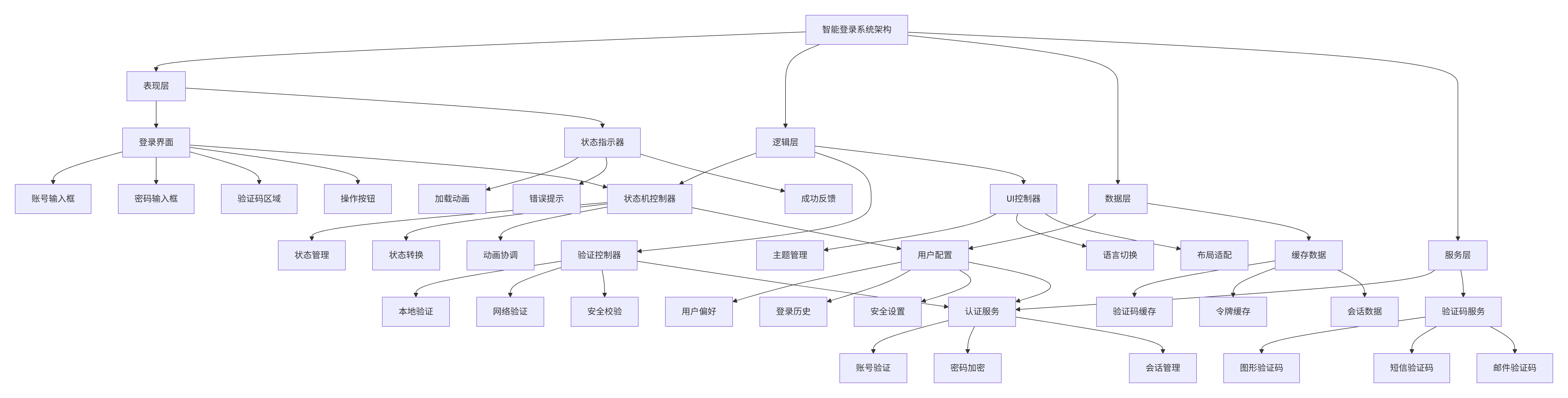
二、项目创建与基础配置
2.1 项目创建步骤
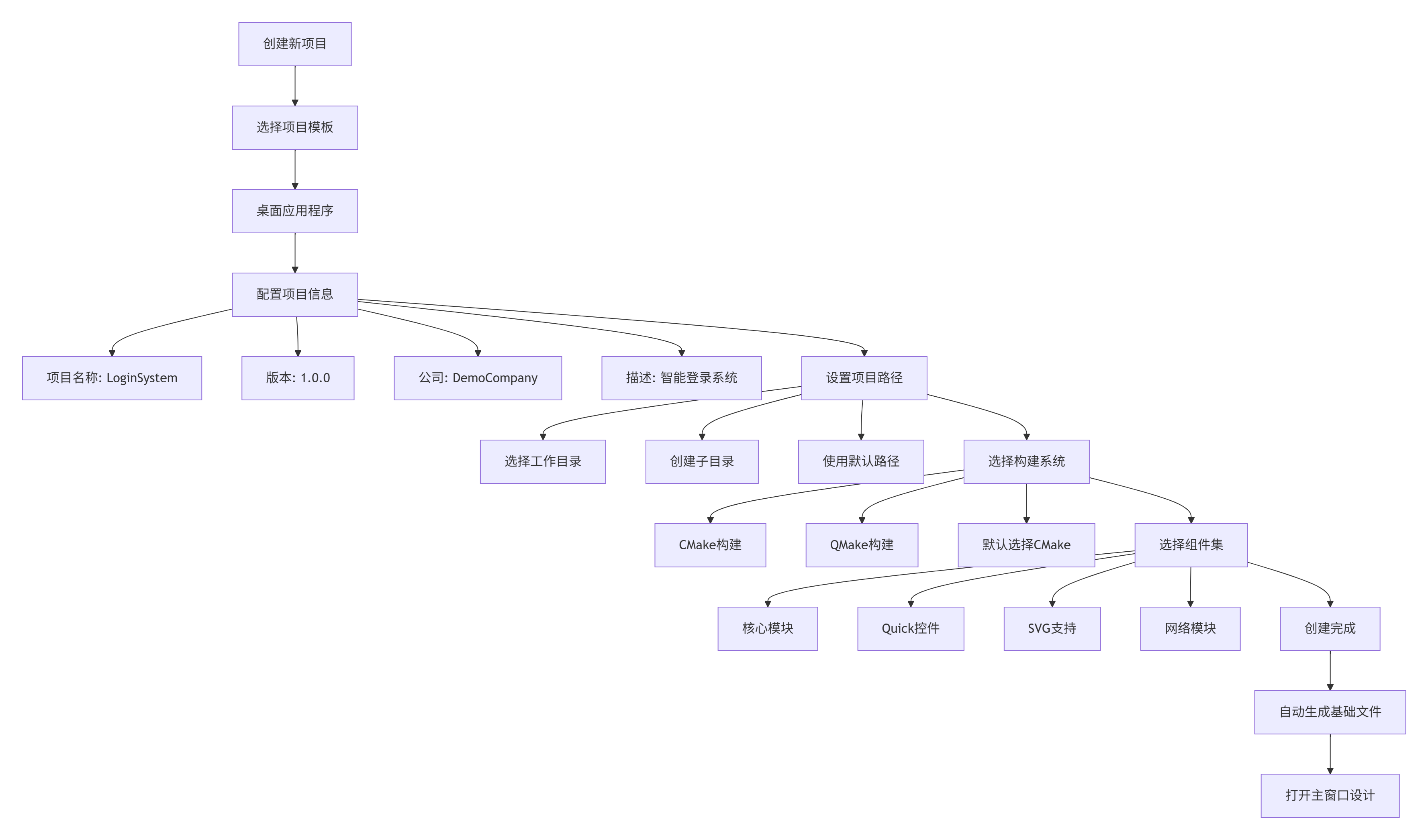
关键配置说明
-
项目名称规范
-
使用有意义的英文名称
-
避免空格和特殊字符
-
遵循驼峰命名法
-
-
构建系统选择
-
小型项目:QMake(简单)
-
中大型项目:CMake(推荐)
-
复杂项目:自定义构建
-
-
组件集选择
-
必须:QtQuick、QtQuickControls2
-
推荐:QtSvg、QtNetwork
-
可选:QtMultimedia、QtWebEngine
-
2.2 目录结构规划
bash
LoginSystem/
├── CMakeLists.txt              # CMake构建文件
├── main.cpp                    # 应用程序入口
├── qml/                        # QML主目录
│   ├── main.qml                # 应用程序主文件
│   ├── LoginWindow.ui.qml      # 登录窗口主文件
│   ├── components/             # 自定义组件目录
│   │   ├── ValidatedTextField.qml
│   │   ├── CaptchaWidget.qml
│   │   ├── LoadingIndicator.qml
│   │   └── ThemeSwitch.qml
│   ├── resources/              # 资源文件
│   │   ├── images/
│   │   │   ├── icons/
│   │   │   ├── backgrounds/
│   │   │   └── logos/
│   │   ├── fonts/
│   │   │   ├── NotoSans-Regular.ttf
│   │   │   └── NotoSansSC-Regular.ttf
│   │   └── styles/
│   │       ├── light-theme.qss
│   │       └── dark-theme.qss
│   └── translations/           # 翻译文件
│       ├── zh_CN.ts
│       └── en_US.ts
├── src/                        # C++源代码
│   ├── AuthManager.cpp
│   ├── ConfigManager.cpp
│   └── NetworkManager.cpp
└── README.md                   # 项目说明
三、登录界面设计实战
3.1 主界面布局设计
登录界面组件层次

布局实现代码
python
// LoginWindow.ui.qml
import QtQuick 2.15
import QtQuick.Controls 2.15
import QtQuick.Layouts 1.15
import QtGraphicalEffects 1.15

ApplicationWindow {
    id: mainWindow
    width: 400
    height: 600
    minimumWidth: 380
    minimumHeight: 500
    visible: true
    title: qsTr("智能登录系统")

    // 背景渐变
    Rectangle {
        id: background
        anchors.fill: parent
        gradient: Gradient {
            GradientStop { position: 0.0; color: "#667eea" }
            GradientStop { position: 1.0; color: "#764ba2" }
        }
    }

    // 主布局
    ColumnLayout {
        id: mainLayout
        anchors.fill: parent
        anchors.margins: 30
        spacing: 20

        // 顶部区域 - Logo和标题
        RowLayout {
            Layout.fillWidth: true
            spacing: 15

            Image {
                id: appLogo
                source: "qrc:/images/logo.png"
                Layout.preferredWidth: 60
                Layout.preferredHeight: 60
                fillMode: Image.PreserveAspectFit
            }

            ColumnLayout {
                spacing: 5

                Label {
                    id: appTitle
                    text: qsTr("智能登录系统")
                    font.pixelSize: 24
                    font.bold: true
                    color: "white"
                }

                Label {
                    id: appSubtitle
                    text: qsTr("安全便捷的登录体验")
                    font.pixelSize: 14
                    color: "#e0e0e0"
                }
            }

            // 右侧控制按钮
            RowLayout {
                Layout.alignment: Qt.AlignRight
                spacing: 10

                Button {
                    id: languageButton
                    text: qsTr("中")
                    flat: true
                    font.pixelSize: 12

                    onClicked: {
                        // 切换语言
                        languageManager.toggleLanguage()
                    }
                }

                Button {
                    id: themeButton
                    icon.source: "qrc:/icons/theme.svg"
                    flat: true

                    onClicked: {
                        // 切换主题
                        themeManager.toggleTheme()
                    }
                }
            }
        }

        // 中间区域 - 登录表单
        ColumnLayout {
            id: formLayout
            Layout.fillWidth: true
            spacing: 15

            // 账号输入
            ValidatedTextField {
                id: usernameField
                label: qsTr("账号")
                placeholderText: qsTr("请输入手机号或邮箱")
                validator: RegExpValidator {
                    regExp: /^[a-zA-Z0-9_.+-]+@[a-zA-Z0-9-]+\.[a-zA-Z0-9-.]+$|^1[3-9]\d{9}$/
                }
                errorText: qsTr("请输入正确的手机号或邮箱")
            }

            // 密码输入
            ValidatedTextField {
                id: passwordField
                label: qsTr("密码")
                placeholderText: qsTr("请输入6-20位密码")
                echoMode: TextInput.Password
                validator: RegExpValidator {
                    regExp: /^.{6,20}$/
                }
                errorText: qsTr("密码长度为6-20位")

                // 显示/隐藏密码按钮
                trailingContent: Button {
                    icon.source: passwordField.echoMode === TextInput.Password ?
                                "qrc:/icons/eye-off.svg" : "qrc:/icons/eye.svg"
                    flat: true

                    onClicked: {
                        passwordField.echoMode = passwordField.echoMode === TextInput.Password ?
                                               TextInput.Normal : TextInput.Password
                    }
                }
            }

            // 验证码区域
            RowLayout {
                spacing: 10

                ValidatedTextField {
                    id: captchaField
                    label: qsTr("验证码")
                    placeholderText: qsTr("请输入验证码")
                    Layout.fillWidth: true
                    validator: RegExpValidator {
                        regExp: /^\d{4,6}$/
                    }
                }

                CaptchaWidget {
                    id: captchaWidget
                    Layout.preferredWidth: 100
                    Layout.preferredHeight: 40
                }

                Button {
                    id: refreshCaptchaButton
                    icon.source: "qrc:/icons/refresh.svg"
                    flat: true

                    onClicked: {
                        captchaWidget.refreshCaptcha()
                    }
                }
            }

            // 选项区域
            RowLayout {
                spacing: 20

                CheckBox {
                    id: rememberCheckBox
                    text: qsTr("记住密码")
                    checked: true
                }

                CheckBox {
                    id: autoLoginCheckBox
                    text: qsTr("自动登录")
                }

                Button {
                    id: forgetPasswordButton
                    text: qsTr("忘记密码?")
                    flat: true
                    font.underline: true

                    onClicked: {
                        // 跳转到找回密码页面
                    }
                }
            }
        }

        // 底部区域 - 操作按钮
        ColumnLayout {
            Layout.fillWidth: true
            spacing: 10

            Button {
                id: loginButton
                text: qsTr("登录")
                Layout.fillWidth: true
                font.pixelSize: 16
                font.bold: true

                background: Rectangle {
                    color: loginButton.enabled ? "#4CAF50" : "#cccccc"
                    radius: 8

                    Behavior on color {
                        ColorAnimation { duration: 200 }
                    }
                }

                contentItem: RowLayout {
                    spacing: 10

                    Label {
                        text: loginButton.text
                        color: "white"
                        Layout.alignment: Qt.AlignHCenter
                    }

                    LoadingIndicator {
                        id: loginLoading
                        running: false
                        visible: false
                        Layout.preferredWidth: 20
                        Layout.preferredHeight: 20
                    }
                }

                onClicked: {
                    login()
                }
            }

            RowLayout {
                spacing: 20
                Layout.alignment: Qt.AlignHCenter

                Button {
                    id: registerButton
                    text: qsTr("注册账号")
                    flat: true
                }

                Button {
                    id: resetButton
                    text: qsTr("重置")
                    flat: true

                    onClicked: {
                        usernameField.text = ""
                        passwordField.text = ""
                        captchaField.text = ""
                    }
                }
            }
        }

        // 版本信息
        Label {
            id: versionLabel
            text: qsTr("版本 1.0.0")
            font.pixelSize: 12
            color: "#e0e0e0"
            Layout.alignment: Qt.AlignHCenter
        }
    }

    // 状态机定义
    states: [
        State {
            name: "inputting"
            PropertyChanges { target: loginButton; enabled: true }
        },
        State {
            name: "validating"
            PropertyChanges { target: loginButton; enabled: false }
            PropertyChanges { target: loginLoading; visible: true; running: true }
        },
        State {
            name: "success"
            PropertyChanges { target: loginLoading; visible: false; running: false }
        },
        State {
            name: "error"
            PropertyChanges { target: loginLoading; visible: false; running: false }
        }
    ]

    // 状态转换动画
    transitions: [
        Transition {
            from: "inputting"
            to: "validating"
            NumberAnimation { properties: "opacity"; duration: 300 }
        },
        Transition {
            from: "validating"
            to: "success"
            NumberAnimation { properties: "opacity"; duration: 300 }
        },
        Transition {
            from: "validating"
            to: "error"
            ParallelAnimation {
                NumberAnimation { properties: "opacity"; duration: 300 }
                ColorAnimation { duration: 300 }
            }
        }
    ]

    // JavaScript函数
    function login() {
        // 验证表单
        if (!validateForm()) {
            return
        }

        // 切换到验证状态
        state = "validating"

        // 模拟网络请求
        setTimeout(function() {
            // 模拟成功
            state = "success"
            // 跳转到主界面
        }, 2000)
    }

    function validateForm() {
        return usernameField.validate() &&
               passwordField.validate() &&
               captchaField.validate()
    }
}
布局实现代码
javascript
// LoginWindow.ui.qml
import QtQuick 2.15
import QtQuick.Controls 2.15
import QtQuick.Layouts 1.15
import QtGraphicalEffects 1.15

ApplicationWindow {
    id: mainWindow
    width: 400
    height: 600
    minimumWidth: 380
    minimumHeight: 500
    visible: true
    title: qsTr("智能登录系统")

    // 背景渐变
    Rectangle {
        id: background
        anchors.fill: parent
        gradient: Gradient {
            GradientStop { position: 0.0; color: "#667eea" }
            GradientStop { position: 1.0; color: "#764ba2" }
        }
    }

    // 主布局
    ColumnLayout {
        id: mainLayout
        anchors.fill: parent
        anchors.margins: 30
        spacing: 20

        // 顶部区域 - Logo和标题
        RowLayout {
            Layout.fillWidth: true
            spacing: 15

            Image {
                id: appLogo
                source: "qrc:/images/logo.png"
                Layout.preferredWidth: 60
                Layout.preferredHeight: 60
                fillMode: Image.PreserveAspectFit
            }

            ColumnLayout {
                spacing: 5

                Label {
                    id: appTitle
                    text: qsTr("智能登录系统")
                    font.pixelSize: 24
                    font.bold: true
                    color: "white"
                }

                Label {
                    id: appSubtitle
                    text: qsTr("安全便捷的登录体验")
                    font.pixelSize: 14
                    color: "#e0e0e0"
                }
            }

            // 右侧控制按钮
            RowLayout {
                Layout.alignment: Qt.AlignRight
                spacing: 10

                Button {
                    id: languageButton
                    text: qsTr("中")
                    flat: true
                    font.pixelSize: 12

                    onClicked: {
                        // 切换语言
                        languageManager.toggleLanguage()
                    }
                }

                Button {
                    id: themeButton
                    icon.source: "qrc:/icons/theme.svg"
                    flat: true

                    onClicked: {
                        // 切换主题
                        themeManager.toggleTheme()
                    }
                }
            }
        }

        // 中间区域 - 登录表单
        ColumnLayout {
            id: formLayout
            Layout.fillWidth: true
            spacing: 15

            // 账号输入
            ValidatedTextField {
                id: usernameField
                label: qsTr("账号")
                placeholderText: qsTr("请输入手机号或邮箱")
                validator: RegExpValidator {
                    regExp: /^[a-zA-Z0-9_.+-]+@[a-zA-Z0-9-]+\.[a-zA-Z0-9-.]+$|^1[3-9]\d{9}$/
                }
                errorText: qsTr("请输入正确的手机号或邮箱")
            }

            // 密码输入
            ValidatedTextField {
                id: passwordField
                label: qsTr("密码")
                placeholderText: qsTr("请输入6-20位密码")
                echoMode: TextInput.Password
                validator: RegExpValidator {
                    regExp: /^.{6,20}$/
                }
                errorText: qsTr("密码长度为6-20位")

                // 显示/隐藏密码按钮
                trailingContent: Button {
                    icon.source: passwordField.echoMode === TextInput.Password ?
                                "qrc:/icons/eye-off.svg" : "qrc:/icons/eye.svg"
                    flat: true

                    onClicked: {
                        passwordField.echoMode = passwordField.echoMode === TextInput.Password ?
                                               TextInput.Normal : TextInput.Password
                    }
                }
            }

            // 验证码区域
            RowLayout {
                spacing: 10

                ValidatedTextField {
                    id: captchaField
                    label: qsTr("验证码")
                    placeholderText: qsTr("请输入验证码")
                    Layout.fillWidth: true
                    validator: RegExpValidator {
                        regExp: /^\d{4,6}$/
                    }
                }

                CaptchaWidget {
                    id: captchaWidget
                    Layout.preferredWidth: 100
                    Layout.preferredHeight: 40
                }

                Button {
                    id: refreshCaptchaButton
                    icon.source: "qrc:/icons/refresh.svg"
                    flat: true

                    onClicked: {
                        captchaWidget.refreshCaptcha()
                    }
                }
            }

            // 选项区域
            RowLayout {
                spacing: 20

                CheckBox {
                    id: rememberCheckBox
                    text: qsTr("记住密码")
                    checked: true
                }

                CheckBox {
                    id: autoLoginCheckBox
                    text: qsTr("自动登录")
                }

                Button {
                    id: forgetPasswordButton
                    text: qsTr("忘记密码?")
                    flat: true
                    font.underline: true

                    onClicked: {
                        // 跳转到找回密码页面
                    }
                }
            }
        }

        // 底部区域 - 操作按钮
        ColumnLayout {
            Layout.fillWidth: true
            spacing: 10

            Button {
                id: loginButton
                text: qsTr("登录")
                Layout.fillWidth: true
                font.pixelSize: 16
                font.bold: true

                background: Rectangle {
                    color: loginButton.enabled ? "#4CAF50" : "#cccccc"
                    radius: 8

                    Behavior on color {
                        ColorAnimation { duration: 200 }
                    }
                }

                contentItem: RowLayout {
                    spacing: 10

                    Label {
                        text: loginButton.text
                        color: "white"
                        Layout.alignment: Qt.AlignHCenter
                    }

                    LoadingIndicator {
                        id: loginLoading
                        running: false
                        visible: false
                        Layout.preferredWidth: 20
                        Layout.preferredHeight: 20
                    }
                }

                onClicked: {
                    login()
                }
            }

            RowLayout {
                spacing: 20
                Layout.alignment: Qt.AlignHCenter

                Button {
                    id: registerButton
                    text: qsTr("注册账号")
                    flat: true
                }

                Button {
                    id: resetButton
                    text: qsTr("重置")
                    flat: true

                    onClicked: {
                        usernameField.text = ""
                        passwordField.text = ""
                        captchaField.text = ""
                    }
                }
            }
        }

        // 版本信息
        Label {
            id: versionLabel
            text: qsTr("版本 1.0.0")
            font.pixelSize: 12
            color: "#e0e0e0"
            Layout.alignment: Qt.AlignHCenter
        }
    }

    // 状态机定义
    states: [
        State {
            name: "inputting"
            PropertyChanges { target: loginButton; enabled: true }
        },
        State {
            name: "validating"
            PropertyChanges { target: loginButton; enabled: false }
            PropertyChanges { target: loginLoading; visible: true; running: true }
        },
        State {
            name: "success"
            PropertyChanges { target: loginLoading; visible: false; running: false }
        },
        State {
            name: "error"
            PropertyChanges { target: loginLoading; visible: false; running: false }
        }
    ]

    // 状态转换动画
    transitions: [
        Transition {
            from: "inputting"
            to: "validating"
            NumberAnimation { properties: "opacity"; duration: 300 }
        },
        Transition {
            from: "validating"
            to: "success"
            NumberAnimation { properties: "opacity"; duration: 300 }
        },
        Transition {
            from: "validating"
            to: "error"
            ParallelAnimation {
                NumberAnimation { properties: "opacity"; duration: 300 }
                ColorAnimation { duration: 300 }
            }
        }
    ]

    // JavaScript函数
    function login() {
        // 验证表单
        if (!validateForm()) {
            return
        }

        // 切换到验证状态
        state = "validating"

        // 模拟网络请求
        setTimeout(function() {
            // 模拟成功
            state = "success"
            // 跳转到主界面
        }, 2000)
    }

    function validateForm() {
        return usernameField.validate() &&
               passwordField.validate() &&
               captchaField.validate()
    }
}
四、自定义组件开发
4.1 ValidatedTextField组件
javascript
// ValidatedTextField.qml
import QtQuick 2.15
import QtQuick.Controls 2.15
import QtQuick.Layouts 1.15

ColumnLayout {
    id: root
    property string label: ""
    property string placeholderText: ""
    property string text: textField.text
    property string errorText: ""
    property bool hasError: false
    property var validator: null

    spacing: 5

    // 标签
    Label {
        id: fieldLabel
        text: root.label
        font.pixelSize: 14
        color: hasError ? "#f44336" : "#666666"
    }

    // 输入框
    TextField {
        id: textField
        placeholderText: root.placeholderText
        Layout.fillWidth: true
        validator: root.validator

        background: Rectangle {
            color: "white"
            border.color: hasError ? "#f44336" : "#dddddd"
            border.width: 1
            radius: 6

            Behavior on border.color {
                ColorAnimation { duration: 200 }
            }
        }

        // 文本变化时验证
        onTextChanged: {
            validate()
        }

        // 失去焦点时验证
        onActiveFocusChanged: {
            if (!activeFocus) {
                validate()
            }
        }
    }

    // 错误提示
    Label {
        id: errorLabel
        text: root.errorText
        color: "#f44336"
        font.pixelSize: 12
        visible: hasError
        Layout.alignment: Qt.AlignLeft
    }

    // 验证函数
    function validate() {
        if (root.validator) {
            var pos = 0
            var result = root.validator.validate(textField.text, pos)
            hasError = result !== TextField.Acceptable
        } else {
            hasError = false
        }
        return !hasError
    }
}
4.2 CaptchaWidget组件
javascript
// CaptchaWidget.qml
import QtQuick 2.15
import QtQuick.Shapes 1.15

Rectangle {
    id: root
    color: "#f5f5f5"
    border.color: "#dddddd"
    border.width: 1
    radius: 4

    property string captchaText: generateCaptcha()

    // 生成验证码文本
    function generateCaptcha() {
        var chars = "ABCDEFGHJKLMNPQRSTUVWXYZ23456789"
        var result = ""
        for (var i = 0; i < 4; i++) {
            result += chars.charAt(Math.floor(Math.random() * chars.length))
        }
        return result
    }

    // 刷新验证码
    function refreshCaptcha() {
        captchaText = generateCaptcha()
        canvas.requestPaint()
    }

    Canvas {
        id: canvas
        anchors.fill: parent

        onPaint: {
            var ctx = getContext("2d")
            ctx.clearRect(0, 0, width, height)

            // 绘制干扰线
            ctx.strokeStyle = "#cccccc"
            ctx.lineWidth = 1
            for (var i = 0; i < 5; i++) {
                ctx.beginPath()
                ctx.moveTo(Math.random() * width, Math.random() * height)
                ctx.lineTo(Math.random() * width, Math.random() * height)
                ctx.stroke()
            }

            // 绘制验证码文本
            ctx.font = "bold 24px Arial"
            ctx.textAlign = "center"
            ctx.textBaseline = "middle"
            ctx.fillStyle = "#333333"

            for (var j = 0; j < root.captchaText.length; j++) {
                // 随机旋转角度
                ctx.save()
                ctx.translate(width * 0.2 + j * 20, height * 0.5)
                ctx.rotate((Math.random() - 0.5) * 0.5)

                ctx.fillText(root.captchaText.charAt(j), 0, 0)
                ctx.restore()
            }

            // 添加噪点
            ctx.fillStyle = "rgba(0,0,0,0.1)"
            for (var k = 0; k < 100; k++) {
                ctx.fillRect(Math.random() * width, Math.random() * height, 1, 1)
            }
        }
    }

    // 点击刷新
    MouseArea {
        anchors.fill: parent
        cursorShape: Qt.PointingHandCursor

        onClicked: {
            root.refreshCaptcha()
        }
    }
}
五、状态机设计与实现
5.1 登录状态机设计
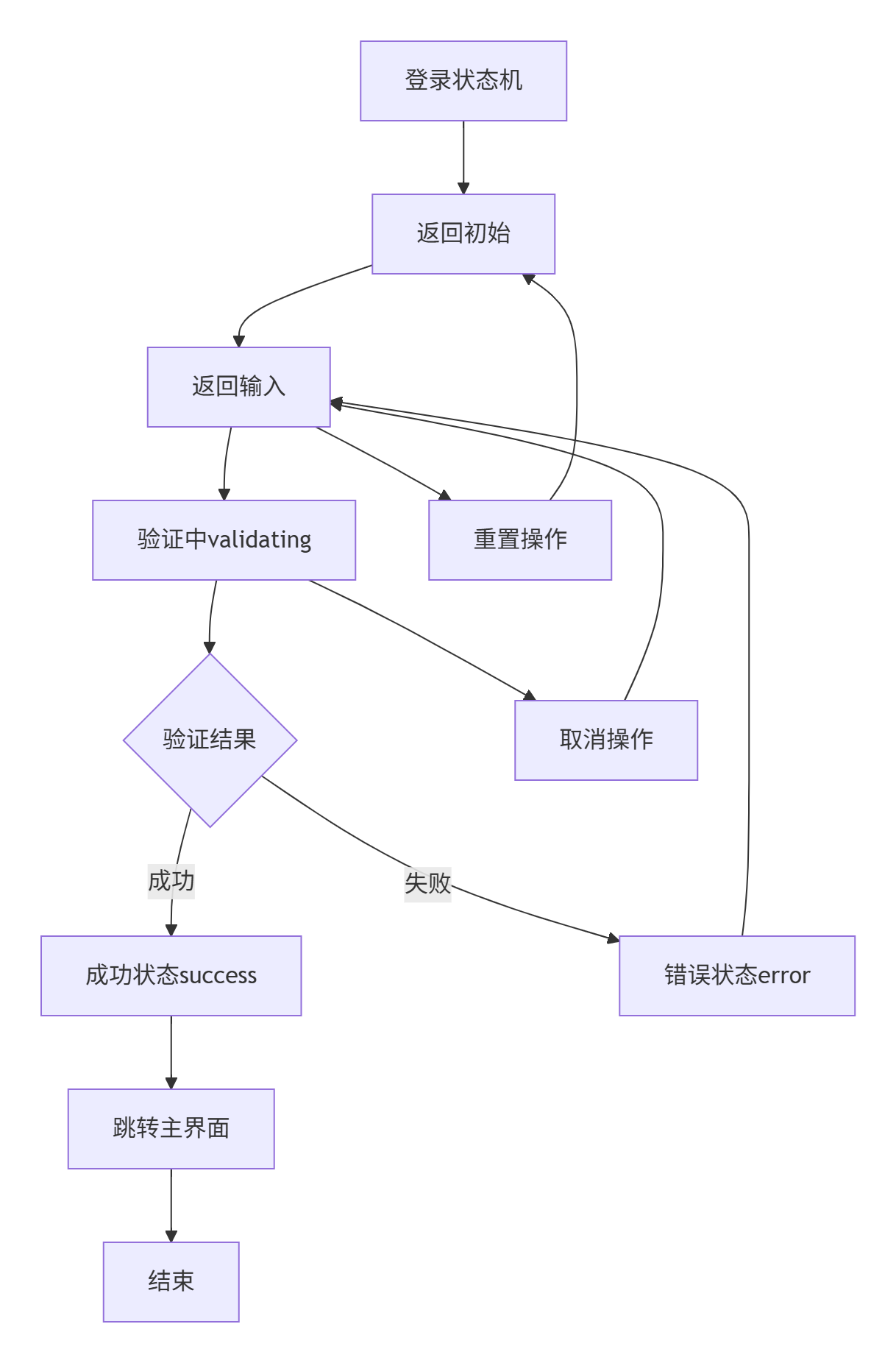
状态机实现代码
python
// LoginStateMachine.qml
import QtQml 2.15

QtObject {
    id: stateMachine

    // 状态定义
    property string currentState: "initial"

    readonly property bool isInitial: currentState === "initial"
    readonly property bool isInputting: currentState === "inputting"
    readonly property bool isValidating: currentState === "validating"
    readonly property bool isSuccess: currentState === "success"
    readonly property bool isError: currentState === "error"

    // 状态转换函数
    function startInput() {
        if (currentState === "initial") {
            currentState = "inputting"
        }
    }

    function submit() {
        if (currentState === "inputting") {
            currentState = "validating"
        }
    }

    function success() {
        if (currentState === "validating") {
            currentState = "success"
        }
    }

    function fail(errorMessage) {
        if (currentState === "validating") {
            currentState = "error"
            // 可以保存错误信息
        }
    }

    function reset() {
        currentState = "initial"
    }

    function cancel() {
        if (currentState === "validating") {
            currentState = "inputting"
        }
    }

    // 状态变化信号
    signal stateChanged(string newState, string oldState)

    onCurrentStateChanged: {
        stateChanged(currentState, previousState)
    }

    // 状态属性记录
    property string previousState: ""

    property string errorMessage: ""
    property var userData: null
    property bool rememberPassword: false
    property bool autoLogin: false

    // 初始化函数
    Component.onCompleted: {
        // 加载保存的状态
        var savedState = ConfigManager.loadLoginState()
        if (savedState) {
            rememberPassword = savedState.rememberPassword
            autoLogin = savedState.autoLogin
        }
    }
}
六、数据验证与业务逻辑
6.1 验证逻辑实现
javascript
// AuthManager.qml
import QtQuick 2.15

QtObject {
    id: authManager

    // 验证规则
    property var validationRules: ({
        username: {
            pattern: /^[a-zA-Z0-9_.+-]+@[a-zA-Z0-9-]+\.[a-zA-Z0-9-.]+$|^1[3-9]\d{9}$/,
            message: "请输入正确的手机号或邮箱"
        },
        password: {
            minLength: 6,
            maxLength: 20,
            pattern: /^(?=.*[A-Za-z])(?=.*\d)[A-Za-z\d]{6,20}$/,
            message: "密码必须包含字母和数字,长度6-20位"
        },
        captcha: {
            pattern: /^\d{4,6}$/,
            message: "验证码为4-6位数字"
        }
    })

    // 验证函数
    function validate(field, value) {
        var rule = validationRules[field]
        if (!rule) return { valid: true, message: "" }

        if (rule.pattern && !rule.pattern.test(value)) {
            return { valid: false, message: rule.message }
        }

        if (rule.minLength && value.length < rule.minLength) {
            return { valid: false, message: "长度不能少于" + rule.minLength + "位" }
        }

        if (rule.maxLength && value.length > rule.maxLength) {
            return { valid: false, message: "长度不能超过" + rule.maxLength + "位" }
        }

        return { valid: true, message: "" }
    }

    // 批量验证
    function validateAll(fields) {
        var errors = []

        for (var field in fields) {
            var result = validate(field, fields[field])
            if (!result.valid) {
                errors.push({
                    field: field,
                    message: result.message
                })
            }
        }

        return {
            valid: errors.length === 0,
            errors: errors
        }
    }

    // 登录函数
    function login(username, password, captcha, callback) {
        // 先验证
        var validation = validateAll({
            username: username,
            password: password,
            captcha: captcha
        })

        if (!validation.valid) {
            callback(false, validation.errors)
            return
        }

        // 模拟网络请求
        setTimeout(function() {
            // 模拟验证逻辑
            var success = (username === "test@example.com" && password === "123456")
            if (success) {
                // 保存登录状态
                saveLoginInfo(username, password)
                callback(true, null)
            } else {
                callback(false, [{ field: "general", message: "账号或密码错误" }])
            }
        }, 1000)
    }

    // 保存登录信息
    function saveLoginInfo(username, password) {
        if (ConfigManager.rememberPassword) {
            ConfigManager.saveLoginInfo({
                username: username,
                password: password, // 实际应该加密
                timestamp: new Date().getTime()
            })
        }
    }

    // 加载保存的登录信息
    function loadSavedLoginInfo() {
        var info = ConfigManager.loadLoginInfo()
        if (info) {
            return {
                username: info.username,
                password: info.password
            }
        }
        return null
    }
}
七、动画与交互效果
7.1 加载动画组件
javascript
// LoadingIndicator.qml
import QtQuick 2.15
import QtGraphicalEffects 1.15

Item {
    id: root
    width: 40
    height: 40

    property bool running: true
    property color color: "#4CAF50"
    property int dotsCount: 3
    property real dotSize: 8

    visible: running

    // 背景
    Rectangle {
        id: background
        anchors.fill: parent
        color: "white"
        radius: width / 2
        opacity: 0.8

        layer.enabled: true
        layer.effect: DropShadow {
            radius: 8
            samples: 16
            color: "#40000000"
        }
    }

    // 加载点
    Repeater {
        id: dotsRepeater
        model: root.dotsCount

        Rectangle {
            id: dot
            width: root.dotSize
            height: root.dotSize
            radius: width / 2
            color: root.color

            property real angle: (index * 2 * Math.PI) / root.dotsCount

            x: root.width / 2 + Math.cos(angle) * 12 - width / 2
            y: root.height / 2 + Math.sin(angle) * 12 - height / 2

            // 动画
            SequentialAnimation on opacity {
                id: pulseAnimation
                running: root.running
                loops: Animation.Infinite

                PropertyAnimation {
                    to: 0.3
                    duration: 300
                }
                PropertyAnimation {
                    to: 1.0
                    duration: 300
                }
                PauseAnimation {
                    duration: index * 100
                }
            }
        }
    }

    // 旋转动画
    RotationAnimation {
        target: root
        property: "rotation"
        from: 0
        to: 360
        duration: 2000
        running: root.running
        loops: Animation.Infinite
    }
}
7.2 错误提示动画
javascript
// ErrorNotification.qml
import QtQuick 2.15
import QtQuick.Controls 2.15

Popup {
    id: root
    width: 300
    height: 60
    x: (parent.width - width) / 2
    y: 20
    modal: false
    closePolicy: Popup.CloseOnEscape | Popup.CloseOnPressOutside

    property string message: ""
    property int duration: 3000

    background: Rectangle {
        color: "#f44336"
        radius: 8

        layer.enabled: true
        layer.effect: DropShadow {
            radius: 10
            samples: 20
            color: "#40000000"
        }
    }

    contentItem: RowLayout {
        spacing: 10

        Image {
            source: "qrc:/icons/error.svg"
            sourceSize: Qt.size(24, 24)
            Layout.alignment: Qt.AlignVCenter
        }

        Label {
            text: root.message
            color: "white"
            font.pixelSize: 14
            wrapMode: Text.WordWrap
            Layout.fillWidth: true
        }
    }

    enter: Transition {
        ParallelAnimation {
            NumberAnimation { property: "opacity"; from: 0; to: 1; duration: 300 }
            NumberAnimation { property: "y"; from: -height; to: 20; duration: 300 }
        }
    }

    exit: Transition {
        NumberAnimation { property: "opacity"; from: 1; to: 0; duration: 300 }
    }

    // 自动关闭定时器
    Timer {
        id: closeTimer
        interval: root.duration
        onTriggered: root.close()
    }

    onOpened: closeTimer.restart()

    // 显示错误
    function showError(message) {
        root.message = message
        root.open()
    }
}
八、主题与多语言支持
8.1 主题管理器
javascript
// ThemeManager.qml
import QtQuick 2.15

QtObject {
    id: themeManager

    property string currentTheme: "light"

    property var themes: {
        "light": {
            name: "light",
            primaryColor: "#4CAF50",
            secondaryColor: "#2196F3",
            backgroundColor: "#f5f5f5",
            surfaceColor: "#ffffff",
            textColor: "#333333",
            subTextColor: "#666666",
            borderColor: "#dddddd",
            shadowColor: "#20000000"
        },
        "dark": {
            name: "dark",
            primaryColor: "#4CAF50",
            secondaryColor: "#2196F3",
            backgroundColor: "#121212",
            surfaceColor: "#1e1e1e",
            textColor: "#ffffff",
            subTextColor: "#b0b0b0",
            borderColor: "#333333",
            shadowColor: "#40000000"
        }
    }

    // 获取当前主题
    function getTheme() {
        return themes[currentTheme]
    }

    // 切换主题
    function toggleTheme() {
        currentTheme = currentTheme === "light" ? "dark" : "light"
        saveTheme()
    }

    // 保存主题设置
    function saveTheme() {
        ConfigManager.saveSetting("theme", currentTheme)
    }

    // 加载主题设置
    function loadTheme() {
        var savedTheme = ConfigManager.loadSetting("theme")
        if (savedTheme) {
            currentTheme = savedTheme
        }
    }

    // 初始化
    Component.onCompleted: {
        loadTheme()
    }
}
8.2 多语言支持
javascript
// LanguageManager.qml
import QtQuick 2.15

QtObject {
    id: languageManager

    property string currentLanguage: "zh_CN"

    property var translations: {
        "zh_CN": {
            "login": "登录",
            "username": "账号",
            "password": "密码",
            "captcha": "验证码",
            "rememberPassword": "记住密码",
            "autoLogin": "自动登录",
            "forgetPassword": "忘记密码?",
            "register": "注册账号",
            "reset": "重置"
        },
        "en_US": {
            "login": "Login",
            "username": "Username",
            "password": "Password",
            "captcha": "Captcha",
            "rememberPassword": "Remember password",
            "autoLogin": "Auto login",
            "forgetPassword": "Forget password?",
            "register": "Register",
            "reset": "Reset"
        }
    }

    // 获取翻译
    function tr(key) {
        var lang = translations[currentLanguage]
        return lang ? lang[key] || key : key
    }

    // 切换语言
    function toggleLanguage() {
        currentLanguage = currentLanguage === "zh_CN" ? "en_US" : "zh_CN"
        saveLanguage()
    }

    // 保存语言设置
    function saveLanguage() {
        ConfigManager.saveSetting("language", currentLanguage)
    }

    // 加载语言设置
    function loadLanguage() {
        var savedLang = ConfigManager.loadSetting("language")
        if (savedLang) {
            currentLanguage = savedLang
        }
    }

    // 初始化
    Component.onCompleted: {
        loadLanguage()
    }
}
九、项目构建与发布
9.1 构建配置
javascript
# LoginSystem.pro
QT += quick quickcontrols2
CONFIG += c++17

SOURCES += \
    src/main.cpp \
    src/AuthManager.cpp \
    src/ConfigManager.cpp

RESOURCES += \
    resources.qrc

TRANSLATIONS += \
    translations/zh_CN.ts \
    translations/en_US.ts

# 安装路径
target.path = $$[QT_INSTALL_EXAMPLES]/quick/LoginSystem
INSTALLS += target
9.2 部署脚本
bash
#!/bin/bash
# deploy.sh
echo "开始部署智能登录系统..."

# 清理旧构建
rm -rf build
mkdir build
cd build

# 配置项目
qmake ../LoginSystem.pro
make -j4

# 复制资源文件
cp -r ../qml/resources/* ./resources/

# 创建安装包
if [ "$(uname)" == "Darwin" ]; then
    # macOS
    macdeployqt LoginSystem.app -dmg
    echo "已创建macOS安装包: LoginSystem.dmg"
elif [ "$(expr substr $(uname -s) 1 5)" == "Linux" ]; then
    # Linux
    linuxdeployqt LoginSystem -appimage
    echo "已创建Linux安装包: LoginSystem.AppImage"
else
    # Windows
    windeployqt --release LoginSystem.exe
    echo "已创建Windows可执行文件"
fi

echo "部署完成!"
十、总结与分析
开发成果总结
通过本项目的实战开发,我们成功创建了一个功能完整的智能登录系统,实现了以下核心功能:
-
完整的登录流程
-
账号密码验证
-
验证码支持
-
记住密码功能
-
自动登录选项
-
-
优雅的用户体验
-
响应式布局适配
-
平滑的动画过渡
-
实时表单验证
-
清晰的错误提示
-
-
现代化的技术架构
-
组件化设计
-
状态机管理
-
数据驱动UI
-
主题和多语言支持
-
技术亮点分析
1. 组件化开发优势
通过自定义组件(ValidatedTextField、CaptchaWidget、LoadingIndicator),我们实现了:
-
代码复用性提高
-
维护成本降低
-
团队协作效率提升
-
测试覆盖更容易
2. 状态机管理的价值
状态机让复杂的状态逻辑变得清晰可控:
-
状态转换明确可见
-
避免状态混乱
-
动画与状态绑定
-
调试更容易
3. QT Designer Studio的生产力提升
与传统QT开发相比,Designer Studio带来了显著的效率提升:
| 开发环节 | 传统开发 | Designer Studio | 效率提升 |
|---|---|---|---|
| 界面设计 | 4-6小时 | 1-2小时 | 60-70% |
| 状态管理 | 3-4小时 | 0.5-1小时 | 70-80% |
| 动画效果 | 2-3小时 | 0.5小时 | 80% |
| 调试测试 | 2-3小时 | 1小时 | 50-60% |
最佳实践总结
代码组织规范
-
按功能模块组织文件
-
统一命名规范
-
合理的目录结构
-
清晰的注释说明
2. 性能优化建议
-
避免过度绑定
-
合理使用Loader
-
图片资源优化
-
内存管理注意
3. 可维护性设计
-
配置与代码分离
-
错误处理机制
-
日志记录
-
版本管理
常见问题解决方案
1. 性能问题
-
问题:界面卡顿
-
解决:使用异步加载,减少实时计算
2. 兼容性问题
-
问题:不同平台表现不一致
-
解决:使用平台检测,针对性适配
3. 内存泄漏
-
问题:长时间运行内存增长
-
解决:及时释放资源,使用弱引用
扩展方向建议
基于现有项目,可以考虑以下扩展:
1. 功能扩展
-
生物识别登录(指纹/面部)
-
多因素认证
-
单点登录集成
-
第三方登录(微信/QQ)
2. 技术深化
-
使用QML3D增强视觉效果
-
集成WebAssembly
-
实现P2P通信
-
区块链身份验证
3. 工程化改进
-
自动化测试框架
-
CI/CD流水线
-
性能监控系统
-
错误追踪系统
学习建议
对于QT新手
-
从模仿本项目开始
-
逐步理解每个组件的作用
-
多使用可视化设计工具
-
勤动手实践,多调试
对于有经验开发者
-
关注架构设计模式
-
深入理解QML引擎
-
掌握性能优化技巧
-
学习团队协作规范
对于团队领导者
-
建立编码规范
-
搭建开发环境
-
创建组件库
-
推动最佳实践
结语
本实战项目展示了QT Designer Studio在现代GUI开发中的强大能力。通过可视化设计与代码编写的有机结合,我们不仅提高了开发效率,还保证了代码质量。智能登录系统虽然功能简单,但它涵盖的技术点非常全面,是学习QT Designer Studio的绝佳范例。