目录
[1. MQ 介绍](#1. MQ 介绍)
[2. MQ 的解决的问题](#2. MQ 的解决的问题)
[1. 服务间的异步解耦](#1. 服务间的异步解耦)
[2. 异步提速, 提升接口响应](#2. 异步提速, 提升接口响应)
[3. 削峰填谷,抗高并发、防系统雪崩](#3. 削峰填谷,抗高并发、防系统雪崩)
[4. 流量广播、一对多分发](#4. 流量广播、一对多分发)
[5. 可靠消息、保障数据最终一致](#5. 可靠消息、保障数据最终一致)
[6. 延时 & 定时业务落地:轻松实现延时类需求](#6. 延时 & 定时业务落地:轻松实现延时类需求)
[7. 异构系统打通:不同技术、不同模块轻松对接](#7. 异构系统打通:不同技术、不同模块轻松对接)
[二、RabbitMQ 的工作流程](#二、RabbitMQ 的工作流程)
[1. 核心概念](#1. 核心概念)
[2. 工作流程](#2. 工作流程)
[三、RabbitMQ 的工作模式](#三、RabbitMQ 的工作模式)
[1. 工作模式介绍](#1. 工作模式介绍)
[1. 简单模式(Simple)](#1. 简单模式(Simple))
[2. 工作队列模式(Work Queue)](#2. 工作队列模式(Work Queue))
[3. 发布订阅模式(Publish/Subscribe)](#3. 发布订阅模式(Publish/Subscribe))
[4. 路由模式(Routing)](#4. 路由模式(Routing))
[5. 通配符模式(Topics)](#5. 通配符模式(Topics))
[6. RPC 通信模式](#6. RPC 通信模式)
[7. 发布确认模式(Publisher Confirms)](#7. 发布确认模式(Publisher Confirms))
[2. 工作模式实现](#2. 工作模式实现)
[1. 引入依赖](#1. 引入依赖)
[2. 简单模式和工作队列模式](#2. 简单模式和工作队列模式)
[3. 发布订阅模式](#3. 发布订阅模式)
[4. 路由模式](#4. 路由模式)
[5. 通配符模式](#5. 通配符模式)
[6. RPC 通信](#6. RPC 通信)
[7. 发布确认](#7. 发布确认)
[3. SpringBoot 中 RabbitMQ 的工作模式](#3. SpringBoot 中 RabbitMQ 的工作模式)
[1. 引入依赖](#1. 引入依赖)
[2. 配置](#2. 配置)
[3. 工作队列模式](#3. 工作队列模式)
[4. 发布订阅模式](#4. 发布订阅模式)
[5. 路由模式](#5. 路由模式)
[6. 通配符模式](#6. 通配符模式)
前言
RabbitMQ 是由 Erlang 语言开发、基于 AMQP 协议的开源消息代理(Message Broker) ,核心作用是接收、存储、转发消息,实现分布式系统中不同服务的异步通信与解耦,是企业级微服务架构的常用中间件。RabbitMQ 以可靠性、路由灵活性、生态成熟度 为核心优势,适合需要精准消息管控 与高可靠交付的企业级业务(如微服务通信、延迟任务、订单处理等)。本文介绍 RabbitMQ 的基础内容。
一、MQ介绍及其应用场景
1. MQ 介绍
MQ 就是消息队列(Message Queue),通常用于分布式系统之间进行通信;
系统之间的调用方式分为两种:
-
- 同步通信:直接调用对方的服务,数据从一端发出后,立即就可以达到另一端;
-
- 异步通信::数据从一端发出后,,先进入一个容器进行临时存储,当达到某种条件后,再由这个容器发给另一端,这个容器的具体实现就是 MQ;
MQ 最本质的意义就是把同步通信改为异步通信;
2. MQ 的解决的问题
MQ 常见的应用场景如下:
1. 服务间的异步解耦
以下单功能为例:
没有 MQ 时:
- 下单服务 要直接调用:短信、物流、积分、库存、推送...
- 下游任何一个服务挂了 / 超时,主业务直接失败
- 加新业务要改主代码,耦合严重
有 MQ 后:
- 下单只发一条消息就结束,不用管下游
- 短信、物流、积分各自监听队列,自己消费
- 下游崩了不影响核心主流程
意义:系统不再牵一发动全身,迭代、扩容、维护都独立。
2. 异步提速, 提升接口响应
同步:用户下单 → 串行执行一堆业务 → 等待全部完成才返回 → 接口慢、体验差;
异步 MQ:用户下单 → 落库 + 发消息 → 立刻返回成功后续非核心操作慢慢后台跑;
意义:缩短核心链路,提高并发、提升用户体验。
3. 削峰填谷,抗高并发、防系统雪崩
秒杀、抢购、活动瞬间流量暴增:
- 直接打垮数据库、订单服务
- 瞬间大量请求压垮整个系统
MQ 作用:
- 突发流量全部先塞进队列排队
- 消费者匀速慢慢处理
- 把瞬时洪峰 变成平稳流量
意义:保护核心服务、保护数据库,避免被高并发冲垮。
4. 流量广播、一对多分发
一个事件,多个系统需要感知:
- 订单创建成功:需要通知库存、推送、风控、数据分析、运营后台...
用 Fanout/Topic 交换机:一条消息,自动分发到多个队列,多个服务各自消费。
意义:一套事件,多方复用,不用重复开发多套调用逻辑。
5. 可靠消息、保障数据最终一致
分布式系统最大难题:多个服务操作,很难同时成功 / 同时回滚。
MQ 提供:
- 消息持久化
- 生产者确认
- 消费者手动 ACK
- 死信队列、重试机制
哪怕服务重启、宕机,消息不丢,恢复后继续处理。
意义:用低成本实现分布式最终一致性,不用复杂分布式事务。
6. 延时 & 定时业务落地:轻松实现延时类需求
应用场景非常普遍:订单 30 分钟未支付自动关闭、售后超时自动确认、会员到期提醒、预约超时取消。
借助 MQ 死信队列 / 延迟队列,不用写定时任务、不用轮询数据库。
意义:减少数据库轮询压力,定时类业务更精准、轻量化,业务实现更简单。
7. 异构系统打通:不同技术、不同模块轻松对接
实际项目里:Java 服务、Python 脚本、第三方系统、硬件设备、边缘端程序混存。MQ 跨语言、跨平台,统一用消息做通信。
意义:不用适配五花八门的接口协议,不同技术栈、不同独立系统之间,低成本实现数据互通。
二、RabbitMQ 的工作流程
RabbitMQ 是 MQ 的一种实现。大部分的 MQ 产品,都或多或少具备 MQ 上面的特性。
1. 核心概念
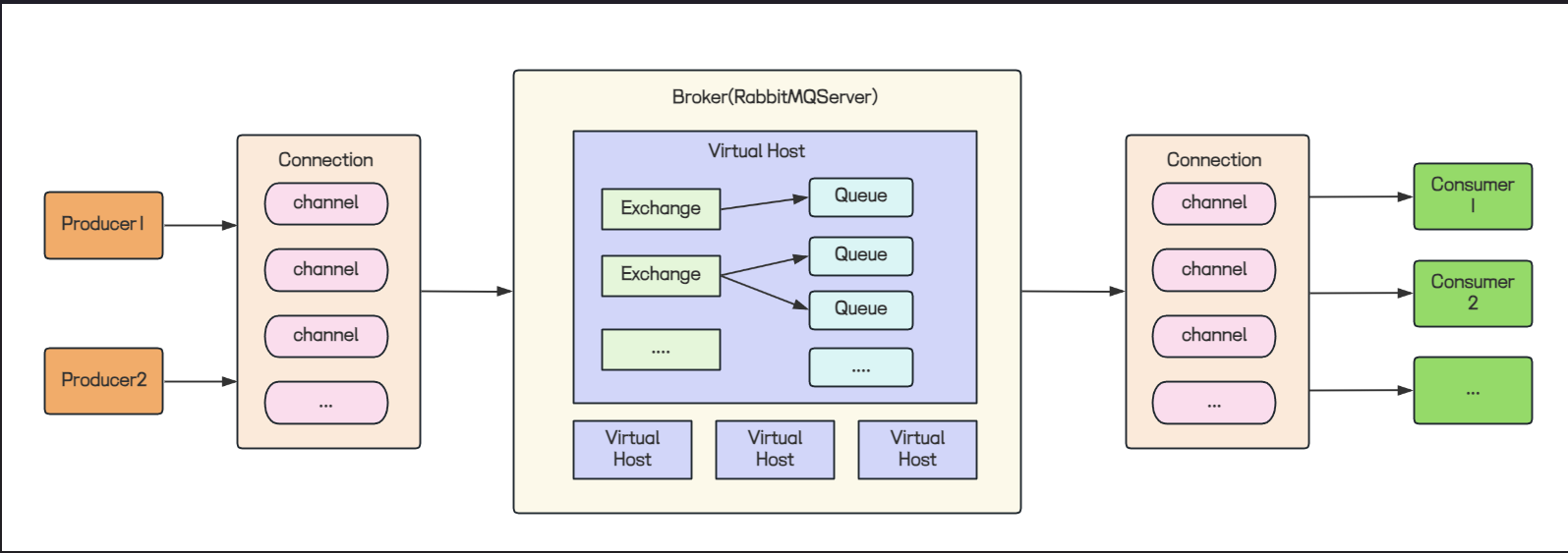
RabbitMQ 是一个消息中间件 ,同时它也是一个生产者消费者 模型。它负责接收,存储,转发消息。
根据上面的工作流程图,一下是它的核心概念介绍:
- Producer:生产者,负责向 RabbitMQ 发送消息;
- Consumer:消费者,从 RabbitMQ 接收消息;
- Broker:消息队列服务器或者服务实例,也就是 RabbitMQ Server;
- Connection:网络连接,允许客户端与服务端通信;
- Channel:网络连接里的一个虚拟通道,发送或者接收消息都是通过通道进行的;
- Exchange:交换机,负责接收生产者发送的消息,并根据路由算法和规则将消息路由到一个或多个队列;
- Queue:消息队列,存储消息直到消息被消费者消费;
- Virtual Host:虚拟机,RabbitMQ 服务器中实现的逻辑隔离,一个 RabbitMQ 服务器可以有多个虚拟机,每个虚拟机都包含多个交换机和队列,不同的虚拟机之间是隔离开的;
2. 工作流程
Producer ---> Broker:
-
- Producer 连接到 RabbitMQ Broker,简历一个连接 (Connection),开启一个信道 (Channel);
-
- Producer 申明交换机和队列,并绑定队列 (Queue) 到交换机 (Exchange);
-
- Producer 向 Broker 发布消息;
Broker:
-
- RabbitMQ Broker 接收消息,并存入相应的队列 (Queue) 中,如果没有找到相应的队列,会根据生产者的配置,选择丢弃或者回退给生产者;
Broker ---> Consumer:
-
- 消费这监听队列 (Queue),消息到达时,从队列中获取消息,处理后,向 RabbitMQ 发送消息确认;
-
- 消息被确认后,RabbitMQ 会把消息从队列中删除;
上述工作流程中,RabbitMQ 最为重要的一点就是一定要保证消息的可靠传递 ,RabbitMQ 如何保证消息的可靠传递,可以参考:面试官必问:RabbitMQ 如何保证消息可靠传递?-CSDN博客
三、RabbitMQ 的工作模式
1. 工作模式介绍
RabbitMQ 一共提供了 7 中工作模式;
1. 简单模式(Simple)
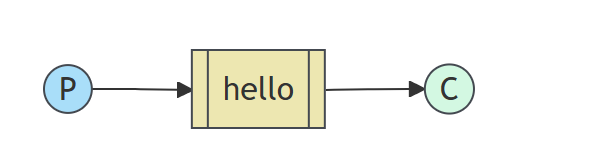
特点:一个生产者 (P),一个消费者 (C),消息只能被消费一次;
场景:消息只能被单个消费者处理;
2. 工作队列模式(Work Queue)
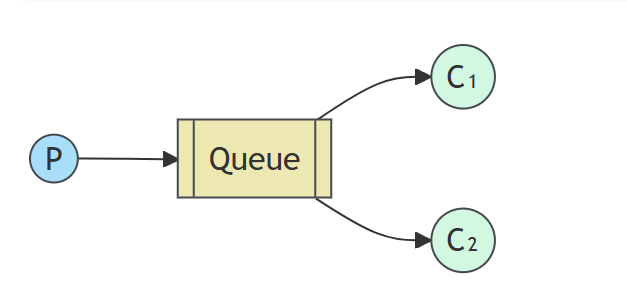
特点:一个生产者 (P),多个消费者 (C),在多个消息的情况下,work queue 会把消息分派给不同的消费者,每个消费者处理的消息不同;
场景:集群环境下,消息被多个消费者消费;
3. 发布订阅模式(Publish/Subscribe)
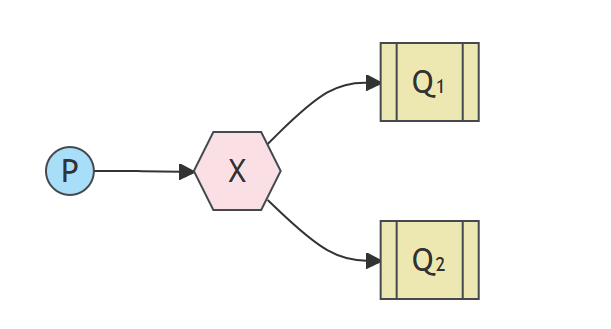
生产者 (P) 发送消息到交换机,交换机 (X) 根据路由规则将消息路由到一个或者多个队列 (Q);
RabbitMQ 中交换机的 4 种类型:
-
- Fanout:广播,将消息交给所有绑定到交换机的队列;
-
- Direct:定向,将消息交给符合指定 routing key 的队列;
-
- Topic:通配符,将消息交给符合 routing key pattern 的队列;
-
- headers:不依赖 routing key 的匹配规则,而是消息内容的 headers 属性进行匹配,这种因为交换性能差,用的少,因此不做详细介绍;
路由键:
routing key:路由键,生产者将消息发给交换机时指定的一个字符串;
binding key:绑定键,交换机和队列绑定指定的一个字符串,它也叫做 routing key;
交换机的路由方式:
当消息的 routing key 和 交换机绑定队列使用的 binding key 相同,或者符合 binding key 指定的 pattern,就可以将消息路由到指定的队列;
发布订阅模式用的就是交换机的 Fanout 模式;
特点: 交换机路由到多个队列的消息相同;
场景:适用于同一个消息需要被多个消费者接收的场景,例如广播消息,通知消息等;
4. 路由模式(Routing)
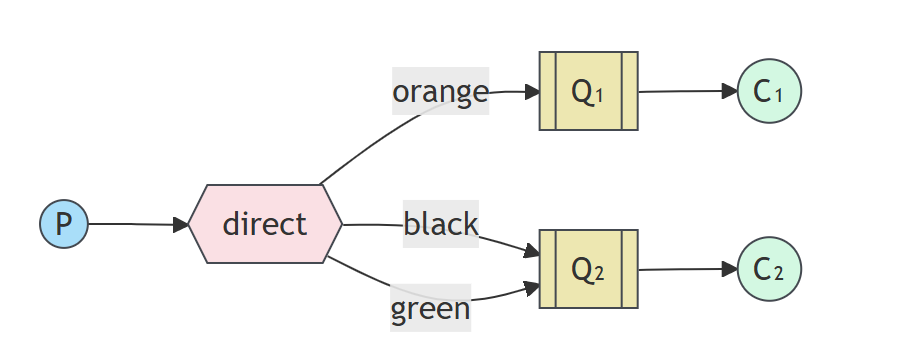
特点:根据生产者发送消息时指定的 routing key,将消息路由到交换机和队列绑定时指定的 binding key 相同的队列中;如上图,如果 routing key 是 orange,就路由到 Q1;
场景:适合根据特定规则分发消息的场景;比如系统打印日志,可以根据日志的级别(error,warning,info)将日志路由到不同的队列,再输出到不同的文件;
5. 通配符模式(Topics)
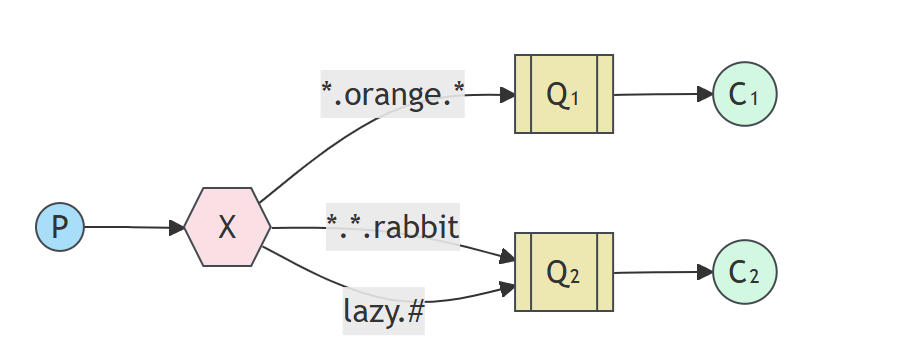
特点:根据生产者发送消息时指定的 routing key,将消息路由到符合交换机和队列绑定时指定的 binding key 定义的模式的队列中;
场景:需要灵活匹配和过滤消息的场景;
binding key 中 * 和 # 的含义:
* 星号:匹配 1 个,必须有且只有 1 个
- 匹配 正好一个单词
- 不多不少,必须有一个
# 井号:匹配 0 个 或 多个
- 匹配 0 个、1 个、多个单词
- 相当于 通吃、模糊全匹配
routing key 和 binding key 都是用 . 点号分割的单词串,例如:user.queue.notification;
例子 1:log.*
-
匹配:
log.infolog.error
-
不匹配:
log(不够 1 个)log.system.error(超过 1 个)
例子 2:log.#
-
匹配:
log(0 个)log.info(1 个)log.system.error(多个)
-
全部能匹配
6. RPC 通信模式

在 RPC 模式中没有生产者和消费者,而是通过两个队列实现了一个可回调的过程;
工作过程:
-
- 客户端发送消息到一个指定的队列,并在消息属性中设置 replyTo 字段,这个字段指定了一个回调队列,用于接收服务端的响应;
-
- 服务端接收到请求后,处理请求,并发送响应到 replyTo 指定的回调队列;
-
- 客户端在回调队列等待响应,一旦收到响应,检查收到响应的 correlationId 属性, 确保它是期望的响应;
7. 发布确认模式(Publisher Confirms)
Publisher Confirms 模式是 RabbitMQ 提供的一种确保消息可靠发送到 RabbitMQ 服务器的机制;
在这种模式下,生产者会等待 RabbitMQ 确认,确保消息已经被服务器接收并处理;
实现方式:
-
- 生产者将 Channel 设置为 confirm 模式 (调用 channel.confirmSelect() ),发布的每一条消息都会获得一个唯一的 id,生产者可以将这些消息和序号关联起来,跟踪消息的状态;
-
- 当消息被 RabbitMQ 服务器接收并处理后,服务器会异步的向生产者发送一个确认 (ACK) 给生产者,确认消息中包含唯一的消息 id,表明消息已经送达;
通过发布确认模式,生产者可以保证消息成功被服务器接收,从而避免消息丢失的问题;
发布确认机制的最大好处在于它是异步的,生产者可以同时发布和等待信道返回确认消息;
-
- 消息最终得到确认后,生产者可以通过回调方法来处理确认该消息;
-
- 如果 RabbitMQ 因为自身内部错误导致消息丢失,就会发送一条 NACK (basic.Nack) 命令,生产者同样可以在回调方法种处理该 NACK 命令;
注意:
- 使用发送确认机制,必须要信道设置成 confirm (确认) 模式。
- 发布确认是 AMQP0.9.1 协议的扩展,默认情况下它不会被启用。生产者通过channel.confirmSelect() 将信道设置为 confirm 模式;
发布确认的策略分为 3 种:单独确认,批量确认,异步确认;
单独确认:每发送一条消息,都需要调用 channel.waitForConfirms() 方法,等待服务器的确认返回;服务器返回某个序号,就表示该序号的消息已经接收成功;
批量确认:每发送一批消息,调用 channel.waitForConfirms() 方法,等待服务器的确认返回;服务器返回某个序号,就表示该序号之前的所有消息,服务器都已经接收成功;
异步确认:提供一个回调方法,服务端确认一条或者多条消息后,客户端会调用这个方法进行处理;
通常来说,异步确认的性能最高,它不需要等待服务器返回确认信号后再继续发送消息,而是服务器什么时候返回确认信号就什么时候调用回调方法进行处理;
2. 工作模式实现
1. 引入依赖
XML
<dependency>
    <groupId>com.rabbitmq</groupId>
    <artifactId>amqp-client</artifactId>
    <version>5.7.3</version>
</dependency>
2. 简单模式和工作队列模式
简单模式和工作队列模式,直接使用以下的生产者和消费者即可,区别是简单模式只有一个消费者,工作队列模式有多个消费者;
编写生产者代码:
java
public class WorkRabbitProducer {
    public static void main(String[] args) throws Exception {

        //1. 创建 channel 通道
        ConnectionFactory factory = new ConnectionFactory();
        factory.setHost(Constants.HOST); // ip 默认值 localhost
        factory.setPort(Constants.PORT); // 默认值 5672
        factory.setVirtualHost(Constants.VIRTUAL_HOST); // 虚拟机名称, 默认 /
        factory.setUsername(Constants.USER_NAME); // ⽤⼾名,默认 guest
        factory.setPassword(Constants.PASSWORD); // 密码, 默认 guest
        Connection connection = factory.newConnection();
        Channel channel = connection.createChannel();

        //2. 声明队列

        //如果没有⼀个这样的⼀个队列, 会⾃动创建, 如果有, 则不创建
        channel.queueDeclare(Constants.WORK_QUEUE_NAME, true, false, false, null);

        //3.发送消息
        for (int i = 0; i < 10; i++) {
            String msg = "Hello World" + i;
            channel.basicPublish("",Constants.WORK_QUEUE_NAME,null,msg.getBytes());
        }

        //4. 释放资源
        channel.close();
        connection.close();
    }
}
编写消费者代码:
java
public class WorkRabbitmqConsumer1 {
    public static void main(String[] args) throws Exception {

        //1. 创建channel通道
        ConnectionFactory factory = new ConnectionFactory();
        factory.setHost(Constants.HOST); // ip 默认值localhost
        factory.setPort(Constants.PORT); // 默认值5672
        factory.setVirtualHost(Constants.VIRTUAL_HOST); // 虚拟机名称, 默认 /
        factory.setUsername(Constants.USER_NAME); // ⽤⼾名,默认guest
        factory.setPassword(Constants.PASSWORD); // 密码, 默认guest
        Connection connection = factory.newConnection();
        Channel channel = connection.createChannel();

        //2. 声明队列
        //如果没有⼀个这样的⼀个队列, 会⾃动创建, 如果有, 则不创建
        channel.queueDeclare(Constants.WORK_QUEUE_NAME, true, false, false, null);

        //3. 接收消息, 并消费
        DefaultConsumer consumer = new DefaultConsumer(channel) {
            @Override
            public void handleDelivery(String consumerTag, Envelope envelope, AMQP.BasicProperties properties, byte[] body) throws IOException {
                System.out.println("接收到消息: " + new String(body));
            }
        };
        channel.basicConsume(Constants.WORK_QUEUE_NAME, true, consumer);
    }
}
3. 发布订阅模式
发布订阅模式要定义交换机,绑定交换机和队列;
编写生产者代码:
java
public class FanoutRabbitProducer {
    public static void main(String[] args) throws Exception {

        //1. 创建channel通道
        ConnectionFactory factory = new ConnectionFactory();
        factory.setHost(Constants.HOST); // ip 默认值localhost
        factory.setPort(Constants.PORT); // 默认值5672
        factory.setVirtualHost(Constants.VIRTUAL_HOST); // 虚拟机名称, 默认 /
        factory.setUsername(Constants.USER_NAME); // ⽤⼾名,默认guest
        factory.setPassword(Constants.PASSWORD); // 密码, 默认guest
        Connection connection = factory.newConnection();
        Channel channel = connection.createChannel();

        //2. 创建交换机
        /*
        exchangeDeclare(String exchange, BuiltinExchangeType type, boolean durable, boolean autoDelete, boolean internal, Map<String, Object> arguments)
        参数:
            1. exchange:交换机名称
            2. type:交换机类型 * DIRECT("direct"), 定向,直连,routing
                * FANOUT("fanout"),扇形(⼴播), 每个队列都能收到消息
                * TOPIC("topic"),通配符
                * HEADERS("headers") 参数匹配(⼯作⽤的较少)
            3. durable: 是否持久化
            4. autoDelete: ⾃动删除
            5. internal: 内部使⽤, ⼀般falase
            6. arguments: 参数
        */
        channel.exchangeDeclare(Constants.FANOUT_EXCHANGE_NAME, BuiltinExchangeType.FANOUT, true, false, false, null);

        //3. 声明队列
        //如果没有⼀个这样的⼀个队列, 会⾃动创建, 如果有, 则不创建
        channel.queueDeclare(Constants.FANOUT_QUEUE_NAME1, true, false, false, null);
        channel.queueDeclare(Constants.FANOUT_QUEUE_NAME2, true, false, false, null);

        //4. 绑定队列和交换机
        /*
            queueBind(String queue, String exchange, String routingKey, Map<String, Object> arguments)

            参数:
                1. queue: 队列名称
                2. exchange: 交换机名称
                3. routingKey: 路由key, 路由规则如果交换机类型为fanout,routingkey设置为"",表⽰每个消费者都可以收到全部信息
        */

        channel.queueBind(Constants.FANOUT_QUEUE_NAME1,Constants.FANOUT_EXCHANGE_NAME, "");
        channel.queueBind(Constants.FANOUT_QUEUE_NAME2,Constants.FANOUT_EXCHANGE_NAME, "");

        //5. 发送消息

        /**
         * basicPublish(String exchange, String routingKey, AMQP.BasicProperties props, byte[] body)
         * 参数说明:
             * Exchange: 交换机名称
             * routingKey: 如果交换机类型为fanout,routingkey设置为"",表⽰每个消费者都可以收到全部信息
        */
        String msg = "hello fanout";
        channel.basicPublish(Constants.FANOUT_EXCHANGE_NAME,"",null,msg.getBytes());

        //6.释放资源
        channel.close();
        connection.close();
    }
}
编写消费者代码:
java
public class FanoutRabbitmqConsumer1 {
    public static void main(String[] args) throws Exception {

        //1. 创建channel通道
        ConnectionFactory factory = new ConnectionFactory();
        factory.setHost(Constants.HOST);//ip 默认值localhost
        factory.setPort(Constants.PORT); //默认值5672
        factory.setVirtualHost(Constants.VIRTUAL_HOST);//虚拟机名称, 默认 /
        factory.setUsername(Constants.USER_NAME);//⽤⼾名,默认guest
        factory.setPassword(Constants.PASSWORD);//密码, 默认guest
        Connection connection = factory.newConnection();
        Channel channel = connection.createChannel();

        //2. 接收消息, 并消费
        DefaultConsumer consumer = new DefaultConsumer(channel) {
            @Override
            public void handleDelivery(String consumerTag, Envelope envelope, AMQP.BasicProperties properties, byte[] body) throws IOException {
                System.out.println("接收到消息: " + new String(body));
            }
        };
        channel.basicConsume(Constants.FANOUT_QUEUE_NAME1, true, consumer);
    }
}
4. 路由模式
编写生产者代码:
java
public class DirectRabbitProducer {
    public static void main(String[] args) throws Exception {
        //1. 创建channel通道

        ConnectionFactory factory = new ConnectionFactory();
        factory.setHost(Constants.HOST);//ip 默认值localhost
        factory.setPort(Constants.PORT); //默认值5672
        factory.setVirtualHost(Constants.VIRTUAL_HOST);//虚拟机名称, 默认 /
        factory.setUsername(Constants.USER_NAME);//⽤⼾名,默认guest
        factory.setPassword(Constants.PASSWORD);//密码, 默认guest
        Connection connection = factory.newConnection();
        Channel channel = connection.createChannel();
        //2. 创建交换机
        channel.exchangeDeclare(Constants.DIRECT_EXCHANGE_NAME,
        BuiltinExchangeType.DIRECT, true, false, false, null);
        //3. 声明队列
        //如果没有⼀个这样的⼀个队列, 会⾃动创建, 如果有, 则不创建

        channel.queueDeclare(Constants.DIRECT_QUEUE_NAME1, true, false, false, null);

        channel.queueDeclare(Constants.DIRECT_QUEUE_NAME2, true, false, false, null);
        //4. 绑定队列和交换机
        //队列1绑定orange                              channel.queueBind(Constants.DIRECT_QUEUE_NAME1,Constants.DIRECT_EXCHANGE_NAME, "orange");
        //队列2绑定black, green
        channel.queueBind(Constants.DIRECT_QUEUE_NAME2,Constants.DIRECT_EXCHANGE_NAME, "black");
        channel.queueBind(Constants.DIRECT_QUEUE_NAME2,Constants.DIRECT_EXCHANGE_NAME, "green");
        //5. 发送消息

        String msg = "hello direct, I am orange";
        channel.basicPublish(Constants.DIRECT_EXCHANGE_NAME,"orange",null,msg.getBytes());
        String msg_black = "hello direct,I am black";
        channel.basicPublish(Constants.DIRECT_EXCHANGE_NAME,"black",null,msg_black.getBytes());
        String msg_green= "hello direct, I am green";
        channel.basicPublish(Constants.DIRECT_EXCHANGE_NAME,"green",null,msg_green.getBytes());
        //6.释放资源

        channel.close();
        connection.close();
    }
}
编写消费者代码:
java
public class DirectRabbitmqConsumer1 {
    public static void main(String[] args) throws Exception {
        //1. 创建channel通道

        ConnectionFactory factory = new ConnectionFactory();
        factory.setHost(Constants.HOST);//ip 默认值localhost
        factory.setPort(Constants.PORT); //默认值5672
        factory.setVirtualHost(Constants.VIRTUAL_HOST);//虚拟机名称, 默认 /
        factory.setUsername(Constants.USER_NAME);//⽤⼾名,默认guest
        factory.setPassword(Constants.PASSWORD);//密码, 默认guest
        Connection connection = factory.newConnection();
        Channel channel = connection.createChannel();
        //2. 接收消息, 并消费

        DefaultConsumer consumer = new DefaultConsumer(channel) {
            @Override
            public void handleDelivery(String consumerTag, Envelope envelope, AMQP.BasicProperties properties, byte[] body) throws IOException {
                System.out.println("接收到消息: " + new String(body));
            }
        };
        channel.basicConsume(Constants.DIRECT_QUEUE_NAME1, true, consumer);
    }
}
5. 通配符模式
编写生产者代码:
java
public class TopicRabbitProducer {
    public static void main(String[] args) throws Exception {
        //1. 创建channel通道

        ConnectionFactory factory = new ConnectionFactory();
        factory.setHost(Constants.HOST);//ip 默认值localhost
        factory.setPort(Constants.PORT); //默认值5672
        factory.setVirtualHost(Constants.VIRTUAL_HOST);//虚拟机名称, 默认 /
        factory.setUsername(Constants.USER_NAME);//⽤⼾名,默认guest
        factory.setPassword(Constants.PASSWORD);//密码, 默认guest
        Connection connection = factory.newConnection();
        Channel channel = connection.createChannel();
        //2. 创建交换机

        channel.exchangeDeclare(Constants.TOPIC_EXCHANGE_NAME,
        BuiltinExchangeType.TOPIC, true, false, false, null);
        //3. 声明队列
        //如果没有⼀个这样的⼀个队列, 会⾃动创建, 如果有, 则不创建

        channel.queueDeclare(Constants.TOPIC_QUEUE_NAME1, true, false, false, null);

        channel.queueDeclare(Constants.TOPIC_QUEUE_NAME2, true, false, false, null);
        //4. 绑定队列和交换机
        //队列1绑定error, 仅接收error信息
        channel.queueBind(Constants.TOPIC_QUEUE_NAME1,Constants.TOPIC_EXCHANGE_NAME, "*.error");
        //队列2绑定info, error: error,info信息都接收

        channel.queueBind(Constants.TOPIC_QUEUE_NAME2,Constants.TOPIC_EXCHANGE_NAME, "#.info");
        channel.queueBind(Constants.TOPIC_QUEUE_NAME2,Constants.TOPIC_EXCHANGE_NAME, "*.error");
        //5. 发送消息

        String msg = "hello topic, I'm order.error";
        channel.basicPublish(Constants.TOPIC_EXCHANGE_NAME,"order.error",null,msg.getBytes());
        String msg_black = "hello topic, I'm order.pay.info";
        channel.basicPublish(Constants.TOPIC_EXCHANGE_NAME,"order.pay.info",null,msg_black.getBytes());
        String msg_green= "hello topic, I'm pay.error";
        channel.basicPublish(Constants.TOPIC_EXCHANGE_NAME,"pay.error",null,msg_green.getBytes();

        //6.释放资源

        channel.close();
        connection.close();
    }
}
编写消费者代码:
java
public class TopicRabbitmqConsumer1 {
    public static void main(String[] args) throws Exception {
        //1. 创建channel通道

        ConnectionFactory factory = new ConnectionFactory();
        factory.setHost(Constants.HOST);//ip 默认值localhost
        factory.setPort(Constants.PORT); //默认值5672
        factory.setVirtualHost(Constants.VIRTUAL_HOST);//虚拟机名称, 默认 /
        factory.setUsername(Constants.USER_NAME);//⽤⼾名,默认guest
        factory.setPassword(Constants.PASSWORD);//密码, 默认guest
        Connection connection = factory.newConnection();
        Channel channel = connection.createChannel();
        //2. 接收消息, 并消费

        DefaultConsumer consumer = new DefaultConsumer(channel) {
            @Override
            public void handleDelivery(String consumerTag, Envelope envelope, AMQP.BasicProperties properties, byte[] body) throws IOException {
                System.out.println("接收到消息: " + new String(body));
            }
        };
        channel.basicConsume(Constants.TOPIC_QUEUE_NAME1, true, consumer);
    }
}
6. RPC 通信
客户端代码主要流程:
-
- 声明两个队列,包含回调队列 replyQueueName,声明本次请求的唯⼀标志 correlationId;
-
- 将 replyQueueName 和 correlationId 配置到要发送的消息队列中;
-
- 使用阻塞队列来阻塞当前进程,监听回调队列种的消息,吧请求放到阻塞队列中;
-
- 阻塞队列有消息后,主线程被唤醒,打印返回内容;
客户端代码编写:
java
public class RPCClient {
    public static void main(String[] args) throws Exception {
        //1. 创建Channel通道

        ConnectionFactory factory = new ConnectionFactory();
        factory.setHost(Constants.HOST);//ip 默认值localhost
        factory.setPort(Constants.PORT); //默认值5672
        factory.setVirtualHost(Constants.VIRTUAL_HOST);//虚拟机名称, 默认 /
        factory.setUsername(Constants.USER_NAME);//⽤⼾名,默认guest
        factory.setPassword(Constants.PASSWORD);//密码, 默认guest
        Connection connection = factory.newConnection();
        Channel channel = connection.createChannel();
        //2. 声明队列

        channel.queueDeclare(Constants.RPC_REQUEST_QUEUE_NAME, true, false, false, null);
        // 唯⼀标志本次请求

        String corrId = UUID.randomUUID().toString();
        // 定义临时队列,并返回⽣成的队列名称

        String replyQueueName = channel.queueDeclare().getQueue();
        // ⽣成发送消息的属性

        AMQP.BasicProperties props = new AMQP.BasicProperties
                .Builder()
                .correlationId(corrId) // 唯⼀标志本次请求

                .replyTo(replyQueueName) // 设置回调队列

                .build();
        // 通过内置交换机, 发送消息

        String message = "hello rpc...";
        channel.basicPublish("", Constants.RPC_REQUEST_QUEUE_NAME, props, message.getBytes());
        // 阻塞队列,⽤于存储回调结果

        final BlockingQueue<String> response = new ArrayBlockingQueue<>(1);
        //接收服务端的响应

        DefaultConsumer consumer = new DefaultConsumer(channel) {
            @Override
            public void handleDelivery(String consumerTag, Envelope envelope, AMQP.BasicProperties properties, byte[] body) throws IOException {
                System.out.println("接收到回调消息:"+ new String(body));
                if (properties.getCorrelationId().equals(corrId)) {
                    response.offer(new String(body, "UTF-8"));
                }
            }
        };
        channel.basicConsume(replyQueueName, true, consumer);
        // 获取回调的结果

        String result = response.take();
        System.out.println(" [RPCClient] Result:" + result);
        //释放资源

        channel.close();
        connection.close();
    }
}
服务端代码主要流程如下:
-
- 接收消息;
-
- 根据消息内容进行响应处理,把应答结果返回到回调队列中;
java
public class RPCServer {
    public static void main(String[] args) throws IOException, TimeoutException {
        //1. 创建Channel通道

        ConnectionFactory factory = new ConnectionFactory();
        factory.setHost(Constants.HOST);//ip 默认值localhost
        factory.setPort(Constants.PORT); //默认值5672
        factory.setVirtualHost(Constants.VIRTUAL_HOST);//虚拟机名称, 默认 /
        factory.setUsername(Constants.USER_NAME);//⽤⼾名,默认guest
        factory.setPassword(Constants.PASSWORD);//密码, 默认guest
        Connection connection = factory.newConnection();
        Channel channel = connection.createChannel();
        //2. 声明队列

        channel.queueDeclare(Constants.RPC_REQUEST_QUEUE_NAME, true, false, false, null);
        //3. 接收消息, 并消费

        // 设置同时最多只能获取⼀个消息

        channel.basicQos(1);
        System.out.println("Awaiting RPC request");
        Consumer consumer = new DefaultConsumer(channel){
            @Override
            public void handleDelivery(String consumerTag, Envelope envelope, AMQP.BasicProperties properties, byte[] body) throws IOException {
                AMQP.BasicProperties replyProps = new AMQP.BasicProperties
                        .Builder()
                        .correlationId(properties.getCorrelationId())
                        .build();
                // ⽣成返回

                String message = new String(body);
                String response = "request:"+ message + ", response: 处理成功";
                // 回复消息,通知已经收到请求

                channel.basicPublish( "", properties.getReplyTo(), replyProps, response.getBytes());
                // 对消息进⾏应答

                channel.basicAck(envelope.getDeliveryTag(), false);
            }
        };
        channel.basicConsume(Constants.RPC_REQUEST_QUEUE_NAME, false, consumer);
    }
}
7. 发布确认
发布确认是 RabbitMQ 7 种工作模式之一,也是解决生产者消息传递到 Broker 丢失问题的主要方式;
发布确认模式的三种确认策略实现:
java
public class PublisherConfirms {

    private static final int MESSAGE_COUNT = 500;
    private static final String PUBLISHER_CONFIRMS_QUEUE_NAME1 = "publisher_confirms_queue1";
    private static final String PUBLISHER_CONFIRMS_QUEUE_NAME2 = "publisher_confirms_queue2";
    private static final String PUBLISHER_CONFIRMS_QUEUE_NAME3 = "publisher_confirms_queue3";

    static Connection createConnection() throws Exception {
        ConnectionFactory factory = new ConnectionFactory();
        factory.setHost(Constants.HOST);//ip 默认值localhost
        factory.setPort(Constants.PORT); //默认值5672
        factory.setVirtualHost(Constants.VIRTUAL_HOST);//虚拟机名称, 默认 /
        factory.setUsername(Constants.USER_NAME);//⽤⼾名,默认guest
        factory.setPassword(Constants.PASSWORD);//密码, 默认guest
        return factory.newConnection();
    }

    public static void main(String[] args) throws Exception {
        publishMessagesIndividually();
        publishMessagesInBatch();
        handlePublishConfirmsAsynchronously();
    }

    static void publishMessagesIndividually() throws Exception {
        try (Connection connection = createConnection()) {
            //创建channel
            Channel ch = connection.createChannel();
            //开启信道确认模式

            ch.confirmSelect();
            //声明队列

            ch.queueDeclare(PUBLISHER_CONFIRMS_QUEUE_NAME1, true, false, true, null);
            long start = System.currentTimeMillis();
            //循环发送消息

            for (int i = 0; i < MESSAGE_COUNT; i++) {
                String body = "消息" + i;
                //发布消息

                ch.basicPublish("", PUBLISHER_CONFIRMS_QUEUE_NAME1, null, body.getBytes());
                //等待确认消息.只要消息被确认,这个⽅法就会被返回

                //如果超时过期, 则抛出TimeoutException. 如果任何消息被nack(丢失waitForConfirmsOrDie将抛出IOException。

                ch.waitForConfirmsOrDie(5_000);
            }
            long end = System.currentTimeMillis();
            System.out.format("Published %d messages individually in %d ms%n", MESSAGE_COUNT, end - start);
        }
    }

    static void publishMessagesInBatch() throws Exception {
        try (Connection connection = createConnection()) {
            //创建信道

            Channel ch = connection.createChannel();
            //信道设置为confirm模式

            ch.confirmSelect();
            //声明队列

            ch.queueDeclare(PUBLISHER_CONFIRMS_QUEUE_NAME2, true, false, true, null);
            int batchSize = 100;
            int outstandingMessageCount = 0;
            long start = System.currentTimeMillis();
            for (int i = 0; i < MESSAGE_COUNT; i++) {
                String body = "消息" + i;
                //发送消息

                ch.basicPublish("", PUBLISHER_CONFIRMS_QUEUE_NAME2, null, body.getBytes());
                outstandingMessageCount++;
                //批量确认消息

                if (outstandingMessageCount == batchSize) {
                    ch.waitForConfirmsOrDie(5_000);
                    outstandingMessageCount = 0;
                }
            }
            //消息发送完, 还有未确认的消息, 进⾏确认

            if (outstandingMessageCount > 0) {
                ch.waitForConfirmsOrDie(5_000);
            }
            long end = System.currentTimeMillis();
            System.out.format("Published %d messages in batch in %d ms%n", MESSAGE_COUNT, end - start);
        }
    }

    static void handlePublishConfirmsAsynchronously() throws Exception {
        try (Connection connection = createConnection()) {
            Channel ch = connection.createChannel();
            ch.queueDeclare(PUBLISHER_CONFIRMS_QUEUE_NAME3, false, false, true, null);
            ch.confirmSelect();
            //有序集合,元素按照⾃然顺序进⾏排序,存储未confirm消息序号

            SortedSet<Long> confirmSet = Collections.synchronizedSortedSet(new TreeSet<>());
            ch.addConfirmListener(new ConfirmListener() {
                @Override
                public void handleAck(long deliveryTag, boolean multiple) throws IOException {

//                    System.out.println("ack, SeqNo: " + deliveryTag + ",multiple:" + multiple);
                    //multiple 批量

                    //confirmSet.headSet(n)⽅法返回当前集合中⼩于n的集合

                    if (multiple) {
                        //批量确认:将集合中⼩于等于当前序号deliveryTag元素的集合清除,表⽰这批序号的消息都已经被ack了

                        confirmSet.headSet(deliveryTag+1).clear();
                    } else {
                        //单条确认:将当前的deliveryTag从集合中移除

                        confirmSet.remove(deliveryTag);
                    }
                }
                @Override
                public void handleNack(long deliveryTag, boolean multiple) throws IOException {
                    System.err.format("deliveryTag: %d, multiple: %b%n", deliveryTag, multiple);
                    if (multiple) {
                        //批量确认:将集合中⼩于等于当前序号deliveryTag元素的集合清除,表⽰这批序号的消息都已经被ack了

                        confirmSet.headSet(deliveryTag+1).clear();
                    } else {
                        //单条确认:将当前的deliveryTag从集合中移除

                        confirmSet.remove(deliveryTag);
                    }
                    //如果处理失败, 这⾥需要添加处理消息重发的场景. 此处代码省略

                }
            });
            //循环发送消息

            long start = System.currentTimeMillis();
            for (int i = 0; i < MESSAGE_COUNT; i++) {
                String message = "消息" + i;
                //得到下次发送消息的序号, 从1开始

                long nextPublishSeqNo = ch.getNextPublishSeqNo();
//                System.out.println("消息序号:"+ nextPublishSeqNo);
                ch.basicPublish("", PUBLISHER_CONFIRMS_QUEUE_NAME3, null, message.getBytes());
                //将序号存⼊集合中

                confirmSet.add(nextPublishSeqNo);
            }
            //消息确认完毕

            while (!confirmSet.isEmpty()){

                Thread.sleep(10);
            }
            long end = System.currentTimeMillis();
            System.out.format("Published %d messages and handled confirms asynchronously in %d ms%n", MESSAGE_COUNT, end - start);
        }
    }
}
3. SpringBoot 中 RabbitMQ 的工作模式
1. 引入依赖
XML
    <!--Spring MVC相关依赖-->
    <dependency>
        <groupId>org.springframework.boot</groupId>
        <artifactId>spring-boot-starter-web</artifactId>
    </dependency>
    <dependency>
        <groupId>org.springframework.boot</groupId>
        <artifactId>spring-boot-starter-test</artifactId>
        <scope>test</scope>
    </dependency>
    <!--RabbitMQ相关依赖-->
    <dependency>
        <groupId>org.springframework.boot</groupId>
        <artifactId>spring-boot-starter-amqp</artifactId>
    </dependency>
2. 配置
配置 RabbitMQ 的基本信息
spring:
rabbitmq:
host: 49.233.162.74
port: 15673 # 默认为 5672
username: study
password: study
virtual-host: study # 默认值为 /
3. 工作队列模式
申明队列:
java
@Configuration
public class RabbitMQConfig {
    //1. ⼯作模式队列

    @Bean("workQueue")
    public Queue workQueue() {
        return QueueBuilder.durable(Constants.WORK_QUEUE).build();
    }
}
生产者:
java
@RequestMapping("/producer")
@RestController
public class ProducerController {

    @Autowired
    private RabbitTemplate rabbitTemplate;

    @RequestMapping("/work")
    public String work(){
        for (int i = 0; i < 10; i++) {
        //使⽤内置交换机发送消息, routingKey和队列名称保持⼀致

        rabbitTemplate.convertAndSend("", Constants.WORK_QUEUE, "hello spring amqp:work...");
        }
        return "发送成功";
    }
}
消费者:
java
@Component
public class WorkListener {
    @RabbitListener(queues = Constants.WORK_QUEUE)
    public void listenerQueue(Message message){
        System.out.println("listener 1["+Constants.WORK_QUEUE+"]收到消息:" + message);
    }

    @RabbitListener(queues = Constants.WORK_QUEUE)
    public void listenerQueue2(Message message){
        System.out.println("listener 2["+Constants.WORK_QUEUE+"]收到消息:" + message);
    }
}
4. 发布订阅模式
申明交换机和队列,绑定交换机和队列:
java
    //声明2个队列, 观察是否两个队列都收到了消息

    @Bean("fanoutQueue1")
    public Queue fanoutQueue1() {
        return QueueBuilder.durable(Constants.FANOUT_QUEUE1).build();
    }
    @Bean("fanoutQueue2")
    public Queue fanoutQueue2() {
        return QueueBuilder.durable(Constants.FANOUT_QUEUE2).build();
    }

    //声明交换机

    //队列和交换机绑定

    @Bean("fanoutExchange")
    public FanoutExchange fanoutExchange() {
        return ExchangeBuilder.fanoutExchange(Constants.FANOUT_EXCHANGE_NAME).durable(true).build();
    }
    @Bean
    public Binding fanoutBinding(@Qualifier("fanoutExchange") FanoutExchange exchange, @Qualifier("fanoutQueue1") Queue queue) {
        return BindingBuilder.bind(queue).to(exchange);
    }
    @Bean
    public Binding fanoutBinding2(@Qualifier("fanoutExchange") FanoutExchange exchange, @Qualifier("fanoutQueue2") Queue queue) {
        return BindingBuilder.bind(queue).to(exchange);
    }
生产者:
java
@RequestMapping("/fanout")
public String fanoutProduct(){
    //routingKey为空, 表⽰所有队列都可以收到消息
    rabbitTemplate.convertAndSend(Constants.FANOUT_EXCHANGE_NAME, "","hello spring boot: fanout");
    return "发送成功";
}
消费者:
java
@Component
public class FanoutListener {

    //指定监听队列的名称
    @RabbitListener(queues = Constants.FANOUT_QUEUE1)
    public void ListenerQueue(String message){
        System.out.println("["+Constants.FANOUT_QUEUE1+ "]接收到消息:"+ message);
    }

    @RabbitListener(queues = Constants.FANOUT_QUEUE2)
    public void ListenerQueue2(String message){
        System.out.println("["+Constants.FANOUT_QUEUE2+ "]接收到消息:"+ message);
    }
}
5. 路由模式
申明队列交换机,绑定队列交换机:
java
    //Routing模式

    @Bean("directQueue1")
    public Queue routingQueue1() {
        return QueueBuilder.durable(Constants.DIRECT_QUEUE1).build();
    }
    @Bean("directQueue2")
    public Queue routingQueue2() {
        return QueueBuilder.durable(Constants.DIRECT_QUEUE2).build();
    }
    //声明交换机

    @Bean("directExchange")
    public DirectExchange directExchange() {
        return ExchangeBuilder.directExchange(Constants.DIRECT_EXCHANGE_NAME).durable(true).build();
    }

    //队列和交换机绑定

    //队列1绑定orange
    @Bean
    public Binding directBinding(@Qualifier("directExchange") DirectExchange exchange, @Qualifier("directQueue1") Queue queue) {
        return BindingBuilder.bind(queue).to(exchange).with("orange");
    }
    //队列2绑定black, green
    @Bean
    public Binding directBinding2(@Qualifier("directExchange") DirectExchange exchange, @Qualifier("directQueue2") Queue queue) {
        return BindingBuilder.bind(queue).to(exchange).with("black");
    }
    @Bean
    public Binding directBinding3(@Qualifier("directExchange") DirectExchange exchange, @Qualifier("directQueue2") Queue queue) {
        return BindingBuilder.bind(queue).to(exchange).with("green");
    }
生产者和消费者的代码与上面的模式相同,可以参考上面的;
6. 通配符模式
申明队列交换机,绑定队列交换机:
java
    //topics模式

    public static final String TOPICS_QUEUE1 = "topics_queue1";
    public static final String TOPICS_QUEUE2 = "topics_queue2";
    public static final String TOPICS_EXCHANGE_NAME = "topics_exchange";
java
    //topic模式

    @Bean("topicsQueue1")
    public Queue topicsQueue1() {
        return QueueBuilder.durable(Constants.TOPICS_QUEUE1).build();
    }
    @Bean("topicsQueue2")
    public Queue topicsQueue2() {
        return QueueBuilder.durable(Constants.TOPICS_QUEUE2).build();
    }
    //声明交换机

    @Bean("topicExchange")
    public TopicExchange topicExchange() {
        return ExchangeBuilder.topicExchange(Constants.TOPICS_EXCHANGE_NAME).durable(true).build();
    }
    //队列和交换机绑定

    //队列1绑定error, 仅接收error信息


    //队列2绑定info, error: error,info信息都接收

    @Bean
    public Binding topicBinding(@Qualifier("topicExchange") TopicExchange exchange, @Qualifier("topicsQueue1") Queue queue) {
        return BindingBuilder.bind(queue).to(exchange).with("*.error");
    }

    @Bean
    public Binding topicBinding2(@Qualifier("topicExchange") TopicExchange exchange, @Qualifier("topicsQueue2") Queue queue) {
        return BindingBuilder.bind(queue).to(exchange).with("#.info");
    }
    @Bean
    public Binding topicBinding3(@Qualifier("topicExchange") TopicExchange exchange, @Qualifier("topicsQueue2") Queue queue) {
        return BindingBuilder.bind(queue).to(exchange).with("*.error");
    }
总结
本文介绍了 RabbitMQ 的应用场景,工作流程,以及工作模式的 jdk 代码实现和 Spring 代码实现。