来源项目:星辰wms
一.引入依赖
SpringAI完全适配了SpringBoot的自动装配功能,而且给不同的大模型提供了不同的starter,比如:
| 模型/平台 | starter |
|---|---|
| Anthropic | <dependency> <groupId>org.springframework.ai</groupId> <artifactId>spring-ai-anthropic-spring-boot-starter</artifactId> </dependency> |
| Azure OpenAI | <dependency> <groupId>org.springframework.ai</groupId> <artifactId>spring-ai-azure-openai-spring-boot-starter</artifactId> </dependency> |
| DeepSeek | <dependency> <groupId>org.springframework.ai</groupId> <artifactId>spring-ai-openai-spring-boot-starter</artifactId> </dependency> |
| Hugging Face | <dependency> <groupId>org.springframework.ai</groupId> <artifactId>spring-ai-huggingface-spring-boot-starter</artifactId> </dependency> |
| Ollama | <dependency> <groupId>org.springframework.ai</groupId> <artifactId>spring-ai-ollama-spring-boot-starter</artifactId> </dependency> |
| OpenAI | <dependency> <groupId>org.springframework.ai</groupId> <artifactId>spring-ai-openai-spring-boot-starter</artifactId> </dependency> |
1.版本
<spring-ai.version>1.0.0-M6</spring-ai.version>2.依赖管理
<dependencyManagement>
    <dependencies>
        <dependency>
            <groupId>org.springframework.ai</groupId>
            <artifactId>spring-ai-bom</artifactId>
            <version>${spring-ai.version}</version>
            <type>pom</type>
            <scope>import</scope>
        </dependency>
    </dependencies>
</dependencyManagement>
3.引入所需依赖
<dependency>
   <groupId>org.springframework.ai</groupId>
   <artifactId>spring-ai-ollama-spring-boot-starter</artifactId>
</dependency>
<dependency>
   <groupId>org.springframework.ai</groupId>
   <artifactId>spring-ai-openai-spring-boot-starter</artifactId>
</dependency>
4.将ai模块依赖引入到主体项目依赖中
ependency>
    <groupId>org.jeecgframework.boot</groupId>
    <artifactId>jeecg-boot-module-airag</artifactId>
    <version>3.8.1</version>
</dependency>
二.修改配置
spring:
  ai:
    ollama:
      base-url: http://localhost:11434 # ollama服务地址, 这就是默认值
      chat:
        model: deepseek-r1:7b # 模型名称
        options:
          temperature: 0.8 # 模型温度,影响模型生成结果的随机性,越小越稳定
    openai:
      base-url: https://dashscope.aliyuncs.com/compatible-mode
      api-key: ${OPENAI_API_KEY}
      chat:
        options:
          model: qwen-max-latest # 可选择的模型列表 https://help.aliyun.com/zh/model-studio/getting-started/models
三.创建ChatClient配置类
@Configuration
public class ChatConfiguration {
    @Bean
    public ChatClient OllamaChatClient(OllamaChatModel model) {
        return ChatClient.builder(model)
                .build();
    }
    @Bean
    public ChatClient OpenAIChatClient(OpenAiChatModel model){
        return ChatClient.builder(model)
                .build();
    }
}
四.同步调用
@RestController
@RequestMapping("/ai")
public class ChatController {
    @Resource(name = "chatClientOllama")
    private ChatClient chatClient;
    @RequestMapping("/chat")
    public String chat(String prompt){
        return chatClient
                .prompt(prompt)
                .call()
                .content();
    }
}
五.流式调用
@RestController
@RequestMapping("/ai")
public class ChatController {
    @Resource(name = "chatClientOpenAI")
    private ChatClient chatClient;
    @RequestMapping(value = "/chat",produces = "text/html;charset=UTF-8")
    public Flux<String> chat(String prompt){
        return chatClient
                .prompt(prompt)
                .stream()
                .content();
    }
}
六.日志Advisor
SpringAI基于AOP机制实现与大模型对话过程的增强、拦截、修改等功能。所有的增强通知都需要实现Advisor接口。
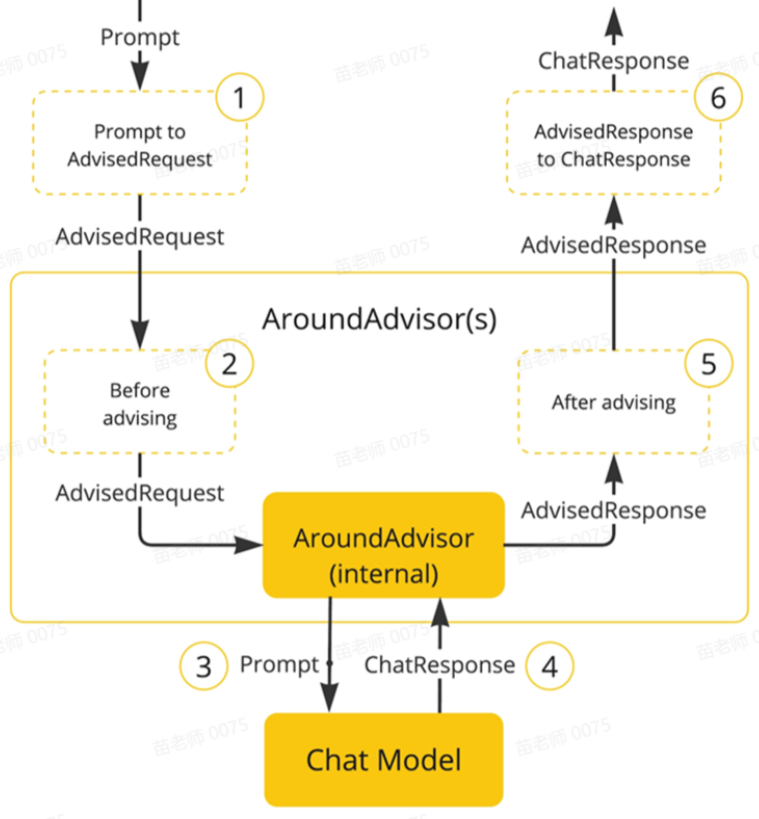
创建chatClient时加入advisors
@Configuration
public class ChatConfiguration {
    @Bean
    public ChatClient chatClientOllama(OllamaChatModel model) {
        return ChatClient.builder(model)
                .defaultAdvisors(new SimpleLoggerAdvisor())
                .build();
    }
    @Bean
    public ChatClient chatClientOpenAI(OpenAiChatModel model){
        return ChatClient.builder(model)
                .defaultAdvisors(new SimpleLoggerAdvisor())
                .build();
    }
}
修改日志级别
logging:
  level:
    org.springframework.context.support.PostProcessorRegistrationDelegate: error
    org.flywaydb: debug
    org.jeecg.modules.system.mapper: info