背景
具身智能(Embodied AI)是当前 AI 领域最受关注的方向之一。Vision-Language-Action(VLA)模型作为连接视觉感知、语言理解与物理操作的核心范式,正在快速推动机器人从 "程序驱动" 走向 "智能驱动"。然而,VLA 模型的训练效果高度依赖于大规模、高质量的操作数据------这恰恰是当前具身智能领域最突出的瓶颈。
传统的机器人操作数据主要依赖遥操作(teleoperation)采集,一位操作员使用专用设备控制机械臂执行任务,同步记录视觉观测、关节状态与语言指令。这种方式成本高昂、采集效率低,且场景覆盖有限------一个实验室中能完成的任务类型远远无法满足通用 VLA 模型的需求。
与此同时,互联网上存在着海量的第一视角(egocentric)人手操作视频 。这些视频天然蕴含了人类在厨房烹饪、工具使用、日常整理等场景中丰富的手部与物体交互行为,覆盖了极其多样的环境、物体类型和操作方式。一个自然的想法是:能否将这些触手可及的人手视频,自动转化为 VLA 模型可以直接使用的训练数据?
然而,将这样一套复杂的流程真正工程化落地,面临着巨大的挑战:不同模型之间存在环境依赖冲突,处理流程涉及视频解码、3D 重建、位姿估计等异构计算,规模化场景下还需要分布式调度与容错------目前业界尚未有一套完整的、可直接运行的 VLA 数据生产流水线。
本文将介绍如何在 PAI 平台上使用 Data-Juicer 数据处理框架,构建业界首个端到端的人手视频 → VLA 数据自动化流水线 。该方案参考 VITRA 论文的技术路线,将其中的核心环节封装为 Data-Juicer 的预置算子与自定义算子,通过 Ray 实现分布式调度与异构环境管理,最终输出符合 LeRobot v2.0 1 格式的标准化 VLA 训练数据集。借助 Data-Juicer 近 200 个预置算子和灵活的自定义算子能力,大幅降低 VLA 数据生产的工程门槛。
基于Data-Juicer的VLA数据流水线详解
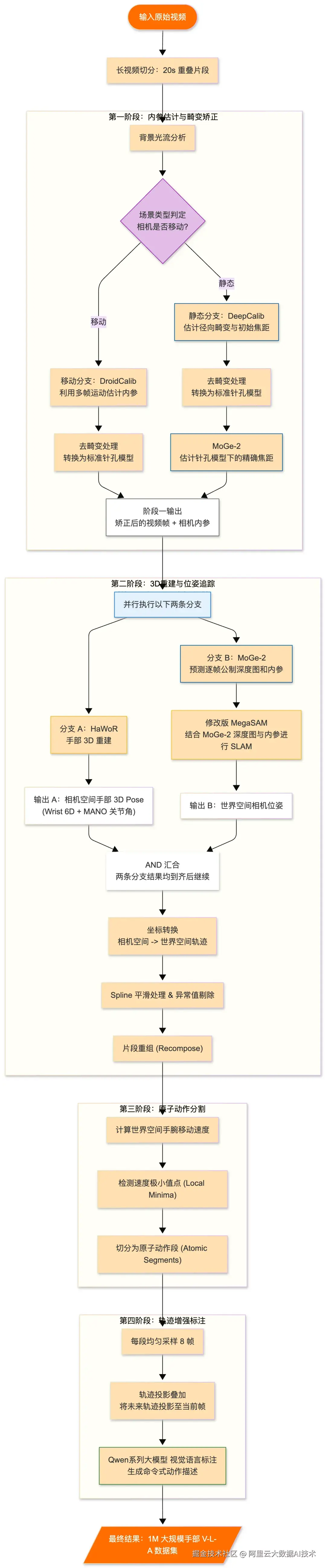
流水线覆盖了从相机内参估计、视频去畸变、深度估计、3D 手部重建、相机位姿估计,到手部动作计算与基于速度极小值的原子动作分割的完整链路,随后为分割出的原子片段生成语言指令,最终输出符合 LeRobot v2.0 格式的标准化 VLA 数据集。
我们将聚焦于阶段一和阶段二,介绍如何基于 Data-Juicer 数据处理框架与 Ray 分布式计算引擎,构建一套端到端的自动化流水线,将第一视角人手视频高效转化为符合 LeRobot v2.0 格式的 VLA 训练数据。并利用 Data-Juicer 丰富的预置算子与灵活的自定义算子能力,实现了从理论到工程的落地。
我们将按照下面抽取出的部分流水线功能为例,逐步介绍每个环节的技术原理与算子实现: 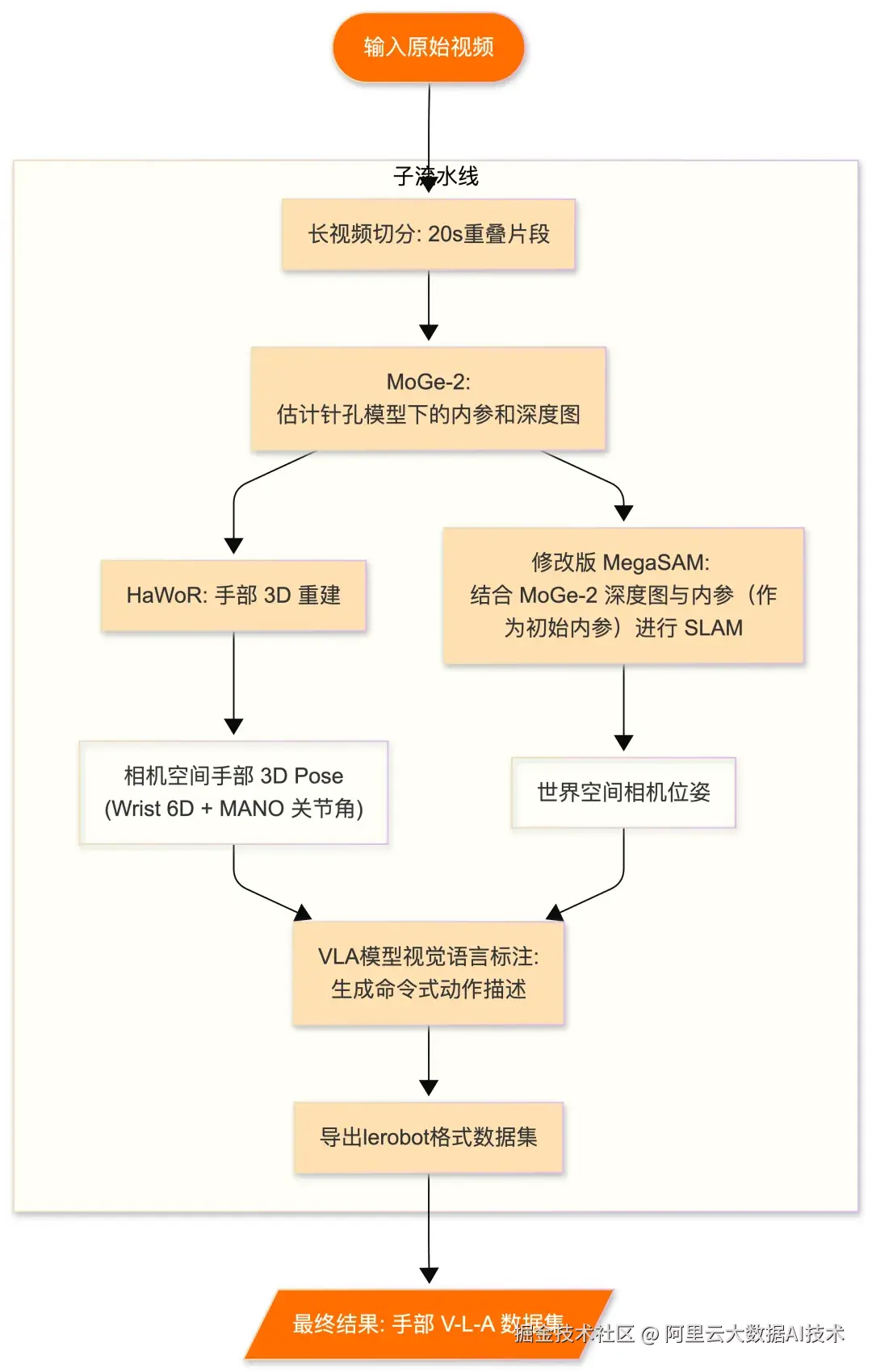
2.1 视频切分
第一视角视频的原始时长通常较长,从几分钟到数小时不等。直接对长视频进行后续的 3D 手部重建、相机位姿估计等处理,不仅显存和内存开销巨大,还容易因单帧异常导致整段处理失败。我们在流水线最前端将长视频按固定时长切分为重叠的 20 秒短片段。
切分时相邻片段之间可以保留一定的时间重叠,目的是确保处于切割边界附近的手部动作不会被截断,后续阶段可以对重叠区域的处理结果进行拼接和去重,保证动作轨迹的连续性。这种策略在提高处理效率和稳定性的同时,也使得流水线天然具备了对长视频的分片。
使用 Data-Juicer 算子(暂未支持时间重叠):
plaintext
from data_juicer.ops.mapper import VideoSplitByDurationMapper

video_split_op = VideoSplitByDurationMapper(
    split_duration=20,
    keep_original_sample=False,
    save_dir=os.path.join(output_dir, 'clips'),
    video_backend="ffmpeg",
    ffmpeg_extra_args="-movflags frag_keyframe+empty_moov",
    skip_op_error=False,
    batch_mode=True,
    video_key=video_key,
    save_field=clip_key,
    legacy_split_by_text_token=False,
)
2.2 视频抽帧
采用全关键帧采样策略(all_keyframes),自动识别视频中的 I 帧(关键帧),确保所提取的每一帧都承载完整的视觉信息,同时避免了全帧提取带来的冗余和存储开销。
抽取的帧以文件路径形式存储在样本的 video_frames 元数据字段中,供后续算子直接引用。
使用 DataJuicer 算子:
plaintext
from data_juicer.ops.mapper import VideoExtractFramesMapper
from data_juicer.utils.constant import MetaKeys

extract_frames_op = VideoExtractFramesMapper(
    frame_sampling_method="all_keyframes",
    output_format='path',
    frame_dir=os.path.join(output_dir, 'frames'),
    frame_field=MetaKeys.video_frames,
    video_key="videos",
    video_backend='ffmpeg',
    batch_mode=True,
)
2.3 MoGe-2 相机标定与深度估计
假设视频画面已符合(或近似符合)针孔相机模型。此时使用 MoGe-2 进行更精确的相机标定与稠密深度估计。
MoGe-2 是一个强大的单目深度与几何估计模型,能够从单帧图像中同时输出:
-
精确的相机焦距:在针孔模型假设下估计最终焦距,精度优于 DeepCalib
-
逐像素的稠密深度图:为后续 MegaSAM 相机位姿估计提供深度先验
MoGe-2 的深度输出在本流水线中扮演着双重角色:既作为 HaWoR 3D 手部重建的辅助输入(提供焦距信息),又作为 MegaSAM 相机位姿估计的深度先验。这种"一次推理、多处复用"的设计有效减少了重复计算。
使用 DataJuicer 算子:
plaintext
from data_juicer.ops.mapper import VideoCameraCalibrationMogeMapper

# ray dataset
ds = ds.map_batches(
    VideoCameraCalibrationMogeMapper,
    fn_constructor_kwargs=dict(
        tag_field_name=MetaKeys.camera_calibration_moge_tags,
        frame_field=MetaKeys.video_frames,
        output_depth=True,
        output_points=False,
        output_mask=False,
        batch_mode=True,
    ),
    batch_size=1,
    num_gpus=0.1,
    batch_format="pyarrow",
    compute=ActorPoolStrategy(min_size=1, max_size=2),  # 范围根据资源调节
)
2.4 HaWoR 3D 手部重建
在获得相机内参和去畸变视频之后,进入 3D 手部重建环节。我们采用 HaWoR(Hands in the Wild with Reconstruction)模型对视频中的双手进行逐帧 3D 重建。
HaWoR 是一个专为自然场景(in-the-wild)视频设计的手部重建模型,能够处理遮挡、运动模糊、复杂背景等挑战性场景。对于每一帧图像,HaWoR 输出:
-
手腕的 6D 位姿
:3 维平移(x, y, z)+ 3 维旋转(roll, pitch, yaw),描述手腕在相机空间中的绝对位置和朝向
-
MANO 手部关节角度
:基于 MANO 2 参数化手部模型的关节角度参数,可以精确描述手指的弯曲和展开状态
值得注意的是,前一阶段由 MoGe-2 估计的相机焦距将作为 HaWoR 的输入参数,这对于从 2D 图像中恢复准确的 3D 手部位置至关重要------焦距直接影响透视投影的逆运算精度。
使用 DataJuicer 算子:
plaintext
from data_juicer.ops.mapper import VideoHandReconstructionHaworMapper

ds = ds.map_batches(
    VideoHandReconstructionHaworMapper,
    fn_constructor_kwargs=dict(
        camera_calibration_field=MetaKeys.camera_calibration_moge_tags,
        tag_field_name=MetaKeys.hand_reconstruction_hawor_tags,
        mano_right_path='/path/to/MANO_RIGHT.pkl',
        mano_left_path='/path/to/MANO_LEFT.pkl',
        frame_field=MetaKeys.video_frames,
        batch_mode=True,
    ),
    batch_size=1,
    num_gpus=0.1,
    batch_format="pyarrow",
    compute=ActorPoolStrategy(min_size=1, max_size=2),  # 范围根据资源调节
)
MANO 手部模型需要从 官方网站 2 单独下载,包含左手(MANO_LEFT.pkl)和右手(MANO_RIGHT.pkl)两个模型文件。
2.5 MegaSAM 相机位姿估计
对于移动相机场景(第一视角视频中相机通常跟随头部运动),需要估计每一帧的相机位姿,才能将相机空间下的 3D 手部转换到统一的世界空间。
我们使用改进版 MegaSAM 进行度量尺度(metric-scale)的相机位姿估计。原始 MegaSAM 结合了 DepthAnything 和 UniDepth 的深度先验来应对相机基线有限和场景动态复杂的挑战。参考 VITRA 论文的经验,我们将这些深度模块替换为前一阶段 MoGe-2 的直接输出,这带来了两个显著改进:
-
精度提升:MoGe-2 的深度预测更加精确和稳定
-
效率提升:避免了加载和运行多个独立深度模型的开销
此外,MegaSAM 的相机内参初始化也使用了前面阶段估计的焦距信息,进一步提升了位姿估计的精度。
由于 MegaSAM 基于 DROID-SLAM 构建,其 CUDA 编译组件(droid_backends、lietorch、torch-scatter)与主环境的依赖版本存在冲突,因此必须在独立的环境中编译一个版本 。借助 Ray 的 runtime_env 机制,我们通过简单的配置即可实现算子级别的环境隔离,无需用户手动切换环境:
plaintext
from data_juicer.ops.mapper import VideoCameraPoseMegaSaMMapper

ds = ds.map_batches(
    VideoCameraPoseMegaSaMMapper,
    fn_constructor_kwargs=dict(
        tag_field_name=MetaKeys.video_camera_pose_tags,
        camera_calibration_field=MetaKeys.camera_calibration_moge_tags,
        batch_mode=True,
    ),
    batch_size=1,
    num_gpus=0.1,
    batch_format="pyarrow",
    compute=ActorPoolStrategy(min_size=1, max_size=2),  # 范围根据资源调节
    runtime_env={"env_vars": {"PYTHONPATH": "/opt/megasam-ext"}}, # 优先使用单独编译的环境
)
2.6 动作指令标注
该环节使用视觉语言模型(VLM)对视频帧进行理解和描述。具体流程为:
-
加载之前提取的关键帧
-
将采样帧连同精心设计的提示词(prompt)发送给 VLM
-
VLM 以结构化 JSON 格式返回推理过程和动作描述
提示词的设计规则:
-
祈使句描述
:使用祈使句形式(如 "Pick up the cup"),与机器人指令的表达习惯一致
-
指定手标注
:明确指定标注左手或右手的动作,避免混淆
-
拒绝幻觉
:如果画面中没有清晰的手部动作或交互物体,返回 "N/A" 而非强行编造
-
动词优先
:使用具体的描述性动词(如 "pick"、"place"),避免模糊泛化的词汇
该算子同时支持 API 调用模式 和 本地 vLLM 推理模式,用户可根据自身的资源条件和精度需求灵活选择。
对原子级动作片段进行标注能有效提高标注准确率。这是因为固定时长切分后的片段仍可能包含多个动作,增加了 VLM 理解的难度。
自定义算子(video_action_captioning_mapper.py):
plaintext
# yapf: disable
import json
import re
from typing importDict, List, Optional
from loguru import logger
from pydantic import PositiveInt
from data_juicer.utils.constant import Fields, MetaKeys
from data_juicer.utils.lazy_loader import LazyLoader
from data_juicer.utils.mm_utils import image_path_to_base64
from data_juicer.utils.model_utils import (
    get_model,
    prepare_model,
    update_sampling_params,
)
from data_juicer.ops.base_op import OPERATORS, TAGGING_OPS, Mapper
vllm = LazyLoader("vllm")
OP_NAME = 'video_action_captioning_mapper'
DEFAULT_SYSTEM_PROMPT = (
'You are a multimodal expert specializing in video captioning '
'for egocentric human-object interaction (HOI) clips.'
)
DEFAULT_USER_PROMPT_TEMPLATE = """Below are video frames sampled from an egocentric video containing a single atomic hand-object interaction. Describe the specific {hand_type}-hand action shown in these frames.
The {hand_type}-hand palm position is marked with a blue dot. Do not confuse it with the {opposite_hand_type} hand. Respect the temporal order of frames (Frame 1 is earliest, last frame is latest). Consider the hand status in each frame, whether there is an interacted object, and the temporal progression.
Rules for describing the {hand_type}-hand action:
- Only describe {hand_type}-hand actions. Ignore the {opposite_hand_type} hand completely.
- Write in imperative form (e.g., "Insert the key," not "The hand is inserting..."). Do not use personal pronouns.
- Use specific, descriptive verbs. Prefer verbs like "pick" and "place" when applicable. Avoid vague terms like "clean", "spray", or "fix".
- Describe the interacted object only if: (1) the {hand_type} hand clearly interacts with it, or (2) the hand is purposefully moving toward it with clear intent. Otherwise, return "N/A" as the action.
- Do not hallucinate: if no clear hand action or object is present, return "N/A" as the action.
- Do not guess the action based on context.
Return your answer in JSON format:
{{"think": "<brief 3-4 sentence reasoning>", "action": "<one-sentence action description or N/A>"}}
Here are the frames:
"""  # noqa: E501
@TAGGING_OPS.register_module(OP_NAME)
@OPERATORS.register_module(OP_NAME)
classVideoActionCaptioningMapper(Mapper):
"""Generates hand action captions from pre-extracted video frames
    using a VLM model (via API or vLLM).
    This operator reads frames from a specified field (e.g., video_frames),
    sends them along with a configurable prompt to a VLM, and stores the
    structured JSON response (think + action) in a meta field.
    The action description is also written to the text field.
    Supports annotating 'left', 'right', or 'both' hands. When hand_type
    is 'both', the operator runs two separate VLM calls (one per hand)
    and joins the action descriptions with '; ' in the text field.
    """
    _accelerator = 'cuda'
def__init__(
        self,
        api_or_hf_model: str = 'Qwen/Qwen2.5-VL-7B-Instruct',
        is_api_model: bool = False,
        *,
        hand_type: str = 'right',
        frame_field: str = MetaKeys.video_frames,
        tag_field_name: str = 'hand_action_caption',
        api_endpoint: Optional[str] = None,
        response_path: Optional[str] = None,
        system_prompt: Optional[str] = None,
        user_prompt_template: Optional[str] = None,
        model_params: Dict = {},
        sampling_params: Dict = {},
        try_num: PositiveInt = 3,
        **kwargs,
    ):
"""
        Initialization method.
        :param api_or_hf_model: API model name or HuggingFace model name.
        :param is_api_model: Whether the model is an API model.
            If true, use OpenAI-compatible API; otherwise use vLLM.
        :param hand_type: Which hand to describe: 'left', 'right', or
            'both'. When 'both', two separate calls are made and actions
            are joined with '; ' in the text field.
        :param frame_field: The field name where pre-extracted frames
            are stored. Each element is a list of frame paths (one list
            per video).
        :param tag_field_name: The meta field name to store the generated
            caption result (JSON with 'think' and 'action').
        :param api_endpoint: URL endpoint for the API.
        :param response_path: Path to extract content from the API response.
            Defaults to 'choices.0.message.content'.
        :param system_prompt: System prompt for the VLM. If None, uses the
            default egocentric HOI system prompt.
        :param user_prompt_template: User prompt template string. Supports
            {hand_type} and {opposite_hand_type} placeholders.
            If None, uses the default template.
        :param model_params: Parameters for initializing the model.
        :param sampling_params: Extra parameters passed to the model.
            e.g {'temperature': 0.9, 'top_p': 0.95}
        :param try_num: The number of retry attempts when there is an API
            call error or output parsing error.
        :param kwargs: Extra keyword arguments.
        """
super().__init__(**kwargs)
self.is_api_model = is_api_model
if hand_type notin ('left', 'right', 'both'):
raise ValueError(
f"hand_type must be 'left', 'right', or 'both', "
f"got '{hand_type}'")
self.hand_type = hand_type
self.frame_field = frame_field
self.tag_field_name = tag_field_name
self.try_num = try_num
self.system_prompt = system_prompt or DEFAULT_SYSTEM_PROMPT
self.user_prompt_template = (
            user_prompt_template or DEFAULT_USER_PROMPT_TEMPLATE
        )
        sampling_params = update_sampling_params(
            sampling_params, api_or_hf_model, notself.is_api_model)
ifself.is_api_model:
self.sampling_params = sampling_params
self.model_key = prepare_model(
                model_type='api',
                model=api_or_hf_model,
                endpoint=api_endpoint,
                response_path=response_path,
                **model_params,
            )
else:
self.num_proc = 1
self.model_key = prepare_model(
                model_type='vllm',
                pretrained_model_name_or_path=api_or_hf_model,
                **model_params,
            )
self.sampling_params = vllm.SamplingParams(**sampling_params)
def_build_messages(self, frame_paths, hand_type, opposite_hand_type):
"""Build the chat messages with frames embedded as images."""
        user_text = self.user_prompt_template.format(
            hand_type=hand_type,
            opposite_hand_type=opposite_hand_type,
        )
# Build multimodal content: prompt text + Frame N: [image] ...
        user_content = [{'type': 'text', 'text': user_text}]
for i, frame_path inenumerate(frame_paths):
            user_content.append({
'type': 'text',
'text': f'Frame {i + 1}:',
            })
            user_content.append({
'type': 'image_url',
'image_url': {
'url': f'data:image/jpeg;base64,'
f'{image_path_to_base64(frame_path)}',
                },
            })
        user_content.append({
'type': 'text',
'text': '\nAnalyze the frames above and return the JSON result.',
        })
        messages = []
ifself.system_prompt:
            messages.append({
'role': 'system',
'content': self.system_prompt,
            })
        messages.append({
'role': 'user',
'content': user_content,
        })
return messages
def_call_model(self, messages, rank=None):
"""Call the model and return raw text output."""
ifself.is_api_model:
            output = ''
for attempt inrange(self.try_num):
try:
                    client = get_model(self.model_key, rank=rank)
                    output = client(messages, **self.sampling_params)
break
except Exception as e:
                    logger.warning(
f'API call failed (attempt {attempt + 1}'
f'/{self.try_num}): {e}')
else:
            model, _ = get_model(self.model_key, rank, self.use_cuda())
            response = model.chat(messages, self.sampling_params)
            output = response[0].outputs[0].text
return output
    @staticmethod
def_parse_output(raw_output):
"""Parse the JSON output from the model.
        Handles cases where the model wraps JSON in ```json...``` fences
        and/or appends extra commentary after the JSON block.
        """
        text = raw_output.strip()
# Try to extract JSON from markdown code fences first
        fence_match = re.search(
r'```(?:json)?\s*(\{.*?\})\s*```', text, re.DOTALL)
if fence_match:
            text = fence_match.group(1)
else:
# Try to extract the first {...} block
            brace_match = re.search(r'\{.*\}', text, re.DOTALL)
if brace_match:
                text = brace_match.group(0)
try:
            result = json.loads(text, strict=False)
except json.JSONDecodeError:
try:
                result = json.loads(text.replace("'", '"'), strict=False)
except Exception:
                logger.warning(
f'Failed to parse model output as JSON: {raw_output}')
return {'think': '', 'action': ''}
ifnotisinstance(result, dict):
return {'think': '', 'action': str(result)}
return {
'think': result.get('think', ''),
'action': result.get('action', ''),
        }
def_caption_single_hand(self, frame_paths, hand_type, rank=None):
"""Run captioning for a single hand and return parsed result."""
        opposite = 'left'if hand_type == 'right'else'right'
        messages = self._build_messages(frame_paths, hand_type, opposite)
        output = self._call_model(messages, rank=rank)
returnself._parse_output(output)
defprocess_single(self, sample, rank=None, context=False):
# check if it's generated already
ifself.tag_field_name in sample.get(Fields.meta, {}):
return sample
if Fields.meta notin sample:
            sample[Fields.meta] = {}
# get frames from the frame_field
        frame_data = sample.get(self.frame_field, [])
ifnot frame_data:
            sample[Fields.meta][self.tag_field_name] = {
'think': '', 'action': 'N/A'}
return sample
# frame_data is a list of lists (one per video), flatten if needed
ifisinstance(frame_data[0], list):
            frame_paths = frame_data[0]
else:
            frame_paths = frame_data
ifnot frame_paths:
            sample[Fields.meta][self.tag_field_name] = {
'think': '', 'action': 'N/A'}
return sample
ifself.hand_type == 'both':
            right_result = self._caption_single_hand(
                frame_paths, 'right', rank=rank)
            left_result = self._caption_single_hand(
                frame_paths, 'left', rank=rank)
            sample[Fields.meta][self.tag_field_name] = {
'right': right_result,
'left': left_result,
            }
# join non-N/A actions into text
            actions = []
for side, result in [('right', right_result),
                                 ('left', left_result)]:
                action = result.get('action', '')
if action and action != 'N/A':
                    actions.append(f'{side} hand: {action}')
if actions:
                sample[self.text_key] = '; '.join(actions)
else:
            result = self._caption_single_hand(
                frame_paths, self.hand_type, rank=rank)
            sample[Fields.meta][self.tag_field_name] = result
            action = result.get('action', '')
if action and action != 'N/A':
                sample[self.text_key] = action
return sample
2.7 导出 LeRobot v2.0 数据集
流水线的最后一步是将处理结果导出为标准化的 VLA 数据集格式。我们选择了 Hugging Face 的 LeRobot v2.0 格式,这是目前具身智能社区最广泛使用的机器人数据集标准之一。
每个原子动作片段被组织为一个独立的 episode,包含:
-
视频片段
(MP4):对应的原始视频画面
-
动作序列
(Parquet):逐帧的 7 维动作向量
[dx, dy, dz, droll, dpitch, dyaw, gripper] -
状态序列
(Parquet):逐帧的 8 维状态向量
[x, y, z, roll, pitch, yaw, pad, gripper] -
任务描述
(JSONL):由 VLM 生成的自然语言指令
最终的数据集目录结构如下:
plaintext
lerobot_dataset/
├── data/
│   └── chunk-000/
│       ├── episode_000000.parquet
│       ├── episode_000001.parquet
│       └── ...
├── videos/
│   └── chunk-000/
│       └── observation.images.image/
│           ├── episode_000000.mp4
│           ├── episode_000001.mp4
│           └── ...
├── meta/
│   ├── info.json          # 数据集元信息(fps、robot_type 等)
│   ├── episodes.jsonl     # episode 索引
│   ├── modality.json      # action/state 的统计信息
│   └── tasks.jsonl        # 任务描述(语言指令)
使用 DataJuicer 算子:
plaintext
from data_juicer.ops.mapper import ExportToLeRobotMapper

export_op = ExportToLeRobotMapper(
    output_dir=LEROBOT_OUTPUT_DIR,
    hand_action_field=MetaKeys.hand_action_tags,
    frame_field=MetaKeys.video_frames,
    video_key="videos",
    task_description_key="text",
    fps=10,
    robot_type="egodex_hand",
    batch_mode=True,
)

# 导出后调用 finalize 生成元信息
ExportToLeRobotMapper.finalize_dataset(
    output_dir=LEROBOT_OUTPUT_DIR,
    fps=10,
    robot_type="egodex_hand",
)
基于PAI-DLC的分布式运行
3.1 流水线串联
Data-Juicer 原生构建于 Ray 底座之上,其算子可被 Ray Data 的 map_batches API 直接调用。所有算子通过链式调用串联为一条完整的流水线,Ray 自动处理数据的分片、调度和并行化。
完整的流水线运行代码如下:
plaintext
import os
import sys
import copy
import time

import ray
from ray.data import ActorPoolStrategy
from ray.data import DataContext
import torch

from data_juicer.utils.constant import Fields, MetaKeys
from data_juicer.ops.mapper import (
    VideoSplitByDurationMapper,
    VideoCameraCalibrationMogeMapper,
    VideoHandReconstructionHaworMapper,
    VideoCameraPoseMegaSaMMapper,
    VideoExtractFramesMapper,
    VideoHandActionComputeMapper,
    ExportToLeRobotMapper)
from video_action_captioning_mapper import VideoActionCaptioningMapper


# ─────────────────────────────────────────────────────────────
# 合并算子: HaWoR + MegaSaM 在同一个 GPU actor 上顺序执行
# ─────────────────────────────────────────────────────────────
from data_juicer.ops.base_op import OPERATORS, Mapper


@OPERATORS.register_module("video_hawor_megasam_combined_mapper")
class VideoHaWorMegaSaMCombinedMapper(Mapper):
    """Combined HaWoR hand reconstruction + MegaSaM camera pose estimation.

    Runs both GPU models sequentially on the same actor to:
    1. Avoid inter-stage data serialization overhead
    2. Simplify Ray scheduling (fewer GPU stages = less resource contention)
    3. Share GPU memory efficiently
    """

    _accelerator = "cuda"

    def __init__(
        self,
        # HaWoR params
        hawor_model_path: str = "hawor.ckpt",
        hawor_config_path: str = "model_config.yaml",
        hawor_detector_path: str = "detector.pt",
        mano_right_path: str = "MANO_RIGHT.pkl",
        mano_left_path: str = "MANO_LEFT.pkl",
        camera_calibration_field: str = MetaKeys.camera_calibration_moge_tags,
        hawor_tag_field: str = MetaKeys.hand_reconstruction_hawor_tags,
        frame_field: str = MetaKeys.video_frames,
        hawor_thresh: float = 0.2,
        # MegaSaM params
        megasam_tag_field: str = MetaKeys.video_camera_pose_tags,
        megasam_max_frames: int = 1000,
        megasam_droid_buffer: int = 128,
        *args,
        **kwargs,
    ):
        super().__init__(*args, **kwargs)

        # 延迟实例化,在 process_single 里按需创建
        self._hawor_kwargs = dict(
            hawor_model_path=hawor_model_path,
            hawor_config_path=hawor_config_path,
            hawor_detector_path=hawor_detector_path,
            mano_right_path=mano_right_path,
            mano_left_path=mano_left_path,
            camera_calibration_field=camera_calibration_field,
            tag_field_name=hawor_tag_field,
            frame_field=frame_field,
            thresh=hawor_thresh,
            batch_mode=True,
            skip_op_error=kwargs.get("skip_op_error", False),
        )
        self._megasam_kwargs = dict(
            tag_field_name=megasam_tag_field,
            camera_calibration_field=camera_calibration_field,
            frame_field=frame_field,
            max_frames=megasam_max_frames,
            droid_buffer=megasam_droid_buffer,
            batch_mode=True,
            skip_op_error=kwargs.get("skip_op_error", False),
        )

        self._hawor_op = None
        self._megasam_op = None

    def _ensure_ops(self):
        if self._hawor_op is None:
            self._hawor_op = VideoHandReconstructionHaworMapper(**self._hawor_kwargs)
        if self._megasam_op is None:
            self._megasam_op = VideoCameraPoseMegaSaMMapper(**self._megasam_kwargs)

    def process_single(self, sample=None, rank=None):
        from loguru import logger as _logger

        self._ensure_ops()
        sample = self._hawor_op.process_single(sample, rank=rank)

        try:
            sample = self._megasam_op.process_single(sample, rank=rank)
        except Exception as e:
            # MegaSaM failure should not discard HaWoR results.
            # Write empty camera pose so downstream can still detect
            # the missing data gracefully instead of crashing.
            import traceback
            _logger.error(f"MegaSaM failed (HaWoR result preserved): "
                          f"{e} -- {traceback.format_exc()}")
            megasam_field = self._megasam_kwargs.get(
                "tag_field_name", MetaKeys.video_camera_pose_tags)
            if Fields.meta not in sample:
                sample[Fields.meta] = {}
            # One empty entry per video clip
            n_videos = len(sample.get(self._hawor_kwargs.get(
                "frame_field", MetaKeys.video_frames), []))
            sample[Fields.meta][megasam_field] = [
                {} for _ in range(max(1, n_videos))
            ]

        return sample


if __name__ == '__main__':

    DataContext.get_current().enable_fallback_to_arrow_object_ext_type = True

    s_time = time.time()

    ray.init(address='auto')

    output_dir = "./outputs"
    hawor_home = os.expanduser('~/.cache/data_juicer/assets/HaWoR/')

    os.makedirs(output_dir, exist_ok=True)
    LEROBOT_OUTPUT_DIR = os.path.join(output_dir, "lerobot_dataset")

    video_key = "videos"
    clip_key = "clips"
    skip_op_error = True

    video_paths = [
        "./data/1018.mp4",
        "./data/1034.mp4",
    ]
    samples = [
        {
            video_key: [video],
            "text": "",
            # Fields.stats: {},
            Fields.meta: {}
        } for video in video_paths
    ]

    ds = ray.data.from_items(samples)

    # =================================================================
    # 阶段 1: 视频切分 (CPU)
    # =================================================================
    ds = ds.map_batches(
        VideoSplitByDurationMapper,
        fn_constructor_kwargs=dict(
            split_duration=20,
            keep_original_sample=False,
            save_dir=os.path.join(output_dir, 'clips'),
            output_format='path',
            video_backend="ffmpeg",
            ffmpeg_extra_args="-movflags frag_keyframe+empty_moov",
            skip_op_error=skip_op_error,
            batch_mode=True,
            video_key=video_key,
            save_field=clip_key,
            legacy_split_by_text_token=False,
        ),
        batch_size=1,
        num_cpus=1,
        batch_format="pyarrow",
        runtime_env=None,
        compute=ActorPoolStrategy(min_size=1, max_size=10),  # 根据资源池调整
    )

    # 将clips平铺,其他字段保持原样
    def flat_clips(sample):
        clips = sample[clip_key]

        flat_samples = []
        for idx in range(len(clips)):
            flat_sample = copy.deepcopy(sample)
            flat_sample[clip_key] = [clips[idx]]  # 兼容datajuicer video list格式
            flat_samples.append(flat_sample)
        return flat_samples

    ds = ds.flat_map(flat_clips)

    # =================================================================
    # 阶段 2: 帧提取 (CPU)
    # =================================================================
    ds = ds.map_batches(
        VideoExtractFramesMapper,
        fn_constructor_kwargs=dict(
            frame_sampling_method="uniform",
            frame_num=20,
            video_backend='ffmpeg',
            output_format='path',  #'bytes',
            frame_dir=os.path.join(output_dir, 'frames'),
            frame_field=MetaKeys.video_frames,
            legacy_split_by_text_token=False,
            batch_mode=True,
            skip_op_error=skip_op_error,
            video_key=clip_key),
        batch_size=1,
        num_cpus=1,
        batch_format="pyarrow",
        compute=ActorPoolStrategy(min_size=1, max_size=10),  # 根据资源池调整
    )

    # =================================================================
    # 阶段 3: MoGe 相机标定 (GPU)
    # =================================================================
    ds = ds.map_batches(
        VideoCameraCalibrationMogeMapper,
        fn_constructor_kwargs=dict(
            model_path="Ruicheng/moge-2-vitl",
            tag_field_name=MetaKeys.camera_calibration_moge_tags,
            frame_field=MetaKeys.video_frames,
            output_depth=True,
            output_points=False,
            output_mask=False,
            batch_mode=True,
            skip_op_error=skip_op_error,
        ),
        batch_size=1,
        num_gpus=0.15,  # 预留10G左右显存,占比根据实际GPU规格调整
        batch_format="pyarrow",
        compute=ActorPoolStrategy(min_size=1, max_size=10),  # 根据资源池调整
        runtime_env=None,
    )

    # =================================================================
    # 阶段 4: HaWoR + MegaSaM 合并 (GPU)
    # =================================================================
    ds = ds.map_batches(
        VideoHaWorMegaSaMCombinedMapper,
        fn_constructor_kwargs=dict(
            hawor_model_path=os.path.join(hawor_home, "hawor.ckpt"),
            hawor_config_path=os.path.join(hawor_home, "model_config.yaml"),
            hawor_detector_path=os.path.join(hawor_home, "detector.pt"),
            camera_calibration_field=MetaKeys.camera_calibration_moge_tags,
            hawor_tag_field=MetaKeys.hand_reconstruction_hawor_tags,
            megasam_tag_field=MetaKeys.video_camera_pose_tags,
            mano_right_path=os.path.join(hawor_home, "_DATA/data/mano/MANO_RIGHT.pkl"),
            mano_left_path=os.path.join(hawor_home, "_DATA/data_left/mano_left/MANO_LEFT.pkl"),
            frame_field=MetaKeys.video_frames,
            batch_mode=True,
            skip_op_error=skip_op_error,
        ),
        batch_size=1,
        num_gpus=0.25,  # 预留18G左右显存,占比根据实际GPU规格调整
        batch_format="pyarrow",
        runtime_env={"env_vars": {"PYTHONPATH": "/opt/megasam-ext"}},
        compute=ActorPoolStrategy(min_size=1, max_size=10),  # 根据资源池调整
    )

    # =================================================================
    # 阶段 5: 手部动作计算 (CPU)
    # =================================================================
    ds = ds.map_batches(
        VideoHandActionComputeMapper,
        fn_constructor_kwargs=dict(
            hand_reconstruction_field=MetaKeys.hand_reconstruction_hawor_tags,  # outputs of VideoHandReconstructionHaworMapper
            camera_pose_field=MetaKeys.video_camera_pose_tags,  # outputs of VideoCameraPoseMegaSaMMapper
            tag_field_name=MetaKeys.hand_action_tags,
            hand_type="both",
            batch_mode=True,
            skip_op_error=skip_op_error,
        ),
        batch_size=1,
        num_cpus=1,
        batch_format="pyarrow",
        compute=ActorPoolStrategy(min_size=1, max_size=10),
    )

    # =================================================================
    # 阶段 6: 手部动作 caption 标注 (CPU)
    # =================================================================
    ds = ds.map_batches(
        VideoActionCaptioningMapper,
        fn_constructor_kwargs=dict(
            api_or_hf_model='qwen-vl-max',
            is_api_model=True,
            hand_type='both',
            frame_field=MetaKeys.video_frames,
            tag_field_name="hand_action_caption",
            batch_mode=True,
            skip_op_error=skip_op_error,
        ),
        batch_size=1,
        num_cpus=1,
        batch_format="pyarrow",
        compute=ActorPoolStrategy(min_size=1, max_size=10),  # 根据资源池调整
    )

    # =================================================================
    # 阶段 7: 导出 LeRobot 格式 (CPU)
    # =================================================================
    ds = ds.map_batches(
        ExportToLeRobotMapper,
        fn_constructor_kwargs=dict(
            output_dir=LEROBOT_OUTPUT_DIR,
            hand_action_field=MetaKeys.hand_action_tags,  # outputs of VideoHandActionComputeMapper
            frame_field=MetaKeys.video_frames,
            video_key=clip_key,
            task_description_key="text",
            fps=10,
            robot_type="egodex_hand",
            batch_mode=True,
            skip_op_error=skip_op_error,
        ),
        batch_size=1,
        num_cpus=1,
        batch_format="pyarrow",
        runtime_env=None,
        compute=ActorPoolStrategy(min_size=1, max_size=10),  # 根据资源池调整
    )

    ds.write_parquet(output_dir)

    # 导出标准 LeRobot 格式
    # ExportToLeRobotMapper.finalize_dataset(
    #     output_dir=LEROBOT_OUTPUT_DIR,
    #     fps=10,
    #     robot_type="egodex_hand",
    # )

    print(f'>>>total cost time: {time.time() - s_time}')
3.2 环境准备
-
准备 MegaSAM 独立环境:MegaSAM 基于 DROID-SLAM 构建,其 CUDA 编译组件与主环境存在依赖冲突,建议安装在单独的环境中(demo 里单独安装在 /opt/megasam-ext 里)。可参考算子里的安装过程。流水线运行时,Ray 会通过 runtime_env 机制实现算子级别的环境隔离。
-
下载 MANO 2 手部模型:HaWoR 3D 手部重建依赖 MANO 参数化手部模型。需要从 MANO 官方网站注册并下载 MANO v1.2,获取 MANO_RIGHT.pkl 和 MANO_LEFT.pkl 两个模型文件,并在流水线配置中将 mano_right_path 和 mano_left_path 指向对应路径。
-
VLM 模型配置:动作指令标注算子支持两种模式。若使用 API 模式(如阿里云通义 qwen3.5-plus),需配置好对应的 API Key(OPENAI_API_KEY)和 endpoint(OPENAI_BASE_URL);若使用本地推理模式,需提前下载模型权重并确保 GPU 显存充足。
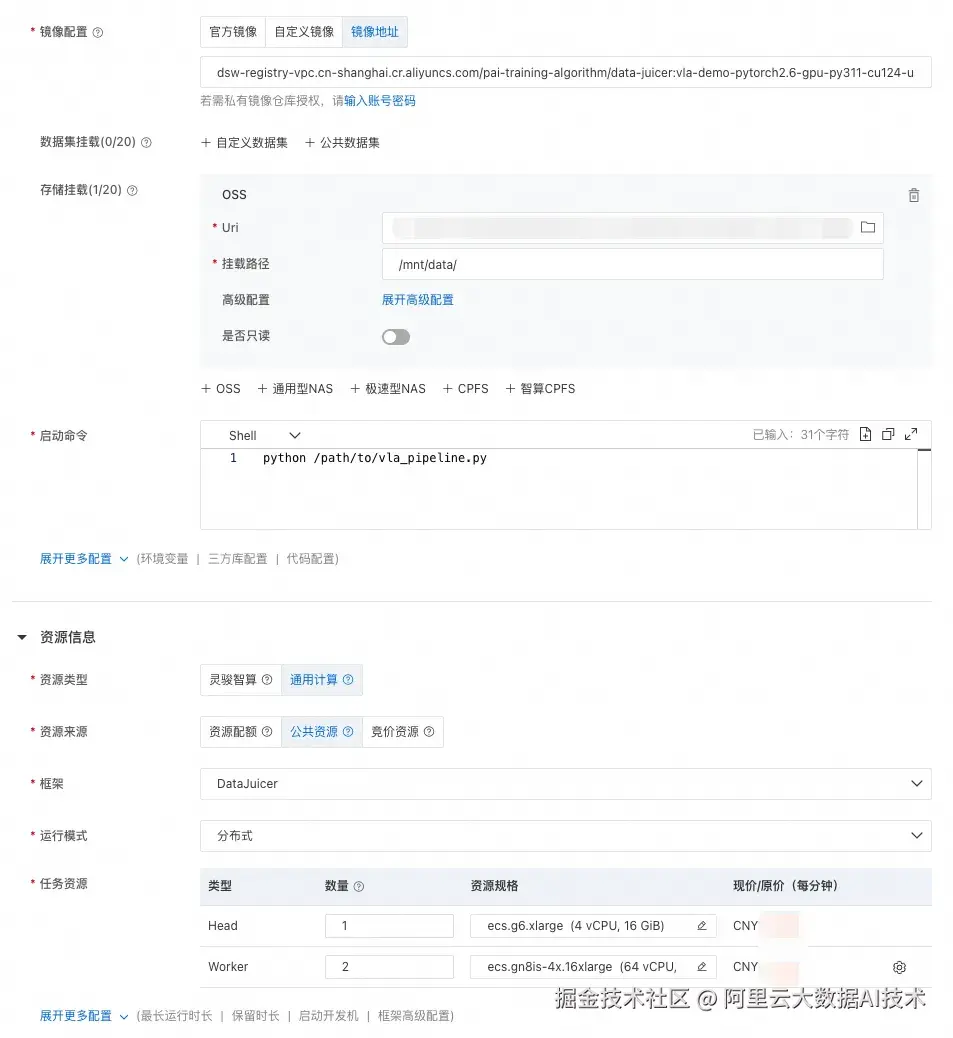
3.3 DLC启动分布式作业
参考文档:help.aliyun.com/zh/pai/user...
这里我们使用自定义镜像启动 DLC Data-Juicer 分布式数据处理作业。
我们提供了一个可用的预制镜像(将 {REGION} 替换为当前所在区域):
dsw-registry-vpc.{REGION}.cr.aliyuncs.com/pai-training-algorithm/data-juicer:vla-demo-pytorch2.6-gpu-py311-cu124-ubuntu22.04
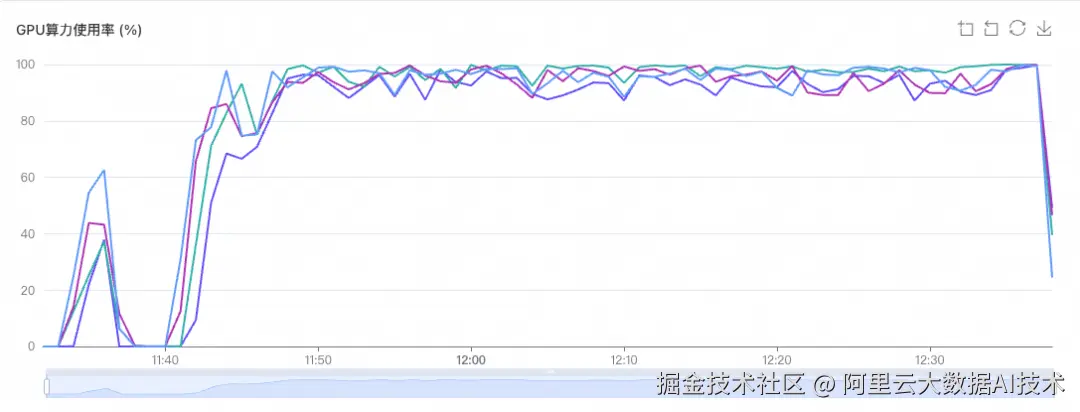
3.4 性能
测试数据: 从 egodex 数据集视频中随机抽取一万条视频,总时长:24小时 52分钟 13秒
机器:32张gn8v卡 (4台机器)
耗时:66 min
GPU利用率: 稳定在 95%
3.5 可视化预览
可视化工具参考:Data-Juicer PR931 3 (demos/ego_hand_action_annotation下的可视化工具)
产品介绍
阿里云人工智能平台PAI
PAI是企业级的一站式AI工程平台,凭借弹性高性能计算集群、卓越的资源调度与管理、与开源生态深度集成、全托管体验 等核心优势,使其成为处理多模态海量数据的理想选择。同时,对于数据处理管线,PAI与通义实验室 DataJuicer 团队合作,致力于构建一套高丰富度、高易用,高性能,高稳定性的数据处理管线,PAI-DLC 已上线 DataJuicer 框架,为用户提供丰富的算子、大规模数据、样本级/job级的自动容错、资源预估功能和卓越的线性扩展性能。
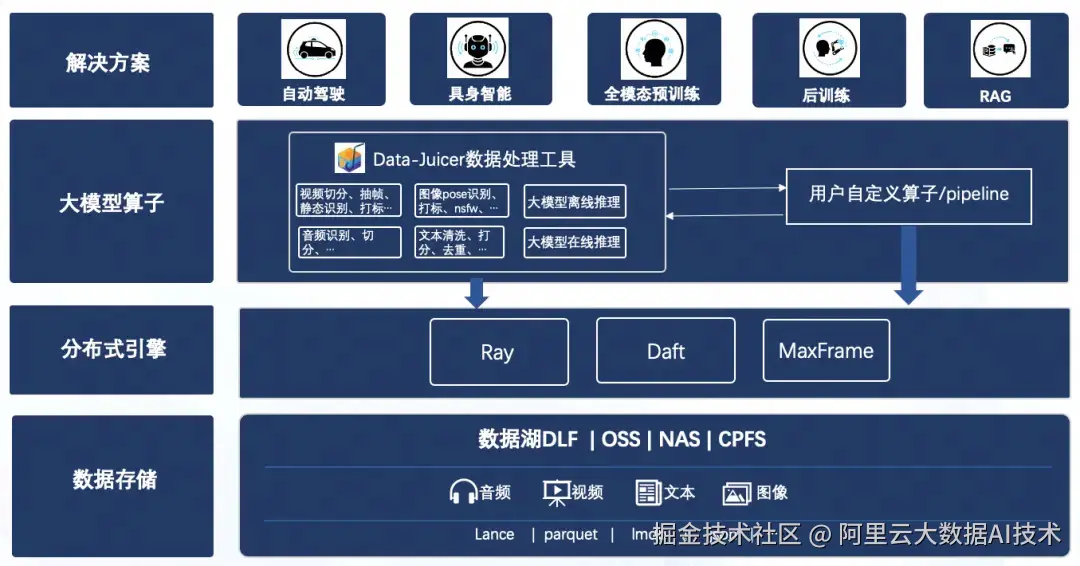
Data-Juicer
Data-Juicer 旨在解决大模型训练中的数据分析、清洗、合成与标注等难题。该平台通过原子化算子库、用户友好界面、分布式执行引擎及效用验证四大支柱,实现了从手动工程到自动化流水线的飞跃,具备系统化与可复用、用户友好与高灵活性、高效与鲁棒和效用验证与易实践的特征。
产品架构
总结与展望
本文展示了如何基于 Data-Juicer 与 Ray,将"第一视角人手视频 → VLA 数据"技术路线,工程化为一条端到端、可直接运行的自动化流水线。
据我们所知,这是业界首个完整的、开箱即用的人手视频 VLA 数据生产流水线。在此之前,尽管相关算法已在学术论文中提出,但从论文到实际可用的数据生产系统之间,仍存在大量的工程化工作------模型环境冲突、数据格式适配、分布式调度、容错处理等。本方案通过 Data-Juicer 的算子化架构将这些复杂性封装起来,使用户只需简单配置即可运行完整流程。
未来,我们计划进一步丰富流水线能力,以及引入数据质量评估与过滤环节,持续提升生产数据的规模与质量。
其他介绍
手部动作计算与原子动作分割
从相机空间到世界空间
通过将相机空间下的 3D 手部位姿与相机的世界位姿(由 MegaSAM 估计)相结合,我们可以将手部运动转换到统一的世界坐标系中。世界空间下的 3D 手部序列具有重要意义:
-
消除了相机运动的影响,手部轨迹反映的是真实的空间运动
-
可以方便地转换到任意视频帧的相机空间中,模拟机器人数据中常见的静态相机视角
-
为后续的动作分割和指令标注提供了更可靠的运动学信息
转换后,对世界空间下的手部运动应用高斯滤波平滑并去除离群值,减轻 3D 重建噪声的影响。
动作向量与状态向量
对于每一帧,算子计算:
-
状态向量
(8 维):
[x, y, z, roll, pitch, yaw, pad, gripper],描述手腕在世界空间中的绝对位姿 -
动作向量
(7 维):[dx, dy, dz, droll, dpitch, dyaw, gripper],描述相邻帧之间的位姿变化量
其中 gripper(夹爪状态)通过手指关节角度估算:1.0 表示手掌完全张开,-1.0 表示手掌完全握紧。这种连续值的设计使数据能够精确反映人手在操作过程中的抓握力度变化,而非简单的开/合二值状态。
基于速度极小值的原子动作分割
这是 VITRA 论文中一个简洁而精妙的设计。其核心观察是:在人类自然的手部动作中,动作转换期间手腕通常会表现出速度变化,而速度极小值往往预示着动作的切换。 例如,当一只手从"拿起杯子"过渡到"放下杯子"时,中间必然经历一个减速-加速的过程,形成一个速度极小值点。
基于这一观察,算子在世界空间中检测 3D 手腕的速度极小值,并将其作为视频切割点:
-
对平滑后的手部轨迹计算逐帧手腕速度
-
选择在以每个点为中心的 0.5 秒固定窗口内的局部速度极小值点作为切割候选
-
对左右手独立进行分割,忽略另一只手的运动
-
每个分割出的片段捕捉至少一只手的单个原子动作
这种方法的优势在于效率极高------不需要额外的模型推理或预标注的文本标签,仅依赖已有的 3D 手部轨迹即可完成分割,因此非常适合大规模数据处理。虽然该策略可能导致某些重复性动作(如擦拭)被"过度分割",但这些片段在指令标注完成后可以很容易地进行合并。