文章目录
前言
Spring AI Alibaba是阿里团队针对Spring AI框架在国内应用风格的一种包装、扩展与延伸。
对Agent Skills的支持,比Langchain4j更早,但对springboot 版本要求更高点。
之前写了demo,忘了做记录。
今天补上。
版本准备
- jdk 17
- maven 3.6.3
- springboot 3.5.4
- spring-ai 1.1.2
- spring-ai-alibaba 1.1.2.0
完整pom信息:
xml
<?xml version="1.0" encoding="UTF-8"?>
<project xmlns="http://maven.apache.org/POM/4.0.0"
         xmlns:xsi="http://www.w3.org/2001/XMLSchema-instance"
         xsi:schemaLocation="http://maven.apache.org/POM/4.0.0 http://maven.apache.org/xsd/maven-4.0.0.xsd">
    <modelVersion>4.0.0</modelVersion>

    <parent>
        <groupId>org.springframework.boot</groupId>
        <artifactId>spring-boot-starter-parent</artifactId>
        <version>3.5.4</version>
        <relativePath/>
    </parent>

    <artifactId>spring-ai-alibaba</artifactId>

    <properties>
        <maven.compiler.source>17</maven.compiler.source>
        <maven.compiler.target>17</maven.compiler.target>
        <project.build.sourceEncoding>UTF-8</project.build.sourceEncoding>
    </properties>

    <dependencyManagement>
        <dependencies>
            <dependency>
                <groupId>com.alibaba.cloud.ai</groupId>
                <artifactId>spring-ai-alibaba-bom</artifactId>
                <version>1.1.2.0</version>
                <type>pom</type>
                <scope>import</scope>
            </dependency>
            <dependency>
                <groupId>org.springframework.ai</groupId>
                <artifactId>spring-ai-bom</artifactId>
                <version>1.1.2</version>
                <type>pom</type>
                <scope>import</scope>
            </dependency>
            <dependency>
                <groupId>com.alibaba.cloud.ai</groupId>
                <artifactId>spring-ai-alibaba-extensions-bom</artifactId>
                <version>1.1.2.1</version>
                <type>pom</type>
                <scope>import</scope>
            </dependency>
        </dependencies>
    </dependencyManagement>

    <dependencies>
        <dependency>
            <groupId>com.alibaba.cloud.ai</groupId>
            <artifactId>spring-ai-alibaba-agent-framework</artifactId>
        </dependency>

        <!-- 百炼大模型 -->
        <dependency>
            <groupId>com.alibaba.cloud.ai</groupId>
            <artifactId>spring-ai-alibaba-starter-dashscope</artifactId>
        </dependency>

        <dependency>
            <groupId>org.springframework.boot</groupId>
            <artifactId>spring-boot-starter</artifactId>
        </dependency>
        <dependency>
            <groupId>org.springframework.boot</groupId>
            <artifactId>spring-boot-starter-web</artifactId>
        </dependency>
        <dependency>
            <groupId>org.springframework.boot</groupId>
            <artifactId>spring-boot-starter-test</artifactId>
            <scope>test</scope>
        </dependency>

        <dependency>
            <groupId>org.projectlombok</groupId>
            <artifactId>lombok</artifactId>
        </dependency>
    </dependencies>

</project>
#测试代码
1、新建skills
在src/main/resources下新建目录skills,并在其中新增weather目录。
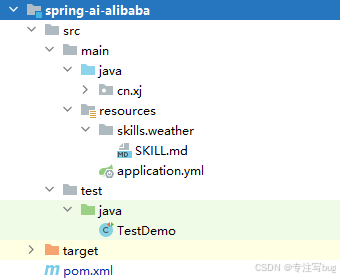
SKILL.md是在https://skills.sh/随便找的,也可以自己写。
---
name: weather
description: Get current weather conditions and forecasts.
---
# Weather
Two free services, no API keys needed.
## wttr.in (primary)
Quick one-liner:
```bash
curl -s "wttr.in/London?format=3"
# Output: London: ⛅️ +8°C
```
Compact format:
```bash
curl -s "wttr.in/London?format=%l:+%c+%t+%h+%w"
# Output: London: ⛅️ +8°C 71% ↙5km/h
```
Full forecast:
```bash
curl -s "wttr.in/London?T"
```
Format codes: `%c` condition · `%t` temp · `%h` humidity · `%w` wind · `%l` location · `%m` moon
Tips:
- URL-encode spaces: `wttr.in/New+York`
- Airport codes: `wttr.in/JFK`
- Units: `?m` (metric) `?u` (USCS)
- Today only: `?1` · Current only: `?0`
- PNG: `curl -s "wttr.in/Berlin.png" -o /tmp/weather.png`
## Open-Meteo (fallback, JSON)
Free, no key, good for programmatic use:
```bash
curl -s "https://api.open-meteo.com/v1/forecast?latitude=51.5&longitude=-0.12¤t_weather=true"
```
Find coordinates for a city, then query. Returns JSON with temp, windspeed, weathercode.
Docs: https://open-meteo.com/en/docs2、自定义tools
编写一个自定义的tools类。
java
import org.springframework.ai.chat.model.ToolContext;
import org.springframework.ai.tool.annotation.ToolParam;

import java.util.function.BiFunction;

/**
 * 工具
 */
public class MyCityTools implements BiFunction<String, ToolContext,String> {
    @Override
    public String apply(@ToolParam(description = "The city name") String city,
                        ToolContext toolContext) {
        return "The City's name is  " + city + "!";
    }
}
3、启动类
java
import org.springframework.boot.SpringApplication;
import org.springframework.boot.autoconfigure.SpringBootApplication;
import org.springframework.boot.context.properties.EnableConfigurationProperties;

@SpringBootApplication
@EnableConfigurationProperties
public class Application {
    public static void main(String[] args) {
        SpringApplication.run(Application.class,args);
    }
}
4、测试类
java
import cn.xj.Application;
import cn.xj.toos.MyCityTools;
import com.alibaba.cloud.ai.dashscope.api.DashScopeApi;
import com.alibaba.cloud.ai.dashscope.chat.DashScopeChatModel;
import com.alibaba.cloud.ai.dashscope.chat.DashScopeChatOptions;
import com.alibaba.cloud.ai.graph.RunnableConfig;
import com.alibaba.cloud.ai.graph.agent.ReactAgent;
import com.alibaba.cloud.ai.graph.agent.hook.skills.SkillsAgentHook;
import com.alibaba.cloud.ai.graph.checkpoint.savers.MemorySaver;
import com.alibaba.cloud.ai.graph.exception.GraphRunnerException;
import com.alibaba.cloud.ai.graph.skills.registry.filesystem.FileSystemSkillRegistry;
import org.junit.jupiter.api.Test;
import org.springframework.ai.chat.messages.AssistantMessage;
import org.springframework.ai.tool.ToolCallback;
import org.springframework.ai.tool.function.FunctionToolCallback;
import org.springframework.boot.test.context.SpringBootTest;

import java.util.List;

@SpringBootTest(classes = Application.class)
public class TestDemo {

    @Test
    public void test() throws GraphRunnerException {

        // 加载百炼大模型 配置key
        DashScopeApi dashScopeApi = DashScopeApi.builder()
                .apiKey(System.getenv("ALI_AI_KEY"))
                //.baseUrl()
                .build();

        // 构建chatmodel
        DashScopeChatModel chatModel = DashScopeChatModel.builder()
                .dashScopeApi(dashScopeApi)
                .defaultOptions(DashScopeChatOptions.builder()
                        // qwen-plus
                        .model(DashScopeChatModel.DEFAULT_MODEL_NAME)
                        .temperature(0.5)
                        .maxToken(1000)
                        .build())
                .build();

        // 加载 tools
        ToolCallback getCityNameToll = FunctionToolCallback
                .builder("getCityNameForLocation", new MyCityTools())
                .description("Get name for a given city")
                .inputType(String.class)
                .build();

        // 加载agent skills
        FileSystemSkillRegistry skillRegistry = FileSystemSkillRegistry.builder().projectSkillsDirectory(System.getProperty("user.dir") + "/src/main/resources/skills/").build();
        SkillsAgentHook skillsAgentHook = SkillsAgentHook.builder().skillRegistry(skillRegistry).build();

        // 构建agent
        ReactAgent agent = ReactAgent.builder()
                .name("test_agent")
                .model(chatModel)
                .tools(List.of(getCityNameToll)) // tools
                .hooks(List.of(skillsAgentHook)) // skills
                .systemPrompt("You are a helpful assistant")
                .saver(new MemorySaver()) // RedisSaver  MysqlSaver
                .build();

        // threadId 是给定对话的唯一标识符
        String threadId = "001";
        RunnableConfig runnableConfig = RunnableConfig.builder().threadId(threadId).addMetadata("user_id", "1").build();

        // 第一次调用
        AssistantMessage response = agent.call("What is the name of the city where China Optics Valley is located ?", runnableConfig);
        System.out.println(response.getText());

        // 问题命中 skills
        response = agent.call("What's the weather like in Wuhan now?", runnableConfig);
        System.out.println(response.getText());
        // 注意我们可以使用相同的 threadId 继续对话
        response = agent.call("thank you!", runnableConfig);
        System.out.println(response.getText());
    }
}
总结
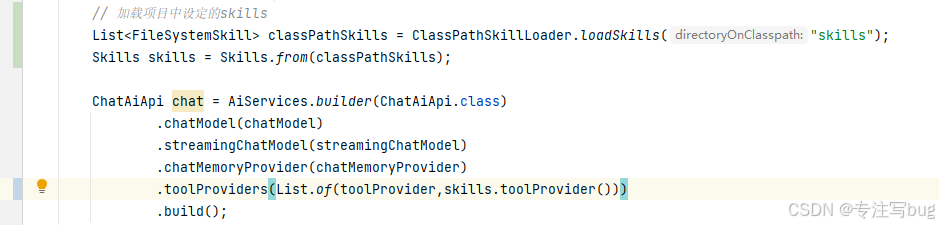
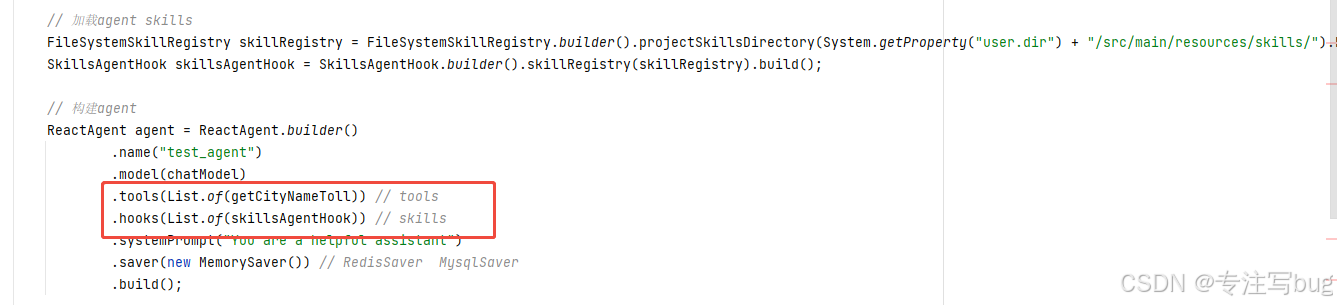
AI Alibaba框架的配置Agent Skills和tools相对Langchain4j而言,使用的是独立的配置。但是在Langchain4j中却是共用一个。
-
AI Alibaba
-
Langchain4j