华为昇腾310P废物利用
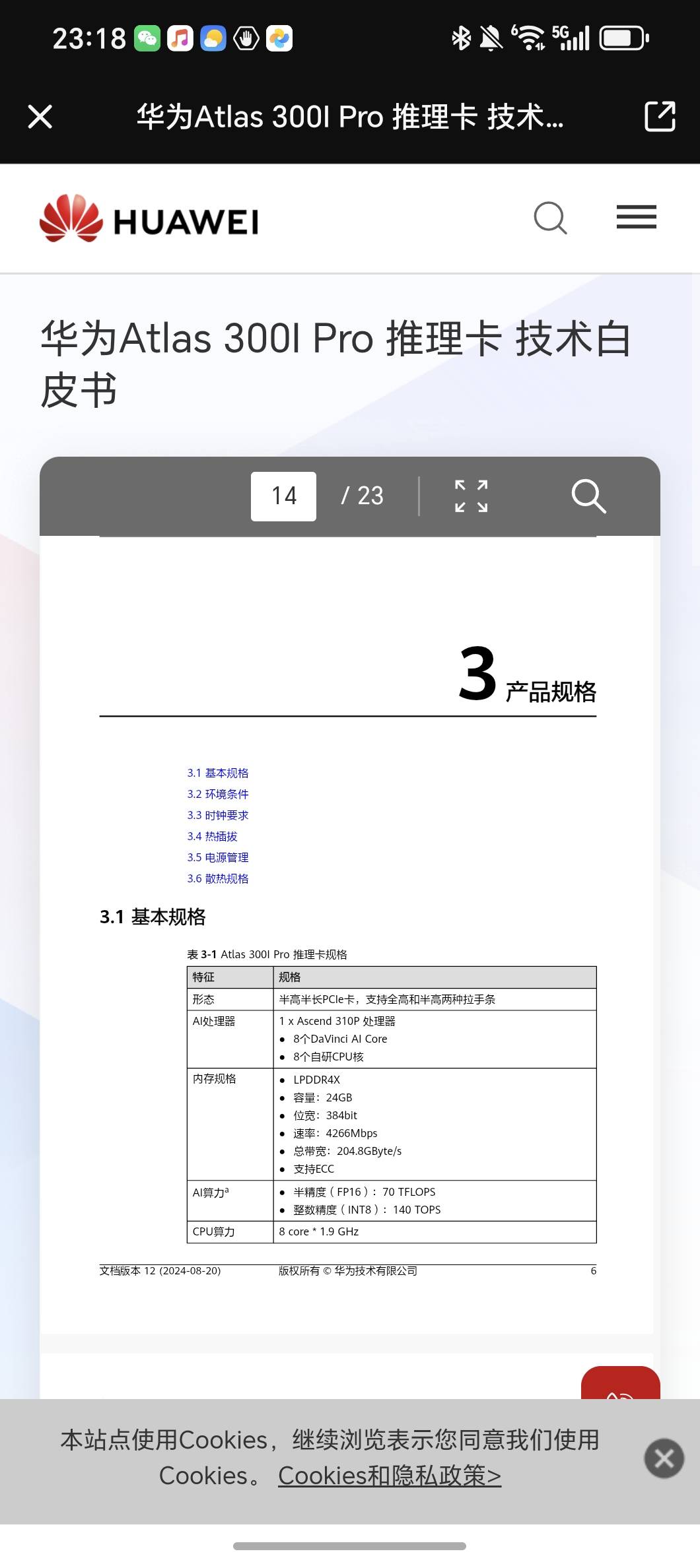
注:310P不支持bf16、W4A4
带宽200G,双芯版的300I duo, 有48g和96g两种
目前市面上所有昇腾的卡均不支持FP8
最终性能优化结果:
Qwen3-8B-W8A8
TPS :15Tokens/s
昇腾的PyTorch图模式使用和vllm-ascend的源码,里面有reduce-overhead和max-autotune两种模式,reduce-overhead只支持910B和910C,而且vllm-ascend里面写死了reduce-overhead模式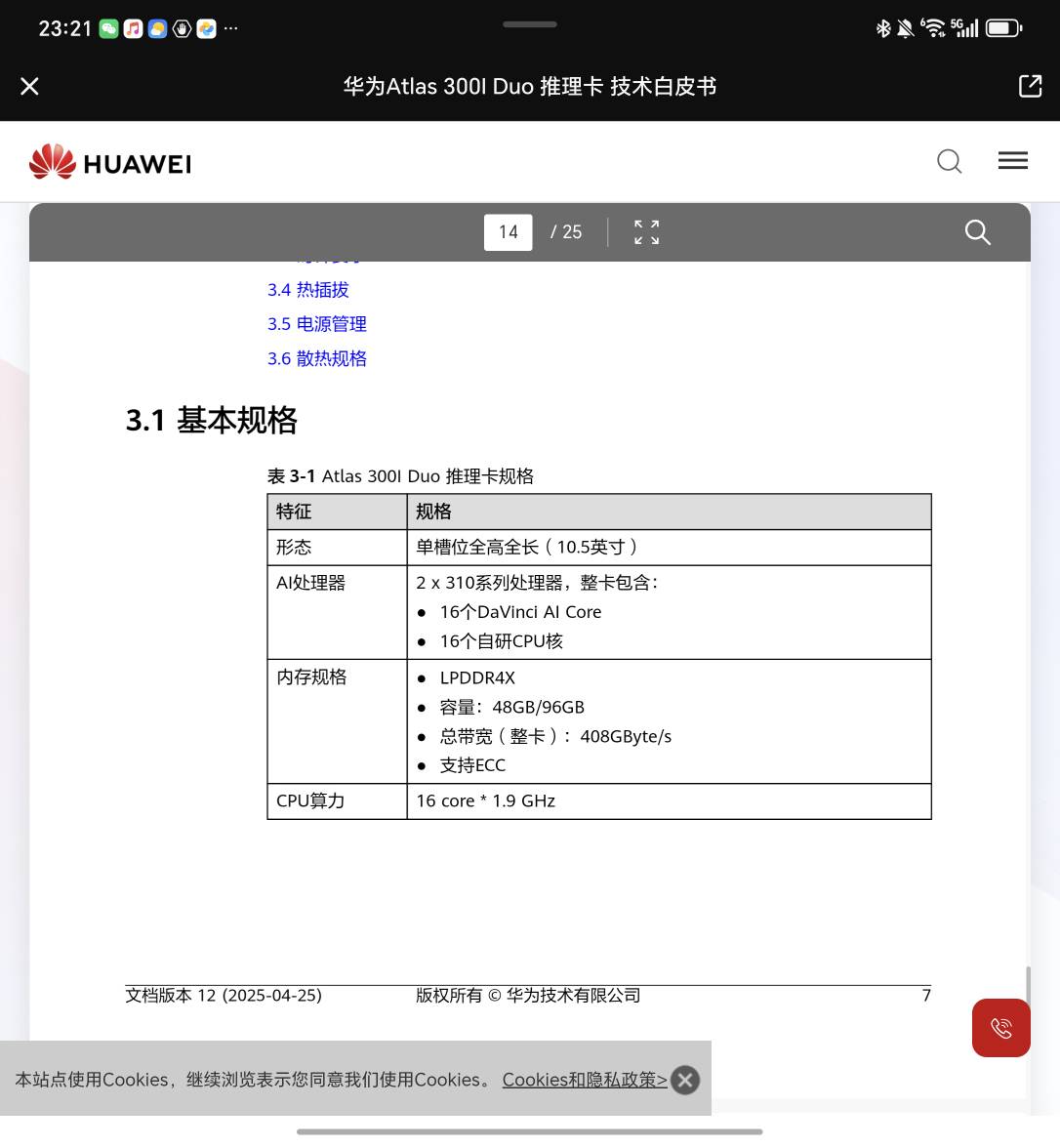
MindIE + Qwen 3-8B-W8A8
bash
1. Launch the container on the host

  docker run -it -d --net=host --shm-size=16g \
    --name mindie-qwen3-8b-310p \
    -w /workspace/MindIE-LLM/examples/atb_models \
    --device=/dev/davinci0:rwm \
    --device=/dev/davinci1:rwm \
    --device=/dev/davinci2:rwm \
    --device=/dev/davinci3:rwm \
    --device=/dev/davinci_manager:rwm \
    --device=/dev/hisi_hdc:rwm \
    --device=/dev/devmm_svm:rwm \
    -v /usr/local/Ascend/driver:/usr/local/Ascend/driver:ro \
    -v /usr/local/dcmi:/usr/local/dcmi:ro \
    -v /usr/local/bin/npu-smi:/usr/local/bin/npu-smi:ro \
    -v /usr/local/sbin:/usr/local/sbin:ro \
    -v /Users/zhaojiacheng/repos/MindIE-LLM:/workspace/MindIE-LLM \
    -v /home/s_zhaojiacheng:/home/s_zhaojiacheng \
    swr.cn-south-1.myhuaweicloud.com/ascendhub/mindie:3.0.0b2-300I-Duo-py311-openeuler24.03-lts \
    bash

  Enter the container:

  docker exec -it mindie-qwen3-8b-310p bash

  2. Prepare the environment inside the container

  cd /workspace/MindIE-LLM
  scripts/qwen3_8b_310p_w8a8sc.sh prepare-env

  3. Download the model from ModelScope

  Recommended: download directly into a normal directory, not only into the default cache.

  mkdir -p /home/s_zhaojiacheng/models/Qwen3-8B-w8a8s

  modelscope download \
    --model Eco-Tech/Qwen3-8B-w8a8s-310 \
    --local_dir /home/s_zhaojiacheng/models/Qwen3-8B-w8a8s

  If you already downloaded it earlier into the default cache with:

  modelscope download --model Eco-Tech/Qwen3-8B-w8a8s-310

  then flatten it into a real directory first:

  mkdir -p /home/s_zhaojiacheng/models/Qwen3-8B-w8a8s
  cp -aL \
    /home/s_zhaojiacheng/.cache/modelscope/hub/models/Eco-Tech/Qwen3-8B-w8a8s-310/. \
    /home/s_zhaojiacheng/models/Qwen3-8B-w8a8s/

  Check the files exist:

  ls /home/s_zhaojiacheng/models/Qwen3-8B-w8a8s

  4. Compress W8A8S into W8A8SC

  cd /workspace/MindIE-LLM

  scripts/qwen3_8b_310p_w8a8sc.sh compress \
    --w8a8s-weight /home/s_zhaojiacheng/models/Qwen3-8B-w8a8s \
    --w8a8sc-weight /home/s_zhaojiacheng/models/Qwen3-8B-w8a8sc

  After it finishes, check the output directory exists:

  ls /home/s_zhaojiacheng/models/Qwen3-8B-w8a8sc

  5. Start the OpenAI-compatible server

  cd /workspace/MindIE-LLM

  scripts/qwen3_8b_310p_w8a8sc.sh serve \
    --w8a8sc-weight /home/s_zhaojiacheng/models/Qwen3-8B-w8a8sc \
    --model-name qwen3-8b-w8a8sc \
    --port 1025

  This should start mindie_llm_server and expose the OpenAI-compatible endpoint on 127.0.0.1:1025.

  6. Verify the service

  List models:

  curlhttp://127.0.0.1:1025/v1/models

  Expected model id:

  qwen3-8b-w8a8sc

  Test one inference request:

  curlhttp://127.0.0.1:1025/v1/chat/completions\
    -H 'Content-Type: application/json' \
    -d '{
      "model": "qwen3-8b-w8a8sc",
      "messages": [
        {"role": "user", "content": "What is deep learning?"}
      ],
      "max_tokens": 128,
      "stream": false
    }'

  Short version

  If you want the shortest working sequence inside the container:

  cd /workspace/MindIE-LLM

  scripts/qwen3_8b_310p_w8a8sc.sh prepare-env

  modelscope download \
    --model Eco-Tech/Qwen3-8B-w8a8s-310 \
    --local_dir /home/s_zhaojiacheng/models/Qwen3-8B-w8a8s

  scripts/qwen3_8b_310p_w8a8sc.sh compress \
    --w8a8s-weight /home/s_zhaojiacheng/models/Qwen3-8B-w8a8s \
    --w8a8sc-weight /home/s_zhaojiacheng/models/Qwen3-8B-w8a8sc

  scripts/qwen3_8b_310p_w8a8sc.sh serve \
    --w8a8sc-weight /home/s_zhaojiacheng/models/Qwen3-8B-w8a8sc \
    --model-name qwen3-8b-w8a8sc \
    --port 1025

  Then test:

  curlhttp://127.0.0.1:1025/v1/models

  One important detail: for this single-310P flow, do not try to serve Qwen3-8B-w8a8s-310 directly. The supported path is download W8A8S -> compress to W8A8SC -> serve W8A8SC.

  If you want, I can also rewrite this into one clean host-side bash script that does docker run, docker exec, download, compress, and serve end to end.