环境检查:安装 UniTask
通过 Git URL 一键拉取 (最推荐)
这是最官方、最快捷的方式,直接从 GitHub 把源码作为 Package 挂载进项目,保证你的 Assets 文件夹干干净净!
操作步骤:
-
打开你的 Unity 工程。
-
在顶部菜单栏点击 Window \\rightarrow Package Manager。
-
在弹出的窗口左上角,点击那个小小的
+号图标。 -
在下拉菜单中选择 Add package from git URL...
-
在输入框里,精准地复制粘贴这串官方地址(注意,一字不差):
Plaintext
https://github.com/Cysharp/UniTask.git?path=src/UniTask/Assets/Plugins/UniTask -
点击 Add,等进度条跑完。搞定!🎉
(⚠️ 提示:这种方式需要你的电脑上安装了 Git 环境)
第一部分:核心运行时底座 (BindableProperty.cs)
职责:提供轻量级响应式数据流和生命周期管理扩展。
cs
using System;
using System.Collections.Generic;

/// <summary>
/// 🚀 轻量级响应式属性 - 严格 MVVM 数据层
/// </summary>
public class BindableProperty<T>
{
    private T _value;
    private Action<T> _onValueChanged;

    public T Value
    {
        get => _value;
        set
        {
            if (EqualityComparer<T>.Default.Equals(_value, value)) return;
            _value = value;
            _onValueChanged?.Invoke(_value);
        }
    }

    public BindableProperty(T initialValue = default)
    {
        _value = initialValue;
    }

    public IDisposable Subscribe(Action<T> action)
    {
        _onValueChanged += action;
        action?.Invoke(_value);
        return new Unsubscriber(() => _onValueChanged -= action);
    }

    private class Unsubscriber : IDisposable
    {
        private Action _unsubscribeAction;
        public Unsubscriber(Action unsubscribeAction) => _unsubscribeAction = unsubscribeAction;
        public void Dispose()
        {
            _unsubscribeAction?.Invoke();
            _unsubscribeAction = null;
        }
    }
}

public static class BindablePropertyExtensions
{
    /// <summary>
    /// 将订阅加入清理桶,随 View 销毁自动释放
    /// </summary>
    public static void AddTo(this IDisposable disposable, ICollection<IDisposable> disposables)
    {
        if (disposable != null && disposables != null) disposables.Add(disposable);
    }
}
第二部分:全自动生成引擎 (UIOneKeyScaffold.cs)
职责 :严格执行 View 与 ViewModel 后缀命名,扫描规约节点,生成三件套,并自动挂载。
cs
using System;
using System.Collections.Generic;
using System.IO;
using System.Linq;
using System.Text;
using UnityEditor;
using UnityEngine;

public class UIOneKeyScaffold
{
    // 配置生成路径(可根据项目需求修改)
    private const string SCRIPT_GEN_PATH = "Assets/Scripts/UI/Generated/";

    [MenuItem("GameObject/大厂工具链/🚀 生成严格 MVVM 架构模板", false, -11)]
    [MenuItem("Assets/大厂工具链/🚀 生成严格 MVVM 架构模板", false, 103)]
    public static void GenerateStrictMVVM()
    {
        GameObject selectedObj = Selection.activeGameObject;
        if (selectedObj == null)
        {
            Debug.LogError("❌ 请先选中一个 UI 预制体或节点!");
            return;
        }

        // 1. 提取核心名称 (例如 LoginPanel -> Login)
        string rawName = selectedObj.name.Replace("(Clone)", "").Trim();
        string coreName = rawName.Replace("View", "").Replace("Panel", "").Replace("UI", "");

        string viewName = coreName + "View";
        string viewModelName = coreName + "ViewModel";

        // 2. 扫描符合规约的节点 (btn_, txt_, img_, input_, obj_)
        var bindInfos = new List<ComponentBindInfo>();
        CollectBindNodes(selectedObj.transform, "", bindInfos);

        // 3. 准备文件夹
        string fullPath = Path.Combine(Application.dataPath, SCRIPT_GEN_PATH.Replace("Assets/", ""));
        if (!Directory.Exists(fullPath)) Directory.CreateDirectory(fullPath);

        // 4. 生成三件套
        GenerateViewModelScript(viewModelName);
        GenerateViewScript(viewName, viewModelName);
        GenerateViewBindScript(viewName, bindInfos);

        // 5. 记录挂载信息 (跨编译周期)
        string assetPath = PrefabUtility.GetPrefabAssetPathOfNearestInstanceRoot(selectedObj);
        bool isPrefab = !string.IsNullOrEmpty(assetPath);
        EditorPrefs.SetString("AutoAttach_ClassName", viewName);
        EditorPrefs.SetBool("AutoAttach_IsPrefab", isPrefab);
        EditorPrefs.SetString("AutoAttach_TargetPath", isPrefab ? assetPath : selectedObj.name);

        Debug.Log($"⏳ [MVVM 自动化]:正在为 {coreName} 构建工程,请稍后...");
        AssetDatabase.Refresh();
    }

    private static void GenerateViewModelScript(string vmName)
    {
        string filePath = Path.Combine(Application.dataPath, SCRIPT_GEN_PATH.Replace("Assets/", ""), $"{vmName}.cs");
        if (File.Exists(filePath)) return;

        StringBuilder sb = new StringBuilder();
        sb.AppendLine("using System;");
        sb.AppendLine("using System.Threading;");
        sb.AppendLine("using Cysharp.Threading.Tasks;");
        sb.AppendLine();
        sb.AppendLine($"public class {vmName}");
        sb.AppendLine("{");
        sb.AppendLine("    // 💡 ViewModel 严禁引用 UnityEngine.UI");
        sb.AppendLine("    public BindableProperty<string> HintMessage = new BindableProperty<string>(\"Ready\");");
        sb.AppendLine();
        sb.AppendLine("    public async UniTask DoActionAsync(CancellationToken ct)");
        sb.AppendLine("    {");
        sb.AppendLine("        HintMessage.Value = \"Executing...\";");
        sb.AppendLine("        await UniTask.Delay(1000, cancellationToken: ct);");
        sb.AppendLine("        HintMessage.Value = \"Success!\";");
        sb.AppendLine("    }");
        sb.AppendLine("}");
        File.WriteAllText(filePath, sb.ToString(), Encoding.UTF8);
    }

    private static void GenerateViewScript(string vName, string vmName)
    {
        string filePath = Path.Combine(Application.dataPath, SCRIPT_GEN_PATH.Replace("Assets/", ""), $"{vName}.cs");
        if (File.Exists(filePath)) return;

        StringBuilder sb = new StringBuilder();
        sb.AppendLine("using UnityEngine;");
        sb.AppendLine("using UnityEngine.UI;");
        sb.AppendLine("using Cysharp.Threading.Tasks;");
        sb.AppendLine();
        sb.AppendLine($"public partial class {vName} : MonoBehaviour");
        sb.AppendLine("{");
        sb.AppendLine($"    private {vmName} _viewModel;");
        sb.AppendLine();
        sb.AppendLine("    private void Awake()");
        sb.AppendLine("    {");
        sb.AppendLine($"        _viewModel = new {vmName}();");
        sb.AppendLine("        AutoBind();");
        sb.AppendLine("        BindViewModel();");
        sb.AppendLine("    }");
        sb.AppendLine();
        sb.AppendLine("    private void BindViewModel()");
        sb.AppendLine("    {");
        sb.AppendLine("        // 绑定数据流示例");
        sb.AppendLine("        // _viewModel.HintMessage.Subscribe(msg => { /* txt_hint.text = msg; */ }).AddTo(_disposables);");
        sb.AppendLine("    }");
        sb.AppendLine("}");
        File.WriteAllText(filePath, sb.ToString(), Encoding.UTF8);
    }

    private static void GenerateViewBindScript(string vName, List<ComponentBindInfo> infos)
    {
        string filePath = Path.Combine(Application.dataPath, SCRIPT_GEN_PATH.Replace("Assets/", ""), $"{vName}.Bind.cs");
        StringBuilder sb = new StringBuilder();
        sb.AppendLine("// 🚀 自动生成 - 请勿手动修改");
        sb.AppendLine("using UnityEngine;");
        sb.AppendLine("using UnityEngine.UI;");
        sb.AppendLine("using System.Collections.Generic;");
        sb.AppendLine("using System;");
        sb.AppendLine();
        sb.AppendLine($"public partial class {vName}");
        sb.AppendLine("{");
        foreach (var info in infos) sb.AppendLine($"    private {info.TypeName} {info.FieldName};");
        sb.AppendLine();
        sb.AppendLine("    private List<IDisposable> _disposables = new List<IDisposable>();");
        sb.AppendLine();
        sb.AppendLine("    public void AutoBind()");
        sb.AppendLine("    {");
        foreach (var info in infos)
        {
            if (info.TypeName == "GameObject") sb.AppendLine($"        this.{info.FieldName} = transform.Find(\"{info.Path}\").gameObject;");
            else sb.AppendLine($"        this.{info.FieldName} = transform.Find(\"{info.Path}\").GetComponent<{info.TypeName}>();");
        }
        sb.AppendLine("    }");
        sb.AppendLine();
        sb.AppendLine("    private void OnDestroy()");
        sb.AppendLine("    {");
        sb.AppendLine("        foreach (var d in _disposables) d.Dispose();");
        sb.AppendLine("        _disposables.Clear();");
        sb.AppendLine("    }");
        sb.AppendLine("}");
        File.WriteAllText(filePath, sb.ToString(), Encoding.UTF8);
    }

    [UnityEditor.Callbacks.DidReloadScripts]
    private static void OnScriptsReloaded()
    {
        string className = EditorPrefs.GetString("AutoAttach_ClassName", "");
        if (string.IsNullOrEmpty(className)) return;

        string targetPath = EditorPrefs.GetString("AutoAttach_TargetPath", "");
        bool isPrefab = EditorPrefs.GetBool("AutoAttach_IsPrefab", false);
        EditorPrefs.DeleteKey("AutoAttach_ClassName");

        Type type = GetTypeByName(className);
        if (type == null) return;

        GameObject obj = isPrefab ? AssetDatabase.LoadAssetAtPath<GameObject>(targetPath) : GameObject.Find(targetPath);
        if (obj != null && obj.GetComponent(type) == null)
        {
            obj.AddComponent(type);
            if (isPrefab) PrefabUtility.SavePrefabAsset(obj);
            Debug.Log($"✅ {className} 已成功挂载!架构已就绪。");
        }
    }

    private static void CollectBindNodes(Transform current, string path, List<ComponentBindInfo> infos)
    {
        string nodeName = current.name.ToLower();
        string relPath = string.IsNullOrEmpty(path) ? "" : path + (path == "" ? "" : "/") + current.name;

        if (nodeName.StartsWith("btn_")) AddInfo(infos, current, "Button", relPath);
        else if (nodeName.StartsWith("txt_")) AddInfo(infos, current, "Text", relPath);
        else if (nodeName.StartsWith("img_")) AddInfo(infos, current, "Image", relPath);
        else if (nodeName.StartsWith("input_")) AddInfo(infos, current, "InputField", relPath);
        else if (nodeName.StartsWith("obj_")) AddInfo(infos, current, "GameObject", relPath);

        foreach (Transform child in current)
        {
            string nextRel = string.IsNullOrEmpty(path) ? current.name : path + "/" + current.name;
            CollectBindNodes(child, nextRel, infos);
        }
    }

    private static void AddInfo(List<ComponentBindInfo> infos, Transform trans, string type, string path)
    {
        string finalPath = path.Contains("/") ? path.Substring(path.IndexOf('/') + 1) : "";
        if (string.IsNullOrEmpty(finalPath)) return;
        infos.Add(new ComponentBindInfo { FieldName = trans.name, TypeName = type, Path = finalPath });
    }

    private static Type GetTypeByName(string className)
    {
        return AppDomain.CurrentDomain.GetAssemblies()
            .SelectMany(a => a.GetTypes())
            .FirstOrDefault(t => t.Name == className);
    }

    private class ComponentBindInfo { public string FieldName; public string TypeName; public string Path; }
}
开发者使用指南(严格执行流程)
-
环境检查 :确认已安装 UniTask。
-
美术规约:在 UI 层级中,需要程序控制的节点必须以前缀命名:
-
btn_Login(Button) -
txt_Title(Text) -
img_Avatar(Image) -
input_Account(InputField) -
obj_Loading(GameObject)
-
-
一键造物 :选中 UI 根节点,右键点击 🚀 生成严格 MVVM 架构模板。
-
架构产出:
-
Logic (XXXViewModel.cs) : 处理纯逻辑,数据更新通过修改
BindableProperty。 -
Controller (XXXView.cs) : 处理绑定,调用
_viewModel.Execute...().Forget()。 -
Auto-Bind (XXXView.Bind.cs) : 工具维护,负责 UI 引用查找和
OnDestroy清理。
-
-
自动关联:等待 Unity 编译完成后,脚本会自动挂载到你的 UI 物体上。
示例:
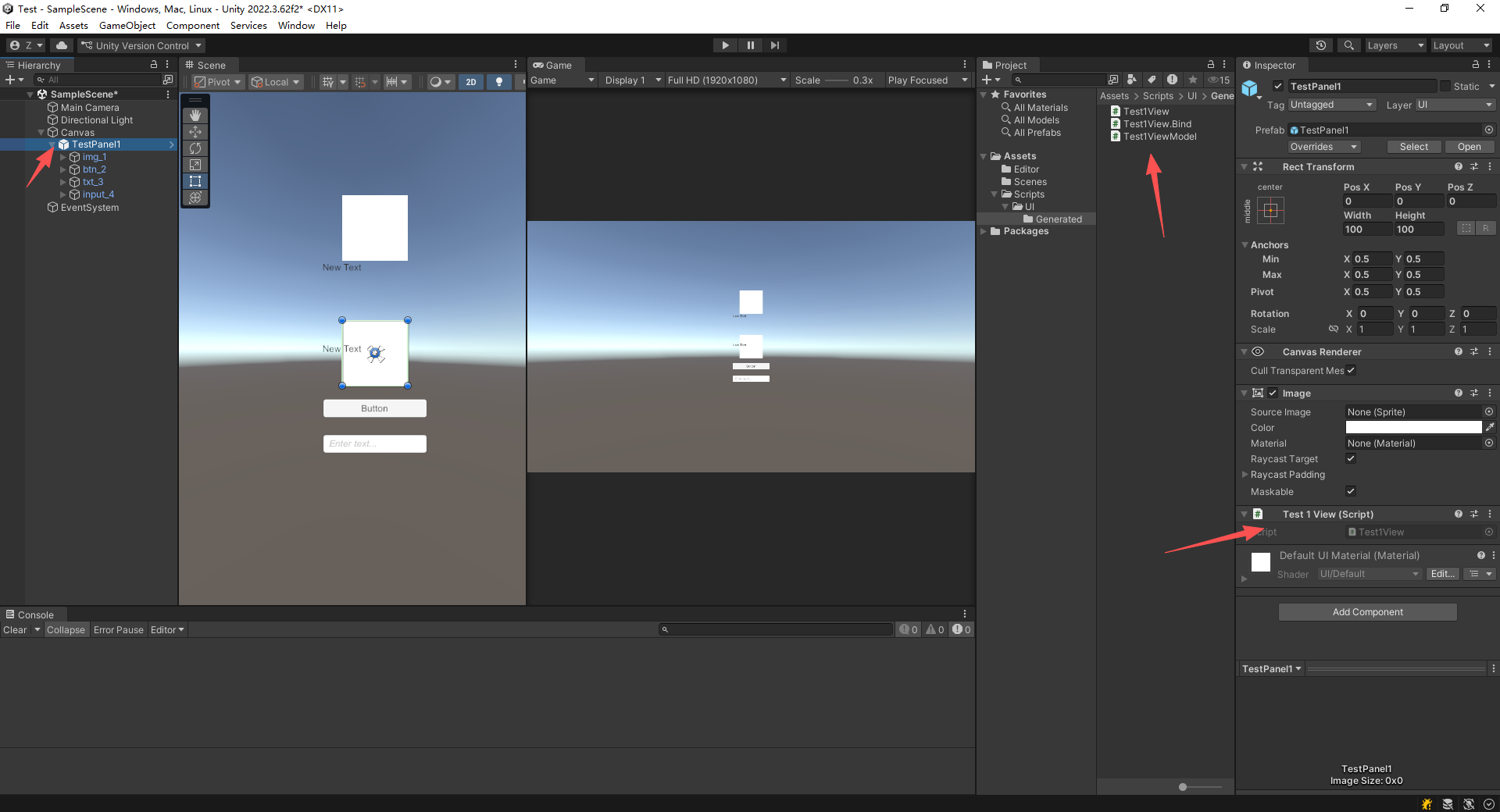
cs
// 🚀 自动生成 - 请勿手动修改
using UnityEngine;
using UnityEngine.UI;
using System.Collections.Generic;
using System;

public partial class Test1View
{
    private Image img_1;
    private Text txt_5;
    private Button btn_2;
    private Text txt_7;
    private Text txt_3;
    private Image img_6;
    private InputField input_4;

    private List<IDisposable> _disposables = new List<IDisposable>();

    public void AutoBind()
    {
        this.img_1 = transform.Find("img_1").GetComponent<Image>();
        this.txt_5 = transform.Find("img_1/txt_5").GetComponent<Text>();
        this.btn_2 = transform.Find("btn_2").GetComponent<Button>();
        this.txt_7 = transform.Find("btn_2/txt_7").GetComponent<Text>();
        this.txt_3 = transform.Find("txt_3").GetComponent<Text>();
        this.img_6 = transform.Find("txt_3/img_6").GetComponent<Image>();
        this.input_4 = transform.Find("input_4").GetComponent<InputField>();
    }

    private void OnDestroy()
    {
        foreach (var d in _disposables) d.Dispose();
        _disposables.Clear();
    }
}
cs
using UnityEngine;
using UnityEngine.UI;
using Cysharp.Threading.Tasks;

public partial class Test1View : MonoBehaviour
{
    private Test1ViewModel _viewModel;

    private void Awake()
    {
        _viewModel = new Test1ViewModel();
        AutoBind();
        BindViewModel();
    }

    private void BindViewModel()
    {
        // 绑定数据流示例
        _viewModel.HintMessage.Subscribe(msg => { txt_3.text = msg; }).AddTo(_disposables);
    }
}
cs
using System;
using System.Threading;
using Cysharp.Threading.Tasks;

public class Test1ViewModel
{
    // 💡 ViewModel 严禁引用 UnityEngine.UI
    public BindableProperty<string> HintMessage = new BindableProperty<string>("Ready");

    public async UniTask DoActionAsync(CancellationToken ct)
    {
        HintMessage.Value = "Executing...";
        await UniTask.Delay(1000, cancellationToken: ct);
        HintMessage.Value = "Success!";
    }
}