CI/CD 配置是什么
CI/CD 流水线 是自动化软件开发流程的工具:
CI (Continuous Integration) - 持续集成
每次代码提交后自动运行测试,确保新代码不会破坏现有功能。
CD (Continuous Deployment) - 持续部署
测试通过后自动将代码部署到服务器。
实际例子:
开发者提交代码 → GitHub 自动运行测试 → 测试通过 → 自动部署到服务器对 kotti_ai_community 项目的好处:
- 自动测试 - 每次提交代码,自动运行 67 个测试
- 防止回归 - 如果修改破坏了功能,立即发现
- 代码质量 - 可以加入代码风格检查
- 团队协作 - 多人开发时自动验证
GitHub Actions 配置示例:
# .github/workflows/test.yml
name: Tests
on: [push, pull_request]
jobs:
  test:
    runs-on: ubuntu-latest
    steps:
      - uses: actions/checkout@v4
      - uses: actions/setup-python@v5
        with:
          python-version: '3.12'
      - run: pip install -e .
      - run: python -m unittest discover -s kotti_ai_community/tests
配置后,每次 git push 都会自动运行测试,结果会显示在 GitHub 页面上(绿色 ✓ 或红色 ✗)。
配置
CI/CD 配置已完成!
创建的文件:
G:\dumate\aicomm\
├── .github/
│   └── workflows/
│       ├── test.yml    # 测试工作流
│       └── lint.yml    # 代码检查工作流
└── pyproject.toml      # 工具配置
test.yml - 测试工作流:
- 支持 Python 3.10、3.11、3.12 多版本测试
- 支持 SQLAlchemy 1.4 和 2.0 兼容性测试
- 自动运行 67 个单元测试
- 生成测试覆盖率报告并上传到 Codecov
lint.yml - 代码检查工作流:
- Black - 代码格式检查
- isort - import 排序检查
- flake8 - 语法和风格检查
- Bandit - 安全漏洞扫描
使用方式:
-
将代码推送到 GitHub:
git add .
git commit -m "Add CI/CD configuration"
git push origin main -
GitHub 会自动运行测试和检查,结果会显示在仓库的 Actions 页面
-
README 中添加了 CI 徽章(需要替换
YOUR_USERNAME为你的 GitHub 用户名)
触发条件:
- Push 到
main、master、develop分支 - Pull Request 到这些分支
跑通
经过多次调试后,跑通
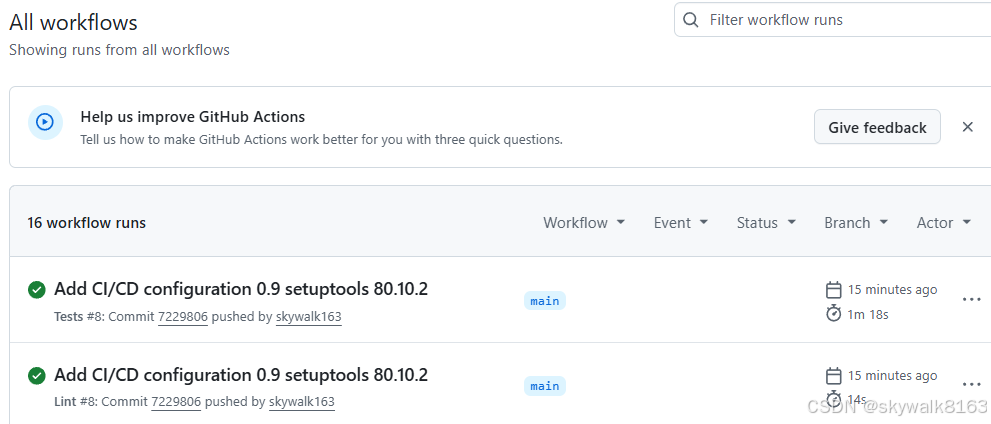
前面8次尝试,主要的问题是:
setuptools版本没有固定为80.10.2
代码没有flake8规范
需要依赖安装Kotti新版本,也就是kotti-py312,在requirements文件里设置通过github安装
调试
提交到github后,有报错
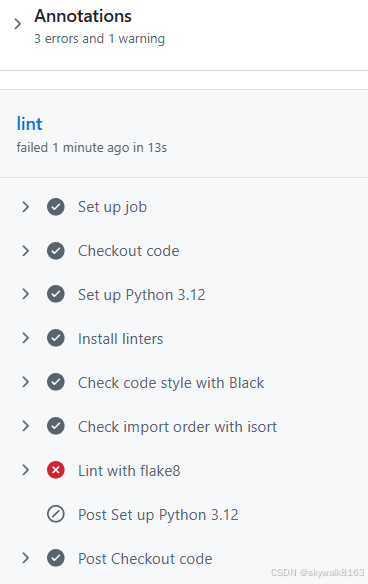
估计是flake8方面有问题。
解决flake8问题
CI/CD flake8 问题已修复!
修复内容:
-
创建
.flake8配置文件 - 忽略迁移文件、测试文件,设置行长度为 100 -
修复代码问题:
- 移除未使用的 import(
Response,view_defaults,datetime,HTTPNotFound等) - 修复 SQLAlchemy 比较语法:
== True→.is_(True),== False→.is_(False),!= None→.is_not(None) - 移除未使用的变量
- 添加缺失的 import(
view_defaults,validate_csrf_token,truncate_string,HTTPForbidden)
- 移除未使用的 import(
-
更新的文件:
kotti_ai_community/__init__.pykotti_ai_community/resources.pykotti_ai_community/moderation.pykotti_ai_community/user_profile.pykotti_ai_community/notification.pykotti_ai_community/views/*.py(所有视图文件)
验证结果:
- flake8 检查通过(0 错误)
- 67 个测试全部通过
现在可以重新提交到 GitHub,CI 应该能通过了。
测试时安装依赖有问题
5s
Run python -m pip install --upgrade pip
Requirement already satisfied: pip in /opt/hostedtoolcache/Python/3.12.13/x64/lib/python3.12/site-packages (26.0.1)
Obtaining file:///home/runner/work/aicomm/aicomm
Installing build dependencies: started
Installing build dependencies: finished with status 'done'
Checking if build backend supports build_editable: started
Checking if build backend supports build_editable: finished with status 'done'
Getting requirements to build editable: started
Getting requirements to build editable: finished with status 'done'
Preparing editable metadata (pyproject.toml): started
Preparing editable metadata (pyproject.toml): finished with status 'done'
Collecting Kotti<3.0.0,>=2.0.0 (from kotti_ai_community==0.1.0)
Downloading Kotti-2.0.9.tar.gz (748 kB)
━━━━━━━━━━━━━━━━━━━━━━━━━━━━━━━━━━━━━━━━ 748.9/748.9 kB 62.3 MB/s 0:00:00
Installing build dependencies: started
Installing build dependencies: finished with status 'done'
Getting requirements to build wheel: started
Getting requirements to build wheel: finished with status 'done'
Installing backend dependencies: started
Installing backend dependencies: finished with status 'done'
Preparing metadata (pyproject.toml): started
Preparing metadata (pyproject.toml): finished with status 'done'
INFO: pip is looking at multiple versions of kotti-ai-community to determine which version is compatible with other requirements. This could take a while.
ERROR: Could not find a version that satisfies the requirement kotti_g4f<1.0.0,>=0.1.0 (from kotti-ai-community) (from versions: none)
ERROR: No matching distribution found for kotti_g4f<1.0.0,>=0.1.0
Error: Process completed with exit code 1.
解决问题:从 GitHub 子目录安装依赖
-
创建
requirements.txt- 从 GitHub 子目录安装依赖:git+https://github.com/skywalk163/kotti_py312.git#subdirectory=Kotti git+https://github.com/skywalk163/kotti_py312.git#subdirectory=kotti_g4f git+https://github.com/skywalk163/kotti_py312.git#subdirectory=kotti_image git+https://github.com/skywalk163/kotti_py312.git#subdirectory=kotti_tinymce -
更新
setup.py- 简化依赖声明,添加注释说明 -
更新
.github/workflows/test.yml- CI 使用pip install -r requirements.txt
安装方式:
# 本地安装
pip install -r requirements.txt
pip install -e .

# 或单独安装每个依赖
pip install "git+https://github.com/skywalk163/kotti_py312.git#subdirectory=Kotti"
pip install "git+https://github.com/skywalk163/kotti_py312.git#subdirectory=kotti_g4f"
报错ModuleNotFoundError: No module named 'pkg_resources'
这个问题以前碰到过:https://skywalk.blog.csdn.net/article/details/160124144
所以解决方法就是设置setuptools的版本号,在Kotti和aicomm两个项目的requirements文件里,都写上setuptools==80.10.2
问题解决。