1
纹理重复的问题
为什么大地形贴图总是看起来「假」?
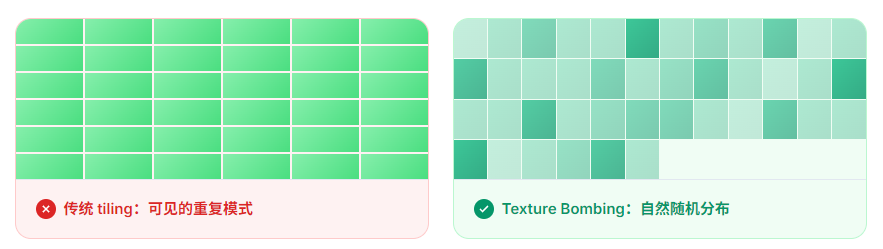
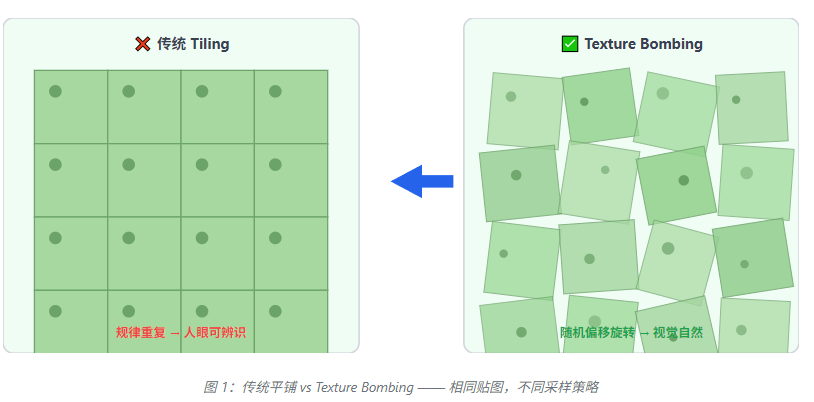
在 Unity URP 开发大型地形时,即使使用高精度贴图, 重复铺设后依然会呈现出明显的周期性模式。 人眼对这种规律性非常敏感,会本能地感知到「这片草地/岩石在循环」。
核心洞察
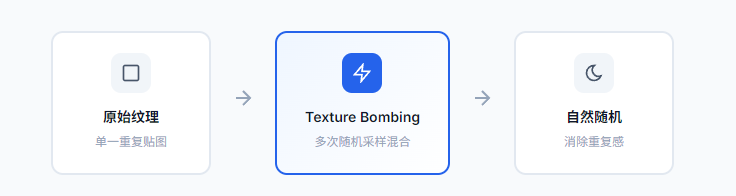
Texture Bombing 的本质不是使用更多贴图,而是对同一张贴图进行「空间扭曲」,让相邻像素看到不同的采样结果。
2
核心原理
每个像素如何混合多个采样结果?
Texture Bombing 的核心思想是:在渲染每个像素时, 不再只采样一次,而是采样 2-3 次, 每次使用不同的UV 偏移和旋转角度, 最后将结果混合。
1
生成随机种子
基于像素世界坐标生成伪随机数,作为该像素的「身份标识」。同一个像素每次运行时得到相同的随机值,保证结果可复现。
random = hash( floor(worldPos.xz / cellSize) )
2
计算采样偏移
根据随机种子,计算多个不同的 UV 偏移量。每个偏移指向贴图上的不同区域,避免相邻像素采样相同位置。
offset = random * tilingFactor % textureSize
3
应用旋转变换
为每次采样应用不同的旋转角度,打破贴图的轴向对称性,让草地、岩石等纹理看起来更加自然分布。
uv = rotate(uv, random * 2π)
4
加权混合结果
将 2-3 次采样结果按权重混合。可以使用简单的平均值,或根据偏移距离给予中心采样更高权重。
result = weight1 * sample1 + weight2 * sample2 + ...+
3
Shader 实现
HLSL 代码逐行解析
以下是完整的 Texture Bombing Shader 实现,基于 Unity URP 的 ShaderLibrary 和 Input 结构。 代码经过优化,在保持视觉效果的同时最小化计算开销。
cs
#ifndef TEXTURE_BOMBING_INCLUDED
#define TEXTURE_BOMBING_INCLUDED
// ============================================================
// 核心参数:控制 Bombing 的行为
// ============================================================
struct TextureBombingParams {
    float cellSize;        // 网格单元大小,影响随机性密度
    float rotationStrength; // 旋转强度,0=无旋转,1=最大旋转
    float offsetStrength;   // UV偏移强度
    int   sampleCount;     // 采样次数,2-3次为最佳平衡
    TEXTURE2D(tex);
    SAMPLER(samplerTex);
};
首先定义参数结构体,包含控制 Bombing 行为的关键参数。 cellSize 决定了随机性的「粒度」, 过小会导致噪点过多,过大则消除重复感不明显。
cs
// ============================================================
// 高质量伪随机数生成器
// 基于 Hash19,输出 [0,1] 范围的均匀分布随机数
// ============================================================
inline float Hash19(float2 p) {
    // 黄金角 ~2.39996323  radians,用于生成准均匀分布
    const float GOLDEN_RATIO = 2.39996323;

    // 第一步:将 2D 坐标映射到 1D
    float h = dot(p, float2(127.1, 311.7));

    // 第二步:sin 变换 + 偏移,破坏线性关系
    h = sin(h) * 43758.5453123;

    // 第三步:取小数部分,实现「回绕」
    return fract(h);
}
// 为每个采样生成独立的随机数序列
inline float GetSampleRandom(float2 cellId, int sampleIndex) {
    // 不同的 sampleIndex 产生不同的偏移,避免序列相关
    float2 offset = float2(17.3, 23.7) * sampleIndex;
    return Hash19(cellId + offset);
}
Hash19 函数使用黄金角比例实现准均匀的伪随机分布。 注意第 36 行的偏移技巧:不同的 sampleIndex 产生完全独立的随机序列, 确保多个采样不会「串谋」。
cs
// ============================================================
// 2D 旋转矩阵
// 旋转是打破纹理轴向对称性的关键
// ============================================================
inline float2 RotateUV(float2 uv, float angle) {
    float s = sin(angle);  // sin(θ)
    float c = cos(angle);  // cos(θ)

    // 旋转矩阵乘法:
    // |  cosθ  -sinθ |   | x |   | x*cosθ - y*sinθ |
    // |  sinθ   cosθ | × | y | = | x*sinθ + y*cosθ |
    return float2(uv.x * c - uv.y * s,
                   uv.x * s + uv.y * c);
}
// ============================================================
// 核心采样函数:计算单次 Bombing 采样的 UV
// ============================================================
inline float2 GetBombingUV(float2 baseUV,
                               float2 cellId,
                               float random,
                               float tiling,
                               float rotationStrength,
                               float offsetStrength) {
    float2 uv = baseUV * tiling;

    // Step 1: 计算 UV 偏移
    // 随机偏移范围: [-0.5, 0.5] * offsetStrength
    float2 offset = (float2(random, Hash19(cellId + 1)) - 0.5) * offsetStrength;
    uv += offset;

    // Step 2: 应用旋转
    // 旋转范围: [0, 2π] * rotationStrength
    float angle = random * 6.28318530718 * rotationStrength;
    uv = RotateUV(uv - 0.5, angle) + 0.5;

    return uv;
}
第 67 行是关键:Hash19(cellId + 1) 再次调用哈希函数, 生成与 random 独立的第二个随机数, 用于 X 和 Y 方向的偏移。第 72 行的 6.28318530718 即 2π, 覆盖完整旋转周期。
cs
// ============================================================
// 主函数:执行 Texture Bombing 采样
// ============================================================
inline float4 SampleTextureBombing(Texture2D tex,
                                       SamplerState samplerTex,
                                       float2 worldPos,
                                       float tiling,
                                       float cellSize,
                                       float rotationStrength,
                                       float offsetStrength,
                                       int   sampleCount) {
    // Step 1: 计算网格单元 ID
    float2 cellId = floor(worldPos / cellSize);

    // Step 2: 生成基础 UV
    float2 baseUV = worldPos / cellSize - cellId;
    // Step 3: 多次采样并混合
    float4 result = float4(0, 0, 0, 0);
    float totalWeight = 0;

    for (int i = 0; i < sampleCount; i++) {
        // 生成该次采样的随机数
        float rand = GetSampleRandom(cellId, i);
        // 计算变换后的 UV
        float2 bombUV = GetBombingUV(baseUV, cellId, rand,
                                          tiling, rotationStrength, offsetStrength);

        // 计算权重:越中心的采样权重越高
        float weight = 1.0 - length(bombUV - 0.5) * 0.5;
        weight = max(weight, 0.1); // 防止权重为 0
        // 采样贴图
        float4 sample = SAMPLE_TEXTURE_LOD(tex, samplerTex, bombUV, 0);
        // 累加加权结果
        result += sample * weight;
        totalWeight += weight;
    }

    // 归一化,得到最终颜色
    return result / totalWeight;
}
#endif // TEXTURE_BOMBING_INCLUDED
完整的 SampleTextureBombing 函数。 第 90 行的 floor() 确保每个网格单元有唯一的 ID。 第 107 行的权重计算给予靠近中心的采样更高权重,产生更自然的过渡效果。
4
技术优势
为什么选择 Texture Bombing?
贴图内存不变
只使用一张原始贴图,通过计算换空间,不增加任何贴图内存占用
性能可控
2-3 次采样在现代 GPU 上开销极低,可通过 sampleCount 参数调节
参数可调
旋转强度、偏移幅度、采样次数均可暴露为材质参数,设计师可自由调节
| 方案 | 内存占用 | Draw Call | 视觉质量 | 适用场景 |
|---|---|---|---|---|
| 传统 Tiling | 低 | 1 | 明显重复 | 小面积、图案随机 |
| Texture Array | 高 | 1 | 优秀 | 大作、高端画质 |
| Texture Bombing | 低 | 1 | 良好 | 大地形、性能敏感 |
| Stitching/Mosaic | 极高 | 多 | 优秀 | 手动拼接特殊需求 |
5
URP 中的集成使用
如何在实际项目中应用
在 URP 中集成 Texture Bombing 最常见的方式是作为 Custom Pass 或修改现有的 Terrain Lit Shader。
cs
// TerrainBombingLit.shader
Shader "URP/TerrainBombingLit"
{
    Properties
    {
        _MainTex("Albedo", 2D) = "white" {}
        _BombingCellSize("Bombing Cell Size", Range(0.1, 10.0)) = 1.0
        _BombingRotation("Rotation Strength", Range(0, 1)) = 0.5
        _BombingOffset("UV Offset Strength", Range(0, 1)) = 0.3
        _SampleCount("Sample Count", Int) = 3
    }

    SubShader
    {
        Tags { "RenderPipeline" = "UniversalPipeline" }

        Pass
        {
            HLSLPROGRAM
            #pragma vertex Vert
            #pragma fragment Frag

            #include "Packages/com.unity.render-pipelines.universal/ShaderLibrary/Core.hlsl"
            #include "TextureBombing.hlsl"
            CBUFFER_START(UnityPerMaterial)
                float4 _MainTex_ST;
                float _BombingCellSize;
                float _BombingRotation;
                float _BombingOffset;
                int   _SampleCount;
            CBUFFER_END
            TEXTURE2D(_MainTex);
            SAMPLER(sampler_MainTex);
            float4 Frag(Varyings input) : SV_Target
            {
                // 使用世界坐标而非 UV,确保地形缩放时行为正确
                float3 worldPos = TransformObjectToWorld(float3(0, 0, 0));
                worldPos = input.positionWS; // 实际使用顶点着色器输出的世界坐标
                // 调用 Texture Bombing 采样
                float4 albedo = SampleTextureBombing(
                    _MainTex,
                    sampler_MainTex,
                    worldPos.xz,
                    _MainTex_ST.x, // tiling
                    _BombingCellSize,
                    _BombingRotation,
                    _BombingOffset,
                    _SampleCount
                );
                // 后续光照计算保持不变...
                return albedo;
            }
            ENDHLSL
        }
    }
}
使用世界坐标
第 41 行使用 positionWS 而非 UV 坐标,确保地形缩放或平移时贴图行为一致
暴露材质参数
第 7-10 行的 Properties 允许设计师在 Inspector 中实时调节效果,无需修改代码
保持光照兼容
Bombing 仅修改采样阶段,albedo 结果可无缝接入 URP 标准光照管线
6
总结与调优建议
实践中的关键参数指南
| 参数 | 推荐值 | 效果说明 |
|---|---|---|
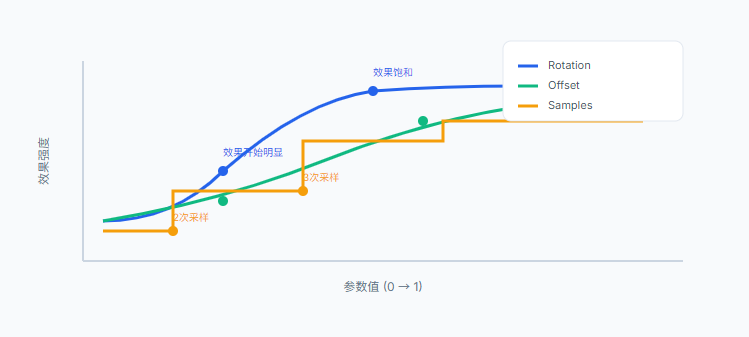
| cellSize | 0.5 ~ 2.0 | 地形单元大小。值越小,随机性越密;值越大,模式越明显 |
| rotationStrength | 0.3 ~ 0.7 | 超过 0.7 后视觉收益递减,建议配合 offset 使用 |
| offsetStrength | 0.2 ~ 0.5 | UV 偏移幅度。过大(>0.8)会导致贴图拉伸或断裂 |
| sampleCount | 2 ~ 3 | 超过 3 次后性能收益比下降,2 次适合性能敏感场景 |
最佳实践
Texture Bombing 是消除大地形纹理重复感的轻量级方案。 结合法线贴图混合使用时效果更佳------不同的旋转和偏移同时应用于 albedo 和 normal map, 可以进一步增强自然感。建议在项目初期就确定参数范围,建立可复用的 Shader 库。