文章目录
- [1. Agent 抽象类](#1. Agent 抽象类)
-
- [1.1 核心属性](#1.1 核心属性)
- [1.2 执行入口](#1.2 执行入口)
-
- [1.2.1 同步执行](#1.2.1 同步执行)
- [1.2.2 流式执行](#1.2.2 流式执行)
- [1.2.3 定时调度执行](#1.2.3 定时调度执行)
- [1.3 图生命周期管理](#1.3 图生命周期管理)
-
- [1.3.1 获取状态图](#1.3.1 获取状态图)
- [1.3.2 状态快照管理](#1.3.2 状态快照管理)
- [1.4 抽象模板方法](#1.4 抽象模板方法)
- [2. BaseAgent](#2. BaseAgent)
-
- [2.1 核心属性](#2.1 核心属性)
- [2.2 构造函数](#2.2 构造函数)
- [2.3 核心方法](#2.3 核心方法)
-
- [2.3.1 节点转换(抽象方法)](#2.3.1 节点转换(抽象方法))
- [2.4 Getter/Setter 方法](#2.4 Getter/Setter 方法)
- [3. FlowAgent](#3. FlowAgent)
-
- [3.1 核心属性](#3.1 核心属性)
- [3.2 构造函数](#3.2 构造函数)
- [3.3 核心方法](#3.3 核心方法)
-
- [3.3.1 图初始化](#3.3.1 图初始化)
- [3.3.2 构建具体图结构( 抽象方法)](#3.3.2 构建具体图结构( 抽象方法))
- [3.3.3 定时调度](#3.3.3 定时调度)
- [3.4 get 方法](#3.4 get 方法)
1. Agent 抽象类
spring-ai-alibaba-agent-framework 模块中提供了 Agent 的抽象基类,所有自定义 Agent 必须继承此类并实现 initGraph() 模板方法。
核心职责:
- 定义
Agent的基本属性 - 提供统一的执行入口(同步/流式/调度)
- 管理图的生命周期
继承结构:
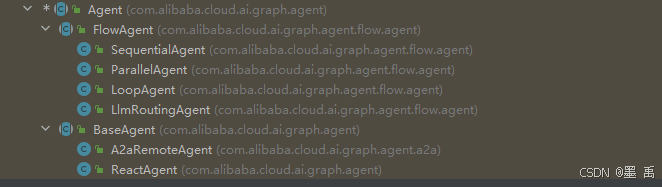
1.1 核心属性
java
public abstract class Agent {

    /** Agent 唯一标识符,在图中必须唯一 */
    protected String name;

    /** Agent 能力描述,用于 A2A 协作时的决策 */
    protected String description;

    /** 编译配置(持久化、检查点等) */
    protected CompileConfig compileConfig;

    /** 已编译的图实例(懒加载 + 缓存) */
    protected volatile CompiledGraph compiledGraph;

    /** 原始状态图(懒加载) */
    protected volatile StateGraph graph;

    /** 并行执行器 */
    protected Executor executor;
}
1.2 执行入口
1.2.1 同步执行
invoke
提供了 8 个 Agent 同步执行,返回完整执行状态 (OverAllState )的 invoke 重载方法,支持多种不同类型的输入:
java
	/**
	 * 【同步执行】使用纯文本字符串调用Agent
	 * @param message 用户输入的文本消息
	 * @return Agent执行后的完整状态(Optional空安全包装)
	 * @throws GraphRunnerException 图执行过程中抛出的异常
	 */
	public Optional<OverAllState> invoke(String message) throws GraphRunnerException {
		// 将字符串消息统一构建为标准Map输入格式
		Map<String, Object> inputs = buildMessageInput(message);
		// 调用底层统一执行方法,无自定义配置
		return doInvoke(inputs, null);
	}

	/**
	 * 【同步执行】使用纯文本字符串调用Agent,并指定运行时配置
	 * @param message 用户输入的文本消息
	 * @param config 执行时的运行配置(超时、线程池、元数据等)
	 * @return Agent执行后的完整状态(Optional空安全包装)
	 * @throws GraphRunnerException 图执行过程中抛出的异常
	 */
	public Optional<OverAllState> invoke(String message, RunnableConfig config) throws GraphRunnerException {
		Map<String, Object> inputs = buildMessageInput(message);
		return doInvoke(inputs, config);
	}

	/**
	 * 【同步执行】使用Spring AI标准UserMessage调用Agent
	 * @param message Spring AI用户消息对象
	 * @return Agent执行后的完整状态(Optional空安全包装)
	 * @throws GraphRunnerException 图执行过程中抛出的异常
	 */
	public Optional<OverAllState> invoke(UserMessage message) throws GraphRunnerException {
		Map<String, Object> inputs = buildMessageInput(message);
		return doInvoke(inputs, null);
	}

	/**
	 * 【同步执行】使用Spring AI标准UserMessage调用Agent,并指定运行时配置
	 * @param message Spring AI用户消息对象
	 * @param config 执行时的运行配置
	 * @return Agent执行后的完整状态(Optional空安全包装)
	 * @throws GraphRunnerException 图执行过程中抛出的异常
	 */
	public Optional<OverAllState> invoke(UserMessage message, RunnableConfig config) throws GraphRunnerException {
		Map<String, Object> inputs = buildMessageInput(message);
		return doInvoke(inputs, config);
	}

	/**
	 * 【同步执行】使用消息列表(对话历史)调用Agent
	 * @param messages 消息列表(支持多轮对话历史)
	 * @return Agent执行后的完整状态(Optional空安全包装)
	 * @throws GraphRunnerException 图执行过程中抛出的异常
	 */
	public Optional<OverAllState> invoke(List<Message> messages) throws GraphRunnerException {
		Map<String, Object> inputs = buildMessageInput(messages);
		return doInvoke(inputs, null);
	}

	/**
	 * 【同步执行】使用消息列表(对话历史)调用Agent,并指定运行时配置
	 * @param messages 消息列表(支持多轮对话历史)
	 * @param config 执行时的运行配置
	 * @return Agent执行后的完整状态(Optional空安全包装)
	 * @throws GraphRunnerException 图执行过程中抛出的异常
	 */
	public Optional<OverAllState> invoke(List<Message> messages, RunnableConfig config) throws GraphRunnerException {
		Map<String, Object> inputs = buildMessageInput(messages);
		return doInvoke(inputs, config);
	}

	/**
	 * 【同步执行】使用自定义Map状态调用Agent(最灵活、最通用)
	 * <p>适用于需要传递messages/input之外的额外业务参数场景</p>
	 * <p>保留键:messages(消息列表)、input(用户输入文本)</p>
	 * <p>自定义键:可传入任意业务状态,用于Prompt模板占位符、上下文传递</p>
	 * @param inputs 自定义输入Map(包含保留键+自定义状态)
	 * @return Agent执行后的完整状态(Optional空安全包装)
	 * @throws GraphRunnerException 图执行过程中抛出的异常
	 */
	public Optional<OverAllState> invoke(Map<String, Object> inputs) throws GraphRunnerException {
		return doInvoke(inputs, null);
	}

	/**
	 * 【同步执行】使用自定义Map状态调用Agent,并指定运行时配置(终极重载)
	 * <p>所有同步invoke方法的最终收敛入口,支持全场景自定义</p>
	 * @param inputs 自定义输入Map(包含保留键+自定义状态)
	 * @param config 执行时的运行配置(超时、并行执行、元数据等)
	 * @return Agent执行后的完整状态(Optional空安全包装)
	 * @throws GraphRunnerException 图执行过程中抛出的异常
	 */
	public Optional<OverAllState> invoke(Map<String, Object> inputs, RunnableConfig config) throws GraphRunnerException {
		return doInvoke(inputs, config);
	}
最终都调用底层 doInvoke () 这个方法,是真正的执行逻辑:
java
/**
 * 【同步执行核心底层方法】
 * <p>所有 public invoke() 重载方法的最终收敛入口,禁止外部直接调用(protected 权限)</p>
 * <p>核心职责:完成图的编译初始化 → 构建非流式执行配置 → 触发状态图执行</p>
 * @param input 标准化输入Map(包含messages/input等状态数据)
 * @param runnableConfig 外部传入的运行时配置(可为null,框架自动构建默认配置)
 * @return 执行完成后的全局完整状态,使用Optional包装保证空安全
 */
protected Optional<OverAllState> doInvoke(Map<String, Object> input, RunnableConfig runnableConfig) {
    // 1. 线程安全地获取【已编译的执行图】(懒加载 + 缓存,保证全局单例)
    CompiledGraph compiledGraph = getAndCompileGraph();

    // 2. 构建非流式执行配置 + 执行图,返回最终状态
    // buildNonStreamConfig:标记非流式执行、注入Agent元数据、绑定线程池
    return compiledGraph.invoke(input, buildNonStreamConfig(runnableConfig));
}
构建【非流式】执行配置:
java
    protected RunnableConfig buildNonStreamConfig(RunnableConfig config) {
        RunnableConfig.Builder builder = config == null
            ? RunnableConfig.builder()
            : RunnableConfig.builder(config);

        // 标记非流式 + 注入Agent名称
        builder.addMetadata("_stream_", false).addMetadata("_AGENT_", name);
        applyExecutorConfig(builder);
        return builder.build();
    }
应用自定义并行执行器配置:
java
    protected void applyExecutorConfig(RunnableConfig.Builder builder) {
        if (executor != null) {
            builder.defaultParallelExecutor(executor);
        }
    }
invokeAndGetOutput
提供了 8 个 Agent 同步执行,返回节点输出 (NodeOutput )的 invokeAndGetOutput 重载方法,支持多种不同类型的输入:
java
	/**
	 * 同步执行 Agent 并返回节点输出(字符串输入)。
	 *
	 * @param message 用户输入的字符串消息
	 * @return 节点输出,可能为空
	 * @throws GraphRunnerException 图执行异常
	 */
	public Optional<NodeOutput> invokeAndGetOutput(String message) throws GraphRunnerException {
		Map<String, Object> inputs = buildMessageInput(message);
		return doInvokeAndGetOutput(inputs, null);
	}

	/**
	 * 同步执行 Agent 并返回节点输出(字符串输入 + 运行时配置)。
	 *
	 * @param message 用户输入的字符串消息
	 * @param config 运行时配置(如线程ID、检查点ID等)
	 * @return 节点输出,可能为空
	 * @throws GraphRunnerException 图执行异常
	 */
	public Optional<NodeOutput> invokeAndGetOutput(String message, RunnableConfig config) throws GraphRunnerException {
		Map<String, Object> inputs = buildMessageInput(message);
		return doInvokeAndGetOutput(inputs, config);
	}

	/**
	 * 同步执行 Agent 并返回节点输出(UserMessage 输入)。
	 *
	 * @param message Spring AI 的 UserMessage 对象
	 * @return 节点输出,可能为空
	 * @throws GraphRunnerException 图执行异常
	 */
	public Optional<NodeOutput> invokeAndGetOutput(UserMessage message) throws GraphRunnerException {
		Map<String, Object> inputs = buildMessageInput(message);
		return doInvokeAndGetOutput(inputs, null);
	}

	/**
	 * 同步执行 Agent 并返回节点输出(UserMessage 输入 + 运行时配置)。
	 *
	 * @param message Spring AI 的 UserMessage 对象
	 * @param config 运行时配置(如线程ID、检查点ID等)
	 * @return 节点输出,可能为空
	 * @throws GraphRunnerException 图执行异常
	 */
	public Optional<NodeOutput> invokeAndGetOutput(UserMessage message, RunnableConfig config) throws GraphRunnerException {
		Map<String, Object> inputs = buildMessageInput(message);
		return doInvokeAndGetOutput(inputs, config);
	}

	/**
	 * 同步执行 Agent 并返回节点输出(消息列表输入)。
	 * <p>
	 * 适用于需要传递完整对话历史的场景。
	 *
	 * @param messages 消息列表(可包含 UserMessage、AssistantMessage 等)
	 * @return 节点输出,可能为空
	 * @throws GraphRunnerException 图执行异常
	 */
	public Optional<NodeOutput> invokeAndGetOutput(List<Message> messages) throws GraphRunnerException {
		Map<String, Object> inputs = buildMessageInput(messages);
		return doInvokeAndGetOutput(inputs, null);
	}

	/**
	 * 同步执行 Agent 并返回节点输出(消息列表输入 + 运行时配置)。
	 * <p>
	 * 适用于需要传递完整对话历史和自定义配置的场景。
	 *
	 * @param messages 消息列表(可包含 UserMessage、AssistantMessage 等)
	 * @param config 运行时配置(如线程ID、检查点ID等)
	 * @return 节点输出,可能为空
	 * @throws GraphRunnerException 图执行异常
	 */
	public Optional<NodeOutput> invokeAndGetOutput(List<Message> messages, RunnableConfig config) throws GraphRunnerException {
		Map<String, Object> inputs = buildMessageInput(messages);
		return doInvokeAndGetOutput(inputs, config);
	}

	/**
	 * 同步执行 Agent 并返回节点输出(Map 输入)。
	 * <p>
	 * 当需要传递除 {@code messages} 和 {@code input} 之外的额外参数时使用此重载方法。
	 * <p>
	 * <b>保留键说明:</b>
	 * <ul>
	 *   <li>{@code messages} - 对话消息列表,作为 Agent 的主要输入</li>
	 *   <li>{@code input} - 最后一条 UserMessage 的文本内容,用于模板占位符</li>
	 * </ul>
	 * <p>
	 * 其他键可以作为任意状态值传递,例如用于 Prompt 模板占位符或其他业务逻辑。
	 *
	 * @param inputs 输入 Map(保留键:messages、input;其他键作为状态传递)
	 * @return 节点输出,可能为空
	 * @throws GraphRunnerException 图执行异常
	 */
	public Optional<NodeOutput> invokeAndGetOutput(Map<String, Object> inputs) throws GraphRunnerException {
		return doInvokeAndGetOutput(inputs, null);
	}

	/**
	 * 同步执行 Agent 并返回节点输出(Map 输入 + 运行时配置)。
	 * <p>
	 * 当需要传递除 {@code messages} 和 {@code input} 之外的额外参数时使用此重载方法。
	 * <p>
	 * <b>保留键说明:</b>
	 * <ul>
	 *   <li>{@code messages} - 对话消息列表,作为 Agent 的主要输入</li>
	 *   <li>{@code input} - 最后一条 UserMessage 的文本内容,用于模板占位符</li>
	 * </ul>
	 * <p>
	 * 其他键可以作为任意状态值传递,例如用于 Prompt 模板占位符或其他业务逻辑。
	 *
	 * @param inputs 输入 Map(保留键:messages、input;其他键作为状态传递)
	 * @param config 运行时配置(控制执行行为,如线程ID、检查点、元数据等)
	 * @return 节点输出,可能为空
	 * @throws GraphRunnerException 图执行异常
	 */
	public Optional<NodeOutput> invokeAndGetOutput(Map<String, Object> inputs, RunnableConfig config) throws GraphRunnerException {
		return doInvokeAndGetOutput(inputs, config);
	}
最终都调用底层 doInvokeAndGetOutput() 这个方法,是真正的执行逻辑:
java
/**
 * 【同步执行核心底层方法】返回节点输出而非完整状态
 * <p>所有 public invokeAndGetOutput() 重载方法的最终收敛入口,禁止外部直接调用(protected 权限)</p>
 * <p>与 doInvoke() 的区别:返回单个节点输出而非完整状态,适用于需要精确控制输出场景</p>
 * <p>核心职责:完成图的编译初始化 → 构建非流式执行配置 → 触发状态图执行并返回节点输出</p>
 *
 * @param input 标准化输入Map(包含messages/input等状态数据)
 * @param runnableConfig 外部传入的运行时配置(可为null,框架自动构建默认配置)
 * @return 执行完成后的节点输出,使用Optional包装保证空安全
 */
protected Optional<NodeOutput> doInvokeAndGetOutput(Map<String, Object> input, RunnableConfig runnableConfig) {
	// 1. 线程安全地获取【已编译的执行图】(懒加载 + 缓存,保证全局单例)
	CompiledGraph compiledGraph = getAndCompileGraph();

	// 2. 构建非流式执行配置 + 执行图,返回节点输出
	// buildNonStreamConfig:标记非流式执行、注入Agent元数据、绑定线程池
	return compiledGraph.invokeAndGetOutput(input, buildNonStreamConfig(runnableConfig));
}
1.2.2 流式执行
stream
提供了 8 个 Agent 流式执行,返回原始节点流 ( Flux<NodeOutput>)的 stream 重载方法,支持多种不同类型的输入:
java
	/**
	 * 【流式执行】使用纯文本字符串调用Agent,返回节点输出流
	 * <p>返回完整的节点执行信息,包含图执行的每个步骤详情</p>
	 *
	 * @param message 用户输入的文本消息
	 * @return 节点输出流,每个NodeOutput包含节点执行结果
	 * @throws GraphRunnerException 图执行过程中抛出的异常
	 */
	public Flux<NodeOutput> stream(String message) throws GraphRunnerException {
		Map<String, Object> inputs = buildMessageInput(message);
		return doStream(inputs, buildStreamConfig(null));
	}

	/**
	 * 【流式执行】使用纯文本字符串调用Agent,返回节点输出流 + 运行时配置
	 *
	 * @param message 用户输入的文本消息
	 * @param config 执行时的运行配置(如线程ID、检查点ID等)
	 * @return 节点输出流
	 * @throws GraphRunnerException 图执行过程中抛出的异常
	 */
	public Flux<NodeOutput> stream(String message, RunnableConfig config) throws GraphRunnerException {
		Map<String, Object> inputs = buildMessageInput(message);
		return doStream(inputs, config);
	}

	/**
	 * 【流式执行】使用Spring AI标准UserMessage调用Agent,返回节点输出流
	 *
	 * @param message Spring AI用户消息对象
	 * @return 节点输出流
	 * @throws GraphRunnerException 图执行过程中抛出的异常
	 */
	public Flux<NodeOutput> stream(UserMessage message) throws GraphRunnerException {
		Map<String, Object> inputs = buildMessageInput(message);
		return doStream(inputs, buildStreamConfig(null));
	}

	/**
	 * 【流式执行】使用Spring AI标准UserMessage调用Agent,返回节点输出流 + 运行时配置
	 *
	 * @param message Spring AI用户消息对象
	 * @param config 执行时的运行配置
	 * @return 节点输出流
	 * @throws GraphRunnerException 图执行过程中抛出的异常
	 */
	public Flux<NodeOutput> stream(UserMessage message, RunnableConfig config) throws GraphRunnerException {
		Map<String, Object> inputs = buildMessageInput(message);
		return doStream(inputs, config);
	}

	/**
	 * 【流式执行】使用消息列表(对话历史)调用Agent,返回节点输出流
	 * <p>适用于多轮对话场景,支持传递完整对话历史</p>
	 *
	 * @param messages 消息列表(支持多轮对话历史)
	 * @return 节点输出流
	 * @throws GraphRunnerException 图执行过程中抛出的异常
	 */
	public Flux<NodeOutput> stream(List<Message> messages) throws GraphRunnerException {
		Map<String, Object> inputs = buildMessageInput(messages);
		return doStream(inputs, buildStreamConfig(null));
	}

	/**
	 * 【流式执行】使用消息列表(对话历史)调用Agent,返回节点输出流 + 运行时配置
	 *
	 * @param messages 消息列表(支持多轮对话历史)
	 * @param config 执行时的运行配置
	 * @return 节点输出流
	 * @throws GraphRunnerException 图执行过程中抛出的异常
	 */
	public Flux<NodeOutput> stream(List<Message> messages, RunnableConfig config) throws GraphRunnerException {
		Map<String, Object> inputs = buildMessageInput(messages);
		return doStream(inputs, config);
	}

	/**
	 * 【流式执行】使用自定义Map状态调用Agent,返回节点输出流(最灵活)
	 * <p>适用于需要传递messages/input之外的额外业务参数场景</p>
	 * <p>保留键:messages(消息列表)、input(用户输入文本)</p>
	 * <p>自定义键:可传入任意业务状态,用于Prompt模板占位符、上下文传递</p>
	 *
	 * @param inputs 自定义输入Map(包含保留键+自定义状态)
	 * @return 节点输出流
	 * @throws GraphRunnerException 图执行过程中抛出的异常
	 */
	public Flux<NodeOutput> stream(Map<String, Object> inputs) throws GraphRunnerException {
		return doStream(inputs, buildStreamConfig(null));
	}

	/**
	 * 【流式执行】使用自定义Map状态调用Agent,返回节点输出流 + 运行时配置(终极重载)
	 * <p>所有 stream() 重载方法的最终收敛入口,支持全场景自定义</p>
	 *
	 * @param inputs 自定义输入Map(包含保留键+自定义状态)
	 * @param config 执行时的运行配置(超时、并行执行、元数据等)
	 * @return 节点输出流
	 * @throws GraphRunnerException 图执行过程中抛出的异常
	 */
	public Flux<NodeOutput> stream(Map<String, Object> inputs, RunnableConfig config) throws GraphRunnerException {
		return doStream(inputs, config);
	}
最终都调用底层 doStream() 这个方法,是真正的执行逻辑:
java
/**
 * 【流式执行核心底层方法】
 * <p>所有 public stream() 和 streamMessages() 重载方法的最终收敛入口,禁止外部直接调用(protected 权限)</p>
 * <p>核心职责:完成图的编译初始化 → 构建流式执行配置 → 触发状态图流式执行</p>
 * <p>
 * 与 doInvoke() 的区别:
 * <ul>
 *   <li>doInvoke():同步阻塞,等待全部执行完成后返回最终状态</li>
 *   <li>doStream():异步流式,边执行边输出,适合实时响应场景</li>
 * </ul>
 * </p>
 *
 * @param input 标准化输入Map(包含messages/input等状态数据)
 * @param runnableConfig 外部传入的运行时配置(可为null,框架自动构建默认配置)
 * @return 节点输出流,每个 NodeOutput 代表一个节点的执行结果
 */
protected Flux<NodeOutput> doStream(Map<String, Object> input, RunnableConfig runnableConfig) {
	// 1. 线程安全地获取【已编译的执行图】(懒加载 + 缓存,保证全局单例)
	CompiledGraph compiledGraph = getAndCompileGraph();

	// 2. 构建流式执行配置 + 触发图流式执行
	// buildStreamConfig:注入Agent元数据、绑定线程池(不设置 _stream_ 标记)
	return compiledGraph.stream(input, buildStreamConfig(runnableConfig));
}
构建【流式】执行配置:
java
    protected RunnableConfig buildStreamConfig(RunnableConfig config) {
        RunnableConfig.Builder builder = config == null
            ? RunnableConfig.builder()
            : RunnableConfig.builder(config);

        // 注入Agent名称
        builder.addMetadata("_AGENT_", name);
        applyExecutorConfig(builder);
        return builder.build();
    }
streamMessages
提供了 8 个 Agent 同步执行,返回消息流 (Flux<Message>)的 streamMessages 重载方法,支持多种不同类型的输入:
java
	/**
	 * 【流式执行】使用纯文本字符串调用Agent,返回消息流(便捷API)
	 * <p>基于 stream() 方法构建的便捷层,自动过滤掉中间节点输出,仅返回用户关心的消息</p>
	 * <p>适用于实时对话、前端流式展示等不需要关注图执行细节的场景</p>
	 *
	 * @param message 用户输入的文本消息
	 * @return 消息流,按生成顺序逐条发出
	 * @throws GraphRunnerException 图执行过程中抛出的异常
	 */
	public Flux<Message> streamMessages(String message) throws GraphRunnerException {
		return stream(message)
				.transform(this::extractMessages);
    }

	/**
	 * 【流式执行】使用纯文本字符串调用Agent,返回消息流 + 运行时配置
	 *
	 * @param message 用户输入的文本消息
	 * @param config 执行时的运行配置(超时、线程池、元数据等)
	 * @return 消息流,按生成顺序逐条发出
	 * @throws GraphRunnerException 图执行过程中抛出的异常
	 */
	public Flux<Message> streamMessages(String message, RunnableConfig config) throws GraphRunnerException {
		return stream(message, config)
				.transform(this::extractMessages);
    }

	/**
	 * 【流式执行】使用Spring AI标准UserMessage调用Agent,返回消息流
	 *
	 * @param message Spring AI用户消息对象
	 * @return 消息流,按生成顺序逐条发出
	 * @throws GraphRunnerException 图执行过程中抛出的异常
	 */
	public Flux<Message> streamMessages(UserMessage message) throws GraphRunnerException {
		return stream(message)
				.transform(this::extractMessages);
    }

	/**
	 * 【流式执行】使用Spring AI标准UserMessage调用Agent,返回消息流 + 运行时配置
	 *
	 * @param message Spring AI用户消息对象
	 * @param config 执行时的运行配置
	 * @return 消息流,按生成顺序逐条发出
	 * @throws GraphRunnerException 图执行过程中抛出的异常
	 */
	public Flux<Message> streamMessages(UserMessage message, RunnableConfig config) throws GraphRunnerException {
		return stream(message, config)
				.transform(this::extractMessages);
    }

	/**
	 * 【流式执行】使用消息列表(对话历史)调用Agent,返回消息流
	 * <p>适用于多轮对话场景,支持传递完整对话历史</p>
	 *
	 * @param messages 消息列表(支持多轮对话历史)
	 * @return 消息流,按生成顺序逐条发出
	 * @throws GraphRunnerException 图执行过程中抛出的异常
	 */
	public Flux<Message> streamMessages(List<Message> messages) throws GraphRunnerException {
		return stream(messages)
				.transform(this::extractMessages);
    }

	/**
	 * 【流式执行】使用消息列表(对话历史)调用Agent,返回消息流 + 运行时配置
	 *
	 * @param messages 消息列表(支持多轮对话历史)
	 * @param config 执行时的运行配置
	 * @return 消息流,按生成顺序逐条发出
	 * @throws GraphRunnerException 图执行过程中抛出的异常
	 */
	public Flux<Message> streamMessages(List<Message> messages, RunnableConfig config) throws GraphRunnerException {
		return stream(messages, config)
			.transform(this::extractMessages);
    }

	/**
	 * 【流式执行】使用自定义Map状态调用Agent,返回消息流(最灵活)
	 * <p>适用于需要传递messages/input之外的额外业务参数场景</p>
	 * <p>保留键:messages(消息列表)、input(用户输入文本)</p>
	 * <p>自定义键:可传入任意业务状态,用于Prompt模板占位符、上下文传递</p>
	 *
	 * @param inputs 自定义输入Map(包含保留键+自定义状态)
	 * @return 消息流,按生成顺序逐条发出
	 * @throws GraphRunnerException 图执行过程中抛出的异常
	 */
	public Flux<Message> streamMessages(Map<String, Object> inputs) throws GraphRunnerException {
		return stream(inputs).transform(this::extractMessages);
	}

	/**
	 * 【流式执行】使用自定义Map状态调用Agent,返回消息流 + 运行时配置(终极重载)
	 * <p>所有 streamMessages() 重载方法的最终收敛入口,支持全场景自定义</p>
	 *
	 * @param inputs 自定义输入Map(包含保留键+自定义状态)
	 * @param config 执行时的运行配置(超时、并行执行、元数据等)
	 * @return 消息流,按生成顺序逐条发出
	 * @throws GraphRunnerException 图执行过程中抛出的异常
	 */
	public Flux<Message> streamMessages(Map<String, Object> inputs, RunnableConfig config) throws GraphRunnerException {
		return stream(inputs, config).transform(this::extractMessages);
	}
最终都是调用 stream() 这个方法,只是执行了从节点输出流中提取用户可见的消息:
java
/**
 * 【消息提取器】从节点输出流中提取用户可见的消息
 * <p>
 * 私有辅助方法,专供 streamMessages() 系列方法使用,对底层节点输出进行过滤和转换。
 * </p>
 *
 * <h3>过滤规则:</h3>
 * <ul>
 *   <li><b>类型过滤</b>:仅保留 {@link StreamingOutput} 类型的输出</li>
 *   <li><b>输出类型过滤</b>:仅保留 AGENT_MODEL_STREAMING 或 AGENT_TOOL_FINISHED 类型</li>
 *   <li><b>空值过滤</b>:排除 message 为 null 的输出</li>
 * </ul>
 *
 * <h3>设计意图:</h3>
 * <p>
 * 过滤掉图执行过程中的中间节点输出(如 Hook 节点、内部工具节点等),
 * 避免向 Agent API 消费者暴露图层面的实现细节,仅返回用户关心的消息内容。
 * </p>
 *
 * <h3>过滤示例:</h3>
 * <pre>
 * 输入流:
 * ├─ StreamingOutput{type=AGENT_MODEL_STREAMING, message=AssistantMessage}  ✅ 保留
 * ├─ StreamingOutput{type=AGENT_TOOL_FINISHED, message=ToolResponseMessage} ✅ 保留
 * ├─ StreamingOutput{type=HOOK_OUTPUT, message=null}                        ❌ 过滤
 * ├─ StreamingOutput{type=AGENT_MODEL_STREAMING, message=null}              ❌ 过滤
 * └─ NodeOutput{node=internal_node}                                         ❌ 过滤
 *
 * 输出流:
 * └─ AssistantMessage, ToolResponseMessage
 * </pre>
 *
 * @param stream 图执行产生的节点输出流
 * @return 过滤后的消息流,仅包含用户可见的 Message 实例
 */
private Flux<Message> extractMessages(Flux<NodeOutput> stream) {
	return stream.filter(o -> o instanceof StreamingOutput<?> so
					&& isMessageOutputType(so.getOutputType())
					&& so.message() != null)
			.map(o -> ((StreamingOutput<?>) o).message());
}
从节点流中过滤出用户可见的消息流:
java
/**
 * 从节点流中过滤出用户可见的消息流
 */
private Flux<Message> extractMessages(Flux<NodeOutput> stream) {
    return stream.filter(o -> o instanceof StreamingOutput<?> so
                    && isMessageOutputType(so.getOutputType())
                    && so.message() != null)
            .map(o -> ((StreamingOutput<?>) o).message());
}

/**
 * 判断是否为用户可见的消息输出类型
 */
private boolean isMessageOutputType(OutputType type) {
    return type == OutputType.AGENT_MODEL_STREAMING
            || type == OutputType.AGENT_TOOL_FINISHED;
}
1.2.3 定时调度执行
提供了基于 Trigger 创建定时调度执行任务的方法:
java
    /**
     * 基于Trigger调度执行Agent
     * @param trigger 调度触发器
     * @param input 执行输入参数
     * @return 调度任务实例
     */
    public ScheduledAgentTask schedule(Trigger trigger, Map<String, Object> input)
            throws GraphStateException, GraphRunnerException {
        ScheduleConfig scheduleConfig = ScheduleConfig.builder().trigger(trigger).inputs(input).build();
        return schedule(scheduleConfig);
    }

    /**
     * 基于完整配置调度执行Agent
     * @param scheduleConfig 调度配置
     * @return 调度任务实例
     */
    public ScheduledAgentTask schedule(ScheduleConfig scheduleConfig) throws GraphStateException {
        CompiledGraph compiledGraph = getAndCompileGraph();
        return compiledGraph.schedule(scheduleConfig);
    }
1.3 图生命周期管理
1.3.1 获取状态图
懒加载获取原始状态图:
java
    /**
     * 懒加载获取原始状态图
     * @return StateGraph 未编译的原始图
     */
    public StateGraph getGraph() {
        if (this.graph == null) {
            try {
                // 模板方法:子类实现图构建逻辑
                this.graph = initGraph();
            }
            catch (GraphStateException e) {
                throw new RuntimeException(e);
            }
        }
        return this.graph;
    }
线程安全地获取【已编译】的执行图:
java
    /**
     * 线程安全地获取【已编译】的执行图(懒加载+缓存)
     * @return CompiledGraph 可执行的编译图
     */
    public synchronized CompiledGraph getAndCompileGraph() {
        if (compiledGraph != null) {
            return compiledGraph;
        }

        StateGraph graph = getGraph();
        try {
            this.compiledGraph = (this.compileConfig == null)
                    ? graph.compile()
                    : graph.compile(this.compileConfig);
        } catch (GraphStateException e) {
            throw new RuntimeException(e);
        }
        return this.compiledGraph;
    }
1.3.2 状态快照管理
获取 Agent 当前执行状态快照:
java
    /**
     * 获取Agent当前执行状态快照
     * @param config 运行配置
     * @return 状态快照
     */
    public StateSnapshot getCurrentState(RunnableConfig config) throws GraphRunnerException {
        return compiledGraph.getState(config);
    }
1.4 抽象模板方法
子类必须实现具体的状态图构建逻辑:
java
    /**
     * 【核心模板方法】子类实现具体的状态图构建逻辑
     */
    protected abstract StateGraph initGraph() throws GraphStateException;
2. BaseAgent
基础 Agent 抽象类,在 Agent 基类的基础上增加了以下核心能力:
- 节点嵌入:通过
asNode()方法将Agent转换为可嵌入图中的节点 - 输入输出
Schema:支持定义结构化的输入输出类型 - 输出键策略:控制
Agent输出结果如何合并到全局状态 - 内容控制:控制消息传递和推理过程内容的可见性
核心使用场景:
- 作为子图节点:在
FlowAgent中作为子Agent嵌入 - 结构化输入输出:定义明确的输入输出类型,支持类型安全
- 状态隔离:通过
outputKey控制输出存储位置
子类实现:
ReactAgent:ReAct模式AgentA2aRemoteAgent:A2A协议远程Agent
2.1 核心属性
java
public abstract class BaseAgent extends Agent {

	// ==================== 输入Schema配置 ====================

	/** 输入参数的JSON Schema描述(用于LLM理解输入结构) */
	protected String inputSchema;

	/** 输入参数的Java类型(用于类型安全的反序列化) */
	protected Type inputType;

	// ==================== 输出Schema配置 ====================

	/** 输出结果的JSON Schema描述 */
	protected String outputSchema;

	/** 输出结果的Java类型 */
	protected Class<?> outputType;

	// ==================== 输出键配置 ====================

	/**
	 * 输出键 - Agent执行结果在全局状态中的存储键名
	 * <p>
	 * 默认情况下,Agent输出存储在 "messages" 键中。
	 * 通过自定义 outputKey,可以将不同Agent的输出隔离到不同的状态键。
	 * </p>
	 * <p>
	 * 示例:
	 * <ul>
	 *   <li>outputKey="weather_result" → 输出存储在 state["weather_result"]</li>
	 *   <li>outputKey=null → 输出存储在 state["messages"]</li>
	 * </ul>
	 * </p>
	 */
	protected String outputKey;

	/**
	 * 输出键策略 - 控制输出值如何合并到全局状态
	 * <p>
	 * 常用策略:
	 * <ul>
	 *   <li>{@link com.alibaba.cloud.ai.graph.state.strategy.ReplaceStrategy} - 替换旧值(默认)</li>
	 *   <li>{@link com.alibaba.cloud.ai.graph.state.strategy.AppendStrategy} - 追加到列表</li>
	 * </ul>
	 * </p>
	 */
	protected KeyStrategy outputKeyStrategy;

	// ==================== 内容控制配置 ====================

	/**
	 * 是否包含父图的消息内容
	 * <p>
	 * 当Agent作为子图节点嵌入时:
	 * <ul>
	 *   <li>true - 继承父图的所有消息,子图可以看到完整对话历史</li>
	 *   <li>false - 子图独立执行,不继承父图消息</li>
	 * </ul>
	 * </p>
	 */
	protected boolean includeContents;

	/**
	 * 是否返回推理过程内容
	 * <p>
	 * 控制子图执行完成后,返回给父图的消息内容:
	 * <ul>
	 *   <li>true - 返回完整的推理过程(包括中间消息)</li>
	 *   <li>false - 仅返回最终结果消息(过滤中间过程)</li>
	 * </p>
	 */
	protected boolean returnReasoningContents;
}
2.2 构造函数
java
	/**
	 * 【构造函数】初始化BaseAgent的核心配置
	 *
	 * @param name Agent名称
	 * @param description Agent描述
	 * @param includeContents 是否包含父图消息内容
	 * @param returnReasoningContents 是否返回推理过程内容
	 * @param outputKey 输出键名(可为null,默认使用"messages")
	 * @param outputKeyStrategy 输出键合并策略(可为null,默认使用ReplaceStrategy)
	 */
	public BaseAgent(String name, String description, boolean includeContents, boolean returnReasoningContents, String outputKey,
			KeyStrategy outputKeyStrategy) {
		super(name, description);
		this.includeContents = includeContents;
		this.returnReasoningContents = returnReasoningContents;
		this.outputKey = outputKey;
		this.outputKeyStrategy = outputKeyStrategy;
	}
2.3 核心方法
2.3.1 节点转换(抽象方法)
将 Agent 转换为可嵌入图中的 Node 节点,这是 BaseAgent 的核心能力,将 Agent 封装为 Node,使其可以作为子图嵌入到更大的 StateGraph 中。
java
	/**
	 * 【抽象方法】将Agent转换为可嵌入图中的Node节点
	 * <p>
	 * 这是BaseAgent的核心能力:将Agent封装为Node,使其可以作为子图
	 * 嵌入到更大的StateGraph中。
	 * </p>
	 *
	 * <h3>参数说明:</h3>
	 * <ul>
	 *   <li><b>includeContents</b>: 控制是否继承父图的消息历史</li>
	 *   <li><b>returnReasoningContents</b>: 控制返回内容的详细程度</li>
	 * </ul>
	 *
	 * <h3>实现示例(ReactAgent):</h3>
	 * <pre>{@code
	 * @Override
	 * public Node asNode(boolean includeContents, boolean returnReasoningContents) {
	 *     if (this.compiledGraph == null) {
	 *         this.compiledGraph = getAndCompileGraph();
	 *     }
	 *     return new AgentSubGraphNode(this.name, includeContents,
	 *         returnReasoningContents, this.compiledGraph, this.instruction);
	 * }
	 * }</pre>
	 *
	 * @param includeContents 是否包含父图消息
	 * @param returnReasoningContents 是否返回推理过程
	 * @return 可嵌入图的Node节点
	 */
	public abstract Node asNode(boolean includeContents, boolean returnReasoningContents);

	/**
	 * 【便捷方法】使用默认配置将Agent转换为Node
	 * <p>使用Agent实例配置的 includeContents 和 returnReasoningContents 值</p>
	 *
	 * @return Node节点
	 */
	public Node asNode() {
		return asNode(includeContents, returnReasoningContents);
	}
2.4 Getter/Setter 方法
java
	// ==================== Getter/Setter 方法 ====================

	/**
	 * 获取是否包含父图消息内容
	 * @return true表示包含
	 */
	public boolean isIncludeContents() {
		return includeContents;
	}

	/**
	 * 获取输出键名
	 * @return 输出键名,可能为null
	 */
	public String getOutputKey() {
		return outputKey;
	}

	/**
	 * 设置输出键名
	 * @param outputKey 输出键名
	 */
	public void setOutputKey(String outputKey) {
		this.outputKey = outputKey;
	}

	/**
	 * 获取输出键合并策略
	 * @return 合并策略,可能为null
	 */
	public KeyStrategy getOutputKeyStrategy() {
		return outputKeyStrategy;
	}

	/**
	 * 设置输出键合并策略
	 * @param outputKeyStrategy 合并策略
	 */
	public void setOutputKeyStrategy(KeyStrategy outputKeyStrategy) {
		this.outputKeyStrategy = outputKeyStrategy;
	}

	/**
	 * 获取输入Schema(包级可见)
	 * @return JSON Schema字符串
	 */
	String getInputSchema() {
		return inputSchema;
	}

	/**
	 * 设置输入Schema(包级可见)
	 * @param inputSchema JSON Schema字符串
	 */
	void setInputSchema(String inputSchema) {
		this.inputSchema = inputSchema;
	}

	/**
	 * 获取输入类型(包级可见)
	 * @return Java类型
	 */
	Type getInputType() {
		return inputType;
	}

	/**
	 * 设置输入类型(包级可见)
	 * @param inputType Java类型
	 */
	void setInputType(Type inputType) {
		this.inputType = inputType;
	}

	/**
	 * 获取输出Schema(包级可见)
	 * @return JSON Schema字符串
	 */
	String getOutputSchema() {
		return outputSchema;
	}

	/**
	 * 设置输出Schema(包级可见)
	 * @param outputSchema JSON Schema字符串
	 */
	void setOutputSchema(String outputSchema) {
		this.outputSchema = outputSchema;
	}

	/**
	 * 设置是否包含父图消息内容
	 * @param includeContents true表示包含
	 */
	void setIncludeContents(boolean includeContents) {
		this.includeContents = includeContents;
	}

	/**
	 * 获取是否返回推理过程内容
	 * @return true表示返回
	 */
	public boolean isReturnReasoningContents() {
		return returnReasoningContents;
	}

	/**
	 * 设置是否返回推理过程内容
	 * @param returnReasoningContents true表示返回
	 */
	public void setReturnReasoningContents(boolean returnReasoningContents) {
		this.returnReasoningContents = returnReasoningContents;
	}
3. FlowAgent
FlowAgent 是 Agent 框架中实现多 Agent 编排的核心抽象类,通过组合多个子 Agent 构建复杂的工作流。采用策略模式,将具体的图构建逻辑委托给子类实现。
提供了以下默认实现:
SequentialAgent:顺序执行 ,多个Agent按预定义的顺序依次执行,每个Agent的输出成为下一个Agent的输入。ParallelAgent:并行执行 ,多个Agent同时处理相同的输入,它们的结果被收集并合并。LoopAgent: 循环执行 ,循环执行单个子Agent,重复执行直到满足退出条件。LlmRoutingAgent:路由执行 ,使用大语言模型(LLM)动态决定将请求路由到哪个子Agent,这种模式非常适合需要智能选择不同专家Agent的场景。
核心能力:
- 子
Agent管理:支持嵌套多个子Agent,形成树形结构 - 图构建委托:通过
buildSpecificGraph()委托给具体子类 Hook支持:支持在图执行过程中注入自定义逻辑- 状态序列化:支持自定义状态序列化器
3.1 核心属性
java
public abstract class FlowAgent extends Agent {

	/** 中断前置节点列表(用于人工审核等场景) */
	protected List<String> interruptBefore;

	/** 子Agent列表,构成工作流的各个步骤 */
	protected List<Agent> subAgents;

	/** 状态序列化器,用于状态的持久化和恢复 */
	protected StateSerializer stateSerializer;

	/** Hook列表,用于在图执行的特定位置注入自定义逻辑 */
	protected List<Hook> hooks;
3.2 构造函数
java
	/**
	 * 【构造函数】基础版本 - 仅包含子Agent列表
	 *
	 * @param name Agent名称
	 * @param description Agent描述
	 * @param compileConfig 编译配置
	 * @param subAgents 子Agent列表
	 */
	protected FlowAgent(String name, String description, CompileConfig compileConfig, List<Agent> subAgents) {
		super(name, description);
		this.compileConfig = compileConfig;
		this.subAgents = subAgents;
	}

	/**
	 * 【构造函数】扩展版本 - 包含状态序列化器
	 *
	 * @param name Agent名称
	 * @param description Agent描述
	 * @param compileConfig 编译配置
	 * @param subAgents 子Agent列表
	 * @param stateSerializer 状态序列化器
	 */
	protected FlowAgent(String name, String description, CompileConfig compileConfig, List<Agent> subAgents,
						StateSerializer stateSerializer) {
		super(name, description);
		this.compileConfig = compileConfig;
		this.subAgents = subAgents;
		this.stateSerializer = stateSerializer;
	}

	/**
	 * 【构造函数】扩展版本 - 包含执行器配置
	 *
	 * @param name Agent名称
	 * @param description Agent描述
	 * @param compileConfig 编译配置
	 * @param subAgents 子Agent列表
	 * @param stateSerializer 状态序列化器
	 * @param executor 并行执行器
	 */
	protected FlowAgent(String name, String description, CompileConfig compileConfig, List<Agent> subAgents,
						StateSerializer stateSerializer, Executor executor) {
		super(name, description);
		this.compileConfig = compileConfig;
		this.subAgents = subAgents;
		this.stateSerializer = stateSerializer;
		this.executor = executor;
	}

	/**
	 * 【构造函数】完整版本 - 包含所有配置项
	 *
	 * @param name Agent名称
	 * @param description Agent描述
	 * @param compileConfig 编译配置
	 * @param subAgents 子Agent列表
	 * @param stateSerializer 状态序列化器
	 * @param executor 并行执行器
	 * @param hooks Hook列表
	 */
	protected FlowAgent(String name, String description, CompileConfig compileConfig, List<Agent> subAgents,
						StateSerializer stateSerializer, Executor executor, List<Hook> hooks) {
		super(name, description);
		this.compileConfig = compileConfig;
		this.subAgents = subAgents;
		this.stateSerializer = stateSerializer;
		this.executor = executor;
		this.hooks = hooks;
	}
3.3 核心方法
3.3.1 图初始化
执行流程:
- 创建
FlowGraphConfig配置对象 - 设置基本属性(名称、根
Agent、子Agent列表) - 可选设置状态序列化器和
Hook列表 - 委托给子类实现
buildSpecificGraph()构建具体图结构
java
	/**
	 * 【图初始化】构建状态图的统一入口
	 * <p>
	 * 执行流程:
	 * <ol>
	 *   <li>创建 FlowGraphConfig 配置对象</li>
	 *   <li>设置基本属性(名称、根Agent、子Agent列表)</li>
	 *   <li>可选设置状态序列化器和Hook列表</li>
	 *   <li>委托给 buildSpecificGraph() 构建具体图结构</li>
	 * </ol>
	 * </p>
	 *
	 * @return 构建完成的状态图
	 * @throws GraphStateException 图构建失败时抛出
	 */
	@Override
	protected StateGraph initGraph() throws GraphStateException {
		// 1. 创建图配置构建器
		FlowGraphBuilder.FlowGraphConfig config = FlowGraphBuilder.FlowGraphConfig.builder()
				.name(this.name())
				.rootAgent(this)
				.subAgents(this.subAgents());

		// 2. 设置状态序列化器(如果配置)
		if (this.stateSerializer != null) {
			config.stateSerializer(this.stateSerializer);
		}

		// 3. 设置Hook列表(如果配置)
		if (this.hooks != null && !this.hooks.isEmpty()) {
			config.hooks(this.hooks);
		}

		// 4. 委托给子类实现具体的图构建逻辑
		return buildSpecificGraph(config);
	}
3.3.2 构建具体图结构( 抽象方法)
父类定义图构建的框架,子类实现具体的构建策略,每种 FlowAgent 子类根据其执行语义实现不同的图结构:
java
	/**
	 * 【抽象方法】构建具体图结构
	 * <p>
	 * 模板方法模式的核心:父类定义图构建的框架,子类实现具体的构建策略。
	 * 每种 FlowAgent 子类根据其执行语义实现不同的图结构。
	 * </p>
	 *
	 * <h3>各子类实现:</h3>
	 * <ul>
	 *   <li>SequentialAgent: 构建顺序执行的链式图</li>
	 *   <li>ParallelAgent: 构建并行执行的扇出-汇聚图</li>
	 *   <li>LoopAgent: 构建带条件判断的循环图</li>
	 *   <li>LlmRoutingAgent: 构建带路由决策的条件分支图</li>
	 * </ul>
	 *
	 * @param config 图配置对象
	 * @return 构建完成的状态图
	 * @throws GraphStateException 图构建失败时抛出
	 */
	protected abstract StateGraph buildSpecificGraph(FlowGraphBuilder.FlowGraphConfig config)
			throws GraphStateException;
3.3.3 定时调度
支持对 FlowAgent 进行定时调度执行:
java
	/**
	 * 【定时调度】支持对FlowAgent进行定时调度执行
	 *
	 * @param scheduleConfig 调度配置
	 * @return 调度任务实例
	 */
	@Override
	public ScheduledAgentTask schedule(ScheduleConfig scheduleConfig) {
		CompiledGraph compiledGraph = getAndCompileGraph();
		return compiledGraph.schedule(scheduleConfig);
	}
3.4 get 方法
java
public abstract class FlowAgent extends Agent {

	/**
	 * 【获取原始图】返回未编译的状态图
	 * <p>适用于需要自定义编译或检查图结构的场景</p>
	 *
	 * @return 状态图实例
	 */
	public StateGraph asStateGraph() {
		return getGraph();
	}

	/**
	 * 【获取子Agent列表】返回所有子Agent
	 *
	 * @return 子Agent列表,可能为空但不会为null
	 */
	public List<Agent> subAgents() {
		return this.subAgents;
	}

	/**
	 * 【获取Hook列表】返回配置的所有Hook
	 * <p>
	 * Hook用于在图执行的特定位置注入自定义逻辑,如:
	 * <ul>
	 *   <li>消息裁剪</li>
	 *   <li>上下文摘要</li>
	 *   <li>日志记录</li>
	 *   <li>人工审核(Human-in-the-Loop)</li>
	 * </ul>
	 * </p>
	 *
	 * @return Hook列表,可能为null
	 */
	public List<Hook> hooks() {
		return this.hooks;
	}
}