EEA-5.1-002 If an EEA V2 Build preloads the Google app (or the Google Go app for Android Go devices), the build MUST implement the choice screen according to the guidelines below:
The user is required to choose one search provider from the choice screen during setup. The effect of a user selecting a search provider from the choice screen is to:
Set the search provider in a home screen search box to the selected provider.
Set the default search provider in Chrome (if installed) to the selected provider.
Install the search app of the selected provider (if not already installed).
The software build MUST adhere to the following out-of-box setup UX requirements:
The choice screen MUST be the Google-provided one from the Search Engine Selector app (com.google.android.apps.setupwizard.searchselector).
The choice screen MUST NOT be skipped if network connectivity is available.
The choice screen MUST be presented to the user, immediately after the Google services screen is presented.
EEA Builds Search Engine Selector app
EEA-5.1-003 For EEA builds, the users:
MUST keep Search Engine Selector app enabled.
MUST NOT be able to disable this app.
For example, it can be done by updating getKeepEnabledPackages method in packages/apps/Settings/src/com/android/settings/applications/ApplicationFeatureProviderImpl.java to return the package name of Search Engine Selector.
MUST be able to see notifications from the Search Engine Selector app out of the box.
On DEVICEs running Android 13 or higher, it MUST be done by overriding the value of config_defaultSearchSelectorPackageName framework resource overlay with the package name of the Search Engine Selector app.
Consistency of product type
EEA-5.1-004 An EEA product type is determined by the type of its Letter Upgrade Release (LR) build. After it's publicly launched, the partners:
MUST NOT change the product type by releasing a different type of Maintenance Release (MR) build.
DMA builds configuration for Choice Screen
A DMA Product, if it preloads the Chrome app or the Google app (or the Google Go app for Android Go devices), then it:
EEA-5.1-005 MUST implement the DMA choice screen by:
Preloading the latest release of the following GMS apps in the June 2024 GMS release for IR/LR/MR builds submitted for approval on August 7, 2024 or later:
SetupWizard (com.google.android.setupwizard) 234.631301522 or higher
SearchSelector (com.google.android.apps.setupwizard.searchselector) 1.34.639843580 or higher
Phonesky (com.android.vending) 41.1.19 or higher
Google Search (com.google.android.googlequicksearchbox) 15.22.32 or higher
Chrome (com.android.chrome) 126.0.6478.71 or higher if it licenses Chrome
Preloading the latest release of the following GMS apps for IR builds submitted for approval before August 7, 2024 :
SetupWizard (com.google.android.setupwizard) 234.590027662 or higher
SearchSelector (com.google.android.apps.setupwizard.searchselector) 1.34.595858019 or higher.
Phonesky (com.android.vending) 38.8.31 or higher
Chrome (com.android.chrome) 120.0.6099.193 or higher if it licenses Chrome
Integrating the reference Setup Wizard scripts included in the latest release of GMS bundle (partner_gms/apps/GmsSampleIntegration/res/raw/*.xml).
The OEM customization of these scripts MUST NOT disrupt the UX and placement of the DMA Choice Screen.
See below for the latest UX of the DMA Choice Screen, which is supported from the June 2024 or higher releases.
See below for the UX of the DMA Choice Screen, if the device is built with the May 2024 or earlier GMS releases.
EEA-5.1-006 MUST adhere to the following requirements:
OEM customization of Setup Wizard scripts MUST NOT alter the UX and placement of the DMA Choice Screen.
OEM partners MUST NOT implement alternative Choice Screens in SUW, which may change the choice the user made in the DMA Choice Screen.
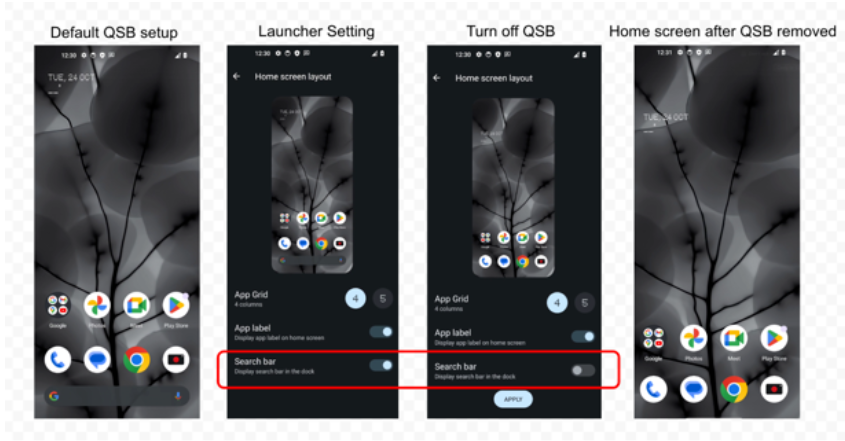
If the preloaded system launcher implements a fixed-placement search widget that doesn't provide full app widget controls (for example, resizing, relocating, or removing), then it MUST provide users with a separate setting to disable or select the default search engine for the widget.
The figure shows an example of an OEM setting that disables the fixed search widget on the hotseat:
IN-5.4-001 Google has delivered a GMS package that supports the implementation of the Default Search Engine (DSE) Choice Screen on GMS devices. Starting June 20, 2023, new PRODUCTs:
MUST implement the DSE Choice Screen to get an approval for sale in the countries if they include India. Otherwise, they MUST NOT be shipped into India for sale.
The software builds implementing the DSE Choice Screen for countries including India:
IN-5.4-002 MUST declare the feature flag com.google.android.feature.DSE_CHOICE_SCREEN.
IN-5.4-003 MUST preload the Search Engine Selector app, and keep it force-enabled.
For example, this can be done by updating the getKeepEnabledPackages method in packages/apps/Settings/src/com/android/settings/applications/ApplicationFeatureProviderImpl.java to return the package name of Search Engine Selector.
IN-5.4-004 MUST adhere to the following out-of-box setup UX requirements for the Choice Screen:
MUST use the Google-provided Choice Screen from the Search Engine Selector app.
MUST NOT skip Choice Screen if network connectivity is available.
MUST present Choice Screen to the user, immediately after the Google services screen is presented.
IN-5.4-005 If the Choice Screen is skipped during initial setup, then the Deferred Setup Wizard implementation:
MUST trigger the deferred setup scenario.
MUST post a persistent notification until the user selects a DSE from the Choice Screen in the deferred setup.
IN-5.4-006 MUST preload the apps in the following table to the minimum required version or higher:
IN-5.4-007 MUST override the value of config_defaultSearchSelectorPackageName framework resource overlay with the package name of the Search Engine Selector app.
3)RU
RU市场就相对来说比较简单了,Google原文如下:
RU v1 build configuration : A RU v1 build MUST meet all standard GMS requirements except for the placement of the Google search widget, and follow the RU-specific configurations below.
The Chrome search widget must be placed on the default home screen in place of the Google search widget.
Any other Google search widget must not be placed on the default home screen.
The version of the preloaded Chrome app must be equal to or greater than 60.0.
RU v2 build configuration: A RU v2 build MUST meet all RU v1 build requirements plus its version of preloaded Chrome app must be equal to or greater than 103.0.
After August 11 2022, all new PRODUCTs, that are going through their first build approval and intended for shipping to Russia and Belarus, must be approved in the RU v2 build configuration. That is, Google will stop approving new PRODUCTs that do not meet the RU v2 build configuration.
RU v3 build configuration: A RU v3 build MUST meet all RU v1 build requirements plus its version of preloaded Chrome app MUST be equal to or greater than 124.0.6367.179.
After June 27 2024, all new PRODUCTs, that are going through their first build approval and intended for shipping to Russia, Belarus, and Kazakhstan, MUST be approved in the RU v3 build configuration. Google will stop approving new PRODUCTs that don't meet the RU v3 build configuration.
RU-6.3-003 The Russia builds:
MUST place the Chrome search widget on the default home screen in place of the Google search widget.
MUST NOT place any other Google search widget on the default home screen.
4)TR
GMS Turkish Builds Configuration Requirements
TR-5.3-002 The Turkish builds MUST meet the following configuration requirements:
MUST have the software build for Turkish Product ("Turkish Build") comply with all standard GMS requirements except for placement of Google search widget on the default home screen or preload of Google's WebView library.
MUST declare declare the feature flag com.google.android.feature.TR_DEVICE for every Turkish build.
MUST NOT use a combination of BRAND, DEVICE, and PRODUCT identifiers for identifying Turkish builds that were used for launching non-Turkish product. Conversely, if a combination of identifiers was used for Turkish Builds, it MUST NOT be reused for launching standard MADA products.
Placement of Google search widget
TR-5.3-003 The Turkish builds MUST meet the following requirements to qualify for the bounty payment:
Partners who elect to to place the Google search widget on the default home screen of a Turkish Product can apply to earn a one-time, per-device activation bounty payment by signing a Google Search Widget Turkey Placement agreement.
Additional Turkey requirements
Refer to the following Turkey-specific requirements:
Ensure the Chromium version that the alternative WebView is built upon is correctly reported by the default User Agent string and match what's reported to the app.
TR-7.7-004.003 MUST set the security as follows:
Publish security updates to the alternative WebView based on new releases to Chromium within one month of those releases becoming available to a stable channel (in open source).
Make the alternative WebView package and any updates independently inspectable by third-party security researchers.
Enable safe browsing protection, where it is available through GMS.
Refrain from using the alternative WebView to collect any data about users' or devices' behavior and sending that data off device.
Disable crash reporting to Google through silent feedback.
TR-7.7-004.004 MUST set the developer and user experience as follows:
Permit free and open use of WebView by all Android apps without requiring additional hurdles, like user sign-in.
Respect any existing app and user opt-outs.
TR-7.7-004.005 MUST set the AndroidX compatibility as follows:
Ensure that the AndroidX reflection bootstrapping doesn't cause a failure, but may return an empty list of feature strings.
Pass all androidx.webkit automated tests for any features exposed in its feature list when using an alternative WebView package.
MUST NOT add new feature strings without coordinating with Google when using an alternative WebView package.
5)JP
Choice Screen builds for the Japan Mobile Software Competition Act (MSCA)
All new and existing Android phones in Japan, if they ship with Google Play, are required to show the Search and Browser Choice Screen to comply with the Mobile Software Competition Act (MSCA), which was announced by the Japan Fair Trade Commission (JFTC) on March 26, 2025.
JP-5.5-001 Google has delivered a GMS package that supports the implementation of the Japan Choice Screen on GMS devices. Starting December 19, 2025, IR builds for any new PHONEs for sale in Japan and LR/MR builds for any existing PHONEs in Japan running Android 15 or higher, if they are submitted for approval, MUST integrate the Japan Choice Screen feature.
Additional notes:
This requirement does not apply to tablets.
This requirement does not apply to the devices running Android 14 or earlier OS.
This requirement does not apply to SMR or EMR builds.
If your PRODUCTs are shipping to multiple countries including Japan, IR/MR builds for them must support the Japan Choice Screen as well. However, the Choice Screen will not be shown to the user if the device is located outside of Japan.
Every software build (IR/MR/LR) implementing the Japan Choice Screen:
JP-5.5-002 MUST declare the feature flag com.google.android.feature.JP_CHOICE_SCREEN.
JP-5.5-003 MUST preload the Search Engine Selector app, and keep it force-enabled.
For example, this can be done by updating the getKeepEnabledPackages method in packages/apps/Settings/src/com/android/settings/applications/ApplicationFeatureProviderImpl.java to return the package name of Search Engine Selector.
JP-5.5-004 MUST override the value of config_defaultSearchSelectorPackageName framework resource overlay with the package name of the Search Engine Selector app.
JP-5.5-005 MUST preload the minimum required version of apps in the following table, or their newer versions.
If the build is submitted for approval from December 19, 2025 to February 9, 2026:
The behavior of the Japan Choice Screen implementation in the out-of-the-box setup UX;
JP-5.5-006 MUST adhere to the following requirements:
The Choice Screen UX MUST come from the Google-provided Search Engine Selector app.
The Choice Screen UX MUST NOT be skippable if the network connectivity is available.
The Choice Screen UX MUST be presented to the user, immediately after the Google services screen is presented.
If the user skipped the Japan Choice Screen during the out-of-the-box setup UX, then the Deferred Setup UX;
JP-5.5-007 MUST be triggered and its UX MUST adhere to the following requirements;
A persistent notification MUST be posted until the user selects a default search engine and a default browser in the Choice Screen.
Important: To test the Japan choice screen, a Google Account for testing must be added to an allowlist. Submit an allow request for your test account to the Partner Issue Tracker. If you don't have access to the Partner Issue Tracker, reach out to your Android contact and ask to be onboarded.