目录
[global 配置参数说明](#global 配置参数说明)
[自定义HAProxy 错误界面](#自定义HAProxy 错误界面)
[HAProxy https 实现](#HAProxy https 实现)
haproxy介绍
HAProxy是法国开发者 威利塔罗(Willy Tarreau) 在2000年使用C语言开发的一个开源软件 是一款具备高并发(万级以上)、高性能的TCP和HTTP负载均衡器 支持基于cookie的持久性,自动故障切换,支持正则表达式及web状态统计
四层负载和七层负载的区别
四层和七层的区别 所谓的四到七层负载均衡,就是在对后台的服务器进行负载均衡时,依据四层的信息或七层的信息来决 定怎么样转发流量
四层的负载均衡,就是通过发布三层的IP地址(VIP),然后加四层的端口号,来决定哪些流量需要做负 载均衡,对需要处理的流量进行NAT处理,转发至后台服务器,并记录下这个TCP或者UDP的流量是由哪 台服务器处理的,后续这个连接的所有流量都同样转发到同一台服务器处理
七层的负载均衡,就是在四层的基础上(没有四层是绝对不可能有七层的),再考虑应用层的特征,比 如同一个Web服务器的负载均衡,除了根据VIP加80端口辨别是否需要处理的流量,还可根据七层的 URL、浏览器类别、语言来决定是否要进行负载均衡。
1.分层位置:四层负载均衡在传输层及以下,七层负载均衡在应用层及以下
2.性能 :四层负载均衡架构无需解析报文消息内容,在网络吞吐量与处理能力上较高:七层可支持解析应用 层报文消息内容,识别URL、Cookie、HTTP header等信息。
3.原理 :四层负载均衡是基于ip+port;七层是基于虚拟的URL或主机IP等。
4.功能类比:四层负载均衡类似于路由器;七层类似于代理服务器。
5.安全性:四层负载均衡无法识别DDoS攻击;七层可防御SYN Cookie/Flood攻击
haproxy的基本配置信息
HAProxy 的配置文件haproxy.cfg由两大部分组成,分别是:
global:全局配置段
- 进程及安全配置相关的参数
- 性能调整相关参数
- Debug参数
proxies:代理配置段
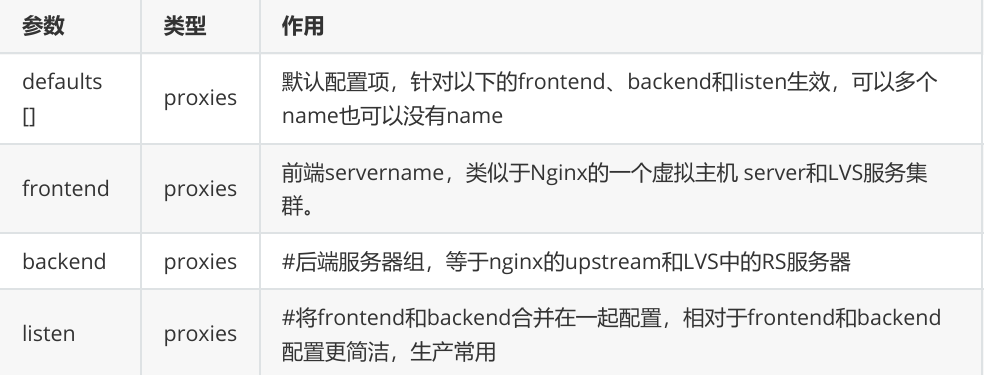
- defaults:为frontend, backend, listen提供默认配置
- frontend:前端,相当于nginx中的server {}
- backend:后端,相当于nginx中的upstream {}
- listen:同时拥有前端和后端配置,配置简单,生产推荐使用
global 配置参数说明
127.0.0.1 local2
定义 syslog 服务器地址和设施代码,需确保 syslog 服务已启用 UDP 协议支持。最多支持配置两个日志服务器。
chroot /var/lib/haproxy
将进程限制在指定目录内运行,增强安全性。需确保该目录及其子目录权限正确。
pidfile /var/run/haproxy.pid
指定 PID 文件路径,用于进程管理。需确保运行用户有写入权限。
maxconn 100000
设置单个进程的最大并发连接数,需根据系统资源调整。
user haproxy和group haproxy
指定服务运行的用户和组,建议使用专用低权限账户。
daemon
以守护进程模式运行,脱离终端在后台执行。
stats socket /var/lib/haproxy/stats
启用统计套接字,提供实时监控接口。可通过工具如 socat 连接获取运行时信息。
nbproc 2
设置HAProxy工作进程数量为2,默认为1。多进程模式可提高性能,但需配合CPU核心绑定避免资源竞争。
cpu-map 1 0
将第一个工作进程绑定到CPU核心0,减少上下文切换开销。
cpu-map 2 1
将第二个工作进程绑定到CPU核心1,确保进程间CPU资源隔离。
nbthread 2
设置每个工作进程的线程数为2。此参数与
nbproc互斥,即两者不可同时使用。线程模式适用于高并发场景,但需注意线程安全。maxsslconn 100000
限制每个HAProxy进程的SSL最大连接数为10万。仅当配置SSL证书时生效,防止SSL握手消耗过多资源。
maxconnrate 100
控制每个客户端每秒新建连接数不超过100,用于防御连接洪泛攻击。
proxies配置
日志与连接配置
log global
继承全局日志配置,通常由syslog或rsyslog处理日志记录。option httplog
记录 HTTP 会话的详细信息,包括请求、状态码、源 IP 等。option dontlognull
忽略空连接日志,减少无效日志条目。网络与超时控制
option http-server-close
允许服务器关闭空闲连接,默认等待 10 秒。option forwardfor except 127.0.0.0/8
透传客户端真实 IP 至后端服务器,需在后端配置X-Forwarded-For头。option redispatch
当后端服务器故障时,自动将请求重定向至其他健康节点。超时参数
timeout connect 120s
后端服务器连接超时时间(120 秒)。timeout client 600s
客户端非活动超时时间(600 秒)。timeout server 600s- 后端服务器响应超时时间(600 秒)。
timeout http-keep-alive 60s
会话保持时间,期间请求会转发至同一后端服务器。- timeout check 10s #指定后端服务器健康检查的超时时间
- maxconn 3000
- default-server inter 1000 weight 3
haproxy的算法
HAProxy通过固定参数 balance 指明对后端服务器的调度算法
balance参数可以配置在listen或backend选项中。
HAProxy的调度算法分为静态和动态调度算法
有些算法可以根据参数在静态和动态算法中相互转换。
#静态
static-rr--------->tcp/http
first------------->tcp/http
#动态
roundrobin-------->tcp/http
leastconn--------->tcp/http
random------------>tcp/http
#以下静态和动态取决于hash_type是否consistent
source------------>tcp/http
Uri--------------->http
url_param--------->http
hdr--------------->http
各算法使用场景
first
适用于测试环境或特殊需求场景,该算法直接将请求分配给第一个可用的服务器,缺乏灵活性。
static-rr
支持会话共享的Web集群场景,基于静态轮询分配请求,确保服务器权重固定且请求均匀分布。
roundrobin
通用型动态轮询算法,根据服务器权重动态调整分配比例,适合大多数无状态服务的负载均衡需求。
random
通过随机选择服务器分配请求,适用于简单场景,但缺乏对服务器负载的感知能力。
leastconn
数据库类长连接场景的首选算法,优先将请求分配给当前连接数最少的服务器,有效避免过载。
会话保持实现方式
source
基于客户端公网IP的会话保持方法,通过哈希计算IP地址将同一客户端的请求固定到同一服务器。
uri
HTTP缓存服务器和CDN服务商(如蓝汛、百度、阿里云、腾讯)常用,根据请求URI路径进行哈希分配。
url_param
HTTP协议专用,通过提取URL中的特定参数(如
sessionid)实现会话保持,适用于需要精确控制的场景。hdr
基于客户端请求报文头部字段(如
User-Agent或Cookie)进行会话绑定,支持高度定制化的流量分配策略。
高级功能及配置
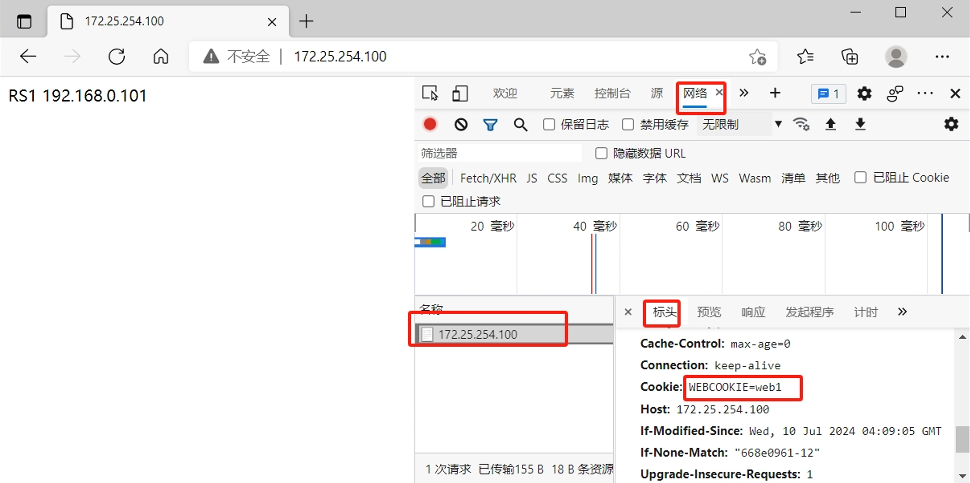
基于cookie的会话保持
bash
haproxy ~]# vim /etc/haproxy/haproxy.cfg
...上面内容省略...
listen webserver_80
bind 172.25.254.100:80
option forwardfor
mode http
balance roundrobin
cookie WEBCOOKIE insert nocache indirect
server webserver1 192.168.0.101:80  cookie web1 weight 1 check inter 3s fall
3 rise 5
server webserver2 192.168.0.102:80  cookie web2 weight 1 check inter 3s fall
3 rise 5
验证cookie信息
HAProxy状态页
bash
haproxy ~]# vim /etc/haproxy/haproxy.cfg
...上面内容省略...
listen stats:
    mode http
    bind 0.0.0.0:8888
    stats enable
    log global
    stats uri /status         #自定义stats page uri
    stats auth lvv:lvv        #认证,此行可以出现多次
...上面内容省略...

测试:
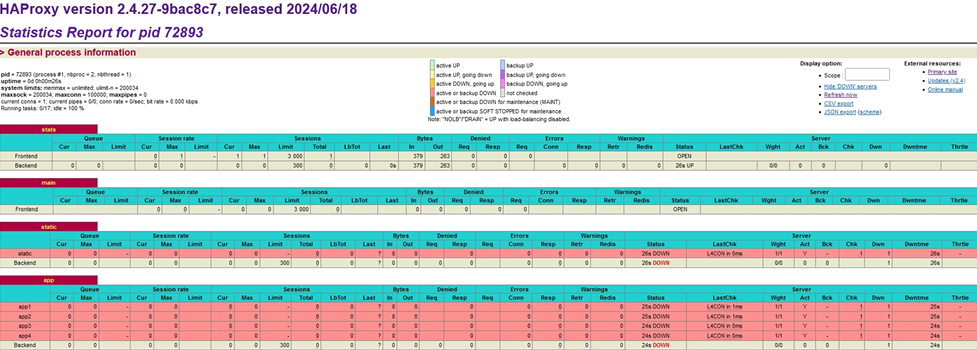
浏览器访问:172.25.254.100:8888/status
通过web界面,显示当前HAProxy的运行状态
IP透传
web服务器中需要记录客户端的真实IP地址,用于做访问统计、安全防护、行为分析、区域排行等场景。
四层IP透传
bash
#nginx 配置:在访问日志中通过变量$proxy_protocol_addr 记录透传过来的客户端IP


[root@rs1 ~]# vim /etc/nginx/nginx.conf
。。。内容省略。。。

http {
log_format main '$remote_addr - $remote_user [$time_local] "$request"' ' "$proxy_protocol_addr"'
'$status $body_bytes_sent "$http_referer" '
'"$http_user_agent" "$http_x_forwarded_for"';
。。。内容省略。。。
    server {
        listen       80 proxy_protocol; #启用此项,将无法直接访问此网站,只能通过四层代
理访问
        listen       [::]:80;
        server_name  _;
        root         /usr/share/nginx/html;
        。。。内容省略。。。
        }
}
#修改haproxy
haproxy ~]# vim /etc/haproxy/haproxy.cfg
...上面内容省略...
listen webserver_80
    bind 172.25.254.100:80
    mode tcp
    balance roundrobin
    server webserver1 192.168.0.101:80 send-proxy weight 1 check inter 3s fall 3
rise 5
...上面内容省略...
#查看日志内容
[root@rs1 ~]# tail -n 3 /var/log/nginx/access.log
192.168.0.10 - - [10/Jul/2024:15:21:00 +0800] "GET / HTTP/1.1"200 18 "-"
"curl/7.29.0" "-"
192.168.0.10 - - [10/Jul/2024:15:26:11 +0800] "GET / HTTP/1.1"200 18 "-"
"curl/7.29.0" "-"
192.168.0.10 - - [10/Jul/2024:15:41:56 +0800] "GET / HTTP/1.1"
"172.25.254.10"200 18 "-" "curl/7.29.0"
七层IP透传
bash
haproxy ~]# vim /etc/haproxy/haproxy.cfg
...上面内容省略...
listen webserver_80
    option forwardfor
    bind 172.25.254.100:80
    mode http
    balance roundrobin
    server webserver1 192.168.0.101:80 send-proxy weight 1 check inter 3s fall 3
rise 5
    server webserver1 192.168.0.102:80  weight 1 check inter 3s fall 3 rise 5
...上面内容省略...
查看日志如下:
bash
[root@rs1 ~]# tail -n 3 /var/log/nginx/access.log
"172.25.254.10, 192.168.0.10" 192.168.0.10 - - [10/Jul/2024:16:15:00 +0800] "GET
/ HTTP/1.1"200 18 "-" "curl/7.29.0" "172.25.254.10"
[root@rs2 ~]# tail -n 3  /etc/httpd/logs/access_log
172.25.254.10 192.168.0.10 - - [11/Jul/2024:00:15:00 +0800] "GET / HTTP/1.1" 200
27 "-" "curl/7.29.0"
ACL
ACL示例-域名匹配
bash
[haproxy ~]# vim /etc/haproxy/haproxy.cfg
...上面内容省略...
frontend testacl
    bind :80
    mode http
    ###########     ACL settings    #######################
    acl web_host hdr_dom(host) www.timinglee.org
    ###########     host        ###########################
    use_backend timinglee_host if web_host
    ###########     default server      ###################
    default_backend default_webserver
backend timinglee_host
    mode http
    server web1 192.168.0.101:80 check weight 1 inter 3s fall 3 rise 5
    server web2 192.168.0.102:80 check weight 1 inter 3s fall 3 rise 5
backend default_webserver
    mode http
    server web1 172.25.254.10:80 check weight 1 inter 3s fall 3 rise 5
...上面内容省略...
#测试结果
[root@node10 html]# curl  www.timinglee.org
RS1 192.168.0.101
[root@node10 html]# curl  www.timinglee.org
RS2 server - 192.168.0.102
[root@node10 html]# curl  172.25.254.100
default web server node10
ACL示例-基于源IP或子网调度访问
bash
[haproxy ~]# vim /etc/haproxy/haproxy.cfg
...上面内容省略...
frontend testacl
    bind :80
    mode http
    ###########     ACL settings    #######################
    acl ip_test src 172.25.254.1 192.168.0.0/24
    ###########     host        ###########################
    use_backend ip_test-host if ip_test
    ###########     default server      ###################
    default_backend default_webserver
backend ip_test-host
    mode http
    server web1 192.168.0.101:80 check weight 1 inter 3s fall 3 rise 5
backend default_webserver
    mode http
    server web1 172.25.254.10:80 check weight 1 inter 3s fall 3 rise 5
#测试结果
[172.25.254.10 root@node10 html]# curl  172.25.254.100
default web server node10
[172.25.254.1 Administrator.WIN-20240602BIS] ➤ curl 172.25.254.100
RS1 192.168.0.101
[192.168.0.102 root@rs1 ~]# curl  192.168.0.101
RS1 192.168.0.101
ACL示例-基于源地址的访问控制
bash
[haproxy ~]# vim /etc/haproxy/haproxy.cfg
...上面内容省略...
frontend testacl
    bind :80
    mode http
    ###########     ACL settings    #######################
    acl web_host hdr_dom(host) www.timinglee.org
    acl ip_test src 172.25.254.1 192.168.0.0/24
    ###########     host        ###########################
    http-request deny if web_host
    ###########     default server      ###################
    default_backend default_webserver
backend ip_test-host
    mode http
    server web1 192.168.0.101:80 check weight 1 inter 3s fall 3 rise 5
backend default_webserver
    mode http
    server web1 172.25.254.10:80 check weight 1 inter 3s fall 3 rise 5
测试
[root@node10 ~]# curl www.timinglee.org
<html><body><h1>403 Forbidden</h1>
Request forbidden by administrative rules.
</body></html>
[root@node10 ~]# curl 172.25.254.100
default web server node10
ACL示例-匹配浏览器类型
bash
[haproxy ~]# vim /etc/haproxy/haproxy.cfg
...上面内容省略...
frontend testacl
    bind :80
    mode http
    ###########     ACL settings    #######################
    acl user_agent_block hdr_sub(User-Agent) -i curl wget
    acl user_agent_redirect hdr_sub(User-Agent) -i Mozilla/5.0
    ###########     host        ###########################
    http-request deny if user_agent_block
    redirect prefix https://www.baidu.com if user_agent_redirect
    ###########     default server      ###################
    default_backend default_webserver
backend ip_test-host
    mode http
    server web1 192.168.0.101:80 check weight 1 inter 3s fall 3 rise 5
backend default_webserver
    mode http
    server web1 172.25.254.10:80 check weight 1 inter 3s fall 3 rise 5
测试:
[root@node10 ~]# curl 172.25.254.100
<html><body><h1>403 Forbidden</h1>
Request forbidden by administrative rules.
</body></html>

2.
[root@node10 ~]# wget http://172.25.254.100/index.html--2024-07-11 23:04:36--  http://172.25.254.100/index.html
Connecting to 172.25.254.100:80... connected.
HTTP request sent, awaiting response... 403 Forbidden
2024-07-11 23:04:36 ERROR 403: Forbidden.
ACL示例-基于文件后缀名实现动静分离
bash
haproxy ~]# vim /etc/haproxy/haproxy.cfg
...上面内容省略...
frontend testacl
    bind :80
    mode http
###########     ACL settings    #######################
    acl url_static  path_end -i .jpg .png .css .js .html
    acl url_php     path_end -i .php
    ###########     host        ###########################
    use_backend static_host if url_static
    use_backend php_host if url_php
    ###########     default server      ###################
    default_backend default_webserver
backend static_host
    mode http
    server web2 192.168.0.101:80 check weight 1 inter 3s fall 3 rise 5
backend php_host
    mode http
    server web1 192.168.0.102:80 check weight 1 inter 3s fall 3 rise 5
backend default_webserver
    mode http
    server web1 172.25.254.10:80 check weight 1 inter 3s fall 3 rise 5
测试:
[root@rs1 ~]# echo css 192.168.0.101 >  /usr/share/nginx/html/index.css
[root@rs2 ~]# echo php 192.168.0.102  > /var/www/html/index.php
[root@node10 ~]# curl 172.25.254.100/index.php
php 192.168.0.102
[root@node10 ~]# curl 172.25.254.100/index.css
css 192.168.0.101
ACL-匹配访问路径实现动静分离
bash
haproxy ~]# vim /etc/haproxy/haproxy.cfg
...上面内容省略...
frontend testacl
    bind :80
    mode http
    ###########     ACL settings    #######################
    acl url_static  path_end -i .jpg .png .css .js .html
    acl url_static  path_end -m sub /static /images /javascript
    acl acl_app     path_beg -m sub /api
    ###########     host        ###########################
use_backend static_host if url_static
use_backend api_host if acl_app
###########
default server
default_backend default_webserver
###################
backend static_host
mode http
server web2 192.168.0.101:80 check weight 1 inter 3s fall 3 rise 5
backend api_host
mode http
server web1 192.168.0.102:80 check weight 1 inter 3s fall 3 rise 5
backend default_webserver
mode http
server web1 172.25.254.10:80 check weight 1 inter 3s fall 3 rise 5
#创建相关文件
[root@rs1 ~]# mkdir /usr/share/nginx/html/static
[root@rs1 ~]# echo static 192.168.0.101 >
/usr/share/nginx/html/static/index.html
[root@rs2 ~]# mkdir  /var/www/html/api/
[root@rs2 ~]# echo api 192.168.0.102 > /var/www/html/api/index.html
#测试访问
[root@node10 ~]# curl 172.25.254.100/api/
api 192.168.0.102
[root@node10 ~]# curl 172.25.254.100/static/
static 192.168.0.101
自定义HAProxy 错误界面
对指定的报错进行重定向,进行优雅的显示错误页面 使用errorfile和errorloc指令的两种方法,可以实现自定义各种错误页面
基于自定义的错误页面文件
bash
#haproxy默认使用的错误错误页面
[root@haproxy ~]# rpm -ql  haproxy24z-2.4.27-1.el7.zenetys.x86_64 | grep -E
http$
/usr/share/haproxy/400.http
/usr/share/haproxy/403.http
/usr/share/haproxy/408.http
/usr/share/haproxy/500.http
/usr/share/haproxy/502.http
/usr/share/haproxy/503.http
/usr/share/haproxy/504.http
bash
haproxy ~]# vim /etc/haproxy/haproxy.cfg
...上面内容省略...
defaults
    mode                    http
    ...内容省略...
    timeout client          1m
    timeout server          1m
    timeout http-keep-alive 10s
    timeout check           10s
    maxconn                 1000000
    errorfile 503 /haproxy/errorpages/503page.http
[root@haproxy ~]# mkdir /haproxy/errorpages/ -p
[root@haproxy ~]# cp /usr/share/haproxy/503.http
/haproxy/errorpages/503page.http
[root@haproxy ~]# vim /haproxy/errorpages/503page.http
HTTP/1.0 503 Service Unavailable
Cache-Control: no-cache
Connection: close
Content-Type: text/html;charset=UTF-8^M
<html><body><h1>什么动物生气最安静</h1>
大猩猩!!
</body></html>
测试:
关闭后端的RS主机 然后用浏览器去访问172.25.254.100
基于http重定向错误页面
bash
haproxy ~]# vim /etc/haproxy/haproxy.cfg
...上面内容省略...
defaults
    mode                    http
    ...内容省略...
    timeout client          1m
    timeout server          1m
    timeout http-keep-alive 10s
    timeout check           10s
    maxconn                 1000000
    errorloc 503 https://www.baidu.com
#浏览器访问172.25.254.100 自动跳转到百度
HAProxy https 实现
haproxy可以实现https的证书安全,从用户到haproxy为https,从haproxy到后端服务器用http通信 但基于性能考虑,生产中证书都是在后端服务器比如nginx上实现
证书制作:
bash
haproxy ~]# mkdir   /etc/haproxy/certs/
haproxy ~]#  openssl req -newkey rsa:2048 \ -nodes -sha256 --keyout /etc/haproxy/certs/timinglee.org.key \ -x509 -days 365 -out /etc/haproxy/certs/timinglee.org.cr
https配置示例
bash
haproxy ~]#  vim /etc/haproxy/haproxy.cfg
frontend webserver
bind *:80
redirect scheme https if !{ ssl_fc }
mode http
use_backend webcluster
frontend webserver-https
bind *:443 ssl  crt  /etc/haproxy/timinglee.org.pem
mode http
use_backend webcluster
backend  webcluster
mode http
balance roundrobin
server web1 172.25.254.200:80 check inter 3s fall 3 rise 5
server web2 172.25.254.201:80 check inter 3s fall 3 rise 5
bash
[root@客户端 ~]#curl -IkL http://172.25.254.100
HTTP/1.1 302 Found
content-length: 0
location: https://www.timinglee.org/
cache-control: no-cache
HTTP/1.1 200 OK
date: Sat, 04 Apr 2020 02:31:31 GMT
server: Apache/2.4.6 (CentOS) PHP/5.4.16
last-modified: Thu, 02 Apr 2020 01:44:13 GMT
etag: "a-5a244f01f8adc"
accept-ranges: bytes
content-length: 10
content-type: text/html; charset=UTF-8
[root@centos6 ~]#curl -Ik https://www.timinglee.org
HTTP/1.1 200 OK
date: Sat, 04 Apr 2020 02:31:50 GMT
server: Apache/2.4.6 (CentOS) PHP/5.4.16
last-modified: Thu, 02 Apr 2020 01:44:28 GMT
etag: "a-5a244f0fd5175"
accept-ranges: bytes
content-length: 10
content-type: text/html; charset=UTF-8