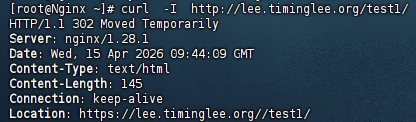
一、Nginx实验环境
Nginx 172.25.254.100 Nginx主机
RS1 172.25.254.10 后端服务器
RS2 172.25.254.20 后端服务器
二、Nginx的源码编译
2.1.下载软件
root@Nginx \~# wget https://nginx.org/download/nginx-1.28.1.tar.gz
2.2.解压
root@Nginx \~# tar zxf nginx-1.28.1.tar.gz
root@Nginx \~# cd nginx-1.28.1/

2.3.检查环境
root@Nginx \~# dnf install gcc openssl-devel.x86_64 pcre2-devel.x86_64 zlib-devel -y
root@Nginx nginx-1.28.1# ./configure --prefix=/usr/local/nginx --user=nginx --group=nginx --with-http_ssl_module --with-http_v2_module --with-http_realip_module --with-http_stub_status_module --with-http_gzip_static_module --with-pcre --with-stream --with-stream_ssl_module --with-stream_realip_module
2.4.编译
root@Nginx nginx-1.28.1# make
root@Nginx nginx-1.28.1# make install
2.5.nginx启动
#设定环境变量
root@Nginx \~# cd /sbin
root@Nginx sbin# vim ~/.bash_profile
9 export PATH=$PATH:/usr/local/nginx/sbin
root@Nginx sbin# source ~/.bash_profile
root@Nginx \~# useradd -s /sbin/nologin -M nginx
root@Nginx \~# nginx

#代表启动成功
#测试
root@Nginx \~# echo timinglee > /usr/local/nginx/html/index.html //修改index主页

2.6.编写启动文件
root@Nginx \~# vim /lib/systemd/system/nginx.service
1 Unit
2 Description=The NGINX HTTP and reverse proxy server
3 After=syslog.target network-online.target remote-fs.target nss-lookup.target
4 Wants=network-online.target
5
6 Service
7 Type=forking
8 ExecStartPre=/usr/local/nginx/sbin/nginx -t
9 ExecStart=/usr/local/nginx/sbin/nginx
10 ExecReload=/usr/local/nginx/sbin/nginx -s reload
11 ExecStop=/bin/kill -s QUIT $MAINPID
12 PrivateTmp=true
13
14 Install
15 WantedBy=multi-user.target
root@Nginx \~# systemctl daemon-reload
#验证

root@Nginx \~# systemctl enable --now nginx
root@Nginx \~# ps aux | grep nginx

root@Nginx \~# reboot
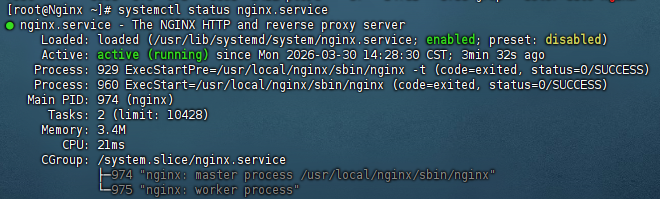
root@Nginx \~# systemctl status nginx.service
三、Nginx配置文件的管理及优化参数
#指定 Nginx 工作进程的运行用户及所属组
root@Nginx \~# vim /usr/local/nginx/conf/nginx.conf
2 user nginx;
root@Nginx \~# nginx -t
nginx: the configuration file /usr/local/nginx/conf/nginx.conf syntax is ok
nginx: configuration file /usr/local/nginx/conf/nginx.conf test is successful
root@Nginx \~# nginx -s reload
root@Nginx \~# ps aux | grep nginx

#指定 Nginx 开启的工作进程数量
root@Nginx \~# vim /usr/local/nginx/conf/nginx.conf
3 worker_processes 2;
root@Nginx \~# nginx -s reload

#在VMware中修改Nginx虚拟机的处理器内核总数,然后重启

#自动根据你的 CPU 核心数,开启对应数量的工作进程(生产环境中最推荐)
#把每个 Nginx 工作进程,绑定到独立的 CPU 核心上,不让它们乱切换
root@Nginx \~# vim /usr/local/nginx/conf/nginx.conf
3 worker_processes auto;
4 worker_cpu_affinity 0001 0010 0100 1000;
root@Nginx \~# nginx -s reload
root@Nginx \~# ps aux | grep nginx

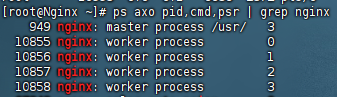
root@Nginx \~# ps axo pid,cmd,psr | grep nginx
#配置events模块,控制连接处理模型和并发模式
#高并发优化方案
root@Nginx \~# vim /usr/local/nginx/conf/nginx.conf
13 events {
14 worker_connections 10000; #设置单个 worker 进程能同时处理的最大连接数
15 use epoll; #指定 Nginx 使用 epoll 事件模型来处理 I/O 事件
16 accept_mutex on; #开启互斥锁 ,让多个 worker 进程轮流、有序地接收新连接
17 multi_accept on; #允许 worker 进程一次性接收所有等待中的新连接
18 }
root@Nginx \~# nginx -s reload
#处理本地文件系统的并发文件数量
root@Nginx \~# dnf install httpd-tools -y
root@Nginx \~# vim /etc/security/limits.conf
62 * - nofile 100000
63 * - noproc 100000
64 root - nofile 100000
root@Nginx \~# reboot
root@Nginx \~# sudo -u nginx ulimit -n # 查看 nginx 用户的最大文件描述符数 → 输出 100000
100000
root@Nginx \~# ulimit -n 100000 # 临时将当前 shell 的最大文件描述符数设为 100000
#测试
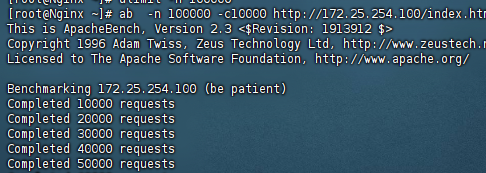
root@Nginx \~# ab -n 100000 -c10000 http://172.25.254.100/index.html
四、长链路优化
4.1.设置长链路时间
root@Nginx \~# vim /usr/local/nginx/conf/nginx.conf
35 keepalive_timeout 5; # 长连接空闲超时时间(秒)
root@Nginx \~# nginx -s reload
root@Nginx \~# dnf install telnet -y
root@Nginx \~# vim /etc/hosts
4 172.25.254.100 www.timinglee.org
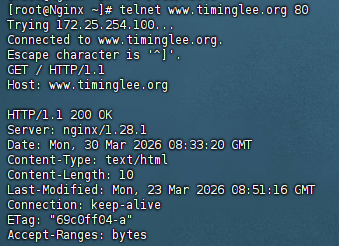
root@Nginx \~# telnet www.timinglee.org 80
GET / HTTP/1.1
Host: www.timinglee.org
#正常
#若不输入
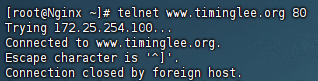
显示的页面出现后根据设定的长链接时间会等待,超过时间后会自动退出
4.2.设定长链路次数
root@Nginx \~# vim /usr/local/nginx/conf/nginx.conf
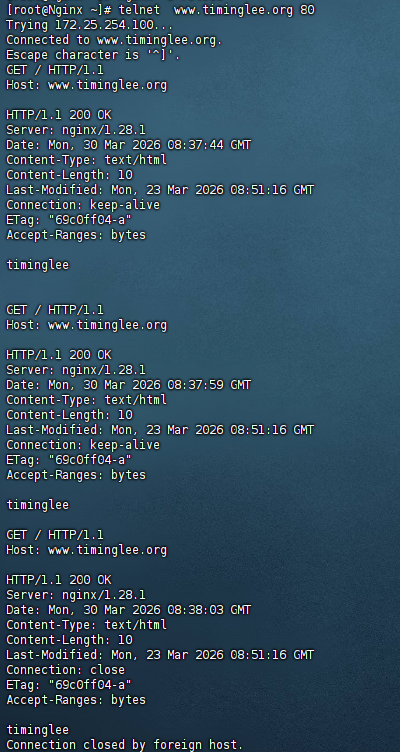
36 keepalive_requests 3;
root@Nginx \~# nginx -s reload
root@Nginx \~# telnet www.timinglee.org 80
五、服务访问的用户认证
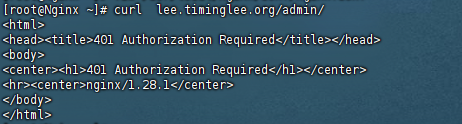
root@Nginx \~# htpasswd -cmb /usr/local/nginx/conf/.htpasswd admin lee
Adding password for user admin
#新增配置
root@Nginx \~# vim /usr/local/nginx/conf/nginx.conf
52 location /admin {
53 root /usr/local/nginx/html;
54 index index.html;
55 auth_basic "login passwd";
56 auth_basic_user_file "/usr/local/nginx/conf/.htpasswd";
57 }
root@Nginx \~# vim /etc/hosts
5 172.25.254.100 lee.timinglee.org
#测试
#账户密码错误或无时
#账户密码正确时

六、自定义错误页面、错误日志、下载服务器
6.1.自定义错误页面
root@Nginx \~# mkdir /usr/local/nginx/errorpage
root@Nginx \~# echo "Warning,Warning,你要访问的页面辞职了!!" > /usr/local/nginx/errorpage/errormessage
root@Nginx \~# cat /usr/local/nginx/errorpage/errormessage
Warning,Warning,你要访问的页面辞职了!!
#把 404 配置写进主配置
root@Nginx \~# vim /usr/local/nginx/conf/nginx.conf
58 # 自定义 404 错误页
59 error_page 404 /errormessage;
60 location = /errormessage {
61 root /usr/local/nginx/errorpage;
62 }
root@Nginx \~# nginx -t #检查配置文件是否正确
root@Nginx \~# nginx -s reload
#测试
root@Nginx \~# curl lee.timinglee.org/lee/

6.2.自定义错误日志
root@Nginx \~# mkdir -p /usr/local/nginx/logs/timinglee.org/
#补充error_log配置
root@Nginx \~# vim /usr/local/nginx/conf/nginx.conf
40 server {
41 listen 80;
42 server_name lee.timinglee.org;
43 error_log logs/timinglee.org/lee.error error;
60 # 自定义 404 505 503 502 错误页
61 error_page 404 505 503 502 /errormessage;
62 location = /errormessage {
63 root /usr/local/nginx/errorpage;
64 }
root@Nginx \~# systemctl restart nginx.service
#测试

6.3.自定义下载服务器
root@Nginx \~# mkdir -p /usr/local/nginx/download
root@Nginx \~# cp /etc/passwd /usr/local/nginx/download/
root@Nginx \~# dd if=/dev/zero of=/usr/local/nginx/download/bigfile bs=1M count=100
记录了100+0 的读入
记录了100+0 的写出
104857600字节(105 MB,100 MiB)已复制,0.256795 s,408 MB/s
root@Nginx \~# vim /usr/local/nginx/conf/nginx.conf
65 # /download 路径:下载服务
66 location /download {
67 root /usr/local/nginx;
68 }
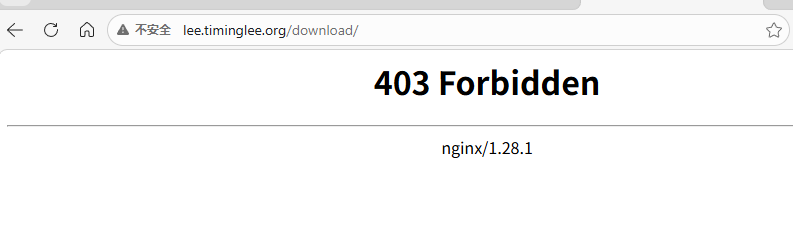
#访问
6.3.1.启用列表功能
root@Nginx \~# vim /usr/local/nginx/conf/nginx.conf
65 # /download 路径:下载服务
66 location /download {
67 root /usr/local/nginx;
68 autoindex on;
69 }
root@Nginx \~# nginx -s reload
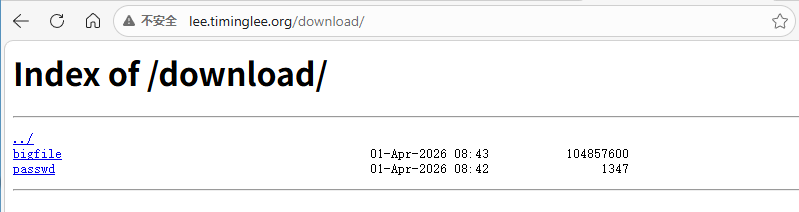
#访问效果
七、Nginx的文件检测与状态页
7.1.Nginx文件检测
#创建默认页
root@Nginx \~# echo default > /usr/local/nginx/errorpage/default.html
root@Nginx \~# cat /usr/local/nginx/errorpage/default.html
default
root@Nginx \~# vim /usr/local/nginx/conf/nginx.conf
40 server {
41 listen 80;
42 server_name lee.timinglee.org;
43 error_log logs/timinglee.org/lee.error error;
44 root /usr/local/nginx/errorpage; #实现文件检测逻辑的核心
45 try_files uri uri.html $uri/index.html /default.html; #实现文件检测逻辑的核心
46 index index.html index.htm;
47
48 location /admin {
49 root /usr/local/nginx/html;
50 index index.html;
51 auth_basic "login passwd";
52 auth_basic_user_file "/usr/local/nginx/conf/.htpasswd";
53 }
54 # 自定义 404 505 503 502 错误页
55 error_page 404 505 503 502 /errormessage;
56 location = /errormessage {
57 root /usr/local/nginx/errorpage;
58 }
59 # /download 路径:下载服务
60 location /download {
61 root /usr/local/nginx;
62 autoindex on;
63 }
root@Nginx \~# nginx -s reload
测试:
curl -v lee.timinglee.org/aaaaaaaaaa/
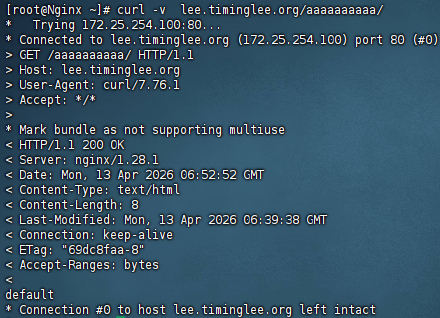
#完美匹配创建的 /usr/local/nginx/errorpage/default.html 的内容,证明try_files的兜底逻辑完全生效:
-
访问不存在的**
/aaaaaaaaa/** -
按顺序检查**
$uri→$uri.html→$uri/index.html**,全部不存在 -
最终兜底返回**
/default.html** ,输出**default**
7.2.Nginx状态页
#目前server的完整配置
#状态页(60-73)
root@Nginx \~# vim /usr/local/nginx/conf/nginx.conf
41 server {
42 # 监听 80 端口(HTTP 默认端口)
43 listen 80;
44 # 这个服务对应的域名
45 server_name lee.timinglee.org;
46
47 # 错误日志存放路径 + 日志级别(error 只记录错误)
48 error_log logs/timinglee.org/lee.error error;
49 # 访问日志存放路径
50 access_log logs/timinglee.org/lee.access;
51
52 # ===================== 核心网站配置 =====================
53 # 网站根目录(所有文件从这里找)
54 root /usr/local/nginx/errorpage;
55 # 自动找文件规则:先找原路径 → 加.html → 找目录下index.html → 最后兜底 default.html
56 try_files uri uri.html $uri/index.html /default.html;
57 # 默认首页文件(访问目录时自动找)
58 index index.html index.htm;
59
60 # ===================== Nginx 状态页(监控用) =====================
61 location /nginx_status {
62 # 开启 Nginx 内置状态页功能
63 stub_status;
64 # 开启账号密码验证,提示文字:auth login
65 auth_basic "auth login";
66 # 账号密码文件存放路径
67 auth_basic_user_file /usr/local/nginx/conf/.htpasswd;
68 # 只允许 172.25.254.0 网段访问
69 allow 172.25.254.0/24;
70 # 禁止其他所有 IP 访问
71 deny all;
72 }
73
74 # ===================== 后台管理页面(需要密码) =====================
75 location /admin {
76 # 后台页面的根目录
77 root /usr/local/nginx/html;
78 # 默认首页
79 index index.html;
80 # 开启密码验证
81 auth_basic "login passwd";
82 # 密码文件(和状态页共用同一个)
83 auth_basic_user_file "/usr/local/nginx/conf/.htpasswd";
84 }
85
86 # ===================== 自定义错误页 =====================
87 # 404/505/503/502 错误时,跳转到 /errormessage
88 error_page 404 505 503 502 /errormessage;
89 # 错误页面的真实路径
90 location = /errormessage {
91 root /usr/local/nginx/errorpage;
92 }
93
94 # ===================== 下载目录 =====================
95 location /download {
96 # 下载目录根路径
97 root /usr/local/nginx;
98 # 开启文件列表展示(可以看到目录里的文件)
99 autoindex on;
100 }
101 }
#检查文件是否有错误
root@Nginx \~# nginx -t
nginx: the configuration file /usr/local/nginx/conf/nginx.conf syntax is ok
nginx: configuration file /usr/local/nginx/conf/nginx.conf test is successful
#文件重载
root@Nginx \~# nginx -s reload
#测试
curl -u admin:密码 http://lee.timinglee.org/nginx_status

##记得在客户机中配置域名解析

八、Nginx的压缩功能
#创建站点目录
root@Nginx \~# mkdir /usr/local/nginx/timinglee.org/lee/html -p
#生成首页测试文件
root@Nginx \~# echo hello lee > /usr/local/nginx/timinglee.org/lee/html/index.html
#复制大文件用于压缩测试
root@Nginx \~# cp /usr/local/nginx/logs/access.log /usr/local/nginx/timinglee.org/lee/html/bigfile.txt
#删除主配置中的server配置(nginx.conf 里留一个 server,会优先匹配、覆盖你写的虚拟主机)
#将压缩配置写在http配置里
root@Nginx \~# vim /usr/local/nginx/conf/nginx.conf
34 gzip on;
35 gzip_comp_level 4;
36 gzip_disable "MSIE 1-6\.";
37 gzip_min_length 1024k;
38 gzip_buffers 32 1024k;
39 gzip_types text/plain application/javascript application/x-javascript text/css application/xml text/javascript application/x-httpd-p hp image/gif image/png;
40 gzip_vary on;
41 gzip_static on;
#现在使用conf.d/vhosts.conf来写入所需配置,这样更方便我们来修改
root@Nginx \~# vim /usr/local/nginx/conf/conf.d/vhosts.conf
1 server {
2 listen 80;
3 server_name lee.timinglee.org;
4 root /usr/local/nginx/timinglee.org/lee/html;
5 location /nginx_status{
6 stub_status;
7 auth_basic "auth login";
8 auth_basic_user_file /usr/local/nginx/conf/.htpasswd;
9 allow 172.25.254.0/24;
10 deny all;
11 }
12 }
root@Nginx \~# nginx -s reload
#测试
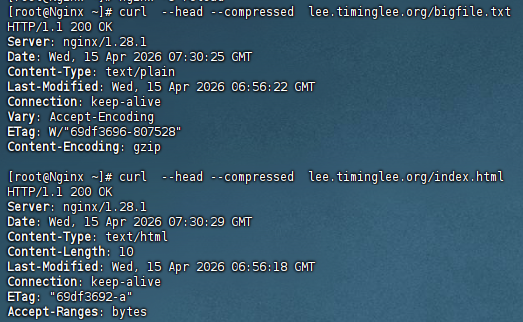
#第一个大文件(日志)完美触发了 gzip 压缩,所有标志位齐全,压缩 100% 生效
#第二个文件只有 10 字节(hello lee 这类内容),远小于配置的 gzip_min_length 1024k(1MB)阈值。所以跳过压缩
八、网页重写
8.1.网页重写中的指令
8.1.1.IF
#创建文件
root@Nginx \~# mkdir -p /webdir/timinglee.org/lee/html
root@Nginx \~# echo "lee page" > /webdir/timinglee.org/lee/html/index.html
root@Nginx \~# chmod -R 755 /webdir/timinglee.org/lee/html
#修改配置文件
root@Nginx \~# vim /usr/local/nginx/conf/conf.d/vhosts.conf
1 server {
2 listen 80;
3 server_name lee.timinglee.org;
4 root /webdir/timinglee.org/lee/html;
5 index index.html;
6
7 # ===================== 内置变量调试路由 =====================
8 location /vars {
9 # 一次性返回所有变量,分行展示(\n 代表换行)
10
11 return 200 '
12 HTTP 认证用户: $remote_user
13 请求方法 : $request_method
14 真实文件路径: $request_filename
15 原始请求URL : $request_uri
16 访问协议 : $scheme
17 ';
18 }
19
20 # ===================== 根路由 + UA 条件拦截 =====================
21 location / {
22 # 条件判断:不区分大小写匹配客户端浏览器标识(包含 firefox 则触发)
23 if ( $http_user_agent ~* firefox ) {
24 # 匹配成功:直接返回 200 状态码 + 自定义文本,终止后续逻辑
25 return 200 "test if messages";
26 }
27 # 条件不满足:默认返回网站根目录页面
28 # 自动读取 root 目录下的 index.html
29 }
30 }
root@Nginx \~# nginx -s reload
#测试

8.1.2.set
#只用修改location模块
root@Nginx \~# vim /usr/local/nginx/conf/conf.d/vhosts.conf
21 location / {
22 set $testname timinglee;
23 return 200 "set 变量测试:$testname\n正常页面:testname";
24 }
#测试

8.1.3.return
root@Nginx \~# vim /usr/local/nginx/conf/conf.d/vhosts.conf
21 location / {
22 return 200 "hello world";
23 }
24 }

8.2.flag
8.2.1.redirect
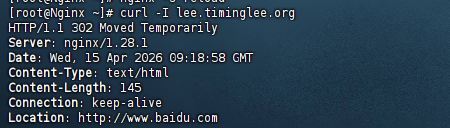
#redirect:重写标记(flag),作用是:
临时重定向(302 状态码),告诉浏览器 "这个地址临时跳转到百度",不会缓存跳转,下次访问还会走这个规则
#:rewrite:Nginx 网页重写指令,用于修改 / 跳转 URL
root@Nginx \~# vim /usr/local/nginx/conf/conf.d/vhosts.conf
1 server {
2 listen 80;
3 server_name lee.timinglee.org;
4 root /webdir/timinglee.org/lee/html;
5
6 # ===================== 内置变量调试路由 =====================
7 location /vars {
8 # 一次性返回所有变量,分行展示(\n 代表换行)
9
10 return 200 '
11 HTTP 认证用户: $remote_user
12 请求方法 : $request_method
13 真实文件路径: $request_filename
14 原始请求URL : $request_uri
15 访问协议 : $scheme
16 ';
17 }
18
19 # ===================== 根路由 + UA 条件拦截 =====================
20 location / {
21 rewrite / http://www.baidu.com redirect;
22 }
23 }
root@Nginx \~# nginx -s reload
#测试
8.2.2.permanent
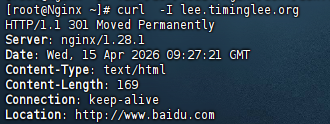
#permanent:重写标记(flag),作用是:永久重定向(301 状态码),告诉浏览器 "这个地址永久跳转到百度",会缓存跳转,下次访问直接跳转目标地址,不再请求原服务器规则。
root@Nginx \~# vim /usr/local/nginx/conf/conf.d/vhosts.conf
20 location / {
21 rewrite / http://www.baidu.com permanent;
22 }
23 }
root@Nginx \~# nginx -s reload
#测试
8.3.利用网络重写实现全站加密
#制作key
root@Nginx \~# mkdir -p /usr/local/nginx/certs
root@Nginx \~# openssl req -newkey rsa:2048 -nodes -sha256 -keyout /usr/local/nginx/certs/timinglee.org.key -x509 -days 365 -out /usr/local/nginx/certs/timinglee.org.crt
#编辑加密配置文件
root@Nginx \~# vim /usr/local/nginx/conf/conf.d/vhosts.conf
1 server {
2 listen 80;
3 # 监听 HTTPS 443 端口,开启 SSL 加密
4 listen 443 ssl;
5
6 # 指定 SSL 证书文件路径(我们用 openssl 生成的自签名证书)
7 ssl_certificate /usr/local/nginx/certs/timinglee.org.crt;
8 # 指定 SSL 证书私钥文件路径
9 ssl_certificate_key /usr/local/nginx/certs/timinglee.org.key;
10 # 开启 SSL 会话缓存,提升 HTTPS 握手性能(共享缓存,有效期20分钟)
11 ssl_session_cache shared:sslcache:20m;
12 # 设置 SSL 会话超时时间,10分钟后重新握手
13 ssl_session_timeout 10m;
14 # 绑定服务域名
15 server_name lee.timinglee.org;
16 # 网站根目录
17 root /webdir/timinglee.org/lee/html;
18
19 # 根路由:HTTP 强制跳转 HTTPS
20 location / {
21 # 判断:如果当前请求协议是 HTTP
22 if ($scheme = http) {
23 # 302 临时重定向:把所有 HTTP 请求,跳转到同域名的 HTTPS 地址
24 rewrite ^(.*) https://host/$1 redirect;
25 }
26 }
27 }
root@Nginx \~# systemctl restart nginx.service
#测试