k8s的存储持久化,让数据能够脱离集群存在,如果没有持久化,k8s就只能运行自身不产生数据的服务,比如最常见的Java后端程序,反之数据库这种自身数据不可分割的应用则无法兼容。或许有读者会想到 localPath 的方式,但它极限只能支撑只读需求,而且需要额外投入运维人力维护所有节点上的对应路径。因此对于数据存储持久化的需求,k8s提供了存储卷的能力
你可以通过如下命令,查看当前版本支持那些储存卷类型
text
[k8sadmin@master01 root]$ kubectl explain pod.spec.volumes
KIND:       Pod
VERSION:    v1

FIELD: volumes <[]Volume>

DESCRIPTION:
    List of volumes that can be mounted by containers belonging to the pod. More
    info: https://kubernetes.io/docs/concepts/storage/volumes
    Volume represents a named volume in a pod that may be accessed by any
    container in the pod.

FIELDS:
  awsElasticBlockStore  <AWSElasticBlockStoreVolumeSource>
    awsElasticBlockStore represents an AWS Disk resource that is attached to a
    kubelet's host machine and then exposed to the pod. More info:
    https://kubernetes.io/docs/concepts/storage/volumes#awselasticblockstore

  azureDisk     <AzureDiskVolumeSource>
    azureDisk represents an Azure Data Disk mount on the host and bind mount to
    the pod.

  azureFile     <AzureFileVolumeSource>
    azureFile represents an Azure File Service mount on the host and bind mount
    to the pod.

  cephfs        <CephFSVolumeSource>
    cephFS represents a Ceph FS mount on the host that shares a pod's lifetime

  cinder        <CinderVolumeSource>
    cinder represents a cinder volume attached and mounted on kubelets host
    machine. More info: https://examples.k8s.io/mysql-cinder-pd/README.md

  configMap     <ConfigMapVolumeSource>
    configMap represents a configMap that should populate this volume

  csi   <CSIVolumeSource>
    csi (Container Storage Interface) represents ephemeral storage that is
    handled by certain external CSI drivers (Beta feature).

  downwardAPI   <DownwardAPIVolumeSource>
    downwardAPI represents downward API about the pod that should populate this
    volume

  emptyDir      <EmptyDirVolumeSource>
    emptyDir represents a temporary directory that shares a pod's lifetime. More
    info: https://kubernetes.io/docs/concepts/storage/volumes#emptydir

  ephemeral     <EphemeralVolumeSource>
    ephemeral represents a volume that is handled by a cluster storage driver.
    The volume's lifecycle is tied to the pod that defines it - it will be
    created before the pod starts, and deleted when the pod is removed.

    Use this if: a) the volume is only needed while the pod runs, b) features of
    normal volumes like restoring from snapshot or capacity
       tracking are needed,
    c) the storage driver is specified through a storage class, and d) the
    storage driver supports dynamic volume provisioning through
       a PersistentVolumeClaim (see EphemeralVolumeSource for more
       information on the connection between this volume type
       and PersistentVolumeClaim).

    Use PersistentVolumeClaim or one of the vendor-specific APIs for volumes
    that persist for longer than the lifecycle of an individual pod.

    Use CSI for light-weight local ephemeral volumes if the CSI driver is meant
    to be used that way - see the documentation of the driver for more
    information.

    A pod can use both types of ephemeral volumes and persistent volumes at the
    same time.

  fc    <FCVolumeSource>
    fc represents a Fibre Channel resource that is attached to a kubelet's host
    machine and then exposed to the pod.

  flexVolume    <FlexVolumeSource>
    flexVolume represents a generic volume resource that is provisioned/attached
    using an exec based plugin.

  flocker       <FlockerVolumeSource>
    flocker represents a Flocker volume attached to a kubelet's host machine.
    This depends on the Flocker control service being running

  gcePersistentDisk     <GCEPersistentDiskVolumeSource>
    gcePersistentDisk represents a GCE Disk resource that is attached to a
    kubelet's host machine and then exposed to the pod. More info:
    https://kubernetes.io/docs/concepts/storage/volumes#gcepersistentdisk

  gitRepo       <GitRepoVolumeSource>
    gitRepo represents a git repository at a particular revision. DEPRECATED:
    GitRepo is deprecated. To provision a container with a git repo, mount an
    EmptyDir into an InitContainer that clones the repo using git, then mount
    the EmptyDir into the Pod's container.

  glusterfs     <GlusterfsVolumeSource>
    glusterfs represents a Glusterfs mount on the host that shares a pod's
    lifetime. More info: https://examples.k8s.io/volumes/glusterfs/README.md

  hostPath      <HostPathVolumeSource>
    hostPath represents a pre-existing file or directory on the host machine
    that is directly exposed to the container. This is generally used for system
    agents or other privileged things that are allowed to see the host machine.
    Most containers will NOT need this. More info:
    https://kubernetes.io/docs/concepts/storage/volumes#hostpath

  iscsi <ISCSIVolumeSource>
    iscsi represents an ISCSI Disk resource that is attached to a kubelet's host
    machine and then exposed to the pod. More info:
    https://examples.k8s.io/volumes/iscsi/README.md

  name  <string> -required-
    name of the volume. Must be a DNS_LABEL and unique within the pod. More
    info:
    https://kubernetes.io/docs/concepts/overview/working-with-objects/names/#names

  nfs   <NFSVolumeSource>
    nfs represents an NFS mount on the host that shares a pod's lifetime More
    info: https://kubernetes.io/docs/concepts/storage/volumes#nfs

  persistentVolumeClaim <PersistentVolumeClaimVolumeSource>
    persistentVolumeClaimVolumeSource represents a reference to a
    PersistentVolumeClaim in the same namespace. More info:
    https://kubernetes.io/docs/concepts/storage/persistent-volumes#persistentvolumeclaims

  photonPersistentDisk  <PhotonPersistentDiskVolumeSource>
    photonPersistentDisk represents a PhotonController persistent disk attached
    and mounted on kubelets host machine

  portworxVolume        <PortworxVolumeSource>
    portworxVolume represents a portworx volume attached and mounted on kubelets
    host machine

  projected     <ProjectedVolumeSource>
    projected items for all in one resources secrets, configmaps, and downward
    API

  quobyte       <QuobyteVolumeSource>
    quobyte represents a Quobyte mount on the host that shares a pod's lifetime

  rbd   <RBDVolumeSource>
    rbd represents a Rados Block Device mount on the host that shares a pod's
    lifetime. More info: https://examples.k8s.io/volumes/rbd/README.md

  scaleIO       <ScaleIOVolumeSource>
    scaleIO represents a ScaleIO persistent volume attached and mounted on
    Kubernetes nodes.

  secret        <SecretVolumeSource>
    secret represents a secret that should populate this volume. More info:
    https://kubernetes.io/docs/concepts/storage/volumes#secret

  storageos     <StorageOSVolumeSource>
    storageOS represents a StorageOS volume attached and mounted on Kubernetes
    nodes.

  vsphereVolume <VsphereVirtualDiskVolumeSource>
    vsphereVolume represents a vSphere volume attached and mounted on kubelets
    host machine
支持的类型非常多,但按照市场上可选的数据服务类型划分,总共有三类,文件存储、块存储、对象存储。其中,文件存储优点是数据读写可以共享,Pod挂载就能用,缺点是性能不好。块存储优点是性能比文件纯粹好,但数据能否共享不一定,看你用的是哪家的服务。对象储存优点是读写性能好,也能数据共享,但缺点是使用方式单一且特殊,而且通常很贵,比如百度的BOS,按年不同存储额度阶梯收费,每上一个阶梯就多4000万,不是大部分普遍项目的选择,有很多项目总营收都不够1000万更别提利润了。总体来讲决定使用哪种数据服务考虑的综合点无非就是数据是否需要持久化、数据可靠性、性能、可扩展性、运维难度、成本。本篇给大家介绍几个相对来说比较常见的储存卷
本地储存卷emptyDir
它是用来解决,一个Pod内不同容器之前的数据持久化,随着Pod被删除,该卷也会被删除,通常用来做测试相关的需求。比如你需要多个容器有的负责写,有的负责读
yaml
apiVersion: v1
kind: Pod
metadata:
  name: volume-emptydir
spec:
  containers:
  # 第一个容器
  - name: write
    image: centos:7
    imagePullPolicy: IfNotPresent
    command: ["bash","-c","echo haha > /data/1.txt ; sleep 6000"]  # 重写这个容器启动后的命令
    volumeMounts:
    - name: data
      mountPath: /data

  # 第二个容器
  - name: read
    image: centos:7
    imagePullPolicy: IfNotPresent
    command: ["bash","-c","cat /data/1.txt; sleep 6000"]
    volumeMounts:
    - name: data
      mountPath: /data

  # 存储卷,使用本地储存时不需要指定宿主机的路径,而是由k8s随机决定
  volumes:
  - name: data  # 这里的名字要和挂载点的名称使用一致
    emptyDir: {}
效果如下
bash
[k8sadmin@master01 test]$ kubectl get pod
NAME              READY   STATUS    RESTARTS   AGE
volume-emptydir   2/2     Running   0          8m44s
[k8sadmin@master01 test]$ kubectl exec -it volume-emptydir -c read -- /bin/bash
[root@volume-emptydir /]# ls
anaconda-post.log  data  etc   lib    media  opt   root  sbin  sys  usr
bin                dev   home  lib64  mnt    proc  run   srv   tmp  var
[root@volume-emptydir /]# cd data/
[root@volume-emptydir data]# ls
1.txt
[root@volume-emptydir data]# cat 1.txt
haha
本地储存卷hostPath
它用来解决Pod和当前运行工作节点的数据挂载,和emptyDir不同的是,不同节点的Pod数据不互通,也就是如果Pod因为各种原因被调度到其他节点数据卷就挂载的是另一个节点上的路径了,不过当Pod离开当前节点时,数据不会被删除
yaml
apiVersion: v1
kind: Pod
metadata:
  name: volume-hostpath
spec:
  containers:
  - name: busybox
    image: busybox
    imagePullPolicy: IfNotPresent
    command: ["/bin/sh","-c","echo haha > /data/1.txt ; sleep 600"]
    volumeMounts:
    - name: data
      mountPath: /data

  volumes:
  - name: data
    hostPath:
      path: /opt
      type: Directory
效果如下
bash
[k8sadmin@master01 opt]$ kubectl get pod -o wide
NAME              READY   STATUS    RESTARTS   AGE    IP           NODE               NOMINATED NODE   READINESS GATES
volume-hostpath   1/1     Running   0          102s   10.10.2.14   worker02.k8s.com   <none>           <none>

[root@worker02 ~]# cd /opt/
You have new mail in /var/spool/mail/root
[root@worker02 opt]# ll
total 4
-rw-r--r--  1 root root   5 Apr 25 14:01 1.txt
drwxr-xr-x  3 root root  17 Apr 11 15:47 cni
drwx--x--x  4 root root  28 Apr 11 14:39 containerd
drwx--x--- 12 root root 171 Apr 25 12:38 docker
[root@worker02 opt]# cat 1.txt
haha
网络存储卷nfs
nfs它是一个文件类型的存储服务,并支持通过本地路径映射的方式,将服务器上的一个路径对接到服务的一个路径中。本文介绍它,除了nfs是日常使用中,操作最省事最容易得到的 k8s 可用远程储存服务之一外,还有一个原因就是让大家体验一下远程映射,因为工作中多数远程服务都是用这种方式给 k8s 提供存储服务,比如阿里云OSS、百度BOS、腾讯的COS等等
首先你要去搭建一个 nfs 服务,这里在master01节点上部署
bash
# 安装,注意nfs是大多数linux发行版默认自带的开箱即用核心组件,但是我的服务器系统用的是最小安装所以没有,大家更具自己的情况来就行
yum install -y nfs-utils

# 创建一个nfs共享用的路径
mkdir -p /opt/nfs

# 修改nfs配置文件
vi /etc/exports
# 追加,空格分割
/opt/nfs *(rw,sync,no_root_squash)

# 随后启动服务
exportfs -r
systemctl enable --now nfs-server
systemctl status nfs-server

# 服务正常时查看 nfs 服务上共享出来的路径列表
[root@master01 nfs]# showmount -e
Export list for master01.k8s.com:
/opt/nfs *

# 其他所有工作节点安装服务的软件包,但不需要配置服务,当做客户端使用就行
yum install -y nfs-utils
# 其他节点安装后测试是否可以连接到nfs服务
[root@worker01 ~]# showmount -e master01.k8s.com
Export list for master01.k8s.com:
/opt/nfs *| 参数 | 含义 | 建议 |
|---|---|---|
| * | 可访问的用户范围 | 授权规则,* 代表所有,可以配置 192.168.1.0/24 等等 |
| rw | 读写权限 (Read-Write)。 | 必须配置,否则只能读不能写。 |
| sync | 同步写入。数据会同时写入内存和硬盘,保证数据不丢失。 | 推荐,虽然性能稍低但更安全。 |
| no_root_squash | 保留 root 权限。客户端 root 用户在服务端也是 root。 | 测试环境推荐,生产环境建议用 all_squash 更安全。 |
| no_subtree_check | 不检查父目录权限。如果只共享子目录,加上这个能提高效率。 | 推荐配置。 |
随后就可以在Pod中使用它了
yaml
apiVersion: apps/v1
kind: Deployment
metadata:
  name: volume-nfs
spec:
  replicas: 2
  selector:
    matchLabels:
      app: nginx
  template:
    metadata:
      labels:
        app: nginx
    spec:
      containers:
      - name: nginx
        image: nginx:1.18.0
        imagePullPolicy: IfNotPresent
        volumeMounts:
        - name: documentroot
          mountPath: /usr/share/nginx/html
        ports:
        - containerPort: 80
      volumes:
      - name: documentroot
        nfs:
          server: master01.k8s.com
          path: /opt/nfs
效果如下
bash
[k8sadmin@master01 test]$ kubectl apply -f nfs
deployment.apps/volume-nfs created
[k8sadmin@master01 test]$ cd /opt/nfs/
[k8sadmin@master01 nfs]$ ll
total 0

# 写一个首页 html
[k8sadmin@master01 nfs]$ su root
Password:
[root@master01 nfs]# echo "haha" > index.html
[root@master01 nfs]# ll
total 4
-rw-r--r-- 1 root root 5 Apr 25 14:58 index.html

# 访问 pod
[root@master01 nfs]# su k8sadmin
[k8sadmin@master01 nfs]$ kubectl get po -o wide
NAME                          READY   STATUS    RESTARTS   AGE    IP           NODE               NOMINATED NODE   READINESS GATES
volume-nfs-75ddd8d474-98259   1/1     Running   0          2m8s   10.10.1.13   worker01.k8s.com   <none>           <none>
volume-nfs-75ddd8d474-w8j6j   1/1     Running   0          2m8s   10.10.2.15   worker02.k8s.com   <none>           <none>
[k8sadmin@master01 nfs]$ curl 10.10.1.13
haha

# 在pod中查看挂载路径
[k8sadmin@master01 nfs]$ kubectl exec -it volume-nfs-75ddd8d474-98259 -- /bin/bash
root@volume-nfs-75ddd8d474-98259:/# cd /usr/share/nginx/html
root@volume-nfs-75ddd8d474-98259:/usr/share/nginx/html# ls
index.html
root@volume-nfs-75ddd8d474-98259:/usr/share/nginx/html# cat index.html
haha
持久存储卷(PV)与持久存储卷声明(PVC)
kubernetes存储卷的分类太丰富了,每种类型都要写相应的接口与参数才行,这就让维护与管理难度加大。因此 k8s 提供了一层存储卷定义封装能力,persistentvolume(PV) 配置好的一个可用存储卷对象(可以是任意类型的存储卷),也就是说能够将网络存储独立配置定义成PV。PersistentVolumeClaim(PVC)是用户pod使用PV的申请请求,用户不需要关心具体的volume实现细节,只需要关心使用需求。而对于服务管理者来讲也有很大好处,可以分离运维能力以及运维点
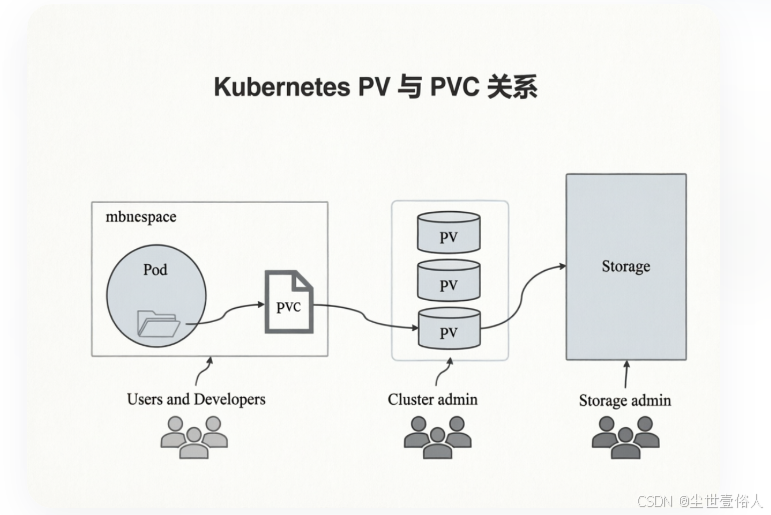
使用上也不复杂,首先创建 PV
yaml
apiVersion: v1
kind: PersistentVolume
metadata:
  name: pv-nfs
spec:
  capacity:
    storage: 1Gi   # 允许用户使用的总量
  accessModes:
    - ReadWriteMany  # 访问模式
  nfs:
    path: /opt/nfs
    server: master01.k8s.com
访问模式有三种可选,ReadWriteOnce 单节点读写挂载、ReadOnlyMany 多节点只读挂载、ReadWriteMany 多节点读写挂载
随后准备一个 PVC
yaml
apiVersion: v1
kind: PersistentVolumeClaim
metadata:
  name: pvc-nfs
spec:
  #storageClassName: pv-nfs  # 这个绑定那个pv先不写下面会说为什么
  accessModes:
    - ReadWriteMany
  resources:
    requests:
      storage: 1Gi  # 这个大小要和 PV 的一致
随后就可以创建Pod了
yaml
apiVersion: apps/v1
kind: Deployment
metadata:
  name: deploy-nginx-nfs
spec:
  replicas: 2
  selector:
    matchLabels:
      app: nginx
  template:
    metadata:
      labels:
        app: nginx
    spec:
      containers:
      - name: nginx
        image: nginx:1.18.0
        imagePullPolicy: IfNotPresent
        ports:
        - containerPort: 80
        volumeMounts:
        - name: www
          mountPath: /usr/share/nginx/html
          #subPath: html  # 这个是指你使用pvc的那个子路径,如果不存在会自动创建
      volumes:
      - name: www
        persistentVolumeClaim:
          claimName: pvc-nfs
效果
bash
[k8sadmin@master01 test]$ kubectl apply -f ng
deployment.apps/deploy-nginx-nfs created
[k8sadmin@master01 test]$ kubectl get po -o wide
NAME                                READY   STATUS    RESTARTS   AGE   IP           NODE               NOMINATED NODE   READINESS GATES
deploy-nginx-nfs-7db678f58b-7jh8p   1/1     Running   0          72s   10.10.1.14   worker01.k8s.com   <none>           <none>
deploy-nginx-nfs-7db678f58b-f4cfw   1/1     Running   0          72s   10.10.2.16   worker02.k8s.com   <none>           <none>
[k8sadmin@master01 test]$ curl 10.10.1.14
haha
此时可能会有读者感觉到有些疑惑,创建pod时指定了pvc,没指定pv,而且创建pvc时也没显示关联pv,为什么能直接生效呢?此时先查询一下pv的信息
bash
[k8sadmin@master01 test]$ kubectl get pv
NAME     CAPACITY   ACCESS MODES   RECLAIM POLICY   STATUS   CLAIM             STORAGECLASS   REASON   AGE
pv-nfs   1Gi        RWX            Retain           Bound    default/pvc-nfs                           8m59s
在 pv 创建完成后,它的STATUS是一个不可用状态,当你创建 pvc 时,默认会从 accessModes模式、storage大小、storageClassName名称中依次查找满足的条件,自动进行一对一绑定。那么这个时候一定会出现另一个疑惑既然pvc和pv只能一对一,那么为什么要分成两个资源类型?原因是上面的使用方式叫 静态PV 和 静态PVC
动态持久存储卷供给
k8s 支持动态储存卷供给,是 k8s 1.4 以后引入的,叫做 StorageClass。对于用户来讲使用的任然是 PVC,但对于集群运维管理方来讲,不再需要去手动创建 PV
这个能力需要安装插件,目前Kubernetes支持的插件列表可以去官方地址:https://kubernetes.io/docs/concepts/storage/storage-classes/ 。但是官方不支持NFS动态供给,但可以用第三方的社区插件来实现,第三方插件地址:https://github.com/kubernetes-sigs/sig-storage-lib-external-provisioner
使用上,需要见创建一个Provisioner(存储供应)
yaml
apiVersion: v1
kind: ServiceAccount
metadata:
  name: nfs-provisioner
  namespace: default
---
apiVersion: rbac.authorization.k8s.io/v1
kind: ClusterRole
metadata:
  name: nfs-provisioner-runner
rules:
  # ... 其他规则保持不变 ...
  - apiGroups: [""]
    resources: ["persistentvolumes"]
    verbs: ["get", "list", "watch", "create", "delete"]
  - apiGroups: [""]
    resources: ["persistentvolumeclaims"]
    verbs: ["get", "list", "watch", "update"]
  - apiGroups: ["storage.k8s.io"]
    resources: ["storageclasses"]
    verbs: ["get", "list", "watch"]
  - apiGroups: [""]
    resources: ["events"]
    verbs: ["create", "update", "patch"]
  - apiGroups: [""]
    resources: ["services", "endpoints"]
    verbs: ["get", "create", "update", "patch"]
  - apiGroups: ["coordination.k8s.io"]
    resources: ["leases"]
    verbs: ["get", "create", "update"]
---
apiVersion: rbac.authorization.k8s.io/v1
kind: ClusterRoleBinding
metadata:
  name: run-nfs-provisioner
subjects:
  - kind: ServiceAccount
    name: nfs-provisioner
    namespace: default
roleRef:
  kind: ClusterRole
  name: nfs-provisioner-runner
  apiGroup: rbac.authorization.k8s.io
---
apiVersion: apps/v1
kind: Deployment
metadata:
  name: nfs-subdir-external-provisioner
  labels:
    app: nfs-subdir-external-provisioner
spec:
  replicas: 1
  strategy:
    type: Recreate
  selector:
    matchLabels:
      app: nfs-subdir-external-provisioner
  template:
    metadata:
      labels:
        app: nfs-subdir-external-provisioner
    spec:
      serviceAccountName: nfs-provisioner
      containers:
        - name: nfs-subdir-external-provisioner
          # 用阿里云公共镜像
          image: registry.cn-hangzhou.aliyuncs.com/lfy_k8s_images/nfs-subdir-external-provisioner:v4.0.2
          volumeMounts:
            - name: nfs-client-root
              mountPath: /persistentvolumes
          env:
            - name: PROVISIONER_NAME
              value: k8s-sigs.io/nfs-subdir-external-provisioner
            - name: NFS_SERVER
              value: master01.k8s.com  # 替换为你的 NFS 服务器 IP
            - name: NFS_PATH
              value: /opt/nfs      # 替换为你的 NFS 共享路径
      volumes:
        - name: nfs-client-root
          nfs:
            server: master01.k8s.com   # 替换为你的 NFS 服务器 IP
            path: /opt/nfs        # 替换为你的 NFS 共享路径
还要创建一个StorageClass 来告诉k8s如何使用它
yaml
apiVersion: storage.k8s.io/v1
kind: StorageClass
metadata:
  name: managed-nfs-storage
# 必须与上面 Deployment 中的 PROVISIONER_NAME 一致
provisioner: k8s-sigs.io/nfs-subdir-external-provisioner
parameters:
  archiveOnDelete: "true"  # 删除 PVC 时,是否归档数据而不是直接删除
随后创建PVC
yaml
apiVersion: v1
kind: PersistentVolumeClaim
metadata:
  name: test-pvc
spec:
  storageClassName: managed-nfs-storage # 指定刚才创建的 SC 名称
  accessModes:
    - ReadWriteMany
  resources:
    requests:
      storage: 1Gi
查询上面创建的资源主体
bash
[k8sadmin@master01 test]$ kubectl get pod
NAME                                               READY   STATUS    RESTARTS   AGE
nfs-subdir-external-provisioner-69c4588b49-x5qmk   1/1     Running   0          4m48s

[k8sadmin@master01 test]$ kubectl get sc
NAME                  PROVISIONER                                   RECLAIMPOLICY   VOLUMEBINDINGMODE   ALLOWVOLUMEEXPANSION   AGE
managed-nfs-storage   k8s-sigs.io/nfs-subdir-external-provisioner   Delete          Immediate           false                  82s

[k8sadmin@master01 test]$ kubectl get pvc
NAME       STATUS   VOLUME                                     CAPACITY   ACCESS MODES   STORAGECLASS          AGE
test-pvc   Bound    pvc-c1bfe8bf-7788-4e22-872c-5afb9da19c90   1Gi        RWX            managed-nfs-storage   5m2s
现在使用这个 PVC 创建Pod
yaml
apiVersion: apps/v1
kind: Deployment
metadata:
  name: deploy-nginx-nfs
spec:
  replicas: 2
  selector:
    matchLabels:
      app: nginx
  template:
    metadata:
      labels:
        app: nginx
    spec:
      containers:
      - name: nginx
        image: nginx:1.18.0
        imagePullPolicy: IfNotPresent
        ports:
        - containerPort: 80
        volumeMounts:
        - name: www
          mountPath: /usr/share/nginx/html
      volumes:
      - name: www
        persistentVolumeClaim:
          claimName: test-pvc
随后去你的 nfs 服务路径上看,正常会有一个 777 权限的子路径
bash
[k8sadmin@master01 test]$ cd /opt/nfs/
[k8sadmin@master01 nfs]$ ll
total 4
drwxrwxrwx 2 root root 6 Apr 25 17:11 default-test-pvc-pvc-c1bfe8bf-7788-4e22-872c-5afb9da19c90
-rw-r--r-- 1 root root 5 Apr 25 14:58 index.html
这个子路径就是上面创建的 动态配额pvc 所对应的路径,将 index.html 负责进去可以看共享效果
bash
[k8sadmin@master01 test]$ kubectl get pod -o wide
NAME                                               READY   STATUS    RESTARTS   AGE     IP           NODE               NOMINATED NODE   READINESS GATES
deploy-nginx-nfs-64c868649-kkztm                   1/1     Running   0          31s     10.10.2.18   worker02.k8s.com   <none>           <none>
deploy-nginx-nfs-64c868649-nlxxd                   1/1     Running   0          31s     10.10.1.17   worker01.k8s.com   <none>           <none>
nfs-subdir-external-provisioner-69c4588b49-nkwff   1/1     Running   0          9m19s   10.10.2.17   worker02.k8s.com   <none>           <none>

# 由于还没东西所有保存 403
[k8sadmin@master01 test]$ curl 10.10.2.18
<html>
<head><title>403 Forbidden</title></head>
<body>
<center><h1>403 Forbidden</h1></center>
<hr><center>nginx/1.18.0</center>
</body>
</html>

# 让如首页文件并访问两个pod
[k8sadmin@master01 nfs]$ cd default-test-pvc-pvc-c1bfe8bf-7788-4e22-872c-5afb9da19c90/
[k8sadmin@master01 default-test-pvc-pvc-c1bfe8bf-7788-4e22-872c-5afb9da19c90]$ ll
total 0
[k8sadmin@master01 default-test-pvc-pvc-c1bfe8bf-7788-4e22-872c-5afb9da19c90]$ cp ../index.html ./
[k8sadmin@master01 default-test-pvc-pvc-c1bfe8bf-7788-4e22-872c-5afb9da19c90]$ ll
total 4
-rw-r--r-- 1 k8sadmin k8sadmin 5 Apr 25 17:18 index.html

[k8sadmin@master01 test]$ curl 10.10.2.18
haha
[k8sadmin@master01 test]$ curl 10.10.1.17
haha
最后要注意动态配额的上限问题,如果在创建一个 PVC 时,指定的配额超过了 NFS 服务路径的可用上限,会报错,API Server 会直接拒绝请求,错误信息类似于:Error from server (Forbidden): persistentvolumeclaims is forbidden: exceeded quota 。如果是一个已有的 PVC ,它相对于一块对用户来讲的磁盘,当这个 PVC 已存在但理论上写满,也就是达到它定义时写在 yaml 中的 NFS 路径配额时,Kubernetes 并不会在其写入过程中实时监控是否超出了该容量,从而达到后不让这些Pod写了,k8s在这方面是一个软限制,真正阻止写入和检测配额的触发对象是使用的储存服务,也就是 NFS 这些,但是正式工作中,NFS 确实有一定的市场比例,毕竟它虽然属于文件储存服务,但是省钱经济啊,所以通常不关注强制它只能写多少这种,即使有,也是正常按照常规的磁盘大小管理方式。反之第三方服务,厂商自然会有配合 quota 检查,这点各位读者要心里明白