Qwen3-TTS语音设计,克隆与生成
- 1、创建虚拟环境、模型下载与依赖包安装
- 2、自定义语音生成
- 2、语音设计
- 3、语音克隆
- [4、启动本地 Web UI 演示](#4、启动本地 Web UI 演示)
- [5、vLLM 使用](#5、vLLM 使用)
-
- 1、服务器部署
-
- [WebSocket 部署方式](#WebSocket 部署方式)
- 模拟大模型生成问答内容然后进行语音流式播报的效果
- 2、脚本离线推理
Qwen3-TTS 是由Qwen开发的一系列功能强大的语音生成,全面支持音色克隆、音色创造、超高质量拟人化语音生成,以及基于自然语言描述的语音控制,为开发者与用户提供最全面的语音生成功能。依托创新的 Qwen3-TTS-Tokenizer-12Hz 多码本语音编码器,Qwen3-TTS 实现了对语音信号的高效压缩与强表征能力,不仅完整保留副语言信息和声学环境特征,还能通过轻量级的非 DiT 架构实现高速、高保真的语音还原。Qwen3-TTS 采用 Dual-Track 双轨建模,达成了极致的双向流式生成速度,首包音频仅需等待一个字符。Qwen3-TTS 多码本全系列模型均已开源,包含1.7B和0.6B两种尺寸,1.7B可以达到极致性能,具有强大的控制能力,0.6B均衡性能与效率。模型覆盖 10 种主流语言(中文、英文、日语、韩语、德语、法语、俄语、葡萄牙语、西班牙语、意大利语)及多种方言音色,满足全球化应用需求。同时,模型具备强大的上下文理解能力,可根据指令和文本语义自适应调整语气、节奏与情感表达,并对输入文本噪声的鲁棒性有显著提升
实时语音合成-千问提供流式文本输入与流式音频输出能力,提供多种拟人音色,支持多语种/方言合成,可在同一音色下输出多语种,并能自适应调节语气,流畅处理复杂文本。
核心功能
实时生成高保真语音,支持中英等多语种自然发声
提供声音复刻(Qwen)与声音设计(Qwen)两种音色定制方式
支持流式输入输出,低延迟响应实时交互场景
可调节语速、语调、音量与码率,精细控制语音表现
兼容主流音频格式,最高支持48kHz采样率输出
支持指令控制,可通过自然语言指令控制语音表现力
1、创建虚拟环境、模型下载与依赖包安装
python
uv venv --python 3.12

# 激活虚拟环境
source .venv/bin/activate
python
uv pip install modelscope

# 模型下载:
modelscope download --model Qwen/Qwen3-TTS-Tokenizer-12Hz  --local_dir ./Qwen3-TTS-Tokenizer-12Hz
modelscope download --model Qwen/Qwen3-TTS-12Hz-1.7B-CustomVoice --local_dir ./Qwen3-TTS-12Hz-1.7B-CustomVoice
modelscope download --model Qwen/Qwen3-TTS-12Hz-1.7B-VoiceDesign --local_dir ./Qwen3-TTS-12Hz-1.7B-VoiceDesign
modelscope download --model Qwen/Qwen3-TTS-12Hz-1.7B-Base --local_dir ./Qwen3-TTS-12Hz-1.7B-Base
modelscope download --model Qwen/Qwen3-TTS-12Hz-0.6B-CustomVoice --local_dir ./Qwen3-TTS-12Hz-0.6B-CustomVoice
modelscope download --model Qwen/Qwen3-TTS-12Hz-0.6B-Base --local_dir ./Qwen3-TTS-12Hz-0.6B-Base
安装依赖包:
python
# # CUDA 12.8
uv pip install torch==2.8.0 torchvision==0.23.0 torchaudio==2.8.0
安装flash-attention(可选:加速推理(需兼容硬件))
python
https://github.com/Dao-AILab/flash-attention
python
https://github.com/Dao-AILab/flash-attention/releases/tag/v2.8.3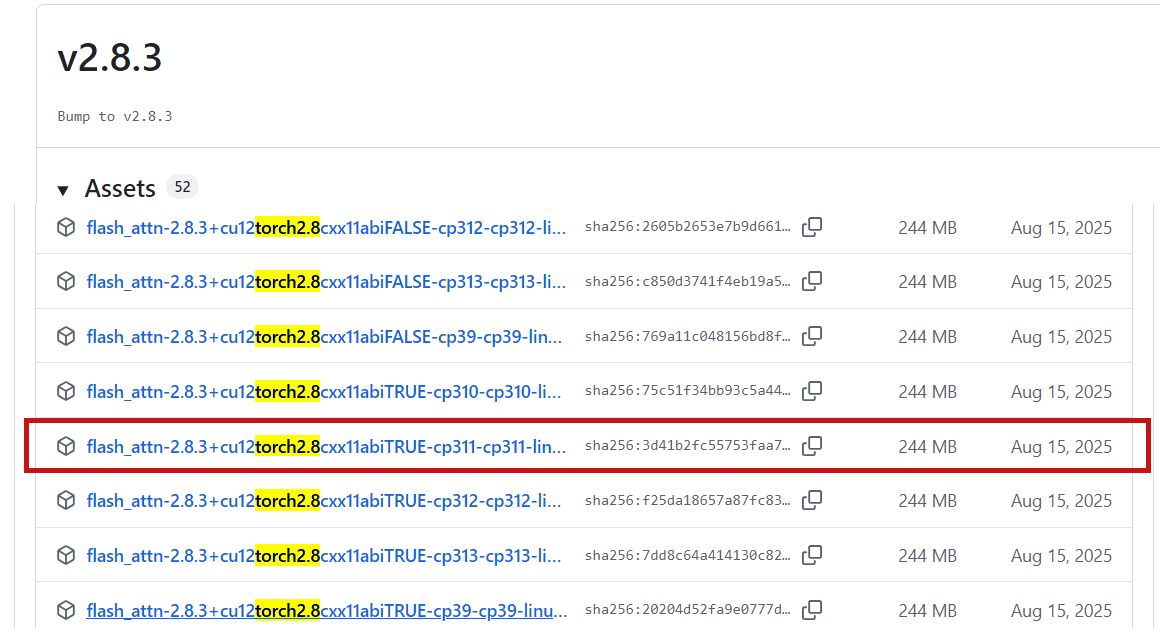
python
uv pip install flash_attn-2.8.3+cu12torch2.8cxx11abiTRUE-cp311-cp311-linux_x86_64.whl同时,你的硬件需要与 FlashAttention 2 兼容。更多详情请参阅 FlashAttention 仓库 的官方文档。只有当模型以 torch.float16 或 torch.bfloat16 加载时,才能使用 FlashAttention 2。
安装核心包
python
uv pip install qwen-tts如果你想在本地开发或修改代码,请以可编辑模式从源码安装。
python
git clone https://github.com/QwenLM/Qwen3-TTS.git
cd Qwen3-TTS
uv pip install -e .
Python 包使用方法
安装完成后,你可以导入 Qwen3TTSModel 来运行自定义语音 TTS、语音设计和语音克隆。模型权重可以指定为 Hugging Face 模型 ID(推荐)或你下载的本地目录路径。对于以下所有 generate_* 函数,除了已展示并明确说明的参数外,你还可以传入 Hugging Face Transformers model.generate 所支持的生成参数,例如 max_new_tokens、top_p 等。
2、自定义语音生成
对于自定义语音模型(Qwen3-TTS-12Hz-1.7B/0.6B-CustomVoice),你只需调用 generate_custom_voice,传入单个字符串或一批文本列表,以及 language、speaker 和可选的 instruct。你也可以调用 model.get_supported_speakers() 和 model.get_supported_languages() 查看当前模型支持的说话人和语言。
python
import torch
import soundfile as sf
from qwen_tts import Qwen3TTSModel

model = Qwen3TTSModel.from_pretrained(
    "Qwen/Qwen3-TTS-12Hz-1.7B-CustomVoice",
    device_map="cuda:0",
    dtype=torch.bfloat16,
    attn_implementation="flash_attention_2",
)

# single inference
wavs, sr = model.generate_custom_voice(
    text="其实我真的有发现,我是一个特别善于观察别人情绪的人。",
    language="Chinese", # Pass `Auto` (or omit) for auto language adaptive; if the target language is known, set it explicitly.
    speaker="Vivian",
    instruct="用特别愤怒的语气说", # Omit if not needed.
)
sf.write("output_custom_voice.wav", wavs[0], sr)

# batch inference
wavs, sr = model.generate_custom_voice(
    text=[
        "其实我真的有发现,我是一个特别善于观察别人情绪的人。",
        "She said she would be here by noon."
    ],
    language=["Chinese", "English"],
    speaker=["Vivian", "Ryan"],
    instruct=["", "Very happy."]
)
sf.write("output_custom_voice_1.wav", wavs[0], sr)
sf.write("output_custom_voice_2.wav", wavs[1], sr)| 说话人 | 语音描述 | 母语 |
|---|---|---|
| Vivian | 明亮、略带锐气的年轻女声 | 中文 |
| Serena | 温暖柔和的年轻女声 | 中文 |
| Uncle_Fu | 音色低沉醇厚的成熟男声 | 中文 |
| Dylan | 清晰自然的北京青年男声 | 中文(北京方言) |
| Eric | 活泼、略带沙哑明亮感的成都男声 | 中文(四川方言) |
| Ryan | 富有节奏感的动态男声 | 英语 |
| Aiden | 清晰中频的阳光美式男声 | 英语 |
| Ono_Anna | 轻快灵活的俏皮日语女声 | 日语 |
| Sohee | 富含情感的温暖韩语女声 | 韩语 |
2、语音设计
对于语音设计模型(Qwen3-TTS-12Hz-1.7B-VoiceDesign),你可以使用 generate_voice_design 提供目标文本和自然语言形式的 instruct 描述。
python
import torch
import soundfile as sf
from qwen_tts import Qwen3TTSModel

model = Qwen3TTSModel.from_pretrained(
    "Qwen/Qwen3-TTS-12Hz-1.7B-VoiceDesign",
    device_map="cuda:0",
    dtype=torch.bfloat16,
    attn_implementation="flash_attention_2",
)

# single inference
wavs, sr = model.generate_voice_design(
    text="哥哥,你回来啦,人家等了你好久好久了,要抱抱!",
    language="Chinese",
    instruct="体现撒娇稚嫩的萝莉女声,音调偏高且起伏明显,营造出黏人、做作又刻意卖萌的听觉效果。",
)
sf.write("output_voice_design.wav", wavs[0], sr)

# batch inference
wavs, sr = model.generate_voice_design(
    text=[
      "哥哥,你回来啦,人家等了你好久好久了,要抱抱!",
      "It's in the top drawer... wait, it's empty? No way, that's impossible! I'm sure I put it there!"
    ],
    language=["Chinese", "English"],
    instruct=[
      "体现撒娇稚嫩的萝莉女声,音调偏高且起伏明显,营造出黏人、做作又刻意卖萌的听觉效果。",
      "Speak in an incredulous tone, but with a hint of panic beginning to creep into your voice."
    ]
)
sf.write("output_voice_design_1.wav", wavs[0], sr)
sf.write("output_voice_design_2.wav", wavs[1], sr)
3、语音克隆
对于语音克隆模型(Qwen3-TTS-12Hz-1.7B/0.6B-Base),要克隆语音并合成新内容,你只需提供参考音频片段(ref_audio)及其对应文本(ref_text)。ref_audio 可以是本地文件路径、URL、base64 字符串,或 (numpy_array, sample_rate) 元组。如果设置 x_vector_only_mode=True,则仅使用说话人嵌入,此时无需提供 ref_text,但克隆质量可能会降低。
python
import torch
import soundfile as sf
from qwen_tts import Qwen3TTSModel

model = Qwen3TTSModel.from_pretrained(
    "Qwen/Qwen3-TTS-12Hz-1.7B-Base",
    device_map="cuda:0",
    dtype=torch.bfloat16,
    attn_implementation="flash_attention_2",
)

ref_audio = "https://qianwen-res.oss-cn-beijing.aliyuncs.com/Qwen3-TTS-Repo/clone.wav"
ref_text  = "Okay. Yeah. I resent you. I love you. I respect you. But you know what? You blew it! And thanks to you."

wavs, sr = model.generate_voice_clone(
    text="I am solving the equation: x = [-b ± √(b²-4ac)] / 2a? Nobody can --- it's a disaster (◍•͈⌔•͈◍), very sad!",
    language="English",
    ref_audio=ref_audio,
    ref_text=ref_text,
)
sf.write("output_voice_clone.wav", wavs[0], sr)
如果你需要在多次生成中重复使用相同的参考提示(以避免重复计算提示特征),请先使用 create_voice_clone_prompt 构建一次提示,并通过 voice_clone_prompt 传入。
python
prompt_items = model.create_voice_clone_prompt(
    ref_audio=ref_audio,
    ref_text=ref_text,
    x_vector_only_mode=False,
)
wavs, sr = model.generate_voice_clone(
    text=["Sentence A.", "Sentence B."],
    language=["English", "English"],
    voice_clone_prompt=prompt_items,
)
sf.write("output_voice_clone_1.wav", wavs[0], sr)
sf.write("output_voice_clone_2.wav", wavs[1], sr)
有关可复用语音克隆提示、批量克隆和批量推理的更多示例,请参阅 示例代码(https://github.com/QwenLM/Qwen3-TTS/blob/main/examples/test_model_12hz_base.py)。结合这些示例和 generate_voice_clone 函数说明,你可以探索更高级的用法。
先设计后克隆
如果你希望获得一个可像克隆说话人一样复用的设计语音,一个实用的工作流程是:(1) 使用 VoiceDesign 模型合成一段符合目标角色设定的短参考音频;(2) 将该音频输入 create_voice_clone_prompt 以构建可复用的提示;(3) 调用 generate_voice_clone 并传入 voice_clone_prompt 来生成新内容,而无需每次都重新提取特征。当你希望在多段文本中保持一致的角色语音时,这种方法尤其有用。
python
import torch
import soundfile as sf
from qwen_tts import Qwen3TTSModel

# create a reference audio in the target style using the VoiceDesign model
design_model = Qwen3TTSModel.from_pretrained(
    "Qwen/Qwen3-TTS-12Hz-1.7B-VoiceDesign",
    device_map="cuda:0",
    dtype=torch.bfloat16,
    attn_implementation="flash_attention_2",
)

ref_text = "H-hey! You dropped your... uh... calculus notebook? I mean, I think it's yours? Maybe?"
ref_instruct = "Male, 17 years old, tenor range, gaining confidence - deeper breath support now, though vowels still tighten when nervous"
ref_wavs, sr = design_model.generate_voice_design(
    text=ref_text,
    language="English",
    instruct=ref_instruct
)
sf.write("voice_design_reference.wav", ref_wavs[0], sr)

# build a reusable clone prompt from the voice design reference
clone_model = Qwen3TTSModel.from_pretrained(
    "Qwen/Qwen3-TTS-12Hz-1.7B-Base",
    device_map="cuda:0",
    dtype=torch.bfloat16,
    attn_implementation="flash_attention_2",
)

voice_clone_prompt = clone_model.create_voice_clone_prompt(
    ref_audio=(ref_wavs[0], sr),   # or "voice_design_reference.wav"
    ref_text=ref_text,
)

sentences = [
    "No problem! I actually... kinda finished those already? If you want to compare answers or something...",
    "What? No! I mean yes but not like... I just think you're... your titration technique is really precise!",
]

# reuse it for multiple single calls
wavs, sr = clone_model.generate_voice_clone(
    text=sentences[0],
    language="English",
    voice_clone_prompt=voice_clone_prompt,
)
sf.write("clone_single_1.wav", wavs[0], sr)

wavs, sr = clone_model.generate_voice_clone(
    text=sentences[1],
    language="English",
    voice_clone_prompt=voice_clone_prompt,
)
sf.write("clone_single_2.wav", wavs[0], sr)

# or batch generate in one call
wavs, sr = clone_model.generate_voice_clone(
    text=sentences,
    language=["English", "English"],
    voice_clone_prompt=voice_clone_prompt,
)
for i, w in enumerate(wavs):
    sf.write(f"clone_batch_{i}.wav", w, sr)
4、启动本地 Web UI 演示
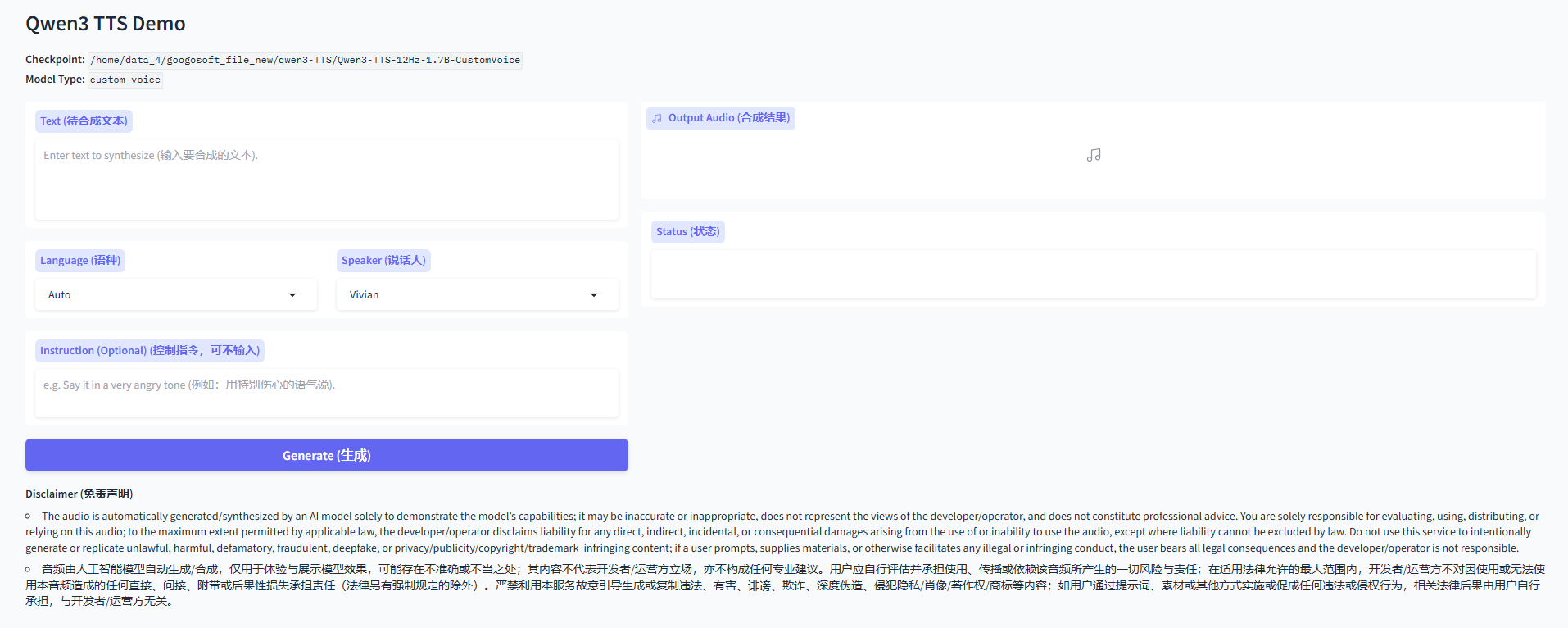
要启动 Qwen3-TTS 的 Web UI 演示,只需安装 qwen-tts 包并运行 qwen-tts-demo。使用以下命令获取帮助:
python
qwen-tts-demo --help
python
(qwen3-TTS) root@googosoft-jin:/home/data_4/googosoft_file_new/qwen3-TTS# qwen-tts-demo --help
usage: qwen-tts-demo [-h] [-c CHECKPOINT] [--device DEVICE] [--dtype {bfloat16,bf16,float16,fp16,float32,fp32}] [--flash-attn/--no-flash-attn | --no-flash-attn/--no-flash-attn]
                     [--ip IP] [--port PORT] [--share/--no-share | --no-share/--no-share] [--concurrency CONCURRENCY] [--ssl-certfile SSL_CERTFILE] [--ssl-keyfile SSL_KEYFILE]
                     [--ssl-verify/--no-ssl-verify | --no-ssl-verify/--no-ssl-verify] [--max-new-tokens MAX_NEW_TOKENS] [--temperature TEMPERATURE] [--top-k TOP_K] [--top-p TOP_P]
                     [--repetition-penalty REPETITION_PENALTY] [--subtalker-top-k SUBTALKER_TOP_K] [--subtalker-top-p SUBTALKER_TOP_P] [--subtalker-temperature SUBTALKER_TEMPERATURE]
                     [checkpoint_pos]

Launch a Gradio demo for Qwen3 TTS models (CustomVoice / VoiceDesign / Base).

Examples:
  qwen-tts-demo Qwen/Qwen3-TTS-12Hz-1.7B-CustomVoice
  qwen-tts-demo Qwen/Qwen3-TTS-12Hz-1.7B-VoiceDesign --port 8000 --ip 127.0.0.01
  qwen-tts-demo Qwen/Qwen3-TTS-12Hz-1.7B-Base --device cuda:0
  qwen-tts-demo Qwen/Qwen3-TTS-12Hz-1.7B-CustomVoice --dtype bfloat16 --no-flash-attn

positional arguments:
  checkpoint_pos        Model checkpoint path or HuggingFace repo id (positional).

options:
  -h, --help            show this help message and exit
  -c CHECKPOINT, --checkpoint CHECKPOINT
                        Model checkpoint path or HuggingFace repo id (optional if positional is provided).
  --device DEVICE       Device for device_map, e.g. cpu, cuda, cuda:0 (default: cuda:0).
  --dtype {bfloat16,bf16,float16,fp16,float32,fp32}
                        Torch dtype for loading the model (default: bfloat16).
  --flash-attn/--no-flash-attn, --no-flash-attn/--no-flash-attn
                        Enable FlashAttention-2 (default: enabled).
  --ip IP               Server bind IP for Gradio (default: 0.0.0.0).
  --port PORT           Server port for Gradio (default: 8000).
  --share/--no-share, --no-share/--no-share
                        Whether to create a public Gradio link (default: disabled).
  --concurrency CONCURRENCY
                        Gradio queue concurrency (default: 16).
  --ssl-certfile SSL_CERTFILE
                        Path to SSL certificate file for HTTPS (optional).
  --ssl-keyfile SSL_KEYFILE
                        Path to SSL key file for HTTPS (optional).
  --ssl-verify/--no-ssl-verify, --no-ssl-verify/--no-ssl-verify
                        Whether to verify SSL certificate (default: enabled).
  --max-new-tokens MAX_NEW_TOKENS
                        Max new tokens for generation (optional).
  --temperature TEMPERATURE
                        Sampling temperature (optional).
  --top-k TOP_K         Top-k sampling (optional).
  --top-p TOP_P         Top-p sampling (optional).
  --repetition-penalty REPETITION_PENALTY
                        Repetition penalty (optional).
  --subtalker-top-k SUBTALKER_TOP_K
                        Subtalker top-k (optional, only for tokenizer v2).
  --subtalker-top-p SUBTALKER_TOP_P
                        Subtalker top-p (optional, only for tokenizer v2).
  --subtalker-temperature SUBTALKER_TEMPERATURE
                        Subtalker temperature (optional, only for tokenizer v2).
要启动演示,你可以使用以下命令:
python
# 后跟模型的路径
# CustomVoice model
qwen-tts-demo Qwen/Qwen3-TTS-12Hz-1.7B-CustomVoice --ip 0.0.0.0 --port 8000
# VoiceDesign model
qwen-tts-demo Qwen/Qwen3-TTS-12Hz-1.7B-VoiceDesign --ip 0.0.0.0 --port 8000
# Base model
qwen-tts-demo Qwen/Qwen3-TTS-12Hz-1.7B-Base --ip 0.0.0.0 --port 8000
然后打开 http://:8000,或通过 VS Code 等工具中的端口转发进行访问。
基础模型 HTTPS 说明
为避免部署服务器后出现浏览器麦克风权限问题,对于基础模型的部署,建议/要求通过 HTTPS 运行 Gradio 服务(尤其是在远程访问或使用现代浏览器/网关时)。请使用 --ssl-certfile 和 --ssl-keyfile 启用 HTTPS。首先,我们需要生成一个私钥和一个自签名证书(有效期为 365 天):
python
openssl req -x509 -newkey rsa:2048 \
  -keyout key.pem -out cert.pem \
  -days 365 -nodes \
  -subj "/CN=localhost"
然后使用 HTTPS 运行演示:
python
qwen-tts-demo Qwen/Qwen3-TTS-12Hz-1.7B-Base \
  --ip 0.0.0.0 --port 8000 \
  --ssl-certfile cert.pem \
  --ssl-keyfile key.pem \
  --no-ssl-verify
并打开 https://:8000 进行体验。如果你的浏览器显示警告,这是自签名证书的正常现象。在生产环境中,请使用正式证书。
5、vLLM 使用
vLLM 官方已提供对 Qwen3-TTS 的 Day-0 支持!欢迎使用 vLLM-Omni 部署和推理 Qwen3-TTS。有关安装和更多详细信息,请参阅 vLLM-Omni 官方文档。目前仅支持离线推理,后续将支持在线服务,vLLM-Omni 将持续在推理速度和流式能力等方面为 Qwen3-TTS 提供支持和优化。
安装依赖包:
注意:由于vLLM推理需要安装 vllm-omni 包,vllm-omni 对vllm与pytorch的版本都有着严格的版本要求,我尝试过很多次都失败,最后没办法了,就新建了一个虚拟环境,先安装vllm-omni==0.18.0 然后其会自动安装相关的pytorch,然后再安装 vllm ==0.18.0
python
uv pip install vllm==0.18.0安装vllm-omni(v0.18.0)
注意:安装的 vllm-omni 版本必须与vllm对应才行,并且今后运行报错,必去源码安装
python
git clone https://github.com/vllm-project/vllm-omni.git
cd vllm-omni
git checkout v0.18.0
uv pip install e .
如果网络不通畅,可以先下载对应的 0.18.0 项目到本地,执行如下指令
python
cd vllm-omni-0.18.0
export SETUPTOOLS_SCM_PRETEND_VERSION=0.18.0
uv pip install e .
详细安装流程:
python
https://docs.vllm.ai/projects/vllm-omni/en/latest/getting_started/installation/gpu/#installation-of-vllm-omni项目地址:
然后下载vllm-omni==0.18.0版本的vllm-omni项目
python
https://github.com/vllm-project/vllm-omni/tree/main/examples/offline_inference/qwen3_tts1、服务器部署
第一步:准备配置文件:
python
cd examples/online_serving/qwen3_tts进入到 examples/online_serving/qwen3_tts 路径下,指向如下指令创建配置文件所需目录:
python
mkdir -p vllm_omni/model_executor/stage_configs然后将 vllm_omni/model_executor/stage_configs/qwen3_tts.yaml 配置文件拷贝至 examples/online_serving/qwen3_tts/vllm_omni/model_executor/stage_configs 目录下
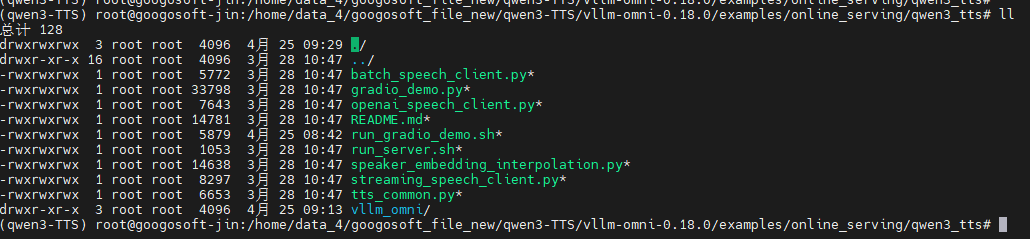
然后执行 目录 examples/online_serving/qwen3_tts 下的相关脚本开启服务
Qwen3-TTS 说话人列表
| 说话人 | 语音描述 | 母语 |
|---|---|---|
| Vivian | 明亮、略带锐气的年轻女声 | 中文 |
| Serena | 温暖柔和的年轻女声 | 中文 |
| Uncle_Fu | 音色低沉醇厚的成熟男声 | 中文 |
| Dylan | 清晰自然的北京青年男声 | 中文(北京方言) |
| Eric | 活泼、略带沙哑明亮感的成都男声 | 中文(四川方言) |
| Ryan | 富有节奏感的动态男声 | 英语 |
| Aiden | 清晰中频的阳光美式男声 | 英语 |
| Ono_Anna | 轻快灵活的俏皮日语女声 | 日语 |
| Sohee | 富含情感的温暖韩语女声 | 韩语 |
支持的模型:
| Model | Task Type | Description |
|---|---|---|
| Qwen/Qwen3-TTS-12Hz-1.7B-CustomVoice | CustomVoice | 预定义音色(如 Vivian、Ryan),支持额外风格控制 |
| Qwen/Qwen3-TTS-12Hz-1.7B-VoiceDesign | VoiceDesign | 用自然语言描述音色(如"温柔女声、活泼语气") |
| Qwen/Qwen3-TTS-12Hz-1.7B-Base | Base | 基于参考音频做声音克隆(voice cloning) |
| Qwen/Qwen3-TTS-12Hz-0.6B-CustomVoice | CustomVoice | 小模型版本,速度更快、资源占用更低 |
| Qwen/Qwen3-TTS-12Hz-0.6B-Base | Base | 小模型版本的声音克隆 |
Server + Gradio Demo:
在启动前需要修改模型所在的路径
python
# Option 1: Launch server + Standard Gradio together
./run_gradio_demo.sh                                # CustomVoice (default)
./run_gradio_demo.sh --task-type VoiceDesign        # VoiceDesign
./run_gradio_demo.sh --task-type Base               # Voice cloning

# Option 2: If server is already running
python gradio_demo.py --api-base http://localhost:8000

# Option 3: FastRTC demo (gapless streaming)
pip install fastrtc
python gradio_fastrtc_demo.py --api-base http://localhost:8000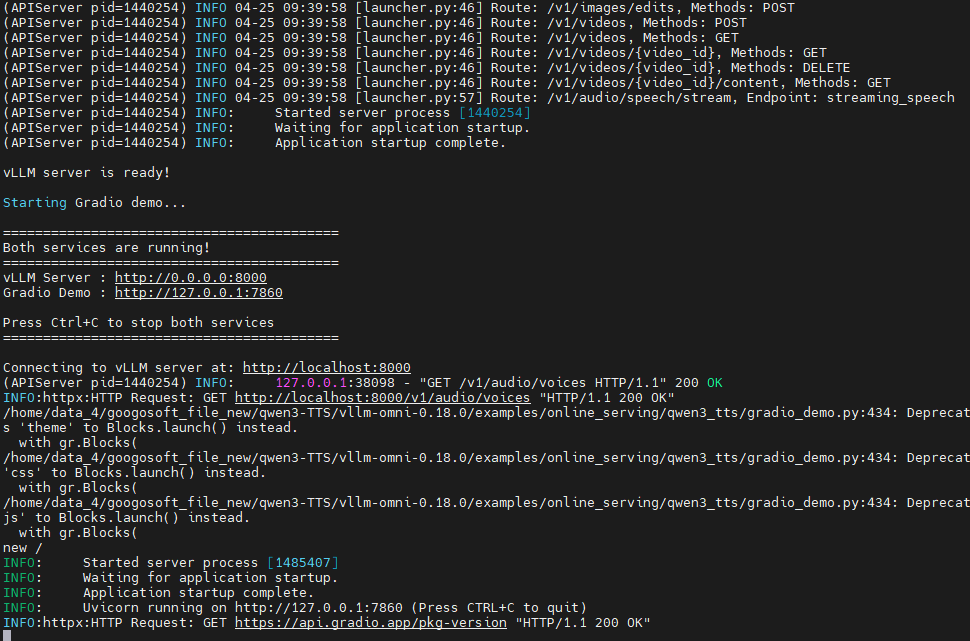
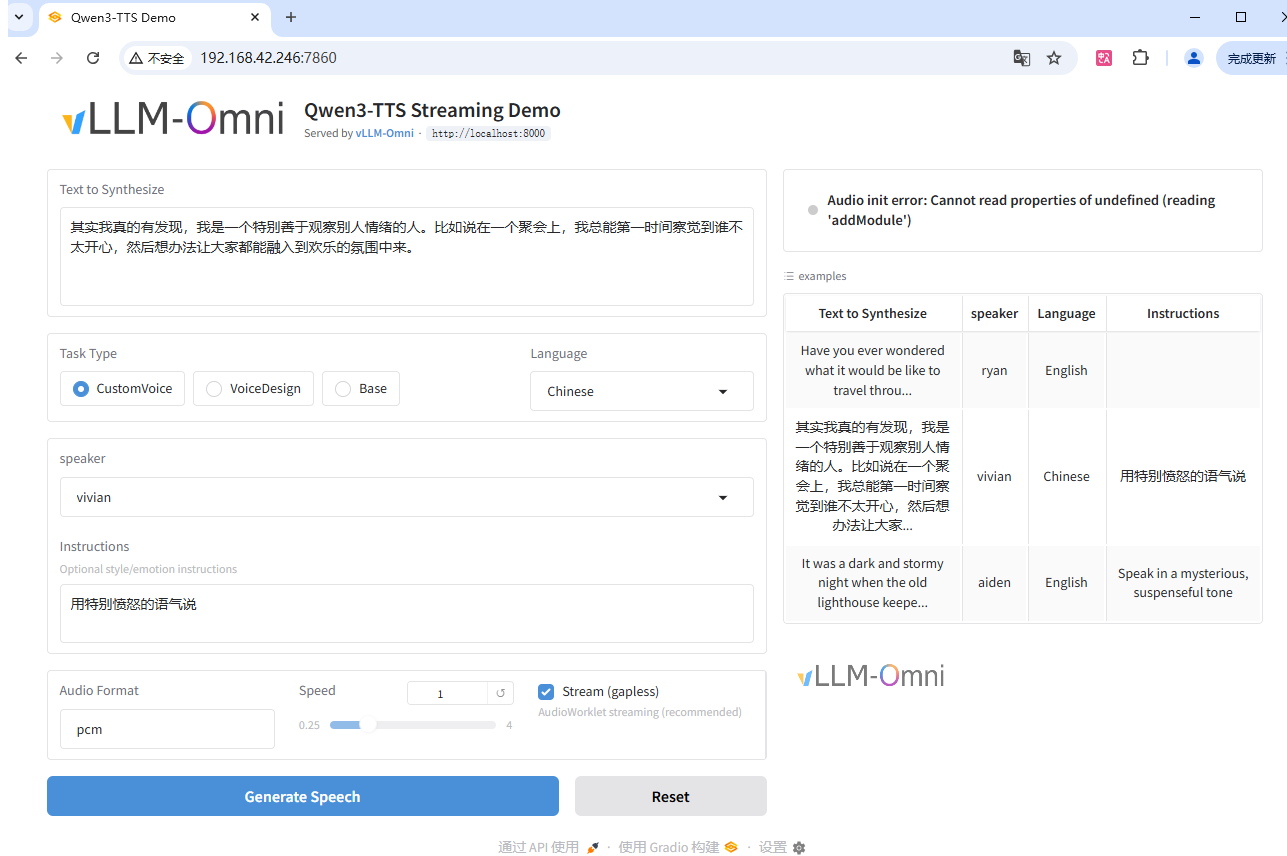
服务端启动:
修改模型路径后执行如下指令
python
./run_server.sh                 # Default: CustomVoice model
./run_server.sh CustomVoice     # CustomVoice model
./run_server.sh VoiceDesign     # VoiceDesign model
./run_server.sh Base            # Base (voice clone) model
也可以使用指令启动服务(运行前需要修改如下指令中的模型路径):
python
# CustomVoice model (predefined speakers)
vllm serve Qwen/Qwen3-TTS-12Hz-1.7B-CustomVoice \
    --stage-configs-path vllm_omni/model_executor/stage_configs/qwen3_tts.yaml \
    --omni \
    --port 8091 \
    --trust-remote-code \
    --enforce-eager

# VoiceDesign model
vllm serve Qwen/Qwen3-TTS-12Hz-1.7B-VoiceDesign \
    --stage-configs-path vllm_omni/model_executor/stage_configs/qwen3_tts.yaml \
    --omni \
    --port 8091 \
    --trust-remote-code \
    --enforce-eager

# Base model (voice cloning)
vllm serve Qwen/Qwen3-TTS-12Hz-1.7B-Base \
    --stage-configs-path vllm_omni/model_executor/stage_configs/qwen3_tts.yaml \
    --omni \
    --port 8091 \
    --trust-remote-code \
    --enforce-eager
如果您有自定义阶段配置文件,请使用以下命令启动服务器
python
vllm serve Qwen/Qwen3-TTS-12Hz-1.7B-CustomVoice \
    --stage-configs-path /path/to/stage_configs_file \
    --omni \
    --port 8091 \
    --trust-remote-code \
    --enforce-eager
通过curl发送请求
python
# Simple TTS request
curl -X POST http://192.168.42.246:8091/v1/audio/speech \
    -H "Content-Type: application/json" \
    -d '{
        "input": "Hello, how are you?",
        "voice": "vivian",
        "language": "English"
    }' --output output.wav

curl -X POST http://192.168.42.246:8091/v1/audio/speech \
    -H "Content-Type: application/json" \
    -d '{
        "input": "你好吗?我的小宝贝",
        "voice": "Uncle_Fu",
        "language": "Chinese"
    }' --output output.wav

# 具有简单的语气     With style instruction
curl -X POST http://192.168.42.246:8091/v1/audio/speech \
    -H "Content-Type: application/json" \
    -d '{
        "input": "I am so excited!",
        "voice": "vivian",
        "instructions": "Speak with great enthusiasm"
    }' --output excited.wav

# VoiceDesign
curl -X POST http://192.168.42.246:8091/v1/audio/speech \
  -H "Content-Type: application/json" \
  -H "Authorization: Bearer EMPTY" \
  -d '{
    "input": "你好呀马泽鑫,小鑫鑫,带上你的RFID,咱俩去单挑",
    "task_type": "VoiceDesign",
    "instructions": "使用正规的男播音员语",
    "response_format": "wav"
  }' --output voice_design.wav

# List available voices in CustomVoice models
curl http://192.168.42.246:8091/v1/audio/voices
""""
{"voices":["aiden","dylan","eric","ono_anna","ryan","serena","sohee","uncle_fu","vivian"],"uploaded_voices":[]}(0019_llm_vlm_diffusion_pic)
"""
通过python脚本发送请求
官方提供的python 脚本

python
"""OpenAI-compatible client for Qwen3-TTS via /v1/audio/speech endpoint.

This script demonstrates how to use the OpenAI-compatible speech API
to generate audio from text using Qwen3-TTS models.

Examples:
    # CustomVoice task (predefined speaker)
    python openai_speech_client.py --text "Hello, how are you?" --voice vivian

    # CustomVoice with emotion instruction
    python openai_speech_client.py --text "I'm so happy!" --voice vivian \
        --instructions "Speak with excitement"

    # VoiceDesign task (voice from description)
    python openai_speech_client.py --text "Hello world" \
        --task-type VoiceDesign \
        --instructions "A warm, friendly female voice"

    # Base task (voice cloning)
    python openai_speech_client.py --text "Hello world" \
        --task-type Base \
        --ref-audio "https://example.com/reference.wav" \
        --ref-text "This is the reference transcript"

    # Base task with pre-computed speaker embedding
    python openai_speech_client.py --text "Hello world" \
        --task-type Base \
        --speaker-embedding embedding.json
"""

import argparse
import base64
import json
import os

import httpx

# Default server configuration
DEFAULT_API_BASE = "http://localhost:8091"
DEFAULT_API_KEY = "EMPTY"


def encode_audio_to_base64(audio_path: str) -> str:
    """Encode a local audio file to base64 data URL."""
    if not os.path.exists(audio_path):
        raise FileNotFoundError(f"Audio file not found: {audio_path}")

    # Detect MIME type from extension
    audio_path_lower = audio_path.lower()
    if audio_path_lower.endswith(".wav"):
        mime_type = "audio/wav"
    elif audio_path_lower.endswith((".mp3", ".mpeg")):
        mime_type = "audio/mpeg"
    elif audio_path_lower.endswith(".flac"):
        mime_type = "audio/flac"
    elif audio_path_lower.endswith(".ogg"):
        mime_type = "audio/ogg"
    else:
        mime_type = "audio/wav"  # Default

    with open(audio_path, "rb") as f:
        audio_bytes = f.read()
    audio_b64 = base64.b64encode(audio_bytes).decode("utf-8")
    return f"data:{mime_type};base64,{audio_b64}"


def run_tts_generation(args) -> None:
    """Run TTS generation via OpenAI-compatible /v1/audio/speech API."""

    # Build request payload
    payload = {
        "model": args.model,
        "input": args.text,
        "speaker": args.speaker,
        "response_format": args.response_format,
    }

    # Add optional parameters
    if args.instructions:
        payload["instructions"] = args.instructions
    if args.task_type:
        payload["task_type"] = args.task_type
    if args.language:
        payload["language"] = args.language
    if args.max_new_tokens:
        payload["max_new_tokens"] = args.max_new_tokens

    # Voice clone parameters (Base task)
    if args.ref_audio:
        if args.ref_audio.startswith(("http://", "https://")):
            payload["ref_audio"] = args.ref_audio
        elif args.ref_audio.startswith("data:"):
            payload["ref_audio"] = args.ref_audio
        else:
            payload["ref_audio"] = encode_audio_to_base64(args.ref_audio)
    if args.ref_text:
        payload["ref_text"] = args.ref_text
    if args.x_vector_only:
        payload["x_vector_only_mode"] = True
    if args.speaker_embedding:
        with open(args.speaker_embedding) as f:
            payload["speaker_embedding"] = json.load(f)

    print(f"Model: {args.model}")
    print(f"Task type: {args.task_type or 'CustomVoice'}")
    print(f"Text: {args.text}")
    print(f"Speaker: {args.speaker}")
    print("Generating audio...")

    # Make the API call
    api_url = f"{args.api_base}/v1/audio/speech"
    headers = {
        "Content-Type": "application/json",
        "Authorization": f"Bearer {args.api_key}",
    }

    with httpx.Client(timeout=300.0) as client:
        response = client.post(api_url, json=payload, headers=headers)

    if response.status_code != 200:
        print(f"Error: {response.status_code}")
        print(response.text)
        return

    # Check for JSON error response (only if content is valid UTF-8 text)
    try:
        text = response.content.decode("utf-8")
        if text.startswith('{"error"'):
            print(f"Error: {text}")
            return
    except UnicodeDecodeError:
        pass  # Binary audio data, not an error

    # Save audio response
    output_path = args.output or "tts_output.wav"
    with open(output_path, "wb") as f:
        f.write(response.content)
    print(f"Audio saved to: {output_path}")


def parse_args():
    """Parse command line arguments."""
    parser = argparse.ArgumentParser(
        description="OpenAI-compatible client for Qwen3-TTS via /v1/audio/speech",
        formatter_class=argparse.RawDescriptionHelpFormatter,
        epilog=__doc__,
    )

    # Server configuration
    parser.add_argument(
        "--api-base",
        type=str,
        default=DEFAULT_API_BASE,
        help=f"API base URL (default: {DEFAULT_API_BASE})",
    )
    parser.add_argument(
        "--api-key",
        type=str,
        default=DEFAULT_API_KEY,
        help="API key (default: EMPTY)",
    )
    parser.add_argument(
        "--model",
        "-m",
        type=str,
        default="Qwen/Qwen3-TTS-12Hz-1.7B-CustomVoice",
        help="Model name/path",
    )

    # Task configuration
    parser.add_argument(
        "--task-type",
        "-t",
        type=str,
        default=None,
        choices=["CustomVoice", "VoiceDesign", "Base"],
        help="TTS task type (default: CustomVoice)",
    )

    # Input text
    parser.add_argument(
        "--text",
        type=str,
        required=True,
        help="Text to synthesize",
    )

    # Voice/speaker
    parser.add_argument(
        "--speaker",
        type=str,
        default="vivian",
        help="Speaker name (default: vivian). Options: vivian, ryan, aiden, etc.",
    )
    parser.add_argument(
        "--language",
        type=str,
        default=None,
        help="Language: Auto, Chinese, English, etc.",
    )
    parser.add_argument(
        "--instructions",
        type=str,
        default=None,
        help="Voice style/emotion instructions",
    )

    # Base (voice clone) parameters
    parser.add_argument(
        "--ref-audio",
        type=str,
        default=None,
        help="Reference audio file path, URL, or base64 for voice cloning (Base task)",
    )
    parser.add_argument(
        "--ref-text",
        type=str,
        default=None,
        help="Reference audio transcript for voice cloning (Base task)",
    )
    parser.add_argument(
        "--x-vector-only",
        action="store_true",
        help="Use x-vector only mode for voice cloning (no ICL)",
    )
    parser.add_argument(
        "--speaker-embedding",
        type=str,
        default=None,
        help="Path to JSON file containing a pre-computed speaker embedding vector (1024-dim for 0.6B, 2048-dim for 1.7B)",
    )

    # Generation parameters
    parser.add_argument(
        "--max-new-tokens",
        type=int,
        default=None,
        help="Maximum new tokens to generate",
    )

    # Output
    parser.add_argument(
        "--response-format",
        type=str,
        default="wav",
        choices=["wav", "mp3", "flac", "pcm", "aac", "opus"],
        help="Audio output format (default: wav)",
    )
    parser.add_argument(
        "--output",
        "-o",
        type=str,
        default=None,
        help="Output audio file path (default: tts_output.wav)",
    )

    return parser.parse_args()


if __name__ == "__main__":
    args = parse_args()
    run_tts_generation(args)
运行方式及参数传入:
python
# CustomVoice: Use predefined speaker
python openai_speech_client.py \
    --text "你好,我是通义千问" \
    --voice vivian \
    --language Chinese

# CustomVoice with style instruction
python openai_speech_client.py \
    --text "今天天气真好" \
    --voice ryan \
    --instructions "用开心的语气说"

# VoiceDesign: Describe the voice style
python openai_speech_client.py \
    --model Qwen/Qwen3-TTS-12Hz-1.7B-VoiceDesign \
    --task-type VoiceDesign \
    --text "哥哥,你回来啦" \
    --instructions "体现撒娇稚嫩的萝莉女声,音调偏高"

# Base: Voice cloning
python openai_speech_client.py \
    --model Qwen/Qwen3-TTS-12Hz-1.7B-Base \
    --task-type Base \
    --text "Hello, this is a cloned voice" \
    --ref-audio /path/to/reference.wav \
--ref-text "Original transcript of the reference audio"- --api-base: API base URL (default: http://localhost:8091)
- --model (or -m): Model name/path (default: Qwen/Qwen3-TTS-12Hz-1.7B-CustomVoice)
- --task-type (or -t): TTS task type. Options: CustomVoice, VoiceDesign, Base
- --text: Text to synthesize (required)
- --voice: Speaker/voice name (default: vivian). Options: vivian, ryan, aiden, etc.
- --language: Language. Options: Auto, Chinese, English, Japanese, Korean, German, French, Russian, Portuguese, Spanish, Italian
- --instructions: Voice style/emotion instructions
- --ref-audio: Reference audio file path or URL for voice cloning (Base task)
- --ref-text: Reference audio transcript for voice cloning (Base task)
- --response-format: Audio output format (default: wav). Options: wav, mp3, flac, pcm, aac, opus
- --output (or -o): Output audio file path (default: tts_output.wav)
| 参数 | 中文说明 | 默认值 | 可选值 / 说明 |
|---|---|---|---|
--api-base |
API 服务地址 | http://localhost:8091 |
vLLM-Omni 服务地址 |
--model / -m |
模型名称或路径 | Qwen/Qwen3-TTS-12Hz-1.7B-CustomVoice |
本地路径或 HuggingFace 模型名 |
--task-type / -t |
任务类型 | CustomVoice |
CustomVoice / VoiceDesign / Base |
--text |
待合成文本 | 必填 | 要转换成语音的内容 |
--voice |
说话人 / 音色 | vivian |
vivian / ryan / aiden 等预置音色 |
--language |
语言类型 | Auto |
Auto / Chinese / English / Japanese / Korean / German / French / Russian / Portuguese / Spanish / Italian |
--instructions |
语音风格描述 | 无 | 控制情绪、语气(如:温柔/兴奋/正式等) |
--ref-audio |
参考音频(语音克隆) | 无 | Base 任务使用,可传本地路径或 URL |
--ref-text |
参考音频文本 | 无 | 用于对齐参考音频内容 |
--response-format |
输出音频格式 | wav |
wav / mp3 / flac / pcm / aac / opus |
--output / -o |
输出文件路径 | tts_output.wav |
保存生成音频的位置 |
🎧 TTS 支持的音频格式说明
| 格式 | 类型 | 是否压缩 | 音质 | 文件大小 | 是否适合流式 | 说明 |
|---|---|---|---|---|---|---|
| wav | 无损 PCM 封装 | ❌ 不压缩 | ⭐⭐⭐⭐⭐ | ❌ 很大 | ⭐⭐⭐⭐ | 默认推荐,最稳定 |
| pcm | 原始音频流 | ❌ 不压缩 | ⭐⭐⭐⭐⭐ | ❌ 最大 | ⭐⭐⭐⭐⭐ | 纯裸数据(无头信息) |
| mp3 | 有损压缩 | ✅ 压缩 | ⭐⭐⭐⭐ | ⭐ 小 | ⭐⭐⭐ | 最通用 |
| flac | 无损压缩 | ❌ 无损压缩 | ⭐⭐⭐⭐⭐ | ⭐ 中等 | ⭐⭐ | 高质量存档 |
| aac | 有损压缩 | ✅ 压缩 | ⭐⭐⭐⭐ | ⭐ 小 | ⭐⭐⭐ | 手机/流媒体常用 |
| opus | 超高压缩(语音优化) | ✅ 压缩 | ⭐⭐⭐⭐(语音很好) | ⭐ 最小 | ⭐⭐⭐⭐⭐ | WebRTC/实时语音首选 |
使用OpenAI SDK
🎙️ OpenAI 标准参数(TTS)
| 参数 | 类型 | 必填 | 默认值 | 说明 |
|---|---|---|---|---|
model |
string | ✅ | 无 | 模型名称或路径 |
input |
string | ✅ | 无 | 要合成的文本 |
voice |
string | ✅ | 无 | 说话人/音色(如 vivian、alloy 等) |
instructions |
string | ❌ | 无 | 语音风格/情绪描述 |
response_format |
string | ❌ | "wav" |
输出格式:wav / mp3 / flac / pcm / opus / aac |
speed |
float | ❌ | 1.0 |
播放速度(0.25--4.0) |
stream_format |
string | ❌ | "audio" |
流式返回格式(audio / sse) |
🧠 扩展参数(Qwen3-TTS 特有)
这些不是标准 OpenAI,但你这个服务支持👇
| 参数 | 类型 | 必填 | 说明 |
|---|---|---|---|
task_type |
string | ❌ | CustomVoice / VoiceDesign / Base |
language |
string | ❌ | Auto / Chinese / English / Japanese 等 |
ref_audio |
string | ❌ | Base模式:参考音频(URL 或 base64) |
ref_text |
string | ❌ | 参考音频对应文本 |
x_vector_only_mode |
bool | ❌ | 是否只用说话人 embedding |
python
from openai import OpenAI

client = OpenAI(base_url="http://192.168.42.246:8091/v1", api_key="none")

response = client.audio.speech.create(
    model="/home/data_4/googosoft_file_new/qwen3-TTS/Qwen3-TTS-12Hz-1.7B-CustomVoice",   # 服务端模型的绝对路径
    voice="vivian",
    input="你好马泽鑫,小逼崽子?",
)

response.stream_to_file("==output.wav")
或者:
python
from openai import OpenAI

client = OpenAI(
    base_url="http://192.168.42.246:8091/v1",
    api_key="none"
)

response = client.audio.speech.create(
    model="/home/data_4/googosoft_file_new/qwen3-TTS/Qwen3-TTS-12Hz-1.7B-CustomVoice",
    voice="Serena",   # 👈 必须加(即使不严格使用)
    input="你好马泽鑫,小逼崽子?",
    instructions="使用标准女播音员的声音,语速正常,不要有口音,不要有感情色彩"
)

response.stream_to_file("===output.wav")
或者:
python
from openai import OpenAI

client = OpenAI(
    base_url="http://192.168.42.246:8091/v1",
    api_key="none"
)

response = client.audio.speech.create(
    model="/home/data_4/googosoft_file_new/qwen3-TTS/Qwen3-TTS-12Hz-1.7B-CustomVoice",
    voice="vivian",   # 👈 必须加(即使不严格使用)
    input="国家政策是指一国政府为发展本国经济而制定的方针、措施,如人口政策、产业政策、物价政策、税收政策、财政金融与信贷政策、外贸政策等。",
    instructions="采用标准女播音员的声音,语速正常,不要有口音,不要有感情色彩",
    speed=1.0,  # 音速
)

response.stream_to_file("===output.wav")
或者(流式播报):
python
pip install sounddevice numpy
python
# -*- coding: utf-8 -*-

import httpx
import numpy as np
import sounddevice as sd

url = "http://192.168.42.246:8091/v1/audio/speech"

payload = {
    "input": "国家政策是指一国政府为发展本国经济而制定的方针、措施,如人口政策、产业政策、物价政策、税收政策、财政金融与信贷政策、外贸政策等。这些方针、政策的实施会对企业的市场营销活动企业起到鼓励、促进或限制、取缔的作用,从而为有的企业提供了新的市场营销机会,使有些企业面临环境。政治局势是指一国政局的稳定程度、与邻国的关系、边界安定性、社会安定性等。政权频繁更替、政府人事更迭、暴力事件、宗教势力的斗争、经济危机的爆发等,都意味着国家内外方针政策的调整和变化,这必然会对企业的市场营销产生重大的影响。",
    "voice": "vivian",
    "language": "English",
    "stream": True,
    "response_format": "pcm"
}

sample_rate = 24000

# ⚠️ PCM缓存(关键修复点)
buffer = b""

with httpx.stream("POST", url, json=payload, timeout=300.0) as r:

    stream = sd.OutputStream(
        samplerate=sample_rate,
        channels=1,
        dtype="int16"
    )
    stream.start()

    chunk_id = 0

    for chunk in r.iter_bytes():
        if not chunk:
            continue

        chunk_id += 1
        print(f"chunk {chunk_id}, size={len(chunk)}")

        # 合并buffer
        buffer += chunk

        # 保证 int16 对齐(2字节)
        valid_len = (len(buffer) // 2) * 2
        if valid_len == 0:
            continue

        audio = np.frombuffer(buffer[:valid_len], dtype=np.int16)
        stream.write(audio)

        # 保留剩余不完整数据
        buffer = buffer[valid_len:]

    stream.stop()
    stream.close()
WebSocket 部署方式
模拟大模型生成问答内容然后进行语音流式播报的效果
python
curl http://192.168.8.221:9026/v1/chat/completions \
  -H "Content-Type: application/json" \
  -N \
  -d '{
    "model": "Qwen3.5-27B-FP8",
    "stream": true,
    "messages": [
      {"role": "user", "content": "你好,简单介绍一下你自己"}
    ]
  }'
python 脚本实现流式输出访问文本大模型生成内容:
python
# -*- coding: utf-8 -*-

from openai import OpenAI
import httpx
import numpy as np
import sounddevice as sd

# =========================
# 1. LLM(OpenAI兼容接口)
# =========================
llm_client = OpenAI(
    api_key="EMPTY",
    base_url="http://192.168.8.221:9026/v1"
)

def get_llm_response(prompt: str) -> str:
    resp = llm_client.chat.completions.create(
        model="Qwen3.5-27B-FP8",
        messages=[
            {"role": "user", "content": prompt}
        ]
    )
    return resp.choices[0].message.content


# =========================
# 2. TTS 流式播放
# =========================
TTS_URL = "http://192.168.42.246:8091/v1/audio/speech"
SAMPLE_RATE = 24000

def stream_tts(text: str):
    payload = {
        "input": text,
        "voice": "vivian",
        "language": "English",
        "stream": True,
        "response_format": "pcm"
    }

    buffer = b""

    with httpx.stream("POST", TTS_URL, json=payload, timeout=300.0) as r:

        audio_stream = sd.OutputStream(
            samplerate=SAMPLE_RATE,
            channels=1,
            dtype="int16"
        )
        audio_stream.start()

        chunk_id = 0

        for chunk in r.iter_bytes():
            if not chunk:
                continue

            chunk_id += 1
            print(f"TTS chunk {chunk_id}, size={len(chunk)}")

            buffer += chunk

            # 保证 int16 对齐
            valid_len = (len(buffer) // 2) * 2
            if valid_len == 0:
                continue

            audio = np.frombuffer(buffer[:valid_len], dtype=np.int16)
            audio_stream.write(audio)

            buffer = buffer[valid_len:]

        audio_stream.stop()
        audio_stream.close()


# =========================
# 3. 主流程(LLM -> TTS)
# =========================
if __name__ == "__main__":

    user_input = "西红柿炒鸡蛋怎么做"

    print("=== LLM生成中 ===")
    text = get_llm_response(user_input)

    print("\n=== LLM输出 ===")
    print(text)

    print("\n=== 开始TTS播放 ===")
    stream_tts(text)

    print("\n=== 完成 ===")
使用 Python httpx
python
import httpx

response = httpx.post(
    "http://192.168.42.246:8091/v1/audio/speech",
    json={
        "input": "你好,我叫马泽鑫,你叫我小逼崽子就行",
        "voice": "vivian",
        "language": "Chinese",
    },
    timeout=300.0,
)

with open("output.wav", "wb") as f:
    f.write(response.content)
或者:
python
import httpx

response = httpx.post(
    "http://192.168.42.246:8091/v1/audio/speech",
    json={
        "input": "你好,我叫马泽鑫,你叫我小逼崽子就行",
        "voice": "vivian",
        "language": "Chinese",
        "instructions": "采用标准女播音员的声音,语速正常,不要有口音,不要有感情色彩"
    },
    timeout=300.0,
)

with open("output.wav", "wb") as f:
    f.write(response.content)
2、脚本离线推理
python
# git clone https://github.com/vllm-project/vllm-omni.git
# cd vllm-omni/examples/offline_inference/qwen3_tts
修改模型路径后执行如下指令:
python
# git clone https://github.com/vllm-project/vllm-omni.git

# cd vllm-omni/examples/offline_inference/qwen3_tts

# Run a single sample with CustomVoice task
python end2end.py --query-type CustomVoice

# Batch sample (multiple prompts in one run) with CustomVoice task:
python end2end.py --query-type CustomVoice --use-batch-sample

# Run a single sample with VoiceDesign task
python end2end.py --query-type VoiceDesign

# Batch sample (multiple prompts in one run) with VoiceDesign task:
python end2end.py --query-type VoiceDesign --use-batch-sample

# Run a single sample with Base task in icl mode-tag
python end2end.py --query-type Base --mode-tag icl
python
"""Offline inference demo for Qwen3 TTS via vLLM Omni.

Provides single and batch sample inputs for CustomVoice, VoiceDesign, and Base
tasks, then runs Omni generation and saves output wav files.
"""

import asyncio
import logging
import os
import time
from typing import Any, NamedTuple

import soundfile as sf
import torch

os.environ["VLLM_WORKER_MULTIPROC_METHOD"] = "spawn"

from vllm.utils.argparse_utils import FlexibleArgumentParser

from vllm_omni import AsyncOmni, Omni

logger = logging.getLogger(__name__)


class QueryResult(NamedTuple):
    """Container for a prepared Omni request."""

    inputs: dict
    model_name: str


def _estimate_prompt_len(
    additional_information: dict[str, Any],
    model_name: str,
    _cache: dict[str, Any] = {},
) -> int:
    """Estimate prompt_token_ids placeholder length for the Talker stage.

    The AR Talker replaces all input embeddings via ``preprocess``, so the
    placeholder values are irrelevant but the **length** must match the
    embeddings that ``preprocess`` will produce.
    """
    try:
        from vllm_omni.model_executor.models.qwen3_tts.configuration_qwen3_tts import Qwen3TTSConfig
        from vllm_omni.model_executor.models.qwen3_tts.qwen3_tts_talker import (
            Qwen3TTSTalkerForConditionalGeneration,
        )

        if model_name not in _cache:
            from transformers import AutoTokenizer

            tok = AutoTokenizer.from_pretrained(model_name, trust_remote_code=True, padding_side="left")
            cfg = Qwen3TTSConfig.from_pretrained(model_name, trust_remote_code=True)

            # Load speech tokenizer (codec encoder) for exact ref_code_len.
            speech_tok = None
            try:
                import os

                from transformers.utils import cached_file

                from vllm_omni.model_executor.models.qwen3_tts.qwen3_tts_tokenizer import Qwen3TTSTokenizer

                st_cfg_path = cached_file(model_name, "speech_tokenizer/config.json")
                if st_cfg_path:
                    speech_tok = Qwen3TTSTokenizer.from_pretrained(
                        os.path.dirname(st_cfg_path), torch_dtype=torch.bfloat16
                    )
                    logger.info("Loaded speech tokenizer for exact ref_code_len estimation")
            except Exception as e:
                logger.debug("Could not load speech tokenizer: %s", e)

            _cache[model_name] = (tok, getattr(cfg, "talker_config", None), speech_tok)

        tok, tcfg, speech_tok = _cache[model_name]
        task_type = (additional_information.get("task_type") or ["CustomVoice"])[0]

        def _estimate_ref_code_len(ref_audio: object) -> int | None:
            """Encode ref_audio with the actual codec to get exact frame count."""
            if not isinstance(ref_audio, (str, list)):
                return None
            audio_path = ref_audio[0] if isinstance(ref_audio, list) else ref_audio
            if not isinstance(audio_path, str) or not audio_path.strip():
                return None
            try:
                from vllm.multimodal.media import MediaConnector

                connector = MediaConnector(allowed_local_media_path="/")
                audio, sr = connector.fetch_audio(audio_path)
                import numpy as np

                wav_np = np.asarray(audio, dtype=np.float32)

                if speech_tok is not None:
                    enc = speech_tok.encode(wav_np, sr=int(sr), return_dict=True)
                    ref_code = getattr(enc, "audio_codes", None)
                    if isinstance(ref_code, list):
                        ref_code = ref_code[0] if ref_code else None
                    if ref_code is not None and hasattr(ref_code, "shape"):
                        shape = ref_code.shape
                        return int(shape[0]) if len(shape) == 2 else int(shape[1]) if len(shape) == 3 else None

                # Fallback: estimate from duration
                codec_hz = getattr(tcfg, "codec_frame_rate", None) or 12
                return int(len(audio) / sr * codec_hz)
            except Exception:
                return None

        return Qwen3TTSTalkerForConditionalGeneration.estimate_prompt_len_from_additional_information(
            additional_information=additional_information,
            task_type=task_type,
            tokenize_prompt=lambda t: tok(t, padding=False)["input_ids"],
            codec_language_id=getattr(tcfg, "codec_language_id", None),
            spk_is_dialect=getattr(tcfg, "spk_is_dialect", None),
            estimate_ref_code_len=_estimate_ref_code_len,
        )
    except Exception as exc:
        logger.warning("Failed to estimate prompt length, using fallback 2048: %s", exc)
        return 2048


def get_custom_voice_query(use_batch_sample: bool = False) -> QueryResult:
    """Build CustomVoice sample inputs.

    Args:
        use_batch_sample: When True, return a batch of prompts; otherwise a single prompt.

    Returns:
        QueryResult with Omni inputs and the CustomVoice model path.
    """
    task_type = "CustomVoice"
    model_name = "Qwen/Qwen3-TTS-12Hz-1.7B-CustomVoice"
    if use_batch_sample:
        texts = [
            "其实我真的有发现,我是一个特别善于观察别人情绪的人。",
            "She said she would be here by noon.",
            "I like you very much.",
            "Really, you do?",
            "Yes, absolutely.",
        ]
        instructs = ["", "Very happy.", "Very happy.", "Very happy.", "Very happy."]
        languages = ["Chinese", "English", "English", "English", "English"]
        speakers = ["Vivian", "Ryan", "Ryan", "Ryan", "Ryan"]
        inputs = []
        for text, instruct, language, speaker in zip(texts, instructs, languages, speakers):
            additional_information = {
                "task_type": [task_type],
                "text": [text],
                "instruct": [instruct],
                "language": [language],
                "speaker": [speaker],
                "max_new_tokens": [2048],
            }
            inputs.append(
                {
                    "prompt_token_ids": [0] * _estimate_prompt_len(additional_information, model_name),
                    "additional_information": additional_information,
                }
            )
    else:
        text = "其实我真的有发现,我是一个特别善于观察别人情绪的人。"
        language = "Chinese"
        speaker = "Vivian"
        instruct = "用特别愤怒的语气说"
        additional_information = {
            "task_type": [task_type],
            "text": [text],
            "language": [language],
            "speaker": [speaker],
            "instruct": [instruct],
            "max_new_tokens": [2048],
        }
        inputs = {
            "prompt_token_ids": [0] * _estimate_prompt_len(additional_information, model_name),
            "additional_information": additional_information,
        }
    return QueryResult(
        inputs=inputs,
        model_name=model_name,
    )


def get_voice_design_query(use_batch_sample: bool = False) -> QueryResult:
    """Build VoiceDesign sample inputs.

    Args:
        use_batch_sample: When True, return a batch of prompts; otherwise a single prompt.

    Returns:
        QueryResult with Omni inputs and the VoiceDesign model path.
    """
    task_type = "VoiceDesign"
    model_name = "Qwen/Qwen3-TTS-12Hz-1.7B-VoiceDesign"
    if use_batch_sample:
        texts = [
            "哥哥,你回来啦,人家等了你好久好久了,要抱抱!",
            "It's in the top drawer... wait, it's empty? No way, that's impossible! I'm sure I put it there!",
        ]
        instructs = [
            "体现撒娇稚嫩的萝莉女声,音调偏高且起伏明显,营造出黏人、做作又刻意卖萌的听觉效果。",
            "Speak in an incredulous tone, but with a hint of panic beginning to creep into your voice.",
        ]
        languages = ["Chinese", "English"]
        inputs = []
        for text, instruct, language in zip(texts, instructs, languages):
            additional_information = {
                "task_type": [task_type],
                "text": [text],
                "language": [language],
                "instruct": [instruct],
                "max_new_tokens": [2048],
                "non_streaming_mode": [True],
            }
            inputs.append(
                {
                    "prompt_token_ids": [0] * _estimate_prompt_len(additional_information, model_name),
                    "additional_information": additional_information,
                }
            )
    else:
        text = "哥哥,你回来啦,人家等了你好久好久了,要抱抱!"
        instruct = "体现撒娇稚嫩的萝莉女声,音调偏高且起伏明显,营造出黏人、做作又刻意卖萌的听觉效果。"
        language = "Chinese"
        additional_information = {
            "task_type": [task_type],
            "text": [text],
            "language": [language],
            "instruct": [instruct],
            "max_new_tokens": [2048],
            "non_streaming_mode": [True],
        }
        inputs = {
            "prompt_token_ids": [0] * _estimate_prompt_len(additional_information, model_name),
            "additional_information": additional_information,
        }
    return QueryResult(
        inputs=inputs,
        model_name=model_name,
    )


def get_base_query(use_batch_sample: bool = False, mode_tag: str = "icl") -> QueryResult:
    """Build Base (voice clone) sample inputs.

    Args:
        use_batch_sample: When True, return a batch of prompts (Case 2).
        mode_tag: "icl" or "xvec_only" to control x_vector_only_mode behavior.

    Returns:
        QueryResult with Omni inputs and the Base model path.
    """
    task_type = "Base"
    model_name = "Qwen/Qwen3-TTS-12Hz-1.7B-Base"
    ref_audio_path_1 = "https://qianwen-res.oss-cn-beijing.aliyuncs.com/Qwen3-TTS-Repo/clone_2.wav"
    ref_audio_single = ref_audio_path_1
    ref_text_single = (
        "Okay. Yeah. I resent you. I love you. I respect you. But you know what? You blew it! And thanks to you."
    )
    syn_text_single = "Good one. Okay, fine, I'm just gonna leave this sock monkey here. Goodbye."
    syn_lang_single = "Auto"
    x_vector_only_mode = mode_tag == "xvec_only"
    if use_batch_sample:
        syn_text_batch = [
            "Good one. Okay, fine, I'm just gonna leave this sock monkey here. Goodbye.",
            "其实我真的有发现,我是一个特别善于观察别人情绪的人。",
        ]
        syn_lang_batch = ["Chinese", "English"]
        inputs = []
        for text, language in zip(syn_text_batch, syn_lang_batch):
            additional_information = {
                "task_type": [task_type],
                "ref_audio": [ref_audio_single],
                "ref_text": [ref_text_single],
                "text": [text],
                "language": [language],
                "x_vector_only_mode": [x_vector_only_mode],
                "max_new_tokens": [2048],
            }
            inputs.append(
                {
                    "prompt_token_ids": [0] * _estimate_prompt_len(additional_information, model_name),
                    "additional_information": additional_information,
                }
            )
    else:
        additional_information = {
            "task_type": [task_type],
            "ref_audio": [ref_audio_single],
            "ref_text": [ref_text_single],
            "text": [syn_text_single],
            "language": [syn_lang_single],
            "x_vector_only_mode": [x_vector_only_mode],
            "max_new_tokens": [2048],
        }
        inputs = {
            "prompt_token_ids": [0] * _estimate_prompt_len(additional_information, model_name),
            "additional_information": additional_information,
        }
    return QueryResult(
        inputs=inputs,
        model_name=model_name,
    )


query_map = {
    "CustomVoice": get_custom_voice_query,
    "VoiceDesign": get_voice_design_query,
    "Base": get_base_query,
}


def _build_inputs(args) -> tuple[str, list]:
    """Resolve model name and inputs list from CLI args."""
    if args.batch_size < 1 or (args.batch_size & (args.batch_size - 1)) != 0:
        raise ValueError(
            f"--batch-size must be a power of two (got {args.batch_size}); "
            "non-power-of-two values do not align with CUDA graph capture sizes "
            "of Code2Wav."
        )

    query_func = query_map[args.query_type]
    if args.query_type in {"CustomVoice", "VoiceDesign"}:
        query_result = query_func(use_batch_sample=args.use_batch_sample)
    elif args.query_type == "Base":
        query_result = query_func(use_batch_sample=args.use_batch_sample, mode_tag=args.mode_tag)
    else:
        query_result = query_func()

    model_name = query_result.model_name

    if args.txt_prompts:
        with open(args.txt_prompts) as f:
            lines = [line.strip() for line in f if line.strip()]
        if not lines:
            raise ValueError(f"No valid prompts found in {args.txt_prompts}")
        template = query_result.inputs if not isinstance(query_result.inputs, list) else query_result.inputs[0]
        template_info = template["additional_information"]
        inputs = [
            {
                "prompt_token_ids": [0] * _estimate_prompt_len({**template_info, "text": [t]}, model_name),
                "additional_information": {**template_info, "text": [t]},
            }
            for t in lines
        ]
    else:
        inputs = query_result.inputs if isinstance(query_result.inputs, list) else [query_result.inputs]

    return model_name, inputs


def _save_wav(output_dir: str, request_id: str, mm: dict) -> None:
    """Concatenate audio chunks and write to a wav file."""
    audio_data = mm["audio"]
    sr_raw = mm["sr"]
    sr_val = sr_raw[-1] if isinstance(sr_raw, list) and sr_raw else sr_raw
    sr = sr_val.item() if hasattr(sr_val, "item") else int(sr_val)
    audio_tensor = torch.cat(audio_data, dim=-1) if isinstance(audio_data, list) else audio_data
    out_wav = os.path.join(output_dir, f"output_{request_id}.wav")
    sf.write(out_wav, audio_tensor.float().cpu().numpy().flatten(), samplerate=sr, format="WAV")
    logger.info(f"Request ID: {request_id}, Saved audio to {out_wav}")


def main(args):
    """Run offline inference with Omni."""
    model_name, inputs = _build_inputs(args)
    output_dir = args.output_dir
    os.makedirs(output_dir, exist_ok=True)

    omni = Omni.from_cli_args(args, model=model_name)

    batch_size = args.batch_size
    for batch_start in range(0, len(inputs), batch_size):
        batch = inputs[batch_start : batch_start + batch_size]
        for stage_outputs in omni.generate(batch):
            output = stage_outputs.request_output
            _save_wav(output_dir, output.request_id, output.outputs[0].multimodal_output)


async def main_streaming(args):
    """Run offline inference with AsyncOmni, logging each audio chunk as it arrives."""
    model_name, inputs = _build_inputs(args)
    output_dir = args.output_dir
    os.makedirs(output_dir, exist_ok=True)

    omni = AsyncOmni.from_cli_args(args, model=model_name)

    for i, prompt in enumerate(inputs):
        request_id = str(i)
        t_start = time.perf_counter()
        t_prev = t_start
        chunk_idx = 0
        async for stage_output in omni.generate(prompt, request_id=request_id):
            mm = stage_output.request_output.outputs[0].multimodal_output
            if not stage_output.finished:
                t_now = time.perf_counter()
                audio = mm.get("audio")
                n = len(audio) if isinstance(audio, list) else (0 if audio is None else 1)
                dt_ms = (t_now - t_prev) * 1000
                ttfa_ms = (t_now - t_start) * 1000
                if chunk_idx == 0:
                    logger.info(f"Request {request_id}: chunk {chunk_idx} samples={n} TTFA={ttfa_ms:.1f}ms")
                else:
                    logger.info(f"Request {request_id}: chunk {chunk_idx} samples={n} inter_chunk={dt_ms:.1f}ms")
                t_prev = t_now
                chunk_idx += 1
            else:
                t_end = time.perf_counter()
                total_ms = (t_end - t_start) * 1000
                logger.info(f"Request {request_id}: done total={total_ms:.1f}ms chunks={chunk_idx}")
                _save_wav(output_dir, request_id, mm)


def parse_args():
    parser = FlexibleArgumentParser(description="Demo on using vLLM for offline inference with audio language models")
    parser.add_argument(
        "--query-type",
        "-q",
        type=str,
        default="CustomVoice",
        choices=query_map.keys(),
        help="Query type.",
    )
    parser.add_argument(
        "--log-stats",
        action="store_true",
        default=False,
        help="Enable writing detailed statistics (default: disabled)",
    )
    parser.add_argument(
        "--stage-init-timeout",
        type=int,
        default=300,
        help="Timeout for initializing a single stage in seconds (default: 300)",
    )
    parser.add_argument(
        "--batch-timeout",
        type=int,
        default=5,
        help="Timeout for batching in seconds (default: 5)",
    )
    parser.add_argument(
        "--init-timeout",
        type=int,
        default=300,
        help="Timeout for initializing stages in seconds (default: 300)",
    )
    parser.add_argument(
        "--shm-threshold-bytes",
        type=int,
        default=65536,
        help="Threshold for using shared memory in bytes (default: 65536)",
    )
    parser.add_argument(
        "--output-dir",
        default="output_audio",
        help="Output directory for generated wav files (default: output_audio).",
    )
    parser.add_argument(
        "--num-prompts",
        type=int,
        default=1,
        help="Number of prompts to generate.",
    )
    parser.add_argument(
        "--txt-prompts",
        type=str,
        default=None,
        help="Path to a .txt file with one prompt per line (preferred).",
    )
    parser.add_argument(
        "--stage-configs-path",
        type=str,
        default=None,
        help="Path to a stage configs file.",
    )
    parser.add_argument(
        "--audio-path",
        "-a",
        type=str,
        default=None,
        help="Path to local audio file. If not provided, uses default audio asset.",
    )
    parser.add_argument(
        "--sampling-rate",
        type=int,
        default=16000,
        help="Sampling rate for audio loading (default: 16000).",
    )
    parser.add_argument(
        "--log-dir",
        type=str,
        default="logs",
        help="Log directory (default: logs).",
    )
    parser.add_argument(
        "--py-generator",
        action="store_true",
        default=False,
        help="Use py_generator mode. The returned type of Omni.generate() is a Python Generator object.",
    )
    parser.add_argument(
        "--use-batch-sample",
        action="store_true",
        default=False,
        help="Use batch input sample for CustomVoice/VoiceDesign/Base query.",
    )
    parser.add_argument(
        "--mode-tag",
        type=str,
        default="icl",
        choices=["icl", "xvec_only"],
        help="Mode tag for Base query x_vector_only_mode (default: icl).",
    )
    parser.add_argument(
        "--streaming",
        action="store_true",
        default=False,
        help="Stream audio chunks as they arrive via AsyncOmni (async_chunk mode only).",
    )
    parser.add_argument(
        "--batch-size",
        type=int,
        default=1,
        help="Number of prompts per batch (default: 1, sequential).",
    )

    return parser.parse_args()


if __name__ == "__main__":
    args = parse_args()
    if args.streaming:
        asyncio.run(main_streaming(args))
    else:
        main(args)