一、数据建模
1、物理建模
在mysql数据库中创建此表,常规情况下,如果多个单词组成,则使用_分隔;
-- 图书表(增加库存字段)
CREATE TABLE books (
id INT PRIMARY KEY AUTO_INCREMENT,
title VARCHAR(100) NOT NULL,
author VARCHAR(50) NOT NULL,
isbn VARCHAR(20) UNIQUE,
stock INT DEFAULT 1,
publish_date DATE,
category VARCHAR(50)
);
2、逻辑建模
在java中创建实体类
@Data
@NoArgsConstructor
@AllArgsConstructor
@Builder
public class Books {
private Integer id; // 主键id
private String title; // 书名
private String author; // 作者
private String isbn; // ISBN
private Integer stock; // 库存
private Date publishDate; //对应与数据表publish_date // 出版日期
private String category; // 类别
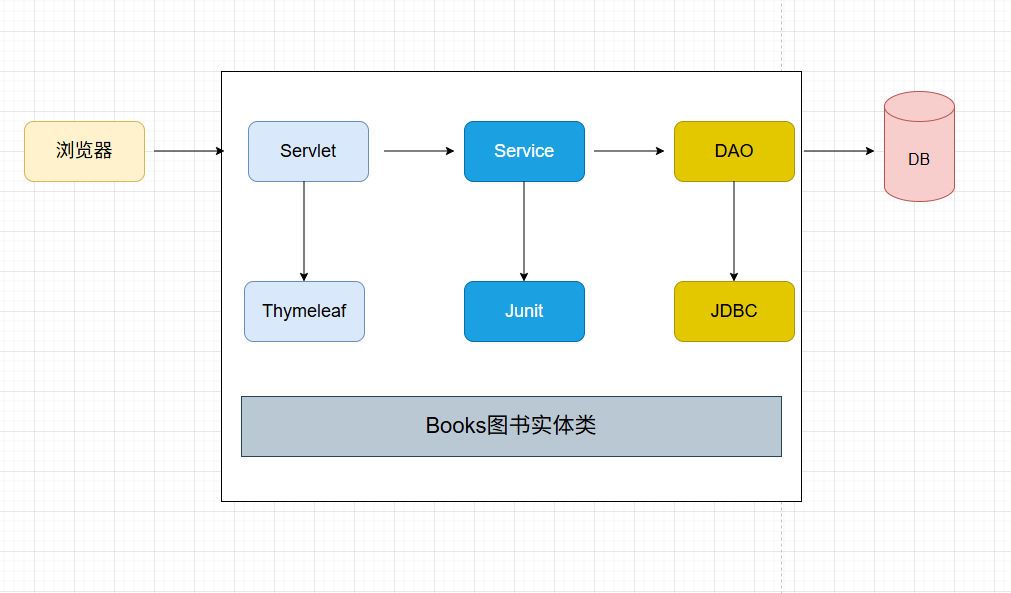
}二、整体架构
三、搭建环境
1、搭建持久层环境
(1)在 pom.xml文件 添加相应的依赖包
<dependencies>
<dependency>
<groupId>jakarta.servlet</groupId>
<artifactId>jakarta.servlet-api</artifactId>
<version>6.1.0</version>
<scope>provided</scope>
</dependency>
<dependency>
<groupId>org.junit.jupiter</groupId>
<artifactId>junit-jupiter-api</artifactId>
<version>${junit.version}</version>
<scope>test</scope>
</dependency>
<dependency>
<groupId>org.junit.jupiter</groupId>
<artifactId>junit-jupiter-engine</artifactId>
<version>${junit.version}</version>
<scope>test</scope>
</dependency>
<!-- Thymeleaf依赖 -->
<dependency>
<groupId>org.thymeleaf</groupId>
<artifactId>thymeleaf</artifactId>
<version>3.1.2.RELEASE</version>
</dependency>
<!-- lombok依赖 -->
<dependency>
<groupId>org.projectlombok</groupId>
<artifactId>lombok</artifactId>
<version>1.18.42</version>
</dependency>
<!-- druid -->
<dependency>
<groupId>com.alibaba</groupId>
<artifactId>druid</artifactId>
<version>1.2.16</version>
</dependency>
<!-- Apache Commons DbUtils -->
<dependency>
<groupId>commons-dbutils</groupId>
<artifactId>commons-dbutils</artifactId>
<version>1.7</version>
</dependency>
<!-- mysql驱动 -->
<dependency>
<groupId>mysql</groupId>
<artifactId>mysql-connector-java</artifactId>
<version>8.0.33</version>
</dependency>
</dependencies>
(2)资源配置文件:druid.properties
driverClassName=com.mysql.cj.jdbc.Driver
url=jdbc:mysql://localhost:3306/library
username=root
password=123456
initialSize=5
maxActive=10
minIdle=5(3)JDBCUtil工具类
package com.hnjt.util;
import com.alibaba.druid.pool.DruidDataSourceFactory;
import javax.sql.DataSource;
import java.io.InputStream;
import java.sql.Connection;
import java.util.Properties;
public class JDBCUtil {
//连接池
private static DataSource ds;
//本地线程对象
//使用ThreadLocal就是为了一个线程在多次数据库操作过程中,使用的是同一个连接!
private static ThreadLocal<Connection> th = new ThreadLocal<>();
//静态代码块,初始化连接池
static {
//1.获取prop对象
Properties prop = new Properties();
//2.加载配置文件
InputStream in = JDBCUtil.class.getClassLoader().getResourceAsStream("druid.properties");
try {
prop.load(in);
//3.获取数据源对象
ds = DruidDataSourceFactory.createDataSource(prop);
} catch (Exception e) {
e.printStackTrace();
}
}
/**
* 获取连接的方法
*
* @return
* @throws Exception
*/
public static Connection getConnection() throws Exception {
//从本地线程中获取连接对象
Connection conn = th.get();
if (conn == null) {
//如果为空,则创建新的连接对象
conn = ds.getConnection();
//将连接对象放入本地线程中
th.set(conn);
}
return conn;
}
/**
* 关闭连接的方法
*/
public static void close() {
try {
//获取连接
Connection conn = getConnection();
if (conn != null) {
//移除本地线程中的连接对象
th.remove();
//处理事务:关闭事务,设置为自动提交
conn.setAutoCommit(true);
//关闭连接池
conn.close();
}
} catch (Exception e) {
e.printStackTrace();
}
}
}(4)BaseDao
package com.hnjt.util;
import org.apache.commons.dbutils.QueryRunner;
import org.apache.commons.dbutils.handlers.BeanHandler;
import org.apache.commons.dbutils.handlers.BeanListHandler;
import java.sql.Connection;
import java.sql.SQLException;
import java.util.List;
public class BaseDao<T> {
private QueryRunner queryRunner = new QueryRunner();
// 增删改
public int update(String sql, Object... param) throws Exception {
Connection connection = JDBCUtil.getConnection();
try {
return queryRunner.update(connection, sql, param);
} catch (SQLException e) {
throw new RuntimeException(e);
} finally {
JDBCUtil.close();
}
}
// 查询单个对象
public T getBean(Class<T> clazz, String sql, Object... param) throws Exception {
Connection connection = JDBCUtil.getConnection();
try {
return queryRunner.query(connection, sql, new BeanHandler<>(clazz), param);
} catch (SQLException e) {
throw new RuntimeException(e);
} finally {
JDBCUtil.close();
}
}
// 查询列表
public List<T> getBeanList(Class<T> clazz, String sql, Object... param) throws Exception {
Connection connection = JDBCUtil.getConnection();
try {
return queryRunner.query(connection, sql, new BeanListHandler<>(clazz), param);
} catch (SQLException e) {
throw new RuntimeException(e);
} finally {
JDBCUtil.close();
}
}
}2、搭建Thymeleaf环境
(1)添加web模块
src/main/webapp/WEB-INF/templates/index.html
<!DOCTYPE html>
<!--引入thymeleaf包-->
<html lang="en" xmlns:th="http://www.thymeleaf/org">
<head>
    <meta charset="UTF-8">
    <base th:href="@{/}">
    <title>Title</title>
</head>
<body>
<h3>首页图书模块</h3>
<a th:href="@{/booksServlet(method='list')}">图书列表</a><p/>
</body>
</html>
src/main/webapp/WEB-INF/templates/list.html
<!DOCTYPE html>
<!--引入thymeleaf包-->
<html lang="en" xmlns:th="http://www.thymeleaf.org">
<head>
<meta charset="UTF-8">
<title>图书列表</title>
<base th:href="@{/}">
<!-- 最新版本的 Bootstrap 核心 CSS 文件 -->
<link rel="stylesheet" href="https://cdn.bootcdn.net/ajax/libs/twitter-bootstrap/3.4.1/css/bootstrap.min.css">
<!-- jquery库文件-->
<script src="https://code.jquery.com/jquery-3.4.1.min.js"></script>
<style>
.table th{
text-align: center;
}
</style>
</head>
<body>
<h2 class="text-center">图书信息管理页</h2>
<h2 class="text-center" th:if="${#lists.isEmpty(books)}">
暂无图书信息!
</h2>
<div class="container">
<p class="pp" ><a href="booksServlet?method=toAdd">添加图书</a></p>
<table th:if="${not #lists.isEmpty(books)}" class="table table-bordered table-striped table-hover">
<thead>
<tr>
<th>编号</th>
<th>名称</th>
<th>作者</th>
<th>ISBN</th>
<th>库存</th>
<th>出版日期</th>
<th>种类</th>
<th colspan="2">操作</th>
</tr>
</thead>
<tbody>
<tr th:each="book:${books}">
<td th:text="${book.id}"></td>
<td th:text="${book.title}"></td>
<td th:text="${book.author}"></td>
<td th:text="${book.isbn}"></td>
<td th:text="${book.stock}"></td>
<td th:text="${book.publishDate}"></td>
<td th:text="${book.category}"></td>
<td><a class="btn btn-info btn-small" th:href="@{/booksServlet(method='toUpdate',id=${book.id})}">修改</a>
</td>
<td><a class="delBtn btn btn-danger btn-small"
th:href="@{/booksServlet(method='remove',id=${book.id})}">删除</a></td>
</tr>
</tbody>
</table>
</div>
<script>
// 删除按钮的点击事件
$(".delBtn").click(function (e) {
var flag= confirm("确定要删除吗?");
// 如果用户点击取消,阻止表单提交
if(!flag){
e.preventDefault();
}
});
</script>
</body>
</body>
</html>(2)拷贝CustomTemplateEngine类
CustomTemplateEngine和ModelServlet不需要配置映射路径,为了让模块Servlet继承的 CustomTemplateEngine:用来进行Thymeleaf视图解析的 ModelServlet:用来获取method请求参数,根据method的值,经过反射机制调用对应的请求方法。 最好把这两个servlet单独放在同一个包里
com.hnjt.thymeleaf.CustomTemplateEngine.java
package com.hnjt.thymeleaf;
import jakarta.servlet.http.HttpServletRequest;
import jakarta.servlet.http.HttpServletResponse;
import org.thymeleaf.TemplateEngine;
import org.thymeleaf.context.WebContext;
import org.thymeleaf.templatemode.TemplateMode;
import org.thymeleaf.templateresolver.WebApplicationTemplateResolver;
import org.thymeleaf.web.servlet.IServletWebExchange;
import org.thymeleaf.web.servlet.JakartaServletWebApplication;
import java.io.IOException;
/**
* 对于一个JavaWeb应用而言,我们只需要配置一套模板引擎即可,所有的请求都通过该模板引擎来解析网页。
* 单例模式。本类中还提供了一个对请求进行解析的方法,方便我们使用。
*/
public class CustomTemplateEngine {
// 定义一个静态变量,用于保存模板引擎对象
private static CustomTemplateEngine webApplication;
// 模板引擎对象
private TemplateEngine templateEngine;
// 创建JakartaServletWebApplication对象
private JakartaServletWebApplication application;
/**
* 私有化构造方法,防止外部直接创建对象
* @param request
*/
private CustomTemplateEngine(HttpServletRequest request) {
System.out.println("设置Thymeleaf模板引擎");
// 创建Thymeleaf的JakartaServletWebApplication对象
application = JakartaServletWebApplication.buildApplication(request.getServletContext());
// 创建模板解析器对象
final WebApplicationTemplateResolver templateResolver = new WebApplicationTemplateResolver(application);
// 设置Thymeleaf的模板模式为HTML,除此之外Thymeleaf还支持处理其他5种模板,它们分别是XML、TEXT、JAVASCRIPT、CSS、RAW
templateResolver.setTemplateMode(TemplateMode.HTML);
// 设置模板文件的前缀(即路径)
templateResolver.setPrefix("/WEB-INF/templates/");
// 设置模板文件的文件后缀
templateResolver.setSuffix(".html");
// 设置缓存时间
templateResolver.setCacheTTLMs(Long.valueOf(3600000L));
// 设置缓存是否可用,开发阶段我们需要将缓存关闭,即设置为false
templateResolver.setCacheable(false);
// 创建模板引擎对象
templateEngine = new TemplateEngine();
// 为模板引擎设置模板解析器
templateEngine.setTemplateResolver(templateResolver);
}
/**
* 获取WebApplication对象
* @param request 请求对象
* @return 返回CustomTemplateEngine对象
*/
public static CustomTemplateEngine getInstance(HttpServletRequest request) {
if (webApplication == null) {
webApplication = new CustomTemplateEngine(request);
}
return webApplication;
}
/**
* 处理模板文件
* @param templateName 模板文件的名称
* @param request 请求对象
* @param response 响应对象
* @throws IOException IO异常
*/
public void processTemplate(String templateName, HttpServletRequest request, HttpServletResponse response) throws IOException {
// 创建IServletWebExchange对象
IServletWebExchange webExchange = application.buildExchange(request, response);
// 创建WebContext对象
WebContext context = new WebContext(webExchange, webExchange.getLocale());
// 设置响应体内容类型和字符集
response.setContentType("text/html;charset=UTF-8");
// 处理模板数据
templateEngine.process(templateName, context, response.getWriter());
}
}com.hnjt.thymeleaf.ModelServlet.java
package com.hnjt.thymeleaf;
import jakarta.servlet.http.HttpServlet;
import jakarta.servlet.http.HttpServletRequest;
import jakarta.servlet.http.HttpServletResponse;
import java.lang.reflect.Method;
public class ModelServlet extends HttpServlet {
@Override
protected void doGet(HttpServletRequest req, HttpServletResponse resp) throws jakarta.servlet.ServletException, java.io.IOException {
doPost(req, resp);
}
@Override
protected void doPost(HttpServletRequest req, HttpServletResponse resp) throws jakarta.servlet.ServletException, java.io.IOException {
//获取请求的参数
String method = req.getParameter("method");
try {
//获取Method对象
Method methodObject = this.getClass().getDeclaredMethod(method, HttpServletRequest.class, HttpServletResponse.class);
//暴力破解
methodObject.setAccessible(true);
//执行方法
methodObject.invoke(this, req, resp);
} catch (Exception e) {
throw new RuntimeException(e);
}
}
}3、显示首页功能

IndexServlet类
package com.hnjt.servlet;
import com.hnjt.thymeleaf.CustomTemplateEngine;
import jakarta.servlet.ServletException;
import jakarta.servlet.annotation.WebServlet;
import jakarta.servlet.http.HttpServlet;
import jakarta.servlet.http.HttpServletRequest;
import jakarta.servlet.http.HttpServletResponse;
import java.io.IOException;
/**
* 访问首页
*/
@WebServlet("/index.html") // 指定访问路径
public class IndexServlet extends HttpServlet {
@Override
protected void doGet(HttpServletRequest req, HttpServletResponse resp) throws ServletException, IOException, IOException {
// 获取模板引擎对象
CustomTemplateEngine templateEngine = CustomTemplateEngine.getInstance(req);
// 处理请求并响应结果
templateEngine.processTemplate("index", req, resp);
}
protected void doPost(HttpServletRequest req, HttpServletResponse resp) throws ServletException, IOException {
doGet(req, resp);
}
}
BooksServet类
package com.hnjt.servlet;
import com.hnjt.dao.BooksDao;
import com.hnjt.dao.impl.BooksDaoImpl;
import com.hnjt.entity.Books;
import com.hnjt.thymeleaf.CustomTemplateEngine;
import com.hnjt.thymeleaf.ModelServlet;
import jakarta.servlet.ServletException;
import jakarta.servlet.annotation.WebServlet;
import jakarta.servlet.http.HttpServletRequest;
import jakarta.servlet.http.HttpServletResponse;
import lombok.extern.slf4j.Slf4j;
import java.io.IOException;
import java.util.List;
@Slf4j
@WebServlet("/booksServlet")
public class BooksServlet extends ModelServlet {
private BooksDao booksService = new BooksDaoImpl();
/**
* 1、查询书籍信息B
* @param req
* @param resp
* @throws ServletException
* @throws IOException
*/
public void list(HttpServletRequest req, HttpServletResponse resp) throws ServletException, IOException {
CustomTemplateEngine engine = CustomTemplateEngine.getInstance(req);
try {
System.out.println("执行list方法...");
// 查询书籍信息
List<Books> books = booksService.queryBooks();
// 将书籍信息保存到request域中
req.setAttribute("books", books);
} catch (Exception e) {
throw new RuntimeException(e);
}
// 转发到list.html页面
engine.processTemplate("list", req, resp);
}
}
- web.xml 配置首页
<?xml version="1.0" encoding="UTF-8"?>
<web-app xmlns="https://jakarta.ee/xml/ns/jakartaee"
xmlns:xsi="http://www.w3.org/2001/XMLSchema-instance"
xsi:schemaLocation="https://jakarta.ee/xml/ns/jakartaee https://jakarta.ee/xml/ns/jakartaee/web-app_6_0.xsd"
version="6.0">
<welcome-file-list>
<welcome-file>index.html</welcome-file>
</welcome-file-list>
</web-app>