源码编译Gnome Nautilus ,结尾有编译好的nautilus 可直接替换 /usr/bin/Nautilus
meson.build:114:6: ERROR: Dependency lookup for gtk4 with method 'pkgconfig' failed: Invalid version, need 'gtk4' '\>= 4.22.0' found '4.20.1'.
GTK4 4.20 对应的 Nautilus 版本大约是 Nautilus 42.x 到 49.x 之间的版本。
具体来看:
| Nautilus 版本 | GTK4 版本要求 |
|---|---|
| 42.x | GTK4 4.18 |
| 43.x | GTK4 4.18--4.20 |
| 44--49.x | GTK4 4.20 |
| 50+ | GTK4 ≥ 4.22 |
下载源码
/home/lm/Projects/nautilus-gnome-49注释:nautilus-gnome-49/src/nautilus-main.c
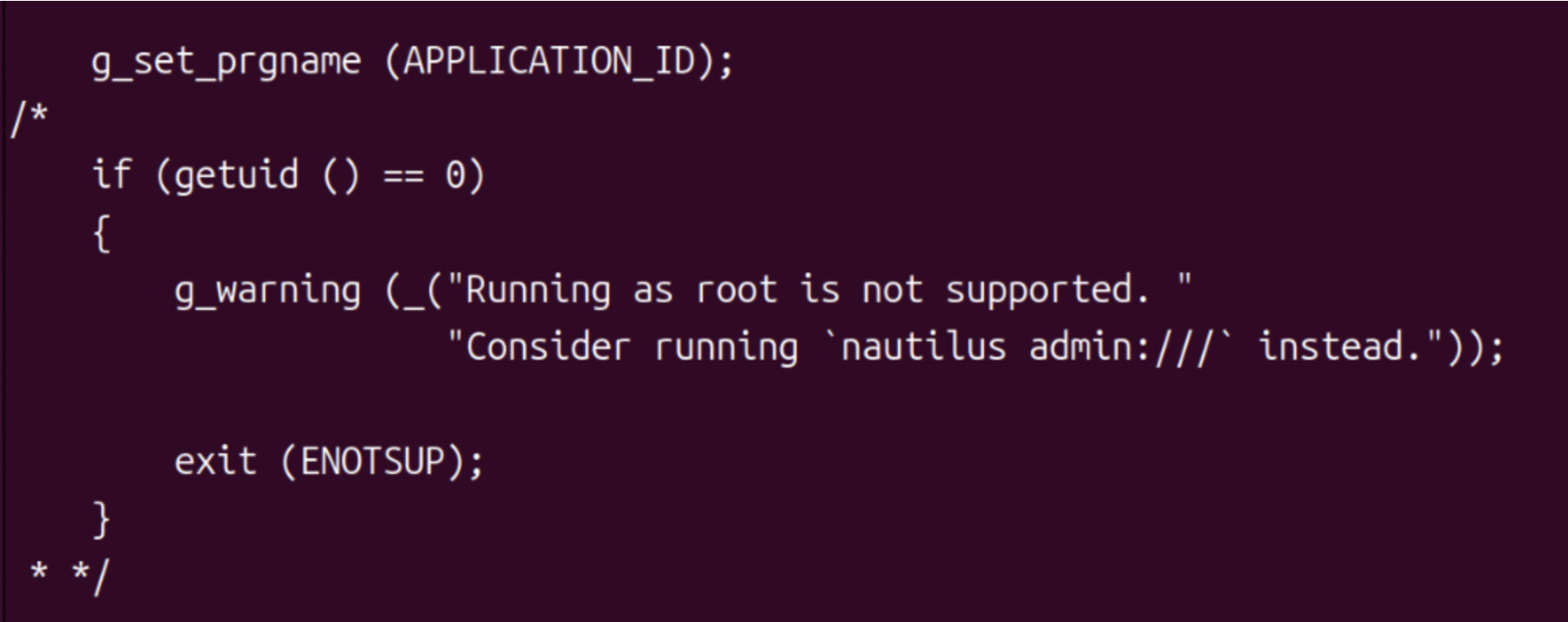
虚拟机环境编译
root@lm-VMware-Virtual-Platform:/home/lm/Projects/nautilus-gnome-49# meson setup build --prefix=/opt/nautilus-49
The Meson build system
Version: 1.7.0
Source dir: /home/lm/Projects/nautilus-gnome-49
Build dir: /home/lm/Projects/nautilus-gnome-49/build
Build type: native build
Project name: nautilus
Project version: 49.7
C compiler for the host machine: cc (gcc 15.2.0 "cc (Ubuntu 15.2.0-4ubuntu4) 15.2.0")
C linker for the host machine: cc ld.bfd 2.45
Host machine cpu family: x86_64
Host machine cpu: x86_64
Compiler for C supports arguments -Wduplicated-branches: YES
Compiler for C supports arguments -Wduplicated-cond: YES
Compiler for C supports arguments -Wlogical-op: YES
Compiler for C supports arguments -Werror=empty-body: YES
Compiler for C supports arguments -Werror=format=2: YES
Compiler for C supports arguments -Werror=implicit-function-declaration: YES
Compiler for C supports arguments -Werror=incompatible-pointer-types: YES
Compiler for C supports arguments -Werror=init-self: YES
Compiler for C supports arguments -Werror=missing-include-dirs: YES
Compiler for C supports arguments -Werror=missing-prototypes: YES
Compiler for C supports arguments -Werror=pointer-arith: YES
Compiler for C supports arguments -Werror=sequence-point: YES
Compiler for C supports arguments -Werror=shadow: YES
Compiler for C supports arguments -Werror=strict-prototypes: YES
Compiler for C supports arguments -Werror=undef: YES
Compiler for C supports arguments -Werror=uninitialized: YES
Compiler for C supports arguments -Wno-deprecated-declarations: YES
Compiler for C supports arguments -Wno-cast-function-type: YES
Compiler for C supports arguments -Wno-unused-parameter: YES
Compiler for C supports arguments -Wno-error=maybe-uninitialized: YES
Library m found: YES
Found pkg-config: YES (/usr/bin/pkg-config) 1.8.1
Run-time dependency gio-2.0 found: YES 2.86.0
Run-time dependency gio-unix-2.0 found: YES 2.86.0
Run-time dependency glib-2.0 found: YES 2.86.0
Run-time dependency gmodule-no-export-2.0 found: YES 2.86.0
Run-time dependency gnome-autoar-0 found: YES 0.4.5
Run-time dependency gnome-desktop-4 found: YES 44.4
Run-time dependency gtk4 found: YES 4.20.1
Run-time dependency libadwaita-1 found: YES 1.8.0
Run-time dependency libportal found: YES 0.9.1
Run-time dependency libportal-gtk4 found: YES 0.9.1
Run-time dependency tracker-sparql-3.0 found: YES 3.8.2
Run-time dependency icu-uc found: YES 76.1
Run-time dependency icu-i18n found: YES 76.1
Program gi-docgen found: NO
Run-time dependency gtk4-x11 found: YES 4.20.1
Run-time dependency gtk4-wayland found: YES 4.20.1
Run-time dependency wayland-client found: YES 1.24.0
Run-time dependency cloudproviders found: YES 0.3.6
Run-time dependency gexiv2 found: YES 0.14.6
Run-time dependency gdk-pixbuf-2.0 found: YES 2.42.12
Run-time dependency gstreamer-tag-1.0 found: YES 1.26.6
Run-time dependency gstreamer-pbutils-1.0 found: YES 1.26.6
Configuring config.h.in using configuration
Configuring org.gnome.Nautilus.desktop.in using configuration
Program msgfmt found: YES (/usr/bin/msgfmt)
Program python3 found: YES (/usr/bin/python3)
Configuring org.gnome.Nautilus.metainfo.xml.in using configuration
Configuring org.gnome.Nautilus.service using configuration
Configuring org.freedesktop.FileManager1.service using configuration
Configuring org.gnome.Nautilus.search-provider.ini using configuration
Dependency gio-2.0 found: YES 2.86.0 (cached)
Program /usr/lib/x86_64-linux-gnu/glib-2.0/glib-compile-schemas found: YES (/usr/lib/x86_64-linux-gnu/glib-2.0/glib-compile-schemas)
Program desktop-file-validate found: YES (/usr/bin/desktop-file-validate)
Program appstreamcli found: YES (/usr/bin/appstreamcli)
Dependency gio-2.0 found: YES 2.86.0 (cached)
Program /usr/bin/gdbus-codegen found: YES (/usr/bin/gdbus-codegen)
Dependency gio-2.0 found: YES 2.86.0 (cached)
Program /usr/bin/gdbus-codegen found: YES (/usr/bin/gdbus-codegen)
Run-time dependency x11 found: YES 1.8.12
Program wayland-scanner found: YES (/usr/bin/wayland-scanner)
Dependency wayland-client found: YES 1.24.0 (cached)
Dependency glib-2.0 found: YES 2.86.0 (cached)
Program /usr/bin/glib-mkenums found: YES (/usr/bin/glib-mkenums)
Dependency glib-2.0 found: YES 2.86.0 (cached)
Program /usr/bin/glib-mkenums found: YES (/usr/bin/glib-mkenums)
Run-time dependency gobject-introspection-1.0 found: YES 1.84.0
Dependency gobject-introspection-1.0 found: YES 1.84.0 (cached)
Program /usr/bin/x86_64-linux-gnu-g-ir-scanner found: YES (/usr/bin/x86_64-linux-gnu-g-ir-scanner)
Dependency gobject-introspection-1.0 found: YES 1.84.0 (cached)
Program /usr/bin/x86_64-linux-gnu-g-ir-compiler found: YES (/usr/bin/x86_64-linux-gnu-g-ir-compiler)
Program msginit found: YES (/usr/bin/msginit)
Program msgmerge found: YES (/usr/bin/msgmerge)
Program xgettext found: YES (/usr/bin/xgettext)
Configuring nautilus.gresource.xml using configuration
Dependency gio-2.0 found: YES 2.86.0 (cached)
Program /usr/bin/glib-compile-resources found: YES (/usr/bin/glib-compile-resources)
Dependency glib-2.0 found: YES 2.86.0 (cached)
Program /usr/bin/glib-mkenums found: YES (/usr/bin/glib-mkenums)
Dependency glib-2.0 found: YES 2.86.0 (cached)
Program /usr/bin/glib-mkenums found: YES (/usr/bin/glib-mkenums)
Dependency gio-2.0 found: YES 2.86.0 (cached)
Program /usr/bin/gdbus-codegen found: YES (/usr/bin/gdbus-codegen)
Dependency gio-2.0 found: YES 2.86.0 (cached)
Program /usr/bin/gdbus-codegen found: YES (/usr/bin/gdbus-codegen)
Dependency gio-2.0 found: YES 2.86.0 (cached)
Program /usr/bin/gdbus-codegen found: YES (/usr/bin/gdbus-codegen)
Dependency gio-2.0 found: YES 2.86.0 (cached)
Program /usr/bin/gdbus-codegen found: YES (/usr/bin/gdbus-codegen)
Program localsearch found: YES (/usr/bin/localsearch)
Library m found: YES
Dependency gio-2.0 found: YES 2.86.0 (cached)
Program /usr/lib/x86_64-linux-gnu/glib-2.0/glib-compile-schemas found: YES (/usr/lib/x86_64-linux-gnu/glib-2.0/glib-compile-schemas)
Program gtk4-update-icon-cache found: YES (/usr/bin/gtk4-update-icon-cache)
Program update-desktop-database found: YES (/usr/bin/update-desktop-database)
Build targets in project: 178

nautilus 49.7

  Features
    Extensions             : true
    Cloud providers support: true
    SELinux support        : false

  Build
    Profile                :
    Debugging              : true
    Optimization           : 0
    Documentation          : false
    Introspection          : true
    Tests                  : headless

  User defined options
    prefix                 : /opt/nautilus-49

Found ninja-1.12.1 at /usr/bin/ninja
root@lm-VMware-Virtual-Platform:/home/lm/Projects/nautilus-gnome-49#


root@lm-VMware-Virtual-Platform:/home/lm/Projects/nautilus-gnome-49# ninja -C build
ninja: Entering directory `build'
[2/394] Generating config.h with a custom command
fatal: 不是 git 仓库(或者任何父目录):.git
[75/394] Generating src/nautilus-resources_h with a custom command
请求了 xml-stripblanks 预处理,但未设定 XMLLINT,且 xmllint 不在 PATH 内
[78/394] Generating src/nautilus-resources_c with a custom command
请求了 xml-stripblanks 预处理,但未设定 XMLLINT,且 xmllint 不在 PATH 内
[394/394] Linking target test/automated/displayless/test-thumbnails
root@lm-VMware-Virtual-Platform:/home/lm/Projects/nautilus-gnome-49#

root@lm-VMware-Virtual-Platform:/home/lm/Projects/nautilus-gnome-49# ninja -C build install
ninja: Entering directory `build'
[1/132] Generating config.h with a custom command
fatal: 不是 git 仓库(或者任何父目录):.git
[1/2] Installing files
Installing data/org.gnome.Nautilus.desktop to /opt/nautilus-49/share/applications
Installing data/nautilus-autorun-software.desktop to /opt/nautilus-49/share/applications
Installing data/org.gnome.Nautilus.metainfo.xml to /opt/nautilus-49/share/metainfo
Installing libnautilus-extension/nautilus-extension-enum-types.h to /opt/nautilus-49/include/nautilus/libnautilus-extension
Installing libnautilus-extension/libnautilus-extension.so.4.1 to /opt/nautilus-49/lib/x86_64-linux-gnu
Installing libnautilus-extension/Nautilus-4.1.gir to /opt/nautilus-49/share/gir-1.0
Installing libnautilus-extension/Nautilus-4.1.typelib to /opt/nautilus-49/lib/x86_64-linux-gnu/girepository-1.0
Installing po/ab/LC_MESSAGES/nautilus.mo to /opt/nautilus-49/share/locale/ab/LC_MESSAGES
Installing po/af/LC_MESSAGES/nautilus.mo to /opt/nautilus-49/share/locale/af/LC_MESSAGES
Installing po/am/LC_MESSAGES/nautilus.mo to /opt/nautilus-49/share/locale/am/LC_MESSAGES
Installing po/an/LC_MESSAGES/nautilus.mo to /opt/nautilus-49/share/locale/an/LC_MESSAGES
Installing po/ar/LC_MESSAGES/nautilus.mo to /opt/nautilus-49/share/locale/ar/LC_MESSAGES
Installing po/as/LC_MESSAGES/nautilus.mo to /opt/nautilus-49/share/locale/as/LC_MESSAGES
Installing po/ast/LC_MESSAGES/nautilus.mo to /opt/nautilus-49/share/locale/ast/LC_MESSAGES
Installing po/az/LC_MESSAGES/nautilus.mo to /opt/nautilus-49/share/locale/az/LC_MESSAGES
Installing po/be/LC_MESSAGES/nautilus.mo to /opt/nautilus-49/share/locale/be/LC_MESSAGES
Installing po/be@latin/LC_MESSAGES/nautilus.mo to /opt/nautilus-49/share/locale/be@latin/LC_MESSAGES
Installing po/bg/LC_MESSAGES/nautilus.mo to /opt/nautilus-49/share/locale/bg/LC_MESSAGES
Installing po/bn/LC_MESSAGES/nautilus.mo to /opt/nautilus-49/share/locale/bn/LC_MESSAGES
Installing po/bn_IN/LC_MESSAGES/nautilus.mo to /opt/nautilus-49/share/locale/bn_IN/LC_MESSAGES
Installing po/bo/LC_MESSAGES/nautilus.mo to /opt/nautilus-49/share/locale/bo/LC_MESSAGES
Installing po/br/LC_MESSAGES/nautilus.mo to /opt/nautilus-49/share/locale/br/LC_MESSAGES
Installing po/bs/LC_MESSAGES/nautilus.mo to /opt/nautilus-49/share/locale/bs/LC_MESSAGES
Installing po/ca/LC_MESSAGES/nautilus.mo to /opt/nautilus-49/share/locale/ca/LC_MESSAGES
Installing po/ca@valencia/LC_MESSAGES/nautilus.mo to /opt/nautilus-49/share/locale/ca@valencia/LC_MESSAGES
Installing po/ckb/LC_MESSAGES/nautilus.mo to /opt/nautilus-49/share/locale/ckb/LC_MESSAGES
Installing po/crh/LC_MESSAGES/nautilus.mo to /opt/nautilus-49/share/locale/crh/LC_MESSAGES
Installing po/cs/LC_MESSAGES/nautilus.mo to /opt/nautilus-49/share/locale/cs/LC_MESSAGES
Installing po/cy/LC_MESSAGES/nautilus.mo to /opt/nautilus-49/share/locale/cy/LC_MESSAGES
Installing po/da/LC_MESSAGES/nautilus.mo to /opt/nautilus-49/share/locale/da/LC_MESSAGES
Installing po/de/LC_MESSAGES/nautilus.mo to /opt/nautilus-49/share/locale/de/LC_MESSAGES
Installing po/dz/LC_MESSAGES/nautilus.mo to /opt/nautilus-49/share/locale/dz/LC_MESSAGES
Installing po/el/LC_MESSAGES/nautilus.mo to /opt/nautilus-49/share/locale/el/LC_MESSAGES
Installing po/en_CA/LC_MESSAGES/nautilus.mo to /opt/nautilus-49/share/locale/en_CA/LC_MESSAGES
Installing po/en_GB/LC_MESSAGES/nautilus.mo to /opt/nautilus-49/share/locale/en_GB/LC_MESSAGES
Installing po/en@shaw/LC_MESSAGES/nautilus.mo to /opt/nautilus-49/share/locale/en@shaw/LC_MESSAGES
Installing po/eo/LC_MESSAGES/nautilus.mo to /opt/nautilus-49/share/locale/eo/LC_MESSAGES
Installing po/es/LC_MESSAGES/nautilus.mo to /opt/nautilus-49/share/locale/es/LC_MESSAGES
Installing po/et/LC_MESSAGES/nautilus.mo to /opt/nautilus-49/share/locale/et/LC_MESSAGES
Installing po/eu/LC_MESSAGES/nautilus.mo to /opt/nautilus-49/share/locale/eu/LC_MESSAGES
Installing po/fa/LC_MESSAGES/nautilus.mo to /opt/nautilus-49/share/locale/fa/LC_MESSAGES
Installing po/fi/LC_MESSAGES/nautilus.mo to /opt/nautilus-49/share/locale/fi/LC_MESSAGES
Installing po/fo/LC_MESSAGES/nautilus.mo to /opt/nautilus-49/share/locale/fo/LC_MESSAGES
Installing po/fr/LC_MESSAGES/nautilus.mo to /opt/nautilus-49/share/locale/fr/LC_MESSAGES
Installing po/fur/LC_MESSAGES/nautilus.mo to /opt/nautilus-49/share/locale/fur/LC_MESSAGES
Installing po/fy/LC_MESSAGES/nautilus.mo to /opt/nautilus-49/share/locale/fy/LC_MESSAGES
Installing po/ga/LC_MESSAGES/nautilus.mo to /opt/nautilus-49/share/locale/ga/LC_MESSAGES
Installing po/gd/LC_MESSAGES/nautilus.mo to /opt/nautilus-49/share/locale/gd/LC_MESSAGES
Installing po/gl/LC_MESSAGES/nautilus.mo to /opt/nautilus-49/share/locale/gl/LC_MESSAGES
Installing po/gu/LC_MESSAGES/nautilus.mo to /opt/nautilus-49/share/locale/gu/LC_MESSAGES
Installing po/gv/LC_MESSAGES/nautilus.mo to /opt/nautilus-49/share/locale/gv/LC_MESSAGES
Installing po/ha/LC_MESSAGES/nautilus.mo to /opt/nautilus-49/share/locale/ha/LC_MESSAGES
Installing po/he/LC_MESSAGES/nautilus.mo to /opt/nautilus-49/share/locale/he/LC_MESSAGES
Installing po/hi/LC_MESSAGES/nautilus.mo to /opt/nautilus-49/share/locale/hi/LC_MESSAGES
Installing po/hr/LC_MESSAGES/nautilus.mo to /opt/nautilus-49/share/locale/hr/LC_MESSAGES
Installing po/hu/LC_MESSAGES/nautilus.mo to /opt/nautilus-49/share/locale/hu/LC_MESSAGES
Installing po/hy/LC_MESSAGES/nautilus.mo to /opt/nautilus-49/share/locale/hy/LC_MESSAGES
Installing po/ia/LC_MESSAGES/nautilus.mo to /opt/nautilus-49/share/locale/ia/LC_MESSAGES
Installing po/id/LC_MESSAGES/nautilus.mo to /opt/nautilus-49/share/locale/id/LC_MESSAGES
Installing po/ie/LC_MESSAGES/nautilus.mo to /opt/nautilus-49/share/locale/ie/LC_MESSAGES
Installing po/ig/LC_MESSAGES/nautilus.mo to /opt/nautilus-49/share/locale/ig/LC_MESSAGES
Installing po/io/LC_MESSAGES/nautilus.mo to /opt/nautilus-49/share/locale/io/LC_MESSAGES
Installing po/is/LC_MESSAGES/nautilus.mo to /opt/nautilus-49/share/locale/is/LC_MESSAGES
Installing po/it/LC_MESSAGES/nautilus.mo to /opt/nautilus-49/share/locale/it/LC_MESSAGES
Installing po/ja/LC_MESSAGES/nautilus.mo to /opt/nautilus-49/share/locale/ja/LC_MESSAGES
Installing po/ka/LC_MESSAGES/nautilus.mo to /opt/nautilus-49/share/locale/ka/LC_MESSAGES
Installing po/kab/LC_MESSAGES/nautilus.mo to /opt/nautilus-49/share/locale/kab/LC_MESSAGES
Installing po/kk/LC_MESSAGES/nautilus.mo to /opt/nautilus-49/share/locale/kk/LC_MESSAGES
Installing po/km/LC_MESSAGES/nautilus.mo to /opt/nautilus-49/share/locale/km/LC_MESSAGES
Installing po/kn/LC_MESSAGES/nautilus.mo to /opt/nautilus-49/share/locale/kn/LC_MESSAGES
Installing po/ko/LC_MESSAGES/nautilus.mo to /opt/nautilus-49/share/locale/ko/LC_MESSAGES
Installing po/ku/LC_MESSAGES/nautilus.mo to /opt/nautilus-49/share/locale/ku/LC_MESSAGES
Installing po/ky/LC_MESSAGES/nautilus.mo to /opt/nautilus-49/share/locale/ky/LC_MESSAGES
Installing po/li/LC_MESSAGES/nautilus.mo to /opt/nautilus-49/share/locale/li/LC_MESSAGES
Installing po/ln/LC_MESSAGES/nautilus.mo to /opt/nautilus-49/share/locale/ln/LC_MESSAGES
Installing po/lt/LC_MESSAGES/nautilus.mo to /opt/nautilus-49/share/locale/lt/LC_MESSAGES
Installing po/lv/LC_MESSAGES/nautilus.mo to /opt/nautilus-49/share/locale/lv/LC_MESSAGES
Installing po/mai/LC_MESSAGES/nautilus.mo to /opt/nautilus-49/share/locale/mai/LC_MESSAGES
Installing po/mg/LC_MESSAGES/nautilus.mo to /opt/nautilus-49/share/locale/mg/LC_MESSAGES
Installing po/mi/LC_MESSAGES/nautilus.mo to /opt/nautilus-49/share/locale/mi/LC_MESSAGES
Installing po/mjw/LC_MESSAGES/nautilus.mo to /opt/nautilus-49/share/locale/mjw/LC_MESSAGES
Installing po/mk/LC_MESSAGES/nautilus.mo to /opt/nautilus-49/share/locale/mk/LC_MESSAGES
Installing po/ml/LC_MESSAGES/nautilus.mo to /opt/nautilus-49/share/locale/ml/LC_MESSAGES
Installing po/mn/LC_MESSAGES/nautilus.mo to /opt/nautilus-49/share/locale/mn/LC_MESSAGES
Installing po/mr/LC_MESSAGES/nautilus.mo to /opt/nautilus-49/share/locale/mr/LC_MESSAGES
Installing po/ms/LC_MESSAGES/nautilus.mo to /opt/nautilus-49/share/locale/ms/LC_MESSAGES
Installing po/my/LC_MESSAGES/nautilus.mo to /opt/nautilus-49/share/locale/my/LC_MESSAGES
Installing po/nb/LC_MESSAGES/nautilus.mo to /opt/nautilus-49/share/locale/nb/LC_MESSAGES
Installing po/nds/LC_MESSAGES/nautilus.mo to /opt/nautilus-49/share/locale/nds/LC_MESSAGES
Installing po/ne/LC_MESSAGES/nautilus.mo to /opt/nautilus-49/share/locale/ne/LC_MESSAGES
Installing po/nl/LC_MESSAGES/nautilus.mo to /opt/nautilus-49/share/locale/nl/LC_MESSAGES
Installing po/nn/LC_MESSAGES/nautilus.mo to /opt/nautilus-49/share/locale/nn/LC_MESSAGES
Installing po/nso/LC_MESSAGES/nautilus.mo to /opt/nautilus-49/share/locale/nso/LC_MESSAGES
Installing po/oc/LC_MESSAGES/nautilus.mo to /opt/nautilus-49/share/locale/oc/LC_MESSAGES
Installing po/or/LC_MESSAGES/nautilus.mo to /opt/nautilus-49/share/locale/or/LC_MESSAGES
Installing po/pa/LC_MESSAGES/nautilus.mo to /opt/nautilus-49/share/locale/pa/LC_MESSAGES
Installing po/pl/LC_MESSAGES/nautilus.mo to /opt/nautilus-49/share/locale/pl/LC_MESSAGES
Installing po/ps/LC_MESSAGES/nautilus.mo to /opt/nautilus-49/share/locale/ps/LC_MESSAGES
Installing po/pt/LC_MESSAGES/nautilus.mo to /opt/nautilus-49/share/locale/pt/LC_MESSAGES
Installing po/pt_BR/LC_MESSAGES/nautilus.mo to /opt/nautilus-49/share/locale/pt_BR/LC_MESSAGES
Installing po/ro/LC_MESSAGES/nautilus.mo to /opt/nautilus-49/share/locale/ro/LC_MESSAGES
Installing po/ru/LC_MESSAGES/nautilus.mo to /opt/nautilus-49/share/locale/ru/LC_MESSAGES
Installing po/rw/LC_MESSAGES/nautilus.mo to /opt/nautilus-49/share/locale/rw/LC_MESSAGES
Installing po/si/LC_MESSAGES/nautilus.mo to /opt/nautilus-49/share/locale/si/LC_MESSAGES
Installing po/sk/LC_MESSAGES/nautilus.mo to /opt/nautilus-49/share/locale/sk/LC_MESSAGES
Installing po/sl/LC_MESSAGES/nautilus.mo to /opt/nautilus-49/share/locale/sl/LC_MESSAGES
Installing po/sq/LC_MESSAGES/nautilus.mo to /opt/nautilus-49/share/locale/sq/LC_MESSAGES
Installing po/sr/LC_MESSAGES/nautilus.mo to /opt/nautilus-49/share/locale/sr/LC_MESSAGES
Installing po/sr@ije/LC_MESSAGES/nautilus.mo to /opt/nautilus-49/share/locale/sr@ije/LC_MESSAGES
Installing po/sr@latin/LC_MESSAGES/nautilus.mo to /opt/nautilus-49/share/locale/sr@latin/LC_MESSAGES
Installing po/sv/LC_MESSAGES/nautilus.mo to /opt/nautilus-49/share/locale/sv/LC_MESSAGES
Installing po/ta/LC_MESSAGES/nautilus.mo to /opt/nautilus-49/share/locale/ta/LC_MESSAGES
Installing po/te/LC_MESSAGES/nautilus.mo to /opt/nautilus-49/share/locale/te/LC_MESSAGES
Installing po/tg/LC_MESSAGES/nautilus.mo to /opt/nautilus-49/share/locale/tg/LC_MESSAGES
Installing po/th/LC_MESSAGES/nautilus.mo to /opt/nautilus-49/share/locale/th/LC_MESSAGES
Installing po/tk/LC_MESSAGES/nautilus.mo to /opt/nautilus-49/share/locale/tk/LC_MESSAGES
Installing po/tr/LC_MESSAGES/nautilus.mo to /opt/nautilus-49/share/locale/tr/LC_MESSAGES
Installing po/ug/LC_MESSAGES/nautilus.mo to /opt/nautilus-49/share/locale/ug/LC_MESSAGES
Installing po/uk/LC_MESSAGES/nautilus.mo to /opt/nautilus-49/share/locale/uk/LC_MESSAGES
Installing po/uz/LC_MESSAGES/nautilus.mo to /opt/nautilus-49/share/locale/uz/LC_MESSAGES
Installing po/uz@cyrillic/LC_MESSAGES/nautilus.mo to /opt/nautilus-49/share/locale/uz@cyrillic/LC_MESSAGES
Installing po/vi/LC_MESSAGES/nautilus.mo to /opt/nautilus-49/share/locale/vi/LC_MESSAGES
Installing po/wa/LC_MESSAGES/nautilus.mo to /opt/nautilus-49/share/locale/wa/LC_MESSAGES
Installing po/xh/LC_MESSAGES/nautilus.mo to /opt/nautilus-49/share/locale/xh/LC_MESSAGES
Installing po/yi/LC_MESSAGES/nautilus.mo to /opt/nautilus-49/share/locale/yi/LC_MESSAGES
Installing po/yo/LC_MESSAGES/nautilus.mo to /opt/nautilus-49/share/locale/yo/LC_MESSAGES
Installing po/zh_CN/LC_MESSAGES/nautilus.mo to /opt/nautilus-49/share/locale/zh_CN/LC_MESSAGES
Installing po/zh_HK/LC_MESSAGES/nautilus.mo to /opt/nautilus-49/share/locale/zh_HK/LC_MESSAGES
Installing po/zh_TW/LC_MESSAGES/nautilus.mo to /opt/nautilus-49/share/locale/zh_TW/LC_MESSAGES
Installing po/zu/LC_MESSAGES/nautilus.mo to /opt/nautilus-49/share/locale/zu/LC_MESSAGES
Installing src/nautilus to /opt/nautilus-49/bin
Installing src/nautilus-autorun-software to /opt/nautilus-49/bin
Installing extensions/image-properties/libnautilus-image-properties.so to /opt/nautilus-49/lib/x86_64-linux-gnu/nautilus/extensions-4
Installing extensions/audio-video-properties/libtotem-properties-page.so to /opt/nautilus-49/lib/x86_64-linux-gnu/nautilus/extensions-4
Installing /home/lm/Projects/nautilus-gnome-49/libnautilus-extension/nautilus-extension.h to /opt/nautilus-49/include/nautilus
Installing /home/lm/Projects/nautilus-gnome-49/libnautilus-extension/nautilus-column-provider.h to /opt/nautilus-49/include/nautilus/libnautilus-extension
Installing /home/lm/Projects/nautilus-gnome-49/libnautilus-extension/nautilus-column.h to /opt/nautilus-49/include/nautilus/libnautilus-extension
Installing /home/lm/Projects/nautilus-gnome-49/libnautilus-extension/nautilus-file-info.h to /opt/nautilus-49/include/nautilus/libnautilus-extension
Installing /home/lm/Projects/nautilus-gnome-49/libnautilus-extension/nautilus-info-provider.h to /opt/nautilus-49/include/nautilus/libnautilus-extension
Installing /home/lm/Projects/nautilus-gnome-49/libnautilus-extension/nautilus-menu-provider.h to /opt/nautilus-49/include/nautilus/libnautilus-extension
Installing /home/lm/Projects/nautilus-gnome-49/libnautilus-extension/nautilus-properties-model-provider.h to /opt/nautilus-49/include/nautilus/libnautilus-extension
Installing /home/lm/Projects/nautilus-gnome-49/libnautilus-extension/nautilus-properties-model.h to /opt/nautilus-49/include/nautilus/libnautilus-extension
Installing /home/lm/Projects/nautilus-gnome-49/libnautilus-extension/nautilus-properties-item.h to /opt/nautilus-49/include/nautilus/libnautilus-extension
Installing /home/lm/Projects/nautilus-gnome-49/libnautilus-extension/nautilus-menu.h to /opt/nautilus-49/include/nautilus/libnautilus-extension
Installing /home/lm/Projects/nautilus-gnome-49/data/icons/hicolor/scalable/apps/org.gnome.Nautilus.svg to /opt/nautilus-49/share/icons/hicolor/scalable/apps
Installing /home/lm/Projects/nautilus-gnome-49/data/icons/hicolor/symbolic/apps/org.gnome.Nautilus-symbolic.svg to /opt/nautilus-49/share/icons/hicolor/symbolic/apps
Installing /home/lm/Projects/nautilus-gnome-49/build/data/org.gnome.Nautilus.service to /opt/nautilus-49/share/dbus-1/services
Installing /home/lm/Projects/nautilus-gnome-49/build/data/org.freedesktop.FileManager1.service to /opt/nautilus-49/share/dbus-1/services
Installing /home/lm/Projects/nautilus-gnome-49/build/data/org.gnome.Nautilus.search-provider.ini to /opt/nautilus-49/share/gnome-shell/search-providers
Installing /home/lm/Projects/nautilus-gnome-49/data/org.gnome.nautilus.gschema.xml to /opt/nautilus-49/share/glib-2.0/schemas
Installing /home/lm/Projects/nautilus-gnome-49/data/ontology/nautilus.description to /opt/nautilus-49/share/nautilus/ontology
Installing /home/lm/Projects/nautilus-gnome-49/data/ontology/nautilus.ontology to /opt/nautilus-49/share/nautilus/ontology
Installing /home/lm/Projects/nautilus-gnome-49/build/meson-private/libnautilus-extension-4.pc to /opt/nautilus-49/lib/x86_64-linux-gnu/pkgconfig
Installing symlink pointing to libnautilus-extension.so.4.1 to /opt/nautilus-49/lib/x86_64-linux-gnu/libnautilus-extension.so.4
Installing symlink pointing to libnautilus-extension.so.4 to /opt/nautilus-49/lib/x86_64-linux-gnu/libnautilus-extension.so
Running custom install script '/usr/lib/x86_64-linux-gnu/glib-2.0/glib-compile-schemas /opt/nautilus-49/share/glib-2.0/schemas'
Running custom install script '/usr/bin/gtk4-update-icon-cache -q -t -f /opt/nautilus-49/share/icons/hicolor'
Running custom install script '/usr/bin/update-desktop-database -q /opt/nautilus-49/share/applications'
root@lm-VMware-Virtual-Platform:/home/lm/Projects/nautilus-gnome-49#
拷贝到主机
scp -r nautilus-49 root@10.74.200.51:/opt/

export PATH=/opt/nautilus-49/bin:$PATH

export LD_LIBRARY_PATH=/opt/nautilus-49/lib:$LD_LIBRARY_PATH
或
scp /home/lm/Projects/nautilus-gnome-49/build/src/nautilus root@ip:/usr/bin/如果运行报错:
 nautilus -help

./nautilus: error while loading shared libraries: libcloudproviders.so.0: cannot open shared object file: No such file or directory root@lm:/opt/nautilus-49/bin#

sudo apt install libcloudproviders0
前置条件:
meson.build:109:9: ERROR: Dependency "glycin-2" not found, tried pkgconfig and cmake
安装 Glycin(推荐)
在 Ubuntu 上可以尝试:
sudo apt install libglycin-2-dev如果找不到,你的 Ubuntu 版本可能没有打包 Glycin,你可以用 Flatpak/Builder 的 SDK 或从源代码编译 Glycin:
git clone https://gitlab.gnome.org/GNOME/glycin.git
cd glycin
meson setup build
ninja -C build
sudo ninja -C build install- 安装后,
pkg-config --modversion glycin-2应该能输出版本号。 - 然后在 Nautilus 源码里重新
meson setup build就不会报错。
Running rustc --version gave "Errno 2 No such file or directory: 'rustc'"
# 安装 rustup

curl --proto '=https' --tlsv1.2 -sSf https://sh.rustup.rs | sh

# 按提示选择默认安装(通常选 1)

# 安装完成后,加载环境变量

source $HOME/.cargo/env

# 检查 rustc 是否可用

rustc --version
glycin-loaders/meson.build:12:2: ERROR: Dependency "libjxl" not found, tried pkgconfig and cmake
sudo apt install libjxl-dev glycin-loaders/meson.build:16:2: ERROR: Dependency "librsvg-2.0" not found, tried pkgconfig and cmake
librsvg2-dev再次编译 Glycin
lm@lm-VMware-Virtual-Platform:~/Projects/glycin$ meson setup build
The Meson build system
Version: 1.7.0
Source dir: /home/lm/Projects/glycin
Build dir: /home/lm/Projects/glycin/build
Build type: native build
Project name: glycin
Project version: 2.1.1
C compiler for the host machine: cc (gcc 15.2.0 "cc (Ubuntu 15.2.0-4ubuntu4) 15.2.0")
C linker for the host machine: cc ld.bfd 2.45
Rust compiler for the host machine: rustc -C linker=cc (rustc 1.95.0)
Rust linker for the host machine: rustc -C linker=cc ld.bfd 2.45
Host machine cpu family: x86_64
Host machine cpu: x86_64
Program cargo found: YES (/home/lm/.cargo/bin/cargo)
Program /home/lm/Projects/glycin/build-aux/crates-version.py found: YES (/home/lm/Projects/glycin/build-aux/crates-version.py)
Found pkg-config: YES (/usr/bin/pkg-config) 1.8.1
Run-time dependency libseccomp found: YES 2.6.0
Run-time dependency libheif found: YES 1.20.2
Run-time dependency libjxl found: YES 0.11.1
Run-time dependency librsvg-2.0 found: YES 2.60.0
Run-time dependency cairo found: YES 1.18.4
Run-time dependency gio-2.0 found: YES 2.86.0
Run-time dependency gtk4 found: YES 4.20.1
Run-time dependency lcms2 found: YES 2.16
Configuring tmp-glycin-heif using configuration
Program msgfmt found: YES (/usr/bin/msgfmt)
Configuring glycin-heif.thumbnailer using configuration
Configuring tmp-glycin-image-rs using configuration
Configuring glycin-image-rs.thumbnailer using configuration
Configuring tmp-glycin-jxl using configuration
Configuring glycin-jxl.thumbnailer using configuration
Configuring tmp-glycin-svg using configuration
Configuring glycin-svg.thumbnailer using configuration
Program meson found: YES
Program /home/lm/Projects/glycin/build-aux/setup-integration-test.py found: YES (/home/lm/Projects/glycin/build-aux/setup-integration-test.py)
Run-time dependency fontconfig found: YES 2.15.0
Dependency gio-2.0 found: YES 2.86.0 (cached)
Dependency libseccomp found: YES 2.6.0 (cached)
Dependency lcms2 found: YES 2.16 (cached)
Dependency gtk4 found: YES 4.20.1 (cached)
Run-time dependency gobject-introspection-1.0 found: YES 1.84.0
Dependency gobject-introspection-1.0 found: YES 1.84.0 (cached)
Program /usr/bin/x86_64-linux-gnu-g-ir-scanner found: YES (/usr/bin/x86_64-linux-gnu-g-ir-scanner)
Dependency gobject-introspection-1.0 found: YES 1.84.0 (cached)
Program /usr/bin/x86_64-linux-gnu-g-ir-compiler found: YES (/usr/bin/x86_64-linux-gnu-g-ir-compiler)
Program vapigen found: YES (/usr/bin/vapigen)
Program vapigen found: YES (/usr/bin/vapigen)
Build targets in project: 28

Found ninja-1.12.1 at /usr/bin/ninja
lm@lm-VMware-Virtual-Platform:~/Projects/glycin$
完美!🎉下一步:编译 Glycin
sudo ninja -C build installRust 环境没有默认的工具链
lm@lm-VMware-Virtual-Platform:~/Projects/glycin$ sudo ninja -C build install
ninja: Entering directory `build'
[0/26] Generating libglycin/libglycin-cargo with a custom command (wrapped by meson to set env)
error: rustup could not choose a version of cargo to run, because one wasn't specified explicitly, and no default is configured.
help: run 'rustup default stable' to download the latest stable release of Rust and set it as your default toolchain.
while executing ['/home/lm/.cargo/bin/cargo', 'build', '--target-dir', '/home/lm/Projects/glycin/build/cargo-target', '--profile', 'release', '--manifest-path', '/home/lm/Projects/glycin/Cargo.toml', '-p', 'libglycin']
FAILED: libglycin/Meson-does-not-support-sub-dir-output
/usr/bin/meson --internal exe --unpickle /home/lm/Projects/glycin/build/meson-private/meson_exe_cargo_212b9002ebf521355774c7cb961518041439f7b8.dat
ninja: build stopped: subcommand failed.
lm@lm-VMware-Virtual-Platform:~/Projects/glycin$
设置 Rust 默认工具链
rustup default stable再次编译并检查是否成功
sudo ninja -C build install

ls /usr/local/lib/x86_64-linux-gnu | grep glycin- 问题 :
Run-time dependency gnome-autoar-0 found: NO(缺少 gnome-autoar 开发库)
执行 :sudo apt install -y libgnome-autoar-0-dev - 问题 :
Dependency gtk4 found: NO. Found 4.20.1 but need: '>= 4.22.0'(GTK4 版本过低,需 >= 4.22.0)
执行 :sudo apt install -y libgtk-4-dev(如果源中版本不够新,需添加 PPA 或从源码编译 GTK4) - 问题 :
Run-time dependency libadwaita-1 found: NO(缺少 libadwaita 开发库)
执行 :sudo apt install -y libadwaita-1-dev - 问题 :
Run-time dependency libportal found: NO(缺少 libportal 开发库)
执行 :sudo apt install -y libportal-dev - 问题 :
Run-time dependency libportal-gtk4 found: NO(缺少 libportal 的 GTK4 绑定)
执行 :sudo apt install -y libportal-gtk4-dev - 问题 :
Run-time dependency cloudproviders found: NO(缺少 cloudproviders 开发库)
执行 :sudo apt install -y libcloudproviders-dev - 问题 :
Run-time dependency gexiv2 found: NO(缺少 gexiv2 开发库)
执行 :sudo apt install -y libgexiv2-dev - 问题 :
Run-time dependency gstreamer-tag-1.0 found: NO(缺少 GStreamer tag 插件开发库)
执行 :sudo apt install -y libgstreamer-plugins-base1.0-dev