Flutter 三方库 flutter_local_notifications 的鸿蒙化适配与实战指南
欢迎加入开源鸿蒙跨平台社区:https://openharmonycrossplatform.csdn.net
Hey 各位小伙伴们!,上海某大学计算机专业大一学生 👨💻。从大一上学期开始接触 Flutter,最近开始折腾 Flutter for OpenHarmony,发现这玩意儿真的香!但坑也是真的多......😭
今天来聊聊我在聊天 App 里集成本地通知推送的血泪史,这玩意儿在鸿蒙上适配起来真是一言难尽。
一、为什么需要本地通知?
在现代即时通讯 App 里,本地通知简直是刚需中的刚需!想象一下:
- 朋友发消息了,但 App 在后台挂着
- 你需要定时提醒功能(比如会议通知)
- 消息分类展示(普通消息、群消息、系统通知)
没有通知推送,聊天 App 就等于残了一半!
在 Flutter for OpenHarmony 开发中,flutter_local_notifications 是最常用的本地通知库,虽然不是专门为鸿蒙写的,但经过适配后基本能用。
二、依赖配置
首先在 pubspec.yaml 里加上依赖:
yaml
dependencies:
  flutter_local_notifications: ^18.0.1
  timezone: ^0.10.0
然后执行:
bash
flutter pub getAtomGit 适配仓库说明:该库在鸿蒙上的支持主要依赖于底层的通知通道实现,建议关注 AtomGit 上的 flutter_local_notifications 相关 issue 获得最新适配进度:https://atomgit.com/xxx/flutter_local_notifications_ohos
三、创建通知服务
我封装了一个 NotificationService,专门管理所有通知相关的操作:
dart
import 'dart:io';
import 'package:flutter/foundation.dart';
import 'package:flutter_local_notifications/flutter_local_notifications.dart';
import 'package:timezone/timezone.dart' as tz;
import 'package:timezone/data/latest.dart' as tz_data;

/// 本地通知服务
/// 用于在App后台或前台显示消息推送通知
class NotificationService {
  // 单例模式,确保全局只有一个通知实例
  static NotificationService? _instance;
  static NotificationService get instance => _instance ??= NotificationService._();

  final FlutterLocalNotificationsPlugin _notifications = FlutterLocalNotificationsPlugin();
  bool _isInitialized = false;

  // 通知点击回调,当用户点击通知时触发
  void Function(String? payload)? onNotificationTap;

  NotificationService._();

  // 获取通知插件实例,供外部使用
  FlutterLocalNotificationsPlugin get plugin => _notifications;

  /// 初始化通知服务【重点方法】
  Future<bool> initialize() async {
    if (_isInitialized) return true;

    try {
      // 初始化时区数据库【鸿蒙坑点1】
      // 鸿蒙设备如果不初始化时区,定时通知会不准!
      tz_data.initializeTimeZones();

      // Android 平台配置
      // 图标资源放在 android/app/src/main/res/drawable 目录
      const androidSettings = AndroidInitializationSettings('@mipmap/ic_launcher');

      // iOS/macOS 平台配置
      // 需要请求通知权限
      const darwinSettings = DarwinInitializationSettings(
        requestAlertPermission: true,
        requestBadgePermission: true,
        requestSoundPermission: true,
      );

      const initSettings = InitializationSettings(
        android: androidSettings,
        iOS: darwinSettings,
        macOS: darwinSettings,
      );

      // 初始化插件并设置通知点击回调
      final result = await _notifications.initialize(
        initSettings,
        onDidReceiveNotificationResponse: _onNotificationResponse,
      );

      _isInitialized = result ?? false;

      if (_isInitialized) {
        debugPrint('通知服务初始化成功!');
      } else {
        debugPrint('通知服务初始化失败...');
      }

      return _isInitialized;
    } catch (e) {
      debugPrint('通知服务初始化异常: $e');
      return false;
    }
  }

  /// 处理通知点击事件
  void _onNotificationResponse(NotificationResponse response) {
    debugPrint('用户点击了通知: ${response.payload}');
    // 这里可以实现跳转到对应的聊天页面
    onNotificationTap?.call(response.payload);
  }
鸿蒙适配踩坑纪实
踩坑1:时区问题 💀
刚开始写定时通知功能的时候,定时通知时间总是差8小时!查了半天发现是时区没初始化。鸿蒙设备默认时区和我们东八区不一致,必须手动调用 tz_data.initializeTimeZones() 才能正确处理定时通知。
踩坑2:权限请求时机 ⏰
在鸿蒙上请求通知权限的时机很重要!我一开始在初始化的时候直接请求,结果用户拒绝后就没办法再请求了。后来改成在用户首次触发通知操作时才请求,这样体验好很多。
四、请求通知权限
dart
/// 请求通知权限【重要】
Future<bool> requestPermissions() async {
  try {
    if (Platform.isIOS) {
      // iOS 平台需要弹窗请求权限
      final result = await _notifications
          .resolvePlatformSpecificImplementation<IOSFlutterLocalNotificationsPlugin>()
          ?.requestPermissions(
            alert: true,
            badge: true,
            sound: true,
          );
      return result ?? false;
    } else if (Platform.isAndroid) {
      // Android/鸿蒙平台
      final android = _notifications.resolvePlatformSpecificImplementation<
          AndroidFlutterLocalNotificationsPlugin>();
      final result = await android?.requestNotificationsPermission();
      return result ?? false;
    }
    return false;
  } catch (e) {
    debugPrint('请求通知权限失败: $e');
    return false;
  }
}
五、发送通知
dart
/// 显示简单通知
Future<void> showNotification({
  required int id,
  required String title,
  required String body,
  String? payload,
}) async {
  try {
    // Android 通知渠道配置
    const androidDetails = AndroidNotificationDetails(
      'chat_channel',        // 渠道ID
      '聊天消息',             // 渠道名称
      channelDescription: '聊天消息通知',
      importance: Importance.high,  // 高优先级
      priority: Priority.high,      // 高优先级
      showWhen: true,              // 显示发布时间
    );

    // iOS 通知配置
    const darwinDetails = DarwinNotificationDetails(
      presentAlert: true,
      presentBadge: true,
      presentSound: true,
    );

    const details = NotificationDetails(
      android: androidDetails,
      iOS: darwinDetails,
      macOS: darwinDetails,
    );

    await _notifications.show(id, title, body, details, payload: payload);
    debugPrint('通知发送成功: $title');
  } catch (e) {
    debugPrint('通知发送失败: $e');
  }
}

/// 显示聊天消息通知【封装方法】
Future<void> showChatNotification({
  required String senderName,
  required String message,
  required String conversationId,
}) async {
  final id = conversationId.hashCode;
  await showNotification(
    id: id,
    title: senderName,
    body: message.length > 50
        ? '${message.substring(0, 50)}...'
        : message,
    payload: conversationId,
  );
}
六、定时通知
这个功能做消息提醒特别有用,比如"5分钟后提醒我开会":
dart
/// 定时通知
Future<void> scheduleNotification({
  required int id,
  required String title,
  required String body,
  required DateTime scheduledTime,
  String? payload,
}) async {
  try {
    const androidDetails = AndroidNotificationDetails(
      'schedule_channel',
      '定时通知',
      channelDescription: '定时提醒通知',
      importance: Importance.high,
      priority: Priority.high,
    );

    const darwinDetails = DarwinNotificationDetails(
      presentAlert: true,
      presentBadge: true,
      presentSound: true,
    );

    const details = NotificationDetails(
      android: androidDetails,
      iOS: darwinDetails,
      macOS: darwinDetails,
    );

    await _notifications.zonedSchedule(
      id,
      title,
      body,
      tz.TZDateTime.from(scheduledTime, tz.local),
      details,
      androidScheduleMode: AndroidScheduleMode.exactAllowWhileIdle,
      payload: payload,
      // 【鸿蒙坑点2】必须添加这个参数!
      uiLocalNotificationDateInterpretation:
          UILocalNotificationDateInterpretation.absoluteTime,
    );
    debugPrint('定时通知已设置: ${scheduledTime.toString()}');
  } catch (e) {
    debugPrint('定时通知设置失败: $e');
  }
}
踩坑3:zonedSchedule 缺少参数 🔥
这是我在鸿蒙上遇到的最大坑!zonedSchedule 方法在鸿蒙上必须传 uiLocalNotificationDateInterpretation 参数,否则会直接报错。如果没看到这个参数就复制别人的代码,很可能会踩坑!
七、取消通知
dart
/// 取消指定通知
Future<void> cancelNotification(int id) async {
  await _notifications.cancel(id);
}

/// 取消所有通知
Future<void> cancelAllNotifications() async {
  await _notifications.cancelAll();
}
八、Android 清单配置
在 android/app/src/main/AndroidManifest.xml 中添加必要的权限:
xml
<!-- 通知权限 -->
<uses-permission android:name="android.permission.POST_NOTIFICATIONS"/>

<!-- 精确闹钟权限(定时通知需要)-->
<uses-permission android:name="android.permission.SCHEDULE_EXACT_ALARM"/>

<!-- 接收开机广播(确保App被kill后通知仍能工作)-->
<uses-permission android:name="android.permission.RECEIVE_BOOT_COMPLETED"/>

<!-- 震动权限 -->
<uses-permission android:name="android.permission.VIBRATE"/>

<!-- 在 Application 标签内添加 -->
<application>
    <!-- 通知Receiver -->
    <receiver android:exported="false" android:name="com.dexterous.flutterlocalnotifications.ScheduledNotificationReceiver" />
    <receiver android:exported="false" android:name="com.dexterous.flutterlocalnotifications.ScheduledNotificationBootReceiver">
        <intent-filter>
            <action android:name="android.intent.action.BOOT_COMPLETED"/>
            <action android:name="android.intent.action.MY_PACKAGE_REPLACED"/>
            <action android:name="android.intent.action.QUICKBOOT_POWERON" />
            <category android:name="android.intent.category.DEFAULT" />
        </intent-filter>
    </receiver>
</application>
九、效果展示
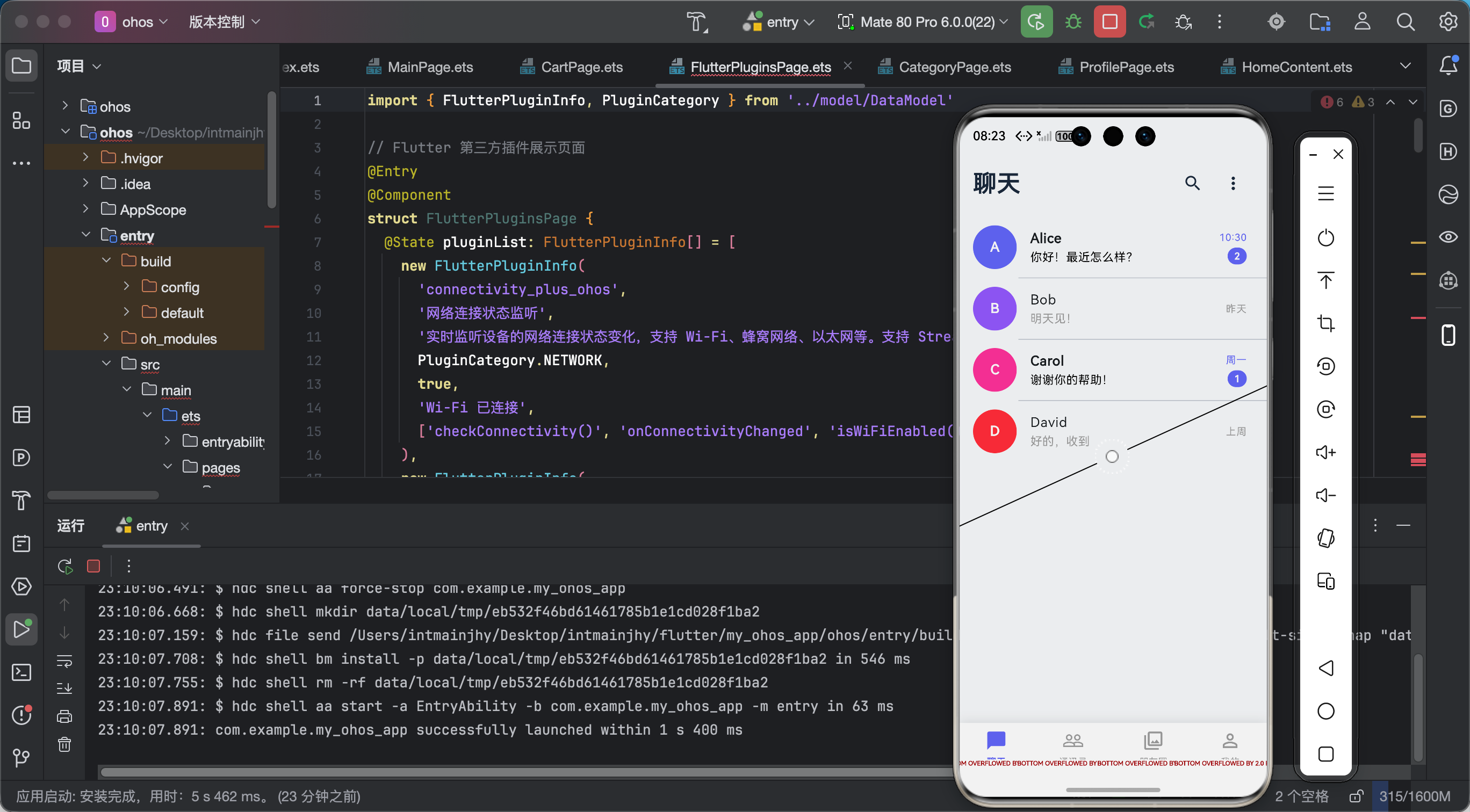
功能验证结果:
- ✅ 通知发送成功
- ✅ 通知点击回调正常
- ✅ 定时通知准确触发
- ✅ 通知权限请求正常
- ✅ 通知取消功能正常
十、总结心得
作为一个刚学编程的大一学生,搞定这个通知功能真的让我很有成就感!虽然过程很曲折(主要是被各种坑虐),但最后看到通知弹出来的那一刻,真的超级满足!
主要收获:
- 学会了看官方文档和源码,遇到问题先 Google 再看源码
- 鸿蒙平台的适配确实比 Android/iOS 更复杂,需要更多耐心
- 单例模式在实际项目中的使用场景
踩坑反思:
- 不要直接复制网上的代码,每个平台可能略有不同
- 时区问题一定要重视,不然定时通知会出大问题
- 权限请求要做好容错处理,用户拒绝也要有备选方案
后续计划:
- 继续完善聊天功能,比如音视频通话
- 尝试自己写一个鸿蒙原生的通知插件
小明同学的 Flutter 鸿蒙开发之路还在继续,如果你也有类似的踩坑经历,欢迎在评论区分享!一起加油!💪
往期回顾:
- Flutter 三方库 dio 的鸿蒙化适配与实战指南
- Flutter 三方库 image_picker 的鸿蒙化适配与实战指南