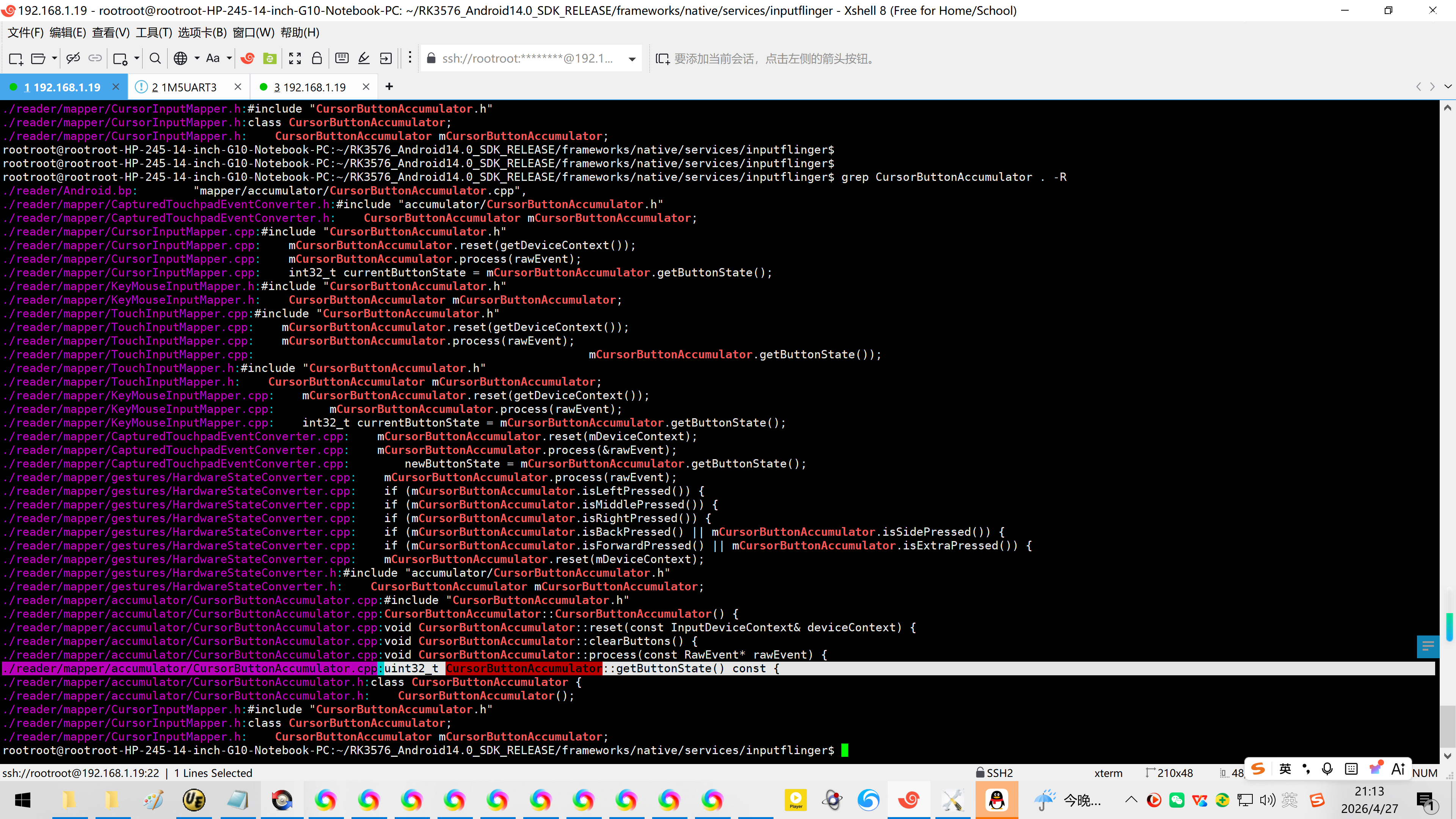
rootroot@rootroot-HP-245-14-inch-G10-Notebook-PC:~/RK3576_Android14.0_SDK_RELEASE/frameworks/native/services/inputflinger$ grep CursorButtonAccumulator . -R
./reader/mapper/accumulator/CursorButtonAccumulator.cpp:uint32_t CursorButtonAccumulator::getButtonState() const {
20260427给万象奥科的开发板HD-RK3576-PI适配瑞芯微原厂的Android14时增加鼠标右键返回
2026/4/27 21:01
1、
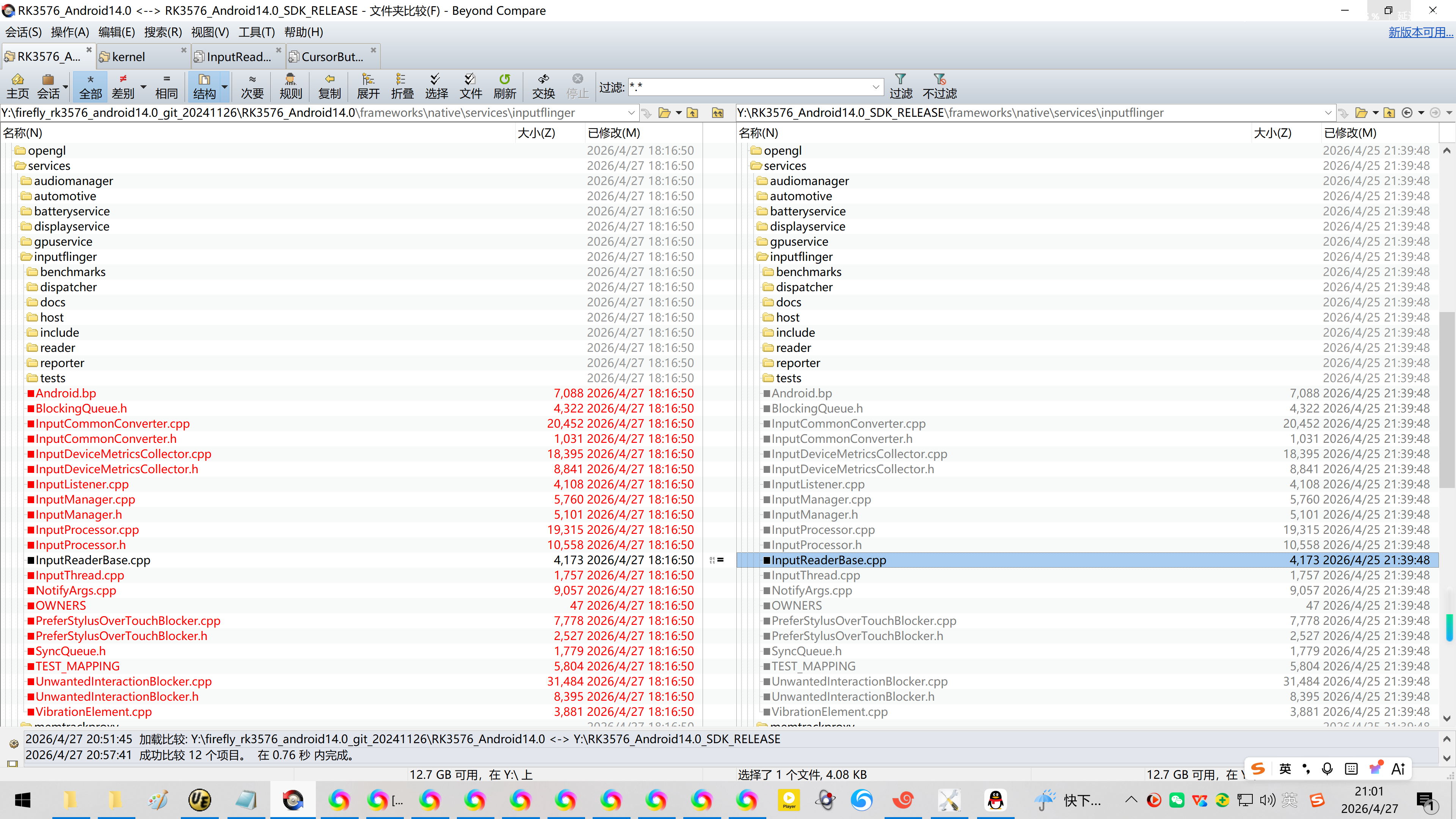
注意,不是这个文件:
Y:\RK3576_Android14.0_SDK_RELEASE\frameworks\native\services\inputflinger\InputReaderBase.cpp
2、问 DeepSeek:
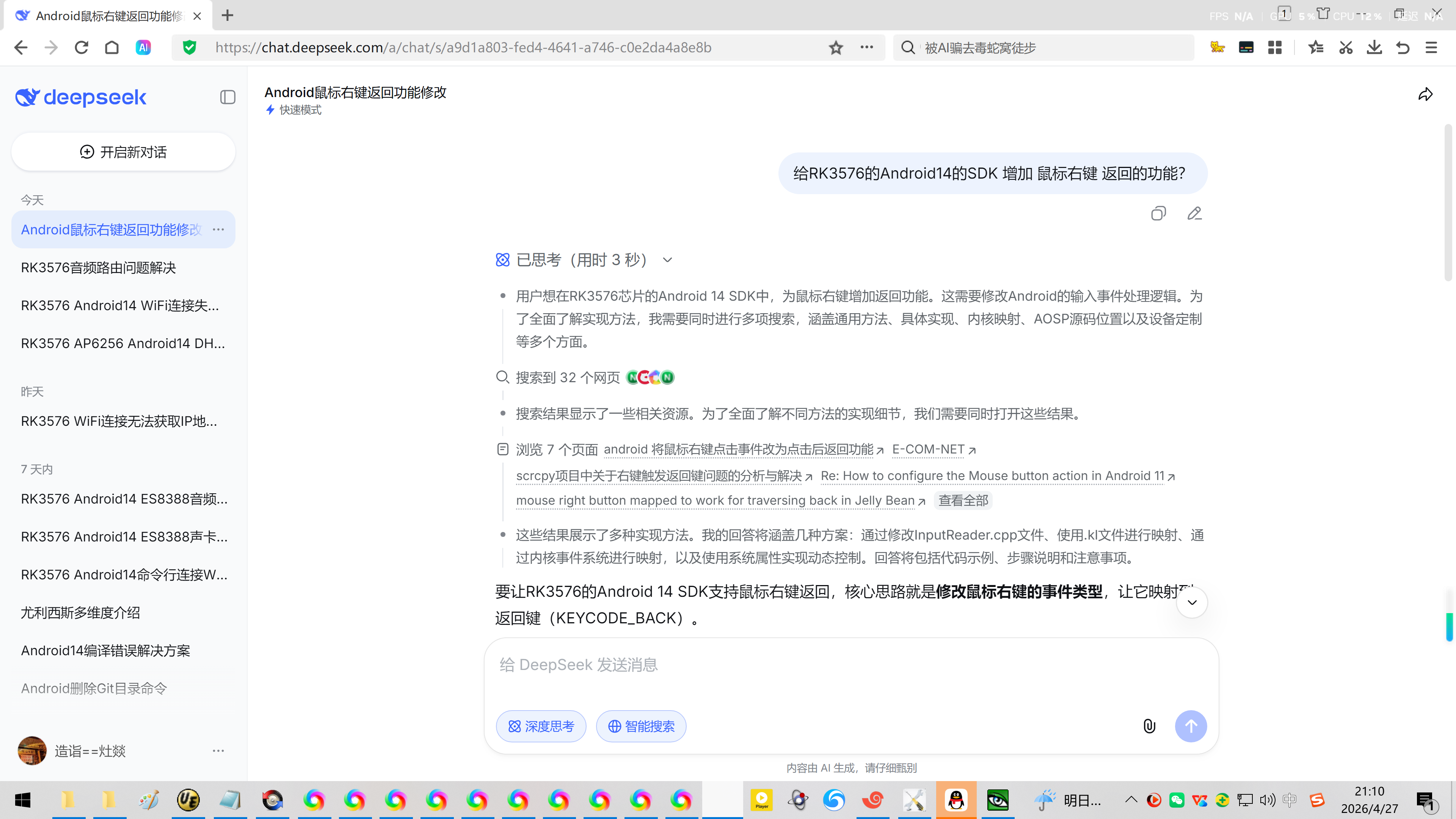
给RK3576的Android14的SDK 增加 鼠标右键 返回的功能?
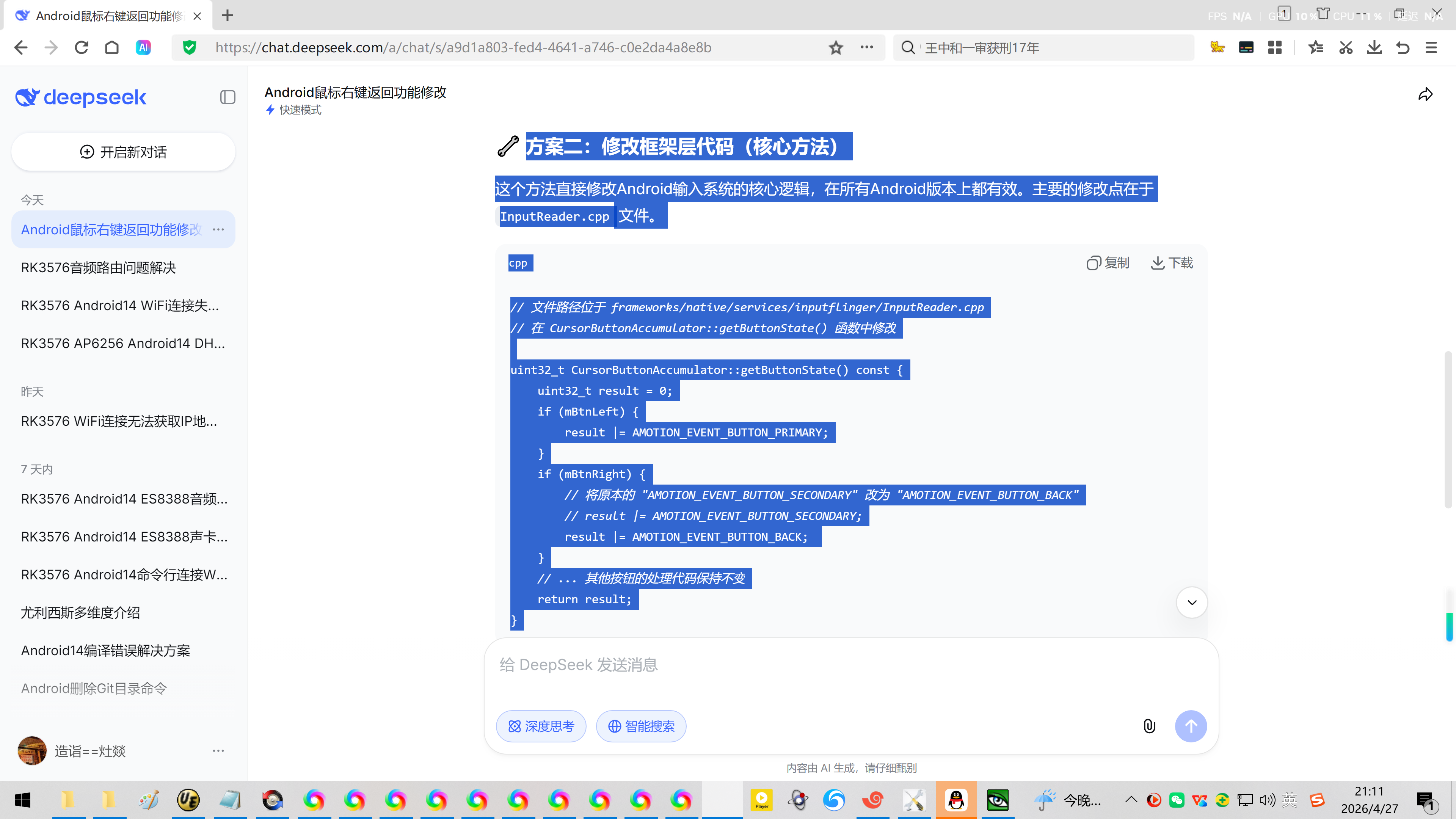
方案二:修改框架层代码(核心方法)
这个方法直接修改Android输入系统的核心逻辑,在所有Android版本上都有效。主要的修改点在于 InputReader.cpp 文件。
cpp
// 文件路径位于 frameworks/native/services/inputflinger/InputReader.cpp
// 在 CursorButtonAccumulator::getButtonState() 函数中修改
uint32_t CursorButtonAccumulator::getButtonState() const {
uint32_t result = 0;
if (mBtnLeft) {
result |= AMOTION_EVENT_BUTTON_PRIMARY;
}
if (mBtnRight) {
// 将原本的 "AMOTION_EVENT_BUTTON_SECONDARY" 改为 "AMOTION_EVENT_BUTTON_BACK"
// result |= AMOTION_EVENT_BUTTON_SECONDARY;
result |= AMOTION_EVENT_BUTTON_BACK;
}
// ... 其他按钮的处理代码保持不变
return result;
}
这个修改直接改变了右键事件的原始状态,因此通常修改这一个函数即可。
3、通过grep找到修改的地方:
rootroot@rootroot-HP-245-14-inch-G10-Notebook-PC:~/RK3576_Android14.0_SDK_RELEASE/frameworks/native/services/inputflinger$
rootroot@rootroot-HP-245-14-inch-G10-Notebook-PC:~/RK3576_Android14.0_SDK_RELEASE/frameworks/native/services/inputflinger$ grep CursorButtonAccumulator . -R
./reader/Android.bp: "mapper/accumulator/CursorButtonAccumulator.cpp",
./reader/mapper/CapturedTouchpadEventConverter.h:#include "accumulator/CursorButtonAccumulator.h"
./reader/mapper/CapturedTouchpadEventConverter.h: CursorButtonAccumulator mCursorButtonAccumulator;
./reader/mapper/CursorInputMapper.cpp:#include "CursorButtonAccumulator.h"
./reader/mapper/CursorInputMapper.cpp: mCursorButtonAccumulator.reset(getDeviceContext());
./reader/mapper/CursorInputMapper.cpp: mCursorButtonAccumulator.process(rawEvent);
./reader/mapper/CursorInputMapper.cpp: int32_t currentButtonState = mCursorButtonAccumulator.getButtonState();
./reader/mapper/KeyMouseInputMapper.h:#include "CursorButtonAccumulator.h"
./reader/mapper/KeyMouseInputMapper.h: CursorButtonAccumulator mCursorButtonAccumulator;
./reader/mapper/TouchInputMapper.cpp:#include "CursorButtonAccumulator.h"
./reader/mapper/TouchInputMapper.cpp: mCursorButtonAccumulator.reset(getDeviceContext());
./reader/mapper/TouchInputMapper.cpp: mCursorButtonAccumulator.process(rawEvent);
./reader/mapper/TouchInputMapper.cpp: mCursorButtonAccumulator.getButtonState());
./reader/mapper/TouchInputMapper.h:#include "CursorButtonAccumulator.h"
./reader/mapper/TouchInputMapper.h: CursorButtonAccumulator mCursorButtonAccumulator;
./reader/mapper/KeyMouseInputMapper.cpp: mCursorButtonAccumulator.reset(getDeviceContext());
./reader/mapper/KeyMouseInputMapper.cpp: mCursorButtonAccumulator.process(rawEvent);
./reader/mapper/KeyMouseInputMapper.cpp: int32_t currentButtonState = mCursorButtonAccumulator.getButtonState();
./reader/mapper/CapturedTouchpadEventConverter.cpp: mCursorButtonAccumulator.reset(mDeviceContext);
./reader/mapper/CapturedTouchpadEventConverter.cpp: mCursorButtonAccumulator.process(&rawEvent);
./reader/mapper/CapturedTouchpadEventConverter.cpp: newButtonState = mCursorButtonAccumulator.getButtonState();
./reader/mapper/gestures/HardwareStateConverter.cpp: mCursorButtonAccumulator.process(rawEvent);
./reader/mapper/gestures/HardwareStateConverter.cpp: if (mCursorButtonAccumulator.isLeftPressed()) {
./reader/mapper/gestures/HardwareStateConverter.cpp: if (mCursorButtonAccumulator.isMiddlePressed()) {
./reader/mapper/gestures/HardwareStateConverter.cpp: if (mCursorButtonAccumulator.isRightPressed()) {
./reader/mapper/gestures/HardwareStateConverter.cpp: if (mCursorButtonAccumulator.isBackPressed() || mCursorButtonAccumulator.isSidePressed()) {
./reader/mapper/gestures/HardwareStateConverter.cpp: if (mCursorButtonAccumulator.isForwardPressed() || mCursorButtonAccumulator.isExtraPressed()) {
./reader/mapper/gestures/HardwareStateConverter.cpp: mCursorButtonAccumulator.reset(mDeviceContext);
./reader/mapper/gestures/HardwareStateConverter.h:#include "accumulator/CursorButtonAccumulator.h"
./reader/mapper/gestures/HardwareStateConverter.h: CursorButtonAccumulator mCursorButtonAccumulator;
./reader/mapper/accumulator/CursorButtonAccumulator.cpp:#include "CursorButtonAccumulator.h"
./reader/mapper/accumulator/CursorButtonAccumulator.cpp:CursorButtonAccumulator::CursorButtonAccumulator() {
./reader/mapper/accumulator/CursorButtonAccumulator.cpp:void CursorButtonAccumulator::reset(const InputDeviceContext& deviceContext) {
./reader/mapper/accumulator/CursorButtonAccumulator.cpp:void CursorButtonAccumulator::clearButtons() {
./reader/mapper/accumulator/CursorButtonAccumulator.cpp:void CursorButtonAccumulator::process(const RawEvent* rawEvent) {
./reader/mapper/accumulator/CursorButtonAccumulator.cpp:uint32_t CursorButtonAccumulator::getButtonState() const {
./reader/mapper/accumulator/CursorButtonAccumulator.h:class CursorButtonAccumulator {
./reader/mapper/accumulator/CursorButtonAccumulator.h: CursorButtonAccumulator();
./reader/mapper/CursorInputMapper.h:#include "CursorButtonAccumulator.h"
./reader/mapper/CursorInputMapper.h:class CursorButtonAccumulator;
./reader/mapper/CursorInputMapper.h: CursorButtonAccumulator mCursorButtonAccumulator;
rootroot@rootroot-HP-245-14-inch-G10-Notebook-PC:~/RK3576_Android14.0_SDK_RELEASE/frameworks/native/services/inputflinger$
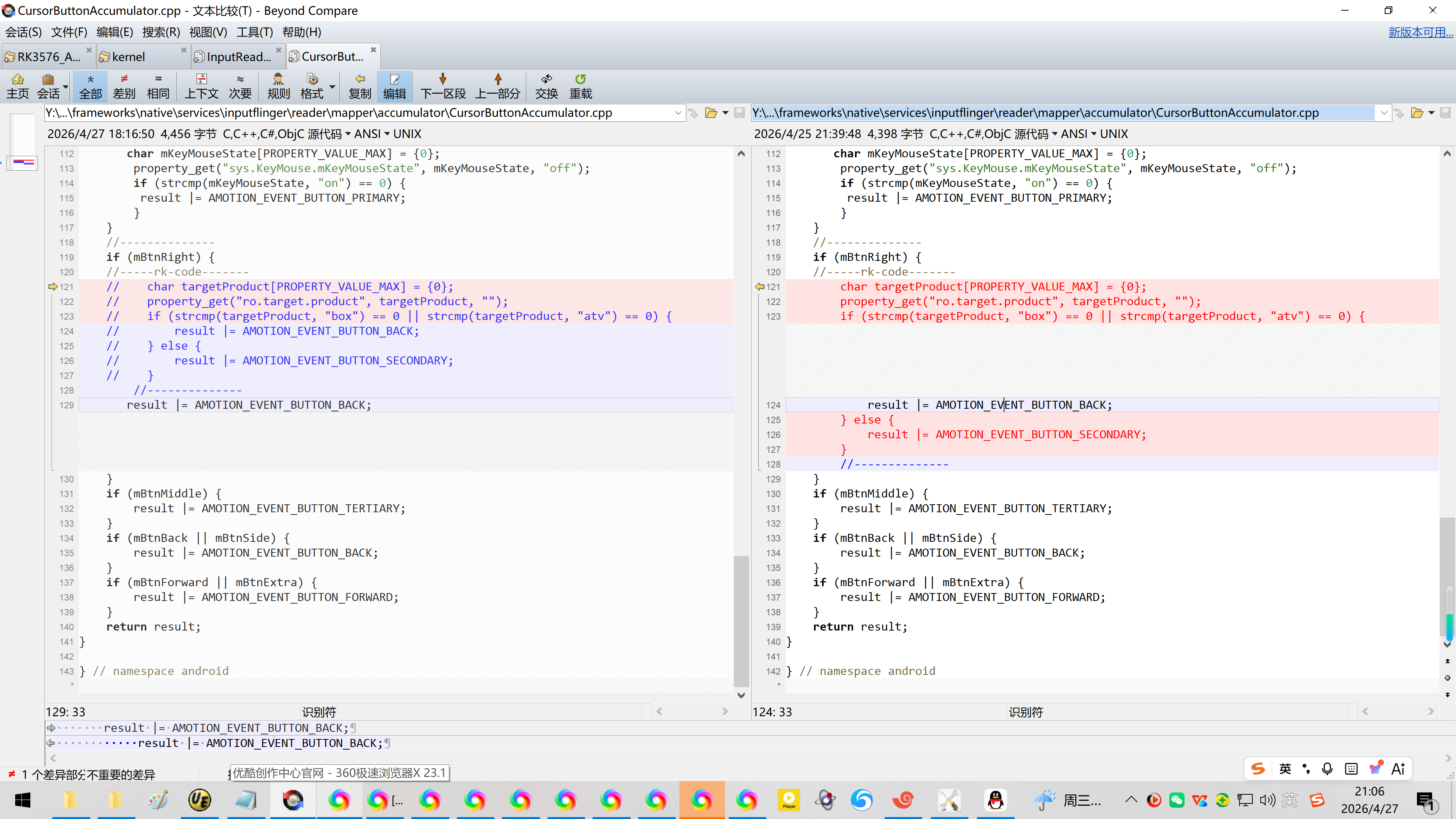
Y:\firefly_rk3576_android14.0_git_20241126\RK3576_Android14.0\frameworks\native\services\inputflinger\reader\mapper\accumulator\CursorButtonAccumulator.cpp
Y:\RK3576_Android14.0_SDK_RELEASE\frameworks\native\services\inputflinger\reader\mapper\accumulator\CursorButtonAccumulator.cpp
//--------------
if (mBtnRight) {
//-----rk-code-------
char targetProductPROPERTY_VALUE_MAX = {0};
property_get("ro.target.product", targetProduct, "");
if (strcmp(targetProduct, "box") == 0 || strcmp(targetProduct, "atv") == 0) {
result |= AMOTION_EVENT_BUTTON_BACK;
} else {
result |= AMOTION_EVENT_BUTTON_SECONDARY;
}
//--------------
}
修改为:
//--------------
if (mBtnRight) {
//-----rk-code-------
// char targetProductPROPERTY_VALUE_MAX = {0};
// property_get("ro.target.product", targetProduct, "");
// if (strcmp(targetProduct, "box") == 0 || strcmp(targetProduct, "atv") == 0) {
// result |= AMOTION_EVENT_BUTTON_BACK;
// } else {
// result |= AMOTION_EVENT_BUTTON_SECONDARY;
// }
//--------------
result |= AMOTION_EVENT_BUTTON_BACK;
}
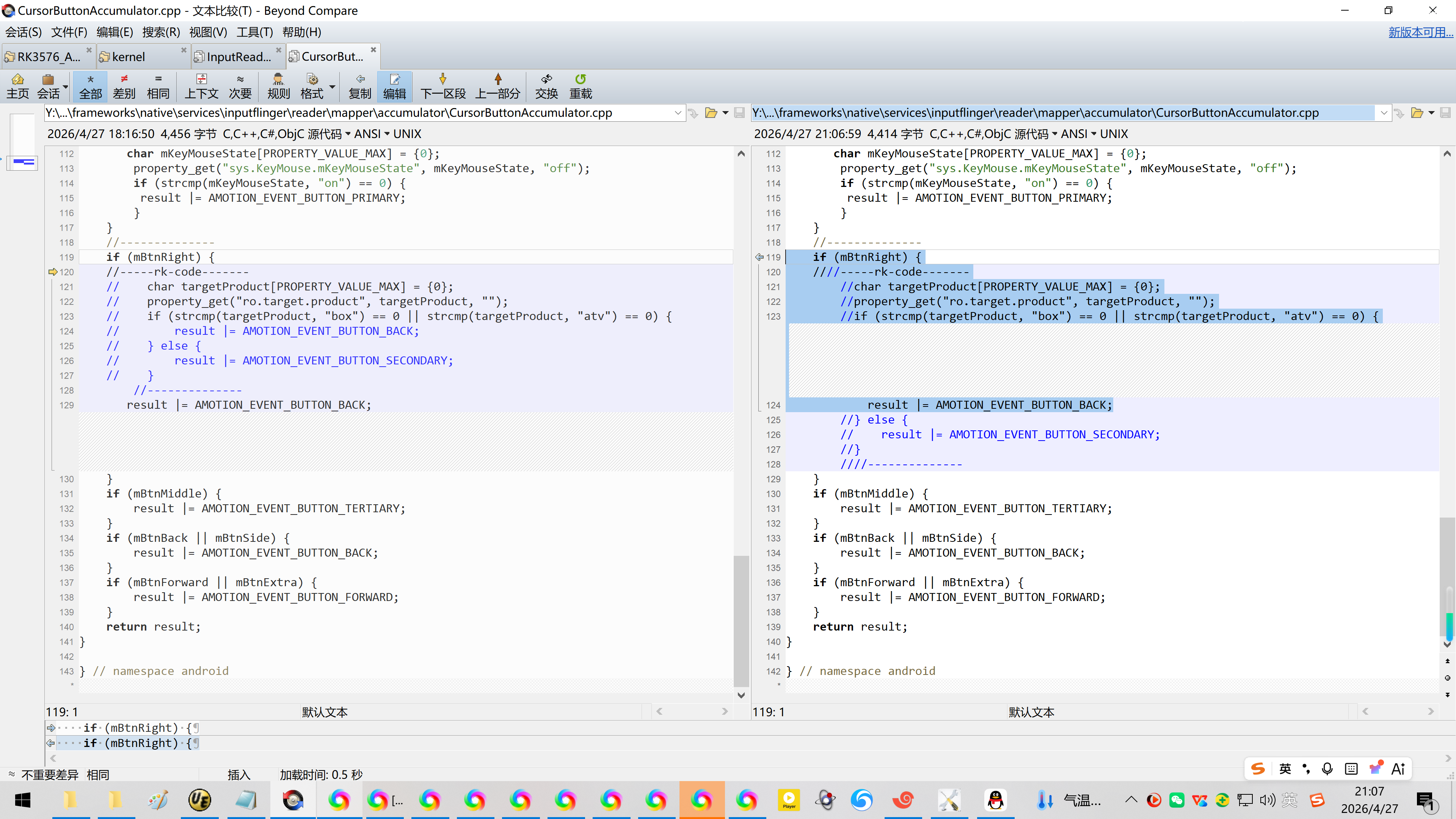
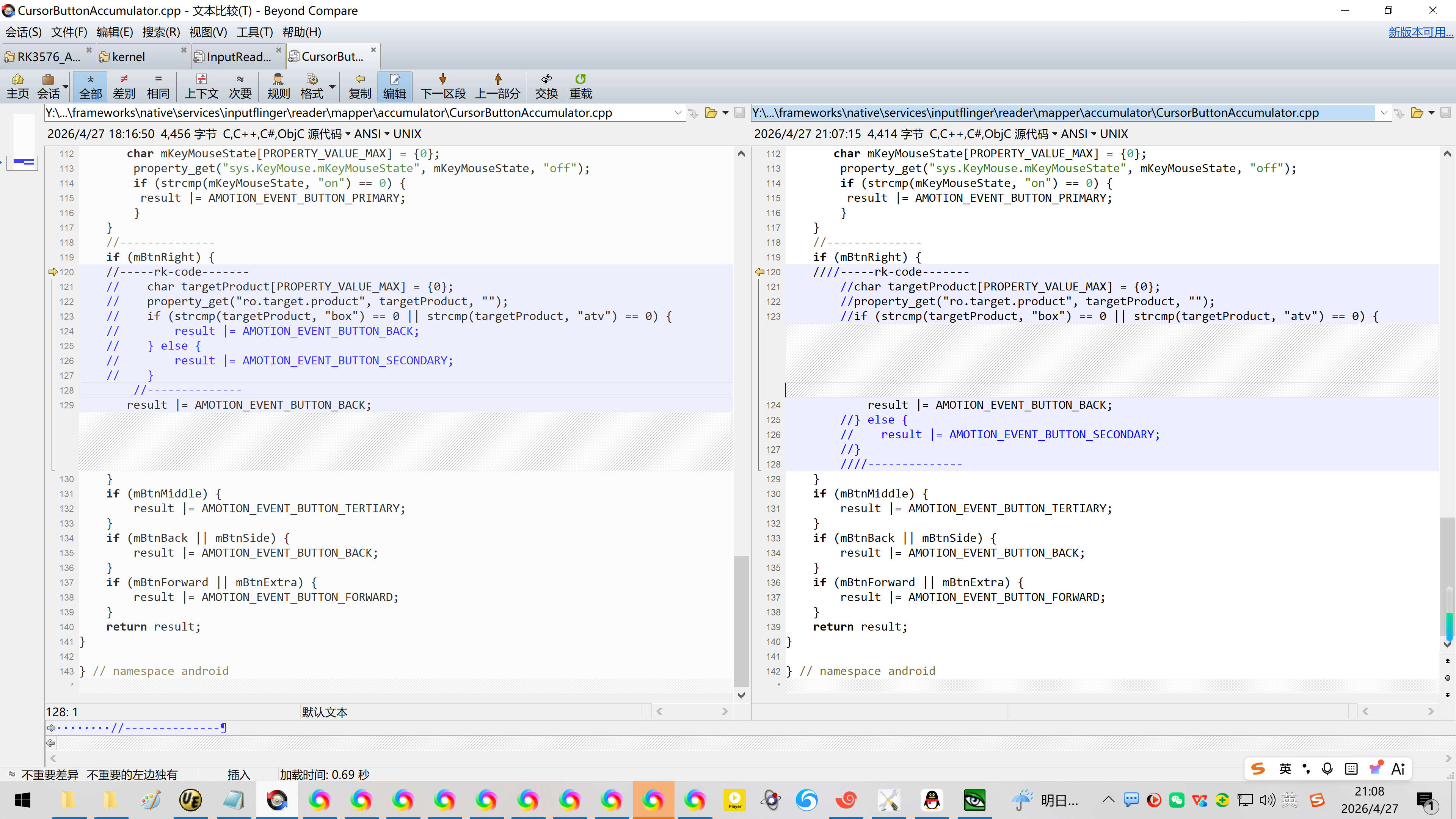
【可选】
//--------------
if (mBtnRight) {
////-----rk-code-------
//char targetProductPROPERTY_VALUE_MAX = {0};
//property_get("ro.target.product", targetProduct, "");
//if (strcmp(targetProduct, "box") == 0 || strcmp(targetProduct, "atv") == 0) {
result |= AMOTION_EVENT_BUTTON_BACK;
//} else {
// result |= AMOTION_EVENT_BUTTON_SECONDARY;
//}
////--------------
}
4、更新IMG固件:
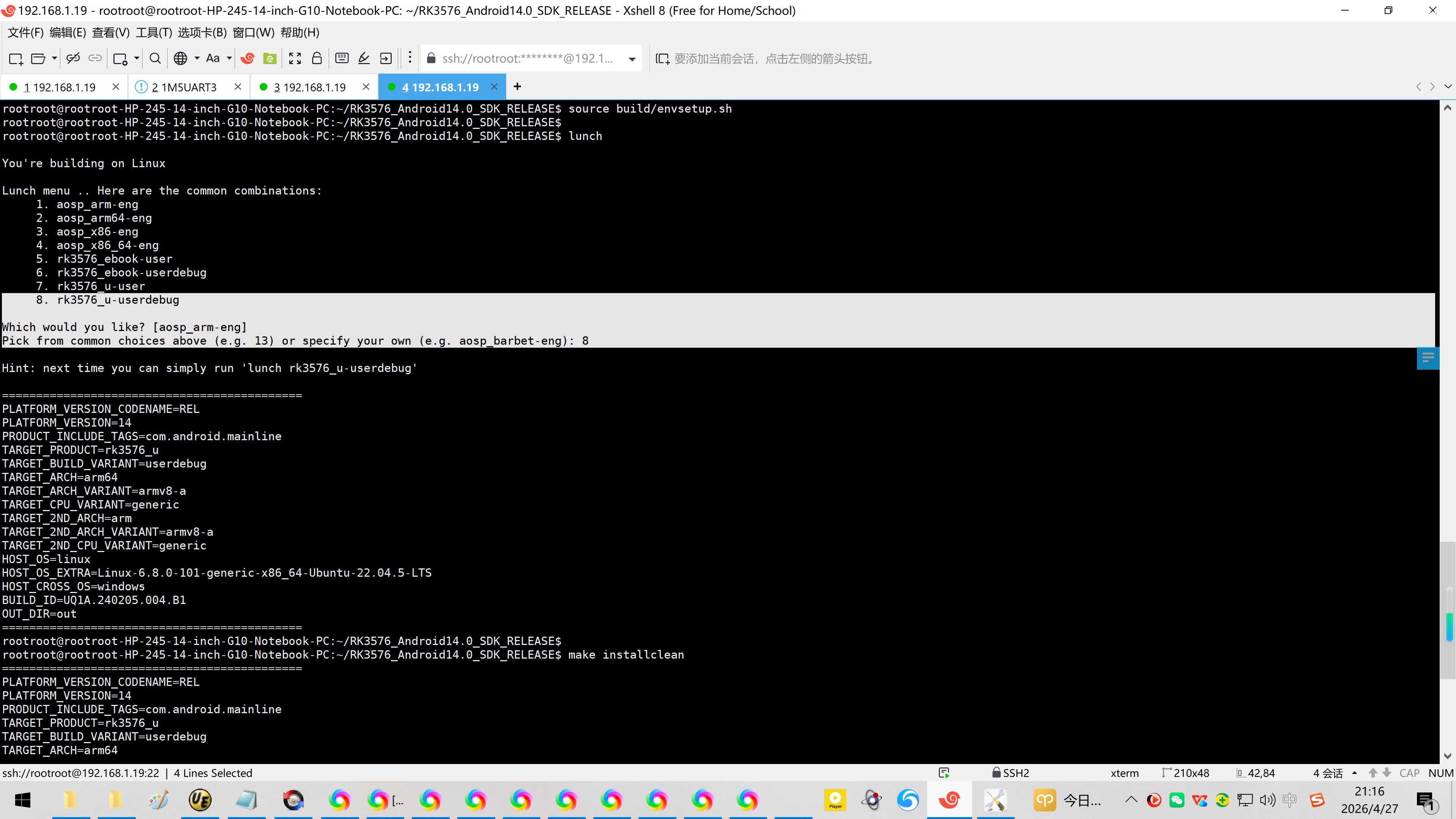
rootroot@rootroot-HP-245-14-inch-G10-Notebook-PC:~/RK3576_Android14.0_SDK_RELEASE$
rootroot@rootroot-HP-245-14-inch-G10-Notebook-PC:~/RK3576_Android14.0_SDK_RELEASE$
rootroot@rootroot-HP-245-14-inch-G10-Notebook-PC:~/RK3576_Android14.0_SDK_RELEASE$ source build/envsetup.sh
rootroot@rootroot-HP-245-14-inch-G10-Notebook-PC:~/RK3576_Android14.0_SDK_RELEASE$
rootroot@rootroot-HP-245-14-inch-G10-Notebook-PC:~/RK3576_Android14.0_SDK_RELEASE$ lunch
You're building on Linux
Lunch menu .. Here are the common combinations:
-
aosp_arm-eng
-
aosp_arm64-eng
-
aosp_x86-eng
-
aosp_x86_64-eng
-
rk3576_ebook-user
-
rk3576_ebook-userdebug
-
rk3576_u-user
-
rk3576_u-userdebug
Which would you like? aosp_arm-eng
Pick from common choices above (e.g. 13) or specify your own (e.g. aosp_barbet-eng): 8
Hint: next time you can simply run 'lunch rk3576_u-userdebug'
============================================
PLATFORM_VERSION_CODENAME=REL
PLATFORM_VERSION=14
PRODUCT_INCLUDE_TAGS=com.android.mainline
TARGET_PRODUCT=rk3576_u
TARGET_BUILD_VARIANT=userdebug
TARGET_ARCH=arm64
TARGET_ARCH_VARIANT=armv8-a
TARGET_CPU_VARIANT=generic
TARGET_2ND_ARCH=arm
TARGET_2ND_ARCH_VARIANT=armv8-a
TARGET_2ND_CPU_VARIANT=generic
HOST_OS=linux
HOST_OS_EXTRA=Linux-6.8.0-101-generic-x86_64-Ubuntu-22.04.5-LTS
HOST_CROSS_OS=windows
BUILD_ID=UQ1A.240205.004.B1
OUT_DIR=out
============================================
rootroot@rootroot-HP-245-14-inch-G10-Notebook-PC:~/RK3576_Android14.0_SDK_RELEASE$
rootroot@rootroot-HP-245-14-inch-G10-Notebook-PC:~/RK3576_Android14.0_SDK_RELEASE$ make installclean
============================================
PLATFORM_VERSION_CODENAME=REL
PLATFORM_VERSION=14
PRODUCT_INCLUDE_TAGS=com.android.mainline
TARGET_PRODUCT=rk3576_u
TARGET_BUILD_VARIANT=userdebug
TARGET_ARCH=arm64
TARGET_ARCH_VARIANT=armv8-a
TARGET_CPU_VARIANT=generic
TARGET_2ND_ARCH=arm
TARGET_2ND_ARCH_VARIANT=armv8-a
TARGET_2ND_CPU_VARIANT=generic
HOST_OS=linux
HOST_OS_EXTRA=Linux-6.8.0-101-generic-x86_64-Ubuntu-22.04.5-LTS
HOST_CROSS_OS=windows
BUILD_ID=UQ1A.240205.004.B1
OUT_DIR=out
============================================
21:16:08 Entire data directory removed.
21:16:09 Deleted images and staging directories.
build completed successfully (3 seconds)
rootroot@rootroot-HP-245-14-inch-G10-Notebook-PC:~/RK3576_Android14.0_SDK_RELEASE rootroot@rootroot-HP-245-14-inch-G10-Notebook-PC:\~/RK3576_Android14.0_SDK_RELEASE ./build.sh -Au
5、刷机验证:
参考资料:
https://blog.csdn.net/wb4916/article/details/128827879?spm=1011.2415.3001.5331
20230201在AIO-3568J开发板在原厂Android11下增加右键返回
Z:\rk3568_Android11.0_ap6257s\frameworks\native\services\inputflinger\reader\mapper\accumulator\CursorButtonAccumulator.cpp
https://blog.csdn.net/qq_38312843/article/details/125234114
RK3588-android12《鼠标右键改为返回功能》
https://blog.csdn.net/wb4916/article/details/134595941?spm=1011.2415.3001.5331
20231124给RK3399的挖掘机开发板在Andorid10下加鼠标右键返回
https://blog.csdn.net/danhu/article/details/122467256
android9/android10 鼠标右键返回(已验证)
Z:\10\frameworks \native\services\inputflinger\InputReader.cpp
frameworks/native/services/inputflinger/InputReader.cpp