代码层面建立模型连接的关键:API 地址(Base URL)、模型名称(Model)、密钥(API Key)
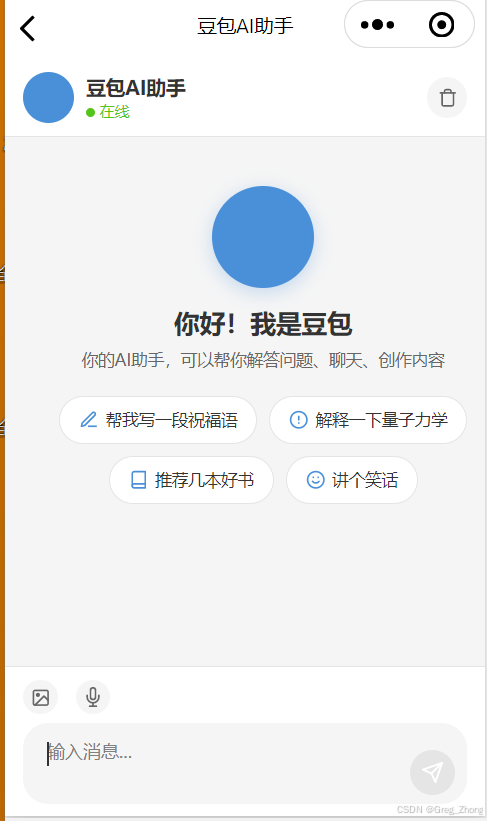
一、拿取豆包模型中,3个核心参数
模型信息(建立连接的必填3项,模型名称、模型的api地址可以在模型的详情中找、密钥key单独在密钥管理中获取)
-
模型名称(即Model ID):【从开通管理】-记住简称,进入【模型广场】
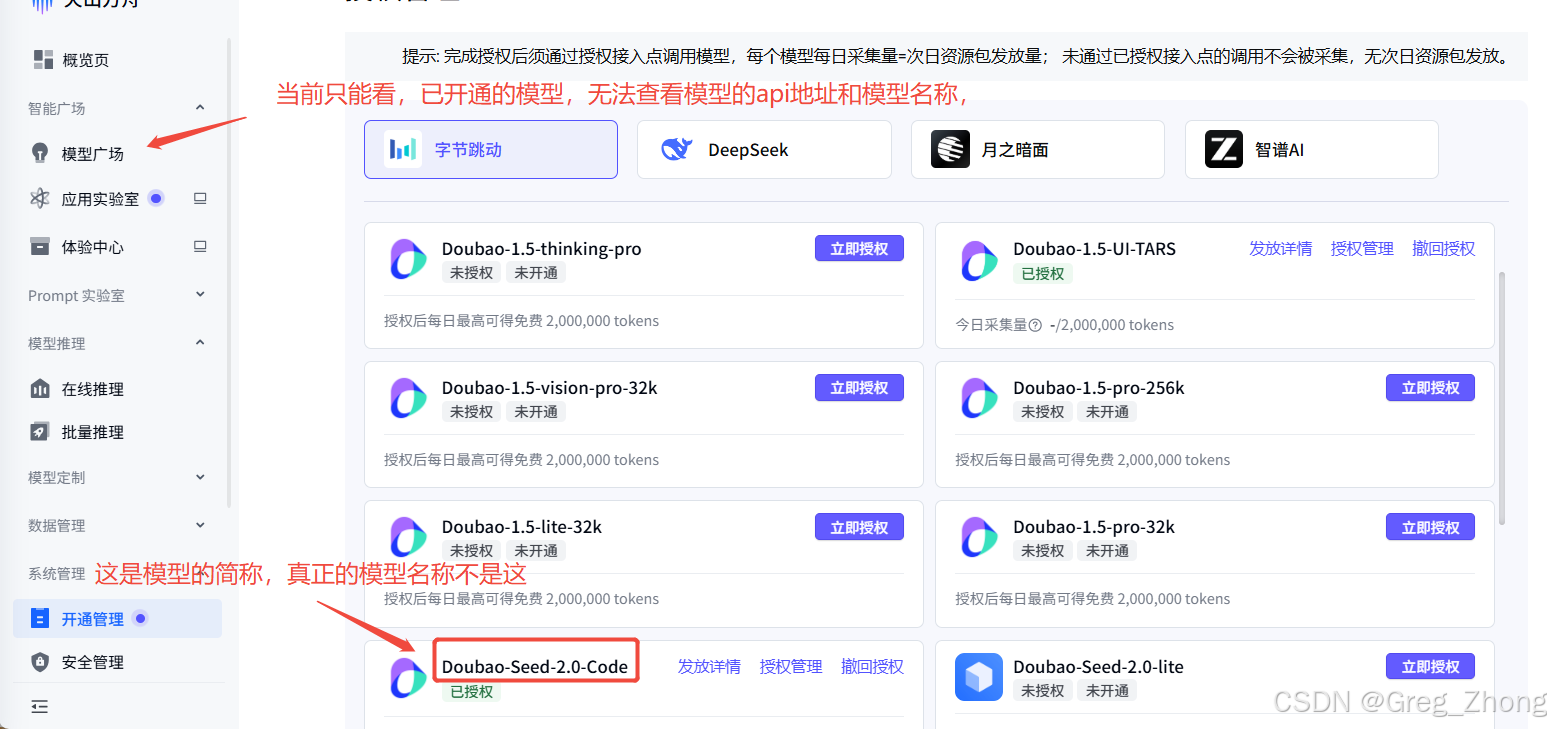
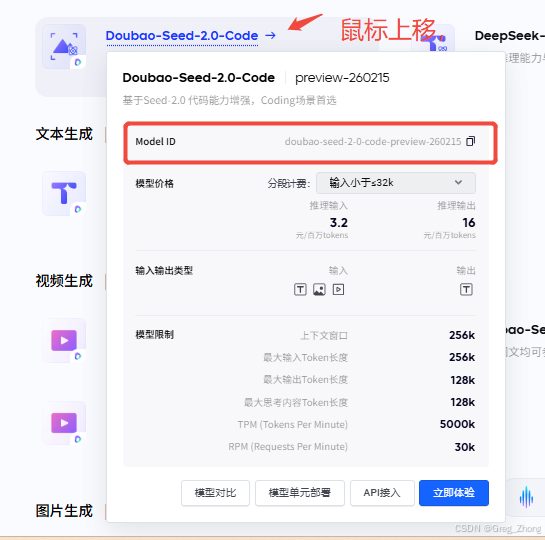
这里的 doubao-seedance-2-0-260128 才是真正的模型名称(模型id) -
模型api地址 :不需要去模型详情内单独去找,豆包内所有的模型api地址都一个,
https://ark.cn-beijing.volces.com/api/v3,当然你得知道,这个地址在模型详情内的具体位置(这里的地址都是同一个,应该属于都是豆包模型下的主体,所以才共用一个,如果使用其他deep seek或者其他不同模型平台,对应api地址,还是要去具体模型详情中去找到,基础地址那部分),进入模型的详情页,找到该模型的api模拟调用的示例( 或者postman可直接复制的curl 示例),这里面就是api地址所在,但是这里的api地址包括:
基本地址+对话接口的路径,完整的调用地址,就是两者拼起来的样子,因为复制到示例地址是直接复制到浏览器可直接调用模型的,而在我们代码层面调用只需要填写模型的基础地址,工具会自动拼接对应对话的路径(具体原理,可查资料,未深度探索原理),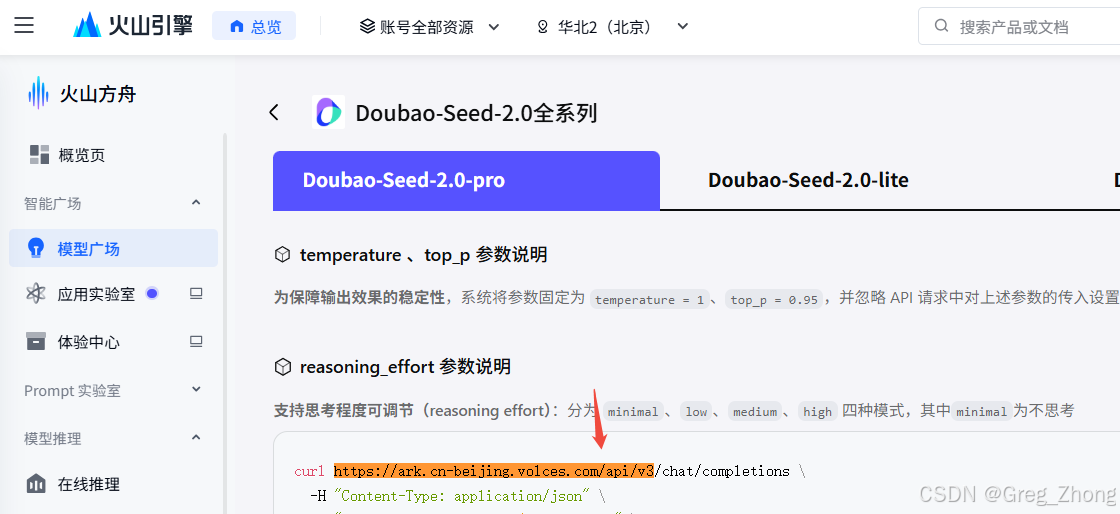
-
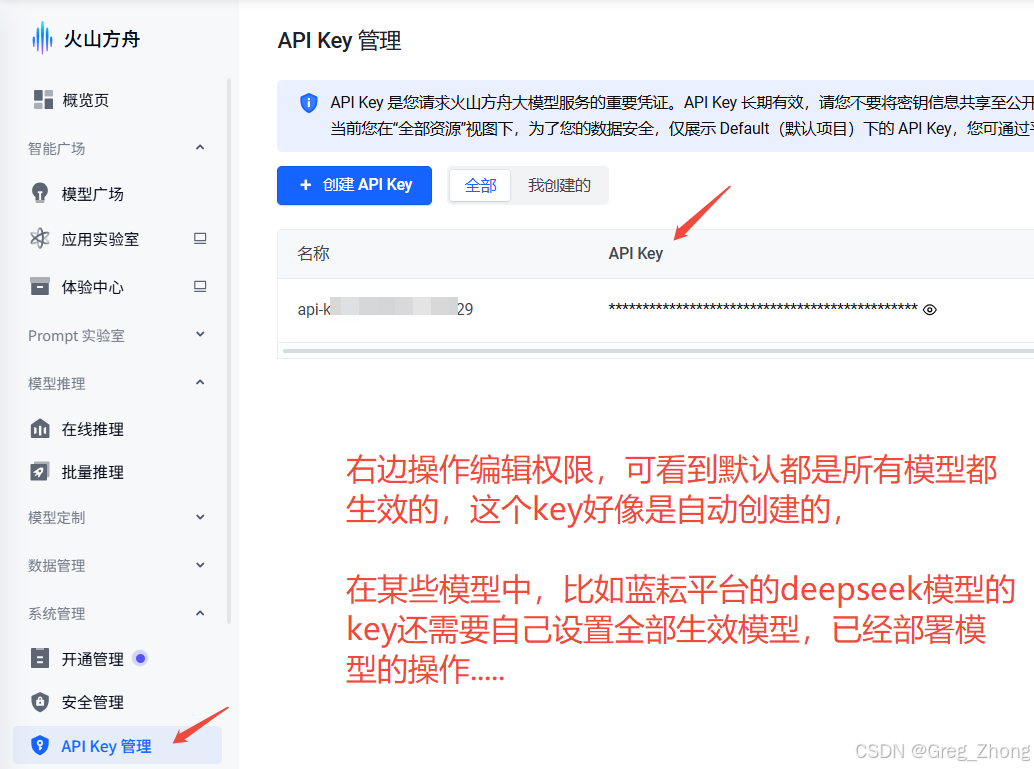
模型密钥key: 从key管理中获取
二、微信小程序中调用豆包模型【AI工程师3天学习】
学习目标:
1.学习流式输出 SSE 的原理
2.在小程序中,用SSE 实现打字机效果的 AI 聊天框
3.解决流式输出的断行、乱码问题
-
小程序中除使用3个核心参数之外,必须打开模型的
推理开关,默认是不开启的,不开启无法进行连接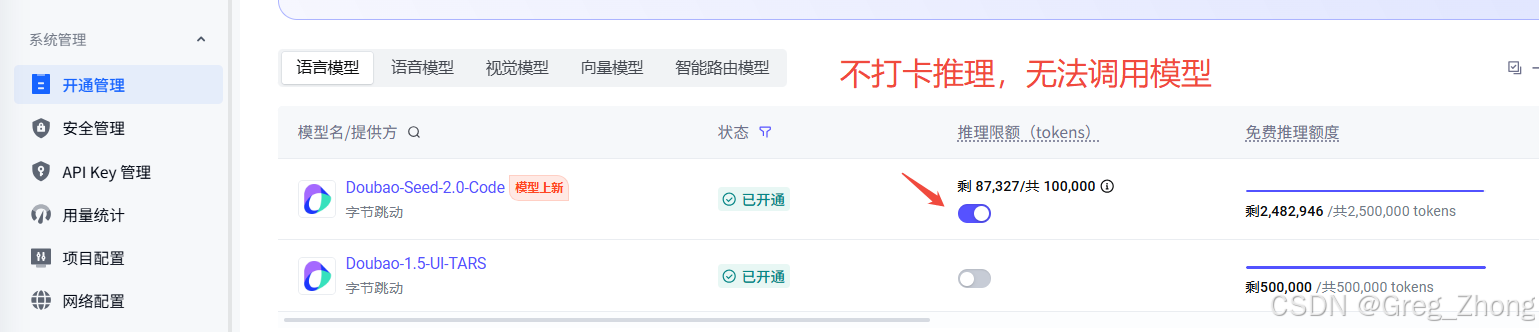
-
实现完整代码
javascriptconst AI_CONFIG = { baseUrl: 'https://ark.cn-beijing.volces.com/api/v3', apiKey: 'ark-xxxxxxxxxxxxxxxxxxx-ef2a1', model: 'doubao-seed-2-0-code-preview-260215', systemPrompt: '你是豆包AI助手,一个友好、专业的人工智能助手。你会用中文回答用户的问题,提供准确、有用的信息。' }; const TYPE_SPEED = 30; const REQUEST_TIMEOUT = 120000; Page({ data: { messages: [], inputMessage: '', scrollToMessage: '', isTyping: false, isStreaming: false }, onLoad() { this.loadChatHistory(); }, loadChatHistory() { try { const history = wx.getStorageSync('ai_chat_history'); if (history && Array.isArray(history)) { this.setData({ messages: history }); } } catch (e) { console.warn('加载聊天记录失败', e); } }, saveChatHistory() { try { wx.setStorageSync('ai_chat_history', this.data.messages); } catch (e) { console.warn('保存聊天记录失败', e); } }, onInputChange(e) { this.setData({ inputMessage: e.detail.value }); }, async sendMessage() { const { inputMessage, messages, isTyping } = this.data; if (!inputMessage.trim() || isTyping) return; const userMsg = { id: Date.now(), role: 'user', content: inputMessage.trim(), timestamp: Date.now() }; this.setData({ messages: [...messages, userMsg], inputMessage: '', isTyping: true }, () => { this.scrollToBottom(); this.saveChatHistory(); }); await this.callAIWithTypewriter(userMsg.content); }, sendQuickMessage(e) { this.setData({ inputMessage: e.currentTarget.dataset.message }, () => { this.sendMessage(); }); }, request(options) { return new Promise((resolve, reject) => { wx.request({ ...options, success: (res) => resolve(res), fail: (err) => reject(err) }); }); }, async callAIWithTypewriter(userContent) { const { messages } = this.data; const aiMsgId = Date.now() + 1; const msgIndex = messages.length; const aiLoadingMsg = { id: aiMsgId, role: 'assistant', content: '', loading: true, timestamp: Date.now() }; this.setData({ messages: [...messages, aiLoadingMsg], isStreaming: true }, () => this.scrollToBottom()); try { console.log('=== 开始发起AI请求 ===', new Date().toLocaleTimeString()); const res = await this.request({ url: `${AI_CONFIG.baseUrl}/chat/completions`, method: 'POST', header: { 'Content-Type': 'application/json', 'Authorization': `Bearer ${AI_CONFIG.apiKey}` }, data: { model: AI_CONFIG.model, messages: [ { role: 'system', content: AI_CONFIG.systemPrompt }, ...messages.map(m => ({ role: m.role, content: m.content })), { role: 'user', content: userContent } ], temperature: 0.7, max_tokens: 2000, stream: false }, timeout: REQUEST_TIMEOUT }); console.log('=== 接口请求完成 ===', new Date().toLocaleTimeString(), res); if (res.statusCode !== 200) { throw new Error(`接口返回错误,状态码:${res.statusCode}`); } if (!res.data || !res.data.choices || !res.data.choices[0]) { throw new Error('接口返回数据格式异常'); } const fullReply = res.data.choices[0].message?.content || '抱歉,未获取到有效回复'; console.log('AI完整回复:', fullReply); await this.startTypewriter(fullReply, aiMsgId, msgIndex); } catch (error) { console.error('=== AI调用失败 ===', error); this.setData({ [`messages[${msgIndex}].content`]: `请求失败:${error.message || '连接异常,请重试'}`, [`messages[${msgIndex}].loading`]: false, isTyping: false, isStreaming: false }); wx.showToast({ title: '请求失败,请重试', icon: 'none' }); } }, startTypewriter(fullText, aiMsgId, msgIndex) { return new Promise((resolve) => { let currentIndex = 0; const timer = setInterval(() => { if (currentIndex >= fullText.length) { clearInterval(timer); this.setData({ [`messages[${msgIndex}].loading`]: false, isTyping: false, isStreaming: false }, () => { this.saveChatHistory(); resolve(); }); return; } currentIndex++; this.setData({ [`messages[${msgIndex}].content`]: fullText.substring(0, currentIndex) }, () => { this.scrollToBottom(); }); }, TYPE_SPEED); }); }, scrollToBottom() { const lastMsg = this.data.messages[this.data.messages.length - 1]; if (lastMsg) { this.setData({ scrollToMessage: `msg-${lastMsg.id}` }); } }, clearChat() { wx.showModal({ title: '提示', content: '确定清空所有聊天记录吗?', success: (res) => { if (res.confirm) { this.setData({ messages: [] }); wx.removeStorageSync('ai_chat_history'); } } }); }, chooseImage() { wx.chooseImage({ count: 1, sizeType: ['compressed'], sourceType: ['album', 'camera'], success: (res) => { const tempFilePath = res.tempFilePaths[0]; const { messages } = this.data; const imageMsg = { id: Date.now(), role: 'user', content: tempFilePath, type: 'image', timestamp: Date.now() }; this.setData({ messages: [...messages, imageMsg] }, () => { this.scrollToBottom(); this.saveChatHistory(); }); } }); }, toggleVoice() { wx.showModal({ title: '语音输入', content: '语音功能开发中,敬请期待', showCancel: false }); }, previewImage(e) { const { src } = e.currentTarget.dataset; wx.previewImage({ urls: [src] }); }, onHide() { this.saveChatHistory(); }, onUnload() { this.saveChatHistory(); } });html<!--pages/ai-chat/ai-chat.wxml--> <view class="chat-container"> <view class="ai-header"> <view class="ai-avatar"> <image src="https://lf-flow-web-cdn.doubao.com/obj/flow-doubao/doubao/web/static/image/logo-icon-white-bg.png" mode="aspectFill"></image> </view> <view class="ai-info"> <text class="ai-name">豆包AI助手</text> <text class="ai-status">在线</text> </view> <view class="ai-actions"> <view class="action-btn" bindtap="clearChat"> <view class="icon-clear"></view> </view> </view> </view> <scroll-view class="chat-messages" scroll-y="true" scroll-into-view="{{scrollToMessage}}" enhanced="true" show-scrollbar="false"> <view class="welcome-message" wx:if="{{messages.length === 0}}"> <view class="ai-avatar-large"> <image src="https://lf-flow-web-cdn.doubao.com/obj/flow-doubao/doubao/web/static/image/logo-icon-white-bg.png" mode="aspectFill"></image> </view> <text class="welcome-title">你好!我是豆包</text> <text class="welcome-subtitle">你的AI助手,可以帮你解答问题、聊天、创作内容</text> <view class="quick-actions"> <view class="quick-btn" bindtap="sendQuickMessage" data-message="帮我写一段祝福语"> <view class="icon-write"></view> <text>帮我写一段祝福语</text> </view> <view class="quick-btn" bindtap="sendQuickMessage" data-message="解释一下量子力学"> <view class="icon-science"></view> <text>解释一下量子力学</text> </view> <view class="quick-btn" bindtap="sendQuickMessage" data-message="推荐几本好书"> <view class="icon-book"></view> <text>推荐几本好书</text> </view> <view class="quick-btn" bindtap="sendQuickMessage" data-message="讲个笑话"> <view class="icon-laugh"></view> <text>讲个笑话</text> </view> </view> </view> <view class="message-list" wx:if="{{messages.length > 0}}"> <view wx:for="{{messages}}" wx:key="id" class="message-item {{item.role}}" id="msg-{{item.id}}"> <view wx:if="{{item.role === 'assistant'}}" class="message-content ai"> <view class="message-avatar"> <image src="https://lf-flow-web-cdn.doubao.com/obj/flow-doubao/doubao/web/static/image/logo-icon-white-bg.png" mode="aspectFill"></image> </view> <view class="message-bubble ai"> <text class="message-text">{{item.content}}</text> <image wx:if="{{item.type === 'image'}}" src="{{item.content}}" mode="widthFix" class="message-image"></image> <view wx:if="{{item.loading}}" class="loading-indicator"> <view class="loading-dots"> <view class="dot"></view> <view class="dot"></view> <view class="dot"></view> </view> </view> </view> </view> <view wx:if="{{item.role === 'user'}}" class="message-content user"> <view class="message-bubble user"> <text class="message-text">{{item.content}}</text> </view> <view class="message-avatar user"> <view class="avatar-placeholder"></view> </view> </view> <view wx:if="{{item.role === 'system'}}" class="message-content system"> <text class="system-text">{{item.content}}</text> </view> </view> </view> <view class="bottom-space"></view> </scroll-view> <view class="input-area"> <view class="input-toolbar"> <view class="toolbar-btn" bindtap="chooseImage"> <view class="icon-image"></view> </view> <view class="toolbar-btn" bindtap="toggleVoice"> <view class="icon-mic"></view> </view> </view> <view class="input-box"> <textarea class="message-input" placeholder="输入消息..." value="{{inputMessage}}" bindinput="onInputChange" bindconfirm="sendMessage" confirm-type="send" auto-height maxlength="2000" show-confirm-bar="{{false}}" ></textarea> <view class="send-btn {{inputMessage.length > 0 ? 'active' : ''}}" bindtap="sendMessage"> <view class="icon-send"></view> </view> </view> </view> </view>css/* pages/ai-chat/ai-chat.wxss */ .chat-container { display: flex; flex-direction: column; height: 100vh; background-color: #f5f5f5; } /* 顶部AI信息 */ .ai-header { display: flex; align-items: center; padding: 20rpx 30rpx; background-color: #ffffff; border-bottom: 1rpx solid #e5e5e5; } .ai-avatar { width: 80rpx; height: 80rpx; border-radius: 50%; overflow: hidden; margin-right: 20rpx; background-color: #4A90D9; } .ai-avatar image { width: 100%; height: 100%; } .ai-info { flex: 1; display: flex; flex-direction: column; } .ai-name { font-size: 32rpx; font-weight: bold; color: #333333; } .ai-status { font-size: 24rpx; color: #52c41a; margin-top: 4rpx; } .ai-status::before { content: ''; display: inline-block; width: 16rpx; height: 16rpx; background-color: #52c41a; border-radius: 50%; margin-right: 8rpx; } .ai-actions { display: flex; gap: 20rpx; } .action-btn { width: 64rpx; height: 64rpx; display: flex; align-items: center; justify-content: center; border-radius: 50%; background-color: #f5f5f5; } .icon-clear { width: 32rpx; height: 32rpx; background: url('data:image/svg+xml;utf8,<svg xmlns="http://www.w3.org/2000/svg" width="32" height="32" viewBox="0 0 24 24" fill="none" stroke="%23666" stroke-width="2" stroke-linecap="round" stroke-linejoin="round"><path d="M3 6h18"></path><path d="M19 6v14c0 1-1 2-2 2H7c-1 0-2-1-2-2V6"></path><path d="M8 6V4c0-1 1-2 2-2h4c1 0 2 1 2 2v2"></path></svg>') center/contain no-repeat; } /* 聊天消息区域 */ .chat-messages { flex: 1; padding: 20rpx 30rpx; overflow-y: auto; } /* 欢迎消息 */ .welcome-message { display: flex; flex-direction: column; align-items: center; padding: 60rpx 40rpx; text-align: center; } .ai-avatar-large { width: 160rpx; height: 160rpx; border-radius: 50%; overflow: hidden; margin-bottom: 30rpx; background-color: #4A90D9; box-shadow: 0 8rpx 32rpx rgba(74, 144, 217, 0.3); } .ai-avatar-large image { width: 100%; height: 100%; } .welcome-title { font-size: 40rpx; font-weight: bold; color: #333333; margin-bottom: 16rpx; } .welcome-subtitle { font-size: 28rpx; color: #666666; margin-bottom: 40rpx; } .quick-actions { display: flex; flex-wrap: wrap; justify-content: center; gap: 20rpx; width: 100%; } .quick-btn { display: flex; align-items: center; gap: 12rpx; padding: 20rpx 30rpx; background-color: #ffffff; border-radius: 40rpx; border: 2rpx solid #e5e5e5; font-size: 26rpx; color: #333333; transition: all 0.3s; } .quick-btn:active { background-color: #f0f0f0; transform: scale(0.98); } .icon-write, .icon-science, .icon-book, .icon-laugh { width: 32rpx; height: 32rpx; } .icon-write { background: url('data:image/svg+xml;utf8,<svg xmlns="http://www.w3.org/2000/svg" width="32" height="32" viewBox="0 0 24 24" fill="none" stroke="%234A90D9" stroke-width="2" stroke-linecap="round" stroke-linejoin="round"><path d="M12 20h9"></path><path d="M16.5 3.5a2.121 2.121 0 0 1 3 3L7 19l-4 1 1-4L16.5 3.5z"></path></svg>') center/contain no-repeat; } .icon-science { background: url('data:image/svg+xml;utf8,<svg xmlns="http://www.w3.org/2000/svg" width="32" height="32" viewBox="0 0 24 24" fill="none" stroke="%234A90D9" stroke-width="2" stroke-linecap="round" stroke-linejoin="round"><circle cx="12" cy="12" r="10"></circle><line x1="12" y1="8" x2="12" y2="12"></line><line x1="12" y1="16" x2="12.01" y2="16"></line></svg>') center/contain no-repeat; } .icon-book { background: url('data:image/svg+xml;utf8,<svg xmlns="http://www.w3.org/2000/svg" width="32" height="32" viewBox="0 0 24 24" fill="none" stroke="%234A90D9" stroke-width="2" stroke-linecap="round" stroke-linejoin="round"><path d="M4 19.5A2.5 2.5 0 0 1 6.5 17H20"></path><path d="M6.5 2H20v20H6.5A2.5 2.5 0 0 1 4 19.5v-15A2.5 2.5 0 0 1 6.5 2z"></path></svg>') center/contain no-repeat; } .icon-laugh { background: url('data:image/svg+xml;utf8,<svg xmlns="http://www.w3.org/2000/svg" width="32" height="32" viewBox="0 0 24 24" fill="none" stroke="%234A90D9" stroke-width="2" stroke-linecap="round" stroke-linejoin="round"><circle cx="12" cy="12" r="10"></circle><path d="M8 14s1.5 2 4 2 4-2 4-2"></path><line x1="9" y1="9" x2="9.01" y2="9"></line><line x1="15" y1="9" x2="15.01" y2="9"></line></svg>') center/contain no-repeat; } /* 消息列表 */ .message-list { display: flex; flex-direction: column; gap: 30rpx; } .message-item { display: flex; width: 100%; } .message-item.assistant { justify-content: flex-start; } .message-item.user { justify-content: flex-end; } .message-item.system { justify-content: center; } .message-content { display: flex; align-items: flex-start; max-width: 85%; } .message-content.ai { flex-direction: row; padding-left: 10rpx; } .message-content.user { flex-direction: row-reverse; padding-right: 10rpx; } .message-avatar { width: 72rpx; height: 72rpx; border-radius: 50%; overflow: hidden; margin-right: 16rpx; flex-shrink: 0; background-color: #4A90D9; } .message-avatar.user { margin-right: 0; margin-left: 16rpx; background-color: #ed8b16; } .avatar-placeholder { width: 90%; height: 90%; padding-left: 6rpx; background: url('data:image/svg+xml;utf8,<svg xmlns="http://www.w3.org/2000/svg" width="72" height="72" viewBox="0 0 24 24" fill="%23ffffff"><path d="M20 21v-2a4 4 0 0 0-4-4H8a4 4 0 0 0-4 4v2"></path><circle cx="12" cy="7" r="4"/></svg>') center/contain no-repeat; } .message-avatar image { width: 90%; height: 90%; padding-left: 6rpx; background: url('data:image/svg+xml;utf8,<svg xmlns="http://www.w3.org/2000/svg" width="72" height="72" viewBox="0 0 24 24" fill="%23ffffff"><path d="M20 21v-2a4 4 0 0 0-4-4H8a4 4 0 0 0-4 4v2"></path><circle cx="12" cy="7" r="4"/></svg>') center/contain no-repeat; } .message-bubble { padding: 24rpx 32rpx; border-radius: 24rpx; max-width: calc(100% - 88rpx); word-wrap: break-word; position: relative; } .message-bubble.ai { background-color: #ffffff; border-top-left-radius: 4rpx; border-bottom-right-radius: 4rpx; box-shadow: 0 2rpx 8rpx rgba(0, 0, 0, 0.06); } .message-bubble.user { background: linear-gradient(135deg, #ed8b16 0% 100%); border-top-right-radius: 4rpx; border-bottom-left-radius: 4rpx; margin-right: 40rpx; margin-left: 15rpx; } /* 消息文本样式 - 支持换行 */ .message-text { font-size: 30rpx; line-height: 1.8; white-space: pre-wrap; word-break: break-all; word-wrap: break-word; } .message-bubble.ai .message-text { color: #333333; } .message-bubble.user .message-text { color: #ffffff; } .message-image { max-width: 100%; border-radius: 16rpx; } /* 打字机效果加载指示器 */ .loading-indicator { display: flex; align-items: center; padding: 8rpx 0; } .loading-dots { display: flex; gap: 12rpx; padding: 8rpx 0; } .dot { width: 16rpx; height: 16rpx; background-color: #4A90D9; border-radius: 50%; animation: bounce 1.4s infinite ease-in-out both; } .dot:nth-child(1) { animation-delay: -0.32s; } .dot:nth-child(2) { animation-delay: -0.16s; } @keyframes bounce { 0%, 80%, 100% { transform: scale(0); opacity: 0.5; } 40% { transform: scale(1); opacity: 1; } } /* 系统消息 */ .system-text { font-size: 24rpx; color: #999999; background-color: rgba(0, 0, 0, 0.05); padding: 12rpx 24rpx; border-radius: 8rpx; } .bottom-space { height: 40rpx; } /* 输入区域 */ .input-area { background-color: #ffffff; border-top: 1rpx solid #e5e5e5; padding: 20rpx 30rpx; padding-bottom: calc(20rpx + env(safe-area-inset-bottom)); } .input-toolbar { display: flex; gap: 30rpx; margin-bottom: 16rpx; } .toolbar-btn { width: 56rpx; height: 56rpx; display: flex; align-items: center; justify-content: center; border-radius: 50%; background-color: #f5f5f5; } .icon-image { width: 32rpx; height: 32rpx; background: url('data:image/svg+xml;utf8,<svg xmlns="http://www.w3.org/2000/svg" width="32" height="32" viewBox="0 0 24 24" fill="none" stroke="%23666" stroke-width="2" stroke-linecap="round" stroke-linejoin="round"><rect x="3" y="3" width="18" height="18" rx="2" ry="2"></rect><circle cx="8.5" cy="8.5" r="1.5"></circle><polyline points="21 15 16 10 5 21"></polyline></svg>') center/contain no-repeat; } .icon-mic { width: 32rpx; height: 32rpx; background: url('data:image/svg+xml;utf8,<svg xmlns="http://www.w3.org/2000/svg" width="32" height="32" viewBox="0 0 24 24" fill="none" stroke="%23666" stroke-width="2" stroke-linecap="round" stroke-linejoin="round"><path d="M12 1a3 3 0 0 0-3 3v8a3 3 0 0 0 6 0V4a3 3 0 0 0-3-3z"></path><path d="M19 10v2a7 7 0 0 1-14 0v-2"></path><line x1="12" y1="19" x2="12" y2="23"></line><line x1="8" y1="23" x2="16" y2="23"></line></svg>') center/contain no-repeat; } .input-box { display: flex; align-items: flex-end; gap: 16rpx; background-color: #f5f5f5; border-radius: 40rpx; padding: 16rpx 20rpx; } .message-input { flex: 1; min-height: 72rpx; max-height: 200rpx; font-size: 30rpx; color: #333333; line-height: 1.4; padding: 16rpx 20rpx; } .send-btn { width: 72rpx; height: 72rpx; display: flex; align-items: center; justify-content: center; border-radius: 50%; background-color: #e5e5e5; transition: all 0.3s; } .send-btn.active { background: linear-gradient(135deg, #4A90D9 0%, #357ABD 100%); } .icon-send { width: 36rpx; height: 36rpx; background: url('data:image/svg+xml;utf8,<svg xmlns="http://www.w3.org/2000/svg" width="36" height="36" viewBox="0 0 24 24" fill="none" stroke="%23fff" stroke-width="2" stroke-linecap="round" stroke-linejoin="round"><line x1="22" y1="2" x2="11" y2="13"></line><polygon points="22 2 15 22 11 13 2 9 22 2"></polygon></svg>') center/contain no-repeat; } .send-btn.active .icon-send { background: url('data:image/svg+xml;utf8,<svg xmlns="http://www.w3.org/2000/svg" width="36" height="36" viewBox="0 0 24 24" fill="none" stroke="%23fff" stroke-width="2" stroke-linecap="round" stroke-linejoin="round"><line x1="22" y1="2" x2="11" y2="13"></line><polygon points="22 2 15 22 11 13 2 9 22 2"></polygon></svg>') center/contain no-repeat; }
三、针对上面的js代码中的知识总结【AI工程师第3天学习】
放弃微信原生流式 API,改用「非流式接口 + 前端模拟打字机」的主流方案:
1. 用能跑通的非流式接口(stream: false),一次性拿到完整回复
2. 前端用 setInterval 定时器逐字渲染,模拟打字机效果
3. 用户感知和真实流式完全一致,甚至更流畅,不会出现断流卡顿
核心知识点1:SSE流式输出原理 callAIWithTypewriter方法
0. SSE (Server-Sent Events) 是一种服务器向客户端推送数据的技术:
1. 客户端发起HTTP请求,服务器保持连接打开
2. 服务器分批发送数据(Content-Type: text/event-stream)
3. 数据格式为 "data: {JSON}\n\n"
4.客户端通过onmessage事件接收每一块数据
- 当前实现说明:
由于微信小程序wx.request对流式响应支持有限
当前采用非流式模式(stream: false)获取完整响应后模拟打字机效果
如果需要真正的SSE,需要服务端支持且小程序基础库版本足够高
核心知识点2:打字机效果实现 startTypewriter方法
1. 使用setInterval定时器逐字渲染
2.每次定时器触发时截取文本的前N个字符
3. 通过setData更新页面,实现逐字显示效果
4.配合scrollToBottom实现自动滚动
- 关键技术点:
提前锁定消息索引(msgIndex),避免数组变化导致更新错误
使用字符串截取substring(0, currentIndex)逐字追加
渲染完成后清除定时器并保存聊天记录
核心知识点3:流式输出断行与乱码处理
3.1 断行问题:
原因:SSE流式数据可能在任意位置截断,JSON可能不完整
解决方案:
a. 使用缓冲区(buffer)累积数据块
b. 识别完整的JSON对象边界
c. 只有当JSON完整时才进行解析
3.2 乱码问题:
原因:字符编码不一致(如UTF-8与GBK混用)
解决方案:
a. 确保请求头设置正确编码:'Content-Type': 'application/json; charset=utf-8'
b. 使用TextDecoder处理二进制数据
c. 对特殊字符进行转义处理
3.3 当前实现的处理策略:
当前使用非流式模式(stream: false)获取完整响应
避免了流式传输中的数据截断问题
使用JSON.parse自动处理编码转换
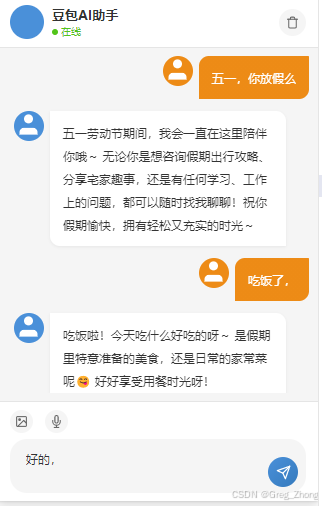
四、遇到的问题
A、代码规范与最佳实践
- 配置常量写在 Page () 外部:彻底避免 this 指向问题
- 微信原生 API 一律封装成 Promise:统一异步处理逻辑
- setData 优先使用索引路径更新:性能最优,避免全量重渲染
- 文本渲染必须加 white-space: pre-wrap,保留换行与格式
B、编码与解码处理
- 中文解码必须使用 TextDecoder,不要使用 String.fromCharCode
- 字符编码乱码:请求头添加 charset=utf-8,依靠 JSON.parse 自动处理编码
C、流式 / 非流式方案
- wx.request 不支持 responseType: 'stream',采用非流式模式 stream: false
- SSE 流式数据截断问题:使用缓冲区累积数据块,识别完整 JSON 后再解析
D、接口与网络异常处理
- 请求超时:设置 timeout: 120000(120 秒)适配慢接口
- 域名校验失败:project.config.json 设置 "urlCheck": false,开发者工具勾选 "不校验合法域名"
E、界面渲染与数据稳定性
- 消息 ID 重复导致渲染异常:使用 Date.now() 生成唯一 ID
五、感受
虽然在小程序中,最终实现了调用豆包模型,doubao-seed-2-0-code-preview-260215,我之前短浅的以为它的专业性能更强,适合代码的输出,实际上对比网页的专家模式,这个免费的模型真的不够看,文档说带preview字段的模型是预览版,比正式版要慢30%-50%,然后正式版对比网页版(那是所有豆包模型内置的顶配,外包商用和放出来的所有模型都是阉割版,都是效果差一阶段的),,,然后小程序中小程序wx.request默认使用 HTTP/1.1,无法复用连接,每次请求都要重新 TCP 三次握手 + TLS 协商(约 200-300ms / 次),及最后接口10-30s响应后,前端做的假字节流效果,其中包含请求前后有大量同步计算,导致最终小程序中模型不占优势(开发来说)、响应速度极慢(我测试都是普遍20s以上的响应速度),,,只能用于学习ai模型和测试调用模型的一些配置调试看效果,