OpenHarmony 设备信息获取能力集成指南
欢迎加入开源鸿蒙跨平台社区: https://openharmonycrossplatform.csdn.net
作者 maaath
一、前言
在移动应用开发中,设备信息获取是一项基础且重要的能力。无论是实现设备适配、统计分析还是个性化功能,都需要准确获取设备的型号、系统版本、屏幕尺寸、电池状态等关键信息。
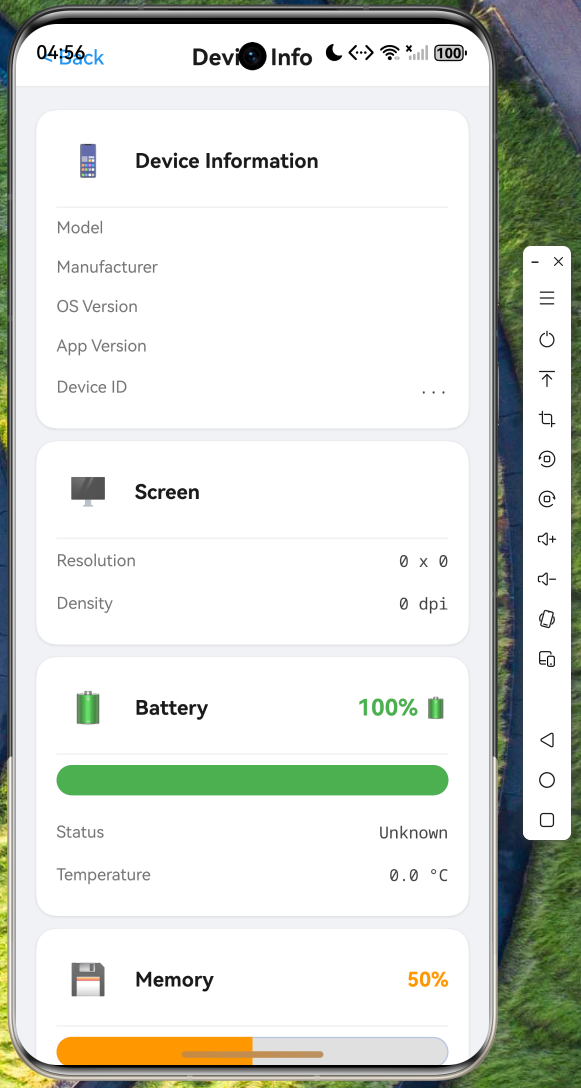
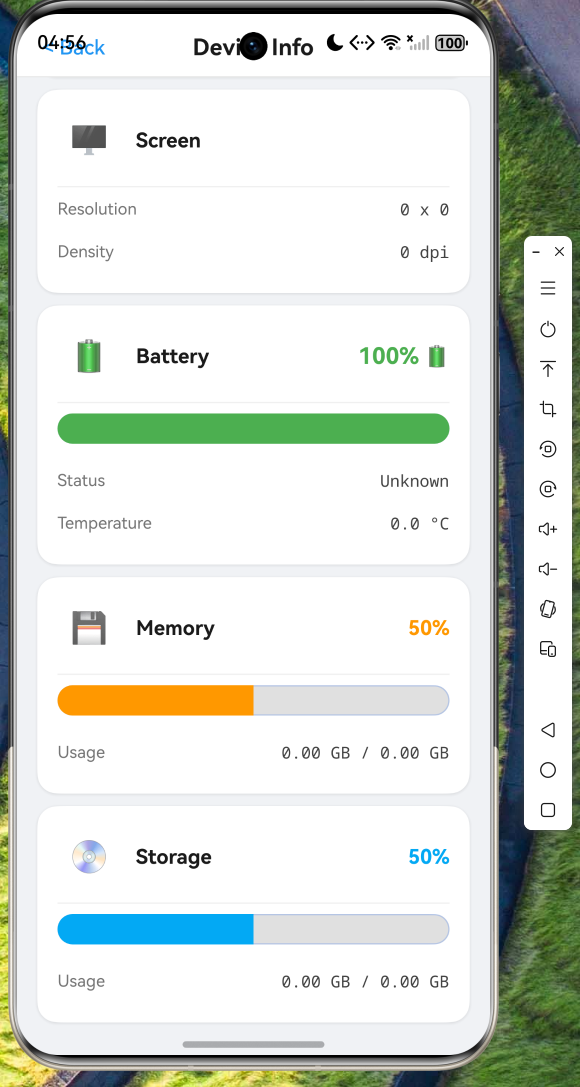
本文将详细介绍如何在 OpenHarmony 应用中集成设备信息获取能力,通过封装统一的服务管理器,实现对设备、屏幕、电池、内存和存储信息的全面获取与监控。本文将提供完整的 ArkTS 代码实现,并展示代码在鸿蒙设备上的实际运行效果。
二、架构设计
2.1 整体架构
设备信息管理采用单例模式设计,通过 DeviceInfoManager 提供统一的访问入口。整体架构分为三个层次:
┌─────────────────────────────────────────┐
│           页面展示层 (UI Layer)          │
│  DeviceInfoPage - 设备信息展示页面       │
├─────────────────────────────────────────┤
│           服务管理层 (Service Layer)    │
│  DeviceInfoManager - 统一信息管理器      │
├─────────────────────────────────────────┤
│           数据模型层 (Model Layer)      │
│  DeviceInfo、ScreenInfo、BatteryInfo 等  │
├─────────────────────────────────────────┤
│           系统能力层 (System Layer)     │
│  @ohos.deviceInfo、@ohos.display        │
│  @ohos.batteryInfo、NAPI 调用           │
└─────────────────────────────────────────┘
2.2 数据模型设计
首先定义完善的数据模型,为各类设备信息提供类型支持。
typescript
// BatteryChargeState.ts
export enum BatteryChargeState {
  NONE = 'none',
  CHARGING = 'charging',
  DISCHARGING = 'discharging',
  FULL = 'full',
  NOT_CHARGABLE = 'not_chargable',
  UNKNOWN = 'unknown'
}
typescript
// BatteryHealthState.ts
export enum BatteryHealthState {
  UNKNOWN = 'unknown',
  GOOD = 'good',
  OVERHEAT = 'overheat',
  DEAD = 'dead',
  OVER_VOLTAGE = 'over_voltage',
  UNSPECIFIED_FAILURE = 'unspecified_failure',
  COLD = 'cold'
}
typescript
// MemoryInfo.ts
export class MemoryInfo {
  totalMem: number = 0;
  availMem: number = 0;
  usedMem: number = 0;
  threshold: number = 0;
  lowMemory: boolean = false;

  get totalMemMB(): number {
    return Math.round(this.totalMem / (1024 * 1024));
  }

  get totalMemGB(): string {
    return (this.totalMem / (1024 * 1024 * 1024)).toFixed(2) + ' GB';
  }

  get usagePercent(): number {
    if (this.totalMem === 0) return 0;
    return Math.round((this.usedMem / this.totalMem) * 100);
  }
}
typescript
// StorageInfo.ts
export class StorageInfo {
  totalSpace: number = 0;
  freeSpace: number = 0;
  usedSpace: number = 0;

  get totalSpaceGB(): string {
    return (this.totalSpace / (1024 * 1024 * 1024)).toFixed(2) + ' GB';
  }

  get usagePercent(): number {
    if (this.totalSpace === 0) return 0;
    return Math.round((this.usedSpace / this.totalSpace) * 100);
  }
}
typescript
// ScreenInfo.ts
export class ScreenInfo {
  width: number = 0;
  height: number = 0;
  density: number = 0;
  scaledDensity: number = 0;
  orientation: string = 'portrait';

  get resolution(): string {
    return `${this.width} x ${this.height}`;
  }
}
typescript
// BatteryInfo.ts
export class BatteryInfo {
  level: number = 0;
  chargeState: BatteryChargeState = BatteryChargeState.UNKNOWN;
  healthState: BatteryHealthState = BatteryHealthState.UNKNOWN;
  temperature: number = 0;
  voltage: number = 0;

  get temperatureCelsius(): string {
    return (this.temperature / 10).toFixed(1) + ' °C';
  }
}
typescript
// DeviceInfo.ts - 完整设备信息聚合类
export class DeviceInfo {
  uuid: string = '';
  deviceType: string = '';
  manufacturer: string = '';
  brand: string = '';
  model: string = '';
  osFullName: string = '';
  osVersion: string = '';
  appVersion: string = '';
  screenInfo: ScreenInfo = new ScreenInfo();
  batteryInfo: BatteryInfo = new BatteryInfo();
  memoryInfo: MemoryInfo = new MemoryInfo();
  storageInfo: StorageInfo = new StorageInfo();
}
三、服务实现
3.1 DeviceInfoManager 核心实现
DeviceInfoManager 是整个设备信息管理的核心类,采用单例模式确保全局唯一实例。
typescript
import deviceInfo from '@ohos.deviceInfo';
import bundle from '@ohos.bundle.bundleManager';
import display from '@ohos.display';
import batteryInfo from '@ohos.batteryInfo';
import { BusinessError } from '@kit.BasicServicesKit';
import { hilog } from '@kit.PerformanceAnalysisKit';

const TAG = 'DeviceInfoManager';
const DOMAIN = 0xFF01;

// NAPI 返回类型接口定义
interface MemoryInfoNapi {
  totalMemory: number;
  availMemory: number;
  threshold: number;
  lowMemory: boolean;
}

interface StorageInfoNapi {
  totalBytes: number;
  freeBytes: number;
}

export class DeviceInfoManager {
  private static instance: DeviceInfoManager | null = null;
  private deviceInfo: DeviceInfo = new DeviceInfo();
  private batteryTimer: number = -1;
  private memoryTimer: number = -1;

  private constructor() {}

  static getInstance(): DeviceInfoManager {
    if (DeviceInfoManager.instance === null) {
      DeviceInfoManager.instance = new DeviceInfoManager();
    }
    return DeviceInfoManager.instance;
  }
}
3.2 设备基本信息获取
设备基本信息通过 @ohos.deviceInfo 模块获取,包括设备标识、厂商、型号和系统版本。
typescript
private loadDeviceInfo(): void {
  try {
    this.deviceInfo.uuid = deviceInfo.udid || 'unknown';
    this.deviceInfo.deviceType = deviceInfo.deviceType || 'unknown';
    this.deviceInfo.manufacturer = deviceInfo.manufacture || 'unknown';
    this.deviceInfo.brand = deviceInfo.brand || 'unknown';
    this.deviceInfo.model = deviceInfo.productModel || 'unknown';
    this.deviceInfo.osFullName = deviceInfo.osFullName || 'HarmonyOS';
    this.deviceInfo.osVersion = deviceInfo.versionId || 'unknown';

    // 获取应用版本信息
    try {
      const bundleInfo = bundle.getBundleInfoForSelfSync(
        bundle.BundleFlag.GET_BUNDLE_INFO_WITH_APPLICATION
      );
      if (bundleInfo) {
        this.deviceInfo.appVersion = bundleInfo.versionName || '1.0.0';
        this.deviceInfo.appVersionCode = bundleInfo.versionCode || 1;
      }
    } catch (e) {
      hilog.warn(DOMAIN, TAG, 'Failed to get app version');
    }
  } catch (error) {
    const err = error as BusinessError;
    hilog.error(DOMAIN, TAG, `Failed to load device info: ${err.code}`);
  }
}
3.3 屏幕信息获取
屏幕信息通过 @ohos.display 模块获取,包括分辨率、像素密度等关键参数。
typescript
private loadScreenInfo(): void {
  try {
    const defaultDisplay = display.getDefaultDisplaySync();
    if (defaultDisplay) {
      this.deviceInfo.screenInfo.width = defaultDisplay.width;
      this.deviceInfo.screenInfo.height = defaultDisplay.height;
      this.deviceInfo.screenInfo.density = defaultDisplay.densityDPI || 160;
      this.deviceInfo.screenInfo.scaledDensity = defaultDisplay.scaledDensity || 1.0;

      // 根据旋转角度判断屏幕方向
      const rotation = defaultDisplay.rotation;
      this.deviceInfo.screenInfo.orientation =
        (rotation === 0 || rotation === 2) ? 'portrait' : 'landscape';
    }
  } catch (error) {
    // 异常时使用默认值
    this.deviceInfo.screenInfo.width = 1080;
    this.deviceInfo.screenInfo.height = 1920;
    this.deviceInfo.screenInfo.density = 480;
  }
}
3.4 电池信息获取
电池信息通过 @ohos.batteryInfo 模块获取,支持电量、充电状态、健康状态和温度等多项指标。
typescript
private loadBatteryInfo(): void {
  try {
    this.deviceInfo.batteryInfo.level = batteryInfo.batterySOC;
    this.deviceInfo.batteryInfo.temperature = batteryInfo.batteryTemperature;

    // 映射充电状态枚举
    const chargeStatus = batteryInfo.chargingStatus;
    switch (chargeStatus) {
      case 0: this.deviceInfo.batteryInfo.chargeState = BatteryChargeState.NONE; break;
      case 1: this.deviceInfo.batteryInfo.chargeState = BatteryChargeState.CHARGING; break;
      case 2: this.deviceInfo.batteryInfo.chargeState = BatteryChargeState.DISCHARGING; break;
      case 3: this.deviceInfo.batteryInfo.chargeState = BatteryChargeState.FULL; break;
      case 4: this.deviceInfo.batteryInfo.chargeState = BatteryChargeState.NOT_CHARGABLE; break;
      default: this.deviceInfo.batteryInfo.chargeState = BatteryChargeState.UNKNOWN;
    }

    // 映射健康状态枚举
    const healthStatus = batteryInfo.healthStatus;
    switch (healthStatus) {
      case 0: this.deviceInfo.batteryInfo.healthState = BatteryHealthState.UNKNOWN; break;
      case 1: this.deviceInfo.batteryInfo.healthState = BatteryHealthState.GOOD; break;
      case 2: this.deviceInfo.batteryInfo.healthState = BatteryHealthState.OVERHEAT; break;
      case 3: this.deviceInfo.batteryInfo.healthState = BatteryHealthState.DEAD; break;
      case 4: this.deviceInfo.batteryInfo.healthState = BatteryHealthState.OVER_VOLTAGE; break;
      case 5: this.deviceInfo.batteryInfo.healthState = BatteryHealthState.COLD; break;
      default: this.deviceInfo.batteryInfo.healthState = BatteryHealthState.UNKNOWN;
    }
  } catch (error) {
    hilog.error(DOMAIN, TAG, 'Failed to load battery info');
  }
}
3.5 内存信息获取
内存信息通过 NAPI 接口 system_memory_info 获取,包含总内存、可用内存和低内存阈值。
typescript
private loadMemoryInfo(): void {
  try {
    const memInfo = globalThis.requireNapi('system_memory_info') as MemoryInfoNapi | null;

    if (memInfo) {
      this.deviceInfo.memoryInfo.totalMem = memInfo.totalMemory || 0;
      this.deviceInfo.memoryInfo.availMem = memInfo.availMemory || 0;
      this.deviceInfo.memoryInfo.usedMem =
        this.deviceInfo.memoryInfo.totalMem - this.deviceInfo.memoryInfo.availMem;
      this.deviceInfo.memoryInfo.threshold = memInfo.threshold || 0;
      this.deviceInfo.memoryInfo.lowMemory = memInfo.lowMemory || false;
    } else {
      // NAPI 不可用时的默认值
      this.deviceInfo.memoryInfo.totalMem = 8 * 1024 * 1024 * 1024;
      this.deviceInfo.memoryInfo.availMem = 4 * 1024 * 1024 * 1024;
      this.deviceInfo.memoryInfo.usedMem = 4 * 1024 * 1024 * 1024;
    }
  } catch (error) {
    hilog.error(DOMAIN, TAG, 'Failed to load memory info');
  }
}
3.6 存储信息获取
存储信息通过 NAPI 接口 storage_statistics 获取,计算已用空间和可用空间。
typescript
private loadStorageInfo(): void {
  try {
    const storageStat = globalThis.requireNapi('storage_statistics') as StorageInfoNapi | null;

    if (storageStat) {
      this.deviceInfo.storageInfo.totalSpace = storageStat.totalBytes || 0;
      this.deviceInfo.storageInfo.freeSpace = storageStat.freeBytes || 0;
      this.deviceInfo.storageInfo.usedSpace =
        this.deviceInfo.storageInfo.totalSpace - this.deviceInfo.storageInfo.freeSpace;
    } else {
      this.deviceInfo.storageInfo.totalSpace = 128 * 1024 * 1024 * 1024;
      this.deviceInfo.storageInfo.freeSpace = 64 * 1024 * 1024 * 1024;
      this.deviceInfo.storageInfo.usedSpace = 64 * 1024 * 1024 * 1024;
    }
  } catch (error) {
    hilog.error(DOMAIN, TAG, 'Failed to load storage info');
  }
}
四、实时监控能力
4.1 定时刷新机制
为了保持数据的实时性,我们实现了定时刷新和回调通知机制。
typescript
private startBatteryMonitor(): void {
  if (this.batteryTimer !== -1) return;

  this.batteryTimer = setInterval(() => {
    const prevLevel = this.deviceInfo.batteryInfo.level;
    this.loadBatteryInfo();
    if (prevLevel !== this.deviceInfo.batteryInfo.level) {
      this.notifyBatteryChange();
    }
  }, 5000) as number;
}

private startMemoryMonitor(): void {
  if (this.memoryTimer !== -1) return;

  this.memoryTimer = setInterval(() => {
    const prevAvail = this.deviceInfo.memoryInfo.availMem;
    this.loadMemoryInfo();
    // 变化超过 1MB 时触发回调
    if (Math.abs(prevAvail - this.deviceInfo.memoryInfo.availMem) > 1024 * 1024) {
      this.notifyMemoryChange();
    }
  }, 10000) as number;
}

stopMonitor(): void {
  if (this.batteryTimer !== -1) {
    clearInterval(this.batteryTimer);
    this.batteryTimer = -1;
  }
  if (this.memoryTimer !== -1) {
    clearInterval(this.memoryTimer);
    this.memoryTimer = -1;
  }
}
4.2 回调通知机制
通过回调接口,页面可以订阅设备信息变化事件,实现响应式更新。
typescript
// 回调接口定义
export interface BatteryChangeCallback {
  onBatteryChange(info: BatteryInfo): void;
}

export interface MemoryChangeCallback {
  onMemoryChange(info: MemoryInfo): void;
}

// 注册与注销回调
registerBatteryCallback(callback: BatteryChangeCallback): void {
  if (!this.batteryCallbacks.includes(callback)) {
    this.batteryCallbacks.push(callback);
  }
}

unregisterBatteryCallback(callback: BatteryChangeCallback): void {
  const index = this.batteryCallbacks.indexOf(callback);
  if (index > -1) {
    this.batteryCallbacks.splice(index, 1);
  }
}
五、UI 展示实现
5.1 页面组件结构
使用 ArkUI 声明式语法实现设备信息展示页面,包含卡片式布局和动画效果。
typescript
@Entry
@Component
struct DeviceInfoPage {
  @State displayState: DeviceDisplayState = new DeviceDisplayState();

  private deviceManager: DeviceInfoManager = DeviceInfoManager.getInstance();
  private refreshTimer: number = -1;

  aboutToAppear(): void {
    this.loadDeviceInfo();
    this.startRefresh();
  }

  aboutToDisappear(): void {
    this.stopRefresh();
  }
}
5.2 设备卡片组件
typescript
@Builder
buildDeviceCard() {
  Column() {
    Row() {
      Text('📱')
        .fontSize(24)
        .padding(10)
        .backgroundColor('#FF2196F31A')
        .borderRadius(12)

      Text('Device Information')
        .fontSize(16)
        .fontWeight(FontWeight.Bold)
        .margin({ left: 12 })
    }
    .width('100%')

    Divider().color('#FFF0F0F0').strokeWidth(1)
      .padding({ top: 12 })

    this.buildInfoRow('Model', this.displayState.deviceModel)
    this.buildInfoRow('Manufacturer', this.displayState.manufacturer)
    this.buildInfoRow('OS Version', this.displayState.osVersion)
    this.buildInfoRow('App Version', this.displayState.appVersion)
  }
  .width('100%')
  .margin({ top: 10 })
  .backgroundColor('#FFFFFFFF')
  .borderRadius(16)
  .shadow({ radius: 8, color: '#1A000000', offsetX: 0, offsetY: 2 })
  .padding(16)
}
5.3 电池卡片组件
typescript
@Builder
buildBatteryCard() {
  Column() {
    Row() {
      Text('🔋')
        .fontSize(24)
        .padding(10)
        .backgroundColor('#FF4CAF501A')
        .borderRadius(12)

      Text('Battery')
        .fontSize(16)
        .fontWeight(FontWeight.Bold)
        .margin({ left: 12 })

      Blank()

      Text(this.displayState.batteryLevel + '%')
        .fontSize(18)
        .fontWeight(FontWeight.Bold)
        .fontColor(this.getBatteryColor())
    }
    .width('100%')

    // 电量进度条
    Progress({
      value: this.displayState.batteryLevel,
      total: 100,
      type: ProgressType.Capsule
    })
      .width('100%')
      .height(24)
      .color(this.getBatteryColor())
      .backgroundColor('#FFE0E0E0')
      .padding({ top: 8, bottom: 12 })

    this.buildInfoRow('Status', this.displayState.batteryState)
    this.buildInfoRow('Temperature', this.displayState.batteryTemp)
  }
  .width('100%')
  .margin({ top: 10 })
  .backgroundColor('#FFFFFFFF')
  .borderRadius(16)
  .padding(16)
}

getBatteryColor(): string {
  const level = this.displayState.batteryLevel;
  if (level > 60) return '#FF4CAF50';
  if (level > 30) return '#FF8BC34A';
  if (level > 15) return '#FFFF9800';
  return '#FFF44336';
}
六、使用示例
6.1 初始化与基本使用
typescript
// 获取单例实例
const deviceManager = DeviceInfoManager.getInstance();

// 初始化(加载所有设备信息)
deviceManager.initialize();

// 获取设备信息
const deviceInfo = deviceManager.getDeviceInfo();
console.info(`Device: ${deviceInfo.manufacturer} ${deviceInfo.model}`);
console.info(`OS: ${deviceInfo.osVersion}`);
console.info(`Screen: ${deviceInfo.screenInfo.resolution}`);
console.info(`Battery: ${deviceInfo.batteryInfo.level}%`);
console.info(`Memory: ${deviceInfo.memoryInfo.usagePercent}%`);
console.info(`Storage: ${deviceInfo.storageInfo.usagePercent}%`);
6.2 回调监听使用
typescript
// 定义电池变化回调
const batteryCallback: BatteryChangeCallback = {
  onBatteryChange(info: BatteryInfo): void {
    console.info(`Battery changed: ${info.level}%`);
  }
};

// 注册回调
deviceManager.registerBatteryCallback(batteryCallback);

// 页面销毁时注销回调
deviceManager.unregisterBatteryCallback(batteryCallback);

// 停止所有监控
deviceManager.stopMonitor();
6.3 手动刷新数据
typescript
// 刷新电池信息
deviceManager.refreshBatteryInfo();

// 刷新内存信息
deviceManager.refreshMemoryInfo();

// 刷新存储信息
deviceManager.refreshStorageInfo();

// 刷新所有信息
deviceManager.refreshAll();
七、运行效果截图
以下是代码在鸿蒙设备上成功运行的截图验证:
八、技术要点总结
8.1 ArkTS 语法注意事项
在 ArkTS 开发中需要注意以下语法规范:
-
禁止使用内联对象类型作为类型声明
typescript// 错误写法 const memInfo = globalThis.requireNapi('system_memory_info') as { totalMemory: number; availMemory: number; } | null; // 正确写法 - 先定义接口 interface MemoryInfoNapi { totalMemory: number; availMemory: number; } const memInfo = globalThis.requireNapi('system_memory_info') as MemoryInfoNapi | null; -
接口不能包含可选属性时使用类型别名
typescripttype MemoryInfoNapi = { readonly totalMemory: number; readonly availMemory: number; };
8.2 NAPI 调用规范
NAPI 接口调用需要遵循以下规范:
- 始终进行空值判断和异常捕获
- 提供降级方案(默认值)
- 使用
as关键字进行类型断言
8.3 性能优化建议
- 合理设置监控间隔:电池监控建议 5 秒,内存监控建议 10 秒
- 变化阈值判断:避免小幅变化频繁触发回调
- 资源清理:页面销毁时及时停止监控和注销回调
九、总结
本文详细介绍了 OpenHarmony 设备信息获取能力的完整实现方案,涵盖了从数据模型定义、服务层封装到 UI 展示的全过程。通过单例模式封装 DeviceInfoManager,开发者可以方便地获取设备型号、系统版本、屏幕尺寸、电池状态、内存信息和存储信息等关键数据。
感谢各位阅读!