效果:
借助第三方插件sortablejs来实现
具体步骤:
1.安装sortablejs
npm install sortablejs
2.在vue文件中引入sortablejs
TypeScript
import Sortable from 'sortablejs'3.在el-table指定row-key,这个row-key必须是唯一的,否则无法正确排序
TypeScript
<el-table
    ref="tableRef"
    v-bind="$attrs"
    :data="localData"
    :row-key="rowKey"
    :class="tableClass"
    :tree-props="treeProps"
    :row-class-name="rowClassName"
    :empty-text="emptyText"
    @expand-change="handleExpandChange"
  >
    <template v-for="column in columns" :key="column.key || column.prop || column.label">
      <el-table-column v-if="column.type === 'expand'" type="expand" :width="column.width" :fixed="column.fixed">
        <template #default="scope">
          <slot :name="column.slotName || 'expand'" v-bind="scope" :column-config="column" />
        </template>
      </el-table-column>
      <el-table-column
        v-else
        :prop="column.prop"
        :label="column.label"
        :width="column.width"
        :min-width="column.minWidth"
        :align="column.align"
        :fixed="column.fixed"
        :show-overflow-tooltip="column.showOverflowTooltip"
      >
        <template #default="scope">
          <slot v-if="column.slotName" :name="column.slotName" v-bind="scope" :column-config="column" />
          <slot v-else name="cell" v-bind="scope" :column-config="column">
            {{ column.prop ? scope.row[column.prop] : '' }}
          </slot>
        </template>
      </el-table-column>
    </template>
  </el-table>
4.具体代码实现(ts)
TypeScript
nextTick(() => {
    const tbody = tableRef.value?.$el?.querySelectorAll('.el-table__body-wrapper tbody')[1]
    if (!tbody) return

    sortableInstance = Sortable.create(tbody, {
      animation: 150,
      disabled: false, //false 为启用
      onChoose(e: any) {}, //选中行时
      onEnd(evt: any) { //拖拽完成
        const { oldIndex, newIndex } = evt

        if (oldIndex === newIndex) return

        const newData = [...props.data]
        const moved = newData.splice(oldIndex, 1)[0]
        newData.splice(newIndex, 0, moved)
        emit('update:data', newData)
      },
    })
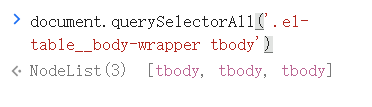
})**注意:**如果无法实现拖拽,可检查一下tbody元素的查找是否有问题。
我的是:tableRef.value?.$el?.querySelectorAll('.el-table__body-wrapper tbody')1
我这里使用了1是因为我查找到三个tbody,我用到的是第二个。
5.完整代码(这是我封装的表格组件,数据由父组件传入)
TypeScript
<template>
  <el-table
    ref="tableRef"
    v-bind="$attrs"
    :data="localData"
    :row-key="rowKey"
    :class="tableClass"
    :tree-props="treeProps"
    :row-class-name="rowClassName"
    :empty-text="emptyText"
    @expand-change="handleExpandChange"
  >
    <template v-for="column in columns" :key="column.key || column.prop || column.label">
      <el-table-column v-if="column.type === 'expand'" type="expand" :width="column.width" :fixed="column.fixed">
        <template #default="scope">
          <slot :name="column.slotName || 'expand'" v-bind="scope" :column-config="column" />
        </template>
      </el-table-column>
      <el-table-column
        v-else
        :prop="column.prop"
        :label="column.label"
        :width="column.width"
        :min-width="column.minWidth"
        :align="column.align"
        :fixed="column.fixed"
        :show-overflow-tooltip="column.showOverflowTooltip"
      >
        <template #default="scope">
          <slot v-if="column.slotName" :name="column.slotName" v-bind="scope" :column-config="column" />
          <slot v-else name="cell" v-bind="scope" :column-config="column">
            {{ column.prop ? scope.row[column.prop] : '' }}
          </slot>
        </template>
      </el-table-column>
    </template>
  </el-table>
</template>

<script setup lang="ts">
import { ref, computed, onBeforeUnmount, nextTick, watch } from 'vue'
import Sortable from 'sortablejs'
import type { TableInstance } from 'element-plus'
import type { OperationTableColumn, OperationTableRow, OperationTableRowClassName } from '@/views/statistics/types'

defineOptions({ inheritAttrs: false })

const props = withDefaults(
  defineProps<{
    columns: OperationTableColumn[]
    data: OperationTableRow[]
    rowKey?: string | ((row: OperationTableRow) => string)
    treeProps?: Record<string, string | boolean>
    rowClassName?: OperationTableRowClassName
    emptyText?: string
    tableClass?: string
    isSort?: boolean
  }>(),
  {
    rowKey: 'id',
    treeProps: () => ({ children: 'children' }),
    rowClassName: '',
    emptyText: '',
    tableClass: '',
  },
)

const emit = defineEmits<{
  'update:data': [val: OperationTableRow[]]
  'expand-change': [row: OperationTableRow, expanded: OperationTableRow[] | boolean]
}>()
let sortableInstance: Sortable | null = null

const localData = computed({
  get() {
    return props.data
  },
  set(val) {
    emit('update:data', val)
  },
})
const tableRef = ref<TableInstance>()

const handleExpandChange = (row: OperationTableRow, expanded: OperationTableRow[] | boolean) => {
  emit('expand-change', row, expanded)
}

const toggleRowExpansion = (row: OperationTableRow, expanded?: boolean) => {
  tableRef.value?.toggleRowExpansion(row, expanded)
}
const initSortable = () => {
  if (!props.isSort) return

  nextTick(() => {
    const tbody = tableRef.value?.$el?.querySelectorAll('.el-table__body-wrapper tbody')[1]
    if (!tbody) return

    sortableInstance = Sortable.create(tbody, {
      animation: 150,
      disabled: false,
      onChoose(e: any) {},
      onEnd(evt: any) {
        const { oldIndex, newIndex } = evt

        if (oldIndex === newIndex) return

        const newData = [...props.data]
        const moved = newData.splice(oldIndex, 1)[0]
        newData.splice(newIndex, 0, moved)
        emit('update:data', newData)
      },
    })
  })
}

const destroySortable = () => {
  if (sortableInstance) {
    sortableInstance.destroy()
    sortableInstance = null
  }
}

watch(
  () => props.isSort,
  val => {
    if (val) {
      initSortable()
    } else {
      destroySortable()
    }
  },
  { immediate: true },
)

onBeforeUnmount(() => {
  destroySortable()
})
defineExpose({
  tableRef,
  toggleRowExpansion,
})
</script>