cat /sys/kernel/debug/pinctrl/pinctrl-rockchip-pinctrl/pinmux-pins
cat /sys/kernel/debug/gpio
用户名/密码:root/root
DTS来自,kernel-pi-v1.0.tar.gz(226.7MB)
https://vanxoak.yuque.com/wb353n/hd-rk3576-pi/mg1yh7k1hgmmgtew
开发资料下载
https://vanxoak.yuque.com/wb353n/hd-rk3576-pi/amue52kesw19pqpg#NoWhJ
与PC互传文件【使用WinSCP即可!】
在此介绍一下MobaXterm SFTP传输的一种简单方法:
https://vanxoak.yuque.com/wb353n/hd-rk3576-pi/zw4xqc5ixduxhm13#v5uOq
音频测试
1.音频硬件分布
2.音频控件
3.耳机播音测试
root@hd-rk3576:~# aplay kiss8.wav
Playing WAVE 'kiss8.wav' : Signed 16 bit Little Endian, Rate 44100 Hz, Stereo
root@hd-rk3576:~# apt update
root@hd-rk3576:~# apt install mpg123
root@hd-rk3576:~# mpg123 wenbie.mp3
root@hd-rk3576:~# apt install sox libsox-fmt-all
root@hd-rk3576:~# play wenbie.mp3
root@hd-rk3576:~# iperf3 -s
C:\iperf3.21>iperf3 -c 192.168.1.182 -i 1 -t 1800
20260428给万象奥科的开发板HD-RK3576-PI适配瑞芯微原厂的Android14时给iperf3配置TMPDIR目录
2026/4/28 19:35
缘起:瑞芯微原厂的Android14直接跑iperf3会出错。
必须手工配置:export TMPDIR=/data/local/tmp、
现在要做的是自动配置!
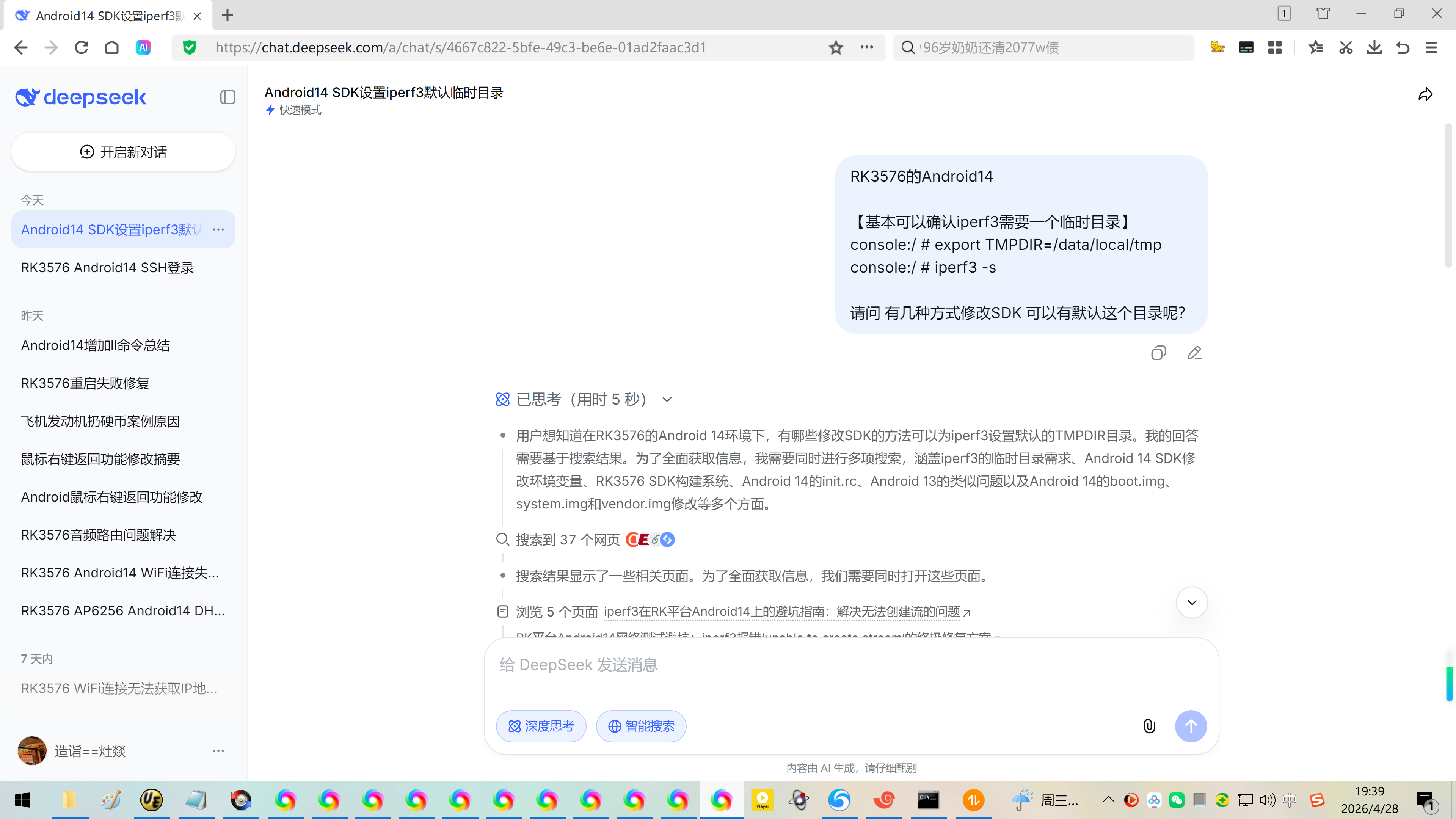
1、问DeepSeek:
RK3576的Android14
【基本可以确认iperf3需要一个临时目录】
console:/ # export TMPDIR=/data/local/tmp
console:/ # iperf3 -s
请问 有几种方式修改SDK 可以有默认这个目录呢?
在RK3576的Android 14 SDK中,为iperf3设置默认TMPDIR目录,其核心思路是在系统启动阶段或adb shell初始化过程中预先设置好环境变量,主要有三种方案。
?? 方案一:在启动脚本中设置全局环境变量
此方案通过在系统初始化脚本(init.rc)或adb shell的环境配置脚本(mkshrc)中添加设置,使TMPDIR成为全局变量。
修改 init.rc 脚本
这种方法需要修改init.rc文件,该文件位于boot.img的rootdir目录下。你需要深入RK3576 SDK中的相关文件并重新编译boot.img才能使其生效。
具体操作是在init.rc中添加类似export TMPDIR /data/local/tmp的语句。想了解如何安全地修改并重新打包boot.img,可以查阅RK3576 SDK开发指南的相关章节。
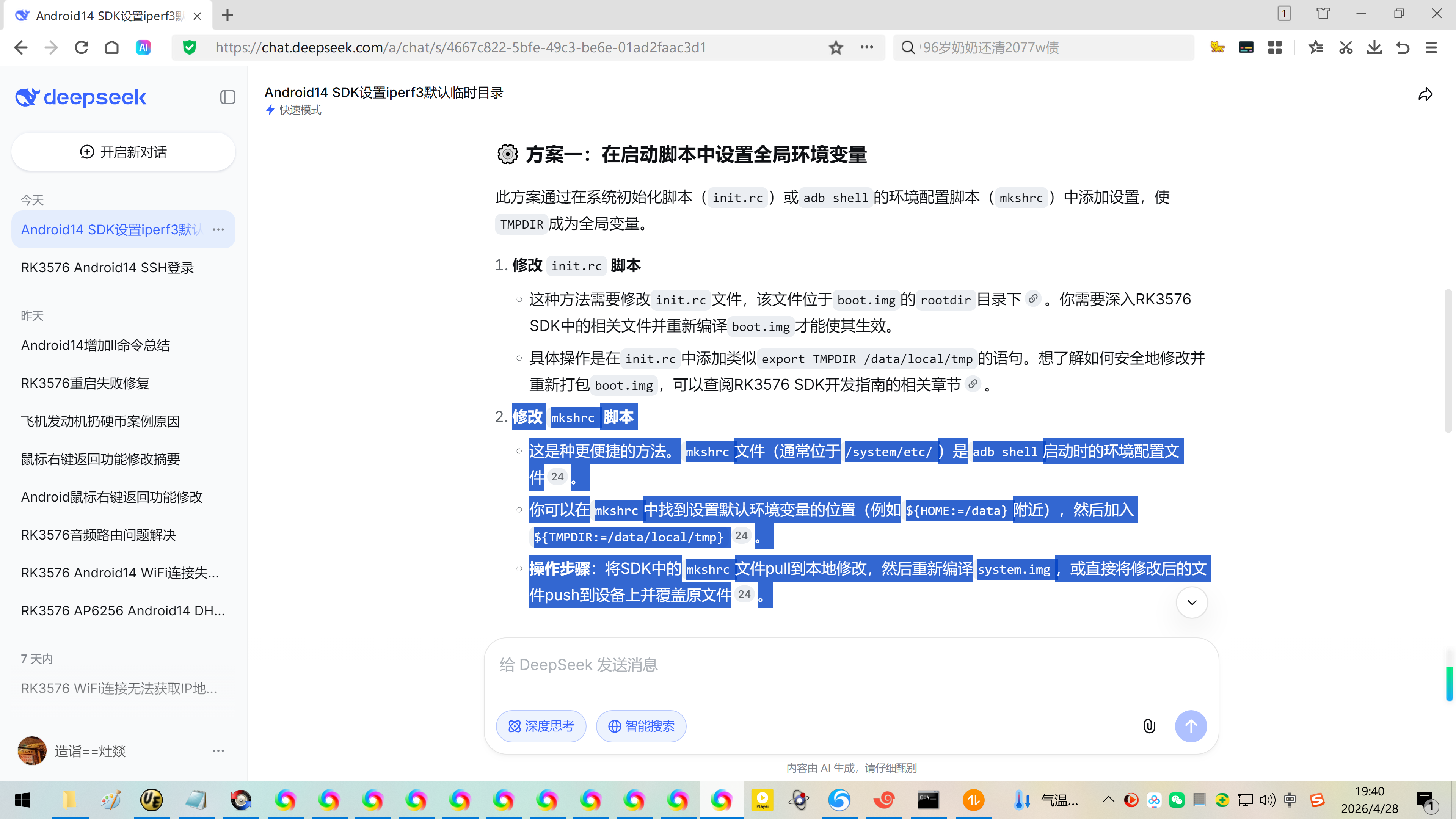
修改 mkshrc 脚本
这是种更便捷的方法。mkshrc文件(通常位于/system/etc/)是adb shell启动时的环境配置文件。
你可以在mkshrc中找到设置默认环境变量的位置(例如{HOME:=/data}附近),然后加入{TMPDIR:=/data/local/tmp}。
操作步骤:将SDK中的mkshrc文件pull到本地修改,然后重新编译system.img,或直接将修改后的文件push到设备上并覆盖原文件。
?? 方案二:创建专用的启动脚本
与方法一相比,这个方法更加轻量,对系统侵入性最小。
编写脚本:创建一个名为set_iperf3_env.sh的脚本,内容如下:
bash
#!/system/bin/sh
export TMPDIR=/data/local/tmp
exec /path/to/iperf3 "$@"
部署与使用:将脚本和iperf3二进制文件一同放入ROM可读写的分区(如/data)。之后,运行此脚本代替直接运行iperf3即可。
?? 方案三:从源码修改,硬编码临时目录路径
这种方案最为彻底,能从根源上解决问题。
原理iperf3在运行时,会优先检查TMPDIR或TMP环境变量,如果均未设置,才会回退到/tmp目录。因此,你可以在编译前修改源码,让其跳过环境变量检查,直接使用/data/local/tmp。
实现方法:你需要定位iperf3源码中决定临时目录的逻辑,通常是在iperf3的主源文件中,找到类似下图的判断逻辑并直接修改:
c
// 原始逻辑:检查TMPDIR和TMP环境变量,如果都不存在则使用"/tmp"
// const char *tmppath = getenv("TMPDIR");
// if (!tmppath) tmppath = getenv("TMP");
// if (!tmppath) tmppath = "/tmp";
// 修改后的逻辑:直接使用安全的Android临时目录
const char *tmppath = "/data/local/tmp";
编译与集成:完成修改后,在RK3576的SDK环境下重新编译iperf3,并将生成的二进制文件集成到你的系统镜像中。
?? 总结与建议
方案对比:几种方案的优缺点对比如下:
系统启动脚本:优点是一次修改全局生效,统一管理;缺点是影响范围大,风险较高,需要重新烧写系统。
专用启动脚本:优点是灵活可控,风险低,易于调试;缺点是需要额外的脚本文件。
源码硬编码:优点是最彻底的解决方案,无需依赖环境变量;缺点是维护性较差,每次更新需重编译。
针对你的场景:
如果你是ROM开发者,且有重新编译和烧录系统的便利,方案一(系统启动脚本) 是维持系统纯净的较好选择。
如果只是希望在现有固件上快速解决问题,方案二(专用启动脚本) 风险最低,操作最便捷。
从简单、稳妥、易调试的角度,我特别推荐使用方案二(专用启动脚本) 来快速解决问题。这不会影响你已运行的SDK环境,也无需重新编译整个系统。
最后,无论选择哪种方案,强烈建议在应用层代码中不再使用/tmp目录。Android环境下,标准Linux的全局可写/tmp目录往往有权限限制,是导致iperf3报错的根源。使用/data/local/tmp或应用的私有目录是更安全可靠的选择。
这几种方法都能解决问题,你想先试试用脚本快速验证,还是希望我详细介绍下修改系统文件(比如mkshrc)的具体步骤?
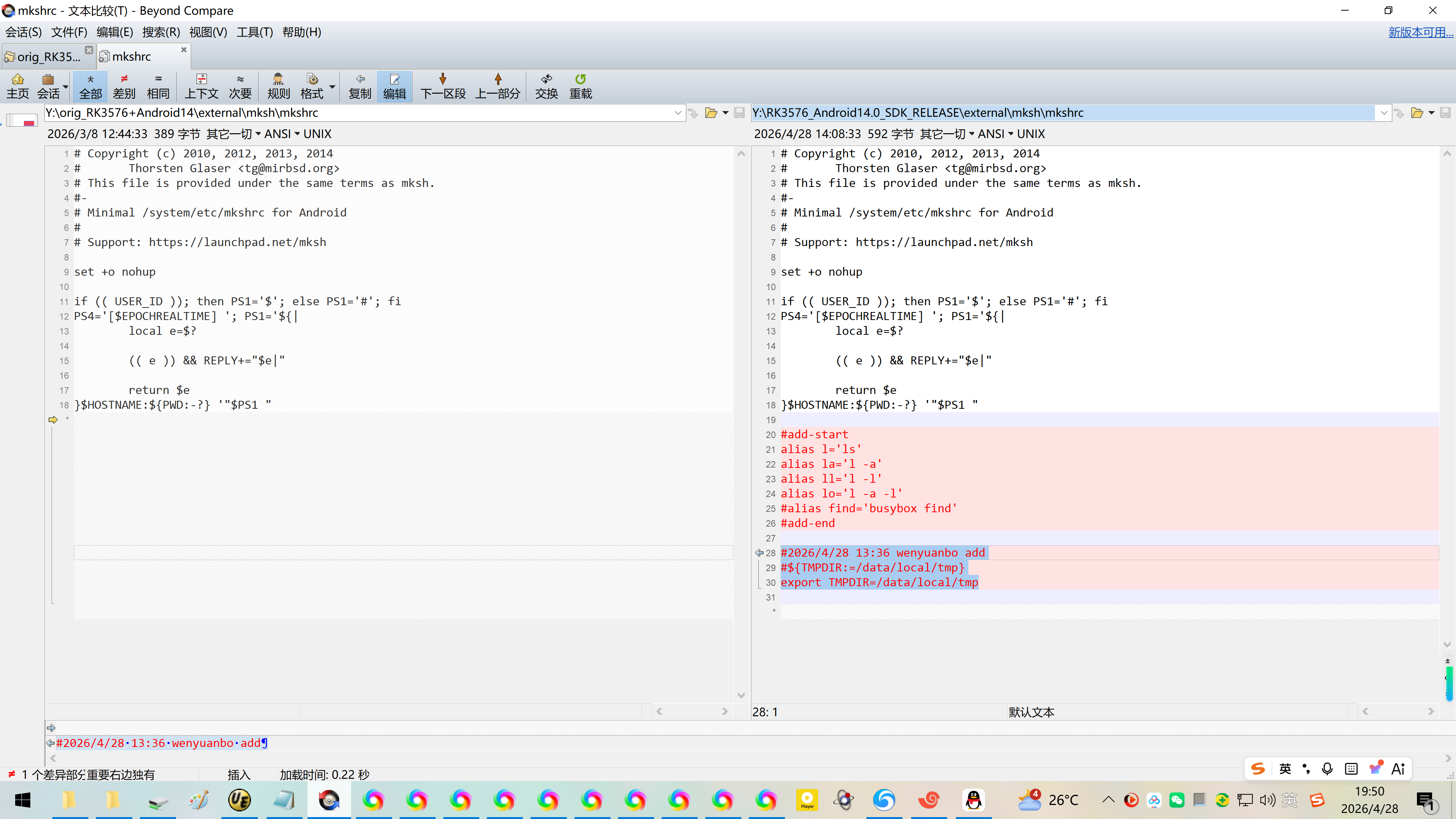
2、修改:【切记,现阶段:请务必不要完全相信DeepSeek】^_
Y:\orig_RK3576+Android14\external\mksh\mkshrc
Y:\RK3576_Android14.0_SDK_RELEASE\external\mksh\mkshrc
Copyright (c) 2010, 2012, 2013, 2014
Thorsten Glaser <tg@mirbsd.org>
This file is provided under the same terms as mksh.
#-
Minimal /system/etc/mkshrc for Android
Support: https://launchpad.net/mksh
set +o nohup
if (( USER_ID )); then PS1='$'; else PS1='#'; fi
PS4='$EPOCHREALTIME '; PS1='${|
local e=$?
(( e )) && REPLY+="$e|"
return $e
}HOSTNAME:{PWD:-?} '"$PS1 "
#add-start
alias l='ls'
alias la='l -a'
alias ll='l -l'
alias lo='l -a -l'
#alias find='busybox find'
#add-end
#2026/4/28 13:36 wenyuanbo add
#${TMPDIR:=/data/local/tmp}
export TMPDIR=/data/local/tmp
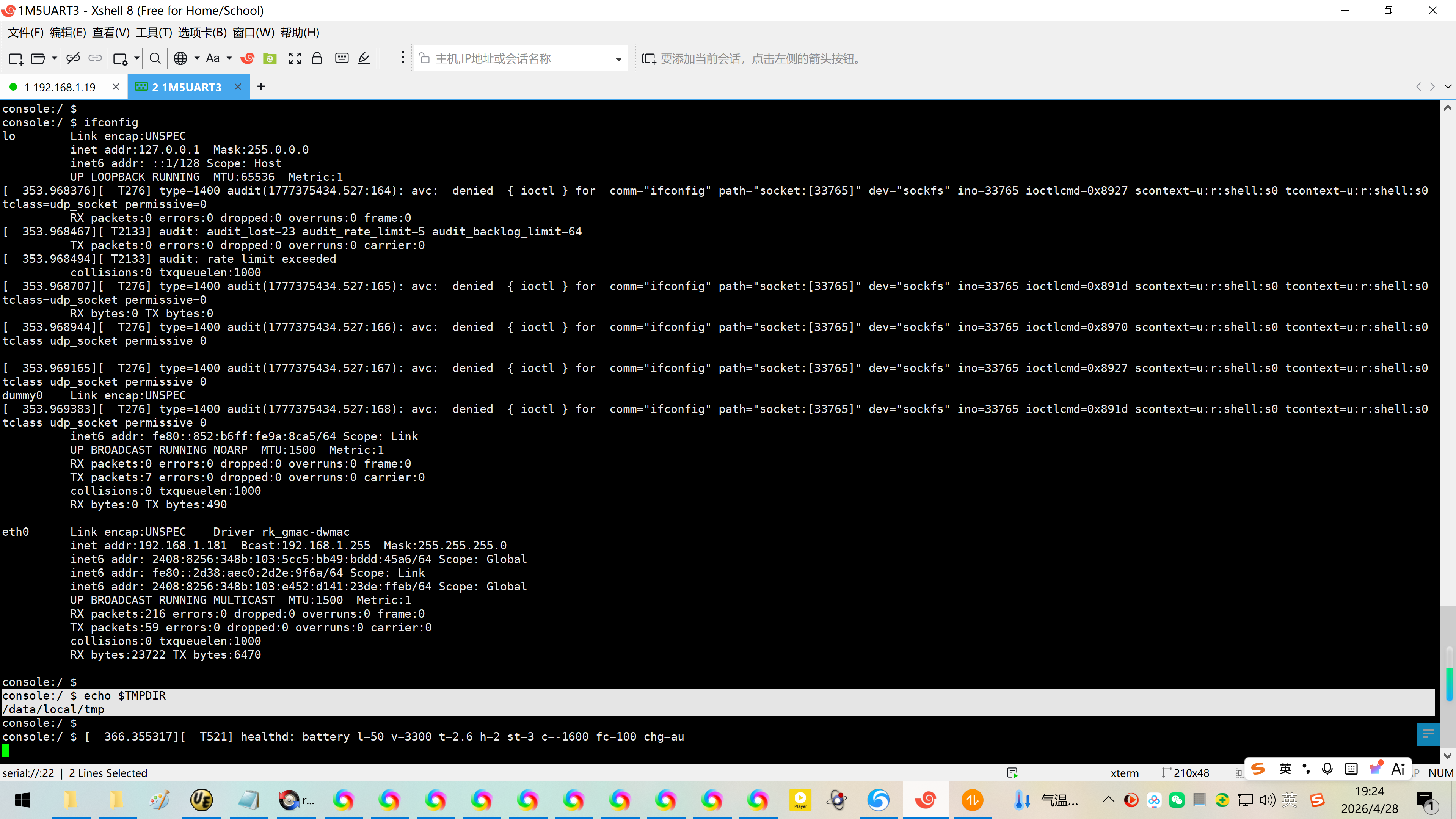
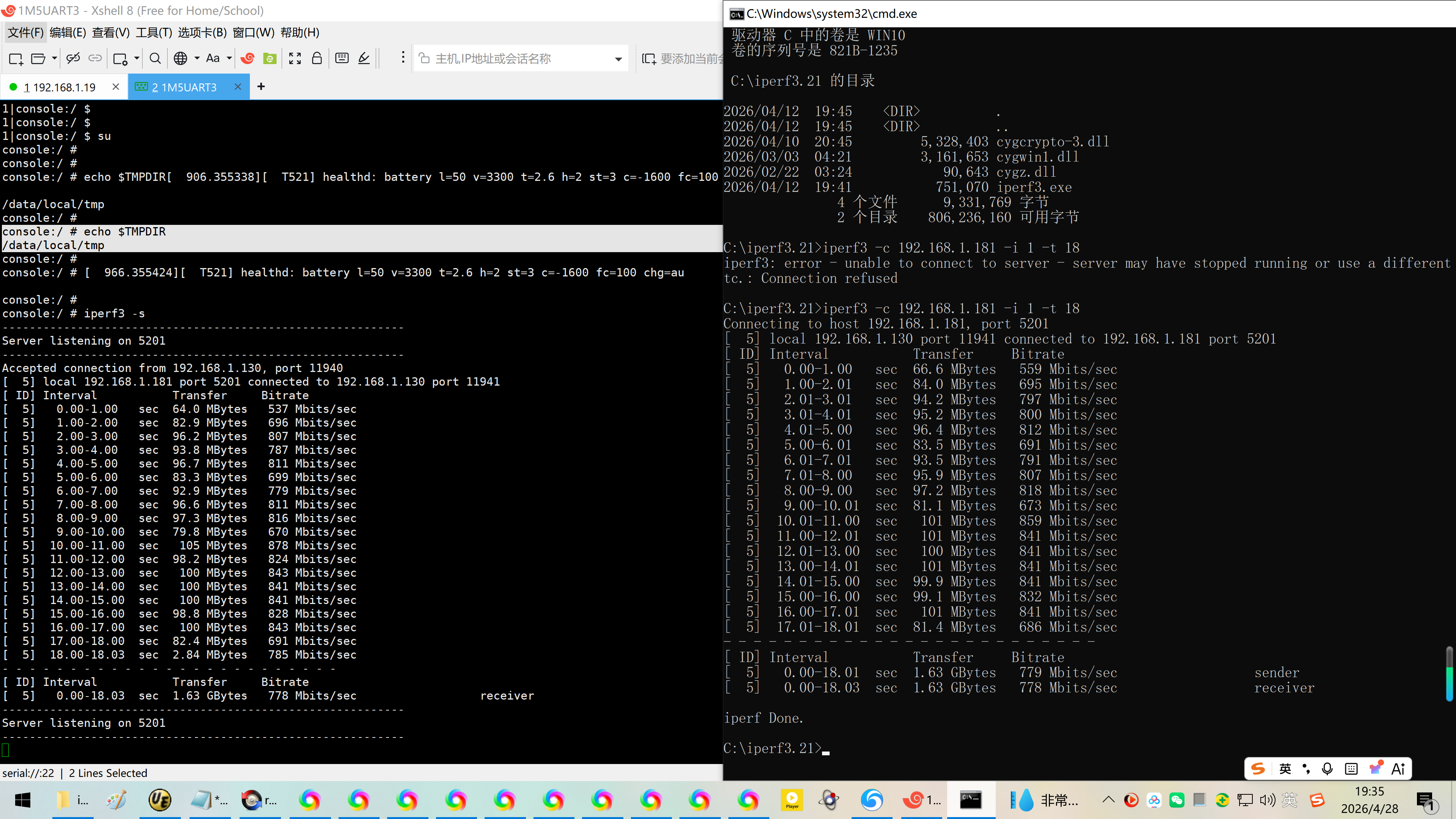
3、在普通用户、su/root权限下确认iperf3打流:
console:/ $
console:/ console:/ ifconfig
lo Link encap:UNSPEC
inet addr:127.0.0.1 Mask:255.0.0.0
inet6 addr: ::1/128 Scope: Host
UP LOOPBACK RUNNING MTU:65536 Metric:1
353.968376 T276 type=1400 audit(1777375434.527:164): avc: denied { ioctl } for comm="ifconfig" path="socket:33765" dev="sockfs" ino=33765 ioctlcmd=0x8927 scontext=u:r:shell:s0 tcontext=u:r:shell:s0 tclass=udp_socket permissive=0
RX packets:0 errors:0 dropped:0 overruns:0 frame:0
353.968467 T2133 audit: audit_lost=23 audit_rate_limit=5 audit_backlog_limit=64
TX packets:0 errors:0 dropped:0 overruns:0 carrier:0
353.968494 T2133 audit: rate limit exceeded
collisions:0 txqueuelen:1000
353.968707 T276 type=1400 audit(1777375434.527:165): avc: denied { ioctl } for comm="ifconfig" path="socket:33765" dev="sockfs" ino=33765 ioctlcmd=0x891d scontext=u:r:shell:s0 tcontext=u:r:shell:s0 tclass=udp_socket permissive=0
RX bytes:0 TX bytes:0
353.968944 T276 type=1400 audit(1777375434.527:166): avc: denied { ioctl } for comm="ifconfig" path="socket:33765" dev="sockfs" ino=33765 ioctlcmd=0x8970 scontext=u:r:shell:s0 tcontext=u:r:shell:s0 tclass=udp_socket permissive=0
353.969165 T276 type=1400 audit(1777375434.527:167): avc: denied { ioctl } for comm="ifconfig" path="socket:33765" dev="sockfs" ino=33765 ioctlcmd=0x8927 scontext=u:r:shell:s0 tcontext=u:r:shell:s0 tclass=udp_socket permissive=0
dummy0 Link encap:UNSPEC
353.969383 T276 type=1400 audit(1777375434.527:168): avc: denied { ioctl } for comm="ifconfig" path="socket:33765" dev="sockfs" ino=33765 ioctlcmd=0x891d scontext=u:r:shell:s0 tcontext=u:r:shell:s0 tclass=udp_socket permissive=0
inet6 addr: fe80::852:b6ff:fe9a:8ca5/64 Scope: Link
UP BROADCAST RUNNING NOARP MTU:1500 Metric:1
RX packets:0 errors:0 dropped:0 overruns:0 frame:0
TX packets:7 errors:0 dropped:0 overruns:0 carrier:0
collisions:0 txqueuelen:1000
RX bytes:0 TX bytes:490
eth0 Link encap:UNSPEC Driver rk_gmac-dwmac
inet addr:192.168.1.181 Bcast:192.168.1.255 Mask:255.255.255.0
inet6 addr: 2408:8256:348b:103:5cc5:bb49:bddd:45a6/64 Scope: Global
inet6 addr: fe80::2d38:aec0:2d2e:9f6a/64 Scope: Link
inet6 addr: 2408:8256:348b:103:e452:d141:23de:ffeb/64 Scope: Global
UP BROADCAST RUNNING MULTICAST MTU:1500 Metric:1
RX packets:216 errors:0 dropped:0 overruns:0 frame:0
TX packets:59 errors:0 dropped:0 overruns:0 carrier:0
collisions:0 txqueuelen:1000
RX bytes:23722 TX bytes:6470
console:/
console:/ echo $TMPDIR
/data/local/tmp
console:/ $
console:/ $ 366.355317 T521 healthd: battery l=50 v=3300 t=2.6 h=2 st=3 c=-1600 fc=100 chg=au
426.355307 T521 healthd: battery l=50 v=3300 t=2.6 h=2 st=3 c=-1600 fc=100 chg=au
486.355218 T521 healthd: battery l=50 v=3300 t=2.6 h=2 st=3 c=-1600 fc=100 chg=au
546.355197 T521 healthd: battery l=50 v=3300 t=2.6 h=2 st=3 c=-1600 fc=100 chg=au
console:/ console:/ iperf3 -s
Server listening on 5201
606.355338 T521 healthd: battery l=50 v=3300 t=2.6 h=2 st=3 c=-1600 fc=100 chg=au
Accepted connection from 192.168.1.19, port 39388
5 local 192.168.1.181 port 5201 connected to 192.168.1.19 port 39390
ID Interval Transfer Bitrate
5 0.00-1.00 sec 87.0 MBytes 730 Mbits/sec
5 1.00-2.00 sec 111 MBytes 933 Mbits/sec
5 2.00-3.00 sec 111 MBytes 933 Mbits/sec
5 3.00-4.00 sec 112 MBytes 937 Mbits/sec
5 4.00-5.00 sec 110 MBytes 927 Mbits/sec
5 5.00-6.00 sec 110 MBytes 921 Mbits/sec
5 6.00-7.00 sec 110 MBytes 923 Mbits/sec
5 7.00-8.00 sec 111 MBytes 935 Mbits/sec
5 8.00-9.00 sec 111 MBytes 935 Mbits/sec
5 9.00-10.00 sec 111 MBytes 929 Mbits/sec
5 10.00-11.00 sec 104 MBytes 872 Mbits/sec
5 11.00-12.00 sec 109 MBytes 916 Mbits/sec
5 12.00-13.00 sec 110 MBytes 919 Mbits/sec
5 13.00-14.00 sec 107 MBytes 895 Mbits/sec
5 14.00-15.00 sec 101 MBytes 848 Mbits/sec
5 15.00-16.00 sec 105 MBytes 883 Mbits/sec
5 16.00-17.00 sec 109 MBytes 913 Mbits/sec
5 17.00-18.00 sec 109 MBytes 912 Mbits/sec
5 18.00-18.03 sec 3.21 MBytes 939 Mbits/sec
ID Interval Transfer Bitrate
5 0.00-18.03 sec 1.90 GBytes 903 Mbits/sec receiver
Server listening on 5201
666.355368 T521 healthd: battery l=50 v=3300 t=2.6 h=2 st=3 c=-1600 fc=100 chg=au
1|console:/ $ su
console:/ #
console:/ #
console:/ # echo $TMPDIR 906.355338 T521 healthd: battery l=50 v=3300 t=2.6 h=2 st=3 c=-1600 fc=100 chg=au
/data/local/tmp
console:/ #
console:/ # echo $TMPDIR
/data/local/tmp
console:/ #
console:/ # 966.355424 T521 healthd: battery l=50 v=3300 t=2.6 h=2 st=3 c=-1600 fc=100 chg=au
console:/ #
console:/ # iperf3 -s
Server listening on 5201
Accepted connection from 192.168.1.130, port 11940
5 local 192.168.1.181 port 5201 connected to 192.168.1.130 port 11941
ID Interval Transfer Bitrate
5 0.00-1.00 sec 64.0 MBytes 537 Mbits/sec
5 1.00-2.00 sec 82.9 MBytes 696 Mbits/sec
5 2.00-3.00 sec 96.2 MBytes 807 Mbits/sec
5 3.00-4.00 sec 93.8 MBytes 787 Mbits/sec
5 4.00-5.00 sec 96.7 MBytes 811 Mbits/sec
5 5.00-6.00 sec 83.3 MBytes 699 Mbits/sec
5 6.00-7.00 sec 92.9 MBytes 779 Mbits/sec
5 7.00-8.00 sec 96.6 MBytes 811 Mbits/sec
5 8.00-9.00 sec 97.3 MBytes 816 Mbits/sec
5 9.00-10.00 sec 79.8 MBytes 670 Mbits/sec
5 10.00-11.00 sec 105 MBytes 878 Mbits/sec
5 11.00-12.00 sec 98.2 MBytes 824 Mbits/sec
5 12.00-13.00 sec 100 MBytes 843 Mbits/sec
5 13.00-14.00 sec 100 MBytes 841 Mbits/sec
5 14.00-15.00 sec 100 MBytes 841 Mbits/sec
5 15.00-16.00 sec 98.8 MBytes 828 Mbits/sec
5 16.00-17.00 sec 100 MBytes 843 Mbits/sec
5 17.00-18.00 sec 82.4 MBytes 691 Mbits/sec
5 18.00-18.03 sec 2.84 MBytes 785 Mbits/sec
ID Interval Transfer Bitrate
5 0.00-18.03 sec 1.63 GBytes 778 Mbits/sec receiver
Server listening on 5201
1026.355217 T521 healthd: battery l=50 v=3300 t=2.6 h=2 st=3 c=-1600 fc=100 chg=au
^Ciperf3: interrupt - the server has terminated
1|console:/ #
参考资料:
https://blog.csdn.net/wb4916/article/details/158889690?spm=1011.2415.3001.5331
20260310解决瑞芯微原厂RK3576的Android14刷机后iperf3连接异常iperf3: error - control socket has closed unexpectedly
【基本可以确认iperf3需要一个临时目录】
console:/ # export TMPDIR=/data/local/tmp
console:/ # iperf3 -s
rootroot@rootroot-HP-245-14-inch-G10-Notebook-PC:~$ iperf3 -c 192.168.1.61 -i 1 -t 1800
https://blog.csdn.net/wb4916/article/details/159047633?spm=1011.2415.3001.5331
20260314解决瑞芯微原厂RK3576的Buildroot刷入万象奥科的开发板HD-RK3576-PI后适配以太网卡芯片YT8521【实测网速902Mbits/sec】