Flutter for OpenHarmony分类筛选与标签匹配深度剖析
欢迎加入开源鸿蒙跨平台社区: https://openharmonycrossplatform.csdn.net
作者:maaath
前言
在内容型应用中,帖子列表是最核心的功能模块之一。与用户列表不同,帖子数据通常具有更丰富的信息维度:标题、摘要、作者、发布时间、分类标签、浏览量、点赞数、评论数等。如何在这些多维数据中实现高效、准确的搜索体验,是本文要深入探讨的核心问题。
本文将聚焦于 Flutter for OpenHarmony 平台,以帖子列表页面为实战案例,详细讲解:
- 多维度标签搜索的实现策略
- 分类筛选与搜索的协同机制
- 帖子卡片的交互设计
- 精选内容的高亮展示
- 数字格式化与人性化呈现
一、帖子数据模型设计
1.1 模型结构解析
相比用户模型,帖子模型需要承载更多的业务信息:
typescript
export interface PostModel {
  id: number;
  title: string;           // 帖子标题
  content: string;          // 内容摘要
  author: string;          // 作者名称
  authorAvatar: string;    // 作者头像标识
  publishTime: string;     // 发布时间
  views: number;           // 浏览量
  likes: number;           // 点赞数
  comments: number;        // 评论数
  tags: string[];          // 标签数组
  category: string;         // 所属分类
  coverImage?: string;     // 封面图(可选)
  isFeatured: boolean;      // 是否精选
}
这个模型的设计体现了几个关键考量:
- 标签数组:使用数组而非单一字段,支持多标签关联,便于多维度检索
- 可选封面:封面图非必填,增加UI灵活性
- 精选标记:独立字段标记优质内容,便于前端差异化展示
1.2 模拟数据示例
typescript
export const mockPosts: PostModel[] = [
  {
    id: 1,
    title: 'HarmonyOS应用开发入门指南',
    content: '本文将带你了解HarmonyOS应用开发的基本概念和入门技巧...',
    author: '张三',
    authorAvatar: 'Z',
    publishTime: '2026-04-20',
    views: 1256,
    likes: 89,
    comments: 23,
    tags: ['HarmonyOS', '入门', '开发'],
    category: '技术',
    isFeatured: true
  },
  // ... 更多帖子数据
];
二、搜索工具类的深度优化
2.1 多字段匹配策略
帖子搜索需要覆盖更广泛的匹配场景:
typescript
static filterPosts(posts: PostModel[], searchText: string): PostModel[] {
  if (!searchText) {
    return posts;
  }

  const query = searchText.toLowerCase();

  return posts.filter(post => {
    const titleMatch = post.title.toLowerCase().includes(query);
    const contentMatch = post.content.toLowerCase().includes(query);
    const authorMatch = post.author.toLowerCase().includes(query);
    const categoryMatch = post.category.toLowerCase().includes(query);
    const tagMatch = post.tags.some(tag => tag.toLowerCase().includes(query));

    return titleMatch || contentMatch || authorMatch || categoryMatch || tagMatch;
  });
}这段代码实现了五维匹配:
| 匹配维度 | 说明 | 用户价值 |
|---|---|---|
| 标题匹配 | 搜索"HarmonyOS"可命中标题包含该词的帖子 | 快速定位主题 |
| 内容匹配 | 搜索关键词可命中摘要包含该词的文章 | 深度内容发现 |
| 作者匹配 | 搜索作者名可查看其所有文章 | 关注特定作者 |
| 分类匹配 | 搜索"技术"可命中该分类下的内容 | 领域探索 |
| 标签匹配 | 搜索任意标签关键词 | 话题聚合 |
2.2 标签匹配的特殊处理
typescript
const tagMatch = post.tags.some(tag => tag.toLowerCase().includes(query));使用 Array.some() 方法进行标签数组的短路匹配,一旦找到匹配的标签即返回 true,避免不必要的全量遍历。
三、分类筛选与搜索的协同机制
3.1 状态管理架构
typescript
@State selectedCategory: string = '全部';
@State searchText: string = '';
@State filteredPosts: PostModel[] = [];

// 分类列表:包含"全部"选项和9个具体分类
private categories: string[] = [
  '全部', '技术', '前端', '架构',
  '性能', '设计', '安全', '资讯', '效率', '质量'
];
3.2 分类筛选与搜索的组合逻辑
typescript
private performSearch(text: string): void {
  let results = SearchUtils.filterPosts(this.allPosts, text);

  if (this.selectedCategory !== '全部') {
    results = results.filter(post => post.category === this.selectedCategory);
  }

  this.filteredPosts = results;
  this.isSearching = false;
}

private handleCategoryChange(category: string): void {
  this.selectedCategory = category;
  this.performSearch(this.searchText);
}

private handleSearchInput(text: string): void {
  this.searchText = text;
  this.isSearching = true;
  this.debouncer.run(() => {
    this.performSearch(text);
  });
}这种设计实现了笛卡尔积式过滤:
搜索词过滤 × 分类过滤 = 最终结果集用户可以同时使用搜索框和分类标签,两者互不干扰但协同生效。
3.3 清除搜索的分类感知
typescript
private clearSearch(): void {
  this.searchText = '';
  this.showClearButton = false;

  if (this.selectedCategory === '全部') {
    this.filteredPosts = this.allPosts.slice();
  } else {
    this.filteredPosts = this.allPosts.filter(
      post => post.category === this.selectedCategory
    );
  }

  this.isSearching = false;
}
清除搜索时,列表会智能恢复到当前分类下的所有帖子,而非完全重置。
四、分类标签组件设计
4.1 水平滚动分类栏
typescript
@Builder
buildCategoryTabs() {
  Scroll() {
    Row({ space: 8 }) {
      ForEach(this.categories, (category: string) => {
        this.buildCategoryChip(category)
      }, (category: string) => category)
    }
    .padding({ left: 16, right: 16, top: 8, bottom: 8 })
  }
  .scrollBar(BarState.Off)
  .width('100%')
  .backgroundColor('#FFFFFFFF')
}
4.2 分类胶囊组件
typescript
@Builder
buildCategoryChip(category: string) {
  Text(category)
    .fontSize(13)
    .fontWeight(
      this.selectedCategory === category
        ? FontWeight.Bold
        : FontWeight.Medium
    )
    .fontColor(
      this.selectedCategory === category
        ? '#FFFFFFFF'
        : '#FF757575'
    )
    .backgroundColor(
      this.selectedCategory === category
        ? '#FF2196F3'
        : '#FFF0F0F0'
    )
    .borderRadius(16)
    .padding({ left: 14, right: 14, top: 6, bottom: 6 })
    .onClick(() => {
      this.handleCategoryChange(category);
    })
}设计亮点:
- 圆角胶囊:16px圆角,符合现代UI设计趋势
- 对比色:选中态使用主色调蓝色,视觉突出
- 字重区分:选中加粗,未选中中粗,层次分明
- 点击区域:足够的padding保证触控体验
4.3 分类色彩映射
typescript
private getCategoryColor(category: string): string {
  const colorMap: Record<string, string> = {
    '技术': '#FF2196F3',
    '前端': '#FF4CAF50',
    '架构': '#FF9C27B0',
    '性能': '#FFFF9800',
    '设计': '#FFE91E63',
    '安全': '#FFF44336',
    '资讯': '#FF00BCD4',
    '效率': '#FF673AB7',
    '质量': '#FF009688'
  };
  return colorMap[category] || '#FF757575';
}
每个分类拥有独特的品牌色彩,便于用户快速识别内容领域。
五、帖子卡片完整实现
5.1 卡片整体布局
typescript
@Builder
buildPostCard(post: PostModel) {
  Column() {
    // 顶部:精选/分类标签 + 发布时间
    this.buildPostHeader(post)

    // 标题
    Text(post.title)
      .fontSize(17)
      .fontWeight(FontWeight.Bold)
      .fontColor('#FF212121')
      .maxLines(2)
      .textOverflow({ overflow: TextOverflow.Ellipsis })
      .lineHeight(24)

    // 摘要
    Text(post.content)
      .fontSize(13)
      .fontColor('#FF757575')
      .maxLines(2)
      .textOverflow({ overflow: TextOverflow.Ellipsis })
      .lineHeight(18)
      .margin({ top: 6 })

    // 标签展示
    if (post.tags.length > 0) {
      this.buildTagsRow(post.tags)
    }

    // 分隔线
    Divider()
      .color('#FFF0F0F0')
      .strokeWidth(1)
      .margin({ top: 12 })

    // 底部:作者信息 + 互动数据
    this.buildPostFooter(post)
  }
  .width('100%')
  .padding(16)
  .backgroundColor('#FFFFFFFF')
  .borderRadius(16)
  .shadow({
    radius: 6,
    color: '#1A000000',
    offsetX: 0,
    offsetY: 2
  })
  .clip(true)
}
5.2 精选内容高亮
typescript
@Builder
buildPostHeader(post: PostModel) {
  Row() {
    if (post.isFeatured) {
      Row({ space: 4 }) {
        Text('⭐')
          .fontSize(12)
        Text('精选')
          .fontSize(11)
          .fontWeight(FontWeight.Bold)
          .fontColor('#FFFFC107')
      }
      .backgroundColor('#1AFFC107')
      .borderRadius(10)
      .padding({ left: 8, right: 8, top: 3, bottom: 3 })
    }

    Text(post.category)
      .fontSize(11)
      .fontColor('#FFFFFFFF')
      .backgroundColor(this.getCategoryColor(post.category))
      .borderRadius(10)
      .padding({ left: 8, right: 8, top: 3, bottom: 3 })
      .margin({ left: 6 })

    Blank()

    Text(post.publishTime)
      .fontSize(11)
      .fontColor('#FFBDBDBD')
  }
  .width('100%')
  .margin({ bottom: 10 })
}精选标识设计:
- 金色星标 + "精选"文字
- 半透明金色背景(
#1AFFC107) - 与分类标签并列展示,共用行布局
5.3 标签行组件
typescript
@Builder
buildTagsRow(tags: string[]) {
  Row({ space: 6 }) {
    ForEach(tags.slice(0, 3), (tag: string) => {
      Text('#' + tag)
        .fontSize(11)
        .fontColor('#FF2196F3')
        .backgroundColor('#1A2196F3')
        .borderRadius(8)
        .padding({ left: 8, right: 8, top: 3, bottom: 3 })
    }, (tag: string) => tag)
  }
  .margin({ top: 10 })
}设计考量:
slice(0, 3)限制最多显示3个标签,避免卡片过高- 标签前加
#符号,符合社交媒体惯例 - 蓝色主色调,一致性设计语言
5.4 互动数据展示
typescript
@Builder
buildPostFooter(post: PostModel) {
  Row() {
    Row({ space: 6 }) {
      Text(post.authorAvatar)
        .fontSize(12)
        .fontWeight(FontWeight.Bold)
        .fontColor('#FFFFFFFF')
        .backgroundColor(this.getAvatarColor(post.author))
        .borderRadius(10)
        .width(20)
        .height(20)
        .textAlign(TextAlign.Center)

      Text(post.author)
        .fontSize(12)
        .fontColor('#FF757575')
    }

    Blank()

    Row({ space: 16 }) {
      this.buildStatItem('👁', post.views)
      this.buildStatItem('❤️', post.likes)
      this.buildStatItem('💬', post.comments)
    }
  }
  .margin({ top: 10 })
}

@Builder
buildStatItem(icon: string, count: number) {
  Row({ space: 4 }) {
    Text(icon).fontSize(11)
    Text(this.formatNumber(count))
      .fontSize(11)
      .fontColor('#FF9E9E9E')
  }
}
六、数字格式化与人性化呈现
6.1 大数字简化
typescript
private formatNumber(num: number): string {
  if (num >= 10000) {
    return (num / 10000).toFixed(1) + '万';
  }
  if (num >= 1000) {
    return (num / 1000).toFixed(1) + 'k';
  }
  return num.toString();
}格式化规则:
| 原始数值 | 格式化结果 | 说明 |
|---|---|---|
| 1256 | 1.3k | 千位简化 |
| 12560 | 1.3万 | 万位简化 |
| 3421 | 3.4k | 保留一位小数 |
| 125 | 125 | 原始值 |
6.2 头像颜色算法
typescript
private getAvatarColor(name: string): string {
  const colors: string[] = [
    '#FF2196F3', '#FF4CAF50', '#FFFF9800', '#FF9C27B0',
    '#FF00BCD4', '#FFE91E63', '#FF673AB7', '#FF009688'
  ];
  const index = name.charCodeAt(0) % colors.length;
  return colors[index];
}
根据姓名首字母计算颜色索引,确保同一作者的头像颜色固定,同时保证色彩多样性。
七、搜索结果计数组件
7.1 动态状态显示
typescript
private getTotalCount(): number {
  if (this.selectedCategory === '全部') {
    return this.allPosts.length;
  }
  return this.allPosts.filter(p => p.category === this.selectedCategory).length;
}
7.2 搜索结果指示器
typescript
@Component
export struct SearchResultCount {
  @Prop totalCount: number;
  @Prop filteredCount: number;
  @Prop isFiltering: boolean;

  build() {
    Row() {
      if (this.isFiltering) {
        Text('正在搜索...')
          .fontSize(12)
          .fontColor('#FF9E9E9E')
      } else if (this.filteredCount !== this.totalCount) {
        Text('找到 ' + this.filteredCount + ' / ' + this.totalCount + ' 条结果')
          .fontSize(12)
          .fontColor('#FF757575')
      } else {
        Text(this.totalCount + ' 条记录')
          .fontSize(12)
          .fontColor('#FF9E9E9E')
      }
    }
    .width('100%')
    .padding({ left: 16, right: 16, top: 8, bottom: 8 })
  }
}
八、空状态组件配置
8.1 智能提示文案
typescript
@Builder
buildEmptyState() {
  EmptyState({
    config: {
      icon: this.searchText ? '🔍' : '📝',
      title: this.searchText ? '未找到相关帖子' : '暂无帖子',
      message: this.searchText
        ? '未找到包含"' + this.searchText + '"的帖子,请尝试其他关键词'
        : '当前分类下暂无帖子',
      showActionButton: this.searchText.length > 0,
      actionText: '清除搜索',
      onAction: () => this.clearSearch()
    }
  })
  .layoutWeight(1)
}空状态场景区分:
| 场景 | 图标 | 标题 | 提示语 |
|---|---|---|---|
| 搜索无结果 | 🔍 | 未找到相关帖子 | 显示搜索关键词 |
| 分类无内容 | 📝 | 暂无帖子 | 当前分类下暂无帖子 |
九、运行效果截图
9.1 全部帖子列表
初始状态展示:
- 显示"全部"分类下的完整帖子列表
- 每个卡片包含:精选标识、分类标签、标题、摘要、标签、作者、互动数据
- 顶部搜索框 + 水平滚动的分类标签栏

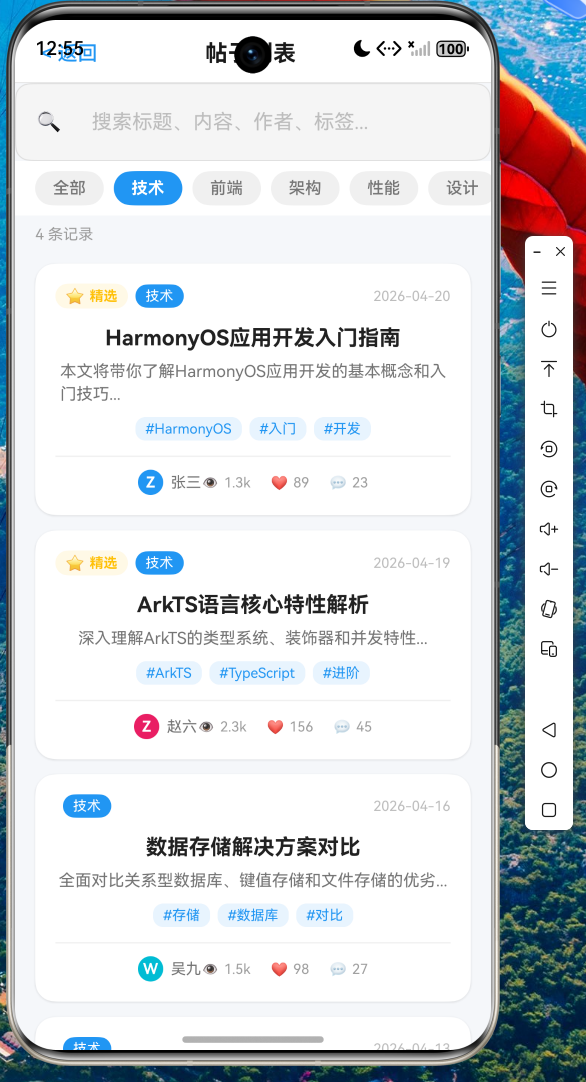
9.2 分类筛选效果
选择"技术"分类:
- 分类标签高亮显示
- 帖子列表自动过滤到该分类
- 结果计数实时更新
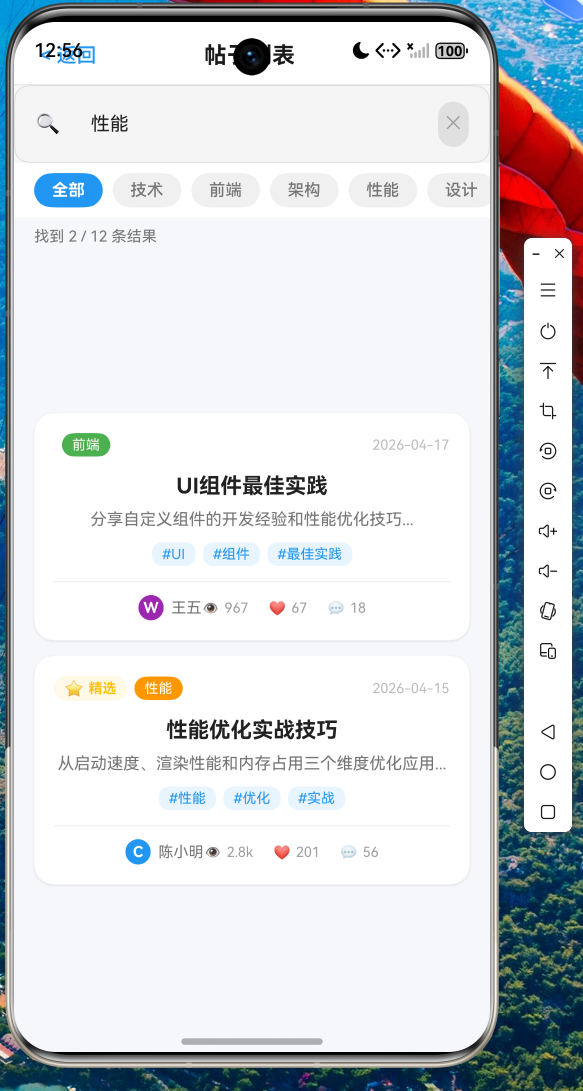
9.3 搜索功能演示
输入关键词"性能":
- 搜索框获得焦点
- 清除按钮出现
- 列表实时筛选匹配"性能"的帖子
- 结果计数显示筛选后数量
十、完整代码实现
10.1 页面完整结构
typescript
@Entry
@Component
struct PostListPage {
  @State searchText: string = '';
  @State filteredPosts: PostModel[] = [];
  @State isSearching: boolean = false;
  @State selectedCategory: string = '全部';
  @State showClearButton: boolean = false;

  private allPosts: PostModel[] = mockPosts;
  private debouncer: Debouncer = new Debouncer(300);
  private categories: string[] = ['全部', '技术', '前端', '架构', '性能', '设计', '安全', '资讯', '效率', '质量'];

  aboutToAppear(): void {
    this.filteredPosts = this.allPosts.slice();
  }

  aboutToDisappear(): void {
    this.debouncer.cancel();
  }

  private handleSearchInput(text: string): void {
    this.searchText = text;
    this.showClearButton = text.length > 0;
    this.isSearching = true;
    this.debouncer.run(() => {
      this.performSearch(text);
    });
  }

  private performSearch(text: string): void {
    let results = SearchUtils.filterPosts(this.allPosts, text);
    if (this.selectedCategory !== '全部') {
      results = results.filter(post => post.category === this.selectedCategory);
    }
    this.filteredPosts = results;
    this.isSearching = false;
  }

  private handleCategoryChange(category: string): void {
    this.selectedCategory = category;
    this.performSearch(this.searchText);
  }

  private clearSearch(): void {
    this.searchText = '';
    this.showClearButton = false;
    this.filteredPosts = this.selectedCategory === '全部'
      ? this.allPosts.slice()
      : this.allPosts.filter(p => p.category === this.selectedCategory);
    this.isSearching = false;
  }

  build() {
    Column() {
      this.buildHeader()
      this.buildSearchBar()
      this.buildCategoryTabs()
      SearchResultCount({
        totalCount: this.getTotalCount(),
        filteredCount: this.filteredPosts.length,
        isFiltering: this.isSearching
      })

      if (this.filteredPosts.length > 0) {
        this.buildPostList()
      } else {
        this.buildEmptyState()
      }
    }
    .width('100%')
    .height('100%')
    .backgroundColor('#FFF5F7FA')
  }
}
10.2 核心交互逻辑
typescript
// 分类与搜索的组合过滤
private performSearch(text: string): void {
  // 第一步:关键词过滤
  let results = SearchUtils.filterPosts(this.allPosts, text);

  // 第二步:分类过滤(可选)
  if (this.selectedCategory !== '全部') {
    results = results.filter(post => post.category === this.selectedCategory);
  }

  // 第三步:更新状态
  this.filteredPosts = results;
  this.isSearching = false;
}

// 清除搜索保留当前分类
private clearSearch(): void {
  this.filteredPosts = this.selectedCategory === '全部'
    ? this.allPosts.slice()
    : this.allPosts.filter(p => p.category === this.selectedCategory);
}
十一、总结与最佳实践
11.1 核心要点
- 多维搜索:支持标题、内容、作者、分类、标签五维匹配
- 组合过滤:搜索与分类筛选协同工作,互不干扰
- 分类感知:清除搜索时智能保留当前分类状态
- 精选标识:优质内容差异化展示
- 数字简化:大数值人性化呈现(k、万单位)
11.2 性能优化建议
- 防抖处理:300ms延迟避免频繁搜索
- 索引优化:大数据量时考虑服务端搜索
- 懒加载:长列表使用 LazyForEach 优化内存
11.3 扩展方向
- 搜索历史:保存用户最近的搜索记录
- 热门搜索:展示当前热门帖子话题
- 搜索建议:输入时提供智能补全
结语
本文以帖子列表页面为载体,深入剖析了 Flutter for OpenHarmony 平台下的搜索功能实现。从数据模型设计到多维搜索逻辑,从分类筛选机制到卡片UI实现,展示了完整的实战方案。
与用户列表相比,帖子列表具有更丰富的信息维度和更复杂的交互场景。通过合理的架构设计和细致的交互打磨,可以为用户带来流畅、直观的搜索体验。
代码已托管至 AtomGit 仓库,欢迎交流讨论: