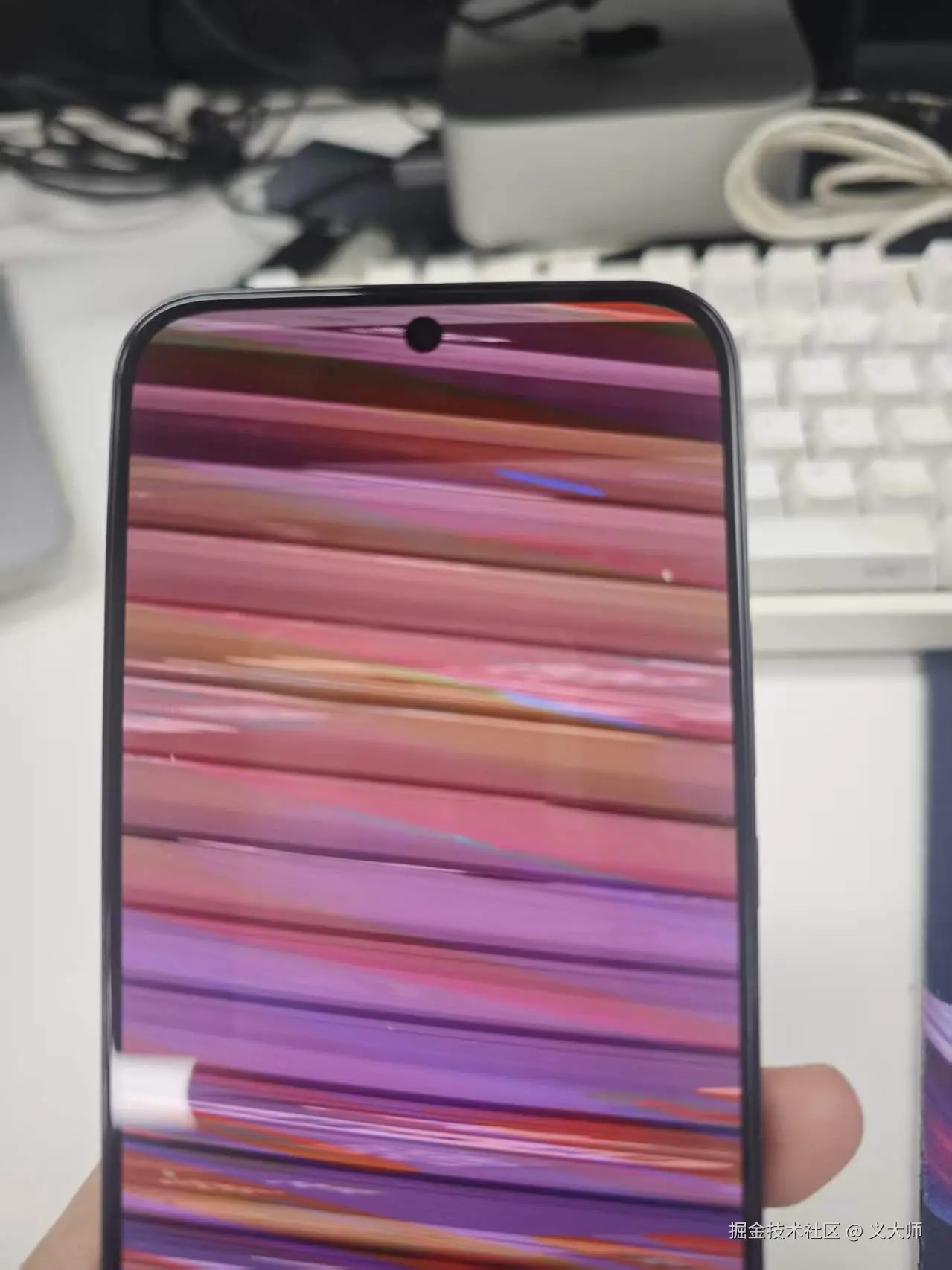
问题现象
问题排查
这个问题的花屏存在规律现象,是横向花屏,但是原因不明,最后的排查方法最后了解到画面的排列存在跨距对齐字节引起的。图像每一行像素的宽度并不一定是是存储在内存的宽度,显示器一般每行数据需要对齐8的字节倍数,但图像像素不一定。所以会存在补充对齐字节的概念。
代码
原代码
cpp
void EGLCore::LoadPhoneYuv(int width, int height, webrtc::I420BufferInterface *buffer) {
      // Texture ID.
    GLuint texts[3] = { 0 };
    // Create several texture objects and get the texture ID.
    glGenTextures(3, texts);

    // Bound texture. The following settings and loadings all apply to the currently bound texture object.
    // GL_TEXTURE0, GL_TEXTURE1, and GL_TEXTURE2 are texture units.
    // GL_Texture_1D, GL_Texture_2D, and CUBE_MAP are texture targets.
    // After the texture target is bound to the texture through the glBindTexture function,
    // the operations performed on the texture target are reflected on the texture.
    glBindTexture(GL_TEXTURE_2D, texts[0]);
    // Shrinking filters.
    glTexParameteri(GL_TEXTURE_2D, GL_TEXTURE_MIN_FILTER, GL_LINEAR);
    // A magnified filter.
    glTexParameteri(GL_TEXTURE_2D, GL_TEXTURE_MAG_FILTER, GL_LINEAR);

    glTexImage2D(GL_TEXTURE_2D,
                 0,                // Details are basically 0 by default.
                 GL_LUMINANCE,     // GPU internal format luminance, grayscale image.
                 width,            // Width of the loaded texture.
                 height,           // Height of the loaded texture.
                 0,                // Textured border.
                 GL_LUMINANCE,     // Data pixel format luminance, grayscale image.
                 GL_UNSIGNED_BYTE, // Data type for storing pixels.
                 NULL              // Data for the texture.
    );

    // Bind the texture.
    glBindTexture(GL_TEXTURE_2D, texts[1]);
    // Shrinking filters.
    glTexParameteri(GL_TEXTURE_2D, GL_TEXTURE_MIN_FILTER, GL_LINEAR);
    glTexParameteri(GL_TEXTURE_2D, GL_TEXTURE_MAG_FILTER, GL_LINEAR);
    // Sets the format and size of the texture.
    glTexImage2D(GL_TEXTURE_2D,
                 0,
                 GL_LUMINANCE,
                 width / 2,        // The amount of u data is 1/4 of the screen.
                 height / 2,
                 0,                // Borders.
                 GL_LUMINANCE,
                 GL_UNSIGNED_BYTE,
                 NULL
    );

    // Bind the texture.
    glBindTexture(GL_TEXTURE_2D, texts[2]);
    // Shrinking filters.
    glTexParameteri(GL_TEXTURE_2D, GL_TEXTURE_MIN_FILTER, GL_LINEAR);
    glTexParameteri(GL_TEXTURE_2D, GL_TEXTURE_MAG_FILTER, GL_LINEAR);
    // Sets the format and size of the texture.
    glTexImage2D(GL_TEXTURE_2D,
                 0,
                 GL_LUMINANCE,
                 width / 2,        //  The amount of v data is 1/4 of the screen.
                 height / 2,
                 0,
                 GL_LUMINANCE,
                 GL_UNSIGNED_BYTE,
                 NULL
    );

    // Activates the first layer of texture, bound to the created texture.
    glActiveTexture(GL_TEXTURE0);
    // Binds the texture corresponding to y.
    glBindTexture(GL_TEXTURE_2D, texts[0]);
    // Replace the texture.
    glTexSubImage2D(GL_TEXTURE_2D, 0, 0, 0, // Offset of the original texture.
                    width, height,          // Width and height of the loaded texture.
                    GL_LUMINANCE, GL_UNSIGNED_BYTE, buffer->DataY());

    // Activates the second layer of texture, which is bound to the created texture.
    glActiveTexture(GL_TEXTURE1);
    // Binds the texture corresponding to u.
    glBindTexture(GL_TEXTURE_2D, texts[1]);
    // Replace the texture.
    glTexSubImage2D(GL_TEXTURE_2D, 0, 0, 0, width / 2, height / 2, GL_LUMINANCE, GL_UNSIGNED_BYTE, buffer->DataU());
    // Activates the third layer of texture, which is bound to the created texture.
    glActiveTexture(GL_TEXTURE2);
    // Binds the texture corresponding to v.
    glBindTexture(GL_TEXTURE_2D, texts[2]);
    // Replace the texture.
    glTexSubImage2D(GL_TEXTURE_2D, 0, 0, 0, width / 2, height / 2, GL_LUMINANCE, GL_UNSIGNED_BYTE, buffer->DataV());
    FinishLoad();
}
修改后的代码
cpp
void EGLCore::LoadPhoneYuv(int width, int height, webrtc::I420BufferInterface *buffer) {
    int yStride = buffer->StrideY();
    int uvStride = buffer->StrideU();
    // Texture IDs for Y, U, V
    GLuint textures[3];
    glGenTextures(3, textures);

    // Uniform texture parameters
    for (int i = 0; i < 3; ++i) {
        glBindTexture(GL_TEXTURE_2D, textures[i]);
        glTexParameteri(GL_TEXTURE_2D, GL_TEXTURE_MIN_FILTER, GL_LINEAR);
        glTexParameteri(GL_TEXTURE_2D, GL_TEXTURE_MAG_FILTER, GL_LINEAR);
        glTexParameteri(GL_TEXTURE_2D, GL_TEXTURE_WRAP_S, GL_CLAMP_TO_EDGE);
        glTexParameteri(GL_TEXTURE_2D, GL_TEXTURE_WRAP_T, GL_CLAMP_TO_EDGE);
    }

    // Set unpack row length (stride)
    glPixelStorei(GL_UNPACK_ROW_LENGTH, yStride); // Set stride for Y plane
    glBindTexture(GL_TEXTURE_2D, textures[0]);
    glTexImage2D(GL_TEXTURE_2D, 0, GL_LUMINANCE, yStride, height, 0, GL_LUMINANCE, GL_UNSIGNED_BYTE, buffer->DataY());

    glPixelStorei(GL_UNPACK_ROW_LENGTH, uvStride); // Set stride for U plane
    glBindTexture(GL_TEXTURE_2D, textures[1]);
    glTexImage2D(GL_TEXTURE_2D, 0, GL_LUMINANCE, uvStride, height / 2, 0, GL_LUMINANCE, GL_UNSIGNED_BYTE,
                 buffer->DataU());

    glPixelStorei(GL_UNPACK_ROW_LENGTH, uvStride); // Set stride for V plane
    glBindTexture(GL_TEXTURE_2D, textures[2]);
    glTexImage2D(GL_TEXTURE_2D, 0, GL_LUMINANCE, uvStride, height / 2, 0, GL_LUMINANCE, GL_UNSIGNED_BYTE,
                 buffer->DataV());

    // Reset unpack row length to default
    glPixelStorei(GL_UNPACK_ROW_LENGTH, 0);

    // Activate and bind textures (if necessary in the rendering pipeline)
    glActiveTexture(GL_TEXTURE0);
    glBindTexture(GL_TEXTURE_2D, textures[0]);

    glActiveTexture(GL_TEXTURE1);
    glBindTexture(GL_TEXTURE_2D, textures[1]);

    glActiveTexture(GL_TEXTURE2);
    glBindTexture(GL_TEXTURE_2D, textures[2]);

    // Signal that textures are loaded (e.g., any additional OpenGL operations)
    FinishLoad();

    // Delete textures if they are temporary
    glDeleteTextures(3, textures);
}