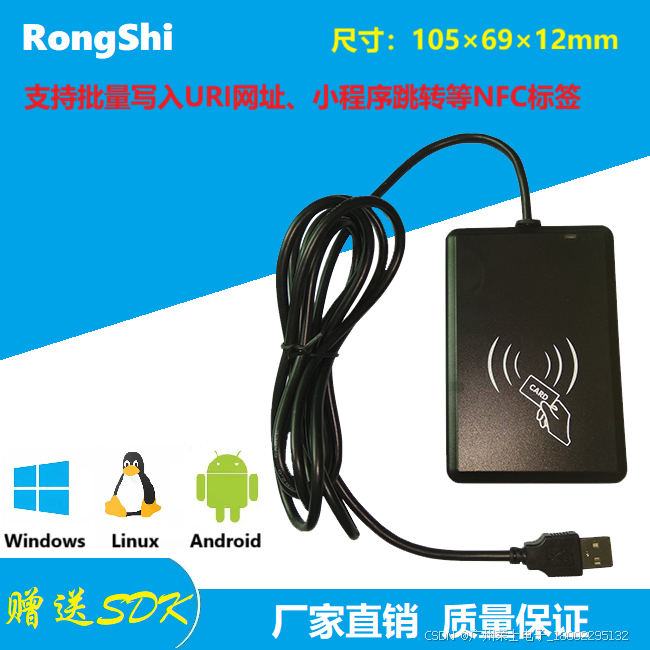
本示例使用的发卡器:https://item.taobao.com/item.htm?spm=a21dvs.23580594.0.0.4fee2c1bf5IkBT&ft=t&id=615391857885
python
# pip install pyautogui 模拟键盘输入库
from PyQt5 import QtCore, QtGui, QtWidgets
from PyQt5.QtWidgets import QApplication, QWidget, QDesktopWidget,QMessageBox
from mainwindow import Ui_MainWindow
import sys
import re #正则表达式库
import threading
import pyautogui # 模拟键盘输出库
import struct # struct的pack函数把任意数据类型变成字符串
import ctypes # 调用DLL动态库要有这个引用
import webbrowser # 默认浏览器打开URI
import configparser # 读写ini配置文件
Reading=0
oldpicckey = bytes.fromhex('FFFFFFFFFFFF')
newpicckey = bytes.fromhex('FFFFFFFFFFFF')
class MainWindow(QtWidgets.QMainWindow, Ui_MainWindow):
def __init__(self, parent=None):
super(MainWindow, self).__init__(parent)
self.setupUi(self)
self.setWindowFlags(QtCore.Qt.WindowMinimizeButtonHint | QtCore.Qt.MSWindowsFixedSizeDialogHint)
self.pushButton_beep.clicked.connect(self.pushButton_beep_clicked)
self.pushButton_save.clicked.connect(self.pushButton_save_clicked)
self.pushButton_exit.clicked.connect(self.pushButton_exit_clicked)
self.initialize()
def initialize(self):
global Reading
Reading = 1
try:
config = configparser.ConfigParser()
config.read('SysConfig.ini')
if config.get('DefaultSetup', 'BeepEn',fallback='1') == '0':
self.checkBox_beep.setChecked(False)
else:
self.checkBox_beep.setChecked(True)
if config.get('DefaultSetup', 'OutputUrlEn',fallback='1') == '0':
self.checkBox_output_url.setChecked(False)
else:
self.checkBox_output_url.setChecked(True)
if config.get('DefaultSetup', 'OpenWebpageEn',fallback='0') == '0':
self.checkBox_jump_url.setChecked(False)
else:
self.checkBox_jump_url.setChecked(True)
if config.get('DefaultSetup', 'MinSystemEn',fallback='0') == '0':
self.checkBox_mini.setChecked(False)
else:
self.checkBox_mini.setChecked(True)
self.showMinimized()
threading.Timer(2, self.task).start() # 首次开启窗口后2秒开启读卡线程
except:
Reading = 0
def pushButton_beep_clicked(self):
status = Objdll.pcdbeep(50) % 256
def pushButton_save_clicked(self):
try:
config = configparser.ConfigParser()
config.read('SysConfig.ini')
if self.checkBox_beep.isChecked():
config.set('DefaultSetup', 'BeepEn', '1')
else:
config.set('DefaultSetup', 'BeepEn', '0')
if self.checkBox_output_url.isChecked():
config.set('DefaultSetup', 'OutputUrlEn', '1')
else:
config.set('DefaultSetup', 'OutputUrlEn', '0')
if self.checkBox_jump_url.isChecked():
config.set('DefaultSetup', 'OpenWebpageEn', '1')
else:
config.set('DefaultSetup', 'OpenWebpageEn', '0')
if self.checkBox_mini.isChecked():
config.set('DefaultSetup', 'MinSystemEn', '1')
else:
config.set('DefaultSetup', 'MinSystemEn', '0')
with open('SysConfig.ini', 'w') as configfile:
config.write(configfile)
QMessageBox.information(None, "提示", "系统参数已保存!", QMessageBox.Yes)
except Exception as e:
QMessageBox.critical(None, "提示", f"保存参数时发生错误:{e}", QMessageBox.Yes)
def pushButton_exit_clicked(self):
global Reading
Reading = 0
app.closeAllWindows()
sys.exit(app.exec_())
def task(self):
global Reading
if Reading == 1:
self.ReadTag()
threading.Timer(0.01, self.task).start() # 10毫秒后再次触发读卡线程
def checkcardtype(self): #检测NFC标签类型
myctrlword=0
devno = bytes(4) # 声明4个字节缓冲
mypiccserial= bytes(8) # 声明8个字节缓冲
mypicckey=bytes(6) # 声明6个字节缓冲
mypicdata=bytes(48)
mypiccseriallen=bytes(2)
status = Objdll.pcdgetdevicenumber(devno) % 256
if (status == 0):
status = Objdll.piccreadex_ntag(myctrlword, mypiccserial, mypicckey, 4, 1, mypicdata) % 256
if (status == 0):
return 1 #forumtype2 Ntag2标签
else:
status = Objdll.iso15693readex(myctrlword,0,1,1, mypiccserial,mypicdata) % 256
if (status == 0):
return 2 #forumtype5 15693标签
else:
myctrlword = 23
mypicckey=bytes([255,255,255,255,255,255])
status = Objdll.piccreadex(myctrlword,mypiccserial,0,1,mypicckey,mypicdata) % 256
if (status == 0):
return 3 #MifareClissic标签,出厂全新状态
else:
mypicckey = bytes([160, 161, 162, 163, 164, 165])
status = Objdll.piccreadex(myctrlword, mypiccserial, 0, 1, mypicckey, mypicdata) % 256
if (status == 0):
return 3 #MifareClissic标签,已经写有NDEF数据
else:
myctrlword = 0
status = Objdll.forumtype4request(myctrlword, mypiccserial, mypiccseriallen) % 256
if (status == 0 or status == 52):
return 4 #forumtype4 标签
else:
return -1 #其他未知型号标签
def ReadTag(self): # 读取各种不同类型的NFC标签的NDEF数据
mypiccserial = bytes(8)
mypiccseriallen = bytes(1)
mypiccdata = bytes(2048)
revstrlen = bytes(2)
recordnumber = bytes(2)
status = -1
cardtyep = self.checkcardtype() #判断发卡器上的标签类型
if (cardtyep == 1): # 读forumtype2 Ntag2标签
myctrlword = 0
status = Objdll.forumtype2_read_ndeftag(myctrlword, mypiccserial, oldpicckey) % 256
elif(cardtyep==2): #读forumtype5 15693标签
myctrlword = 0
afi=0
status = Objdll.forumtype5_read_ndeftag(myctrlword,afi, mypiccserial) % 256
elif (cardtyep == 3): # 读MifareClassic标签
myctrlword = 144
status = Objdll.piccread_ndeftag(myctrlword, mypiccserial, oldpicckey) % 256
elif(cardtyep==4): #读forumtype4 标签
myctrlword = 0
status = Objdll.forumtype4_read_ndeftag(myctrlword, mypiccserial,mypiccseriallen,oldpicckey) % 256
if cardtyep==2:
Objdll.iso15693stayquiet(34, mypiccserial) % 256 #休眠15693卡
else:
Objdll.picchalt() #休眠卡
if (status == 0):
Objdll.tagbuf_read(mypiccdata,revstrlen,recordnumber)
strlen=revstrlen[0]+revstrlen[1]*256
strinf=mypiccdata[0:strlen]
ndefstr=strinf.decode('gbk')
uribegin=ndefstr.find('URI field:')
if uribegin>0:
urlstr = extract_between_chars(ndefstr, 'URI field:', chr(13))
if self.checkBox_beep.isChecked():
Objdll.pcdbeep(50) % 256
if self.checkBox_output_url.isChecked():
pyout(urlstr)
if self.checkBox_jump_url.isChecked():
webbrowser.open(urlstr)
else:
textbegin = ndefstr.find('text:')
if textbegin > 0:
if self.checkBox_beep.isChecked():
Objdll.pcdbeep(50) % 256
textstr = extract_between_chars(ndefstr, 'text:"', '"'+chr(13))
pyout(textstr)
def extract_between_chars(s, start, end): #截取 2个字符串 中间的字符串
pattern = f"{re.escape(start)}(.*?){re.escape(end)}"
match = re.search(pattern, s)
if match:
result = match.group(1)
return result
else:
return None
def pyout(textstr):
#for char in textstr:
# pyautogui.typewrite(char) # 逐个字符输入
#pyautogui.press('enter') # 如果需要,在每个字符后按Enter键
#time.sleep(0.1) # 添加延迟,以减慢输入速度(可选)
# 或者一次性输入整个字符串(不包含延迟和Enter)
pyautogui.write(textstr, interval=0.02) # 使用write可以一次性输入整个字符串,interval参数控制字符间的延迟
pyautogui.press('enter') #输出回车键
if __name__ == "__main__":
if sys.platform == 'win32':
# windows系统加载当前目录下的DLL库
dllfile = sys.path[0] + '\OUR_MIFARE.dll'
Objdll = ctypes.windll.LoadLibrary(dllfile)
elif sys.platform == 'linux':
# Linux加载当前目录下的so库
dllfile = sys.path[0] + '/libOURMIFARE.so'
Objdll = ctypes.cdll.LoadLibrary(dllfile)
else:
# macOS加载当前目录下的.dylib库
dllfile = sys.path[0] + '/libOURMIFARE.dylib'
Objdll = ctypes.cdll.LoadLibrary(dllfile)
app = QtWidgets.QApplication(sys.argv)
mainWindow = MainWindow()
screen = QDesktopWidget().screenGeometry()
size = mainWindow.geometry()
# 获得窗口相关坐标
newLeft = (screen.width() - size.width()) // 2
newTop = (screen.height() - size.height()) // 2
# 移动窗口使其居中
mainWindow.move(newLeft, newTop)
mainWindow.setWindowTitle("Reader is running")
mainWindow.show()
sys.exit(app.exec_())