3.1 Openlayers调用ArcGis影像服务之动态地图、地图切片
各个库版本如下:
javascript
    "ol": "^10.8.0",
    "proj4": "^2.20.8",
    "vue3-openlayers": "^12.2.2"
目录
- [3.1.1 介绍](#3.1.1 介绍 "#311-%E4%BB%8B%E7%BB%8D")
- [3.1.2 核心特点](#3.1.2 核心特点 "#312-%E6%A0%B8%E5%BF%83%E7%89%B9%E7%82%B9")
- [3.1.3 核心接口](#3.1.3 核心接口 "#313-%E6%A0%B8%E5%BF%83%E6%8E%A5%E5%8F%A3")
- [3.1.4 服务信息查看](#3.1.4 服务信息查看 "#314-%E6%9C%8D%E5%8A%A1%E4%BF%A1%E6%81%AF%E6%9F%A5%E7%9C%8B")
- [3.1.5 Openlayers调用](#3.1.5 Openlayers调用 "#315-openlayers%E8%B0%83%E7%94%A8")
- [3.1.6 Vue3-Openlayers用](#3.1.6 Vue3-Openlayers用 "#316-vue3-openlayers%E7%94%A8")
3.1.1 介绍
影像服务是一种通过Web服务提供对栅格数据和影像数据访问的能力。它允许用户通过互联网高效地存储、管理、处理、分析和显示大规模影像数据集合,包括卫星影像、无人机影像、航空摄影、天气雷达数据等。简单来说,影像服务就是将大量的影像数据(如某个地区多年的卫星图)发布成一个统一的、可通过网络访问的图层,用户无需下载原始数据,即可在浏览器或桌面应用中查看、分析和处理这些影像。下面使用ArcGis官方服务作为示例直接调用(如果使用自己的私有服务,可能先要获取token)
3.1.2 核心特点
-
动态处理(On-the-fly Processing)
这是影像服务最强大的特性之一。影像服务可以在服务器端实时对影像进行处理,而无需预处理和存储多个副本。支持的动态处理包括:
-
正射校正
-
山体阴影、坡度分析
-
波段组合与代数运算(如NDVI)
-
拉伸增强
-
裁剪与重投影
例如,同一个原始影像服务,用户A可以查看真彩色影像,用户B可以查看NDVI植被指数,系统根据请求实时计算并返回结果,无需存储两份数据。
-
-
动态镶嵌(Dynamic Mosaicking)
当影像服务基于镶嵌数据集发布时,服务器会自动将重叠的多张影像按规则(如按采集时间、按云量最少)动态拼接成一张无缝的影像图。用户无需关心底层有多少张影像,只需像查看一张图一样操作。
-
服务端栅格函数(Raster Functions)
ArcGIS Pro支持创建栅格函数模板(.rft.xml),并将其发布到影像服务中。客户端通过REST API调用这些模板,即可应用复杂的处理链。支持的默认函数包括:
-
NDVI(归一化植被指数)
-
Slope(坡度)
-
Hillshade(山体阴影)
-
Stretch(拉伸)
-
Aspect(坡向)
-
-
缓存支持
对于访问频繁的影像服务,可以生成缓存切片来提升性能。缓存后的影像服务不再需要动态渲染,而是直接返回预生成的切片。但需要注意:缓存仅支持1或3波段的影像,且一旦缓存,动态处理能力将受限。
3.1.3 核心接口
| 操作 | 说明 |
|---|---|
| /exportImage | 导出指定范围、大小、格式的影像 |
| /query | 查询镶嵌数据集的属性表(影像列表) |
| /queryCatalog | 查询目录项(每个影像的轮廓、元数据) |
| /computeStatisticsHistograms | 计算统计信息 |
| /identify | 识别某位置的像素值 |
| /download | 下载原始影像文件 |
3.1.4 服务信息查看
ArcGis官方服务4 -- 没有切片
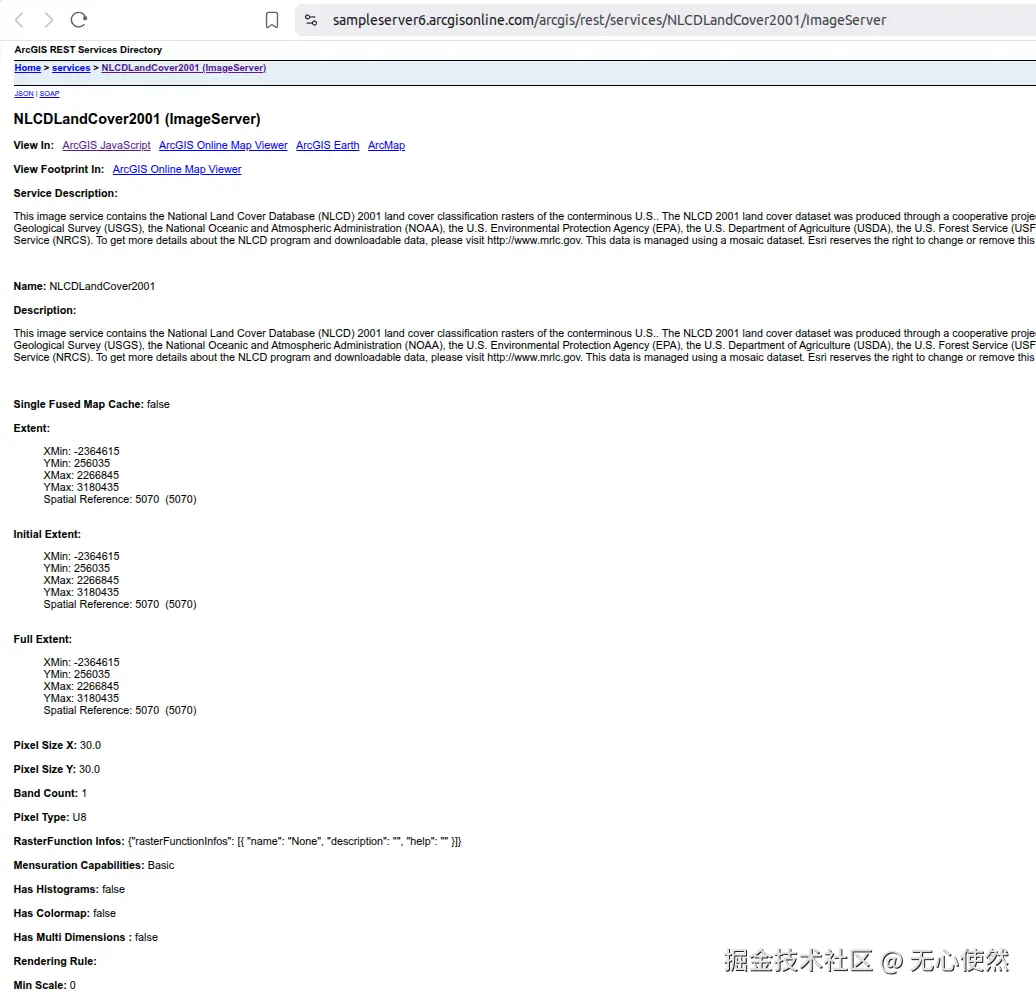
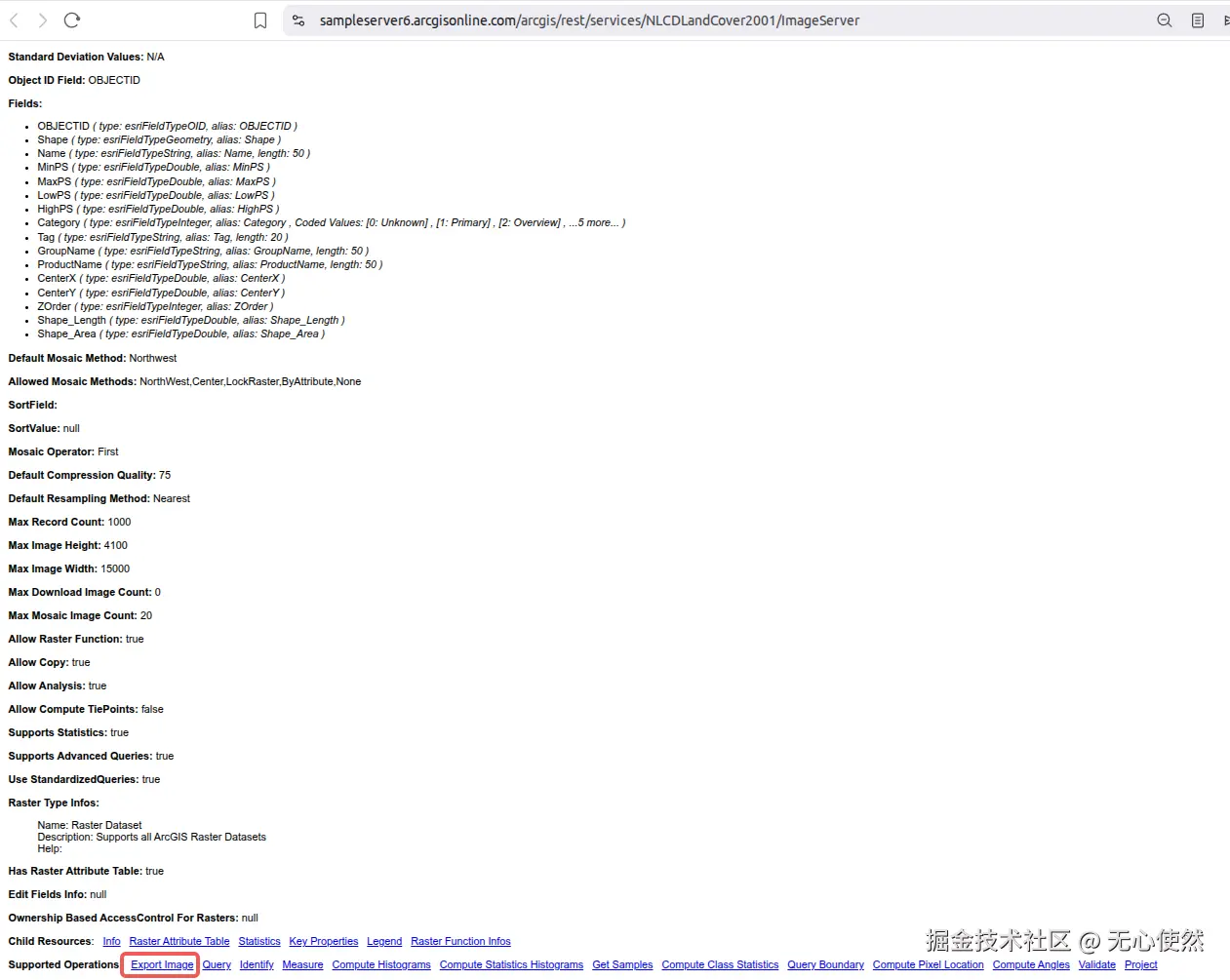
可以看到有Export Image接口
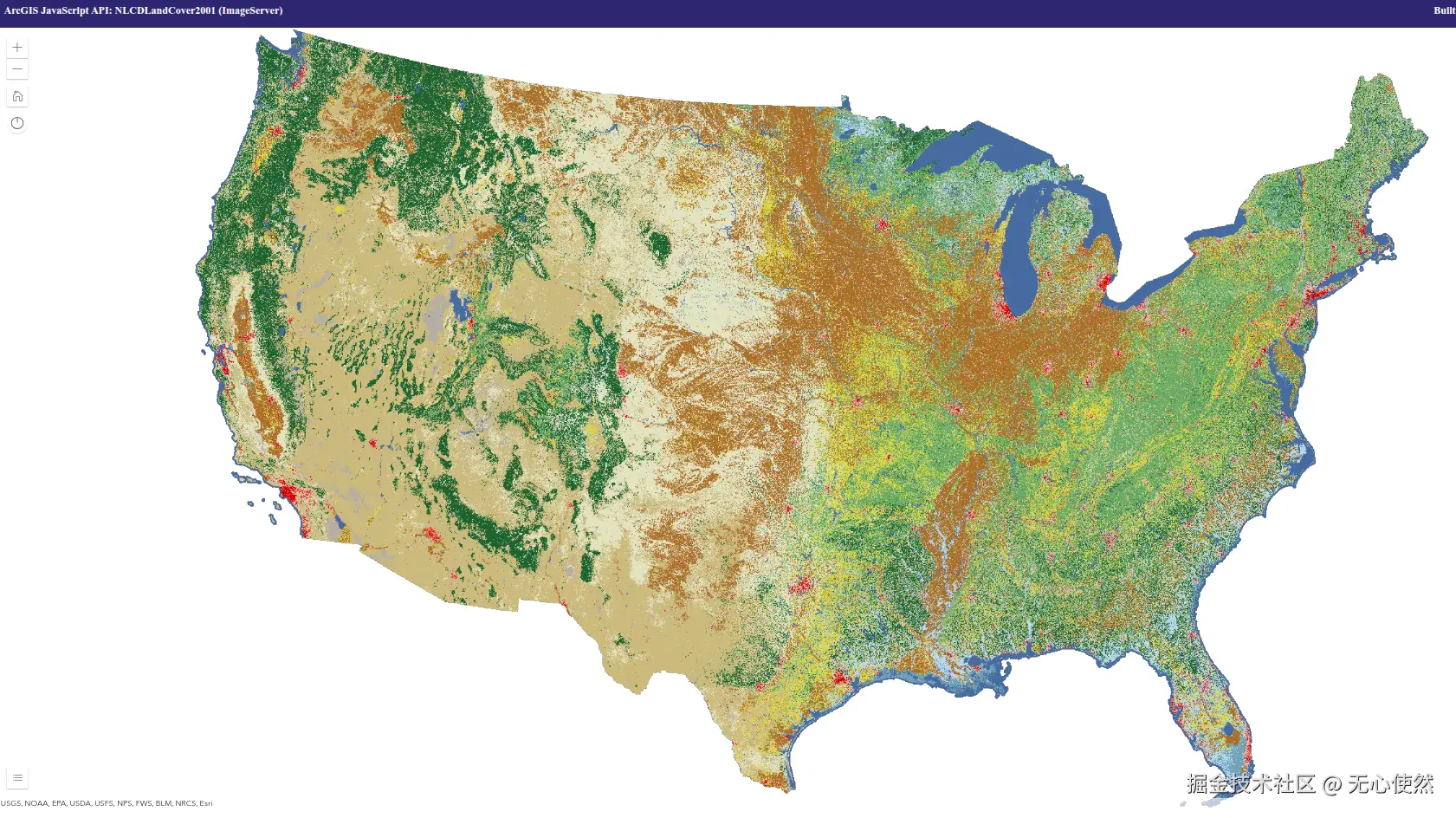
在线预览如下:
ArcGis官方服务5 --有切片
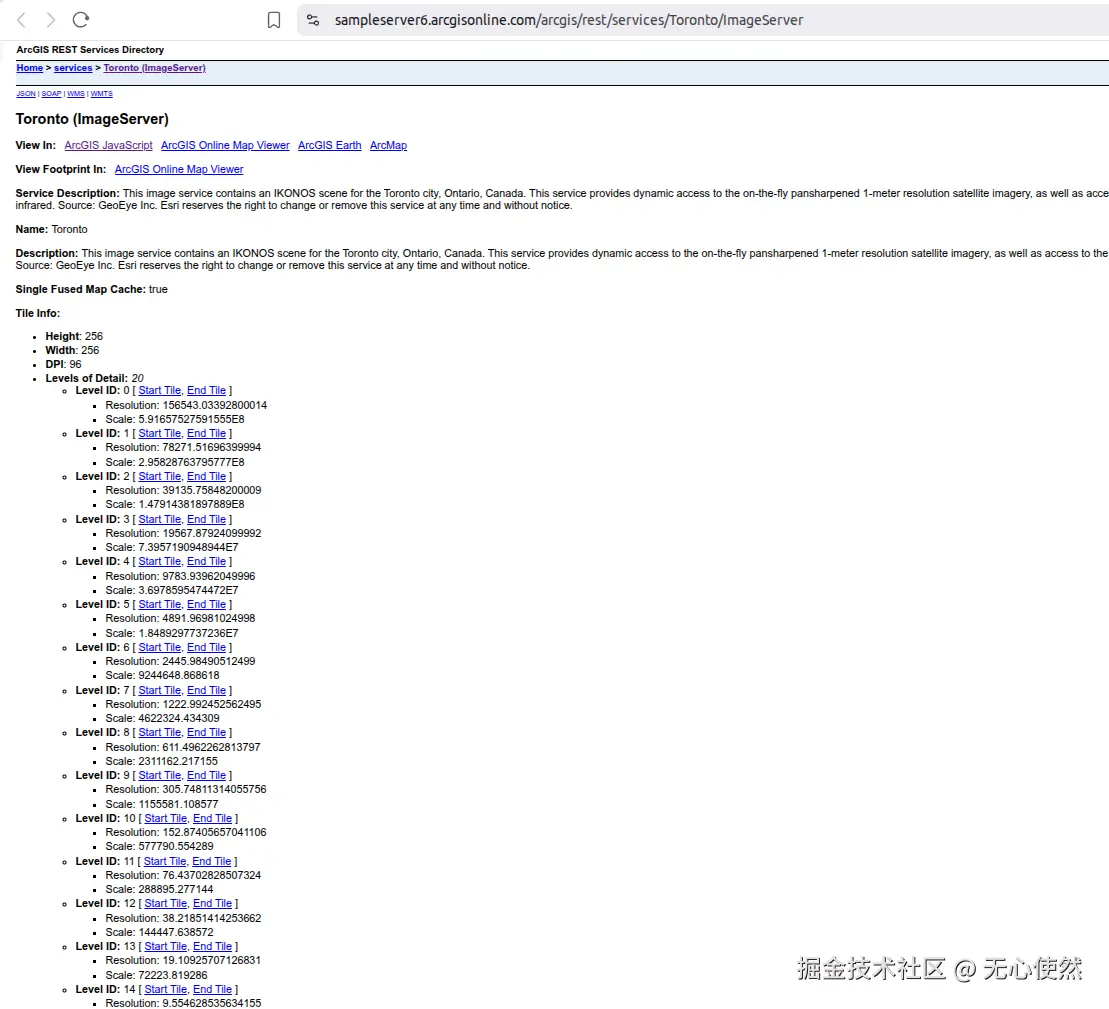
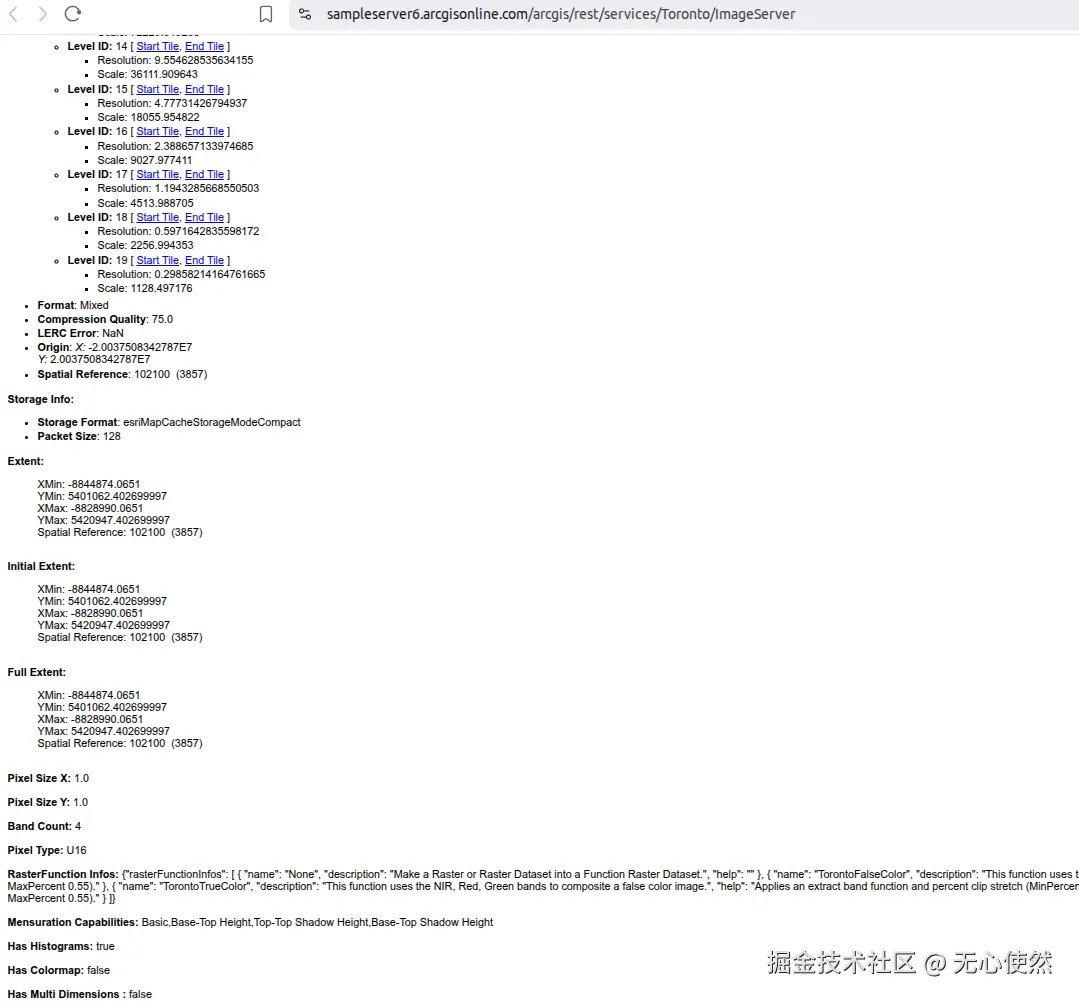
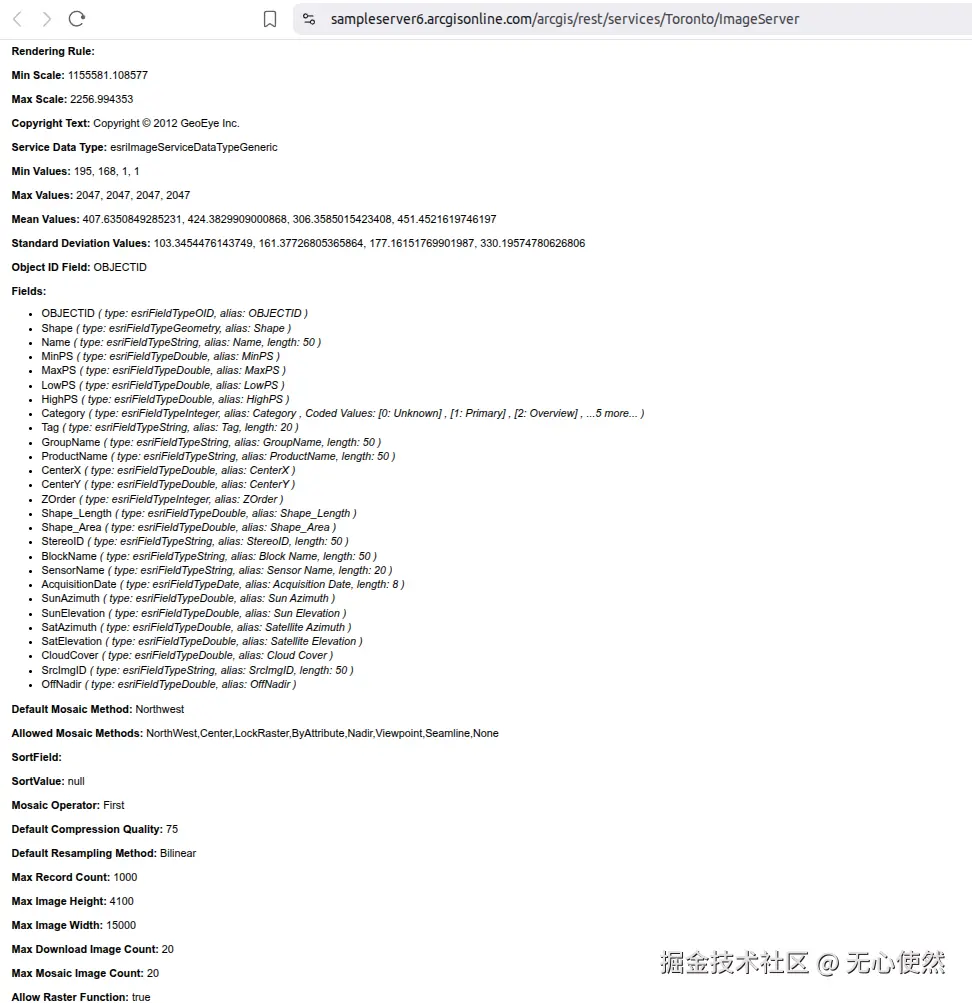
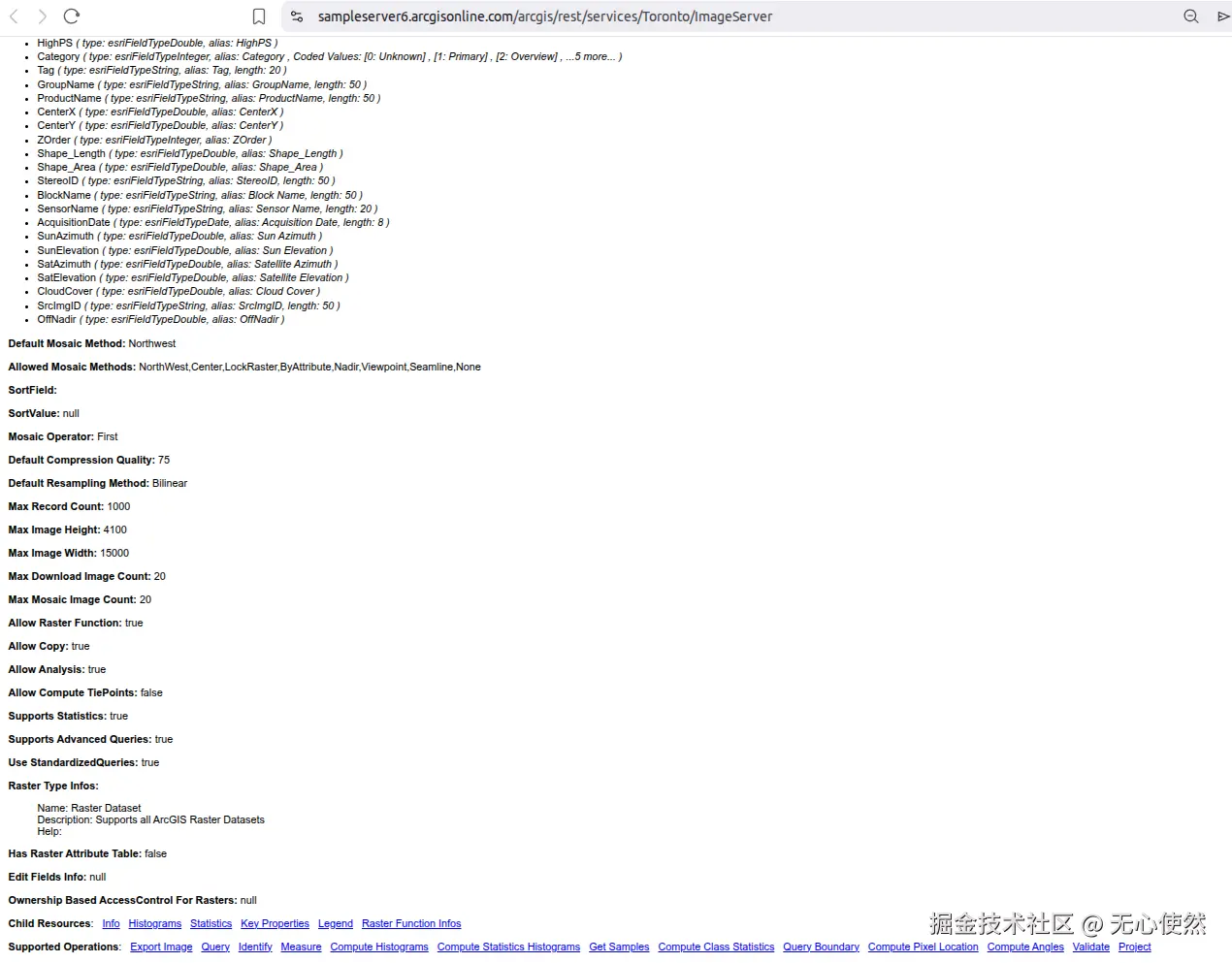
可以看到有有切片信息Single Fused Map Cache: true和Tile Info:
在线预览如下:
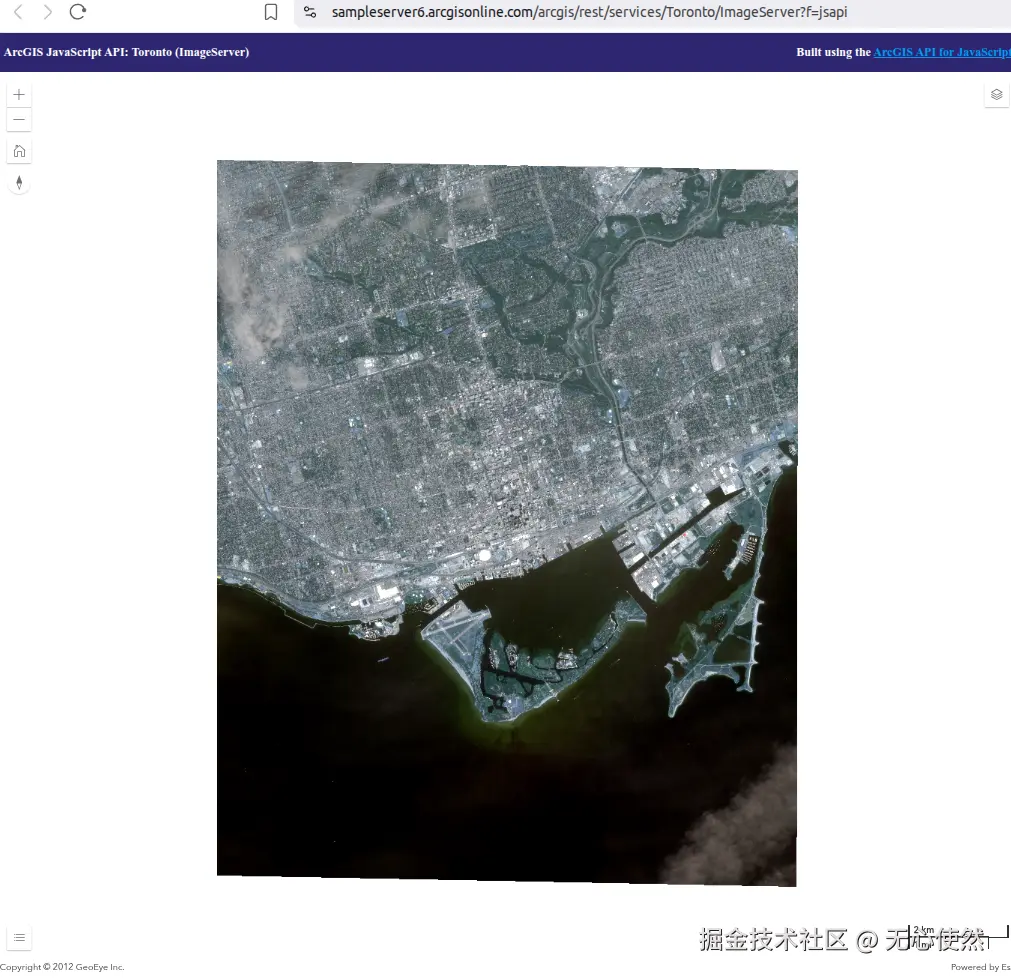
3.1.5 Openlayers调用
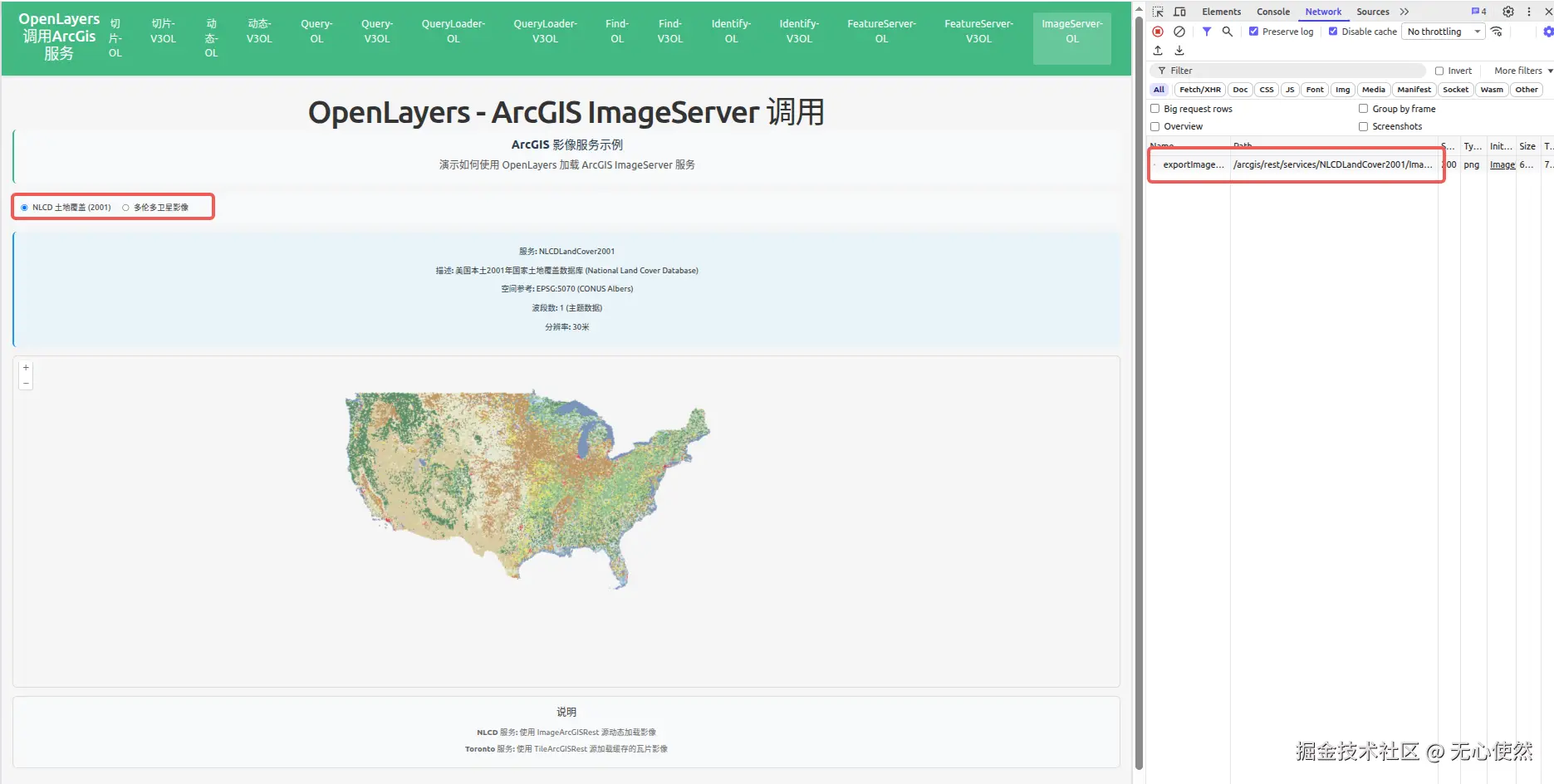
可以看到,官方服务4没有切片,直接使用一个/exportImage接口返回完整图片
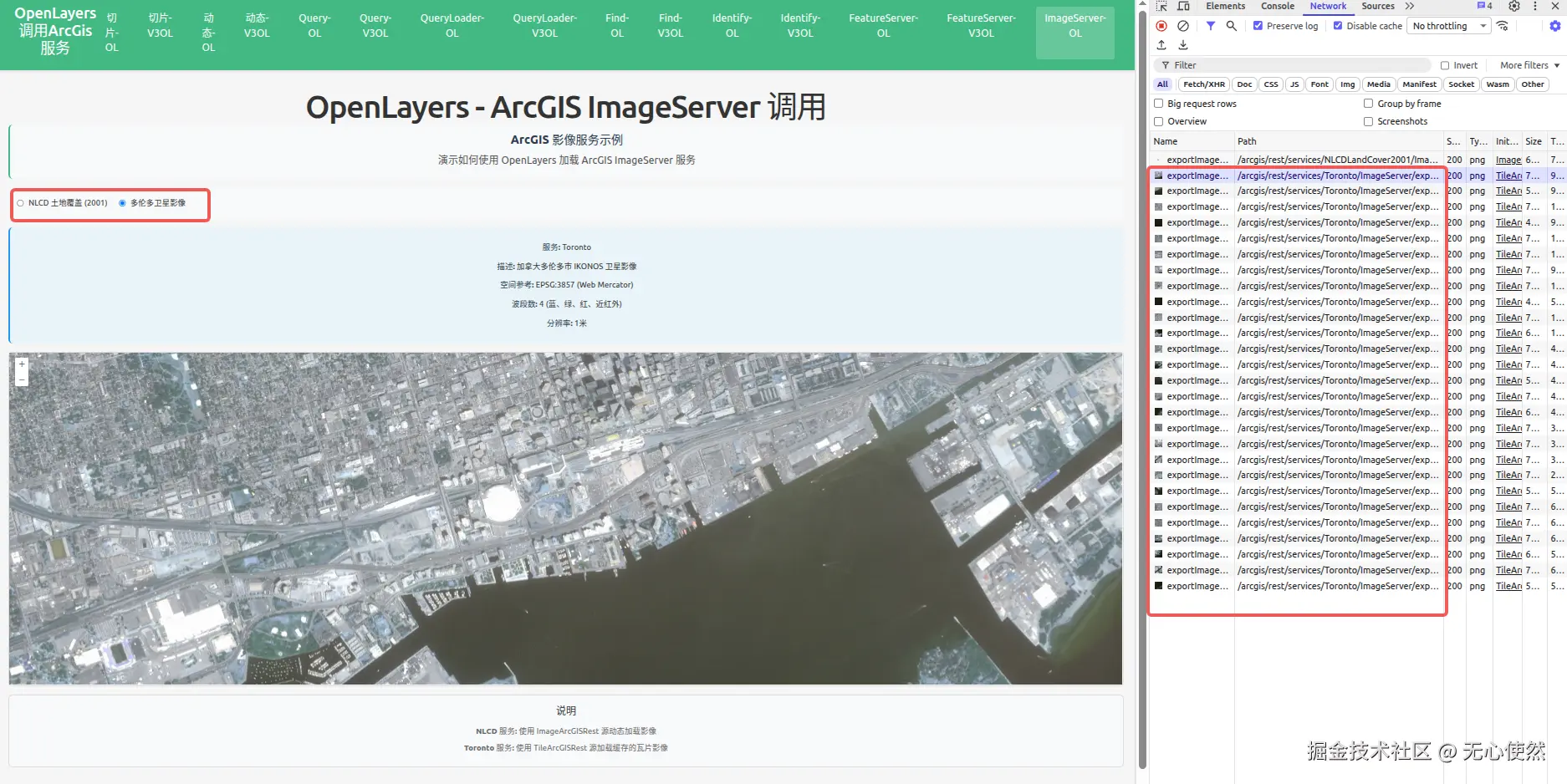 可以看到,官方服务5有切片,直接使用多个/exportImage接口返回图片进行拼接
javascript
<template>
  <div class="map-page">
    <h1>OpenLayers - ArcGIS ImageServer 调用</h1>
    <div class="info-panel">
      <h3>ArcGIS 影像服务示例</h3>
      <p>演示如何使用 OpenLayers 加载 ArcGIS ImageServer 服务</p>
    </div>

    <div class="controls">
      <label>
        <input
          type="radio"
          value="nlcd"
          v-model="selectedService"
          @change="switchService"
        />
        <span>NLCD 土地覆盖 (2001)</span>
      </label>
      <label>
        <input
          type="radio"
          value="toronto"
          v-model="selectedService"
          @change="switchService"
        />
        <span>多伦多卫星影像</span>
      </label>
    </div>

    <div class="service-info">
      <div v-if="selectedService === 'nlcd'">
        <p><strong>服务:</strong> NLCDLandCover2001</p>
        <p>
          <strong>描述:</strong> 美国本土2001年国家土地覆盖数据库 (National Land
          Cover Database)
        </p>
        <p><strong>空间参考:</strong> EPSG:5070 (CONUS Albers)</p>
        <p><strong>波段数:</strong> 1 (主题数据)</p>
        <p><strong>分辨率:</strong> 30米</p>
      </div>
      <div v-else>
        <p><strong>服务:</strong> Toronto</p>
        <p><strong>描述:</strong> 加拿大多伦多市 IKONOS 卫星影像</p>
        <p><strong>空间参考:</strong> EPSG:3857 (Web Mercator)</p>
        <p><strong>波段数:</strong> 4 (蓝、绿、红、近红外)</p>
        <p><strong>分辨率:</strong> 1米</p>
      </div>
    </div>

    <div id="imageserver-ol-map" ref="mapContainer" class="map-container"></div>

    <div class="legend">
      <h4>说明</h4>
      <p><strong>NLCD 服务:</strong> 使用 ImageArcGISRest 源动态加载影像</p>
      <p>
        <strong>Toronto 服务:</strong> 使用 TileArcGISRest 源加载缓存的瓦片影像
      </p>
    </div>
  </div>
</template>

<script setup lang="ts">
import { onMounted, onUnmounted, ref } from "vue";
import Map from "ol/Map";
import View from "ol/View";
import TileLayer from "ol/layer/Tile";
import ImageLayer from "ol/layer/Image";
import { OSM } from "ol/source";
import ImageArcGISRest from "ol/source/ImageArcGISRest";
import TileArcGISRest from "ol/source/TileArcGISRest";

import { register } from "ol/proj/proj4";
import proj4 from "proj4";

// 注册 EPSG:5070 投影 (CONUS Albers)
proj4.defs(
  "EPSG:5070",
  "+proj=aea +lat_1=29.5 +lat_2=45.5 +lat_0=23 +lon_0=-96 +x_0=0 +y_0=0 +datum=NAD83 +units=m +no_defs",
);
register(proj4);

const mapContainer = ref<HTMLDivElement>();
const selectedService = ref<"nlcd" | "toronto">("nlcd");

let map: Map | null = null;
let nlcdLayer: ImageLayer<ImageArcGISRest> | null = null;
let torontoLayer: TileLayer<TileArcGISRest> | null = null;

// NLCD ImageServer layer (动态影像)
const createNlcdLayer = (): ImageLayer<ImageArcGISRest> => {
  return new ImageLayer({
    source: new ImageArcGISRest({
      url: "https://sampleserver6.arcgisonline.com/arcgis/rest/services/NLCDLandCover2001/ImageServer",
      params: {},
      ratio: 1,
      projection: "EPSG:5070",
    }),
    opacity: 0.7,
  });
};

// Toronto ImageServer layer (瓦片影像)
const createTorontoLayer = (): TileLayer<TileArcGISRest> => {
  return new TileLayer({
    source: new TileArcGISRest({
      url: "https://sampleserver6.arcgisonline.com/arcgis/rest/services/Toronto/ImageServer",
      params: {},
      projection: "EPSG:3857",
    }),
    opacity: 0.8,
  });
};

// 切换服务
const switchService = () => {
  if (!map) return;

  // 移除现有图层
  if (nlcdLayer) {
    map.removeLayer(nlcdLayer);
  }
  if (torontoLayer) {
    map.removeLayer(torontoLayer);
  }

  // 添加选中的图层
  if (selectedService.value === "nlcd") {
    if (!nlcdLayer) {
      nlcdLayer = createNlcdLayer();
    }
    map.addLayer(nlcdLayer);

    // 设置视图到美国本土范围
    const view = map.getView();
    if (view) {
      view.setCenter([-10000000, 4000000]); // 美国中心点
      view.setZoom(4);
    }
  } else {
    if (!torontoLayer) {
      torontoLayer = createTorontoLayer();
    }
    map.addLayer(torontoLayer);

    // 设置视图到多伦多范围
    const view = map.getView();
    if (view) {
      view.setCenter([-8837000, 5410000]); // 多伦多坐标
      view.setZoom(15);
    }
  }
};

onMounted(() => {
  const baseLayer = new TileLayer({});

  // 创建地图
  map = new Map({
    target: mapContainer.value!,
    layers: [baseLayer],
    view: new View({
      center: [-10000000, 4000000],
      zoom: 4,
      projection: "EPSG:3857",
    }),
  });

  // 初始化图层
  nlcdLayer = createNlcdLayer();
  torontoLayer = createTorontoLayer();

  // 默认加载 NLCD 服务
  switchService();
});

onUnmounted(() => {
  if (map) {
    map.setTarget(undefined);
    map = null;
  }
});
</script>

<style scoped>
.map-page {
  padding: 20px;
}

h1 {
  margin-bottom: 20px;
  color: #333;
}

.info-panel {
  background-color: #f8f9fa;
  padding: 15px;
  border-radius: 8px;
  margin-bottom: 15px;
  border-left: 4px solid #42b983;
}

.info-panel h3 {
  margin-top: 0;
  margin-bottom: 10px;
  color: #2c3e50;
}

.info-panel p {
  margin: 5px 0;
  color: #555;
}

.controls {
  margin-bottom: 15px;
  padding: 15px;
  background-color: #f8f9fa;
  border-radius: 8px;
  display: flex;
  gap: 20px;
}

.controls label {
  display: flex;
  align-items: center;
  gap: 8px;
  cursor: pointer;
}

.controls input[type="radio"] {
  cursor: pointer;
}

.controls span {
  font-size: 14px;
  color: #333;
}

.service-info {
  margin-bottom: 15px;
  padding: 15px;
  background-color: #e8f4f8;
  border-radius: 8px;
  border-left: 4px solid #2196f3;
}

.service-info p {
  margin: 8px 0;
  color: #333;
  font-size: 14px;
}

.service-info strong {
  color: #2c3e50;
}

.map-container {
  width: 100%;
  height: 600px;
  border: 2px solid #ddd;
  border-radius: 8px;
}

.legend {
  margin-top: 15px;
  padding: 15px;
  background-color: #f8f9fa;
  border-radius: 8px;
  border: 1px solid #ddd;
}

.legend h4 {
  margin-top: 0;
  margin-bottom: 10px;
  color: #333;
}

.legend p {
  margin: 5px 0;
  color: #666;
  font-size: 14px;
}
</style>
3.1.6 Vue3-Openlayers用
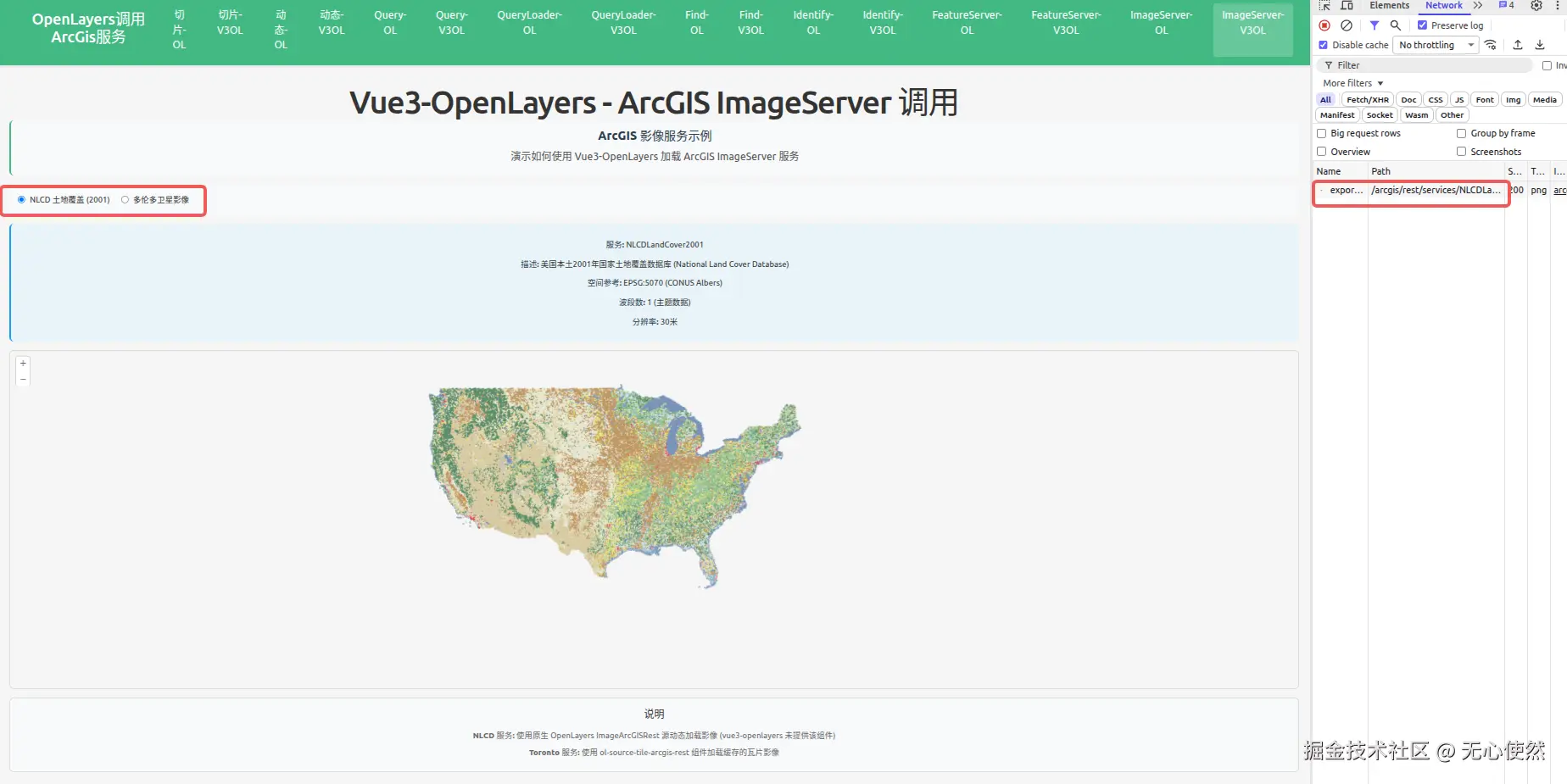
可以看到,官方服务4没有切片,直接使用一个/exportImage接口返回完整图片
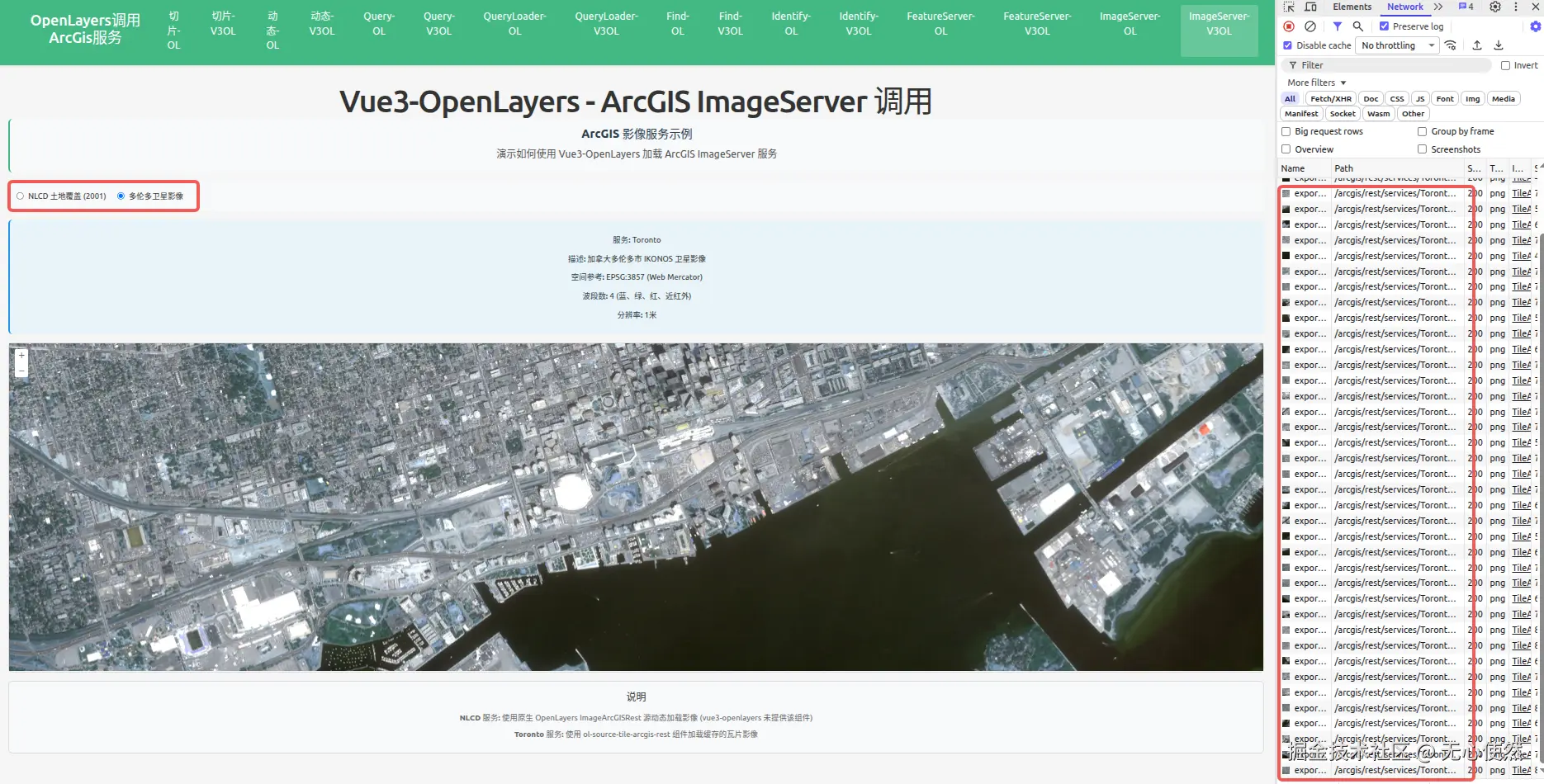
可以看到,官方服务5有切片,直接使用多个/exportImage接口返回图片进行拼接
javascript
<template>
  <div class="map-page">
    <h1>Vue3-OpenLayers - ArcGIS ImageServer 调用</h1>
    <div class="info-panel">
      <h3>ArcGIS 影像服务示例</h3>
      <p>演示如何使用 Vue3-OpenLayers 加载 ArcGIS ImageServer 服务</p>
    </div>

    <div class="controls">
      <label>
        <input
          type="radio"
          value="nlcd"
          v-model="selectedService"
          @change="switchService"
        />
        <span>NLCD 土地覆盖 (2001)</span>
      </label>
      <label>
        <input
          type="radio"
          value="toronto"
          v-model="selectedService"
          @change="switchService"
        />
        <span>多伦多卫星影像</span>
      </label>
    </div>

    <div class="service-info">
      <div v-if="selectedService === 'nlcd'">
        <p><strong>服务:</strong> NLCDLandCover2001</p>
        <p>
          <strong>描述:</strong> 美国本土2001年国家土地覆盖数据库 (National Land
          Cover Database)
        </p>
        <p><strong>空间参考:</strong> EPSG:5070 (CONUS Albers)</p>
        <p><strong>波段数:</strong> 1 (主题数据)</p>
        <p><strong>分辨率:</strong> 30米</p>
      </div>
      <div v-else>
        <p><strong>服务:</strong> Toronto</p>
        <p><strong>描述:</strong> 加拿大多伦多市 IKONOS 卫星影像</p>
        <p><strong>空间参考:</strong> EPSG:3857 (Web Mercator)</p>
        <p><strong>波段数:</strong> 4 (蓝、绿、红、近红外)</p>
        <p><strong>分辨率:</strong> 1米</p>
      </div>
    </div>

    <ol-map
      ref="mapRef"
      :loadTilesWhileAnimating="true"
      :loadTilesWhileInteracting="true"
      style="
        height: 600px;
        width: 100%;
        border: 2px solid #ddd;
        border-radius: 8px;
      "
    >
      <ol-view
        ref="viewRef"
        :center="center"
        :zoom="zoom"
        :projection="projection"
      />

      <!-- Toronto Image Layer (瓦片影像) -->
      <ol-tile-layer v-if="selectedService === 'toronto'">
        <OlSourceTileArcGISRest
          url="https://sampleserver6.arcgisonline.com/arcgis/rest/services/Toronto/ImageServer"
          :params="{}"
          projection="EPSG:3857"
        />
      </ol-tile-layer>
    </ol-map>

    <div class="legend">
      <h4>说明</h4>
      <p>
        <strong>NLCD 服务:</strong> 使用原生 OpenLayers ImageArcGISRest
        源动态加载影像 (vue3-openlayers 未提供该组件)
      </p>
      <p>
        <strong>Toronto 服务:</strong> 使用 ol-source-tile-arcgis-rest
        组件加载缓存的瓦片影像
      </p>
    </div>
  </div>
</template>

<script setup lang="ts">
import { ref, onMounted, computed } from "vue";
import { register } from "ol/proj/proj4";
import proj4 from "proj4";
import ImageArcGISRest from "ol/source/ImageArcGISRest";
import ImageLayer from "ol/layer/Image";

// 注册 EPSG:5070 投影 (CONUS Albers)
proj4.defs(
  "EPSG:5070",
  "+proj=aea +lat_1=29.5 +lat_2=45.5 +lat_0=23 +lon_0=-96 +x_0=0 +y_0=0 +datum=NAD83 +units=m +no_defs",
);
register(proj4);

const projection = ref("EPSG:3857");
const center = ref([-10000000, 4000000]);
const zoom = ref(4);
const selectedService = ref<"nlcd" | "toronto">("nlcd");

const viewRef = ref();
const mapRef = ref();

// 创建 NLCD 动态影像源 (使用原生 OpenLayers)
const nlcdSource = computed(() => {
  return new ImageArcGISRest({
    url: "https://sampleserver6.arcgisonline.com/arcgis/rest/services/NLCDLandCover2001/ImageServer",
    params: {},
    ratio: 1,
    projection: "EPSG:5070",
  });
});

// 创建 NLCD 图层
const nlcdLayer = computed(() => {
  return new ImageLayer({
    source: nlcdSource.value,
    opacity: 0.7,
  });
});

// 切换服务
const switchService = () => {
  const view = viewRef.value?.view;
  const map = mapRef.value?.map;
  if (!view || !map) return;

  // 清除现有图层
  const layers = map.getLayers().getArray();
  const nlcdLayers = layers.filter(
    (layer: any) => layer.get("name") === "nlcd-layer"
  );
  nlcdLayers.forEach((layer: any) => map.removeLayer(layer));

  if (selectedService.value === "nlcd") {
    // 设置视图到美国本土范围
    center.value = [-10000000, 4000000];
    zoom.value = 4;
    projection.value = "EPSG:3857";

    // 添加 NLCD 图层
    const layer = nlcdLayer.value;
    layer.set("name", "nlcd-layer");
    map.addLayer(layer);
  } else {
    // 设置视图到多伦多范围
    center.value = [-8837000, 5410000];
    zoom.value = 15;
    projection.value = "EPSG:3857";
  }

  // 更新视图
  view.setCenter(center.value);
  view.setZoom(zoom.value);
};

onMounted(() => {
  // 初始加载 NLCD 服务
  switchService();
});
</script>

<style scoped>
.map-page {
  padding: 20px;
}

h1 {
  margin-bottom: 20px;
  color: #333;
}

.info-panel {
  background-color: #f8f9fa;
  padding: 15px;
  border-radius: 8px;
  margin-bottom: 15px;
  border-left: 4px solid #42b983;
}

.info-panel h3 {
  margin-top: 0;
  margin-bottom: 10px;
  color: #2c3e50;
}

.info-panel p {
  margin: 5px 0;
  color: #555;
}

.controls {
  margin-bottom: 15px;
  padding: 15px;
  background-color: #f8f9fa;
  border-radius: 8px;
  display: flex;
  gap: 20px;
}

.controls label {
  display: flex;
  align-items: center;
  gap: 8px;
  cursor: pointer;
}

.controls input[type="radio"] {
  cursor: pointer;
}

.controls span {
  font-size: 14px;
  color: #333;
}

.service-info {
  margin-bottom: 15px;
  padding: 15px;
  background-color: #e8f4f8;
  border-radius: 8px;
  border-left: 4px solid #2196f3;
}

.service-info p {
  margin: 8px 0;
  color: #333;
  font-size: 14px;
}

.service-info strong {
  color: #2c3e50;
}

.legend {
  margin-top: 15px;
  padding: 15px;
  background-color: #f8f9fa;
  border-radius: 8px;
  border: 1px solid #ddd;
}

.legend h4 {
  margin-top: 0;
  margin-bottom: 10px;
  color: #333;
}

.legend p {
  margin: 5px 0;
  color: #666;
  font-size: 14px;
}
</style>